What Is an AI Video Agent? How It Plans, Draws and Renders an Ad
An AI video agent plans shots, draws references, and makes a finished ad from one brief. Learn how it works, what it costs, and where its limits sit.
 The Seadanse Team11 分钟阅读
The team behind Seadanse. We run the models we write about, and we publish the specs, prices and limits the marketing leaves out.

TL;DR — An AI video agent plans the shots for a whole ad and makes the finished video, instead of handing back one clip from one prompt. You give it a single brief, edit the story card it writes, and approve the pictures it draws before it makes anything. It's built for solo brand owners and freelance creators who need consistent ads without cutting clips together by hand.
Making video ads with a standard generator is frustrating. One prompt gives you one clip, but an ad needs four or five clips that clearly belong together.
If you generate shots one at a time, your product changes shape in every take. The lighting drifts, the cuts look awkward, and you spend hours trying to fix the seam.
An agent solves this by planning the whole ad before it runs a single take. Here is how an agent works step by step, what it can build today, and where its limits sit.
An AI video agent takes the job, not the prompt
An AI video agent takes a goal written in plain language and runs the whole production. It plans the shots, writes the description for each shot, draws visual references, generates the shots, and returns a finished video.
Traditional tools leave the hard assembly work on your desk:
- An AI video generator turns one prompt into one raw clip.
- An AI video editor gives you a blank timeline and leaves every cut and pacing choice to you.
- An AI video agent takes the whole job, turning your brief into a planned sequence so you don't have to piece clips together yourself.
The category is new enough that vendor explainers, not product pages, hold the top search results for the term today.
Made by the agent from a single brief on Seadanse, Seedance 2.0 at 720p, four beats over 20 seconds — 2026-08-28.
Other teams across the industry describe this split the same way. On its product page, Pexo explains that "An agent owns the whole job; a generator owns a single clip; an editor leaves the whole job to you". In their breakdown of the category, DeepReel makes the same point: "a tool obeys instructions. An agent understands context and makes recommendations".
Start with the ad you want, not the prompt you can write
You can see what the agent does on Seadanse to turn a plain product description into an editable storyboard. When you're ready to make your ad, you can start a project directly in the workspace.
What the agent actually does, step by step
When you run our AI video agent, the work moves through four clear stages. Each stage gives you a review step before you spend any credits on video.
It reads the brief and picks a shape
You start with a single brief in plain words.
A small model classifies what kind of ad you want and picks a story skeleton for it. A second pass fills that skeleton in with specific actions, camera moves, and scene transitions for your product.
You don't need to write camera directions or shot prompts yourself. You just describe what the ad should do.
It fills in the beats and shows you a card you can edit
You get a Story card back in the chat.
The Story card holds the beats. A beat is one moment of the ad, roughly one shot.
This card is the single source of truth for the whole project. You edit the card directly, not the prompts behind it.
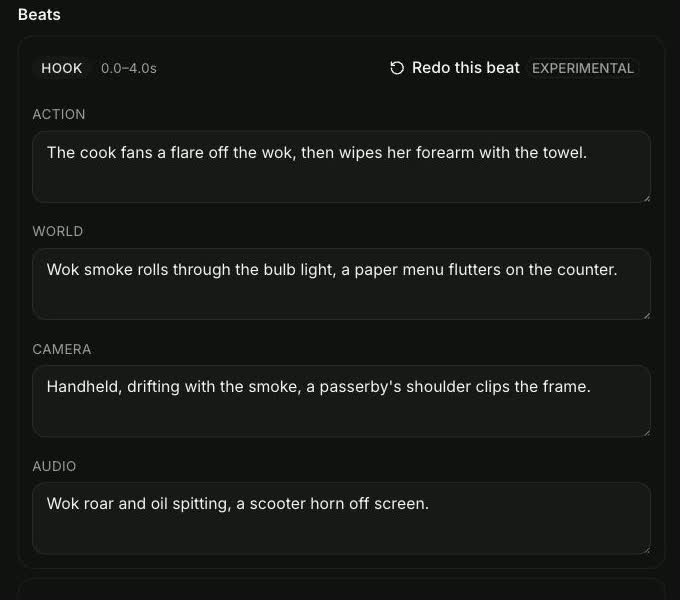 The Story card the agent writes. You edit this, not the prompts.
It draws each beat before it generates anything
Before it makes any video, the agent draws one frame for each beat, so a four-beat story arrives as a four-panel storyboard.
You review actual pictures instead of guessing how a text prompt will look in motion. You approve what looks right and change what doesn't.
To keep your subject stable across different angles, the agent creates a reference sheet with front, three-quarter, and back views. If you need tight control over a transition, precise mode pins a beat by its first and last frame.
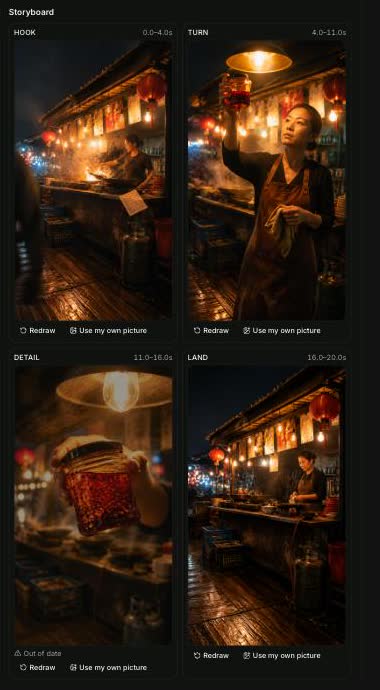 One frame per beat, drawn and approved before a single second is rendered.
It quotes the price and waits
Once you approve the drawings, the agent sets up the job.
Every paid render shows a price card in the chat first. It gives you two buttons: Generate, and Always allow.
The planning model can't confirm a render on your behalf. We removed the confirm parameter from the tool it calls, so saying "make another one" won't trigger a charge by accident.
Why the plan is the part that matters
If you generate shots one at a time, the product changes between takes. The lighting drifts, the subject's face morphs, and the clips never cut together cleanly.
Planning the entire ad up front fixes that drift.
To keep the story tight, a story holds at most five beats. The skeletons also enforce a strict rule: the same subject never goes more than two beats without reappearing. That rule matters because consistency falls apart when the gap between shots grows too wide.
The way it generates video helps keep things stable, too. By default, the whole ad runs as a single take instead of separate clips stitched together, because Seedance 2.5 accepts second-level timing inside a single generation up to 30 seconds.
The agent uses multiple clips only when the ad runs past 30 seconds, crosses scenes, or when you ask to re-render one beat. If one moment looks off, you can re-render that single beat and keep the rest of the cut.
You can also pick an older model by naming it in the chat. Say "use Seedance 2.0 at 720p" and the workspace pins it for that project. The default setting is Seedance 2.5 at 720p.
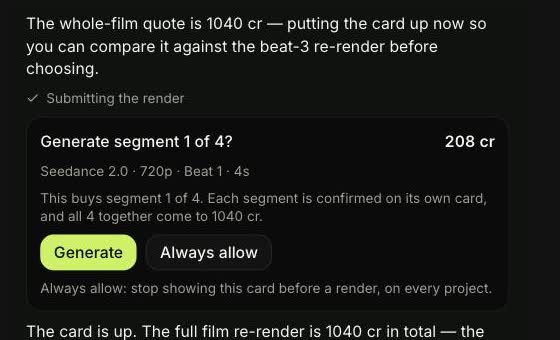 Every paid step asks first, and the card names what this press buys. The planning model cannot press it.
Planning the story and checking your beats is free on Seadanse. The storyboard frames and the finished video are what spend credits.
The workspace needs an account because a job in flight holds credits, and an anonymous session has nothing to hold them against. A new account gets 40 starter credits with no card needed, and a job that fails or gets interrupted returns its credits automatically. Check what a render costs on our pricing page.
What an agent can make today
The agent builds ads using three tested story skeletons. It picks one based on your brief:
- A short narrative ad (HOOK, TURN, DETAIL, LAND) — You'd pick this one when you want a complete story arc for your brand. It grabs attention in the first three seconds, introduces a problem or twist, shows how your product works, and finishes on a clear brand close.
- An unboxing reveal (TEASE, REVEAL, FIRST_TOUCH, LAND) — You'd pick this one when you want to focus on a physical item. It creates anticipation around packaging, reveals your product, shows a hands-on detail, and settles on your final brand shot.
- A daily ritual (SETTLE, RITUAL, SAVOR, LAND) — You'd pick this one when you want to frame your product inside a familiar routine. It establishes a calm setting, shows the product in everyday use, captures the satisfying payoff moment, and lands on your call to action.
Agent, generator or editor: which one fits your job
Different platforms take different paths to automation.
For instance, HeyGen's agent page is avatar-first, focusing on digital presenters, custom likenesses, and voice translation rather than shot planning. Meanwhile, Pippit focuses on direct publishing to social platforms alongside its creation tools. By contrast, invideo answers control with a timeline editor for manual video assembly, while Agent Opus sells one-click publish-ready video.
Here is how these approaches compare across a real production job:
| AI video agent | AI video generator | AI video editor | What it means for you | |
|---|---|---|---|---|
| What you hand it | A brief: what the ad should do | One prompt for one shot | Footage you already have | The agent is the only one you can talk to in outcomes |
| Who decides the shots | The agent, and you edit the plan | You, in every prompt | You, on a timeline | You review a plan instead of writing five prompts |
| What comes back | A finished cut of several beats | One clip | The project you assembled | An agent's output is closer to done, and further from your hands |
| Fixing one bad moment | Re-render that beat | Re-run the prompt and re-cut | Trim it yourself | Only the agent knows which beat was which |
| Best for | Ads and short stories with a subject that must stay the same | One-shot ideas and tests | Precise control over existing material | Pick by how much of the job you want to own |
As the comparison shows, an agent replaces manual prompt writing with structured planning. You can visit the agent's own page to see how reviewing story beats up front changes how you build ads.
Where agents still fall short
Here are the limits, stated plainly:
- An agent is only as good as the plan it writes. If your brief is vague, the shot list will be generic, and no amount of generating can fix an unfocused idea.
- Five beats is a hard ceiling, not a target. The agent is built for short commercial sequences, so this isn't the tool for long-form video.
- Approving a frame for every beat takes time. If you just want one quick clip for a visual test, typing a prompt into a standard video generator is faster.
- Re-rendering one beat costs another render. Every new one spends credits from your balance.
- Reference audio is not wired for Seedance on Seadanse. You must describe the voiceover in your text brief instead of uploading an audio sample to copy.
- Nothing here posts to social platforms for you. We don't publish, schedule, or post clips to your accounts; you download the finished video file and post it yourself.
FAQ
Is an AI video agent the same as an AI video generator?
No, they handle different parts of the job. A video generator turns a single prompt into one raw clip. An AI video agent takes an entire brief, picks a story shape, writes individual shot descriptions, draws reference panels, and makes a multi-beat cut.
Do I need to write prompts to use one?
No, you don't write prompts for each camera angle. You submit one plain brief describing what your ad should achieve. Then you adjust the story card and approve the drawn panels directly instead of tweaking prompt strings.
How long does an agent take to make a video?
Planning the story skeleton and filling in the beats is fast. Drawing a frame for every beat and making the final video takes longer, and the wait depends on the model you pick and how long the ad runs.
Can an AI video agent replace a videographer?
No. An agent creates short ads and product spotlights using AI models and planned storyboards. It can't run physical cameras on a live set, record real-world events, or direct live actors on location.
The short answer
An AI video agent replaces disconnected prompt tests with structured shot planning, visual reference panels, and unified video generation. It helps solo creators and brand owners produce consistent commercial ads without cutting clips together by hand. You can try the agent on Seadanse to plan and make your next ad from a single brief.
We ran a single five-beat brief for a night-market chilli oil spot through the agent on Seedance 2.0 at 720p on 2026-08-28 to evaluate the plan and the finished cut.
Related articles
- AI Video Agent vs AI Video Generator — the same brief run both ways, with the clips.
- Best AI Video Agents — what else is on the market and what each one is actually for.


