FLUX 3 vs Seedance 2.5: The Comparison BFL Didn't Run
Black Forest Labs benchmarked FLUX 3 against Seedance 2.0, never 2.5. The honest spec comparison: 20s vs 30s, keyframes vs references, and what neither model does yet.

TL;DR — Black Forest Labs benchmarked FLUX 3 against Seedance 2.0 and called it a tie on image-to-video, but Seedance 2.5 was never part of that comparison. FLUX 3's strongest documented advantages are native audio with multilingual lip-sync and ordered keyframe pinning.
Seedance 2.5 gives you a longer 30-second single take, a wider menu of aspect ratios, and a browser generator with no API key. Your choice depends on what you're making.
You probably saw the headline numbers from Black Forest Labs and assumed their test included Seedance 2.5. It didn't.
The release posts from Black Forest Labs only benchmarked against Seedance 2.0. Every article claiming FLUX 3 beats or matches ByteDance's current video model is looking at the wrong generation.
We wrote this guide to give you the real spec breakdown instead. You'll find the documented mechanisms for both models, clearly labeled evidence from vendor releases, and an honest look at where each tool fits.
Jump to: Short answer · At a glance · How we compared · Motion · Audio · Length · Control · Cost
The Short Answer
FLUX 3 is a multimodal foundation model (one model that learns from images, video and audio together) from Black Forest Labs, announced on bfl.ai/blog/flux-3 on July 23, 2026. Its core strengths center on precise control and unified generation. It produces native audio (the model makes the sound in the same generation, so it's not added afterward) and handles multilingual lip-sync across 13 named languages and more.
It also lets you pin up to 10 ordered keyframes to exact seconds in a timeline, and you can chain 20-second clips agentically for longer scenes. If you want the full background on how it works, read our breakdown on What Is FLUX 3?.
Seedance 2.5 on Seadanse focuses on immediate browser production. It gives you a 30-second single take without chaining separate clips together.
You can pick from three output resolutions and six fixed aspect ratios right on the page, with audio on by default. You don't need to configure an API key or write code to start generating.
This comparison names the actual specifications of both models and shows you where every piece of evidence comes from.
FLUX 3 vs Seedance 2.5 at a Glance
| Dimension | FLUX 3 | Seedance 2.5 (on Seadanse) | What it means for you |
|---|---|---|---|
| Max length | ★★★★☆ Up to 20 seconds in one generation; chain clips agentically for longer stories | ★★★★★ Up to 30 seconds in one generation, six duration chips (5/10/15/20/25/30s) | Seedance 2.5 holds a longer single take before you have to stitch anything |
| Resolution ceiling | ★★★★★ HD (720p) and Full HD (1080p) shipped, plus a separate upscale to native 4K | ★★★☆☆ 480p, 720p or 1080p — no 4K on the 2.5 preset | FLUX 3 reaches 4K through an extra upscale step; Seedance 2.5 tops out at 1080p |
| Audio | Native audio generated in the same pass, multilingual dialogue with lip-sync | Audio on by default in every clip | Both build sound into the generation itself, not as a separate step |
| Input modes | Text, image, video-to-video continuation (up to 4s), keyframes, agentic clip chaining — five endpoints | Text prompt, picture references, reference video | FLUX 3 has more distinct entry points; Seedance 2.5's set is simpler to use |
| Control / steering | ★★★★★ Pins up to 10 ordered frames to exact timed positions | ★★★☆☆ Steers from a picture or video reference, no ordered frame pinning, no clip extension | FLUX 3 gives frame-exact timing if you build the keyframes; Seedance 2.5 is faster to set up but less exact about timing |
| Aspect ratios | A broad range, not published as a fixed list | Six named: 16:9, 9:16, 1:1, 4:3, 3:4, 21:9 | Seedance 2.5 tells you the exact menu up front |
| Where it runs | ★★★☆☆ BFL API and select partners (fal, Comfy, Krea); no consumer app of its own, and coming to Seadanse | ★★★★★ One-click browser generator on Seadanse, no API key needed | FLUX 3 needs code or a third-party platform account; Seedance 2.5 is a page you open |
| Price shape | ★★★☆☆ Draft mode ≈ a third of full cost; Full HD ≈ 1.7x HD; video-in ≈ 2.4x text/image-in; audio included; partial seconds round up | ★★★★★ Free starter credits, a no-subscription credit pack, the exact price shown before you click, failed clips refunded automatically | Seedance 2.5's entry cost is visible and predictable before you commit; FLUX 3's is metered per second, though fal gives away five draft clips a day |
| Best for | Keyframe-pinned multi-shot sequences with built-in multilingual dialogue, via API | Long single takes with sound, started and finished in a browser | Pick based on if you're connecting your own code or opening a generator |
How we scored: the star ratings above cover only checkable specs — max length, resolution ceiling, control mechanism, where the model runs, and price shape.
They never cover output quality: the clips on the FLUX 3 side are Black Forest Labs' own (see "How We Compared"). Sources: bfl.ai/blog/flux-3, bfl.ai/blog/flux-3-video, bfl.ai/models/flux-3, bfl.ai/pricing, and fal.ai/flux-3.
Three Differences That Actually Change Your Edit
20 seconds vs 30 seconds in a single take. FLUX 3 generates clips up to 20 seconds long in a single pass, according to the bfl.ai/blog/flux-3-video announcement on August 4, 2026. For longer sequences, it relies on video-to-video continuation from the last 4 seconds of a clip or agentic chaining.
Dillon Rolnick, CEO, Nous Research, described this process on bfl.ai/models/flux-3:
FLUX 3 puts a new medium of entertainment and storytelling in our users' hands, and it responds well to an agent's direction. Hermes can generate a shot, checks it, then continues from it, so those 20-second clips become cohesive longform pieces.
Seedance 2.5 generates up to 30 seconds in a single continuous pass without any chaining. In your timeline, that means an extra 10 seconds of action before you need to plan a cut or stitch two clips together.
Keyframe pinning vs picture references. FLUX 3 includes a dedicated keyframes-to-video endpoint that lets you pin up to 10 ordered frames to exact timestamps. Seedance 2.5 steers motion from starting images or video references, but it doesn't let you lock intermediate frames to specific seconds.
If your storyboard demands that an action occurs at second 5 and another at second 12, FLUX 3 gives you an exact temporal structure for those targets. If you want to steer a character's look from a still image without building a multi-frame storyboard, Seedance 2.5 takes your input image directly.
An API you integrate vs a browser generator. Black Forest Labs sells FLUX 3 strictly as an API service and through partner platforms like fal, Comfy, and Krea. There's no first-party consumer web interface from BFL.
Seedance 2.5 runs as a browser application on Seadanse. You pick your duration, aspect ratio, and resolution using interface buttons, enter your prompt, and generate without managing developer keys or servers.
Try a Prompt Yourself
Every clip below comes with the prompt that made it, on both sides. Copy one into the generator on Seadanse, pick a duration and a resolution, and hit Create. No key, no code, no other steps.
How We Compared
We generated the Seedance 2.5 clips on Seadanse, with the exact prompts and settings shown below.
The FLUX 3 clips are Black Forest Labs' own published demos. We're bringing FLUX 3 to Seadanse, and our own runs will replace these demos once it lands.
Motion and Physics
fal's published demo for physical cause and effect is a marble and a row of dominoes. fal's own description:
"A red marble rolls in from the left, strikes only the first of six dominoes, and the run completes cleanly to the right while the marble comes to rest beside the piece it started. Motion carries mass and momentum from one object to the next instead of resetting between beats."
Black Forest Labs' own demo for physical cause and effect — 864×480, 5s, native audio. fal.ai/flux-3, 2026-08-22.
We built ours around the same idea — one impact, and everything that follows from it:
Generated with Seedance 2.5 on Seadanse, 720×1280, 9:16, 8s, audio on — 2026-08-12. Prompt: "A tall glass of iced citrus soda on a sunlit pale concrete counter beside a scattering of fresh lime wedges. The very first frame is already mid-action: a single large ice cube has just struck the surface and a crown of liquid is suspended in the air… Over the next seconds the splash falls back, condensation beads and runs down the glass, and the camera drifts slowly upward in a smooth vertical push."
Both clips are built on one idea: a single contact event, then whatever physics says comes next. Watch the momentum in the first and the liquid in the second, and judge for yourself.
Audio and Dialogue
This is FLUX 3's loudest claim, and fal's demo goes straight at it — a blacksmith at an anvil. fal's description:
"FLUX 3 renders audio inside the same pass as the video, so an event arrives carrying the sound it makes. Every hammer blow here lands with its own ring off the anvil and the hiss of sparks leaving the hot blade, on the exact frame the metal is struck. Nothing needs lining up afterward and no second model gets called, because the soundtrack was never a separate render."
Black Forest Labs' own demo for native audio — 1280×704, 5s, native audio. fal.ai/flux-3, 2026-08-22.
Seedance 2.5 also makes its audio in the same pass, on by default. We put it through the same test — a sound that has to land on a physical contact — with a potter's hands on a wheel:
Generated with Seedance 2.5 on Seadanse, 1280×720, 16:9, 8s, audio on — 2026-08-12. Prompt: "Extreme close-up of a potter's hands shaping wet clay on a spinning wheel in a dim workshop… Audio: the wet slap and squelch of clay under pressure from the first frame, the low continuous hum of the wheel, and faint workshop ambience. No music."
Turn your sound on for both. Neither clip got a second audio pass; in both cases the soundtrack came back with the picture.
Length and Continuity
Here the numbers do the work, and the gap is real.
FLUX 3 tops out at 20 seconds in one generation. fal published exactly that, uncut, so you can see what 20 seconds buys:
"Clips run up to 20 seconds, and the one in this row is exactly that: a single 20 second generation with no cuts and no stitching. Kids roll snow into a snowman, it stands alone through a golden sunset and then a moonlit night, and the snow around it recedes to bare grass as the season turns."
Black Forest Labs' own 20-second demo — 1280×704, 20s, native audio, one pass. fal.ai/flux-3, 2026-08-22.
Seedance 2.5 goes to 30 seconds in one pass, picked from six duration chips: 5, 10, 15, 20, 25 or 30. Past 20 seconds FLUX 3 has to continue from its own last four seconds, or chain clips; Seedance 2.5 keeps going inside the same generation.
We are not going to pretend a clip proves that. The ceiling is a published number on both sides, and those ten seconds are the whole difference — the gap between a shot that ends and a shot that finishes.
Control: Keyframes vs References
These are two different mechanisms, not two answers to one question, so there is no fair head-to-head to run.
FLUX 3 pins frames to exact times. fal's description of its own demo:
"FLUX 3's keyframes to video endpoint pins up to 10 frames to exact positions. Here four frames at 0, 5, 10, and 15 seconds set the whole arc, from a rock headland above a harbour to a colossus standing above the clouds, and the model returns one continuous take that hits every one of them."
Black Forest Labs' own keyframe demo — 1710×942, 15s, native audio. fal.ai/flux-3, 2026-08-22.
Seedance 2.5 steers from references instead: hand it pictures or a reference clip and it carries the look forward. There is no way to say "this pose at second 12."
Which one you want depends on what you already have. If you have a storyboard with beats on a clock, keyframes hit them.
If instead you have a character or a look that has to hold, a reference carries it and you skip building four frames first. Our prompt guide covers writing for that path.
What Each One Costs, in Shape Not Dollars
The two platforms use different billing structures. On bfl.ai/pricing, FLUX 3's pricing follows specific ratios:
- A Draft-mode preview costs roughly one-third of a full-quality clip at the same resolution.
- Full HD (1080p) costs about 1.7 times what HD (720p) costs, for text-to-video and image-to-video.
- Feeding video in costs about 2.4 times what feeding text or a still image in costs, at the same resolution.
- Native audio is included at no extra cost alongside the video generation.
- Generation time rounds up to the next full second.
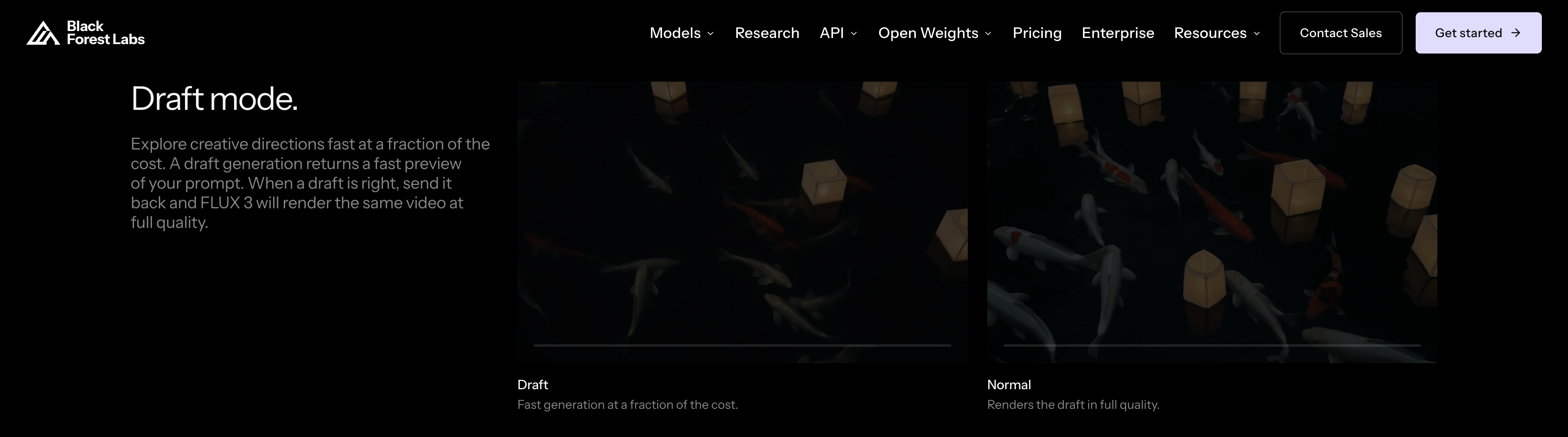
Black Forest Labs' own Draft-mode comparison on bfl.ai/models/flux-3, captured 2026-08-22. BFL's copy: "Explore creative directions fast at a fraction of the cost... When a draft is right, send it back and FLUX 3 will render the same video at full quality."
On Seadanse, Seedance 2.5 uses upfront credit packs:
- Free starter credits on sign-up, no card needed.
- A one-time credit pack you can buy without a subscription.
- Credits stay valid for 12 months.
- The exact credit cost shows on the Generate button before you click.
- Failed or interrupted generations refund automatically.
- No watermark on exported video.
You can check our pricing page or test scenarios in our cost calculator. For live API rates, check bfl.ai/pricing and fal.ai/flux-3.
When to Choose Each One
Choose FLUX 3 if you're connecting it to your own code via API, or if you need frame-exact keyframe placement across a timeline. It's also the right fit if you need dialogue in languages like Chinese, French, German, or Spanish with synced lip movement. It gives developers deep control and offers preview drafts at roughly one-third of the full generation cost.
Choose Seedance 2.5 if you want to produce up to 30-second continuous shots directly in your browser without managing code or API credentials. It offers simple image reference inputs, six standard aspect ratios, and predictable credit costs. If neither model matches your specific production needs, check our list of FLUX 3 alternatives to compare other tools on the market.
What Neither Model Does Yet
Both platforms still have noticeable feature gaps. On Black Forest Labs' model page at bfl.ai/models/flux-3 (as of August 22, 2026), FLUX 3 Image still displays a "SOON" badge. The open-weight FLUX 3 Dev variant also remains unreleased on BFL's roadmap.
In its July 23, 2026 announcement on bfl.ai/blog/flux-3, Black Forest Labs reported preference numbers run on its own testing harness:
- 52% preference over Seedance 2.0
- 60% preference over Kling v3 Pro
- Up to 69% preference over Grok Imagine Video
- 77% preference over Runway Gen-4.5
These figures were generated by Black Forest Labs on its own test suite and haven't been independently verified. Most importantly, no publisher or lab has released a direct benchmark comparing FLUX 3 against Seedance 2.5. If you're looking for an independent side-by-side study between those two specific versions, it doesn't exist yet.
Final Thoughts
Black Forest Labs' internal benchmarks reported a tie against Seedance 2.0, not ByteDance's newer 2.5 model. Until independent benchmarks test both current versions side by side, the best way to choose is by looking at documented specifications.
If you need keyframe pinning and API access, explore FLUX 3. If you want a 30-second single take with built-in audio inside a browser, open the Seedance 2.5 generator on Seadanse and run your prompt directly.
Related Articles
- What Is FLUX 3? — the full rundown of what shipped, when, and what still says "SOON."
- 7 Best FLUX 3 Alternatives — seven models you can run today, scored and limited.


