
How to Use Pollo AI: 7 Steps and What Each One Costs
A beginner's walkthrough of Pollo AI: picking a model, reading the credit price, the Unlimited switch, the queue, and the watermark rule nobody mentions.
 The Seadanse Team8 min read
The team behind Seadanse. We run the models we write about, and we publish the specs, prices and limits the marketing leaves out.

TL;DR — Pollo runs many models behind one composer, and the two things that decide what your clip costs are which model you pick and whether the Unlimited switch is on. The seven steps below take you from sign-up to a downloaded file. The free tier is 20 credits, so read step 3 before you spend them.
The panel looks simple when you open it: one prompt box and a row of chips. But each chip changes the price, and two of them are billing rules rather than visual settings. Here's the whole flow in order so you don't waste your balance.
Start with the free credits, and know what they buy
When you register an account, Pollo gives you 20 free credits and one parallel task. That parallel limit means the platform will only run one job at a time.
Pollo divides credits into three types, and they don't follow the same rules:
- Subscription credits: You get these each billing cycle on a paid plan. Unused credits don't roll over to the next billing cycle.
- Bonus credits: You earn these through sign-up bonuses, daily check-ins, and referrals. They never expire.
- Add-on credits: You buy these through credit packs. They never expire.
You can also grab extra free credits without paying. Pollo points users to this option directly: "Go to the free-credits channel and tap the claim link."
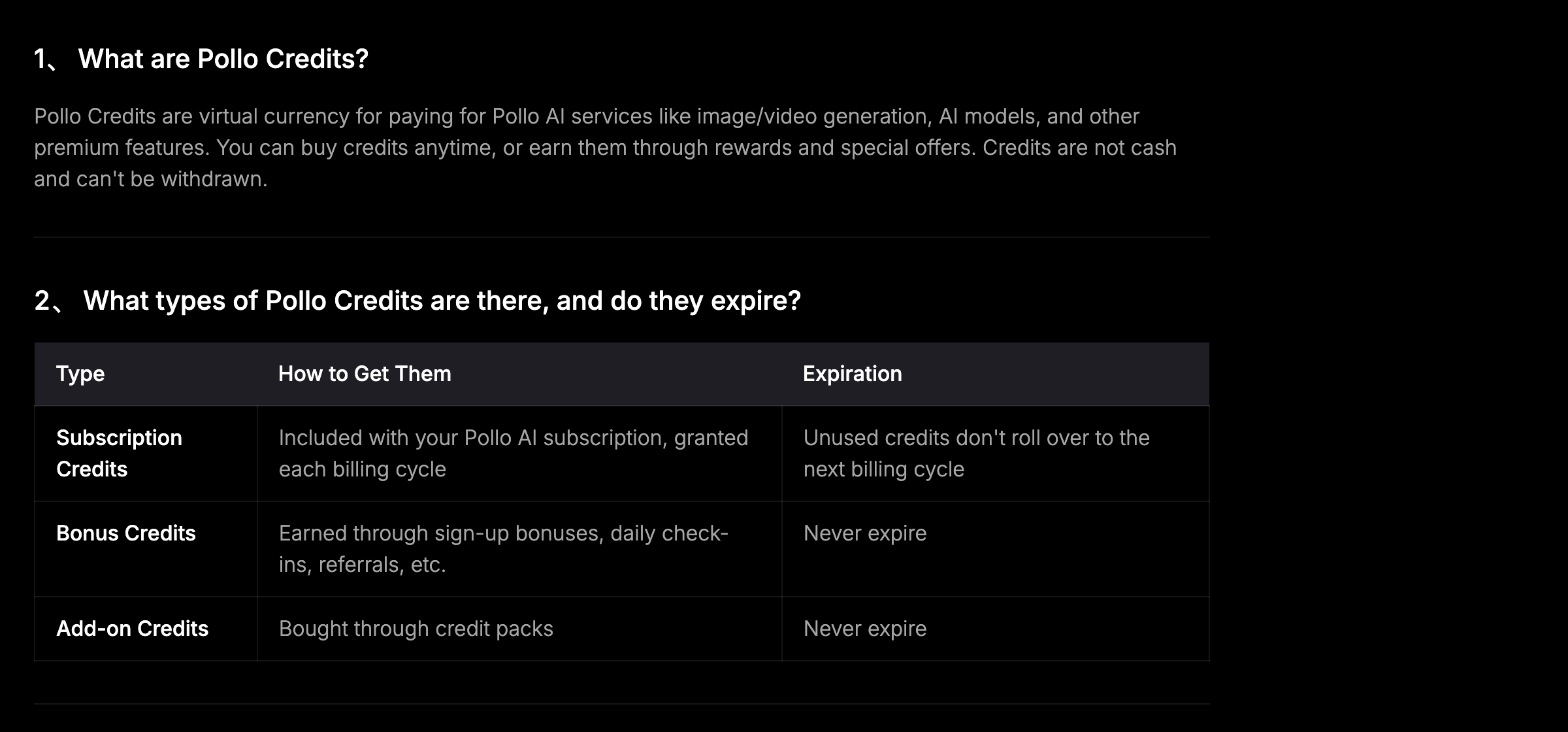 Pollo AI's credits FAQ, 2026-08-24 — only the credits your plan grants expire, and they go first when you generate.
Pick text to video or image to video first
Look at the mode chip on the left side of the composer bar. You can toggle between text to video and image to video.
Text to video needs only a written prompt to build a scene from scratch. Image to video starts from a still picture you give it, then animates the frame using your prompt.
Pick a model and watch the price change
The model chip sits right beside the mode selector. The default option is Pollo 2.5, which costs 12 credits for a standard 5-second 720p clip. So your free 20 credits will cover one clip, with eight credits left over.
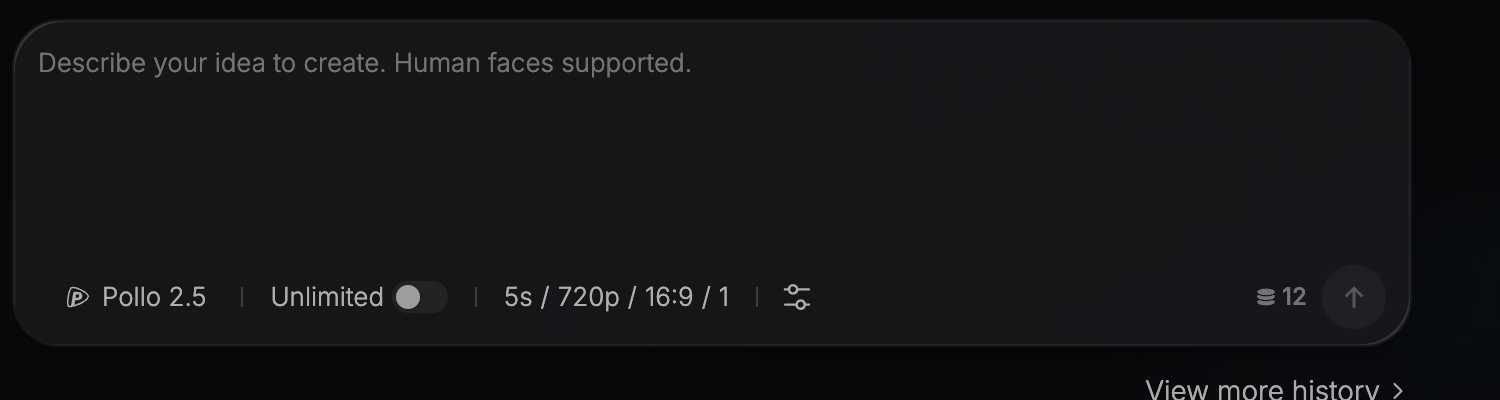 Pollo AI's text-to-video composer, 2026-08-24 — the default is Pollo 2.5 at 12 credits for a 5-second 720p clip.
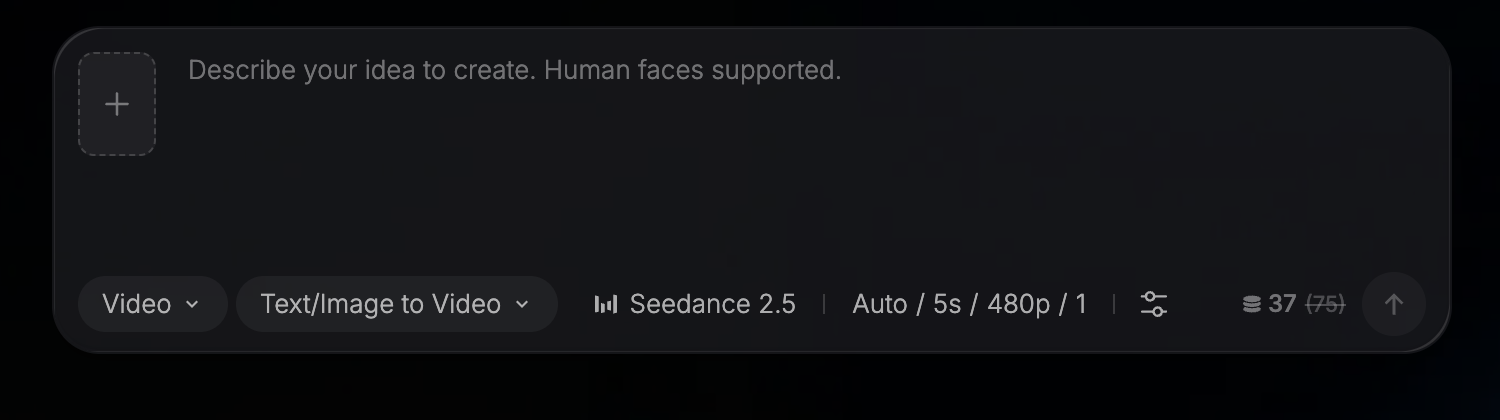 The same bar on Pollo's Seedance 2.5 page, 2026-08-24 — 37 credits with the standard 75 struck through.
You'll see plenty of choices on the generator page. Pollo lists Pollo 2.5, Seedance 2.5, Minimax H3, Seedance 2.0, Veo 3, Sora 2, Kling 3.0, Kling AI, Hailuo AI, PixVerse, Runway, Vidu AI, and more.
When you switch to Seedance 2.5, the composer shows 37 credits with 75 struck through. Pollo puts up a banner that reads: "Save 50% on Seedance 2.5 and 60% on Selected Models … Exclusive to paid plans!" That discount is only for paying members. If you're not on a paid plan, budget with 75 credits in mind so you aren't caught off guard.
Set the length, the resolution and how many clips
Look for the settings chip next to the model picker. By default, it reads "5s / 720p / 16:9 / 1".
Those four settings control what you get:
- Duration: How many seconds your clip plays.
- Resolution: The frame size, like 480p or 720p.
- Aspect ratio: The frame shape, like wide 16:9.
- Number of clips: How many versions the model makes in that single run.
Every time you pick a longer clip, bump the resolution, or ask for more versions, the price moves. The credit number sitting next to the send arrow shows the exact amount the run will cost. Watch that number before you submit the task.
Decide the Unlimited switch: free or fast
The composer features an Unlimited switch right by the model picker. Its tooltip explains what it does: "Turn it on for unlimited free generations. Turn it off for faster speeds."
There's no fixed upper limit on your total number of generations during the active period. But before you flip it on, keep Pollo's four rules in mind:
- Speed isn't included: "Please note: The Unlimited usage rights apply to your generation eligibility and output volume, not to processing speed."
- A separate queue: "To ensure a stable and fair user experience for all Pollo AI creators, the use of Unlimited models is subject to dynamic speed and parallel limits. Generation tasks for Unlimited models run on a dedicated processing queue, which is independent of the 'priority queue' that consumes credits."
- Only supported settings: "Unlimited rights apply only to specific models and parameters (resolution/duration, etc.) explicitly supported in your subscription plan."
- It stops when your plan stops: Unlimited access ends immediately if your subscription is cancelled, lapses, or is downgraded to a plan without it. If you're on term-based unlimited, it runs for a set number of days and expires at the end of the term.
Also remember: "This parallel limit applies at all times, regardless of whether you are in Unlimited mode."
Write the prompt, then send the job
The prompt box shows a short placeholder: "Describe your idea to create. Human faces supported."
Keep your prompt clear and plain. Describe the subject, the setting, and the primary motion you want to see. Once you're happy with your text and you've checked the credit price in the corner, click the send arrow.
Your job joins a queue based on your plan's parallel tasks allowance:
- Free plan: 1 parallel task.
- Lite plan: 2 parallel tasks.
- Pro plan: 4 parallel tasks.
- Ultra plan: 6 parallel tasks, scaling up to 10 on the largest Ultra plan.
Pollo defines this cap as your limit to "Process up to N generation or enhancing tasks at the same time." If you have the Unlimited switch turned on, your job will wait in that dedicated processing queue instead of the credit queue.
Download the file, and check the watermark rule
When your video finishes, you can download the file. But you should check the export rules before you rely on the output.
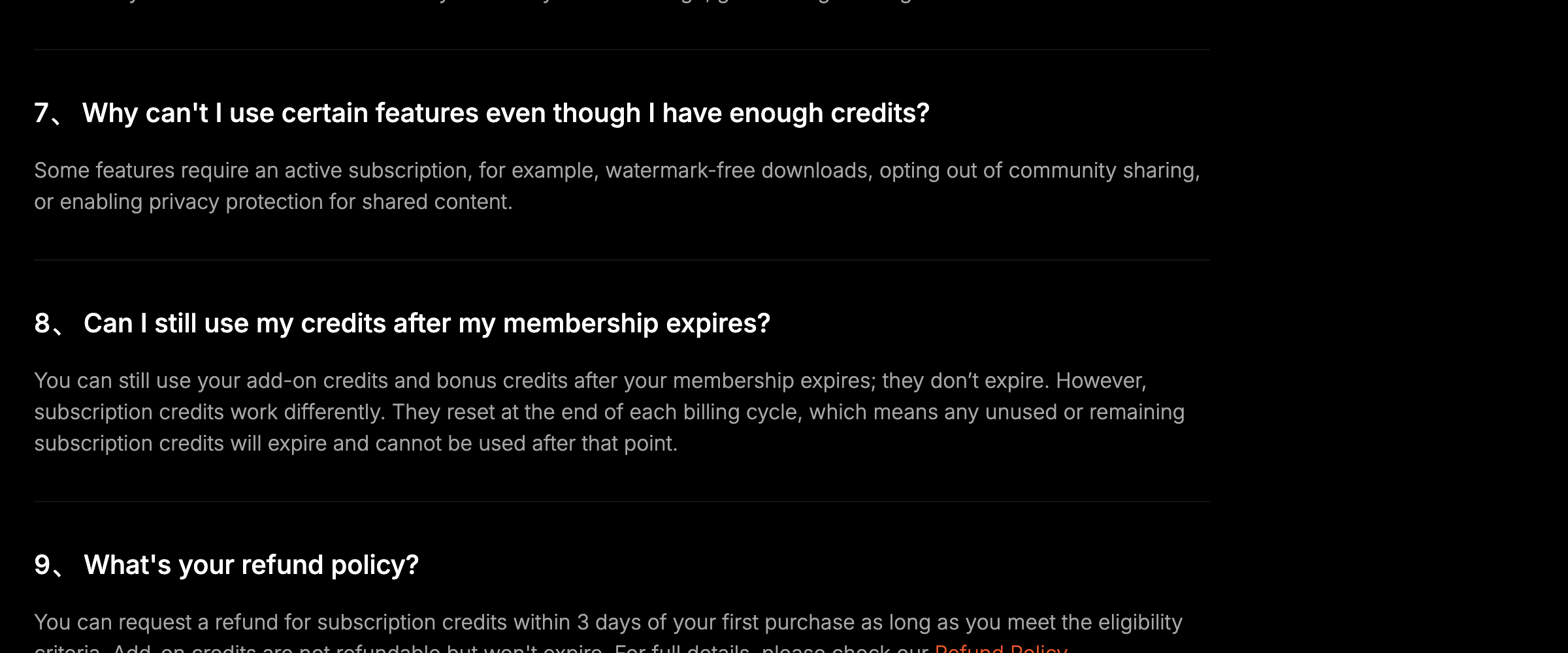 Pollo AI's credits FAQ, 2026-08-24 — a clean download and a private clip both need a live subscription.
Pollo's FAQ makes this clear: "Some features require an active subscription, for example, watermark-free downloads, opting out of community sharing, or enabling privacy protection for shared content."
That means without an active subscription, you don't get watermark-free downloads. You also can't opt out of community sharing or turn on privacy protection for shared content. If you need clean clips for client work or private clips, you'll need a paid plan.
Check Billing -> Usage before your credits reset
To see how many credits you've got left and where they went, follow Pollo's path: "To check your current credit balance and your history of credit usage, go to Billing -> Usage."
Pollo spends your credits in a specific order: "Credits that expire sooner are used first: Subscription credits → Bonus credits → Add-on credits."
Because subscription credits expire when your billing cycle ends, you'll want to use them up before that reset date so they don't go to waste. If you buy a plan and change your mind, Pollo notes: "You can request a refund for subscription credits within 3 days of your first purchase as long as you meet the eligibility criteria. Add-on credits are not refundable but won't expire."
Run the same models somewhere else if the rules don't fit
If you want to run these models without a subscription, you can use the Seedance 2.5 AI Video Maker on Seadanse.
We give you free starter credits when you sign up, and we don't ask for a card. When you need more balance, you can buy a single $9.9 credit pack without joining a monthly plan. You can see what credits cost across our options.
Your credits stay valid for 12 months, and if a job fails or gets cut off, our system refunds your credits automatically. There's also no watermark on what you export.
Our browser workspace gives you full control over Seedance 2.5:
- Resolutions: 480p, 720p, or 1080p.
- Durations: Six fixed choices (5, 10, 15, 20, 25, and 30 seconds).
- Aspect ratios: Six framing presets.
- Prompt space: A 10,000-character prompt box.
- Inputs and audio: Native audio on by default, with support for reference pictures and reference clips (reference audio isn't supported).
Here's our honest limit: we don't offer 4K resolution on Seedance 2.5. If you need 4K output, you can use our Seedance 2.0 preset instead. We also don't have Pollo's avatar or ad tooling; for face swap we have one video effect, face swap photo to video, which turns a scene photo and a face photo into a 6-second clip.
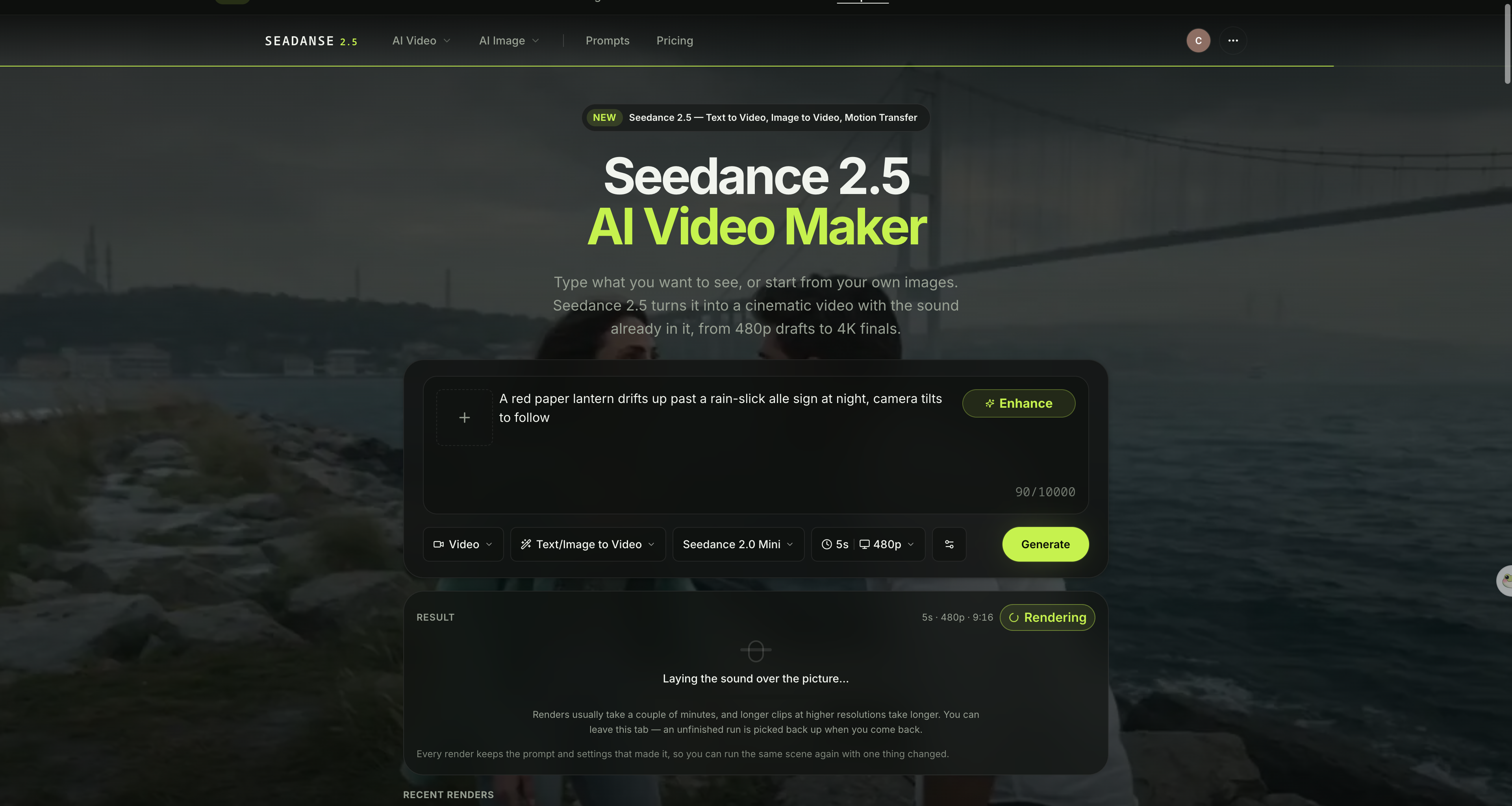 The generator on Seadanse — one balance, credits good for 12 months, and no watermark on what you export. Captured 2026-08-24.
To start right away, run Seedance 2.5 in the browser. Open the generator, type your scene, pick Seedance 2.5, set the duration, and click Generate.
Related Articles
- 7 Best Pollo AI Alternatives in 2026 (Prices Checked) — seven platforms that run the same models, with what each one gets wrong.
- Pollo AI Not Working? 6 Fixes and 3 Billing Rules — the billing rules behind the most common Pollo problems.


