
Unforgettable Car Trend: Why Your Cards Say 42 Instead of 24
Why Unforgettable car trend cards read 42 instead of 24 (a mirror image or cards in the wrong order) and the fix for each on your phone or in CapCut.
 The Seadanse Team7 min read
The team behind Seadanse. We run the models we write about, and we publish the specs, prices and limits the marketing leaves out.

TL;DR — Unforgettable car trend cards say 42 instead of 24 for one of two reasons: your phone saved a mirror image, or the cards were held in the wrong order. Play the clip back: backwards digits mean you flip the video in your editor, and normal digits mean you swap the cards and film again.
Or skip the filming: in Seadanse's Unforgettable car trend generator the 2 stays on the left, so your video always reads 24.
You film the reveal, post it, and the comments say 42. It happens to big accounts too.
Under @supercarvicky's reveal, 18 of the 135 comments we read on October 14, 2026 pointed out the 42. The most-liked of them said "The video is flipped that's why it's 42" (1,906 likes).
Viewers spot the number right away. Here's how to tell which mistake you have and how to spot it during playback. You'll also see how to fix your clip or your next take on iPhone, Samsung Galaxy and Google Pixel.
New to the trend? Our guide explains what the Unforgettable car trend is and where it started.
Why your Unforgettable car trend cards say 42 instead of 24
In the Unforgettable car trend, your cards should read 24: seen from the camera's side, the 2 is on the left and the 4 is on the right.
The selfie screen (what the front camera shows you while you film) shows you a mirror image, and what gets saved can match that screen or be flipped back.
Apple's Final Cut Camera guide explains that a front-camera recording "matches the image you see in the viewfinder or is flipped horizontally", and "The effect is visible only during playback." Your screen can't tell you which one you got, but playback can.
Your 42 comes from one of two things:
- A mirror image: your phone saved the picture flipped, which swaps the cards and turns both digits backwards.
- The wrong order: the cards were held with the 4 on the left, and the digits look normal.
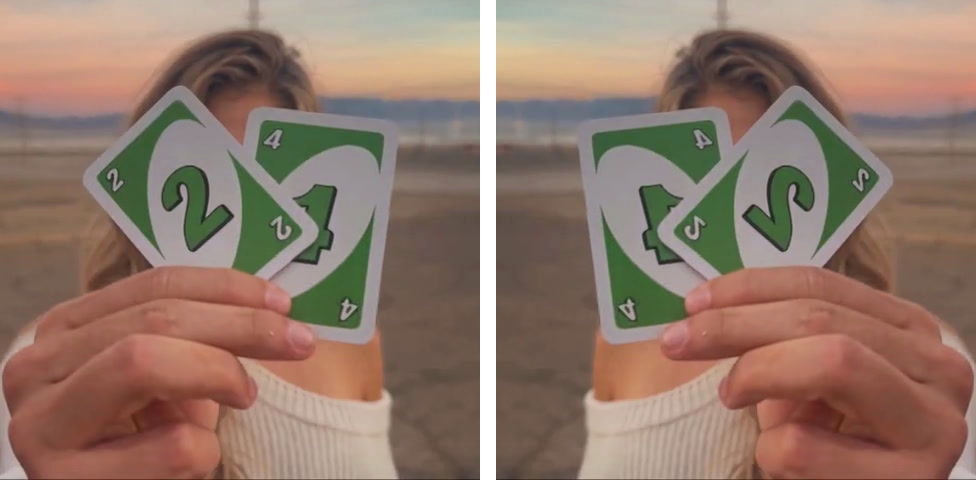
Left: a frame from the sample on our Unforgettable Car Trend page, reading 24. Right: the same frame flipped left to right. The 4 moves to the left, and both digits face backwards.
How to tell why your Unforgettable car trend video says 42
Pause your clip where the cards are up and look at the digits, then at any writing in the shot.
| What you see when you pause on the cards | What happened | The fix |
|---|---|---|
| Both digits face backwards, and so does any writing | Your phone saved a mirror image | Flip the clip in your editor |
| Normal digits, with the 4 on the left | The cards were held in the wrong order | Swap the cards and film again |
| Normal digits, with the 2 on the left | Nothing: it reads 24 | Post it |
Checked against a frame of our own sample and its mirror image on October 16, 2026.
Here's a clear example: @supercarvicky's reveal. The lettering on the T-shirt in the clip reads the right way round, so that picture isn't flipped. The 4 is simply on the left, so the cards were held in the wrong order.
The same check works on a video from an AI template. A backwards one gets flipped like any clip. If it has normal digits in the 4-2 order, you'll need to make it again with cards that read 24.
Prompts spell out the rule too: Media.io's prompt for the trend says: "Show exactly two cards: 2 and 4, reading 24 from the viewer's left to right. Do not mirror or change the numbers." We compared the AI apps that make the Unforgettable car trend side by side, including how they handle prompts.
How to fix a 42 in a clip you've already filmed
Flip a mirrored clip in CapCut
If the digits face backwards, flipping the clip left to right puts the 2 back on the left and turns both digits the right way round. Follow CapCut's own flip guide to do it.
- Phone app: tap the clip on the timeline, tap Transform in the bottom bar, then Mirror.
- Computer: click the clip on the timeline, then the Mirror symbol in the top bar.
Mirror flips the whole picture, so don't use it unless the digits are backwards.
Swap the cards and film again
If the digits look normal, a flip won't help: the 2 moves to the left, but both digits turn backwards. Film the take again with the cards swapped. You'll see how to hold them in the next section.
How to film the Unforgettable car trend so the cards read 24
Read 24 yourself, then turn the cards to face the lens
Hold the cards facing you so you read 24, then turn them around to face the lens, the way you'd show someone a sign. The camera sees 24, and the 2 ends up on your right side.
On the selfie screen they'll look backwards, as 42. That's the mirror, so leave them where they are.
Turn off the mirror switch on your phone
Each of these phones has a switch that decides whether the front camera saves the mirror image that's on your screen.
- iPhone: go to Settings > Camera and turn off Mirror Front Camera. Apple says that with it on, a selfie "captures the shot as you see it in the front-facing camera frame, rather than reversing it".
- Samsung Galaxy: open the Camera app and tap the Settings icon in the top left corner of the screen. Then under Selfies turn off Save selfies as previewed, which Samsung describes as "Save selfies as they appear in the preview without flipping them."
- Google Pixel: in the camera, at the top, tap the Down arrow, then Settings, then Save selfie as previewed, and switch it off.
After you've switched it off, film a two-second test and play it back before the real take. Playback shows what your phone saves.
Skip the filming: the Unforgettable car trend generator always reads 24
On Seadanse's Unforgettable Car Trend for TikTok and Reels page, the green 2 and 4 cards, the swipe past the lens and the car are built into the trend's clip.
The 2 stays on the left and the 4 on the right, so the cards read 24 every time.
- Photos: you add one photo of you. An optional car photo under More options puts your car behind you instead of the dark-blue sports car from the clip, at no extra credit cost.
- Video: one MP4, 11 seconds, 16:9, with the trend's "Unforgettable" sound and no watermark.
- Price: one 720p video is $9.90 (500 credits). 480p takes 375 credits and 1080p takes 1,480 credits. Credit packs are one-time payments with no subscription.
- Account: you don't need one. Signed out, you click "Create · $9.90", pay once, and your video starts right in your browser, with no template or prompt to find.
The sample on our Unforgettable Car Trend page, made from one photo of an AI-generated adult and one car photo: 11 seconds, 16:9, with the trend's "Unforgettable" sound.
Our step-by-step guide shows how to do the Unforgettable car trend with one photo. There's also Birthday Car Trend, where a car pulls up to a birthday cake and you blow out the candle from the driver's seat.
Get 24, not 42, on your next Unforgettable car trend video
Play your clip back to see if your 42 comes from a mirrored clip or cards in the wrong order. Then flip the video or switch the cards.
If you'd rather get a clean reveal without filming retakes, make it with Unforgettable car trend AI, where the cards stay set to 24.
Written by The Seadanse Team. We read the trend's TikTok comments on October 14, 2026, and checked the phone guides, CapCut's steps and our page on October 16, 2026.
Related articles
- How to Do the Unforgettable Car Trend Without a Car (One Photo) — one photo of you, an optional car, and the 11-second reveal, step by step.
- What Is the Unforgettable Car Trend? The 24 Cards, the Song and Where It Started — the cards, the song and the first posts.
- Best Unforgettable Car Trend App: 8 AI Apps Compared (2026) — which apps make it, what they cost and whether the sound comes with it.


