
Pixlr Not Working? 7 Fixes to Try First
Pixlr not working? Check the sign-in wall, content filter locks, resetting credits, and unexpected billing charges before you try to generate again.
 The Seadanse Team6 min read
The team behind Seadanse. We run the models we write about, and we publish the specs, prices and limits the marketing leaves out.

TL;DR — Most Pixlr failures come down to four things: you aren't signed in, the content filter refused the job, your credits reset, or a payment didn't go through. If your job failed or the editor won't load, work down this list in order.
When a Pixlr job fails, you don't need background reading. You just want to know what broke and how to fix it right now.
Check you are actually signed in
Pixlr's generator pages load for logged-out visitors with a working prompt box, a model picker, and a Generate button that shows a credit price. That makes it look ready to run.
But when we typed a prompt and clicked Generate on their cheapest model, nothing generated. Instead, a box opened headed "Hi there!" with the line "Welcome to Pixlr, so happy to see you!", offering sign-ins through Google, Facebook, Apple, or email.
If you press Generate and nothing happens, check if you're signed in before trying anything else.
 Press Generate while signed out and this is what you get instead of a picture. Read 26 August 2026.
Wait for your other job to finish
Pixlr limits how many AI jobs you can run at once based on your plan tier. According to Pixlr's pricing page, you get one job at a time on Plus, 4 on Premium, and 8 on Ultra, which also includes a priority queue.
If you're on the Plus plan, a second job started while the first is running has nowhere to go. Wait for the running job to finish before you submit the next one.
If the filter blocked an ordinary photo
Pixlr includes toggles for "Allow Mature Content" and "Make private" on its video generator, stating that "Mature content is automatically deleted after 30 days". The video picker groups six mature models together, while the image picker groups seven.
Pixlr's pricing page lists "Private and Mature content" as an Ultra-tier feature, so those switches aren't available on lower plans.
Reviewers on Pixlr's Trustpilot profile, which shows 175 reviews and a 2.0 score, report that the filter started blocking ordinary photos following a change on 1 July 2026. Reviewer Keith Gordon wrote on 5 July 2026: "Service completely trashed on July 1st. Removed mature content allowance and imposed content restrictions that make zero sense."
If your job was blocked, you can't toggle mature generation on unless you're on Ultra.
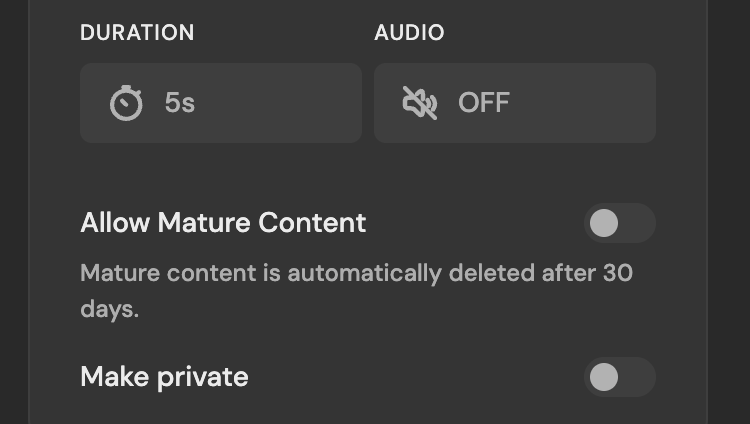 The mature-content switch and its 30-day deletion note, 26 August 2026.
Clear your cache or open an incognito window
If you're seeing a broken editor screen, Pixlr's support article for the editor error page suggests opening Pixlr Editor in an incognito window or clearing your browser cache.
Here are Pixlr's steps for Google Chrome:
- Open Chrome and click More at the top right.
- Click More tools, then click Clear browsing data.
- Choose a time range, picking "All time" to delete everything.
- Tick "Cookies and other site data" and "Cached images and files".
- Click Clear data.
Check whether your credits reset
Every Pixlr plan card states "Credits valid for 1 month". Pixlr's FAQ explains that subscription credits reset at renewal: if a monthly Premium subscriber holds 863 credits on renewal day, the balance resets to 1,000 rather than rolling over.
If you cancel your plan, subscription credits reset to zero.
Credit packs bought separately never expire, but monthly plan allowances are fixed:
- Plus: 80 credits a month.
- Premium: 1,000 credits a month.
- Ultra: up to 10,000 credits a month.
A free Pixlr account starts with 10 credits — the generator prints "10 remaining" under the button. Ten credits is about ten of their 1-credit images, and not one video: the cheapest clip on the platform is Vidu Q3 at 360p for 1 second, 9 credits, and the next one up costs 12.
When your balance is short, you don't get a "not enough credits" error. With Seedance 2.5 picked and the button reading "Generate (250)" against 10 credits, pressing it opened a box headed "Choose payment method" offering "Credit / Debit Card" and "PayPal". So a job that seems to do nothing may just be your balance.
On their video generator, a single 5-second 1080p clip from Seedance 2.5 costs 575 credits, so a Plus balance can't pay for one.
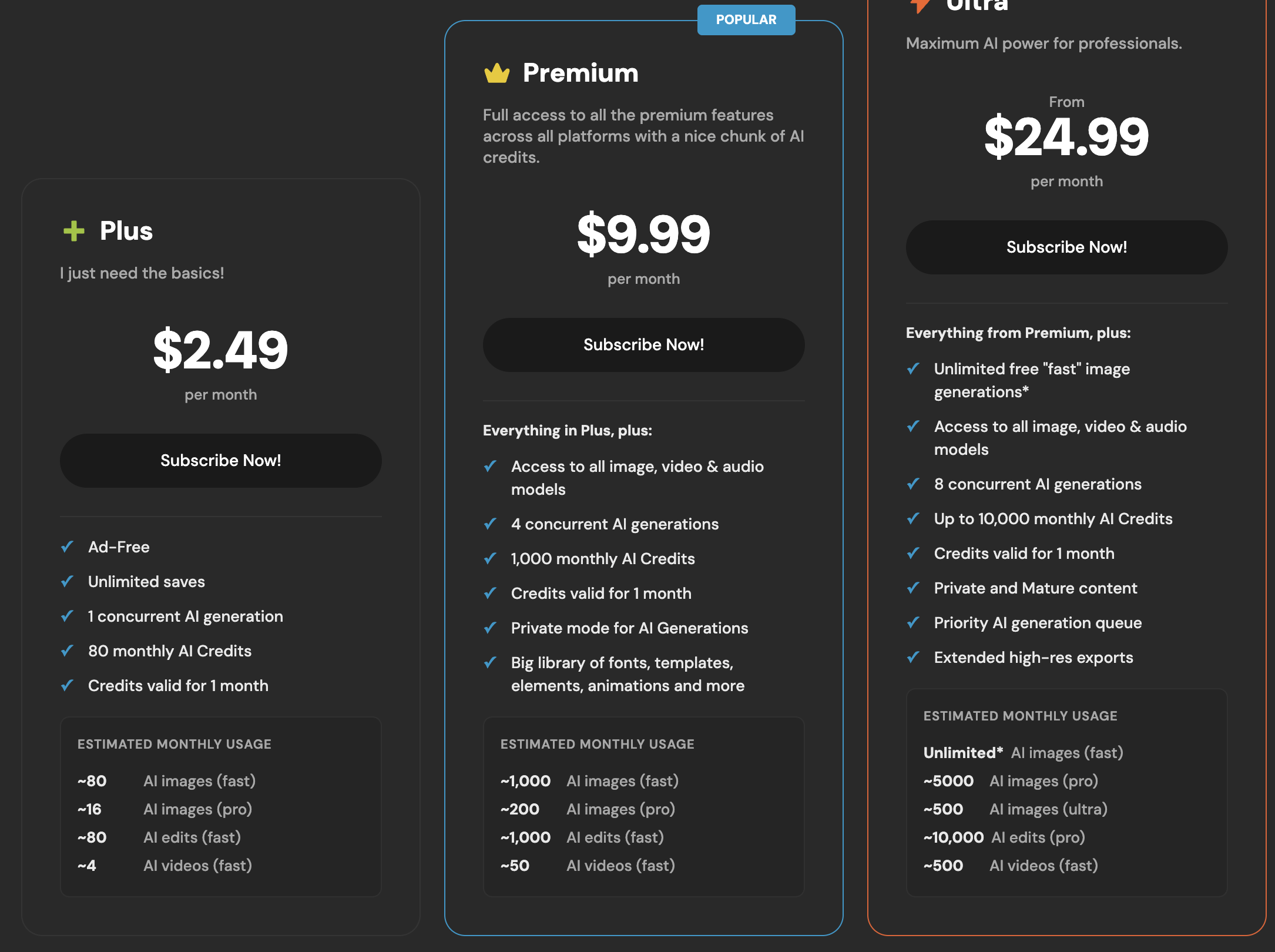 Every Pixlr plan card carries the same line: credits valid for 1 month. Read 26 August 2026.
If a payment failed or the plan will not upgrade
If a payment fails to go through, Pixlr's FAQ says to check with your bank, as banks may block international and subscription transactions. They also don't accept cash cards because plans are recurring subscriptions.
Upgrades only work with a credit or debit card, not with PayPal. If you originally paid with PayPal, their FAQ tells you to email support.
You can cancel anytime on your Subscriptions page and keep access until the paid period ends.
If a charge appeared that you did not expect
If an unexpected charge appears on your statement, Pixlr's FAQ and Trustpilot responses tell you to email info@pixlr.com.
If you bought your plan inside a mobile app, payments go through the app store account on that device rather than Pixlr's website.
When the tool is fine and the credits are the problem
If Pixlr is working but the credit rules don't suit you, you can generate on Seadanse. When you press Generate with us, we freeze the estimated credits and only settle them if your job finishes properly.
As stated on our Seedance 2.5 pricing page: "Failures, timeouts, and platform errors release the hold automatically."
Signing up for our Seedance 2.5 AI Video Generator gives you 40 free credits without asking for a payment card. We also sell a standalone credit pack at $9.9 without a subscription, and all paid tiers include private generations, a commercial licence, and watermark-free exports.
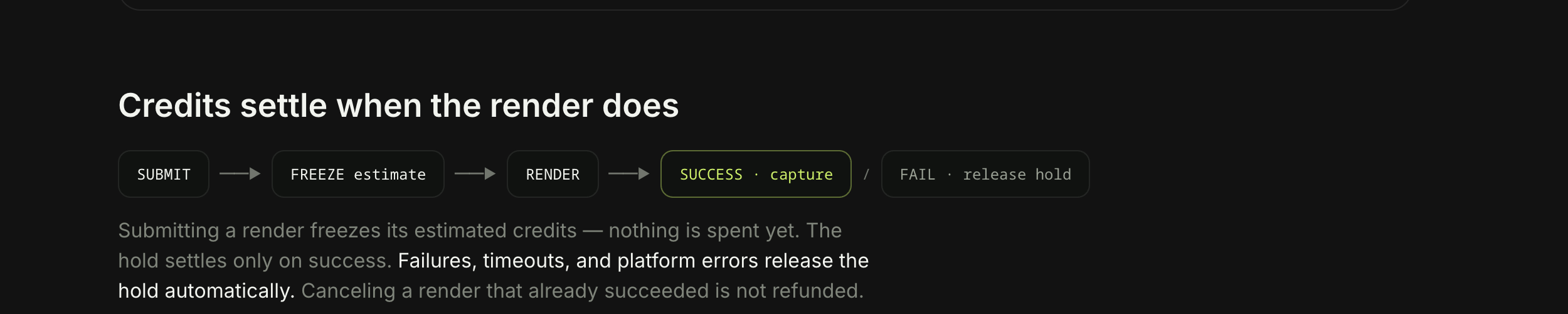 How a hold settles on Seadanse: captured on success, released on failure.
Limits, plainly: our subscription credits also expire at the end of each 30-day cycle without rolling over, though standalone credit packs remain valid for 12 months. We also don't have a photo editor, collage maker, or background remover, so running Seedance 2.5 on our platform won't replace Pixlr's traditional image editing tools.
We checked Pixlr's support pages, pricing documentation, and Trustpilot profile on 26 August 2026. We made a free account on 26 August 2026, ran one 1-credit image on it, and never generated a video there.
Related Articles
- 8 Best Pixlr Alternatives in 2026 — eight tools sorted by which half of Pixlr you are replacing.
- What Is the Pixlr AI Video Generator? Models, Credits, Limits — every model in their video picker and what a clip costs.
- Is Pixlr Free? What You Get Without Paying — where the free tier stops and what it asks for first.


