
6 Best Pika Alternatives in 2026 (Prices Checked)
Pika alternatives checked against each vendor's own pricing page in August 2026 so you can see where watermark-free exports and commercial rights start.
 The Seadanse Team12 min read
The team behind Seadanse. We run the models we write about, and we publish the specs, prices and limits the marketing leaves out.

TL;DR — You're likely looking for Pika alternatives because Pika's Basic and Standard plans both watermark your video and both refuse commercial rights. We checked Higgsfield, Runway, Seadanse, Kling AI, Pollo AI, and Luma directly against their live pricing pages on 26 August 2026.
The right pick comes down to whether you want presets, editing tools, long single shots without a subscription, motion controls, many models in one dashboard, or team exports.
You pay for Pika, and your clip still downloads with a logo on it. If you want it removed, you've got to jump from $8 to $28 a month, and older clips stay marked even after you upgrade.
Six places get you clean exports and commercial use lower down the ladder, with plan prices we read on 26 August 2026. Whether you need a full post-production editor or just want to try Seedance 2.5 AI Video Maker, you get clean files without paying twice.
The six Pika alternatives at a glance
| Platform | Cheapest paid plan | Watermark-free export starts at | Key limitation | What it means for you |
|---|---|---|---|---|
| Pika | $8/mo billed yearly | $28/mo (Pro) | Basic and Standard both watermark and both bar commercial use | You pay twice before your clip is usable at work |
| Higgsfield | $19/mo billed yearly | — | Starter has no Seedance 2.5 at all | The cheap tier is a different product from the one you read about |
| Runway | $12/mo billed yearly | Standard | Free plan is 125 one-time credits, not a monthly allowance | You can test it once, then you're on the ladder |
| Seadanse | $9.9 credit pack, no plan | Every render | No one-tap effects library, no mobile app | Good for long clips, wrong tool for a phone-first effects habit |
| Kling AI | $8.80/mo after the first month | Every paid tier | Card price is a first-month discount, not the renewal | Read the small type under the big number |
| Pollo AI | $15/mo | Paid plans | Headline per-model credit figures are promotional | Compare its standard price, not its badge |
| Luma | $30/mo | — | No free plan on the pricing page | Nothing to try before you pay |
A dash (—) means the pricing page does not say. Every figure was read on each vendor's own pricing page on 26 August 2026, logged out. Sources: Pika, Higgsfield, Runway, Kling AI, Luma.
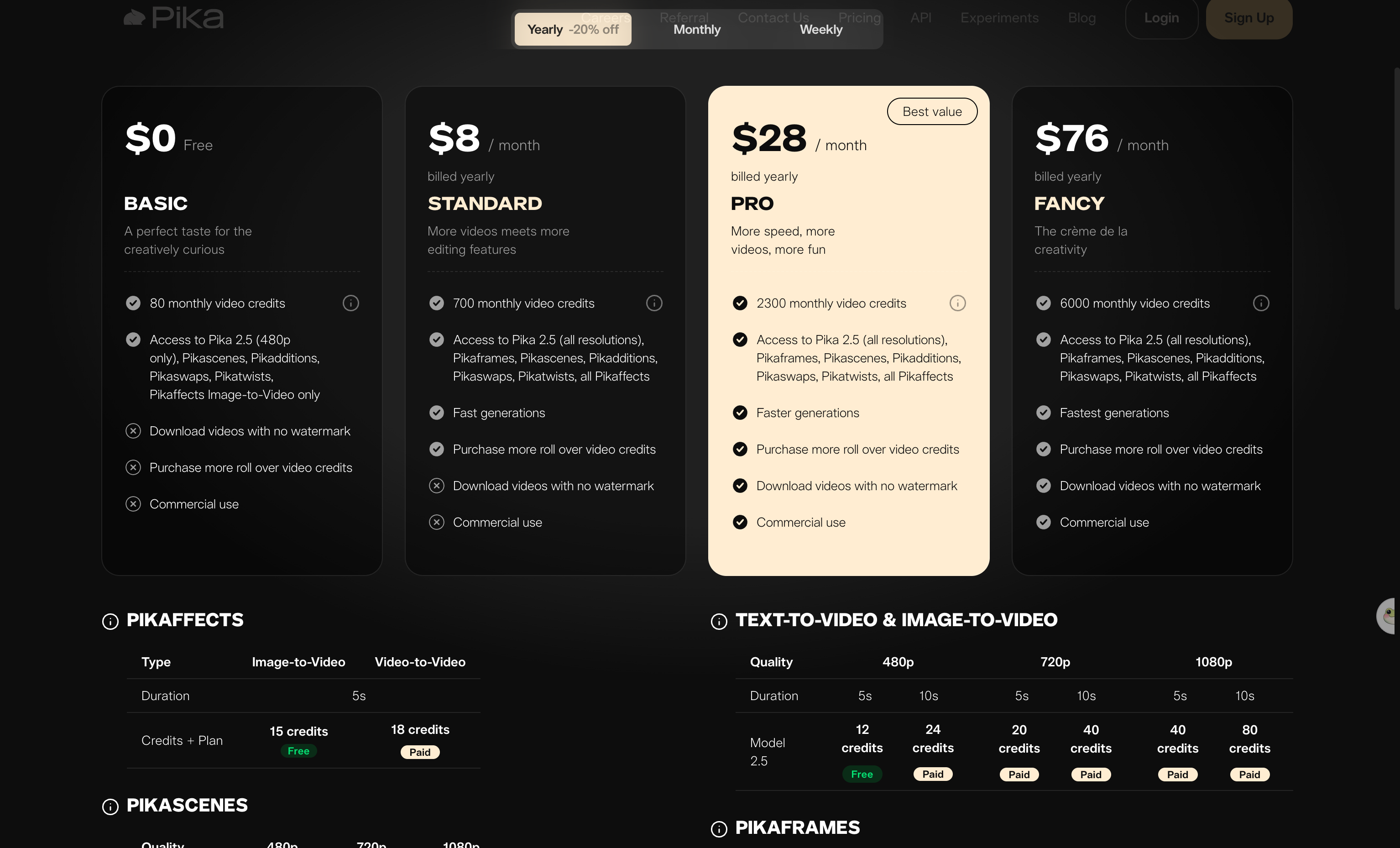
Pika's four plans on the yearly tab — read 26 August 2026. Standard costs money and still shows a cross beside "Download videos with no watermark".
What to look for in a Pika alternative
- Watermark-free exports, so you don't pay for a plan that leaves logos.
- Commercial rights, meaning you can use your clips in client projects.
- Single-take duration, so you don't have to stitch short clips together.
- Credit rollover, so this month's unused credits don't vanish at renewal.
These four points separated the six tools below. They show which platforms let you finish client work and which ones keep you behind paywalls. If you'd rather skip monthly subscriptions completely, you can use the Seadanse generator to make clean clips directly in your browser.
1. Higgsfield: best for one-tap cinematic effects
Higgsfield sells presets through a large library of named camera moves and effects you pick rather than describe. That's the closest thing on this list to Pika's one-tap effects. You pick a movement, attach an image or prompt, and let the tool handle the film-like motion path.
On the Higgsfield pricing page, Starter is $19 a month billed annually with a fixed 270 credits a month. But the card itself says: "NO ACCESS TO SEEDANCE 2.5 — Available from Plus plan".
To get full Seedance 2.5 access at 1080p, you need the Plus plan at $59 marked down to $47 a month billed annually with 1,200 credits a month. Their Ultra tier lists at $129 marked down to $99 a month billed annually.
Higgsfield also includes this footnote on its pricing cards:
Unlimited usage may be subject to dynamic speed adjustments during high-traffic periods.
Higgsfield's pricing page says nothing about watermarks either way, so we left that cell blank.
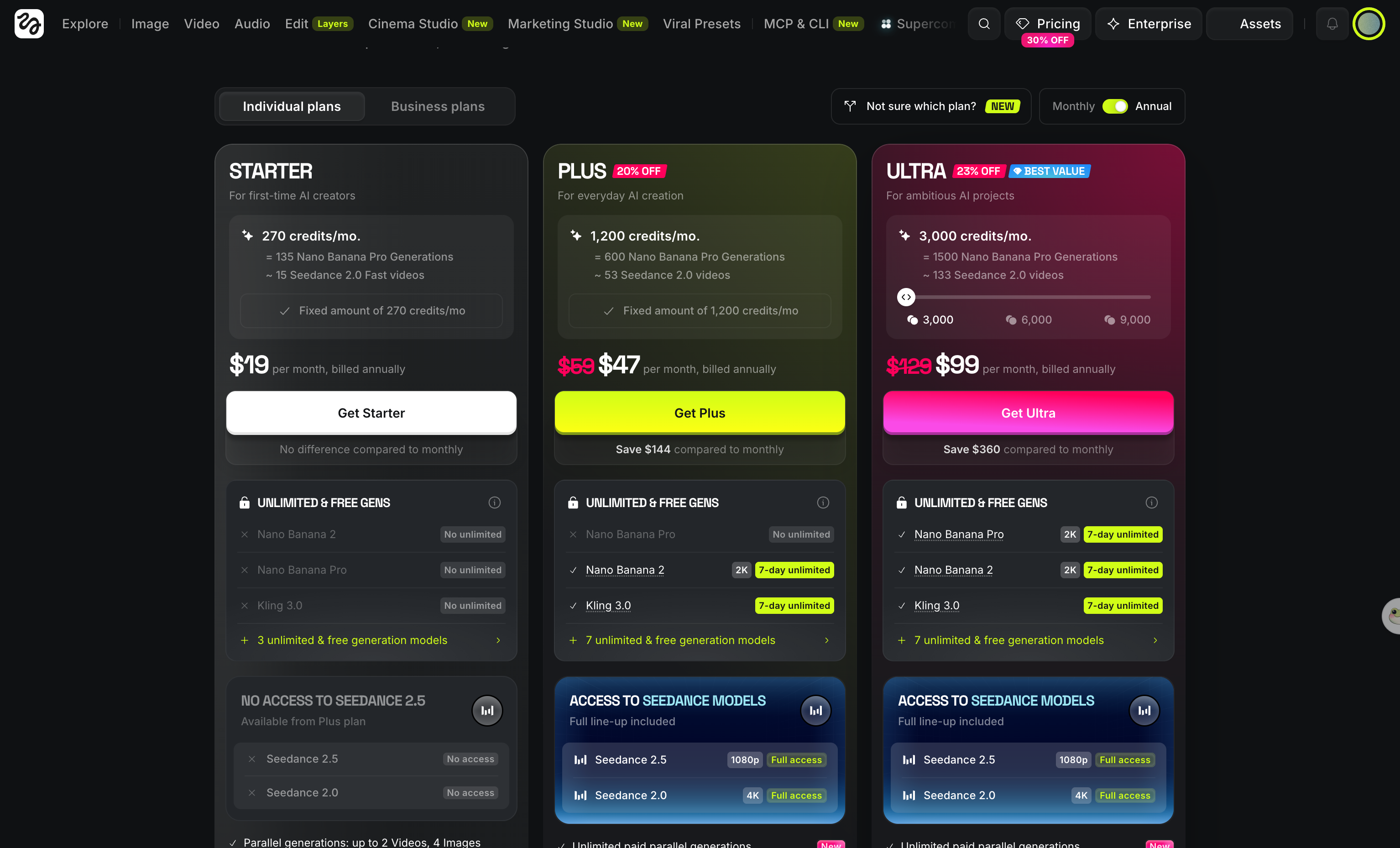
Higgsfield's plan cards — read 26 August 2026. The $19 Starter tier says on its face that Seedance 2.5 starts one tier up.
2. Runway: best if you edit as much as you generate
Runway combines video generation and video editing in one place. Its card lists Aleph alongside Gen-4.5 and Veo 3.1, so editing an existing clip and generating a new one live in the same subscription. You can change what's already in a shot and build new shots from scratch without jumping between different apps.
On the Runway pricing page, Free gives 125 one-time credits so you can test it once, but it's not a monthly allowance. Standard is $15 a month, or $12 billed annually, with 625 credits a month, all image and video models, 4K upscaling, and "No watermarks" on the card.
Pro is $35, or $28 billed annually, with 2,250 credits. Max is $95, or $76 billed annually, with 9,500 credits and unused credits that roll over for one month.
If you hit a stuck Pika generation or need deep post-generation editing, Runway gives you a start-to-finish workspace as long as you keep an active plan.
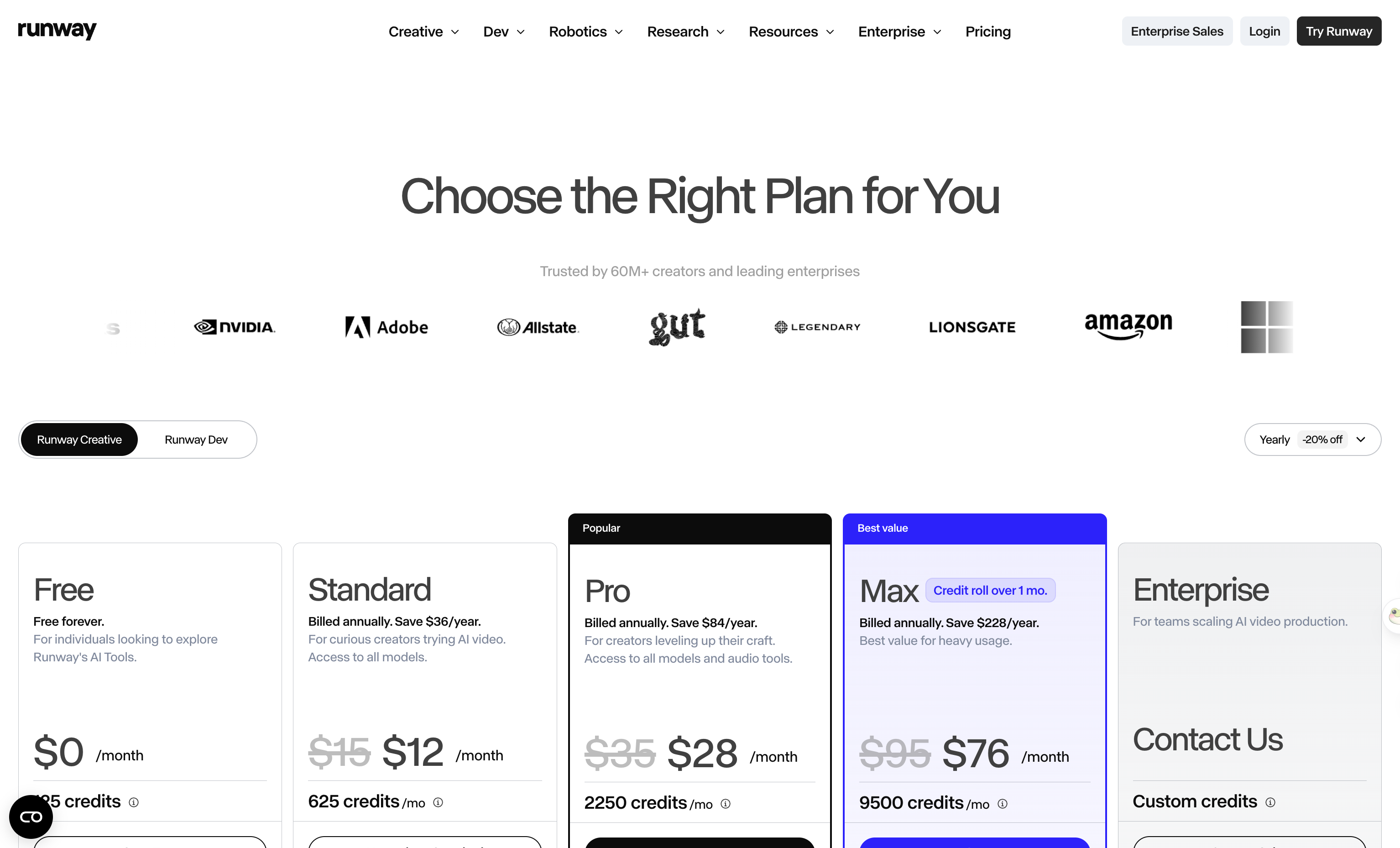
Runway's plans — read 26 August 2026. The free tier is 125 one-time credits, not a monthly allowance.
3. Seadanse: best for long single shots without a subscription
Seadanse lets you run Seedance 2.5 in the browser without a subscription. Free starter credits arrive on sign-up and no card is needed, while exported video carries no watermark.
There's a $9.9 credit pack that needs no monthly plan at all, and top-up pack credits stay valid for 12 months. Plan credits expire at the end of each 30-day cycle and don't roll over, while failed or interrupted renders are refunded automatically. You can check what credits cost on Seadanse before you pick a pack.
Seedance 2.5 offers 480p, 720p, and 1080p. Durations run 5, 10, 15, 20, 25, and 30 seconds across six aspect ratios (16:9, 9:16, 1:1, 4:3, 3:4, 21:9).
Audio is on by default with a 10,000-character prompt box, and you can attach reference pictures and clips. You can also run Seedance 2.0 AI Image to Video.
Our real drawbacks are plain: there's no one-tap effects library like Pikaffects, there's no mobile app, and we don't offer 4K output on Seedance 2.5.
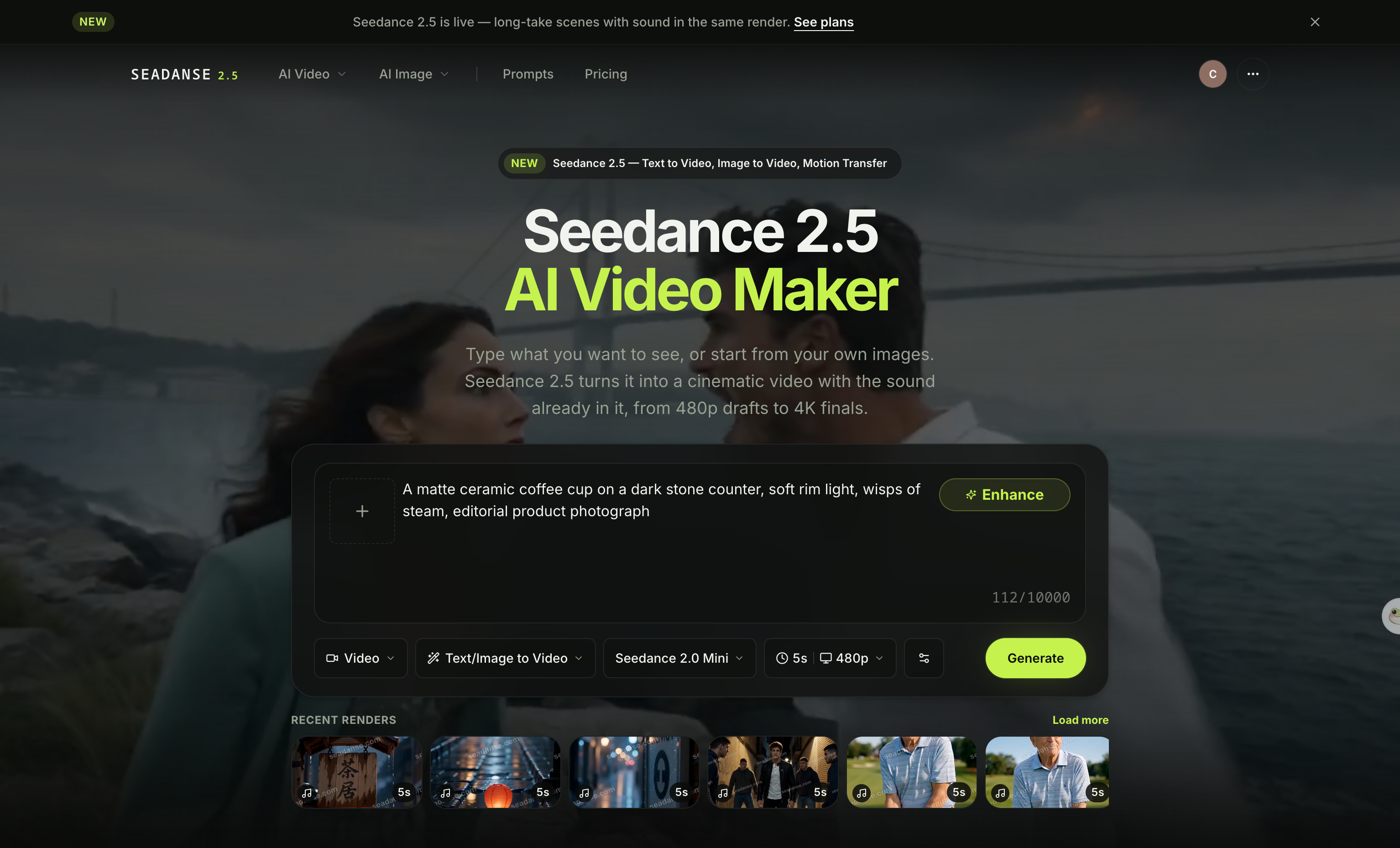
The Seedance 2.5 generator on Seadanse — 5 to 30 seconds, six aspect ratios, no app to install.
4. Kling AI: best for a clean export on the cheapest plan
Kling's cheapest paid card already lists brand watermark removal, commercial use, and 1080p or 4K generation. That's the thing Pika makes you climb two tiers for.
On the monthly tab of the Kling AI membership page, the plans renew at these regular prices:
- Standard: lists at $10 and renews at $8.80 a month with 660 credits.
- Pro: lists at $37 and renews at $32.56 a month with 3,000 credits.
- Premier: lists at $92 and renews at $80.96 a month with 8,000 credits.
- Ultra: lists at $180 and renews at $159.99 a month with 26,000 credits.
The big number on each card is a discounted first month, while the renewal price sits underneath in small type. If you want to see how a multi-shot model handles the same brief, you can also check the Kling O3 AI Video Maker model.
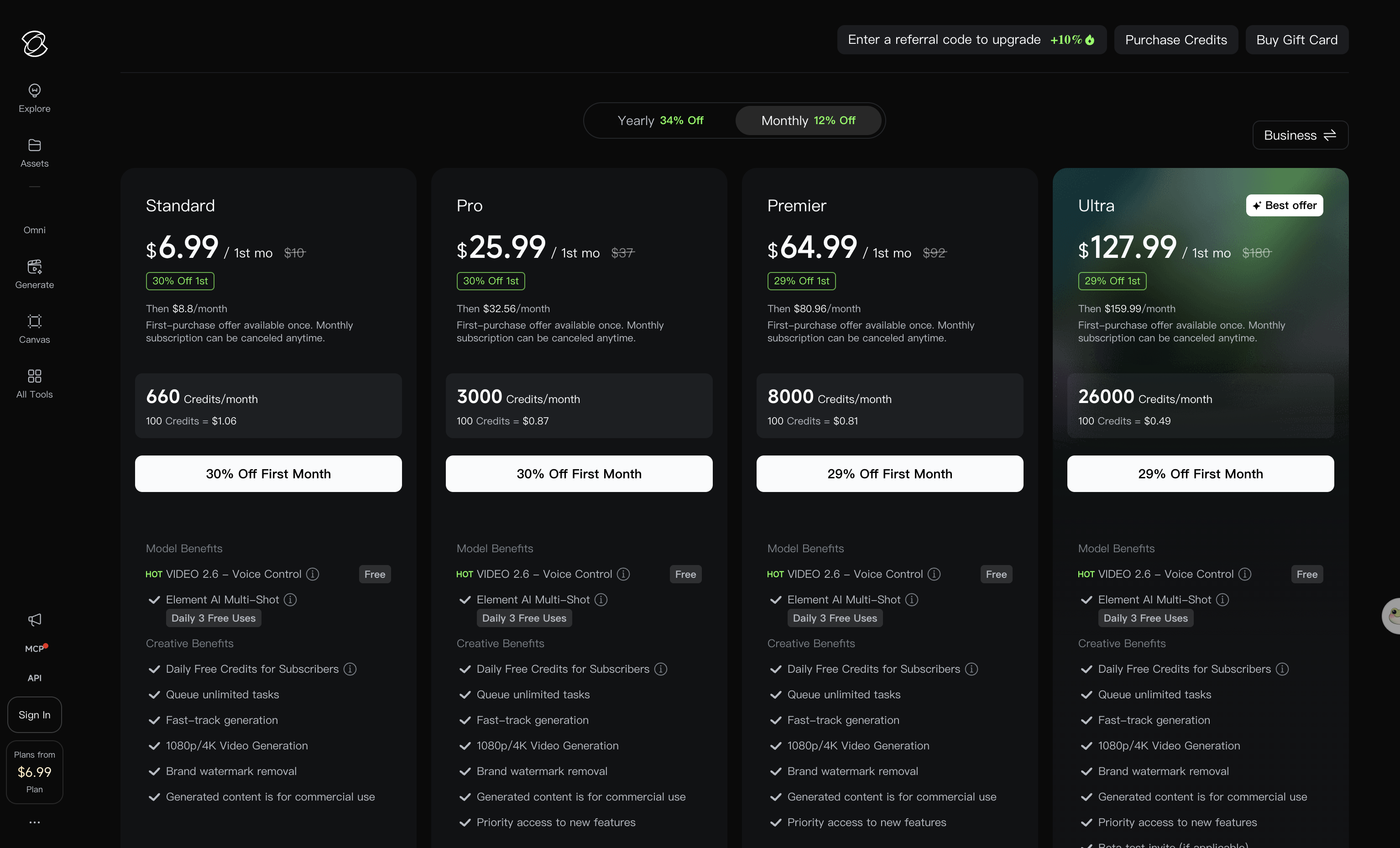
Kling AI's monthly plans — read 26 August 2026. The large number is the first month; the renewal price is the small line under it.
5. Pollo AI: best single app for many models
Pika runs its own in-house trained model inside its consumer web app. Pollo AI takes the opposite path by offering a single consumer dashboard powered by models from several external vendors. If you want to switch between different model providers without managing separate accounts, this setup puts them under one login.
Pollo's monthly subscription plans break down across these tiers:
- Lite: $15 a month for 400 credits, or $144 a year.
- Pro: $29, $59, and $89 a month for 800, 2,000, and 3,000 credits.
- Ultra: $129, $219, and $299 a month for 5,000, 8,000, and 12,000 credits.
Subscription credits don't roll over month to month, but separately bought add-on credits don't expire. Advertised per-model credit numbers are promotional prices tied to holding a paid plan, meaning that headline figure isn't what you pay on a free tier. We broke down how Pollo's promotional credit prices work in a separate guide.
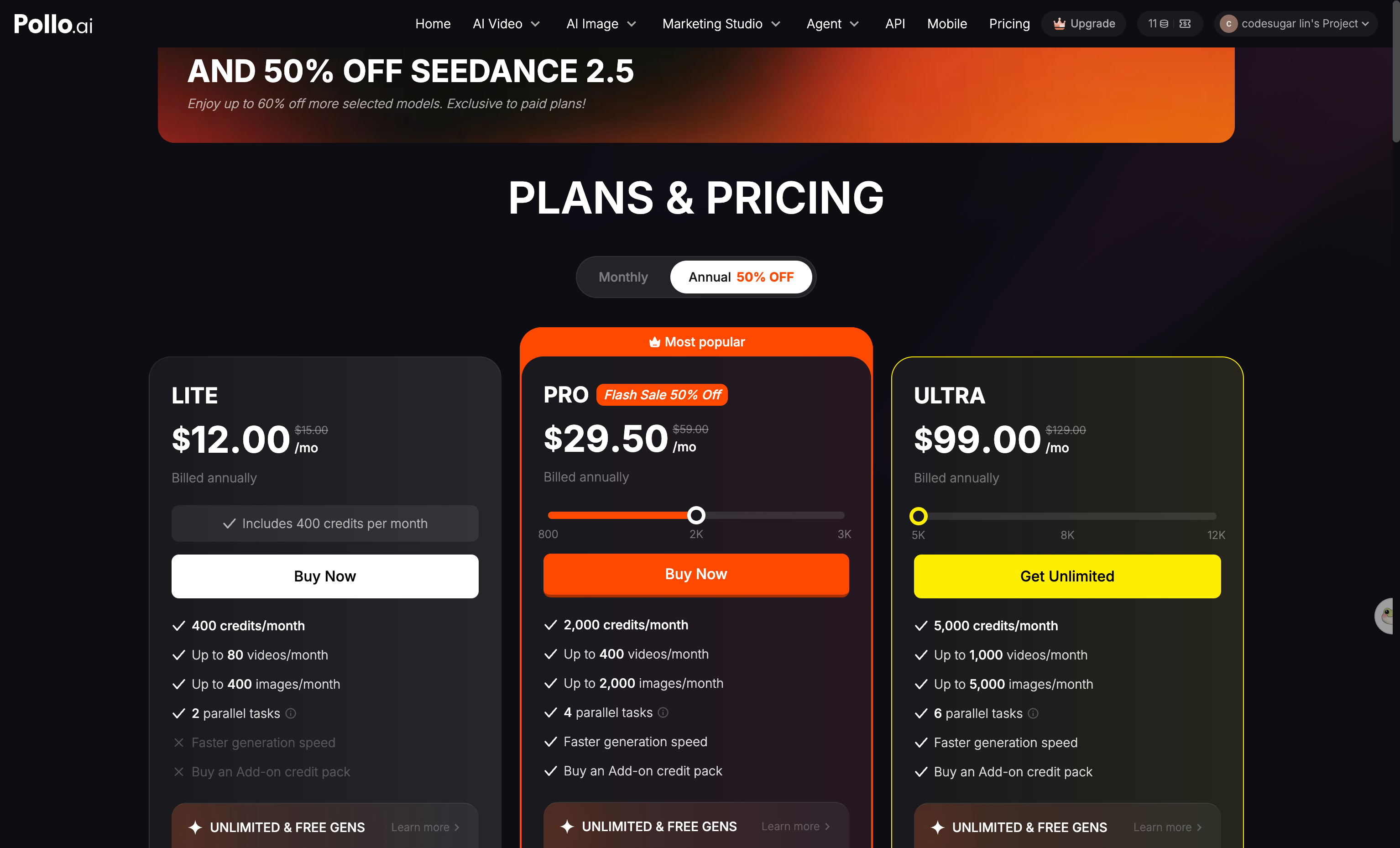
Pollo AI's plans — read 26 August 2026. Its Pro tier is sold at three different credit allowances.
6. Luma: best for teams shipping production files
Luma is built around team collaboration and post-production export options. Its plans mention EXR export and guest collaborator seats, which fits teams that hand finished files to an editor.
On the Luma pricing page, there's no free plan listed. Plus is $30 a month with 10,000 credits, giving you access to Luma and third-party image and video models, edit access for guest collaborators, and commercial use. Pro is $90 a month with 40,000 credits, and Ultra is $300 a month with 150,000 credits, with yearly billing saving up to 20%.
Its rate table lists Ray3.2, Ray3.14, Seedance 2.0, Seedance 2.5, and Seedance 2.0 Mini, alongside EXR export. If your team needs shared project spaces or EXR file deliveries, Luma's plans fit that kind of work, though you can't test the tool on a free plan first. Luma's pricing page doesn't mention watermarks either, which is why that cell is blank too.
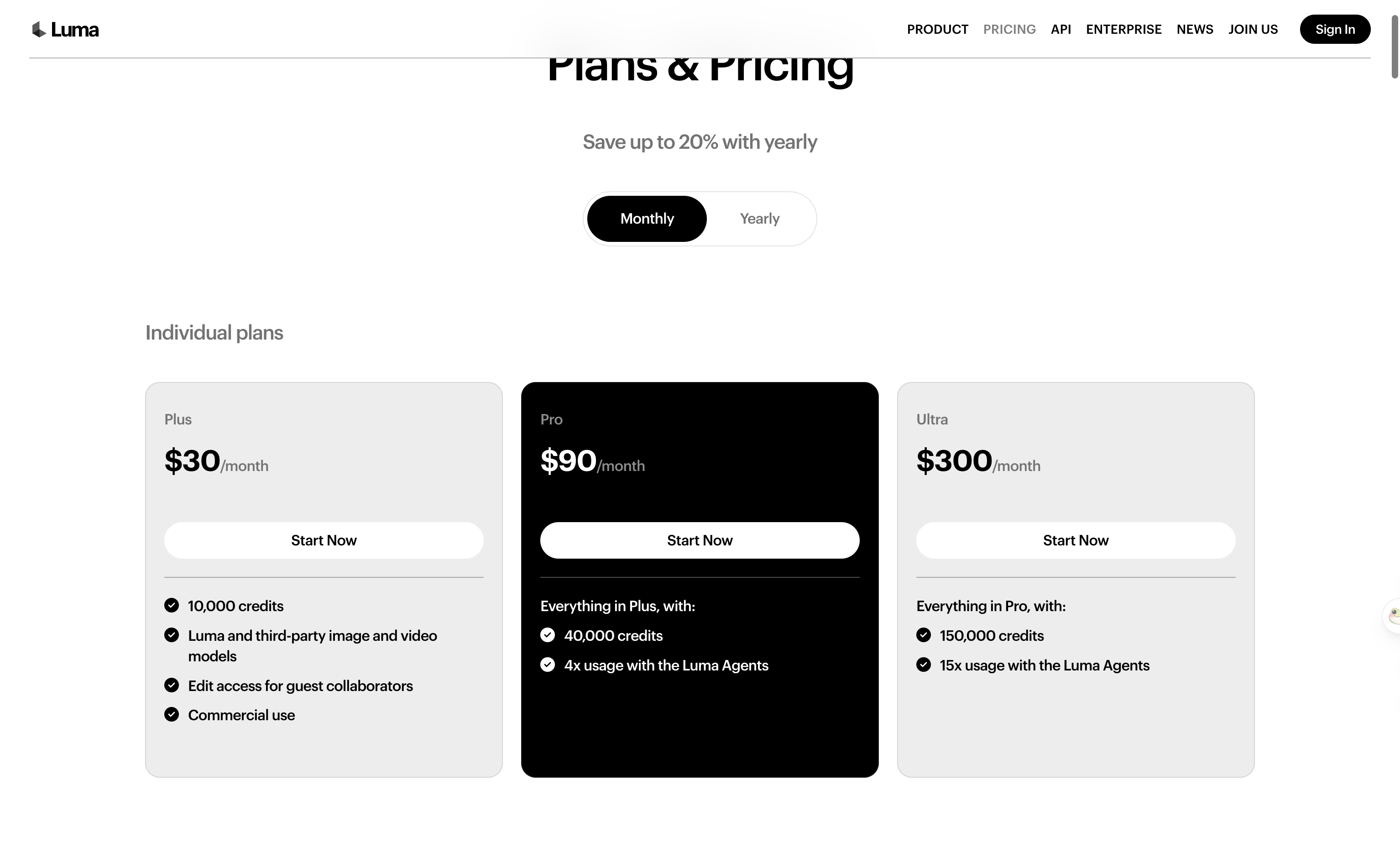
Luma's individual plans — read 26 August 2026. There is no free card on this page.
What Pika still does better than all six
Pika's named effects shelf—including Pikaffects, Pikascenes, Pikatwists, Pikadditions, and Pikaswaps—is genuinely its own, and nobody on this list ships that set of one-tap video-to-video effects. Pikaframes also runs to 25 seconds with first-frame and last-frame control, meaning you supply the opening still and the closing still while it fills the middle.
Pika also has an iOS app where credit costs match the web app. If you want to see how the free tier operates before upgrading, you can read what Pika's free plan actually gives you.
Pika says it plainly on its own support page: "Watermark removal and commercial terms only apply to videos created under an upgraded plan. Anything you generated earlier, on Basic or Standard, keeps its watermark — upgrading doesn't reach back and change files you already made."
So the cheapest way out of a watermarked library is not to build one.
What the independent ratings say (and why they disagree)
Trustpilot rates Pika 1.7 out of 5 from 67 reviews, with 84% of them one star.
But that number can't be compared across this category. Same page, same day: Runway 1.1 from 311 reviews, Kling 1.2 from 369, Luma 1.5 from 62, against Higgsfield 4.0 and Pollo AI 4.3 from thousands each.
The low scores sit at companies that never ask their customers for reviews. Trustpilot itself flags Pika's profile as unclaimed and says the reviews may not be representative.
The App Store tells the opposite story: Pika's own app rates 4.7 out of 5 from 3,814 ratings. Same storefront, same day: Runway 4.5 from 13,399, Kling 4.7 from 28,646, Luma 4.5 from 1,781, Pollo AI 4.5 from 12,624. We didn't find a first-party Higgsfield app in that search.

Read 26 August 2026. The apps carrying the Higgsfield name come from other developers — this one lists sterra OU — and higgsfield.ai links to no app store of its own.
The two numbers disagree because Trustpilot collects self-selected complaints at a company that never asks for reviews, while the App Store collects prompts shown to people already using the app. Neither is a verdict on output quality, so we didn't rank anything on either one.
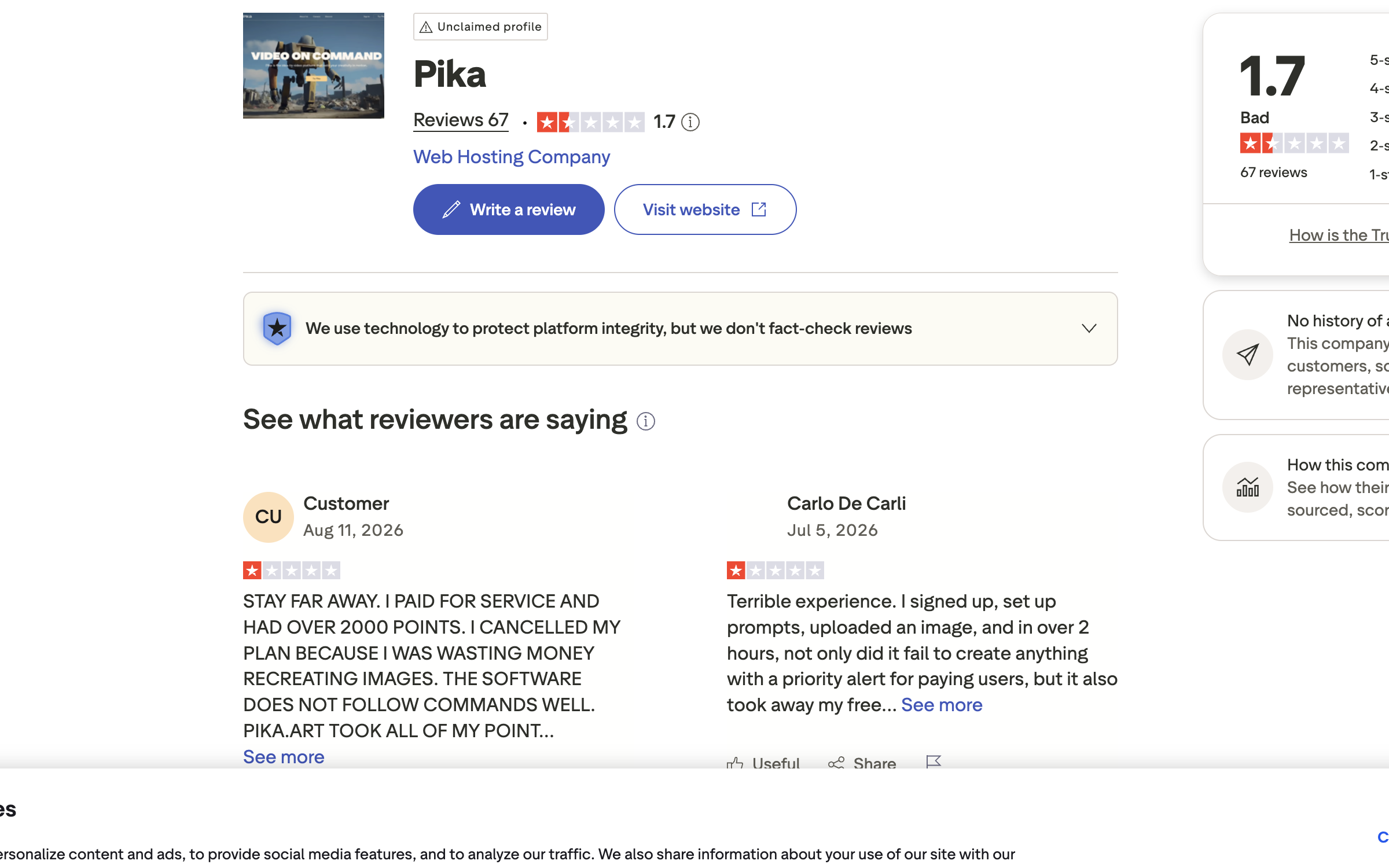
Pika on Trustpilot — read 26 August 2026. The profile is unclaimed and Pika has never invited customers to review it, which is why the sample is small and skewed.
How we made this list
We read every price and limit directly from each vendor's public pricing page on 26 August 2026, logged out. We didn't run the same prompt through all six platforms for this roundup. We also read each platform's Trustpilot page and App Store listing, and we ranked nothing on either score.
Hailuo AI was dropped because its site kept redirecting our browser to its Chinese version, so we couldn't read an English price page. Vidu was dropped because its pricing page never finished loading its plans while logged out.
We build Seadanse, which is why we list our own platform's limitations as plainly as everyone else's.
Start with one prompt
Open Seedance 2.5 on Seadanse, type one prompt, pick a length, and press Create. Your video generates directly in your browser. Best of all, it doesn't carry a watermark.
Related articles
- Is Pika Free? What the Free Plan Gives You (and What It Doesn't) — the 480p ceiling, the watermark and the commercial-use line, in one page.
- Pika Not Working? 6 Fixes Straight From Pika's Own Support — stuck generations, missing credits and the sign-in trap that looks like a lost subscription.
- How to Use Pika: 7 Steps and What Each One Costs — the walkthrough, with the credit cost of every step.


