
ChatGPT Millionaire Meme Prompt (Copy-Ready) and How to Skip It
ChatGPT millionaire meme prompt: the real edit prompt behind Seadanse's 13-second video, 3 public prompts, or skip it with 1 photo for $9.90.
 The Seadanse Team20 min read
The team behind Seadanse. We run the models we write about, and we publish the specs, prices and limits the marketing leaves out.

TL;DR — The ChatGPT millionaire meme prompt is a 193-word video edit prompt for the real 13-second parking-lot take and 1 photo. It swaps the young man for whoever is in your photo, while every move, the mouth on every word, the parking lot and the camera stay the same. Here's the edit prompt Seadanse runs, word for word.
Edit the video. Replace the young man with curly dark hair in the black T-shirt with a white print, the gold chain with a cross and the colourful wristbands, who stands alone on the brick paving of the parking lot holding a phone, with whoever is in @Image 1 (a person, or a cartoon or game character, or a pet when @Image 1 shows one): their face, hair, body and whole outfit come from @Image 1 only. They do not wear the black T-shirt, its white print, the gold chain with the cross or the wristbands, and do not have the young man's curly hair, unless @Image 1 shows them. Keep everything else exactly unchanged: every movement, each time the phone goes up to the mouth and back down to the screen, the mouth moving with every word, every look down at the screen and up past the camera, the phone in its clear case, the camera pushing in at the start and the handheld framing, the parking lot, the red brick paving, the trees, the fence and the playground behind, the cloudy daylight and the timing. No captions or text on screen.If you don't want to write a prompt, you can upload 1 photo to our ChatGPT millionaire meme generator. You'll get the 13-second video with the skit's own voice for $9.90 for one 720p video.
Under the Frank Gallagher version of the meme, which pulled 2.6 million views on TikTok, a commenter wrote "good prompt tho". But nobody in the comments posts the actual prompt. MakeViral's page notes: "No creator of the trend shared a prompt, and the CapCut template shows none."
Most prompts you find online don't edit the video at all. The prompt Media.io gives you describes the skit in words for an image-to-video tool (an AI that makes a brand-new clip from one still photo). On top of that, Media.io's own page tells you to "add your own licensed audio if needed".
You don't have to rebuild the clip from scratch or hunt down sound files. Below is the real edit prompt behind Seadanse's ChatGPT Millionaire Meme, three prompts other sites posted, and the way to skip all of them.
Here's what you'll find below:
- The real edit prompt: The exact 193-word prompt that edits the original take.
- The five-part formula: Why each line of the prompt works the way it does.
- 3 public prompts: What Media.io, MakeViral and Starrd posted on their pages.
- The one-photo route: How to get the 13-second video without touching a prompt.
What Is the ChatGPT Millionaire Meme Prompt?
The ChatGPT millionaire meme prompt is a video edit prompt (a prompt that changes a clip you already have instead of making a new one). You give it to an AI video editor together with the real take and 1 picture. It tells the editor who to swap out (the young man) and what to keep (everything else).
To run this edit prompt yourself, you need four specific pieces:
- The clip: The first 13 seconds of the original reel @glowboynoah posted on Instagram. It's 9:16 (a tall phone-shaped frame), shot as one continuous handheld take with no cut.
- The picture: One clear photo of your subject, marked as @Image 1 (the first picture you attach). This acts as your reference photo (the picture the AI copies a face and look from).
- The editor: You'll need an AI video editor that changes a clip you've already got, using a reference photo. It doesn't make fresh footage from scratch.
- The sound: The skit's voice track, added after the edit finishes. The video edit prompt changes visual frames, so you lay the audio under the clip from the first frame.
This is the prompt our ChatGPT Millionaire Meme maker runs, word for word, as of October 20, 2026.
You'll find four prompts for this trend, and each one's built for a different route:
| Prompt | Posted by | What you attach | What it's built to make |
|---|---|---|---|
| Edit prompt, 193 words | Seadanse, October 20, 2026 | Your photo and the real 13-second take | The real take with the person in your photo in the lead |
| Image-to-video prompt, 78 words | Media.io, read October 20, 2026 | One photo | A new vertical clip of the skit, made from the photo |
| Shot-for-shot prompt, 5,355 characters | MakeViral, October 15, 2026 | Your photo and a viral AI clip of the skit | A remake of that AI clip with you in it |
| Character sheet prompt, 77 words | Starrd, October 14, 2026 | One photo | A character sheet, step 1 of Starrd's 4-step route |
Read the story behind the ChatGPT millionaire meme to see why this parking-lot take went viral in the first place.
This is the ChatGPT millionaire meme video our edit prompt gave back, with the skit's own voice. It's the man from the photo in his white T-shirt, phone at his mouth, in the real parking lot.
How Is the ChatGPT Millionaire Meme Prompt Built?
The ChatGPT millionaire meme prompt has 5 parts: subject, action, environment, style and camera. Only the subject changes. The other 4 tell the editor to keep the real take.
The prompt distributes those jobs across its lines:
| Part | What our prompt says | What it does |
|---|---|---|
| Subject | "Replace the young man with curly dark hair in the black T-shirt with a white print" | Points at the one person in the take by what you can see, so the editor knows who to swap. |
| Action | "every movement, each time the phone goes up to the mouth and back down to the screen, the mouth moving with every word" | Sits in the keep list. Every move and every word come from the real take, so you never describe them. |
| Environment | "the parking lot, the red brick paving, the trees, the fence and the playground behind" | Keeps the real parking lot from the original take. |
| Style | "the cloudy daylight" and "No captions or text on screen" | Keeps the light of the real day and leaves the frame clean for your own caption. |
| Camera | "the camera pushing in at the start and the handheld framing" and "the timing" | Keeps the one handheld take, from the push-in to the last beat of the 13 seconds. |
Every quote in the table comes from the prompt above, word for word.
It's the same kind of edit our Paris Riot Coffee AI effect runs on a real café clip. If you'd rather not manage these prompt lines yourself, you can make the ChatGPT Millionaire Meme for TikTok and Reels directly in your browser.
What Does Each Part of the ChatGPT Millionaire Meme Prompt Do?
The ChatGPT millionaire meme prompt does three jobs in 193 words: it names who goes out, it names what doesn't carry over, and it lists everything that stays.
Edit the video. Replace the young man with curly dark hair in the black T-shirt with a white print, the gold chain with a cross and the colourful wristbands, who stands alone on the brick paving of the parking lot holding a phone, with whoever is in @Image 1 (a person, or a cartoon or game character, or a pet when @Image 1 shows one): their face, hair, body and whole outfit come from @Image 1 only. They do not wear the black T-shirt, its white print, the gold chain with the cross or the wristbands, and do not have the young man's curly hair, unless @Image 1 shows them. Keep everything else exactly unchanged: every movement, each time the phone goes up to the mouth and back down to the screen, the mouth moving with every word, every look down at the screen and up past the camera, the phone in its clear case, the camera pushing in at the start and the handheld framing, the parking lot, the red brick paving, the trees, the fence and the playground behind, the cloudy daylight and the timing. No captions or text on screen.Name the Young Man by What You See
The prompt opens with "Edit the video." so the tool knows it's changing footage that's already there. Then it points at the performer by what you can see:
- His hair: It's curly and dark.
- His clothes: He wears a black T-shirt with a white print.
- His jewelry: He's got a gold chain with a cross and colourful wristbands.
- His spot: He stands alone on the brick paving.
You won't find a creator handle, a personal name, or the word "meme" anywhere in the text.
Say What Doesn't Carry Over
The prompt doesn't let his clothes carry over onto your character. It explicitly states: "They do not wear the black T-shirt, its white print, the gold chain with the cross or the wristbands, and do not have the young man's curly hair, unless @Image 1 shows them."
The prompt allows "a person, or a cartoon or game character, or a pet when @Image 1 shows one" to take the lead. That means "their face, hair, body and whole outfit come from @Image 1 only", so your dog or your favourite game lead can ask the phone for that million too.
List Everything That Stays the Same
The line "Keep everything else exactly unchanged" is what keeps the real footage the real footage. It's followed by six things that don't change:
- The moves: Every movement, each time the phone goes up to the mouth and down to the screen, and every look down at the screen and up past the camera.
- The mouth: The mouth moving with every word, which keeps the lip-sync (the mouth moving in time with the words) aligned.
- The phone: The smartphone held in its clear protective case.
- The camera: The camera pushing in at the start and the handheld framing throughout.
- The place: The parking lot, the red brick paving, the trees, the fence and the playground behind.
- The light and timing: The cloudy daylight and the exact pace of the 13-second take.
The prompt finishes with "No captions or text on screen." That leaves the frame completely clean, so you can overlay your own custom caption when you post to TikTok or Instagram.
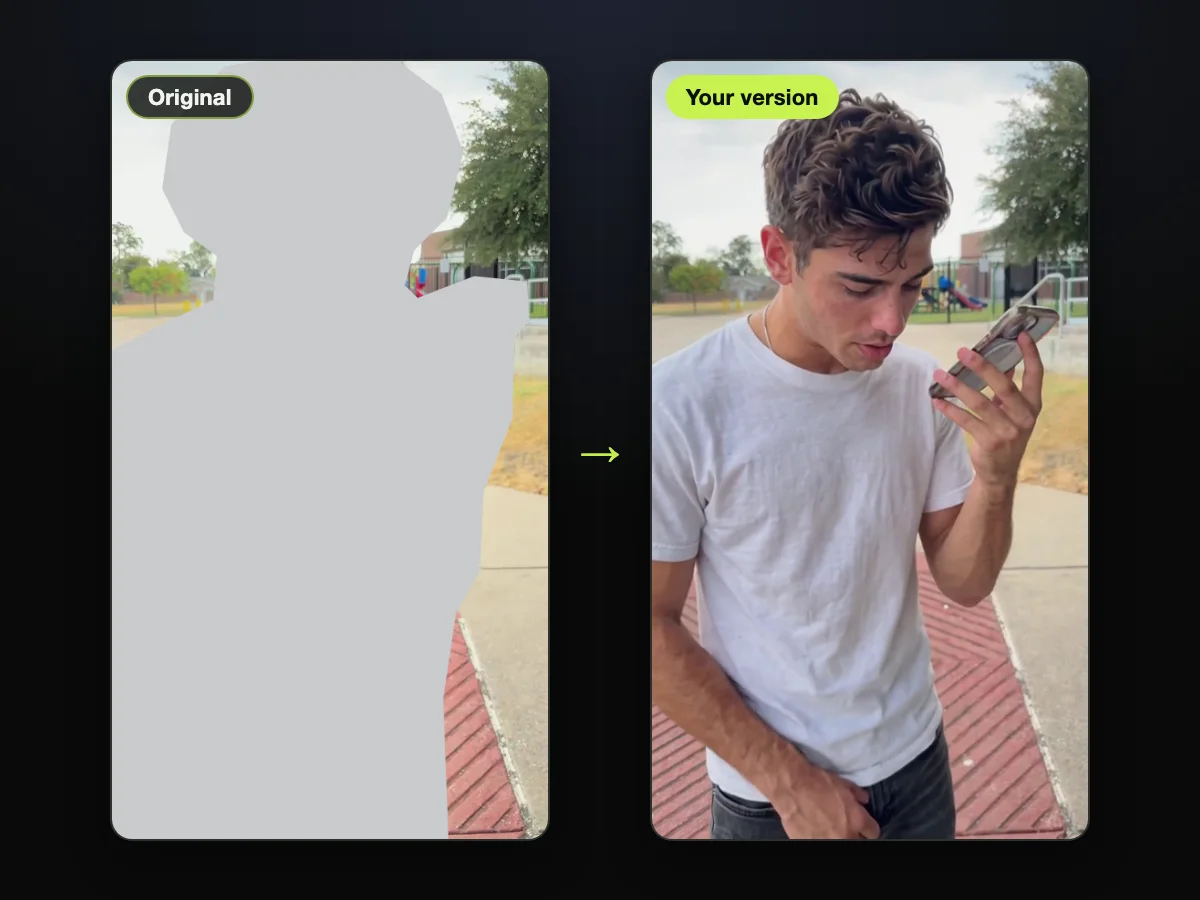
On the left, labelled "Original", the young man is greyed out, and the parking lot around him stays. On the right, labelled "Your version", the new lead stands in the same spot with the phone.
Use the Prompt in an AI Video Editor
Setting up an AI video editor to run this prompt takes five direct steps:
- Upload a photo: Attach your reference picture into the slot designated for @Image 1.
- Add the clip: Load the first 13 seconds of the original parking-lot reel as the source video to edit.
- Paste the prompt: Copy the 193-word text block into the instruction field.
- Keep the shape: Pick 9:16 (a tall phone-shaped frame). That's the shape the clip already has.
- Add the sound: Overlay the skit's original voice track over the exported video from the very first frame.
On Seadanse, our ChatGPT Millionaire Meme maker runs this exact prompt every time you press Create, just like our run on October 20, 2026.
On that day, we ran the prompt word for word on the real take with one picture of an AI-made man (a made-up adult, not a real person). He's in the lead for all 13 seconds, with the same parking lot and the same camera. His mouth moves with every word, and the skit's own voice plays under it.
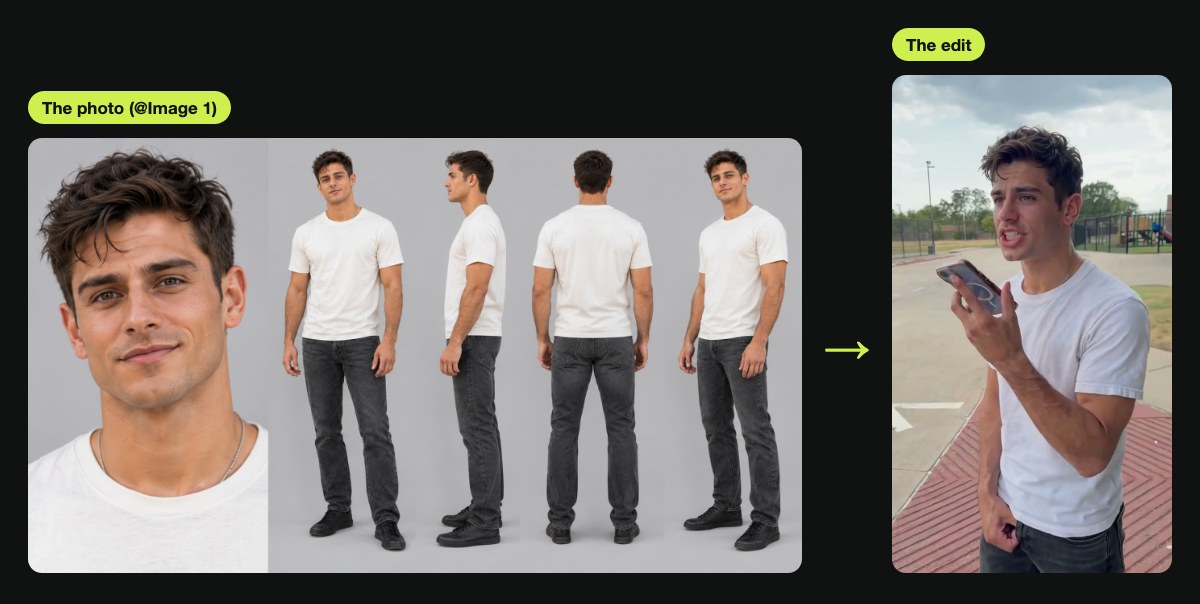
On the left is the picture that went in as @Image 1; on the right is the same man 1.5 seconds into the edit. You can build a multi-angle turnaround like that for your own character using our AI character sheet generator.
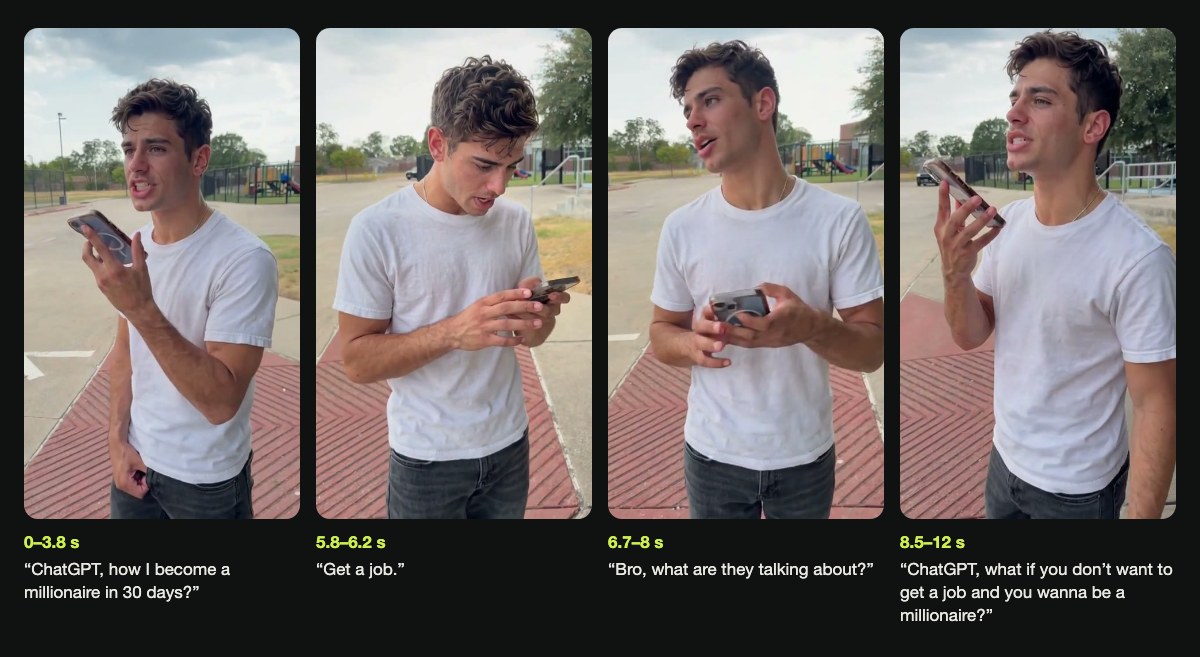
Here are the four beats of the take, with the time and the line under each:
- 0–3.8 s: He's got the phone at his mouth for the first question.
- 5.8–6.2 s: He reads "Get a job." off the screen.
- 6.7–8 s: He looks up, insulted: "Bro, what are they talking about?"
- 8.5–12 s: The phone's up again for the second question.
What ChatGPT Millionaire Meme Prompts Have Others Posted?
Three other sites posted a ChatGPT millionaire meme prompt by October 20, 2026: Media.io, MakeViral and Starrd.
Media.io: An Image-to-Video Prompt
Media.io's trend page gives you this prompt in its FAQ. We read it on October 20, 2026.
Vertical 9:16 candid handheld video outdoors. The person in the reference photo holds a smartphone near their mouth and confidently asks how to become a millionaire in 30 days. They look at the screen and read the short reply ‘Get a job.’ Their face changes from hopeful to shocked; they lean back, frown, type quickly, and lift the phone to ask again. Natural comic pauses, stable face, consistent outfit, one phone, realistic hands, no extra people or text.This 78-word prompt is built for an image-to-video tool. It starts from 1 photo, describes the skit's six actions in a single sentence, and asks for "Vertical 9:16" in a "candid handheld video outdoors". Because the prompt creates an entirely new video, Media.io's page notes: "Add dialogue separately if the model does not support speech."
MakeViral: A Shot-for-Shot Prompt
MakeViral posted its prompts on October 15, 2026, one for people and one for pets. The human version opens with "Recreate the reference video [Video 1] shot for shot" and runs to 5,355 characters, so you're writing out every beat of the skit by hand.
MakeViral's page explains that "Each version copies a viral AI clip of the skit", rather than the original Instagram video. The prompt describes the setting as "a big empty concrete lot by a park" and spells out 12 timed lines down to a tenth of a second. It enforces strict lip movements with the rule: "The person's mouth talks ONLY where a line is written and is CLOSED everywhere else".
Starrd: A Character Sheet Prompt
Starrd shared its prompt in Starrd's Build It Yourself guide on October 14, 2026, as step 1 of its route.
A photorealistic vertical 9:16 character sheet of the person from the photo. Top two-thirds: a candid handheld phone video still of them in the same place as their photo, framed from the knees up, holding a smartphone near their mouth in their right hand, talking into it like a voice message. Bottom row: a 360° turnaround on a plain white background, four full-body views, front, three-quarter, side and back. Same face, hair and outfit in every panel.Starrd uses that 77-word prompt to build a character sheet (one picture that shows the same person from several sides). Its other three steps are more technical:
- A depth map: A greyscale depth version (a black-and-white picture of how far away each thing is) keeps the original camera and body moves, but you won't see the actor's face or clothes.
- No on-screen text: Captions are removed from the video before the depth pass runs.
- A beat-by-beat list: A written schedule pairs timestamps with facial expressions, mouth shapes and lines.
Starrd notes that its final output remains "driven by the original clip, not a written story".
What Does a Regenerated ChatGPT Millionaire Meme Prompt Have to Rebuild?
A regenerated ChatGPT millionaire meme prompt has to rebuild the voice, the lip-sync and the parking lot, while an edit prompt takes all three from the real 13-second take. A regenerated clip is a brand-new video the AI makes, so it isn't the real footage changed.
Here's what each kind of ChatGPT millionaire meme prompt has to supply, as each site's own page states it:
| What the video needs | Edit the real take (our prompt) | Image-to-video (Media.io's prompt) | Shot-for-shot remake (MakeViral's prompt) | What it means for you |
|---|---|---|---|---|
| The voice | The skit's own voice goes under the edit from the first frame | Media.io's page says to add your own licensed audio if needed | MakeViral's page says the original voice track is put back after the run | With the edit, every line is the skit's own voice. |
| The lip-sync | "the mouth moving with every word" stays from the real take | Media.io's page says lip sync depends on the chosen model | The prompt writes out when the mouth talks and when it's closed | With the edit, the mouth already moves on every word. |
| The parking lot | The real lot: red brick paving, trees, fence, playground | "candid handheld video outdoors" | "a big empty concrete lot by a park" | With the edit, it's the parking lot people know from the meme. |
| The moves and timing | Every movement and the timing come from the take | Six actions in one sentence, no times | 12 timed lines, down to a tenth of a second | With the edit, you don't write a single beat. |
| The length | 13 seconds, the length of the take | Media.io's page says to split the scene into shorter clips if a 12-second sequence isn't supported | 13 seconds | With the edit, you get the whole bit in one video. |
The longer a prompt has to describe the scene, the more timing notes you have to write by hand. MakeViral has to script 12 separate timestamps just to keep the pacing straight.
An edit prompt never describes a single move, because the pacing already exists in the original video. You can see what the ChatGPT millionaire meme CapCut template does to compare how other creators try to bypass these steps.
Can You Make the ChatGPT Millionaire Meme Without a Prompt?
Yes, Seadanse makes it from 1 photo. The real 13-second take and the skit's own voice are already built in, so there's no prompt to write and no clip to find. You don't have to install any apps or edit timelines, because the whole process runs in your web browser.
The generator gives you four simple controls:
- Upload photo: Add a clear picture of one person, pet or character facing the camera in good lighting.
- 480p, 720p or 1080p: Pick your target video quality using the resolution switch.
- The tick box: Confirm you have the right to use the photo and any person shown is 18 or older.
- Create · $9.90: You press the button and pay once, and your video starts right away on the page.
When it's done, you'll download a 13-second vertical 9:16 MP4 with the original voice, no text on screen and no watermark on the exported video.
A single 720p video costs $9.90 for 500 credits. A 1080p video uses 1,480 credits, which is about $23.60 with the $39.90 pack of 2,500 credits. You can see every credit pack on the pricing page.
You pay once. There's no subscription and no sign-up, and your pack credits stay valid for 12 months. If a video ever fails, you'll get your credits back automatically.
You can make your ChatGPT millionaire meme from one photo without typing any instructions. Read our guide covering the steps to make the ChatGPT millionaire meme to see every step from photo to video.
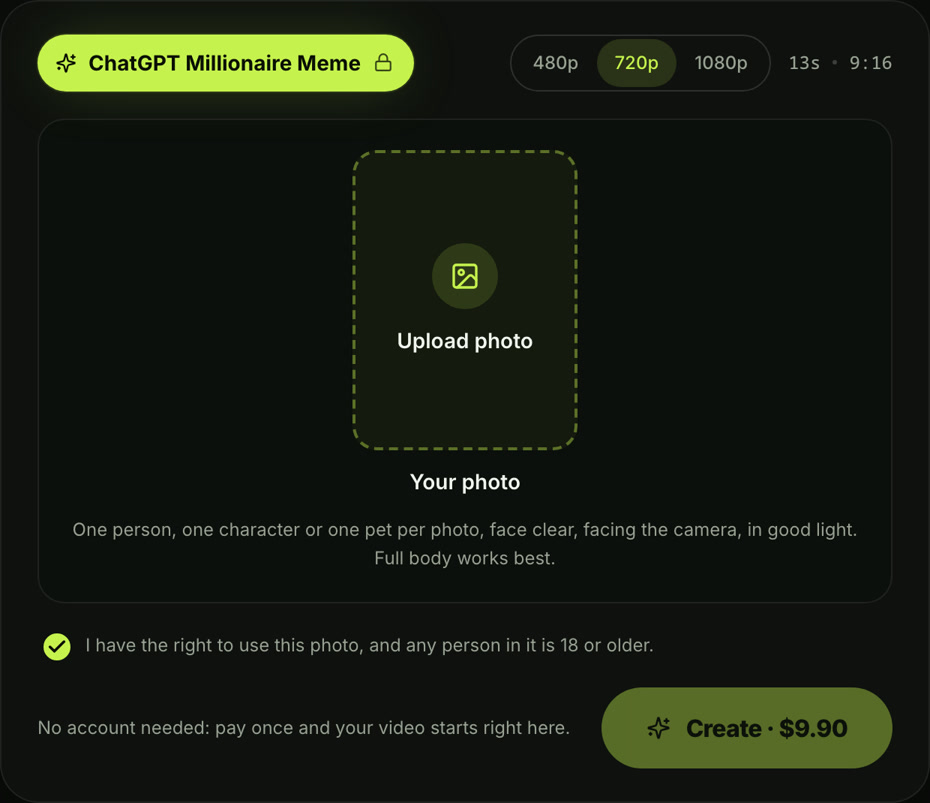
This shows the live generator with 720p picked and the price on the Create button.
ChatGPT Millionaire Meme Prompt FAQ
Is this the prompt Seadanse actually uses?
Yes, these are the exact words running behind our ChatGPT Millionaire Meme page as of October 20, 2026. You can find more automated video styles on our AI video effects directory.
Which AI video tool runs the ChatGPT millionaire meme prompt?
You'll need an AI video editor that edits a clip you've already got, using a reference photo and a text prompt. An image-to-video tool won't work with this prompt, because it makes brand-new clips. It doesn't change real footage.
Check our breakdown of the best ChatGPT millionaire meme generators to see which tools accept video inputs.
Can you use the ChatGPT millionaire meme prompt with a pet?
Yes, the prompt explicitly accepts "a person, or a cartoon or game character, or a pet when @Image 1 shows one" into the lead role. On Seadanse, you can upload a photo of your dog or cat, and your pet will star in the exact same parking lot scene.
Does the ChatGPT millionaire meme prompt add the voice?
No, the edit prompt only changes the picture, so you'll add the sound yourself. On Seadanse, the skit's original voice track is attached to your video from the first frame automatically.
Did ChatGPT really say "Get a job"?
No, it's a scripted comedy skit, and ChatGPT never actually answered the question. The humor comes entirely from the actor's offended reaction when he pretends to read the reply off his screen.
Ready to Skip the ChatGPT Millionaire Meme Prompt?
The real ChatGPT millionaire meme prompt edits the real 13-second take. It swaps only the young man for whoever's in your photo and keeps everything else, the skit's own voice included. Seadanse does the same from 1 photo, and you don't write a prompt at all.
You can skip the typing, the clip hunting and the timeline editing entirely. Head to Seadanse to create your ChatGPT millionaire meme video for $9.90.
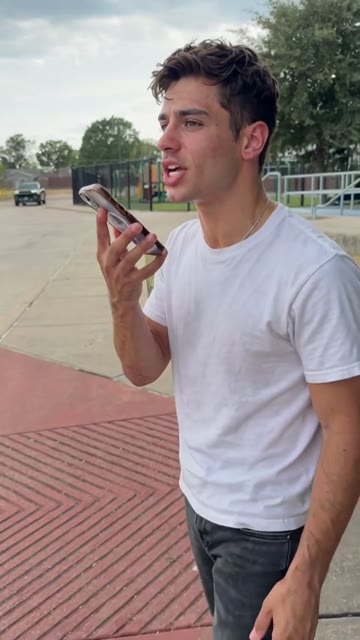
In this closing frame, the man from the photo holds the phone up again for his second question.
Related Articles
- How to Make the ChatGPT Millionaire Meme — the steps from one photo to the finished 13-second video.
- What Is the ChatGPT Millionaire Meme? — the original skit, the four lines and how the AI versions took off.
- ChatGPT Millionaire Meme CapCut Template — which templates the tutorials link, and what to use instead.
- Best ChatGPT Millionaire Meme Generators — every tool that makes the meme, side by side.


