
Damon Salvatore CapCut Template: Find the Church Scene One, Fix It When It Won't Open, or Skip It
Seadanse: the Damon Salvatore CapCut template for the church scene is Hh, what to try when it won't open, or one photo in your browser, $9.90 at 720p.
 The Seadanse Team10 min read
The team behind Seadanse. We run the models we write about, and we publish the specs, prices and limits the marketing leaves out.

TL;DR — The Damon Salvatore CapCut template for the church scene is "Hh", a one-photo AI template from October 19, 2026 with 998,673 uses on November 3. You open it from a trend video on TikTok, and when it won't open, update the app and try again from your phone. Or skip it: Seadanse's Damon Salvatore AI page makes the 13-second vertical video from one photo in your browser, $9.90 at 720p.
Tapping the template button under a church-entrance clip doesn't always work. One person wrote, "когда нажимаю ,переходит на кап Кут но ничего не происходит" ("when I tap, it goes to CapCut but nothing happens"). Others couldn't spot which tool people use, like a question on Reddit's Vampire Diaries forum: "What app is everyone using for the Damon Salvatore church walk trend?"
We've got the exact answers below. You'll see which template creates the entrance, how to open it, and what to try when it gets stuck. You'll also see how to skip the template entirely with an in-browser route that needs no app.
Our page turns one photo into a 13-second vertical video. You walk into a bright church, the guests turn, your hand dips into the holy water, and you smirk at the lens.
Here's what's below:
- The template: which one actually makes the church scene.
- The taps: how to open it directly from TikTok.
- The fixes: what to try when it won't open or load.
- The other way: how to make the video from one photo in your browser.
Which Damon Salvatore CapCut Template Is the Church Scene?
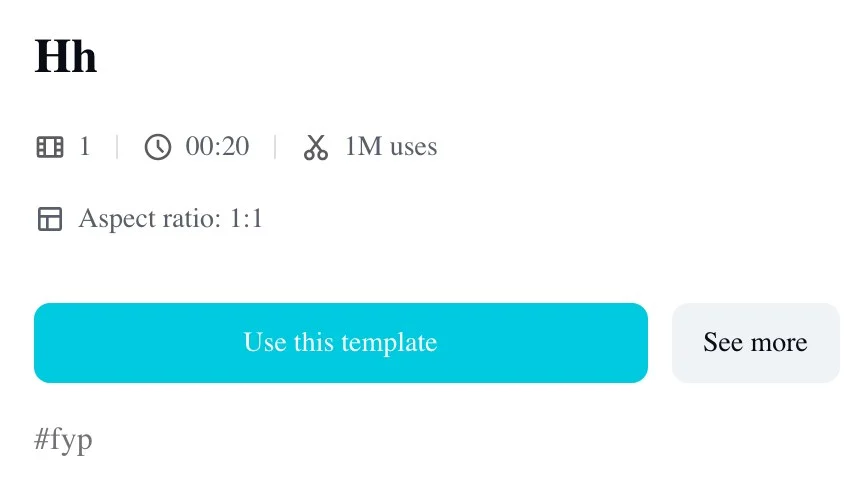
The Damon Salvatore CapCut template for the church scene is "Hh", made on October 19, 2026 by a template maker.
Here's how to spot it:
- The name: "Hh" sits right at the top of the screen.
- The photo: one photo is all it asks for.
- The clip: a 19-second square output at 720 by 720.
- The uses: the Hh template page reached 998,673 uses on November 3, 2026, up from 897,344 the day before.
Other templates turn up when you search for a Damon Salvatore template. For instance, a May 10, 2026 template called "damon salvatore" has 3,862 uses and edits five photo clips with text across 19.6 seconds. Another called "Damon Salvatore" from March 29, 2025 has 158 uses and runs 21.5 seconds, but neither of them is the church entrance, so they won't give you the walk-in.
How to Use the Damon Salvatore CapCut Template, Step by Step
People open the Damon Salvatore CapCut template from a trend video on TikTok, in five taps.
- The search: Search the trend on TikTok and open a trend video.
- The template button: Tap "CapCut · Try this template".
- The handoff: Tap "Use template in CapCut".
- The photo pick: Tap "Use template" and pick one photo.
- The finish: Tap "Next".
The template page shows no price, and a commenter wrote "Hay que pagar" ("you have to pay").
Damon Salvatore CapCut Template Not Working? What to Try
When the Damon Salvatore CapCut template won't open, there are three things to try.
Here's what to try:
- The app: Update CapCut to its newest version so older bugs don't stop the template from opening.
- The phone: Open the template in the CapCut phone app because some templates don't load in CapCut on a computer.
- The link: Go back to the TikTok video and tap "CapCut · Try this template" again to reload the shortcut.
A template can be limited to some regions, and CapCut will say it isn't available where you are. One person reported, "Оно пишет что не доступно в моем регионе" ("it says it's not available in my region").
What People Say About the Damon Salvatore Template
Under the tutorials, people who tried the Damon Salvatore template write about paying, waiting at 99% and taps that go nowhere.
- Paying: "paso 1 te pide q le pagues para poder hacerlo" ("step 1 asks you to pay to do it").
- Waiting: "Se queda en 99% y no avanza" ("it stays at 99% and doesn't move").
- Asking for help: "Alguém faz um vídeo desse para mim por favor" ("Can someone make one of these videos for me, please").
- Asking how: "como se hace?" ("how do you do it?").
One viewer also asked "é filme?" ("is it a film?"), and it isn't: in the trend, the church, the guests and every shot are made new with AI.
Skip the Template: Make the Damon Salvatore Church Scene in Your Browser
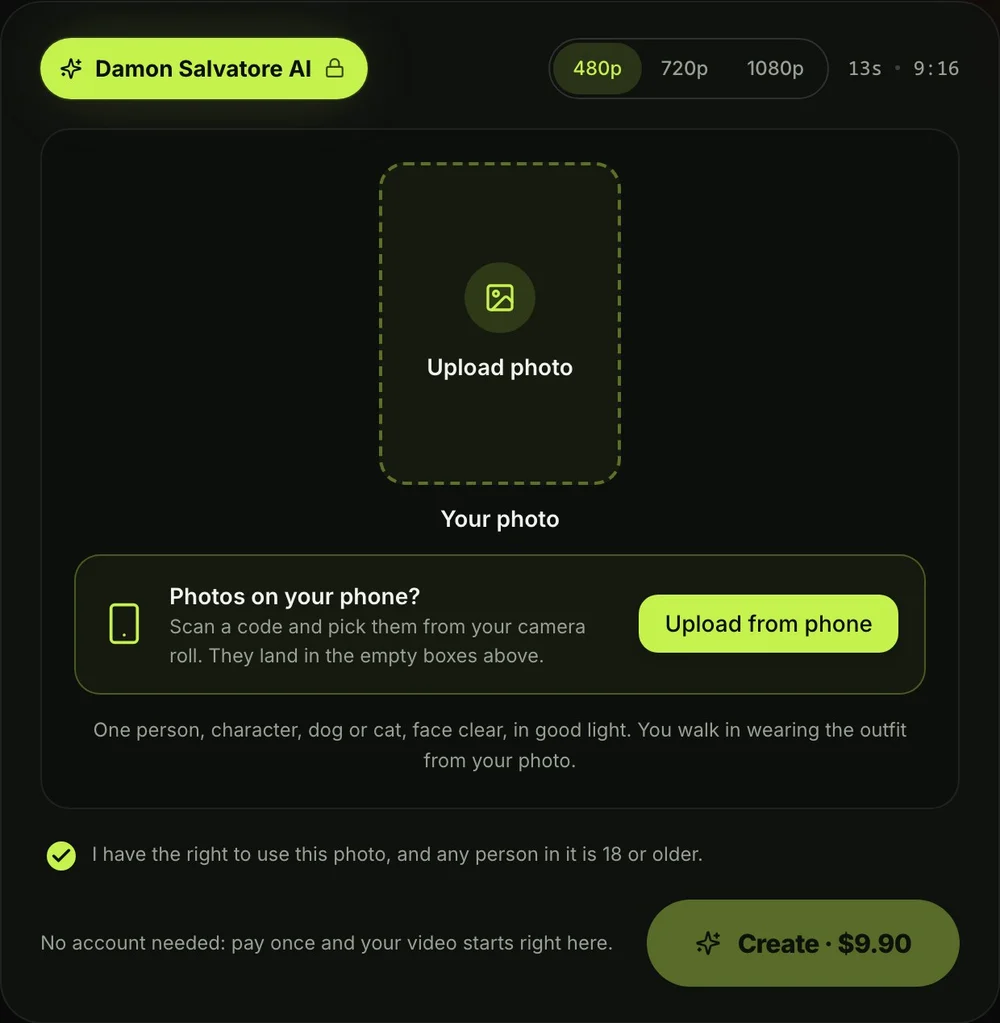
You can make the Damon Salvatore church scene without a template, in your browser, from one photo using our Damon Salvatore AI video generator.
Here's all you do:
- The photo: Add your photo to make the Damon Salvatore AI video from one photo.
- The quality: Pick 480p, 720p or 1080p.
- The creation: Tick the box and press Create.
Here's what happens in your 13 seconds:
- The doorway: From 0 to 1.25 seconds, you stand in the open double door and take your first step in.
- The guests turn: A woman in a pew turns over her shoulder, eyes widening, and a man on the aisle raises one eyebrow.
- The holy water: Your hand, in your own sleeve, dips two fingertips into the stone basin by the door.
- The walk in: You walk slowly down the aisle, rub your nose with one finger, touch your collar and glance at the guests.
- The smirk: At about 10 seconds, you look straight into the lens with a small, knowing smirk.
- The tail: You get a moment outdoors at night, then you're in the driver's seat of an open-top black car in dark sunglasses.
You'll keep your own face, hair, skin tone, body and the outfit from your photo in every shot, and the sunglasses are the only thing that's added.
The photo that works best shows one person, character, dog or cat, face clear, in good light, wearing the outfit you want to walk in. Anyone 18 or older can walk in, women and men alike. A dog or a cat stays itself, a cartoon or game character keeps its own look, and the price is the same.
A window opens with credit packs, and you pay once at checkout with no account and no subscription. That $9.90 pack gives you 500 credits, which covers one 720p video or a 480p video. Pack credits stay valid for 12 months, and you can see how pay-once credits work for details.
The price shows on the Create button before you pay. The checkout email carries a link, so your video opens on any phone, tablet or computer.
When your video's ready, you'll download the 13-second vertical MP4 with the trend's original sound and no watermark on exported video. Seadanse runs no facial recognition, collects no biometric data, and never sells personal information.
CapCut Template or Damon Salvatore AI: Which One Fits You?
The CapCut template and our Damon Salvatore AI page both start from one photo, and they differ in where they run, the length and the frame.
| CapCut "Hh" template | Seadanse Damon Salvatore AI | |
|---|---|---|
| Where it runs | The CapCut app, opened from TikTok | Your web browser on a phone, tablet or computer |
| Photos | 1 | 1 |
| Length | 19 seconds | 13 seconds |
| Frame | Square | Vertical 9:16 |
| Sound | The trend's sound | The trend's original sound |
| Account | A CapCut account | None: you pay once |
| Price | Not shown on the template page | $9.90 for one 720p video |
You can check the Damon Salvatore AI video generators compared to see how different tools line up side by side.
Damon Salvatore CapCut Template FAQ
Where do I find the Damon Salvatore CapCut template?
Search for the trend on TikTok and open any church walk video. Tap "CapCut · Try this template", and then tap "Use template in CapCut" to open the "Hh" template.
Why does CapCut open and nothing happens?
Try the three fixes: update your CapCut app to the latest build, switch from your computer to the phone app, and tap the link again from TikTok.
Can I make the Damon Salvatore video without CapCut?
Yes, you can create the Damon Salvatore AI church scene video directly in your browser without templates, apps, or links. If you'd rather make your own clips, you can also copy the copy-ready Damon Salvatore AI prompt.
Which episode is the church scene from?
The church entrance comes from The Vampire Diaries season 4, episode 2, "Memorial", which first aired on October 18, 2012. You can read the story of the Damon Salvatore church scene to see how the scene played out on screen. If you're curious about how it blew up online, check what the Damon Salvatore AI trend is.
How much does the Damon Salvatore AI video cost?
One 720p video costs $9.90, paid once with no ongoing subscription. That $9.90 pack gives you 500 pack credits, which covers one 720p clip (500 credits) or a 480p clip (375 credits), while a 1080p clip takes 1,480 credits. If a video fails, its credits come back automatically, and you can see every tier on Seadanse pricing.
Can I make other trend videos from my photos?
Yes, you can turn your photos into other trending clips right in your browser. Try Nightwing AI Trend for a 15-second edit with its original sound. You can also dance to Hop Hop Hop Dance AI in an 8-second clip, or explore our full collection of AI video effects.
Make the Damon Salvatore Church Scene Today
Finding the right Damon Salvatore CapCut template comes down to looking for "Hh", and three simple app checks solve most loading issues. If you'd rather skip the app entirely, add one photo to your browser to make your Damon Salvatore AI video for $9.90 at 720p. You'll keep your own outfit, dip into the holy water, and smirk as the guests turn.
Written by The Seadanse Team, the team that built the Damon Salvatore AI page.
Related Articles
- How to Do the Damon Salvatore AI Trend: The Church Scene From One Photo in 3 Steps — every shot of the church entrance timed, and the one-photo way to make it.
- What Is the Damon Salvatore AI Trend? The Church Entrance Everyone Is Posting, Explained — the scene, the "Replace my namesake with me" caption and how it spread.
- Damon Salvatore Church Scene: Which Episode It Is and How the AI Trend Replays It — the episode, the entrance and the AI version shot by shot.
- 8 Best Damon Salvatore AI Video Generators for the Church Scene Trend (2026) — the tools that make the church scene from one photo, side by side.
- Damon Salvatore AI Prompt: Copy the 13-Second Church Scene, Shot by Shot — a copy-ready prompt for the church scene, to use in an AI video app yourself.


