
Nightwing CapCut Template: Why Your Clothes Never Change (and the Fix)
Seadanse: the Nightwing CapCut template is ai by Blanc15. Why nothing happens or your clothes stay the same, and the one-photo route to a 15-second video.
 The Seadanse Team11 min read
The team behind Seadanse. We run the models we write about, and we publish the specs, prices and limits the marketing leaves out.

TL;DR — The Nightwing CapCut template that TikTok tutorials point to is "ai" by Blanc15, with 4 slots and 13,766 uses by October 24, 2026. Its page lists clipping, speed changes, picture-in-picture and an effect, and no AI step, so nothing in it turns your photo into a person in the suit. The other one, "beth cast nightwing" by Lance, copies the moves, but the man in its demo keeps his own clothes.
Seadanse's Nightwing AI Trend for TikTok and Reels makes the whole change from one photo. One 15-second 720p video is $9.90.
Beth Cast's original clip has 14.5 million views, and the tutorials under the trend send you straight to a CapCut template.
You watch the clip, you want the suit, and you grab the template link everyone's sharing.
Then you run into a wall. Under the Spanish CapCut tutorial, a viewer wrote "y luego de apretar siguiente qué??? no pasa nada" ("and after pressing next, what??? nothing happens").
You tap next, and your edit either stalls or shows your normal clothes.
We read both template pages and the tutorial on October 24, 2026.
Here's which template is which, why it stalls, and the one-photo route that gives you the real video.
Which Nightwing CapCut Template Is the Beth Cast Trend?
The Nightwing CapCut template the Beth Cast trend runs on is "ai" by Blanc15, and a smaller one, "beth cast nightwing" by Lance, went up a day earlier. Both creators built edits around the viral sound, but they don't work the same way.
Here's what each page showed on October 24, 2026.
| "ai" by Blanc15 | "beth cast nightwing" by Lance | What it means for you | |
|---|---|---|---|
| Posted on CapCut | October 21, 2026 | October 20, 2026 | Both went up in the trend's first week of AI remakes. |
| Slots | 4 | 1 photo | The tutorials say one photo, but "ai" has 4 slots to fill. |
| Length on the page | 00:14 | 00:15 | Both stay under the original clip's full run. |
| Uses on October 24 | 13,766 | 398 | Almost everyone lands on "ai". |
| Features on its page | Clipping, speed, picture-in-picture, an effect | Clipping and a feature that makes your photo move | Only "beth cast nightwing" moves your photo at all. |
| What its demo shows | Beth Cast's real clip plus a one-second AI shot | A man doing the moves in his own clothes | Neither puts your photo into the suit. |
Read on both template pages at 3:19 p.m. Singapore time on October 24, 2026.
CapCut's general Nightwing edits are fan edits of the comic character, and neither of these two sits in CapCut's own Nightwing Trend gallery.
If you want background on where the Beth Cast Nightwing AI trend comes from, her real costume clip started the whole wave.

How the Nightwing CapCut Template Tutorials Work
The Nightwing CapCut template tutorials send you from a TikTok video into the CapCut app in three steps. You'll see a finished clip, and then the creator tells you to jump between apps.
The Spanish tutorial with 151K views shows these taps in its own captions:
- Tap share and copy the video's link ("enlace del video"), captioned "paso uno haz clic".
- Open CapCut, where the photo template ("plantilla de fotos") shows up, captioned "paso dos".
- If it isn't there ("si no lo encuentras"), go to the poster's profile ("principal") and come back to this video.
- Tap "Usar plantilla" (Use template) and "sube tus fotos" (upload your photos), captioned "paso tres utiliza la plantilla".
- Tap the button and it's done ("y ya estará listo").
The tutorial opens on "sola foto" (one photo) and "es supersencillo" (it's super easy). But the "ai" template actually has 4 slots, so one picture won't fill it.
Why Nothing Happens After You Press Next in the CapCut Template
Nothing happens after you press next in the "ai" CapCut template because the template only cuts up what you put in its 4 slots. It's a standard video layout, not an automated costume changer.
That explains the viewer who pressed next and saw nothing, along with another viewer who wrote "no me sirve" ("it doesn't work for me").
You're expecting a costume swap, but the app just sits on the media you gave it.
Its page lists clipping, speed changes, picture-in-picture and an effect, and there's no AI feature. Its demo video is Beth Cast's real clip for the first 11 seconds plus a one-second shot from an AI remake.
So your photo goes into a slot as it is, without any transformation.
You don't need to post anything to check this out either, since one reply confirmed: "Sirve sin compartir el video, no es obligatorio." ("It works without sharing the video, it's not required").
If you'd like the real change from one photo, the Beth Cast Nightwing AI transformation takes care of the whole scene.
Why Your Clothes Never Change in the Nightwing CapCut Template
Your clothes never change in the "beth cast nightwing" CapCut template because it copies the moves, not the costume. The template animates your body, but it doesn't give you the hero suit.
Lance's template takes 1 photo, runs 00:15, and its page lists a feature that makes your photo move.
In its demo, a man in a white shirt and black waistcoat lifts the mask and does the baton moves, but he's in his own clothes all 15 seconds.
The same complaint showed up in the March 2026 Nightwing trend, and that's the earlier wave with a different clip. Under a March YouTube tutorial, a viewer wrote "ele nao trocou de roupa igual ao video, so fez a dança" ("he didn't change clothes like in the video, he only did the dance").

Is the Nightwing CapCut Template Free?
The Nightwing CapCut template pages show no price, but viewers under the trend's videos say the route asked them to pay. When you tap deeper into certain app features, checkout screens can pop up.
Credits are CapCut's virtual currency for AI features, each worth $0.01. On CapCut's website, "Use this template" sends a visitor who isn't signed in straight to CapCut's log-in page.
Back in March 2026, a viewer wrote "yo quiero hacer uno pero la app me pide que pague :(" ("I want to make one but the app asks me to pay"). In October 2026, another viewer said they'd spent $10 on an app the day before to make the trend, and it didn't do anything.
On Seadanse, one 15-second 720p video is $9.90, paid once with no subscription and no sign-up.
The same pack covers a 480p video, and you'll see the price on the Create button before you pay. You can check Seadanse pricing and see how pay-once credits work on any browser.
The Fix: Make the Nightwing AI Trend From One Photo
The fix is to make the Nightwing AI trend from one photo on Seadanse's Nightwing AI trend generator. The mask flip, the cut, the dance and the trend's sound are built in.
You don't have to fiddle with cut points or multi-slot templates.
Here's all you do on the page:
- Add your photo: one person facing the camera, with your face and eyes clear in good light.
- Add a costume photo, if you like: upload an outfit you want, or leave it blank to get the suit.
- Pick 480p, 720p or 1080p: pick the video quality you'd like before starting. The page opens on 480p.
- Press Create: the exact price shows right on the button before you check out.
You pay once at checkout, with no subscription and no sign-up.
If a video fails, you'll get its credits back automatically. You download a clean MP4 without watermarks, with the trend's sound.
Here's what your finished video looks like:
- Before the cut: you lift the blue eye mask against a lavender wall in your own clothes. Then you pull it off and swing it out to the side as the camera whips.
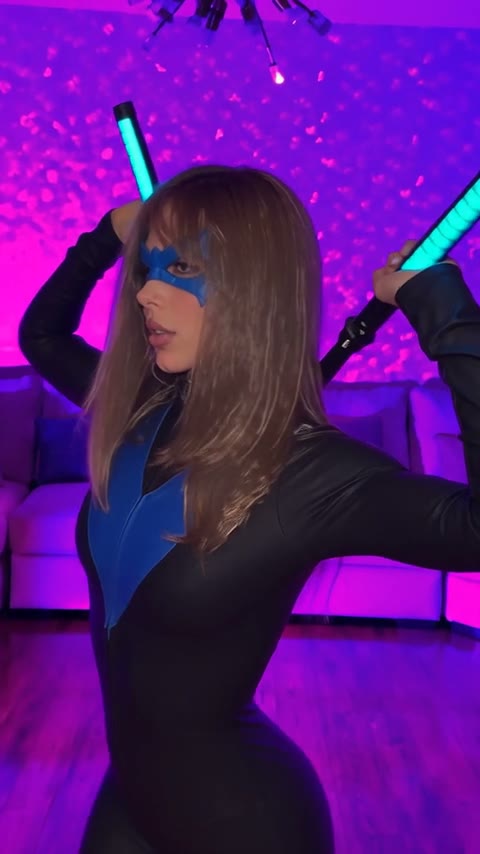
- On the cut: you appear in the black suit with the blue V across the chest, wearing the mask and holding two glowing batons.
- The room: you dance in the purple-lit living room with the white sofa, spin in dark profile, and hit the closing pose with both batons crossed behind your head.
- The sound: the trend's music plays from the very first second of the clip.
Your face stays yours behind the mask, and the suit fits your build. You'll find more photo tips in how to do the Nightwing AI trend step by step.

Other Nightwing AI Trend Tools Besides CapCut
Other Nightwing AI trend tools besides CapCut exist, and each one makes a different length, room and sound. Different services don't handle character remakes the same way.
We've put together a guide with every Nightwing AI video generator compared so you can review their formats. You can also browse other viral AI video effects on Seadanse to create new clips from one photo.
Nightwing CapCut Template FAQ
Where Is the Nightwing CapCut Template Link?
The Nightwing CapCut template links point to the ai template by Blanc15 and Lance's beth cast nightwing template. Both links open directly inside the CapCut app if you've got it installed on your device.
Why Can't I Find the Nightwing CapCut Template in CapCut?
The Nightwing CapCut template won't show up in search because CapCut's Free Nightwing Trend Templates gallery lists five different edits, and neither trend template is one of them.
The Spanish tutorial's workaround is to tap the video creator's profile and then return to the original TikTok clip so the template button appears.
Do I Have to Share the Video to Use the Nightwing CapCut Template?
No, you don't have to share the video to use the template. A reply under the Spanish tutorial pointed out that it works without sharing the video, and that sharing isn't required.
What Song Does the Nightwing CapCut Template Use?
The "ai" Nightwing CapCut template's demo uses the trend's sound, "STEREO LOVE FUNK" by Cotneus, PVNZER and Kngmn. The "ai" template demo stays silent for its first 7.5 seconds before that audio kicks in, but you can read the Nightwing trend song, explained.
You can also make a Nightwing AI video without CapCut that plays the music from the very start.
Is There a Nightwing AI Prompt Instead of the Template?
A Nightwing AI prompt is the other route people ask about. Our guide to the full Nightwing AI prompt gives you the exact text behind the trend, and it shows you how to skip manual prompting entirely.
Skip the Nightwing CapCut Template Tonight
CapCut templates only chop up your existing media or animate your everyday clothes without changing your outfit. With just one photo, you can make a Nightwing AI trend video with the mask flip, the black-and-blue suit, the purple living room and the real sound. It's $9.90 at 720p, and you don't download any app.
Written by The Seadanse Team. We read both template pages, CapCut's Nightwing Trend gallery, the Spanish CapCut tutorial and its comments on October 24, 2026.
Related Articles
- How to Do the Nightwing AI Trend From One Photo (3 Steps) — add a photo, pick a quality, press Create.
- What Is the Beth Cast Nightwing AI Trend? (Real Clip, AI Remakes) — the original clip, the AI remakes and how the trend spread.
- Best Nightwing AI Video Generators (2026): 9 Ways Compared — every tool that makes the trend, side by side.
- Nightwing AI Prompt (Copy-Ready), and How to Skip It — the prompt behind the trend, if you'd rather write it yourself.
- Nightwing Trend Song: Stereo Love Funk (and the March One) — the sound the trend's videos use.


