
How to Access Seedance 2.5: 4 Routes and Their Catches
How to access Seedance 2.5 across Dreamina, Jimeng, BytePlus ModelArk, and Seadanse, plus the exact catch that comes with each route.
 The Seadanse Team11 min read
The team behind Seadanse. We run the models we write about, and we publish the specs, prices and limits the marketing leaves out.

TL;DR — There are four routes into Seedance 2.5: Dreamina, Jimeng, the BytePlus ModelArk API, and a third-party platform. The fastest route for most people is a platform, because it needs nothing but a sign-up. Every route has a catch and this article names all four.
ByteDance announced that Seedance 2.5 is live worldwide, but many creators still can't find it in their usual tools. You can check which surfaces carry Seedance 2.5 in your region before you pick a door. On 21 August 2026, and again when we re-checked on 27 August 2026, we opened Dreamina's main generator logged out and Seedance 2.5 wasn't in its model list.
The four routes at a glance
| Route | Who it's for | What you need | The catch |
|---|---|---|---|
| Dreamina | Anyone outside China | An account | On 21 August 2026, and re-checked on 27 August 2026, it wasn't in the main model picker; the free tier marks your export |
| Jimeng | People in China | A Jimeng account | We didn't check what its sign-up asks for |
| BytePlus ModelArk | Developers | An API key and a paid account | The China console is a separate contract; keys don't cross over |
| A platform like Seadanse | Anyone who just wants the clip | A sign-up, no card to start | You get that platform's limits, not ByteDance's full feature list |
Sources line after the table, verbatim: "Checked on the vendors' own pages on 21 August 2026. Sources: the ByteDance announcement and the BytePlus ModelArk rate card."
Each option serves a different kind of project. Pick the one that matches your technical setup and your location.
Route 1: Dreamina, if you're outside China
Dreamina is ByteDance's consumer creative tool for international users. On 21 August 2026, its landing page declared: "Seedance 2.5 is officially live worldwide—get first access on Dreamina!".
If you want to use the model on Dreamina, don't head to the general video tool. Open the page that ByteDance set up for the model instead.
Open the Seedance 2.5 page, not the main generator
Start by opening Dreamina's dedicated Seedance 2.5 landing page at dreamina.capcut.com/seedance/seedance-2-5. The page is titled "Official Seedance 2.5: 4K & 30s AI Video Generator with Audio".
When you land on that URL, you'll see a dedicated composer box that is already set to Seedance 2.5. If you open the general video generator instead, you won't see the new model in the picker.
Sign in — Dreamina needs an account
You can't create video anonymously on Dreamina. We checked the site on 20 August 2026 and confirmed that it needs an account before you can make a clip.
Dreamina gives new users free daily credits to test the generator before buying a subscription. You can use these free credits to try prompts directly on the dedicated page.
Use the generate box on that page
Once you're signed in, type your text prompt into the composer on the Seedance 2.5 page. The model creates standard video clips of 30 seconds with audio in a single pass.
According to ByteDance's launch announcement, the model takes up to 30 images, 10 video clips, and 10 audio clips as reference material. You can feed those references in to shape the result.
Watch out for Dreamina's catches
Dreamina has a few practical constraints you should know before starting:
- On 21 August 2026, and again when we re-checked on 27 August 2026, the main model picker on
dreamina.capcut.com/ai-tool/home?type=videolisted only five models: Seedance 2.0 Mini, 2.0 Fast, 2.0, 1.5 Pro, and 1.0 Mini. Seedance 2.5 wasn't in that list. - The free tier marks your export. Dreamina's page notes that paid plans add "watermark-free downloads, higher-resolution output, smoother videos up to 60 FPS".
- The standard output is 30 seconds, though Dreamina's page describes a beta long-video mode that goes up to 180 seconds.
- According to a third-party report by leadde.ai, access checks your region, subscription level, account standing, and age (16 and older). Dreamina's own site doesn't list an age limit.
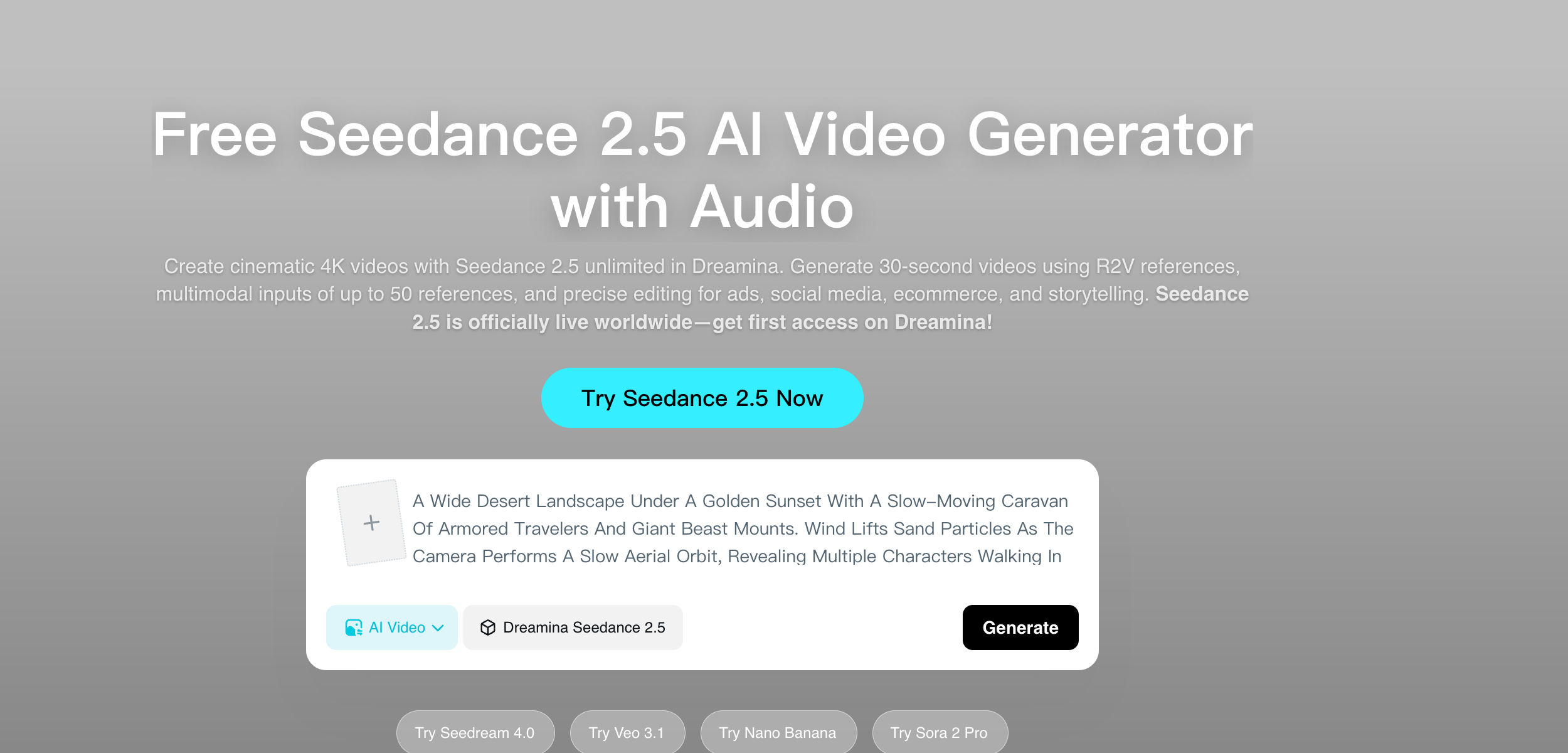
Dreamina's Seedance 2.5 page carries its own generate box, already set to the model. Read 21 August 2026.
Route 2: Jimeng, if you're in China
Jimeng is ByteDance's domestic creative platform for users located in China. On 31 July 2026, ByteDance published its official rollout plan:
"Today, Seedance 2.5 is rolling out on Jimeng AI, Doubao Pro, and other platforms."
ByteDance's official directions for Jimeng are simple: "Jimeng Web → Video Generation → Select Seedance 2.5". They gave the same instruction for Doubao Pro: "Doubao Pro → Video Generation → Select Seedance 2.5".
Check the composer defaults
When we opened Jimeng logged out on 21 August 2026, and again when we re-checked on 27 August 2026, the composer was already set to Seedance 2.5 by default.
The interface showed the settings configured to a 16:9 aspect ratio, 720P resolution, and a 5-second duration. Omni reference was switched on by default.
The prompt box on Jimeng stated that you can upload up to 50 reference files. That's the limit shown directly inside the composer.
Note Jimeng's catch
We didn't check what Jimeng's sign-up asks for, so we don't know what credentials or account checks it needs. If you choose this domestic route, you'll see those requirements when you register.
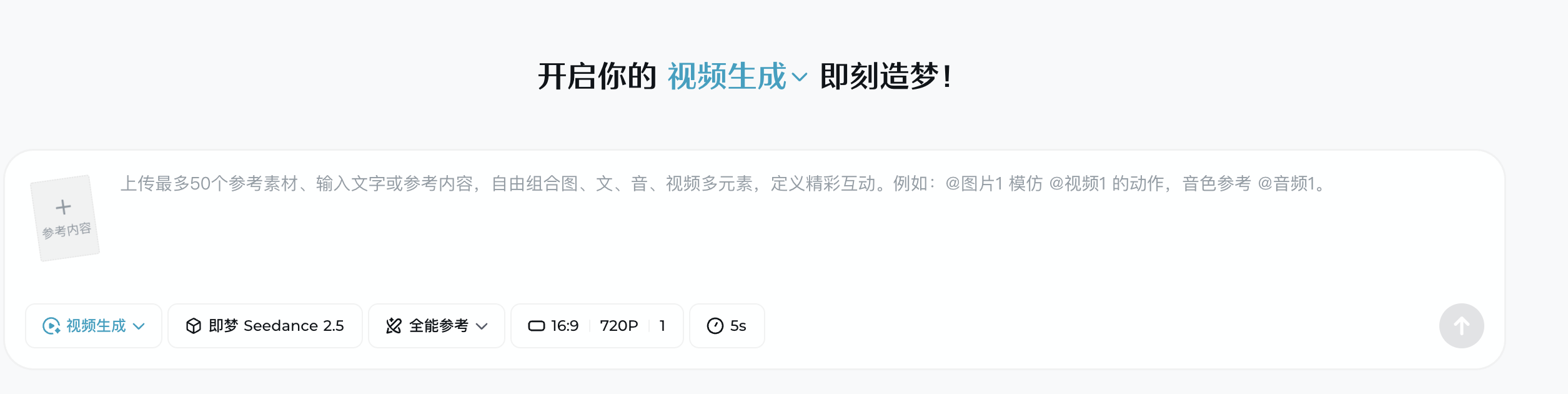
Jimeng, logged out on 27 August 2026: the composer opens on Seedance 2.5 already.
Route 3: the BytePlus ModelArk API, if you write code
If you build software, ByteDance gives backend API access through BytePlus ModelArk. You call it from your own code, you pay per million tokens, and there are two consoles to keep straight.
Look up the official model ID
To send a request, your code must supply a model ID (the string your code sends to say which model you want).
On 21 August 2026, the BytePlus ModelArk rate card listed Seedance 2.5 under the model ID dreamina-seedance-2-5-260628. It sits right next to dreamina-seedance-2-0-260128 in the documentation.
Billing on ModelArk is calculated per million tokens. The documentation specifies pricing tiers for 480p/720p and 1080p resolutions.
Understand the two console systems
The biggest catch with the API is regional separation. BytePlus ModelArk handles international developers, while Volcano Engine Ark serves developers in China.
According to guides from AtlasCloud and wan27.org, the China console operates under its own contract. It needs separate access keys, bills prepaid in RMB, and routes traffic through a Beijing endpoint.
Access keys from BytePlus don't work on Volcano Engine, and keys from Volcano Engine don't work on BytePlus. The two consoles also list the model under different names. We couldn't verify the China model ID ourselves, so we don't print it here.
In addition, the BytePlus rate card stops at 1080p for Seedance 2.5. There's no 4K row listed for 2.5 on that table, even though the Seedance 2.0 row directly beneath it does offer 4K.
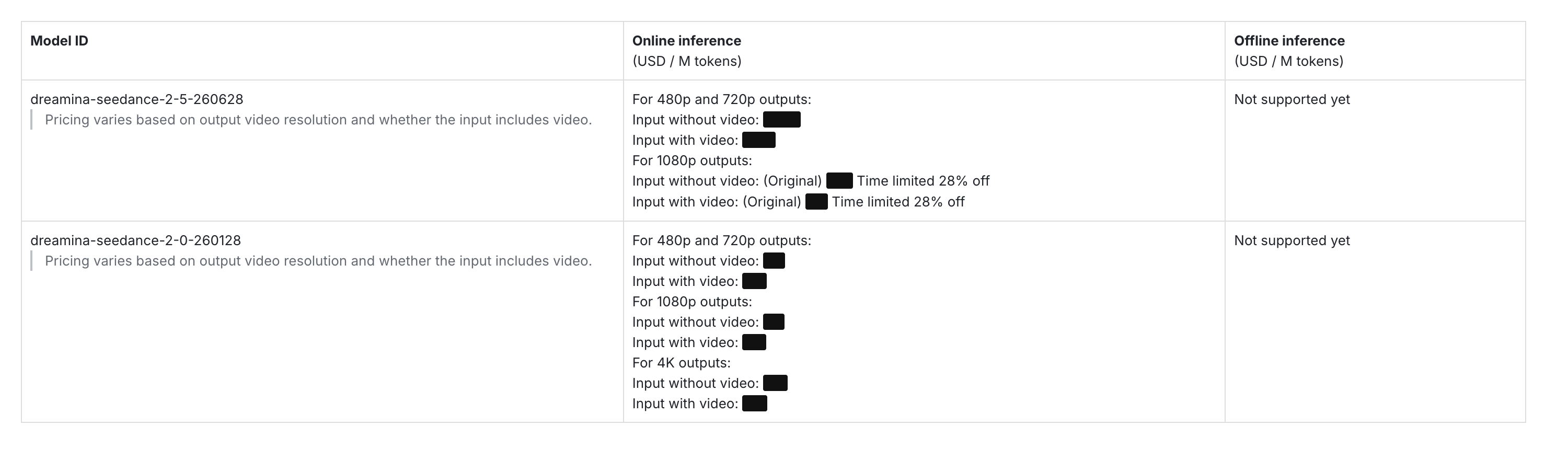
The model ID you put in the call: dreamina-seedance-2-5-260628. Its tiers stop at 1080p. Prices blacked out by us. Read 21 August 2026.
Route 4: a platform, if you just want the clip
If you just want the clip, a web platform is the shortest route. You can run Seedance 2.5 on Seadanse directly in your browser.
You sign up, pick the model and your settings, and write a prompt. Everything runs in the browser, so there's nothing to install.
Sign up — no card needed to start
Getting started takes a standard sign-up. New accounts receive free starter credits right away without entering a credit card.
If you want to create more, there's a $9.9 credit pack that needs no subscription. You can check what a clip costs on Seadanse before you start. If a clip ever fails or gets interrupted, the system refunds your credits automatically.
Pick Seedance 2.5 and your settings
Open the generator and select Seedance 2.5 from the model options. You can pick your resolution: 480p, 720p, or 1080p.
There's no 4K setting available for Seedance 2.5 here. If you need 4K, switch to the Seedance 2.0 preset instead.
Next, choose your clip length: 5, 10, 15, 20, 25, or 30 seconds. Finally, pick from six aspect ratios: 16:9, 9:16, 1:1, 4:3, 3:4, or 21:9.
Write the prompt and generate
Enter your text prompt into the composer box, which holds up to 10,000 characters. When you're ready, you can make a Seedance 2.5 clip.
You can upload reference pictures and reference clips. Reference audio isn't wired in our interface, so you'll describe any voices or sounds in your text prompt.
Accept the platform limits
When you use a third-party platform, you get our limits rather than ByteDance's full feature list:
- We don't offer 4K on Seedance 2.5.
- We don't offer the experimental 180-second mode.
- Reference audio isn't supported, so audio cues must stay in your text prompt.
If your project needs a continuous 180-second clip, Dreamina is the only official route that describes that mode. Just remember that Dreamina's free tier marks exported files.
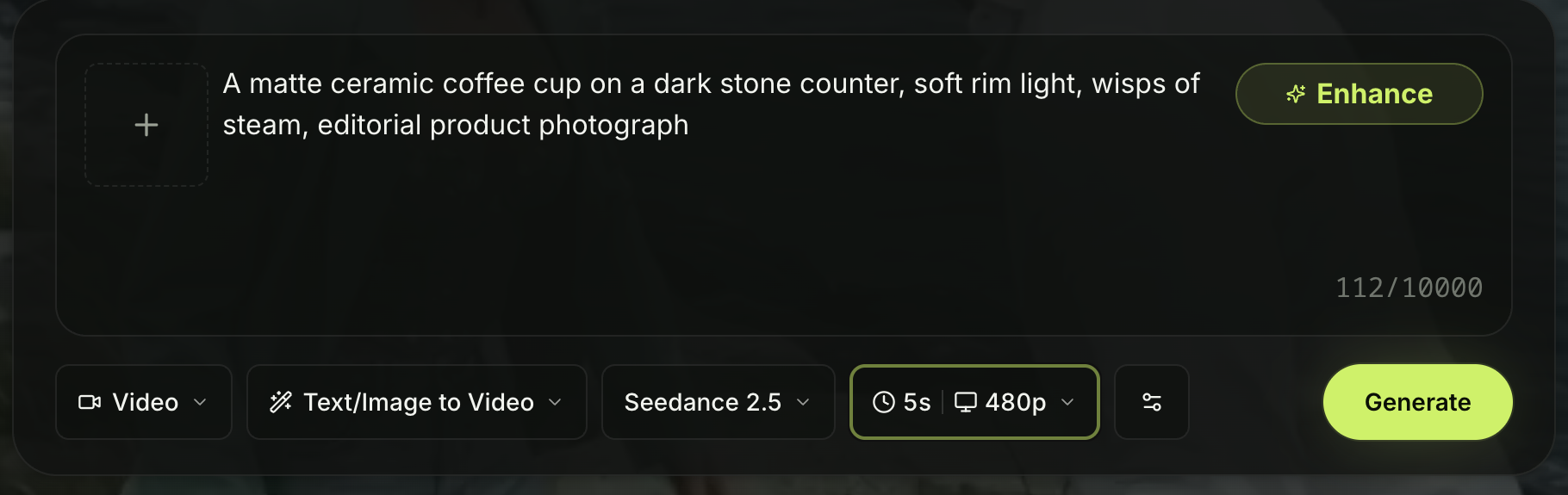
Route four: a sign-up, a prompt and the settings on one screen. Captured 27 August 2026.
Which route should you pick
Pick Dreamina if you're outside China and want to test ByteDance's experimental long-duration video modes. Pick Jimeng if you're in China.
Choose the BytePlus ModelArk API if you write code and need to send automated requests. If you don't want to manage code or regional accounts, use a dedicated Seedance 2.5 video maker platform to make 1080p clips up to 30 seconds.
What every route has in common
No matter which path you take, all four options share a few clear realities:
- Every route needs an account before you can make a video.
- None of these services gives you a file or model weights to keep on your computer.
- The 4K claim remains an open question. Dreamina advertises 4K, but the BytePlus ModelArk rate card has no 4K tier for 2.5, and kie.ai's rate card stops at 1080P despite its "30s 4K" header. None of these pages state whether 4K comes from the model or an upscale.
- Nothing here is a local download, so every route runs on cloud servers over an active internet connection.
FAQ
Is Seedance 2.5 free to try?
Dreamina gives free daily credits that leave a mark on exports, while Seadanse gives free starter credits with no card needed. API access through BytePlus ModelArk needs a paid developer account billed per million tokens.
Do I need an API key to use Seedance 2.5?
No, three of the four routes need no API key. You can use Dreamina, Jimeng, or a web platform directly in your browser. You only need a key if you write code for BytePlus ModelArk.
How long can a Seedance 2.5 clip be?
Seedance 2.5 produces standard 30-second clips with audio in a single pass. Dreamina's page describes a beta mode that goes up to 180 seconds. On Seadanse, clip lengths can be 5, 10, 15, 20, 25, or 30 seconds.
The verdict
Seedance 2.5 is live worldwide, but finding it depends on picking the right door. Developers should head to BytePlus ModelArk, while creators who just want a clip can use Seedance 2.5 in your browser. Pick the route that matches your project and start generating.
Written by The Seadanse Team. We opened every page named here ourselves, and every step in this article is one a vendor published or one we saw on the screen.
Related Articles
- Where Is Seedance 2.5 Available? Every Surface, by Region — the map behind these four routes.
- Is Seedance 2.5 Open Source? Here's What Is — why none of these routes hands you a file.
- Can I Run Seedance 2.5 Locally? What Your GPU Can Do — what your own hardware can do instead.
- Seedance 2.5 Prompt Guide: How to Write Prompts That Work — what to type once you're in.


