
How to Make a 58th Floor AI Video From Two Photos (3 Steps)
How to make a 58th Floor AI video from two photos: hook on the left, verse on the right at the hanging mic, 15 seconds with the song, $9.90 at 720p, no account.
 The Seadanse Team11 min read
The team behind Seadanse. We run the models we write about, and we publish the specs, prices and limits the marketing leaves out.

TL;DR — To learn how to make a 58th Floor AI video, you add two photos to get 15 seconds at one hanging mic in a teal studio. Photo 1 finishes the hook on the left, photo 2 takes the verse on the right, and the song section is already laid under the video. Seadanse's 58th Floor AI page creates your video in three steps for $9.90 at 720p, with no account, no app and no prompt to write.
The 58th Floor duet is the clip people send their best friend. Under the vertical COLORS TikTok, at least 15 of the 291 comments we read are just a tagged friend.
One viewer wrote "New AI video loading now". You don't need a filming crew to join in.
We timed all four shots of the rap duet and built them into our page. You just pick your photos, choose a quality and press one button.
Our sample video shows a young man in a white T-shirt on the left and a young woman in an olive jacket on the right, rapping together at the mic.
Here's what's below:
- The shots: the 15 seconds of the rap duet, timed out across four camera cuts.
- The steps: three picks and presses to create your video on our page.
- The photos: how to decide who takes the hook on the left and who takes the verse on the right.
- The FAQ: details on the song section, pricing, CapCut templates and other rap effects.
What a 58th Floor AI Video Looks Like
A 58th Floor AI video gives you 15 seconds of two people at one silver mic hanging in a teal studio across four distinct shots. Both of you keep your own face, hair and clothes the whole time.
Here's how our 15-second version plays out:
- The two-shot (0 to 5.5 seconds): you're both in the frame from the waist up. Photo 1 on the left raps the end of the hook toward the camera, rocking on the beat. Photo 2 on the right vibes along, then turns toward photo 1 for the handover.
- The close-up (5.5 to 8.7 seconds): photo 2 is alone at the mic and takes the verse, eyes half closed, one hand moving with the words.
- The wide shot (8.7 to 11.5 seconds): you're both head to toe on the low teal platform. Photo 2 raps turned toward photo 1, and photo 1 bounces and dances.
- The two-shot again (11.5 to 15 seconds): photo 2 raps straight at photo 1 with a hand out. Photo 1 faces the camera and nods along with an impressed grin to the end.
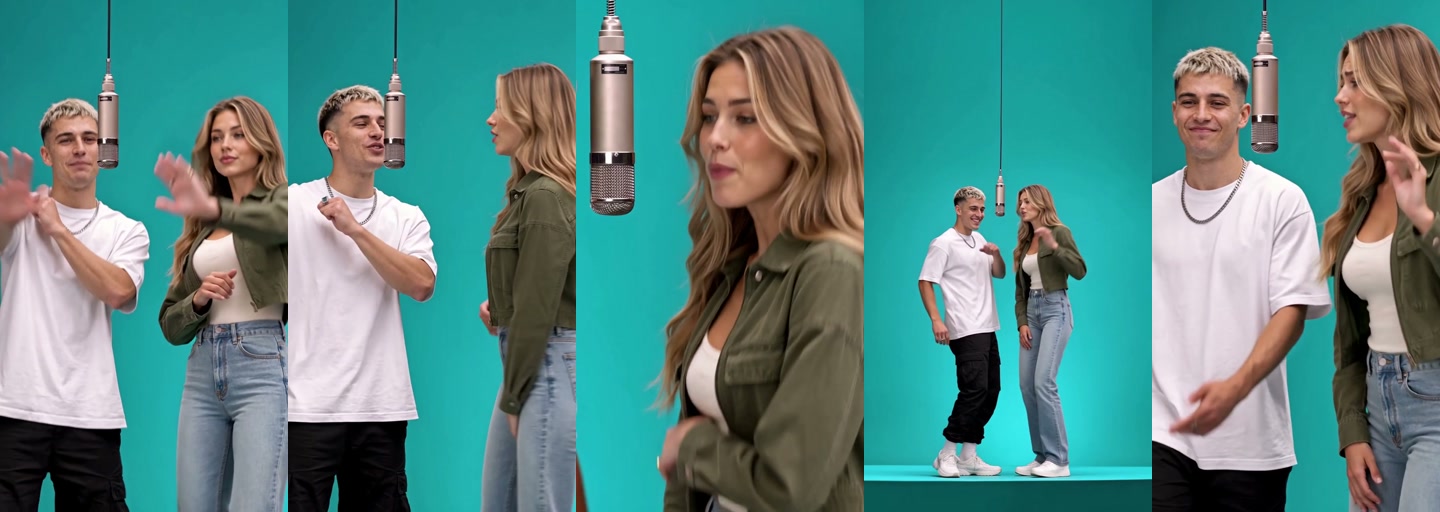
The trend's song section plays under all four shots from the first second: the end of the hook, the handover and the start of the verse.
How to Make a 58th Floor AI Video in 3 Steps
You'll make a 58th Floor AI video on our 58th Floor AI generator in three steps, with nothing to film and no studio. You can do the whole thing in your browser on your phone, tablet or desktop computer.
Here's how to do the 58th Floor AI trend on our page:
- Add your two photos: add photo 1 for the left and photo 2 for the right into the two side-by-side boxes. On a computer, you can scan a code with your phone and pick the photos straight from your camera roll.
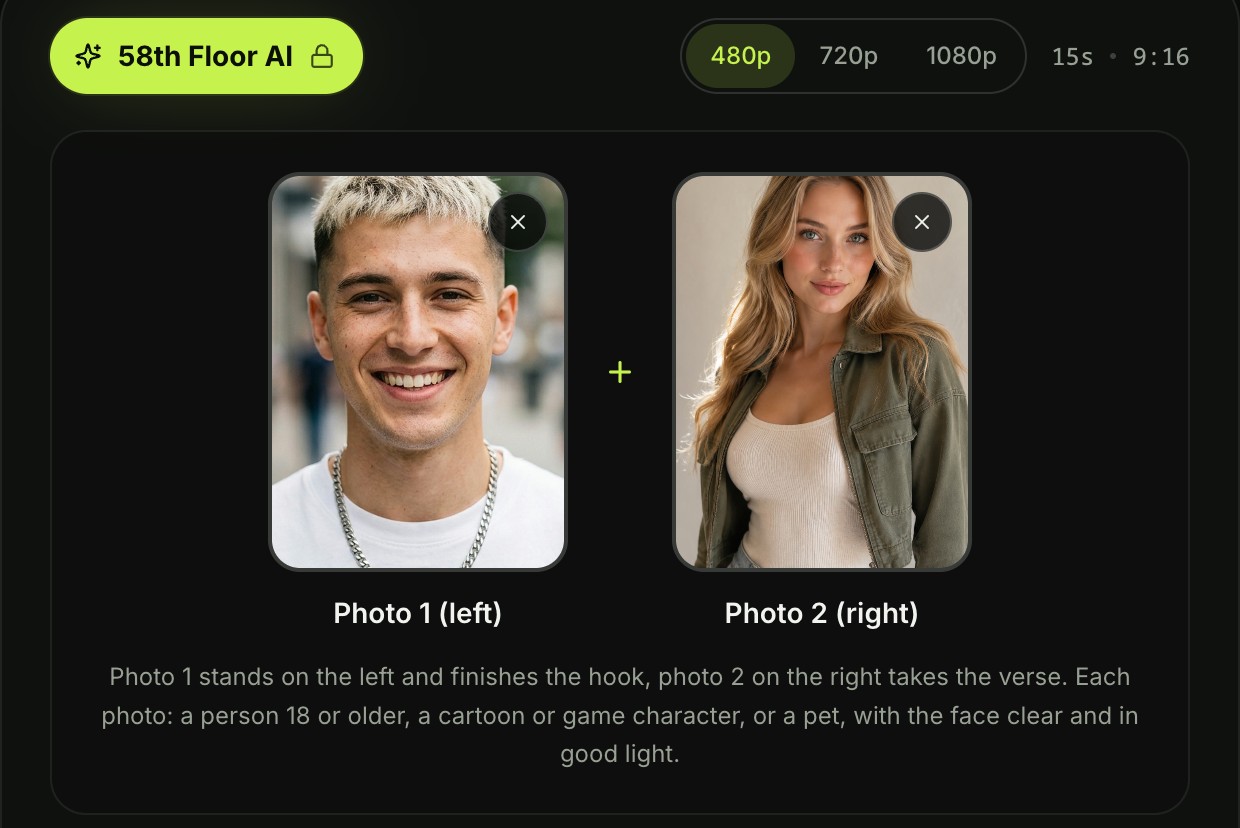
- Pick a quality: choose 480p, 720p or 1080p. The page has 480p picked to start, but you can tap 720p or 1080p instead. Your video stays 15 seconds long in vertical 9:16 frame shape at any quality you pick.

- Leave the box ticked and press Create: the box comes ticked when the page opens. It confirms you have the right to use the photos and that everyone in them is 18 or older. The price shows right on the Create button before you pay, so you always know what it costs.

When you press Create, a window opens with our credit packs. You pay once at checkout with no account and no subscription, and your video starts creating right on the page.
You don't need an account or a sign-in at any point. We don't ask you to create a password or join a recurring plan.
Once it's done, you download your 15-second video. It's got the song section laid underneath and carries no watermark on exported video, so it's ready to post straight to TikTok and Reels.
Which Photo Goes Left in Your 58th Floor AI Video
Photo 1 goes on the left of the mic and finishes the hook, and photo 2 goes on the right, takes the verse and gets the close-up. Thinking about who fits each role makes the finished clip much funnier to watch.
Here's how to pick:
- Photo 1, the hook: photo 1 stands on the left side of the hanging mic and opens the video rapping the hook. If your friend loves setting the rhythm, put them here.
- Photo 2, the verse: photo 2 stands on the right, takes the close-up on their own and raps the verse directly at photo 1. Put the friend who should rap the verse in photo 2.
- The nod: photo 1 finishes the final shot facing forward, nodding along with an impressed grin while photo 2 raps at them. Put the friend who'll laugh at that reaction in photo 1.
When you've got your two pictures sorted, you can make the 58th Floor rap duet from two photos in a couple of taps.
Pick the Best Photos for the 58th Floor Duet
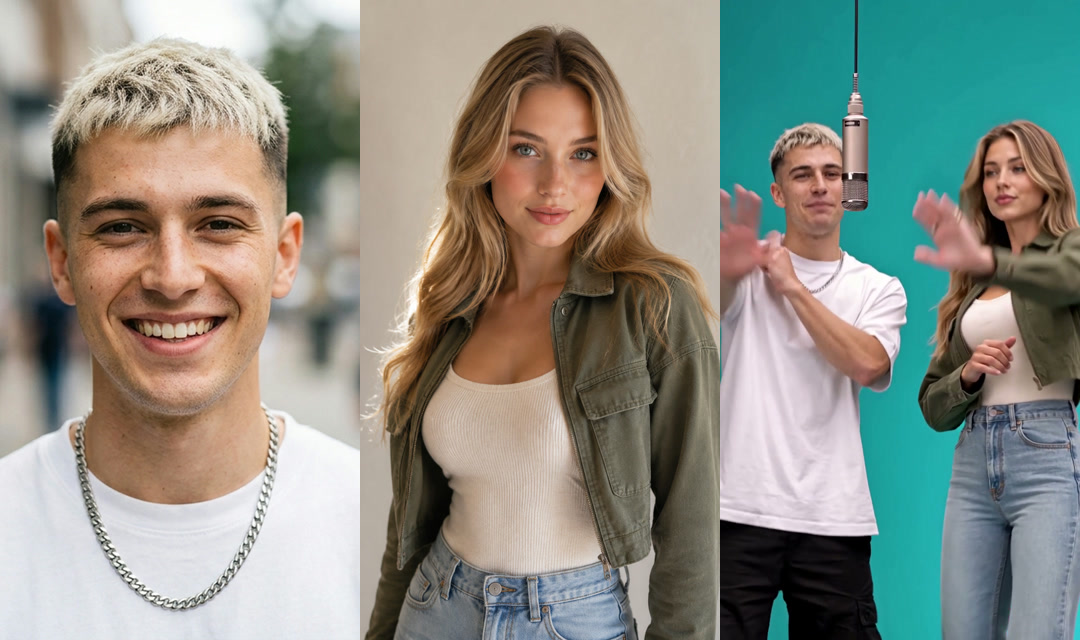
The best photos for the 58th Floor duet show one person, character or pet each, with the face clear, in good light. Clear pictures help the page capture your features and outfits accurately across all four angles.
Here's what works best:
- One per photo: pick an image that features just one subject so the generator knows who's at the mic. If a photo has a crowd, crop it down to just the person you want.
- The face: pick photos where the face is clearly visible, evenly lit and looking toward the camera. Good lighting brings out eyes, hair and natural smiles.
- Full body: use full-body or waist-up photos if you can. The wide shot shows you both head to toe on the low teal platform, in the outfits from your photos.
- Ages: make sure every person in your pictures is an adult 18 or older.
You show up in the outfit from your photo, so wear the one you want at the mic. If you're wondering about checkout, here's how pay-once credits work: pack credits stay valid for 12 months.
Put Your Pet or a Character at the 58th Floor Mic
Either spot at the 58th Floor mic can be a dog, a cat or a cartoon or game character, as well as a person 18 or older. You aren't limited to human rap partners.
Here are four pairs that work:
- Best friends: two close friends sharing the mic and matching each other's energy.
- Rap partners: two musicians or collaborators showing off their chemistry across all four shots.
- You and your pet: you as photo 1 and your dog or cat as photo 2, taking the close-up and rapping straight at you while you nod along.
- Two characters: two cartoon or game characters sharing one silver hanging mic in the teal studio.
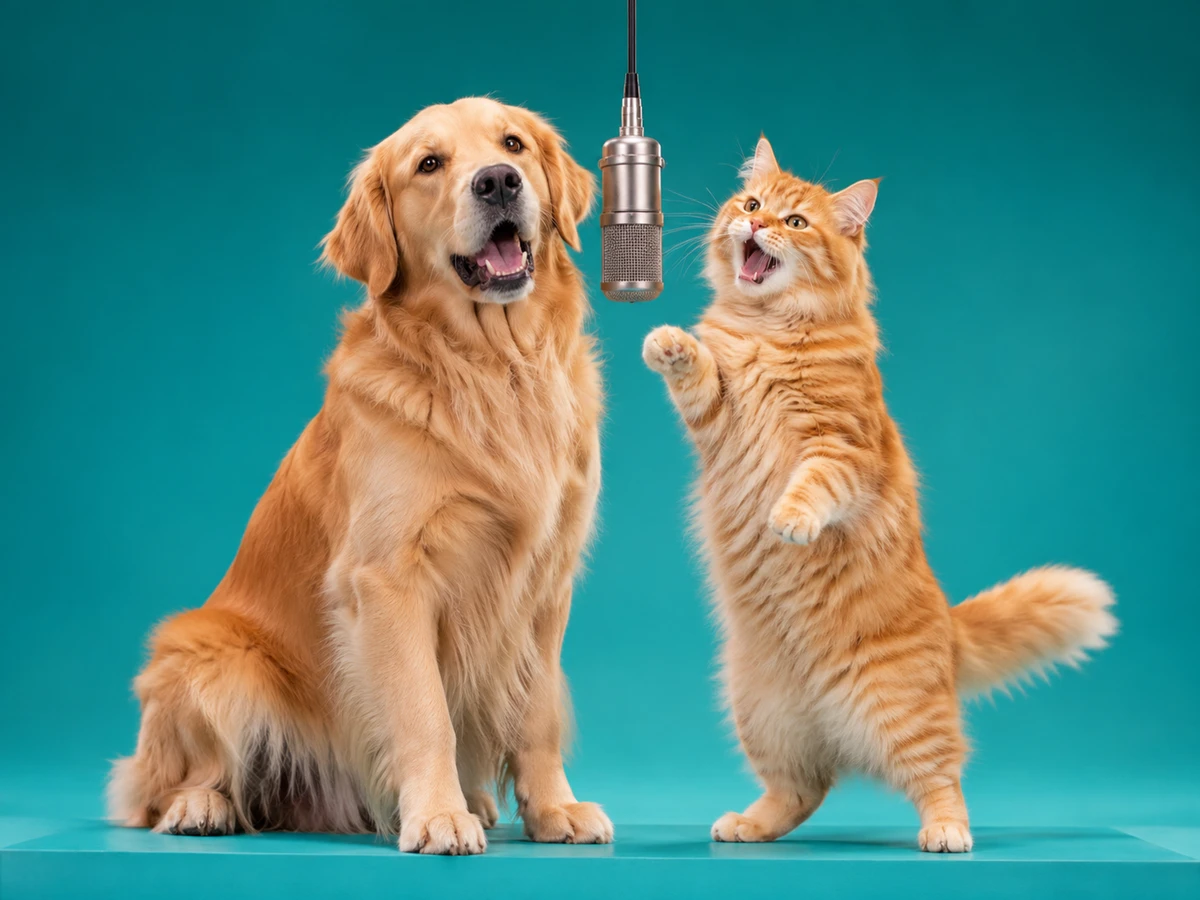
Any photos cost the same, whether you upload yourself, your friend, a pet or a fictional character.
Do You Need a 58th Floor AI Prompt or a CapCut Template?
No: on our page there's no 58th Floor AI prompt to write, no CapCut template to find and no app to download. That's because the studio, the mic, the four shots and the song section are built in. You don't have to spend time typing scene descriptions or hunting for third-party templates.
If you've seen a prompt that puts the duet in a tall building, that's a mix-up. "58th Floor" is the song's title, and the trend's scene is the teal studio with one hanging mic.
Here's what the scene holds, whatever tool you use:
- The studio: one seamless teal colour covering the walls and floor, a low teal platform, soft even light, and nothing else in the room.
- The mic: one silver microphone hanging on a long black cable at mouth height between the two heads.
- The two of you: one person on the left who finishes the hook, and one on the right who takes the verse and raps at the first.
- The four shots: the two-shot, the close-up of the person on the right, the wide shot, and the two-shot again, cut at about 5.5, 8.7 and 11.5 seconds.
We built 58th Floor AI for TikTok and Reels so you get all of this from two photos, with no manual editing needed.
Why the 58th Floor Duet Gets Shared
The 58th Floor duet gets shared because it copies the moment the mic changes hands between two friends in a live COLORS performance. On the vertical TikTok, the clip pulled 764,800 plays and 128,300 likes when we read it on November 4, 2026, so it's the version most people have seen.
Here's what viewers wrote under the performance:
- The chemistry: "Their chemistry is insane", with 976 likes on YouTube.
- The scream: "paak's scream got me DYING", with 743 likes on YouTube.
- The next one: "New AI video loading now", from a viewer under the vertical TikTok.
If you want to find out more about the live performance and the studio setup, check out where the 58th Floor AI trend came from.
58th Floor AI Video FAQ
What song is in a 58th Floor AI video?
The song is "58th Floor" by Anderson .Paak and Cordae, the opening track of their album Heavy Is the Crown. Our video lays 15 seconds of their COLORS performance under it: the end of the hook, the handover and the start of the verse.
Are Anderson .Paak and Cordae in my video?
No: the two at the hanging mic are the ones in your two photos, photo 1 on the left and photo 2 on the right, across the same four shots. You'll keep your own faces, hair and clothing.
Will my 58th Floor AI video fit TikTok and Reels?
Yes: it's 15 seconds in vertical 9:16, the tall frame TikTok and Reels use, in 480p, 720p or 1080p. You can post your exported video directly without resizing or cropping.
How much does a 58th Floor AI video cost?
One 720p video costs $9.90 through our 500-credit pack, which you pay once with no subscription. That same $9.90 pack covers a 480p video, which takes 375 credits, and the remaining credits stay in your balance. A 1080p video takes 1,480 credits.
Any photos cost the same. Pack credits stay valid for 12 months, and if a video fails, your credits come back automatically. Check Seadanse pricing for all pack details.
Can I make other rap and trend videos from my photos?
Yes: you can make a 10-second rap video of two people sharing a mic with AI Rap Duo. You can also make a 13-second dance clip from one photo using Neymar AI Dance. Both sit alongside our other AI video effects, where you add a photo and make a video without typing prompts.
Make Your 58th Floor AI Video Today
You can make your 58th Floor AI video right now using two photos you already have on your phone. Photo 1 raps the hook on the left, photo 2 takes the verse on the right, and the 15-second song section is laid in place. There's nothing to film and no prompt to write, and it's $9.90 for one 720p video with no account.
Written by The Seadanse Team, the team that built the 58th Floor AI page.
Related Articles
- What Is the 58th Floor AI Trend? The COLORS Rap Duet, Explained — the song, the COLORS performance, the dates and real vs AI.
- 8 Best 58th Floor AI Generators, Compared (2026) — eight ways to make the rap duet, what each asks for and what it costs.


