
Wan 3.0 Prompt Guide: 4 Prompts, 4 Clips (Tested)
Wan 3.0 prompts work best when built in five parts. Here are four exact prompts, their reference rules, and the clips they generated.
 The Seadanse Team15 min read
The team behind Seadanse. We run the models we write about, and we publish the specs, prices and limits the marketing leaves out.

TL;DR — A Wan 3.0 prompt has five parts, and they work best in one order: shot, subject, action, light, sound. Its references aren't one pool of twenty files — they're three groups with their own ceilings: 10 images, 5 video clips, 5 audio clips. Every prompt below is printed exactly as we sent it, alongside the unedited clip it produced on our account.
You write a careful prompt, attach your files, and the model ignores your camera move or picks the wrong face. We ran four test shots on our own account at 480p, five seconds each with audio on, plus one thirty-second take we shot in August. Here's what we typed, what came back, and how you can get clean results on your first pass.
Prompt structure and order: write the five parts in this order
Put the shot type first. Everything after it describes a shot that's already decided. When you name the subject, the action, the light and the audio in a straight sequence, you keep the prompt clean and predictable.
| Part | What it decides | Example fragment | What it means for you |
|---|---|---|---|
| Subject | who or what is in the frame | "A ceramicist in a flour-dusted apron" | Name the person and one detail you would recognise them by, or the model picks both. |
| Performance | the motion, and how it is done | "lifts a still-wet bowl off the wheel with both hands and turns it slowly" | One action done one way beats three actions listed. |
| Ambience | the place, the time and where the light comes from | "Late-afternoon light comes in low from a window on the left" | Say the direction and what stays dark, or you get flat, even light. |
| Camera | one shot type and one move | "The camera holds steady on one slow push-in, no cuts" | Put it first. A shot type decided late gets overruled by everything before it. |
| Extra cues | audio, and what you do not want | "Audio: the wheel winding down. No music, no voice-over." | Sound is on by default, so silence has to be asked for. |
Every fragment above is lifted from the first prompt in this guide.
Here's our baseline prompt for Alibaba's Wan 3.0 video model from Tongyi Lab:
Medium shot. A ceramicist in a flour-dusted apron lifts a still-wet bowl off the wheel with both hands and turns it slowly to check the rim. Late-afternoon light comes in low from a window on the left, catching the wet clay and the dust in the air, and the rest of the studio stays in shadow. The camera holds steady on one slow push-in, no cuts. Audio: the wheel winding down, wet clay squeaking under her thumbs, faint street noise through the window. No music, no voice-over.Generated with Wan 3.0 on Seadanse, 480p, 5 seconds, audio on, from the prompt above, unedited — 2026-09-05.
In our test clip, the ceramicist lifted the bowl and rotated it to inspect the rim. The low light entered from the left window while the background studio remained dark, and the push-in stayed smooth from the first frame to the last.
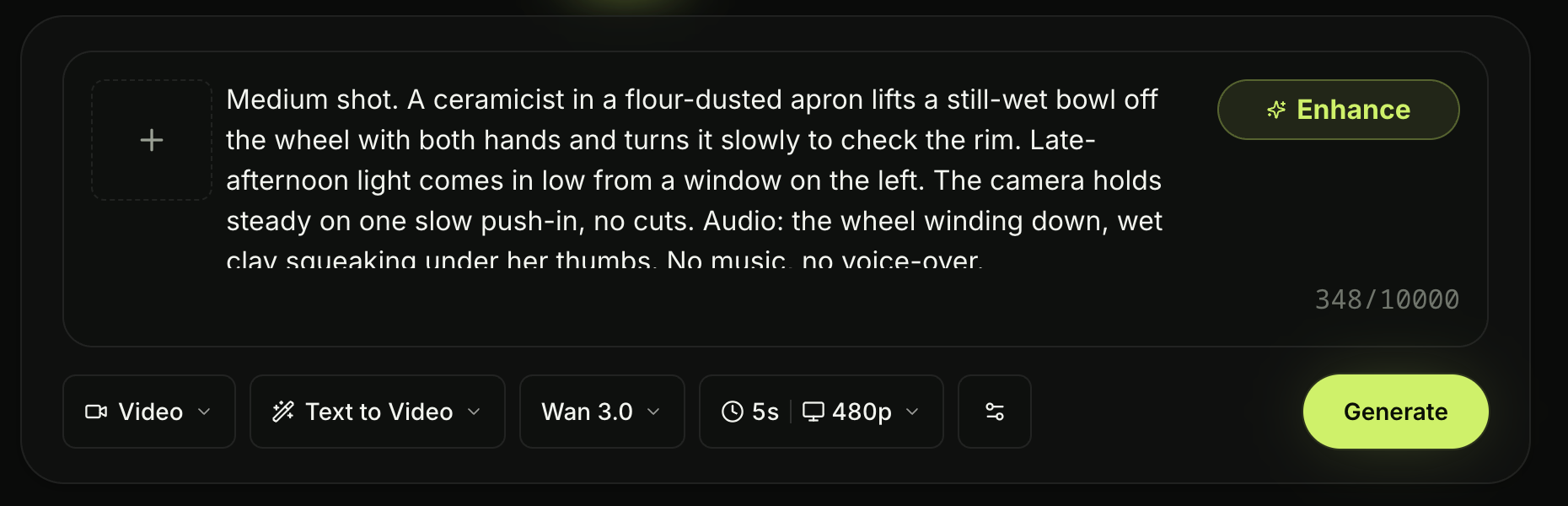
The same prompt in the Seadanse composer: model set to Wan 3.0, length 5s, resolution 480p — 2026-09-05.
If you want to test this five-part layout on your own project, you can run Wan 3.0 on Seadanse right now.
Ambience is a clause, not an adjective
Writing "at night" or "dramatic lighting" leaves the environment open to guesswork. One adjective leaves the light to chance. A full clause works better because it names the exact light source, the direction it travels, and what stays dark.
In our second test, we placed a passenger on an evening bus. We detailed every lighting element in a single descriptive sentence:
Wide shot. A single passenger stays seated by the window of a night bus as it pulls away from an empty stop, watching the street go past. Rain runs down the glass, sodium streetlights slide across her face one after another, and the interior is lit only by the pale strip light overhead, so everything outside the window falls out of focus. The camera sits opposite her and holds, no move, no cuts. Audio: tyres on wet road, the engine settling into gear, rain on the roof. No music.Generated with Wan 3.0 on Seadanse, 480p, 5 seconds, audio on, from the prompt above, unedited — 2026-09-05.
Looking at the frames, water ran down the glass pane while yellow sodium lights crossed her face one at a time. The interior was lit only by the overhead strip, the street outside blurred naturally, and the camera never moved.
Working with references: 10 images, 5 clips, 5 audio files
Alibaba markets this feature under the name Omni-Creation, describing it on its site as "Up to 20 reference assets, with document and webpage parsing".
Twenty is right. It just isn't twenty of anything you like. In practice, the API splits uploads into three separate reference groups with their own caps.
| Group | How many | The other limits |
|---|---|---|
| Reference images | up to 10 | 20 MB each; JPG, JPEG, PNG, BMP or WebP |
| Reference video | up to 5 clips | 1 to 15 seconds each, 15 seconds in total; MP4 or MOV |
| Reference audio | up to 5 clips | 1 to 15 seconds each, 15 seconds in total; WAV or MP3 |
Ten images, five clips, five audio files: so you can't attach twenty pictures. Reference video clips can't exceed 15 seconds in total duration, and reference audio shares that same 15-second total cap.
Wan 3.0 will take a reference audio clip on its own, with no picture attached — which isn't true of every model on our site, MiniMax Hailuo 3 included.
To point Wan 3.0 toward specific files, use explicit labels in your prompt text: @Image1, @Video1, and @Audio1. Keep the attachment order in the Wan 3.0 composer the same as the numeric labels you write in the prompt. We tested this by uploading two separate reference stills generated with Nano Banana 2.
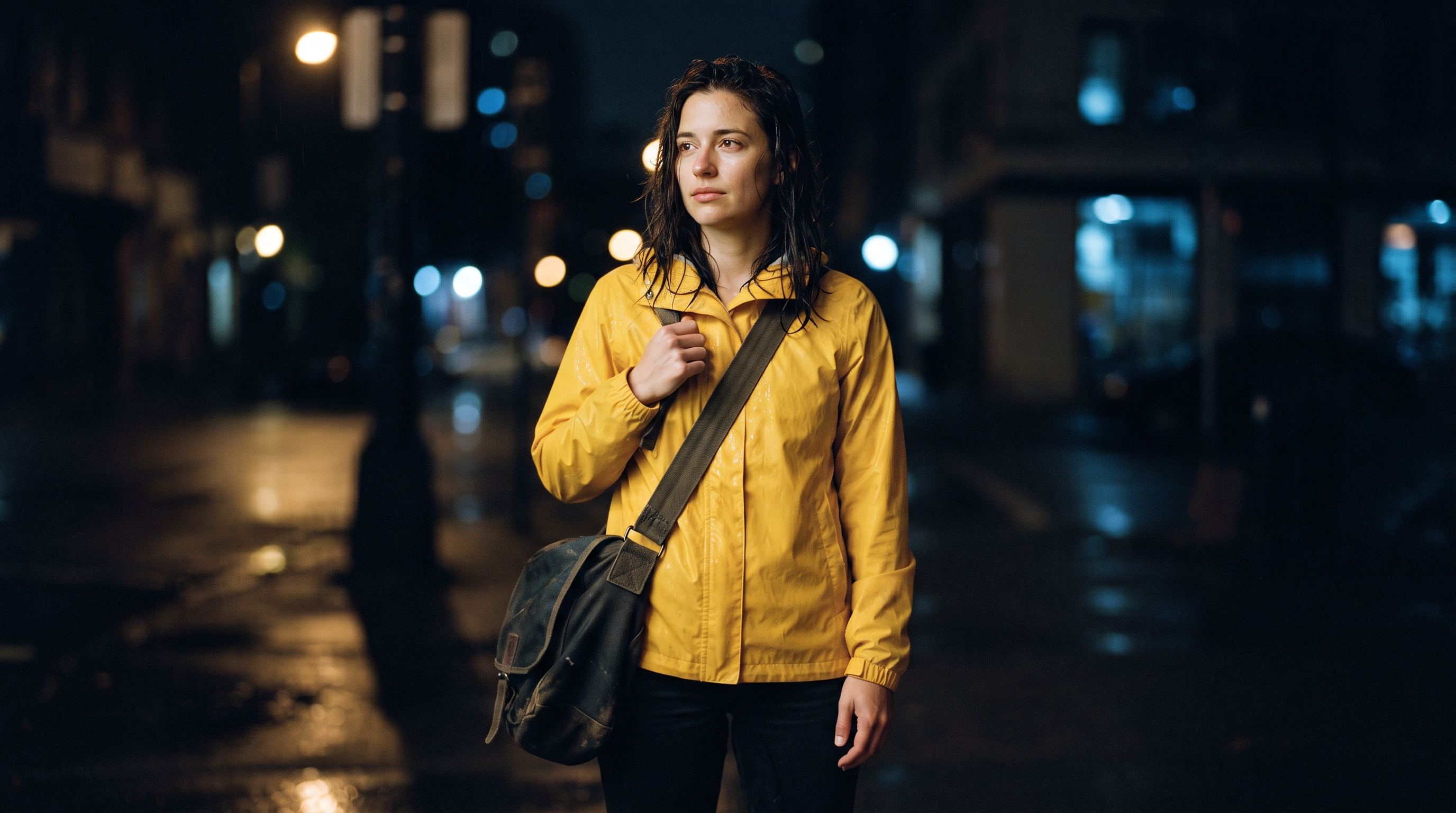
The still we attached as @Image1. Generated with Nano Banana 2, not with Wan 3.0 — 2026-09-05.
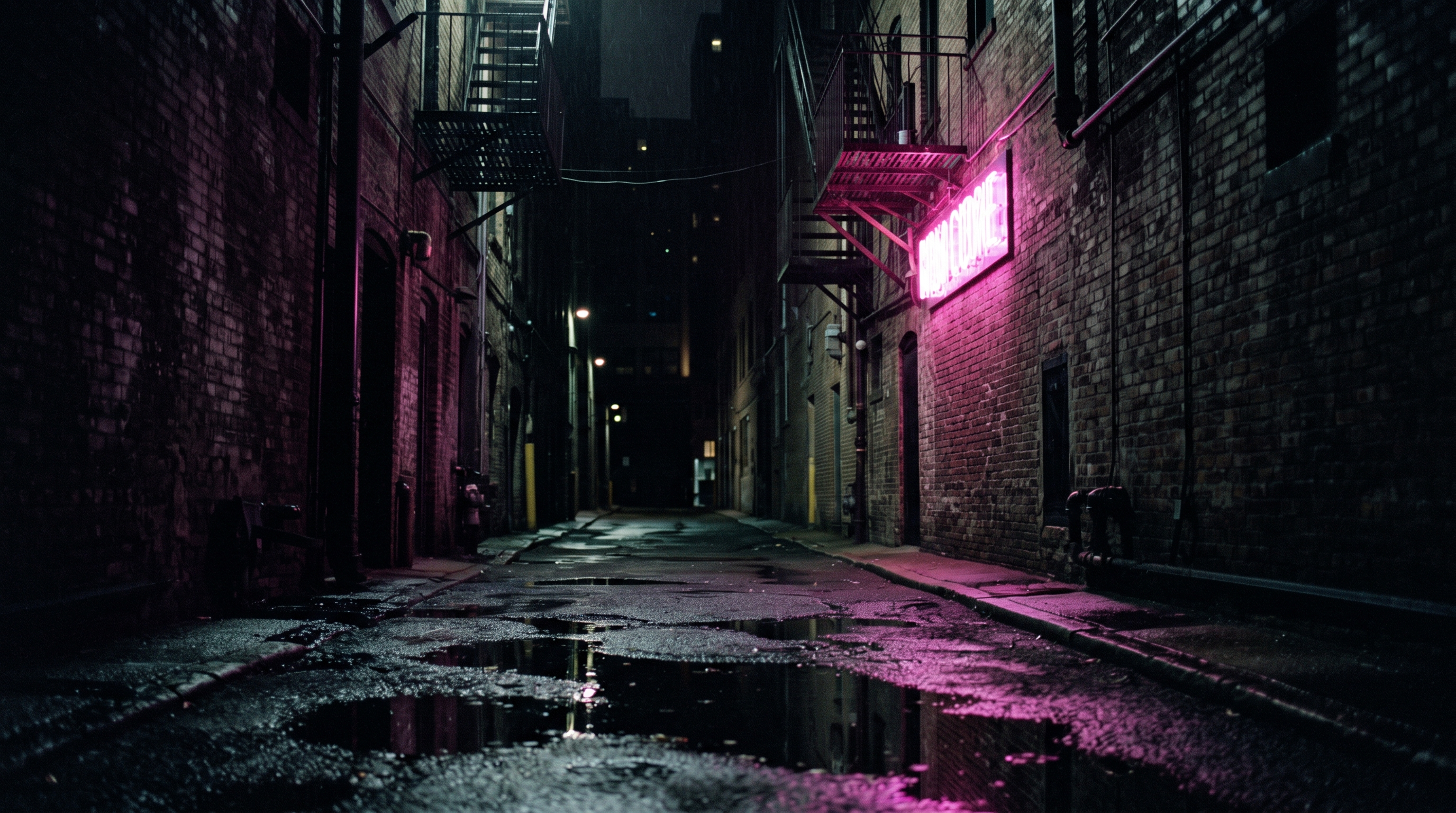
The still we attached as @Image2. Generated with Nano Banana 2, not with Wan 3.0 — 2026-09-05.
We then combined the character from the first still with the lighting and alleyway of the second:
Medium shot. The courier in @Image1 walks into the alley in @Image2 and stops under the neon sign to check a package label. Keep her yellow jacket, bag strap and hair exactly as they are in @Image1, and keep the alley's neon and wet ground from @Image2. Night, the neon is the only strong light and everything else stays in shadow. The camera tracks her from the side for three steps and stops when she stops. Audio: footsteps in shallow water, a distant train, the sign buzzing. No music.Generated with Wan 3.0 on Seadanse, 480p, 5 seconds, audio on, with the two stills above attached as @Image1 and @Image2 — 2026-09-05.
The yellow jacket, dark hair and canvas strap carried over from the first picture. The magenta sign, fire escape and wet ground came from the second still, and the character paused to check her parcel as instructed.
Here's the honest limit on this test: one shot shows the labels worked here. It doesn't isolate whether the @Image labels did the binding or whether the plain words ("the courier", "the alley") did the work. We used the labels because published guides recommend them, but we aren't claiming to have proved the syntax alone caused the visual match.
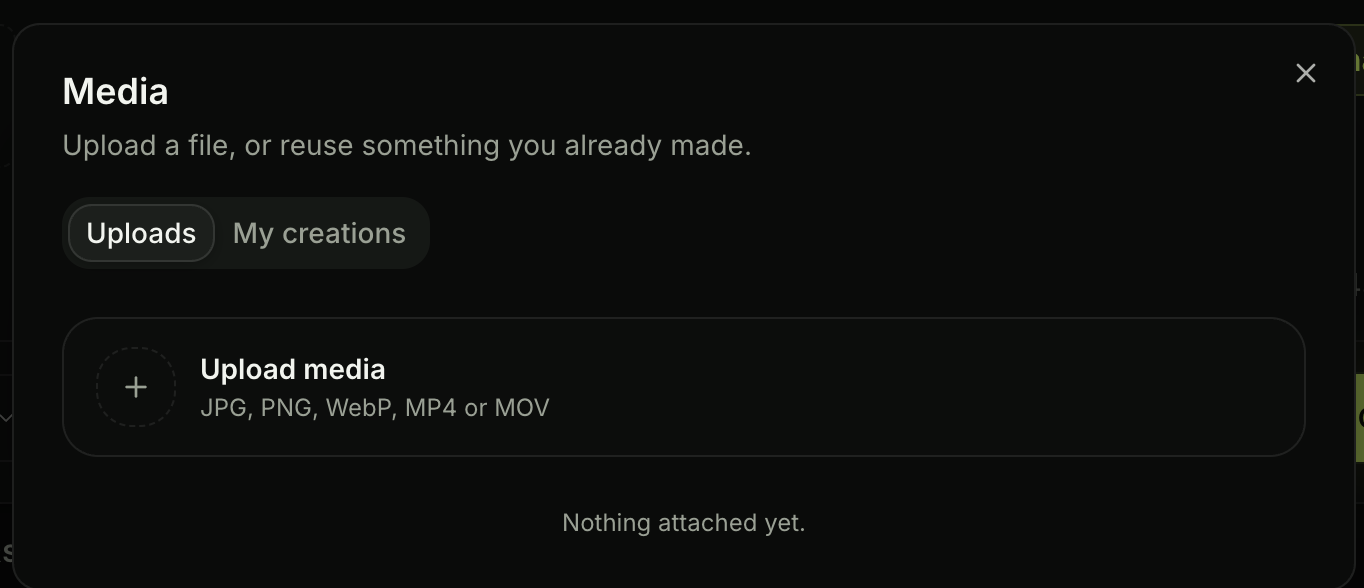
Where references get attached on Seadanse. The panel names the file types it takes and nothing about the per-group caps — 2026-09-05.
Keep in mind that our upload panel lists accepted file types (JPG, PNG, WebP, MP4, MOV) but doesn't print the per-group limits on screen.
Frame to video: the first frame is required, the last one is optional
In Wan 3.0's frame-to-video mode, you anchor your video with a real still. The first frame is required, while adding a last frame is optional. If you don't add a last frame, Wan 3.0 picks its own ending based on your text prompt.
To test a guided transition, we created a starting still of a closed storefront and edited it into an open, lit version for the final frame. Editing the original image made sure the brickwork and perspective held steady.
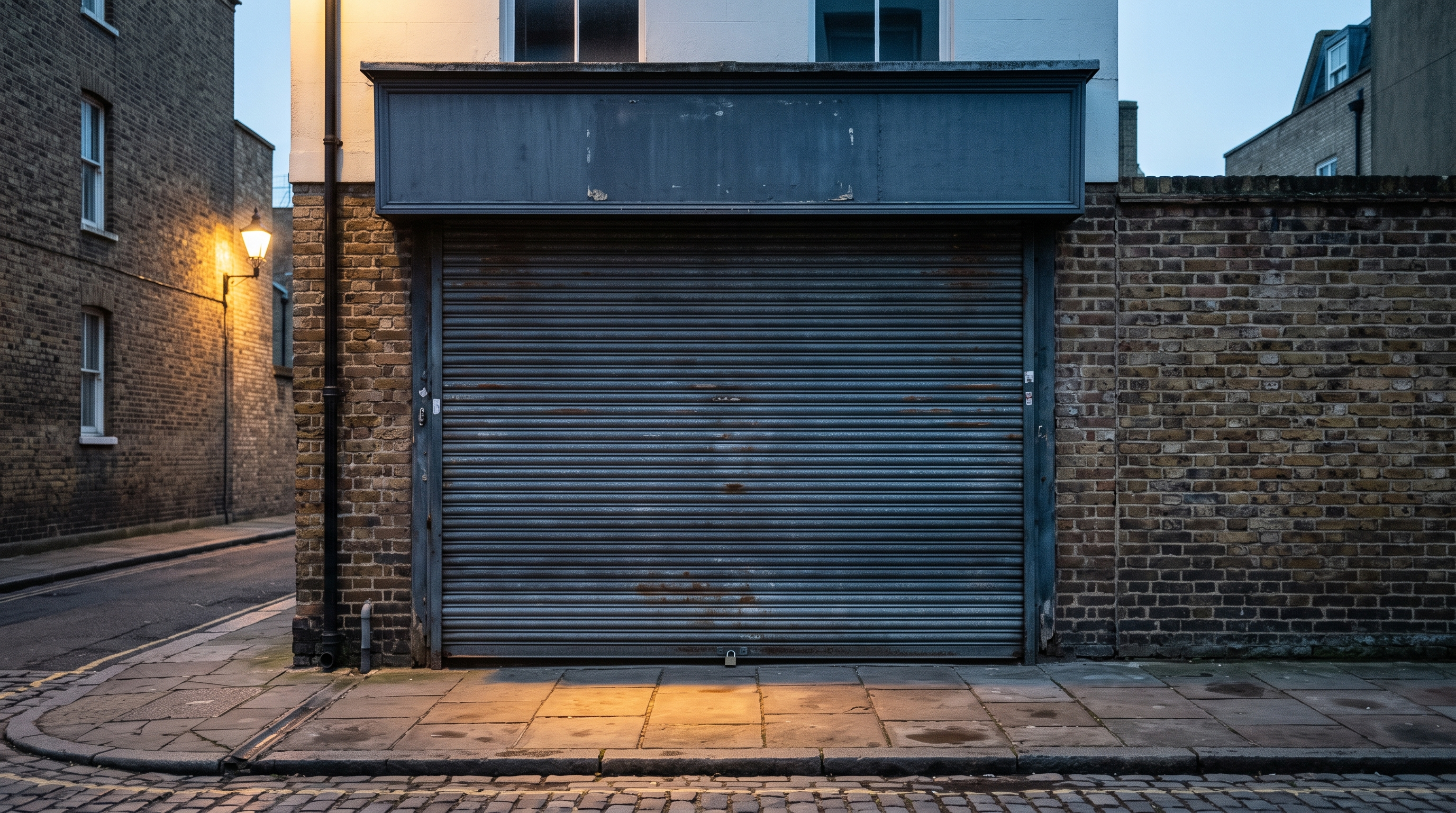
The first frame. Generated with Nano Banana 2, not with Wan 3.0 — 2026-09-05.
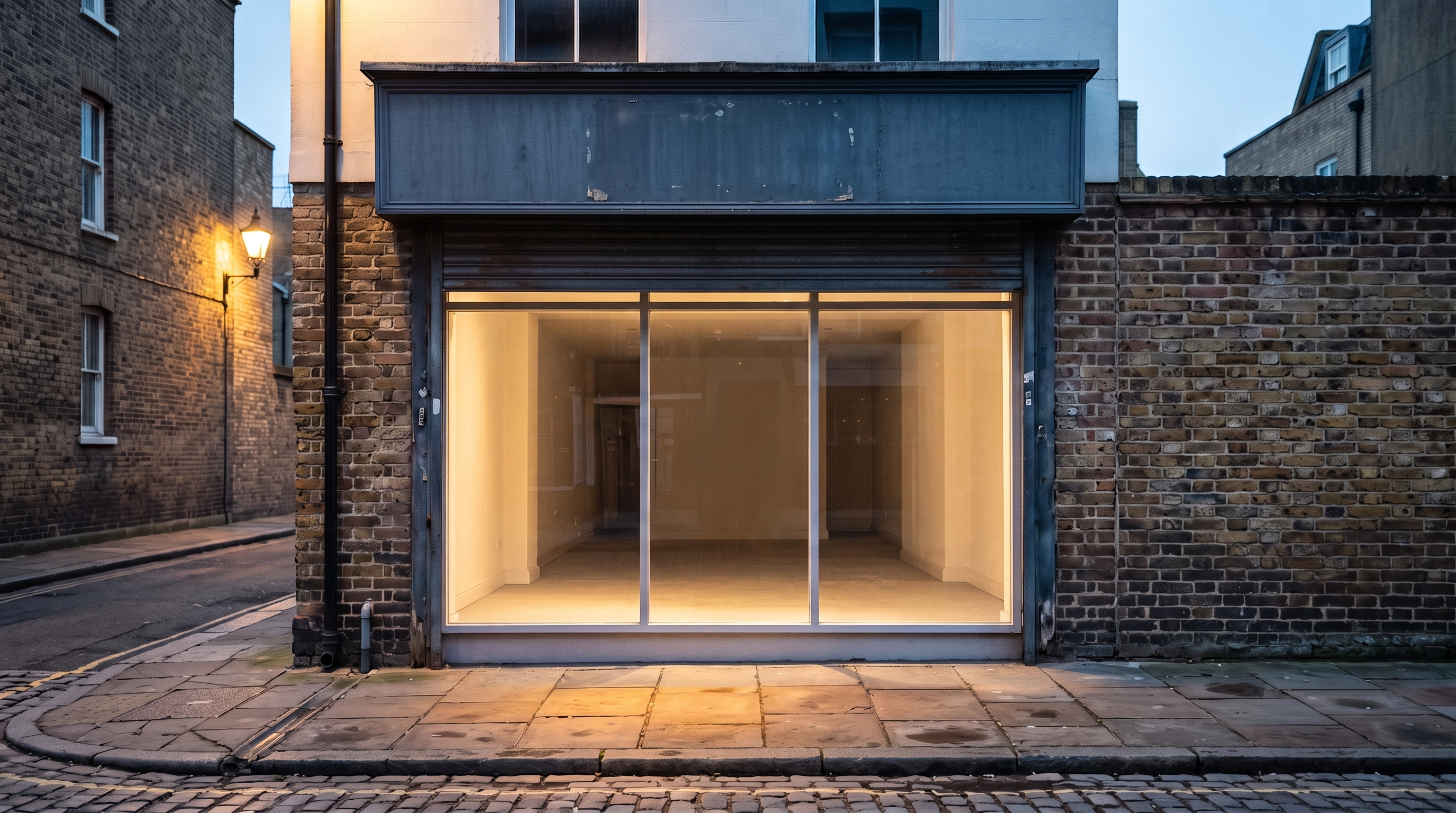
The last frame, made by editing the first still rather than generating a second one, so the building and the framing hold — 2026-09-05.
We then ran this prompt to animate the roll-up shutter between both states:
The corrugated shutter in the first frame rolls all the way up and the shop lights come on behind it, ending exactly on the last frame. One continuous move, camera locked off, no cuts. Dawn light warms across the brick as the shutter rises. Audio: the shutter's metal rattle, a lock turning, early birds.Generated with Wan 3.0 on Seadanse, 480p, 5 seconds, audio on, with the two stills above set as first and last frame — 2026-09-05.
The shutter began closed, rolled smoothly upward across the middle of the clip, and the interior light showed through at the finish. The walls and framing held, landing squarely on the final image.
Audio and dialogue handling: the sound arrives with the picture
The sound comes out of the same run as the picture. Nothing's added on afterwards. Audio generation is turned on by default, and your clip costs the same whether audio is on or off.
To handle audio cleanly in your prompt, follow three basic rules:
- Dialogue: put spoken lines inside double quotes and describe the speaker's voice right next to them.
- Sound effects: name distinct noises on their own line, focusing on physical movements in the frame.
- Silence: write "no music" or "no voice-over" explicitly if you want natural background sound without an artificial score.
Because the system defaults to generating audio, you've got to ask for silence directly in your text.
Alibaba's own Wan 3.0 demo for what it calls Immersive Experience, from wan.video. We did not make this one and Alibaba publishes no prompt for it.
Thirty seconds in one pass, and what that changes
Wan 3.0 can generate one continuous shot of up to 30 seconds at 30 frames per second, doubling the 15-second limit of the older Wan 2.7 release.
Generated with Wan 3.0 on Seadanse, 1080p, 30 seconds in one pass, audio on, unedited — 2026-08-16.
We tested this long duration on 2026-08-16 with a 1080p crane shot moving from rooftop herbs out to a morning city skyline. For that shot, our audio line read: "a watering can's trickle and birdsong in the opening beat, a rising city traffic hum swelling naturally as the camera climbs, no music".
A thirty-second shot is a structure, not just a length. You need to prompt how the camera travels and how the ambient sound changes as your viewpoint shifts across time.
What you can set in the composer
Our composer gives you direct control over these settings:
- Duration: drag clip length anywhere between 4 and 30 seconds.
- Resolution: pick between 480p, 720p, and 1080p.
- Aspect ratio: pick from six ratios alongside an Auto setting.
- Prompt text: type up to 10,000 characters in the text box, while the provider API accepts up to 20,000.
- Audio toggle: turn sound generation on or off, and the cost doesn't move.
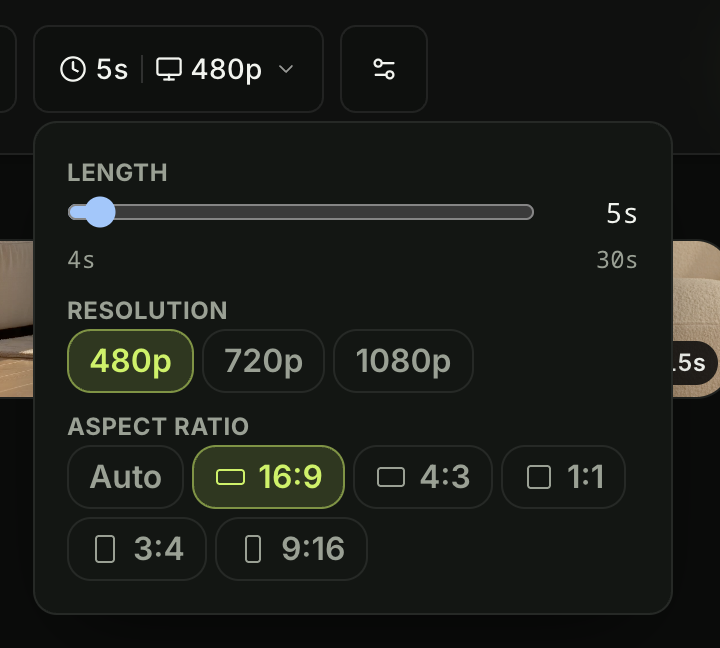
The length, resolution and aspect-ratio controls for a Wan 3.0 clip on Seadanse: 4 to 30 seconds, three resolutions, and six ratios plus Auto — 2026-09-05.
At any clip length, 720p costs twice as much as 480p, while 1080p costs four times the 480p base rate. For duration, a 30-second video costs six times as much as a 5-second take at the same resolution. Turning audio off doesn't make a clip cheaper.
To try your exact settings, head over to the Wan 3.0 video generator.
You can also review credit bundles to see what credits cost on Seadanse before starting large batches.
What Wan 3.0 will not do
Wan 3.0 has five hard limits, and four of them are ours rather than Alibaba's:
- Open weights: Wan 2.2 is the last Wan you can download and run on your own machine. The open Wan line stops there. Wan 3.0 is one of several models you can only run through somebody else's API, Google's Veo 3 among them.
- Documents and web pages: the raw API accepts one document (up to 100 MB and 50 pages) and one live webpage, but our composer doesn't expose those inputs.
- In-place editing: precision video editing exists in Alibaba's demos, but it isn't available inside our composer.
- High resolutions: resolution stops at 1080p, with no 4K tier available.
- Short clips: our composer starts at 4 seconds, even though the API goes down to 2.
Alibaba's own demo for Omni-Creation, the feature that reads documents and web pages, from wan.video. We did not make this one and Alibaba publishes no prompt for it.
Alibaba's own demo for Precision Video Editing, from wan.video. We did not make this one and Alibaba publishes no prompt for it.
Wan 3.0 prompt questions we get asked
Which prompt shape fits a product ad, a scene, or a story?
For product ads, attach clean reference stills and lock your camera on steady pans across the object. For a scene, write a dedicated ambience clause that defines your light sources, shadows, and camera move. For a narrative story, use first and last frames so your characters and sets transition cleanly between shots.
Reference images or text only — which should I use?
When you write from text alone, describe your subject with distinct physical details and put your camera move in the opening sentence. If you use reference files, label them clearly as @Image1 or @Video1 and match your upload order to those labels. Remember that your references split across three distinct categories with individual limits rather than a single pool.
Does a longer prompt help?
Writing longer descriptions only helps if you give it details it can act on rather than filler. Our four test prompts produced clear clips using between 60 and 100 words each, and extra adjectives don't add anything the model can see.
Try these four prompts
Good results with Wan 3.0 come down to keeping your prompt in five parts from shot type to sound. You've also got to respect the separate caps across images, video clips and audio files. When you write clear lighting clauses, lock the camera first, and label your reference files accurately, you get the shot you asked for.
When you're ready to build your next scene, head over to the composer to generate with Wan 3.0.
We shot these renders on our own account at 480p on 2026-09-05 and checked every clip frame by frame.
Related Articles
- Is Seedance 2.5 open source? — the same open-weights question, asked about the other model we run.
- Can I run Seedance 2.5 locally? — what "no downloadable weights" means when you actually want to run something on your own machine.
- How to access Seedance 2.5 — where a model lives when the maker does not ship a standalone site.


