
Pixlr vs Seadanse for Seedance 2.5
Seedance 2.5 runs on Pixlr and Seadanse. See the real differences in clip length, references, credit rules, and what happens when a job fails.
 The Seadanse Team10 min read
The team behind Seadanse. We run the models we write about, and we publish the specs, prices and limits the marketing leaves out.

TL;DR — Both platforms run Seedance 2.5, so the model isn't the question here. The real split comes down to clip length, what you can hand the model as a reference, and what happens to your credits when a job fails. Pixlr suits anyone who wants photo tools alongside clips, while Seadanse fits creators who need longer single shots without extra cuts.
You'll find the exact same model name on two different websites, but the products built around it don't match. We run Seadanse, so we're not pretending to be neutral observers.
But we've put the facts from both sites side by side so you don't have to hunt them down. Here's what each panel actually gives you, what clips cost, and where the hard limits sit.
Pixlr vs Seadanse at a glance
| Pixlr | Seadanse | What it means for you | |
|---|---|---|---|
| Longest Seedance 2.5 clip | 15 seconds | 30 seconds | A 30-second idea needs stitching on one side, not the other |
| References on Seedance 2.5 | Start image, end image | Pictures and reference clips | You can hand over motion, not just a look |
| Prompt box | 2,000 characters | 10,000 characters | Long shot lists fit without trimming |
| Audio | Off by default | On by default | One less setting to remember before you pay for a clip |
| 4K | Yes, on other models | No on Seedance 2.5; 4K is the Seedance 2.0 preset | If 4K is the job, they have more ways to get there |
| Models in the picker | 27 video, 29 image | 8 live, Kling 3.0 soon | More choice on one side; a shorter, newer list on the other |
| Photo editing | Two editors, collage, background remover, face swap | None | If you retouch photos, this decides it on its own |
| Cheapest plan | $2.49 a month | See our pricing | Their entry tier is cheaper than anything we sell |
| Plan credits | Valid for 1 month | Expire at the end of each 30-day cycle | Same rule on both sides |
| Failed job | No published rule | Hold released automatically | You find out the difference on a bad day |
| Score | ★★★★☆ | ★★★★☆ | Different shapes, not different grades |
We scored both on four things: what the model can do on that site, what the surrounding tool adds, how the credits behave, and how clear the terms are. Every figure comes from the two products' own pages, read on 26 August 2026, and we never ran a generation on Pixlr.
Three differences that decide it
Clip length is the first difference. Pixlr offers 5, 10, and 15 seconds on Seedance 2.5, while Seadanse lets you pick up to 30 seconds on the same model.
A 30-second idea has to be cut into two or three clips on Pixlr and stitched afterwards. That's usually where a character's face starts to drift between shots.
What you can hand the model is the second difference. Pixlr's Seedance 2.5 takes two slots: a start image and an end image.
Seadanse takes pictures and reference clips (a video you upload so the model copies its motion). Neither side wires reference audio on Seedance 2.5, so you'll have to describe a voice in your prompt instead of copying an audio track.
What happens on a failed job is the third difference. On Seadanse the credits go on hold when you press Generate, and the system settles them only on success.
Our pricing page states that failures, timeouts, and platform errors release the hold automatically. Pixlr doesn't publish an equivalent rule on its pricing page, and Trustpilot reviews from July and August 2026 describe credits being spent on jobs that failed.
Seedance 2.5 on Pixlr, setting by setting
On Pixlr's video generator, Seedance 2.5 gives you these settings:
- Resolutions: 480p, 720p, and 1080p
- Durations: 5, 10, and 15 seconds
- Prompt box: 2,000 characters (the counter shows 0/2000)
- References: two slots, Start Image (1) and End Image (1)
- Audio: off by default
There's nothing longer than 15 seconds offered here. If you switch to Seedance 2.0 Fast instead, the panel adds Video (3) and Audio (3) slots. That shows the reference limit belongs to this model row, not to the whole site.
Across the wider workspace, their video picker lists 27 models, plus a separate group of 6 mature ones. Their image picker lists 29 models, and every row carries a fast, pro, or ultra label.
Pixlr also lists house names like Seedflame, Seedflame 2.5, Velora H3, DreamNoir, Siren 2.7, P-Video, and P-spicy. Pixlr doesn't say which lab trained any of them. Seedflame 2.5 shows the same resolutions and durations as Seedance 2.5 on their model list. But it costs more: 625 credits for a 5-second 1080p clip against 575 credits for Seedance 2.5.
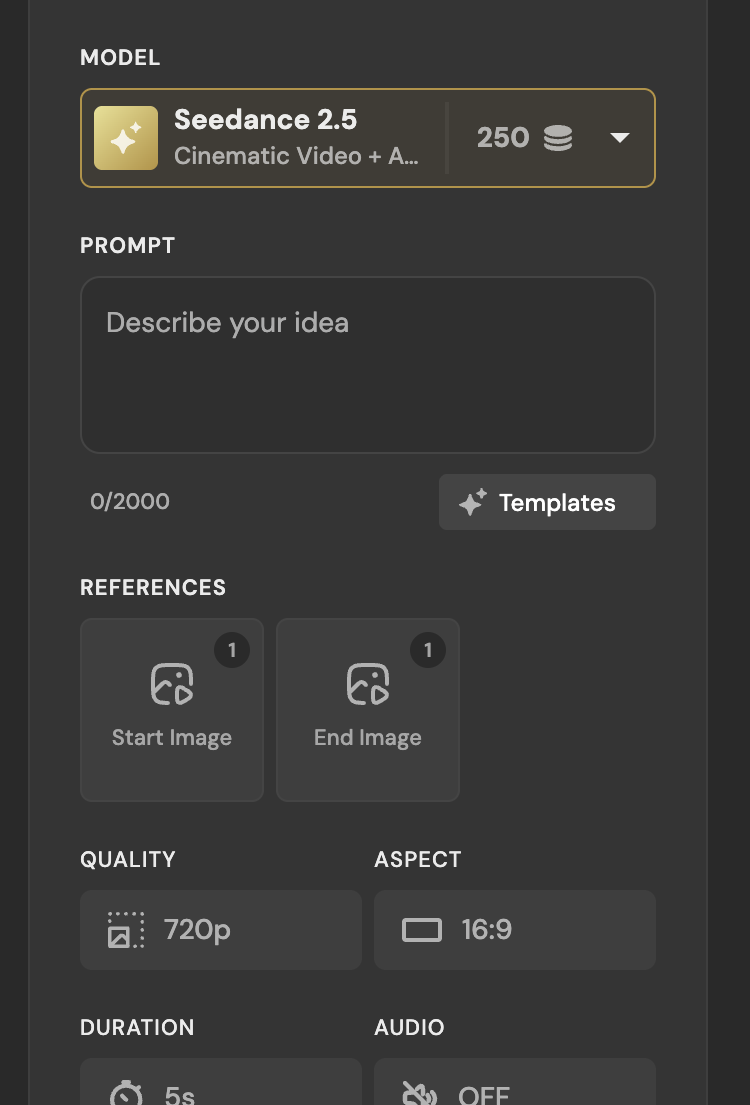 Seedance 2.5 on Pixlr, 26 August 2026: a 2,000-character box, two image slots, audio off.
Seedance 2.5 on Seadanse, setting by setting
Our Seedance 2.5 AI Video Generator composer gives you:
- Resolutions: 480p, 720p, and 1080p
- Durations: 5, 10, 15, 20, 25, and 30 seconds
- Aspect ratios: six options (16:9, 9:16, 1:1, 4:3, 3:4, 21:9)
- Prompt box: 10,000 characters
- References: static pictures and reference clips
- Audio: on by default
Seedance 2.5 stops at 1080p here. If you need 4K output, that belongs to our Seedance 2.0 preset.
Every paid plan includes commercial rights, watermark-free downloads, and private generations. When you sign up, you'll get 40 free credits without entering a card. If you want extra runs, our standalone credit pack costs $9.9 without any active subscription.
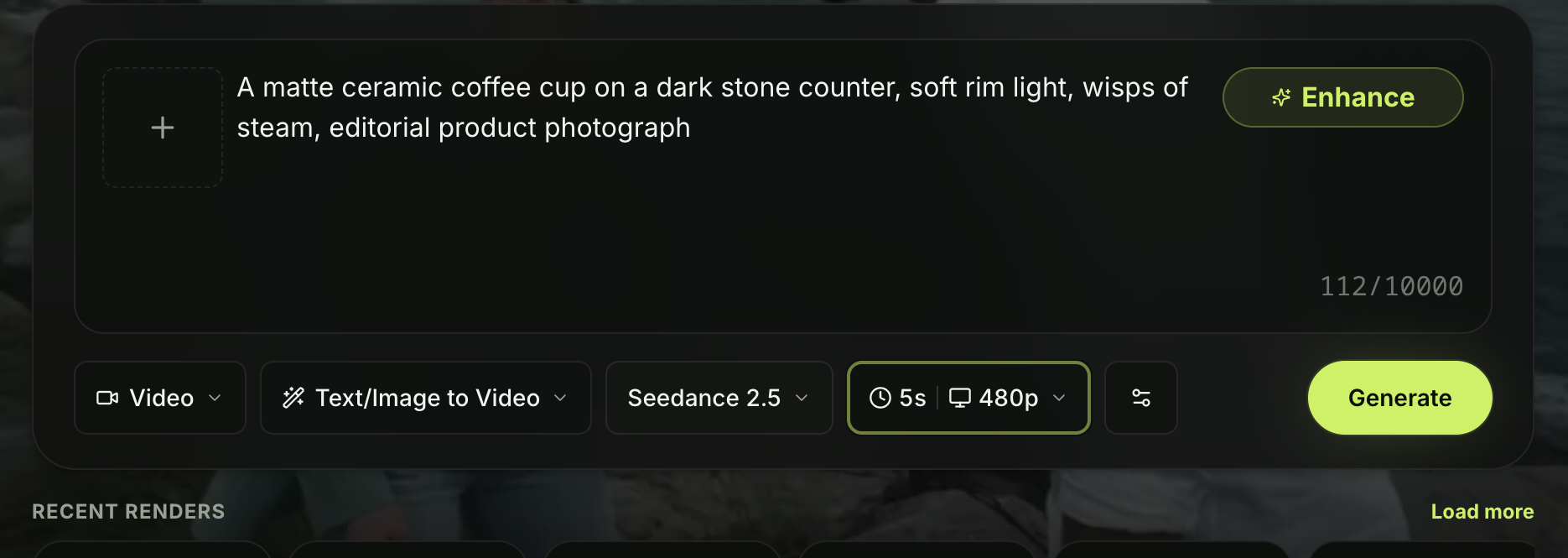 The same model on Seadanse, 26 August 2026, with a 10,000-character box.
What a clip costs on each
On Pixlr, you'll spend 250 credits for a 5-second 720p Seedance 2.5 clip and 575 credits for a 5-second 1080p clip. If you switch over to Seedance 2.0 Fast, you'll pay 125 credits for a 5-second 720p clip.
A free account there holds 10 credits, which the generator prints as "10 remaining". Seedance 2.5 costs 115 credits at its cheapest setting on Pixlr, so a free balance can't pay for one clip — press Generate and a "Choose payment method" box opens instead of an error, which we saw on 26 August 2026.
Pixlr sells four monthly plans on its pricing page:
- Plus at $2.49 for 80 credits
- Premium at $9.99 for 1,000 credits
- Ultra from $24.99 with up to 10,000 credits
- Ultra MAX at $49.99
Paying yearly takes 20% off those plan rates.
For our side, check the Seedance 2.5 pricing page to see the plan tiers. You can also open our AI video cost calculator. It lets you figure out a month by clip length, resolution, how many clips you need, and how many tries it takes to land a good one.
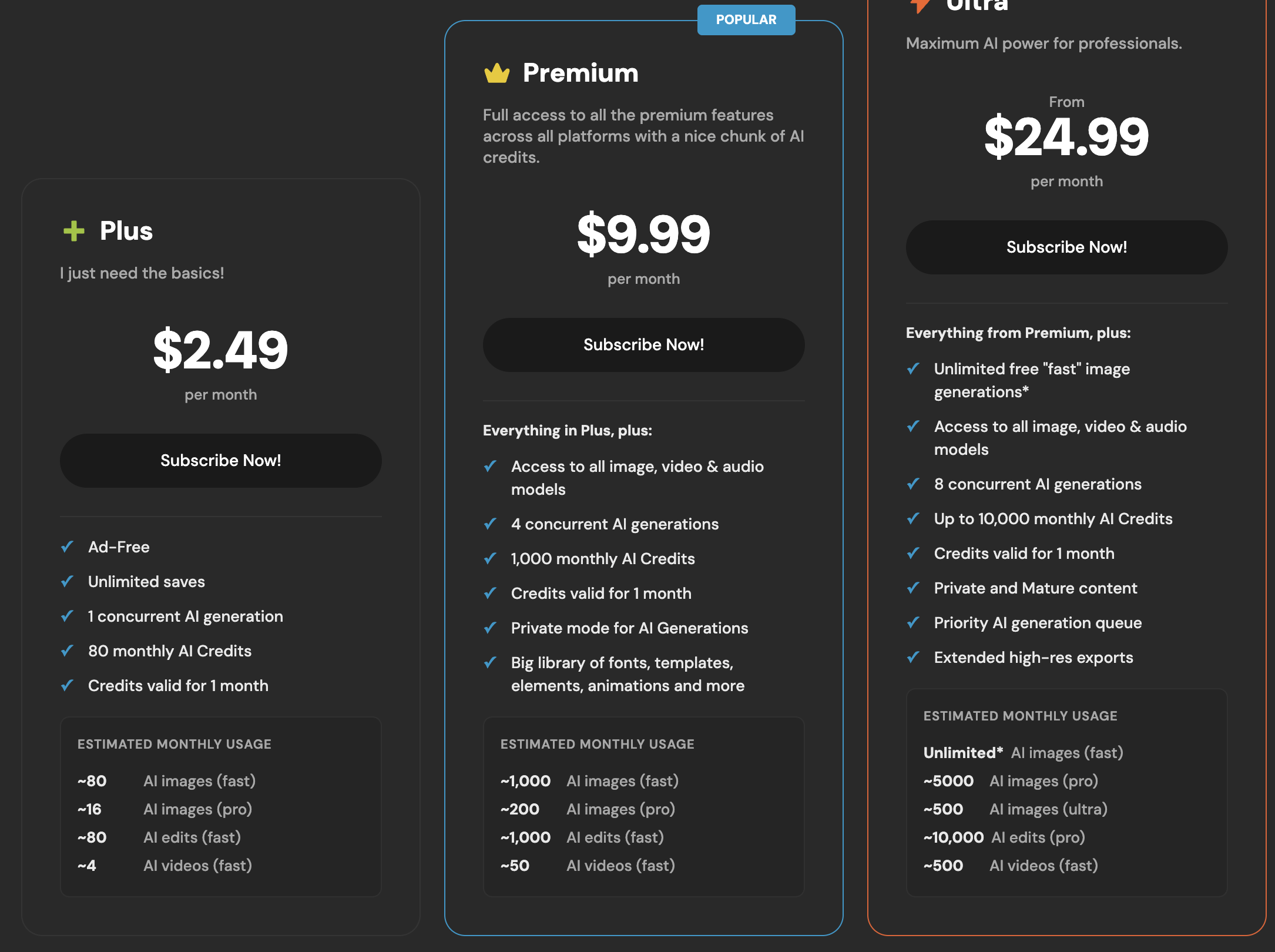 Pixlr's plans on 26 August 2026. Every card carries the same line: credits valid for 1 month.
What happens when a job fails
Pixlr sets these four credit rules across its plans and help pages:
- Plan cards show credits are valid for 1 month
- Subscription credits reset at renewal (an account with 863 credits resets to 1,000)
- Cancelling a plan resets subscription credits to zero
- Credit packs bought separately never expire
On Seadanse, plan credits expire at the end of each 30-day cycle and don't roll over. Extra credit packs stay valid for 12 months. So the monthly-expiry rule is the same on both sides.
The split is what happens during a job error. On Seadanse the credits go on hold when you press Generate. Our pricing page says: "Failures, timeouts, and platform errors release the hold automatically."
Pixlr publishes no matching rule on its pricing page. Their Trustpilot profile holds 175 reviews with an overall score of 2.0, where recent reviews describe credits being deducted for jobs that failed.
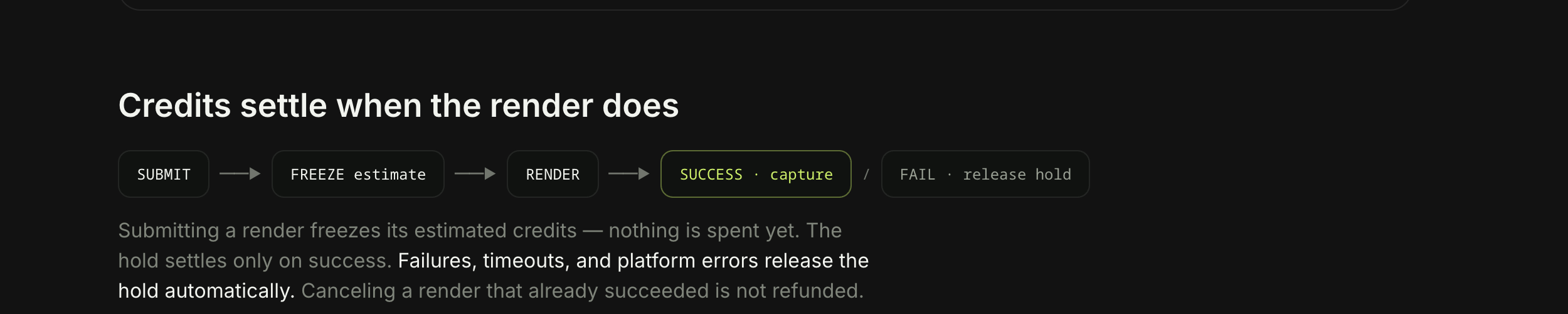 How a hold settles on Seadanse: captured on success, released on failure.
Where Pixlr wins
Pixlr brings a big set of design tools that we don't have:
- Two dedicated photo editors
- A collage maker
- An automated background remover
- A photo face swap tool (ours turns a photo into a face swap video instead)
- An audio generator
Their entry plan costs $2.49 a month, so you'd struggle to spend less on any plan we sell.
You get a much longer list there, with 27 video models and 29 image models compared to our eight live models (with Kling 3.0 coming soon). Pixlr also carries dedicated 4K video rows, including Kling VIDEO 3.0 4K, Kling O3 4K, and Seedance 2.0 at 4K.
If you want one subscription that edits photos and makes clips, Pixlr covers more ground than we do.
Where Seadanse wins
Seadanse gives you 30-second clips on Seedance 2.5 instead of 15, so you can run it for 30 seconds here in one take. That means you won't have to stitch split shots together.
Our composer accepts reference clips as well as images, and the prompt box holds 10,000 characters rather than 2,000. Audio is turned on by default, and your credits stay safe under a published policy that releases holds if a job fails.
Our Pro plan also includes unlimited image generation for Nano Banana 2 at 1K and all of GPT Image 2. That includes reference images in a fair-use, one-at-a-time queue.
Pixlr offers unlimited image runs only on its Ultra plan under "Unlimited free 'fast' image generations". Their own data puts that fast tier on cheap models like FLUX.2 Klein 9B, GPT Image 2 Low, Wan 2.7 Image, and Qwen Lightning (1 to 5 credits each). Nano Banana 2 sits in their ultra tier at 15 credits, outside that unlimited allowance.
Made on Seadanse with Seedance 2.5 from a single prompt, sound included.
Which one should you pick?
Pick Pixlr if you need an inexpensive creative suite to retouch photos, make collages, and generate shorter video clips. Their $2.49 entry tier gives you broad utility across dozens of tools.
Pick Seedance 2.5 on our platform if you're making full video scenes that need longer takes, reference clips, and protected credits on failed jobs. You can start testing right away with 40 free credits.
We read the public panels, model lists, and published pricing terms on both sites on 26 August 2026. We made a free account there on 26 August 2026 and spent one credit on an image, but we never generated a video on Pixlr, so nothing in this comparison is a same-prompt test of the two sites' output.
Related Articles
- 8 Best Pixlr Alternatives in 2026 — eight tools sorted by which half of Pixlr you are replacing.
- What Is the Pixlr AI Video Generator? Models, Credits, Limits — every model in their video picker and what a clip costs.
- Is Pixlr Free? What You Get Without Paying — where the free tier stops and what it asks for first.


