
What Is the Pixlr AI Video Generator?
Pixlr AI Video Generator puts 27 models into one prompt box. Here is the full model list, what a 5-second clip costs, and where the caps sit.
 The Seadanse Team10 min read
The team behind Seadanse. We run the models we write about, and we publish the specs, prices and limits the marketing leaves out.

TL;DR — The Pixlr AI Video Generator is the video half of a Pixlr subscription, putting about two dozen models into one box. Clips cost credits that scale with resolution and length across models like Seedance 2.5, Veo, and Kling. It suits quick drafts, but tight caps stop it from replacing a dedicated video workspace.
Pixlr's pricing page tells you what a monthly subscription costs, but it doesn't tell you what a single clip costs. You won't see that number until you choose a model, pick your resolution, and check the Generate button.
We dug through their picker and public model data to map out the entire tool. Here's what every clip costs, the full list of models you'll find, and where their caps sit.
What the Pixlr AI Video Generator is
Pixlr's video generator isn't a standalone video studio. It's one of seven tools on their site. It sits right next to two photo editors, a collage maker, a face swap tool, a background remover, an image generator, and an audio generator.
When you open the page as a logged-out visitor, the tool introduces itself as "The best free video AI generator — turn text into video or bring photos to life. Powered by Google Veo, Seedance, and Kling AI models." The workspace loads on Seedance 2.0 Fast at 720p and 5 seconds with audio turned off. The Generate button already carries a price tag: 125 credits.
You get one prompt box where you type your prompt, pick a model from a drop-down list, and make a short clip. Everything runs on models from outside labs.
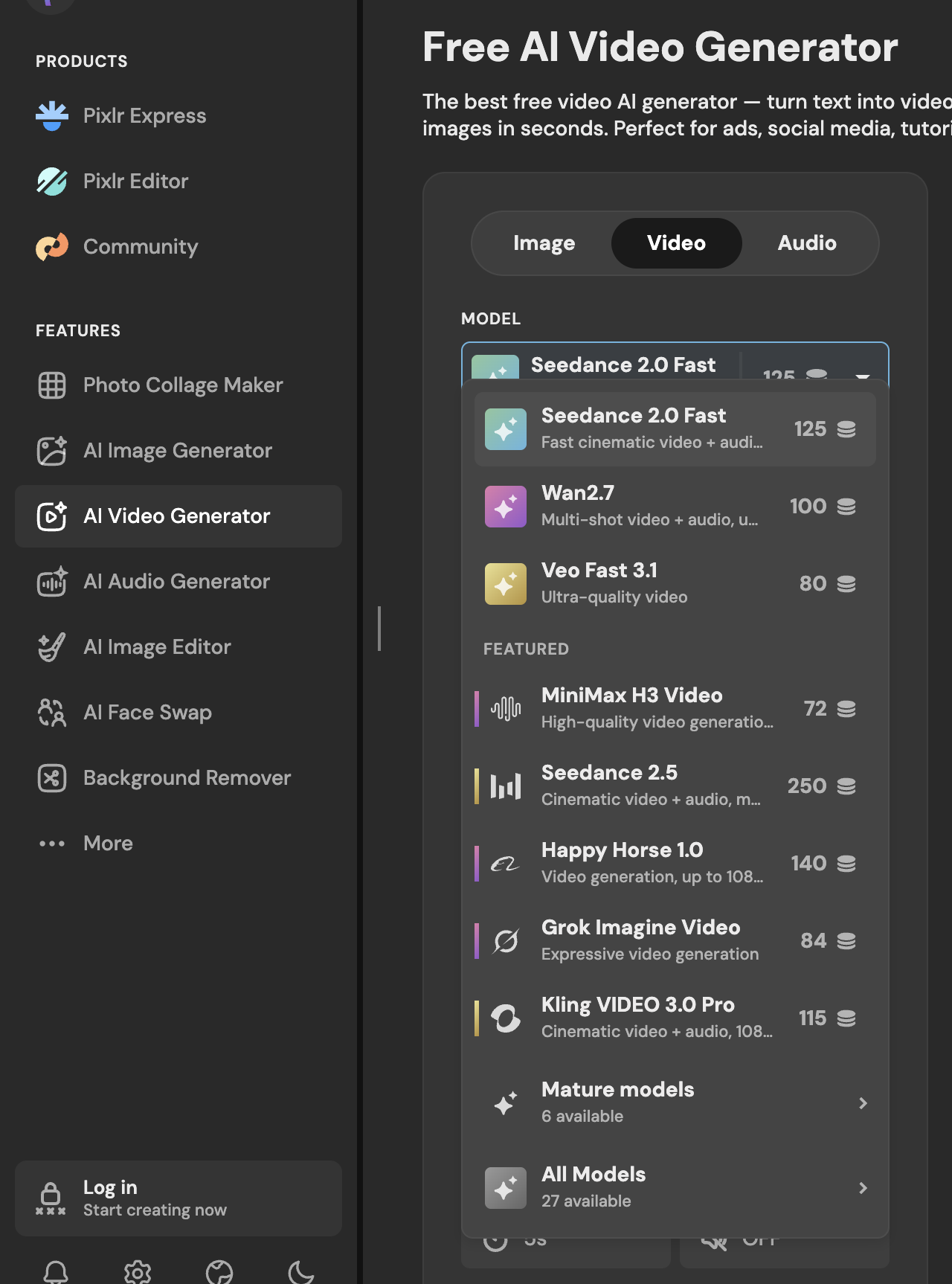 Pixlr's video model picker, read 26 August 2026: 27 models, each with its price on the row.
Every model in the picker
The picker's footer shows "Mature models — 6 available" and "All Models — 27 available". When you read their public API without logging in, you get 25 models for text-to-video and 27 for image-to-video.
Every model on the list carries a tier label: fast, pro, or ultra. Here's the roster of branded models you'll find in Pixlr's picker:
- Seedance 2.5
- Seedance 2.0
- Seedance 2.0 Fast
- Seedance 2.0 Mini
- Veo Fast 3.1
- Veo Lite 3.1
- Kling VIDEO 3.0
- Kling VIDEO 3.0 Pro
- Kling VIDEO 3.0 4K
- Kling O3 Standard
- Kling O3 4K
- Wan2.7
- Wan2.6 Flash
- MiniMax H3 Video
- Grok Imagine Video
- PixVerse V6
- Vidu Q3
- LTX-2.3
- LTX-2.3 Fast
- Happy Horse 1.0
The house names next to the branded ones
Alongside those branded lab models, you'll see several options with names no AI lab publishes:
- Seedflame
- Seedflame 2.5
- Velora H3
- DreamNoir
- Siren 2.7
- P-Video
- P-spicy
These house-named rows sit right next to branded rows, but they charge different credit prices for the same setup. Seedflame 2.5 gives you the exact same three resolutions (480p, 720p, 1080p) and durations (5, 10, 15 seconds) as Seedance 2.5. But Seedflame 2.5 costs you 625 credits for a 5-second 1080p clip, while Seedance 2.5 costs 575 credits.
Velora H3 gives you the same single resolution (768P) and durations (4, 6, 8, 10, 15 seconds) as MiniMax H3 Video. Velora H3 costs you 100 credits for a 5-second clip, while MiniMax H3 Video costs 90 credits.
Pixlr doesn't say which lab trained any house-named model. We don't know who built them or what sits under the hood, because the picker doesn't tell you.
What a clip costs
Pixlr calculates your generation cost on a variable credit scale. The cost rises with the resolution you pick and multiplies by the length of the clip.
When you look at their interface, a 5-second 720p Seedance 2.0 Fast clip shows 125 credits on the button. If you switch up to a 5-second 720p Seedance 2.5 clip, the button shows 250 credits.
You won't pay the same way for sound across all models. Veo Fast 3.1 and the Kling 3.0 models add an extra audio surcharge if you turn sound on. Seedance models don't add that extra audio fee.
| Model on Pixlr | Best resolution offered | Cost of a 5-second clip | What that means |
|---|---|---|---|
| Seedance 2.0 Mini | 720p | 90 credits | Their cheapest way to see a shot |
| Seedance 2.0 Fast | 720p | 125 credits | The default a logged-out visitor lands on |
| Seedance 2.5 | 1080p | 575 credits | Their newest Seedance, and their priciest common pick |
| Seedance 2.5 | 720p | 250 credits | The same model, one step down |
| Seedflame 2.5 | 1080p | 625 credits | Same caps as Seedance 2.5, 50 credits more |
| Veo Fast 3.1 | 1080p | 100 credits, plus sound | Sound is charged on top for this one |
| Kling VIDEO 3.0 Pro | 1080p | 115 credits, plus sound | Same again |
| MiniMax H3 Video | 768P | 90 credits | One resolution only |
| Seedance 2.0 | 4K | 825 credits | The only 4K row in the Seedance family |
Every figure comes from Pixlr's own model data, read on 26 August 2026, and matches the price their Generate button showed on the day.
Where Seedance 2.5 stops on Pixlr
When you pick Seedance 2.5 on Pixlr, the settings panel enforces strict interface caps.
You get three resolutions: 480p, 720p, and 1080p. Durations are 5, 10, and 15 seconds, so you can't go past 15 seconds. The text prompt box reads 0/2000, which caps your text at 2,000 characters.
The references row gives you two slots: Start Image (1) and End Image (1). You won't find reference video or reference audio slots here. Audio is toggled off by default when you load the model.
These reference caps belong to the model profile rather than the site itself. When you pick Seedance 2.0 Fast instead, the references row expands to give you Video (3) and Audio (3) slots alongside images.
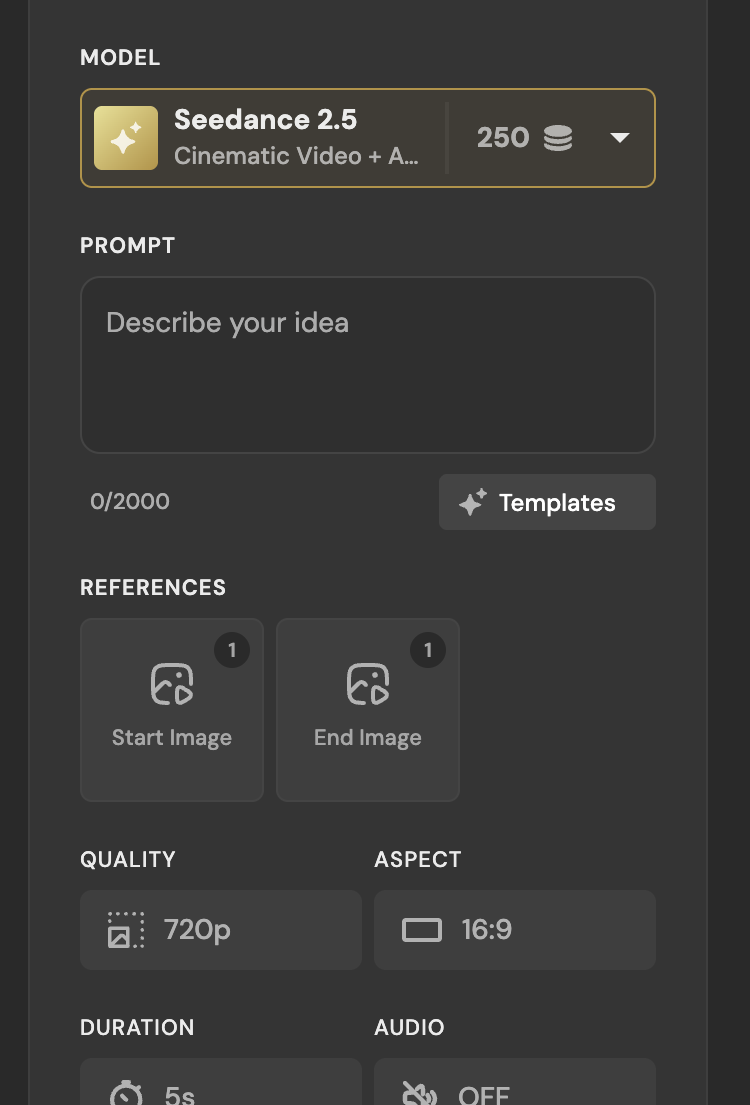 Seedance 2.5 on Pixlr, 26 August 2026: a 2,000-character box, two image slots, and audio off by default.
The mature-content switch and the July change
Under the generation settings, Pixlr has a toggle labelled "Allow Mature Content" alongside a note that reads "Mature content is automatically deleted after 30 days". Next to it sits a second toggle labelled "Make private".
The picker groups six mature video models under their own header. Pixlr's pricing page lists "Private and Mature content" as an Ultra-tier feature.
Pixlr's Trustpilot profile shows 175 reviews with an overall score of 2.0. Reviewers in July and August 2026 describe the platform's filters blocking normal photos after an update on 1 July 2026.
Keith Gordon wrote on 5 July 2026: "Service completely trashed on July 1st. Removed mature content allowance and imposed content restrictions that make zero sense."
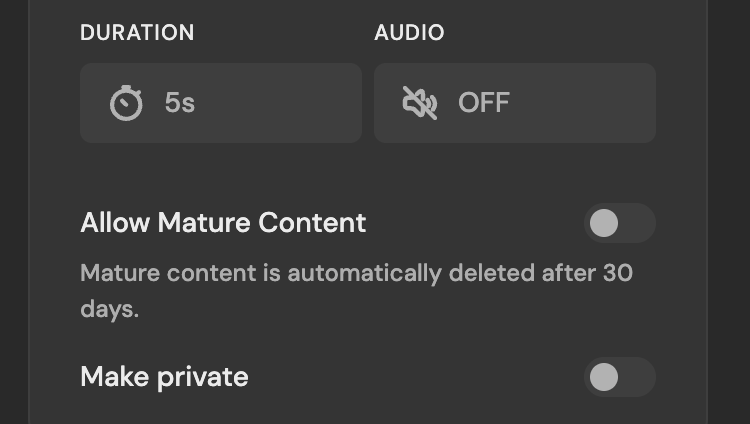 The mature-content switch on Pixlr, 26 August 2026, with its 30-day deletion note.
What it does not tell you
Pixlr's pricing page has conflicting statements about credit allowances. The Ultra tier card promises "Up to 10,000 monthly AI Credits".
Directly beneath it, the Ultra MAX upsell says: "Double the credits with Max, get 10,000 instead of 5,000 monthly". Both sentences appear on the very same page. The upsell box Pixlr shows right after you sign up prints Ultra as "5,000-10,000 monthly AI Credits", so the plan starts at 5,000 and reaches 10,000 on the MAX card. We read that box on 26 August 2026.
The Ultra plan also highlights "Unlimited free 'fast' image generations" as a main perk, footnoted with "Subject to fair use." Their own model data lists the fast tier as four cheap image rows: FLUX.2 Klein 9B, GPT Image 2 Low, Wan 2.7 Image, and Qwen Lightning. Each of those costs 1 to 5 credits. Higher-tier models like Nano Banana 2 sit in the ultra tier at 15 credits and aren't in that unlimited set.
We made a free Pixlr account on 26 August 2026 and spent one of its ten credits on a 1-credit image, but we never generated a video there — a free balance of 10 credits cannot pay for one, since their cheapest clip anywhere is 9 credits and Seedance 2.5 starts at 115.
The same model on Seadanse
We run a competing platform called Seadanse, where you can use the Seedance 2.5 AI Video Generator. We set up the same model with a different set of limits.
On our workspace, Seedance 2.5 gives you 480p, 720p, and 1080p across six aspect ratios: 16:9, 9:16, 1:1, 4:3, 3:4, and 21:9. You can generate clips at 5, 10, 15, 20, 25, and 30 seconds.
Audio is on by default, the prompt box takes 10,000 characters, and you can upload both still pictures and reference clips. You can price a month of Seedance 2.5 clips on our AI video cost calculator before you buy anything.
We don't have photo editors, collage makers, background removers or audio generators, and our face swap is a video effect (face swap photo to video) rather than a photo face swapper. Seedance 2.5 doesn't do 4K here; 4K belongs to our Seedance 2.0 preset.
Signing up gives you 40 free credits without asking for a card. When you press Generate, the system holds estimated credits and settles them only when the clip succeeds. As our Seedance 2.5 pricing page notes: "Failures, timeouts, and platform errors release the hold automatically." Our plan credits expire every 30 days without rollover, while separate credit packs stay valid for 12 months.
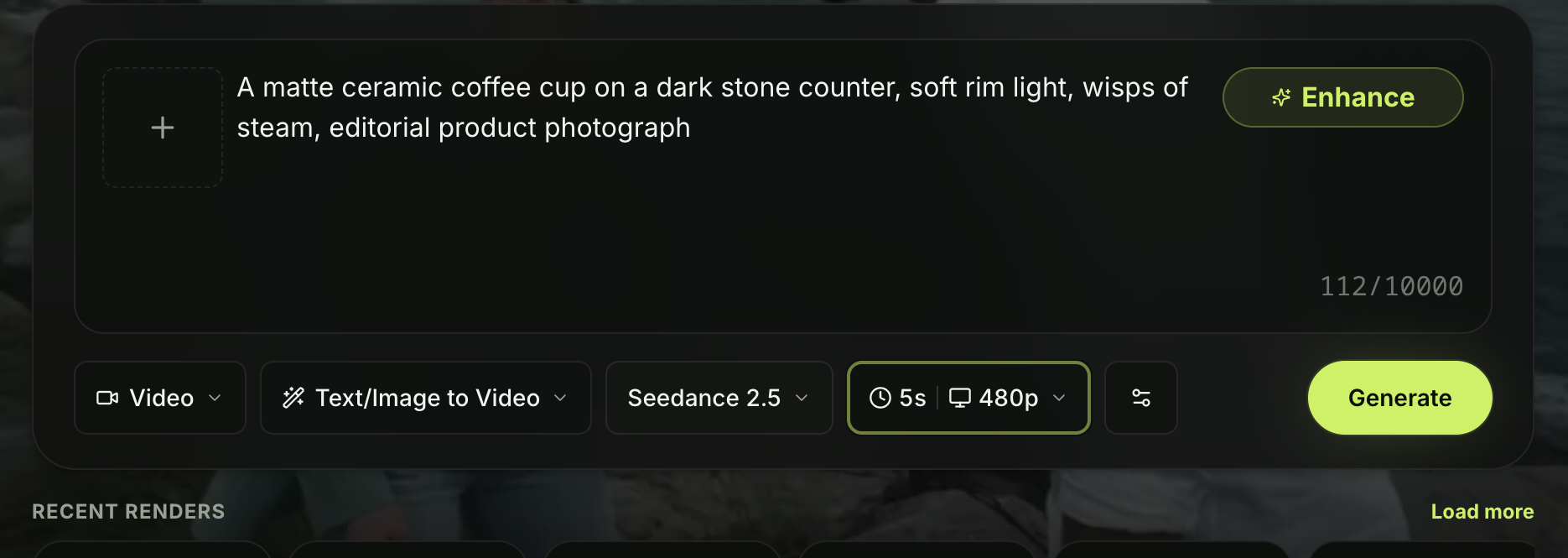 The composer on Seadanse with Seedance 2.5 picked, 26 August 2026.
Made on Seadanse with Seedance 2.5 from a single prompt. The crowd noise came out of the same render.
Should you pay for it?
Pixlr works well if you already edit images on their site and want one credit pool for quick 5-second video drafts. It doesn't suit you if you need 30-second clips, video reference uploads, or clear credit terms. If you'd like to test those extended limits without handing over a card, you can run the same model here instead.
We reviewed Pixlr's live web app, model API endpoints, pricing terms, and Trustpilot profile on 26 August 2026. We compared the settings their picker shows directly against our own workspace settings.
Related Articles
- 8 Best Pixlr Alternatives in 2026 — eight tools sorted by which half of Pixlr you are replacing.
- Is Pixlr Free? What You Get Without Paying — where the free tier stops and what it asks for first.
- Pixlr vs Seadanse for Seedance 2.5: Which One Fits Your Work? — the same model on two platforms, side by side.
- Pixlr Not Working? 7 Fixes to Try First — the sign-in wall, the content filter, and the credits that reset under you.


