
Wassup in a Minute CapCut Template: Which One Makes the Dance, and Why It Stalls
The Wassup in a Minute CapCut template that makes the trio dance is Wassup Dance. Learn how to fix stuck templates and how to dance without one.
 The Seadanse Team10 min read
The team behind Seadanse. We run the models we write about, and we publish the specs, prices and limits the marketing leaves out.

TL;DR — The Wassup in a Minute CapCut template that makes the trio dance is "Wassup Dance", with over 68,000 uses by November 15, 2026. The 4,993,948-use "in a minute wassup" template is a four-photo head-bop, not the dance. When a template stalls, CapCut's own steps are to clear the cache, check your connection, update the app and restart. Or make the trio dance on Seadanse's Wassup in a Minute AI from one to three photos for $9.90 at 720p, with no app.
Under the most-used dance template, the comments are all about waiting. People report "Mine says it will be ready in 8 HOURS" and "Mine's stuck at 95" on the template's page, read November 15, 2026.
We read each template's page so you don't have to guess. Below, we break down which templates make the dance and which ones don't. We'll show how to open one from TikTok, what to try when an export stalls, and how to make the dance without a template.
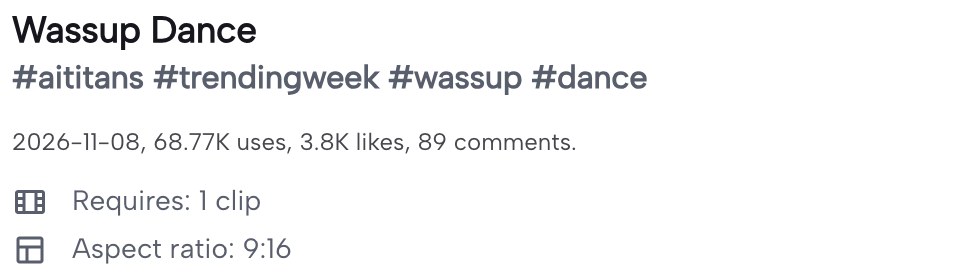
The dance template's own page lists one clip and a 9:16 frame.
Here's what's below:
- The templates: which one is the dance.
- Opening one: from a TikTok post.
- The fixes: CapCut's own steps.
- No template: the dance from your photos.
Which Wassup in a Minute CapCut Template Makes the Dance
Three Wassup in a Minute CapCut templates make the trio dance from one photo, and the others on the same sound make an anime sway or a four-photo head-bop. It's easy to tap the wrong wassup capcut template when several share the exact same sound.
Here's how the six templates compare:
| Template | What it makes | Photos | Length | Frame | Uses (November 15, 2026) |
|---|---|---|---|---|---|
| "Wassup Dance" | The trio dance (CapCut AI) | 1 | 7.2 seconds | 9:16 | Over 68,000 |
| "Ai trend" | The trio dance (CapCut AI) | 1 | 14.9 seconds | Wide | 26,771 |
| "Wassup Dance AI" | The trio dance (CapCut AI) | 1 | 10 seconds | Upright | 8,548 |
| "ai" | The anime sway (CapCut AI) | 1 | 7.3 seconds | Upright | 50,940 |
| "in a minute wassup" | A four-photo head-bop | 4 | 14.2 seconds | Square | 4,993,948 |
| "Wassup in minutes" | Four photos on the beat | 4 | 14.1 seconds | Square | 1,414 |
The three dance templates each take one photo. The template with the most uses, "in a minute wassup", plays four photos as a head-bop, so it doesn't make the trio dance.
On CapCut, "Wassup Dance" gives you 7.2 seconds in an upright 9:16 frame. The "Ai trend" template runs for 14.9 seconds in a wide frame, while "Wassup Dance AI" runs for 10 seconds upright.
The "ai" template makes the anime sway rather than the dance, running 7.3 seconds. Another four-photo option, "Wassup in minutes", plays four photos on the beat for 14.1 seconds.
You can read how the dance and the anime edit differ to see how the dance and the drawn edits split across the platform.
How to Open a Wassup Template From TikTok
You open a wassup template from TikTok through the "CapCut · Try this template" tag on a post made with one. That's the direct route to open the exact wassup in a minute template you just watched in your feed.
Here's how it goes:
- The tag: tap "CapCut · Try this template" above the post's caption.
- The template: the template opens in CapCut, where its page shows "Try this template".
- Your photo: pick the photo the template asks for (one for the dance templates, four for the head-bop).
- The export: let the template make your video, then save it.
You can also search CapCut for the template's name, exactly as the table spells it. Searching the name brings up the template's page directly.
Why a Wassup in a Minute CapCut Template Gets Stuck
A Wassup in a Minute CapCut template gets stuck in two places: while the template loads, or while its AI step makes your video. When you see a capcut template not working, local device conditions often interrupt the process.
CapCut's help page names temporary files, low memory, a weak connection, an old app version and low storage as reasons loading hangs.
Here's what people report under the "Wassup Dance" template:
- The estimate: "Mine says it will be ready in 8 HOURS" on November 11, 2026, "Mine says 5 hours" on November 14, 2026, and "Mine said three minutes and rn it's stuck on 90% and 27 secs" on November 12, 2026.
- The 95%: "Mine's stuck at 95" on November 14, 2026.
- The 98%: "98% 23 seconds and it's not continuing" on November 12, 2026.
- The 99%: "it still says 99%" on November 12, 2026.
The comments show estimates from three minutes up to "8 HOURS", in their own words.
How to Fix a Stuck Wassup in a Minute CapCut Template
To fix a stuck Wassup in a Minute CapCut template, follow CapCut's own help page. Working through CapCut's checklist clears out common device hitches that stop a template from finishing.
Here are CapCut's steps:
- Clear the cache: clear the app cache on your device; it removes temporary files that may interfere with the app.
- Close other apps: close apps running in the background, since they use up memory the template needs to load.
- Check your connection: templates need a stable internet connection, so switch between WiFi and mobile data or try a different WiFi network. Restarting the app or phone can refresh the connection.
- Update CapCut: check your phone's app store for updates and install them, but don't uninstall the app to update it, as that may remove your local projects or unfinished edits.
- Restart your phone: a fresh start can clear temporary glitches.
- Free up storage: make sure your device has enough free storage space.
- Contact CapCut support: if it still sticks, CapCut asks you to contact its support team with your device, your app version and the template you're trying to use.
If you're making a trio, you can also skip the template — see the next section.
Make the Wassup Dance Without a CapCut Template
You make the wassup dance from your photos on our page in three picks and presses. There's no app to install, and you don't have to search through template lists.
In our video, you see a young woman with long wavy blonde hair, wearing an olive-green jacket over a white top and light blue jeans. She leads two of Seadanse's dancers in white T-shirts across four shots on the beat.
The trio routine, the four cuts, who stands where and the sound are built in. You don't have to prompt anything or set up keyframes.
It runs in your web browser on a phone, tablet or computer. On a computer, you can scan a code with your phone and pick photos directly from your camera roll.
Here's how it works:
- Add your photos: one to three; your first photo leads in the middle; an empty spot gets one of Seadanse's dancers.
- Pick a quality: 720p or 1080p; 720p is picked to start.
- Leave the box ticked and press Create: the box comes ticked, and the price shows on the button before you pay.
Here's what you get:
- Your trio: each of you keeps your face, hair and the clothes from your photo, in your own spot.
- The four shots: the bounce, the close-up, the walk and the dusk sway in 15 seconds of widescreen 16:9, with the trend's sound under it.
- The price: $9.90 for 720p, paid once with no account and no subscription; 1080p takes 1,480 credits on Seadanse pricing.
In the first shot (0 to 3.6 seconds), the three of you bounce on a sunny lawn with palms and pines, putting both hands on your heads. The close-up (3.6 to 7.2 seconds) brings you right to the camera with thumbs and finger-guns while your friends wave behind you.
Next, you walk toward the camera on a path by the water (7.2 to 10.8 seconds). In the dusk sway (10.8 to 15 seconds), you sway and point on a lawn with city lights behind you.
You can make friend trios with adult friends who say yes, or family videos with relatives who are 18 or older. You can also dance with your dog, your cat, or a cartoon or game character.
Credit packs are a one-time purchase, and pack credits stay valid for 12 months. When your video's ready, you'll download an MP4 with no watermark on exported video.
Check out how to do the Wassup in a Minute AI trend in three steps to pick photos with clear lighting.
Wassup in a Minute CapCut Template FAQ
Is the "in a minute wassup" template the wassup dance?
The "in a minute wassup" template isn't the trio dance. It takes four photos and plays them as a head-bop, running 14.2 seconds in a square frame, with 4,993,948 uses on November 15, 2026. The dance templates only take one photo.
Do CapCut AI templates use credits?
CapCut AI templates use credits for AI features according to CapCut's help page. It states that "Each credit in CapCut is equivalent to $0.01 USD" on CapCut's credits page. That's what CapCut states on how credits work for its AI tools.
Can I put my friends in a wassup CapCut template?
A wassup CapCut dance template only takes one photo, so you can't add your friends into it. On Seadanse's Wassup in a Minute AI generator, you add up to three photos. Each friend dances in their own spot, wearing the clothes from their photo.
What song is in the wassup templates?
The song in the wassup templates is producer zbee's jersey club remix of "From Time" by Drake featuring Jhené Aiko. Jersey club is a fast, bouncy dance-music style with a kick drum on every beat. The hook says "What's up? Been a minute", which gave the trend its name.
Can I make other dance videos from my photo?
Other dance videos from your photo are available on Seadanse, including Like JENNIE AI Dance, where you lead eight dancers in black. You can also browse our other AI video effects to turn photos into videos without writing prompts. You can try Car Doritos AI with friends or You're Under Arrest AI Dance on your own.
Make Your Wassup Trio Today
The "Wassup Dance" CapCut template gives you the dance, while the head-bop template with 4,993,948 uses won't make the routine. When an export hangs, follow CapCut's cache and restart steps, or skip the template and make your trio from one to three photos for $9.90 at 720p. You'll get your full 15-second widescreen dance video with the trend's sound under it.
Written by The Seadanse Team, the team that built the Wassup in a Minute AI page.
Related Articles
- What Is the Wassup in a Minute Trend? The Dance, the Song and the Anime Edit — who started the dance, which song says "wassup in a minute", and how the dance differs from the anime edit.
- How to Do the Wassup in a Minute AI Trend With Your Friends (3 Steps) — the 15 seconds shot by shot, three picks and presses, and the photos that work best.
- Best Wassup in a Minute AI Generators (2026): 7 Tools Compared — the dance and anime tools side by side: photos, length, sound and how you pay.
- Wassup in a Minute AI Prompt (Copy-Ready) and the Video It Made — the prompt behind our video, word for word, and what each part does.


