
Yan Diomandé Missed Goal Prompt (Copy-Ready) and the Video It Made
The soccer missed shot celebration prompt is the exact prompt behind Seadanse's Yan Diomandé Missed Goal, with every beat on its second. Skip it for $9.90.
 The Seadanse Team15 min read
The team behind Seadanse. We run the models we write about, and we publish the specs, prices and limits the marketing leaves out.

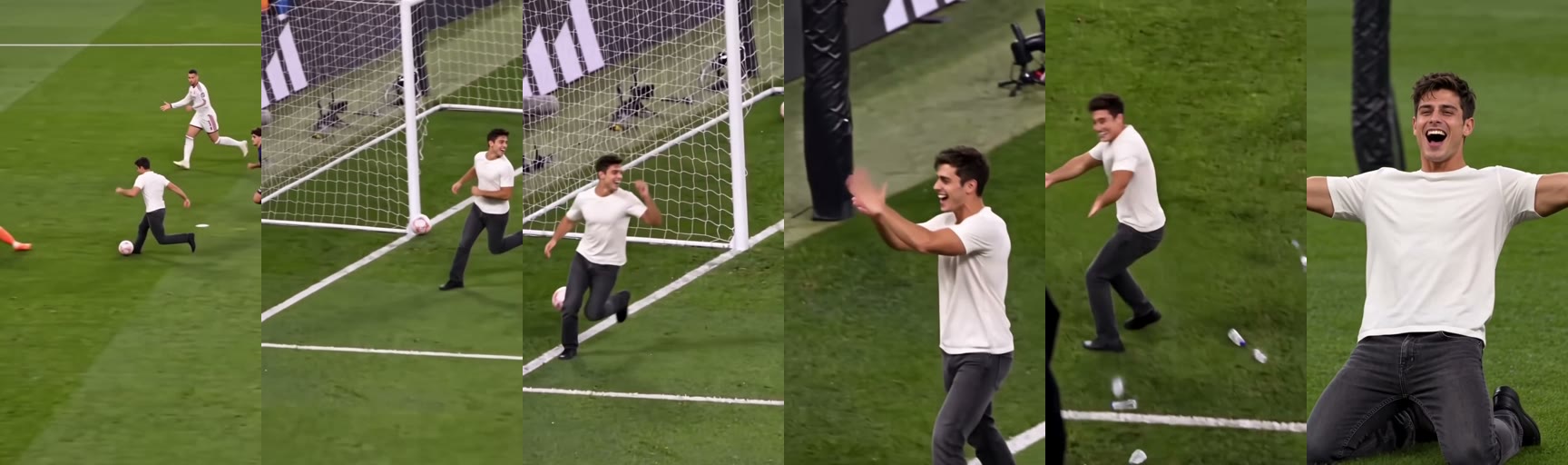
TL;DR — The soccer missed shot celebration prompt is the exact 424-word prompt Seadanse's Yan Diomandé Missed Goal page runs. It edits the trend's 12-second clip with one photo and keeps every beat on its second, from rounding the keeper at about 1 second to the kneel from about 9.9 seconds. It made the video below, from one photo, in the man's own clothes.
On Seadanse's Yan Diomandé Missed Goal page, the clip, the prompt and the stadium sound are built in. So you add one photo instead, and one 12-second 720p video is $9.90.
People watch the missed goal clip on social feeds and ask how someone made it. One French caption puts it straight: "Comment créer cette vidéo où tu tires au but et le rates complètement ? C'est en fait généré par l'IA, il suffit d'utiliser le modèle en bas à gauche", meaning "How do you make this video where you shoot and miss completely? It's actually AI-generated, you just use the template at the bottom left".
When you look for the words, the videos don't share them. In the most-watched how-to video, the creator walks through taps inside an app rather than showing a prompt. The prompt ideas you'll find elsewhere simply describe a match scene in words, without locking this specific clip or the post at 4.4 seconds.
Here's the exact prompt our page runs and the video it made. Then you'll see how it's built, what you need to run it, the habits that make it work, and the way to skip it.
What Is the Soccer Missed Shot Celebration Prompt?
The soccer missed shot celebration prompt is the written instruction a video tool reads to put the one in your photo into the trend's 12-second clip. It says who the player becomes, when each beat lands and what never changes. Here it is, word for word as our page runs it:
Edit @Video1. Replace the one young woman who dribbles round the goalkeeper, misses the empty goal and celebrates in @Video1 (long wavy brown hair, a navy off-shoulder cropped sweatshirt with a big white star-and-letters print, light blue wide-leg jeans, cream sneakers) with the person in @Image1 (exactly their face, hair, skin tone, age, gender and build, wearing the clothes they wear in @Image1; a character or a pet when @Image1 shows one), in every shot from the first touch to the end. No long wavy brown hair, no navy sweatshirt, no star or letter print, no grey top or strap at the waist or shoulder, no light blue wide-leg jeans, no cream sneakers and no hoop earrings unless @Image1 shows them; the clothes are the plain fabric of @Image1, with no print, letters or logo added. The person keeps the place, size in frame, pose and every movement of the woman they replace, at the same moment: dribbling towards goal, going round the goalkeeper as he slides in at about 1 second, running with the ball to the goal line, poking the ball against the near post at about 4.4 seconds so it stays out of the empty goal, already turning away laughing with a hand in the hair, walking away laughing, swinging both arms out in celebration by the black padded post at about 7 seconds, ducking as plastic bottles are thrown from about 8 seconds and then spreading the arms wide, and from about 9.9 seconds kneeling on the grass with arms spread wide, laughing and shouting with joy until the end. Keep every other person exactly as they are and never give them the face of @Image1: the teammate in the white kit running behind at the start, the opponent in the dark red and blue kit at the right edge, the goalkeeper in orange who slides in, the three men in white on the bench who laugh behind the waving flag, the fans whose flags sweep across the foreground and the crowd in the stands. Keep everything else from @Video1 exactly as it is: the floodlit night stadium, the striped green pitch and white lines, the goal and net, the dark advertising boards and camera rigs behind the goal, the black padded post, the thrown bottles on the grass, the five shots and the hard cuts at the same moments, the camera moves, framing, lens, motion blur, the ball's path and the timing. Clean, sharp, true-to-life image with clear detail on the face. No captions, watermarks, text or logos added.In this instruction, @Video1 (the trend's 12-second clip, the video the prompt edits) gives the action, while @Image1 (your photo) gives the face and clothes. It's one paragraph, the same for every video, and your photo is the only thing that changes.
This prompt made the video below from one photo:
The finished video shows the man from the photo, wearing his cream T-shirt, dark grey jeans and black shoes, right through all 12 seconds.
How the Yan Diomandé Missed Goal Prompt Is Built
The Yan Diomandé missed goal prompt is built in seven parts, and each part does one job.
| Part | The prompt's words | What it does |
|---|---|---|
| Open the edit | "Edit @Video1." | Tells the tool to change the trend's 12-second clip, not make a new one |
| Who becomes the player | "the person in @Image1 (exactly their face, hair, skin tone, age, gender and build, wearing the clothes they wear in @Image1 …)" | Puts the one in your photo on the pitch, "in every shot from the first touch to the end" |
| What never comes back | "unless @Image1 shows them" | Keeps the clip player's hair and clothes out of your video |
| Every move at its second | "at about 1 second … at about 4.4 seconds … at about 7 seconds … from about 8 seconds … from about 9.9 seconds" | Lands the keeper, the post, the celebration, the bottles and the kneel where the trend has them |
| Everyone else | "Keep every other person exactly as they are and never give them the face of @Image1" | Keeps the keeper, the bench, the fans and the crowd as they are |
| What stays | "the five shots and the hard cuts at the same moments" | Keeps the stadium, the camera and the timing people know |
| The finish | "Clean, sharp, true-to-life image with clear detail on the face." | Asks for a sharp face and no added text |
Together, those seven parts keep the clip's timing steady while placing your subject into the action.
What You Need to Run the Missed Goal Prompt Yourself
To run the missed goal prompt yourself you need four things:
- The tool: a video tool that edits a clip you already have, using one photo and your words.
- @Image1: your photo of one person 18 or older, a friend with their say, a cartoon or game character, or a pet, with the face clear and in good light.
- @Video1: the trend's 12-second vertical clip, the one with the keeper, the post, the bench and the bottles.
- The sound: you lay the clip's own stadium sound back under the finished video from the first second.
On our Yan Diomandé Missed Goal generator all four are built in, so you add the photo and nothing else.
Habits That Make the Missed Goal Prompt Work
Six habits make the missed goal prompt work, and you can see each one in the prompt above.
Put Every Beat on Its Second
The timed lines in the prompt give every camera cut and movement a specific second. That timing keeps the narrative intact across the full 12 seconds:
- 0-2 seconds: Seen from high in the stands of a floodlit night stadium, you dribble in with a team-mate in white running behind. You go round the keeper in orange as he slides in at about 1 second.
- 2-4 seconds: you carry the ball to the goal line with the goal wide open.
- About 4.4 seconds: you poke the ball against the near post and it stays out.
- 4.6-7 seconds: already laughing, a hand in your hair, you walk away as the ball rolls back along the line.
- About 7 seconds: a hard cut, closer: you swing both arms out by the padded post as if you'd scored.
- About 7.8 seconds: a fan's flag sweeps past and three men on the bench double over laughing.
- 8-9.9 seconds: you duck as plastic bottles come down from the stands, then spread your arms among them on the grass.
- 9.9-12 seconds: you're on your knees on the grass, arms wide, laughing and shouting with joy, your face big in the frame.
The ball hits the post at about 4.4 seconds, so the miss lands before most people have scrolled.
Point at the Player by Look, Not by Name
The prompt doesn't name any player. Instead, it singles out the player who misses by pointing at "the one … who dribbles round the goalkeeper, misses the empty goal and celebrates" by hair and clothes.
Because the prompt describes that specific person's look, nobody else in the stadium changes. The video tool knows who it's changing, and it doesn't touch anyone else in the frame.
Say What Never Comes Back
The prompt tells the tool what items must disappear "unless @Image1 shows them". It also states that "the clothes are the plain fabric of @Image1, with no print, letters or logo added".
That's what makes sure the one in your photo plays in their own clothes, not in parts of the outfit from the clip.
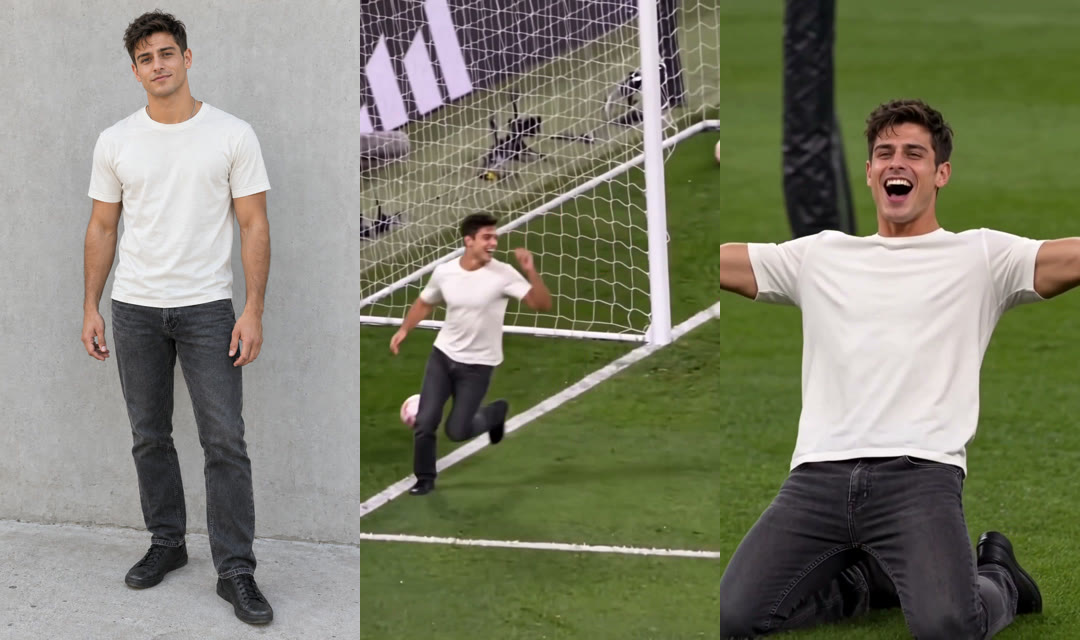
In the frame above, you can see the man's plain cream T-shirt and dark grey jeans stay the same in both shots.
Keep Everyone Else's Face
The prompt explicitly states: "Keep every other person exactly as they are and never give them the face of @Image1".
It keeps the rest of the stadium as it is, group by group:
- The team-mate: the team-mate in the white kit running behind at the start stays unchanged.
- The opponent: the opponent in the dark red and blue kit at the right edge keeps their original look.
- The goalkeeper: the goalkeeper in orange who slides in keeps his face and kit.
- The bench: the three men in white on the bench who laugh behind the waving flag remain the same.
- The fans and crowd: the fans whose flags sweep across the foreground and the crowd in the stands stay untouched.
Lock the Stadium, the Shots and the Cuts
The prompt directs the tool to preserve "the five shots and the hard cuts at the same moments", along with "the floodlit night stadium, the striped green pitch and white lines".
A hard cut (the picture jumps straight to the next shot) keeps the rhythm brisk. By locking "the camera moves, framing, lens, motion blur, the ball's path and the timing", the prompt keeps the clip's visual structure intact.
Let One Line Cover a Person, a Character or a Pet
The prompt uses the phrase "a character or a pet when @Image1 shows one". That single line handles photos of you, a friend with their say, a cartoon or game character, or a dog or cat.
So you don't need to rewrite anything: it's the exact same prompt for every subject.
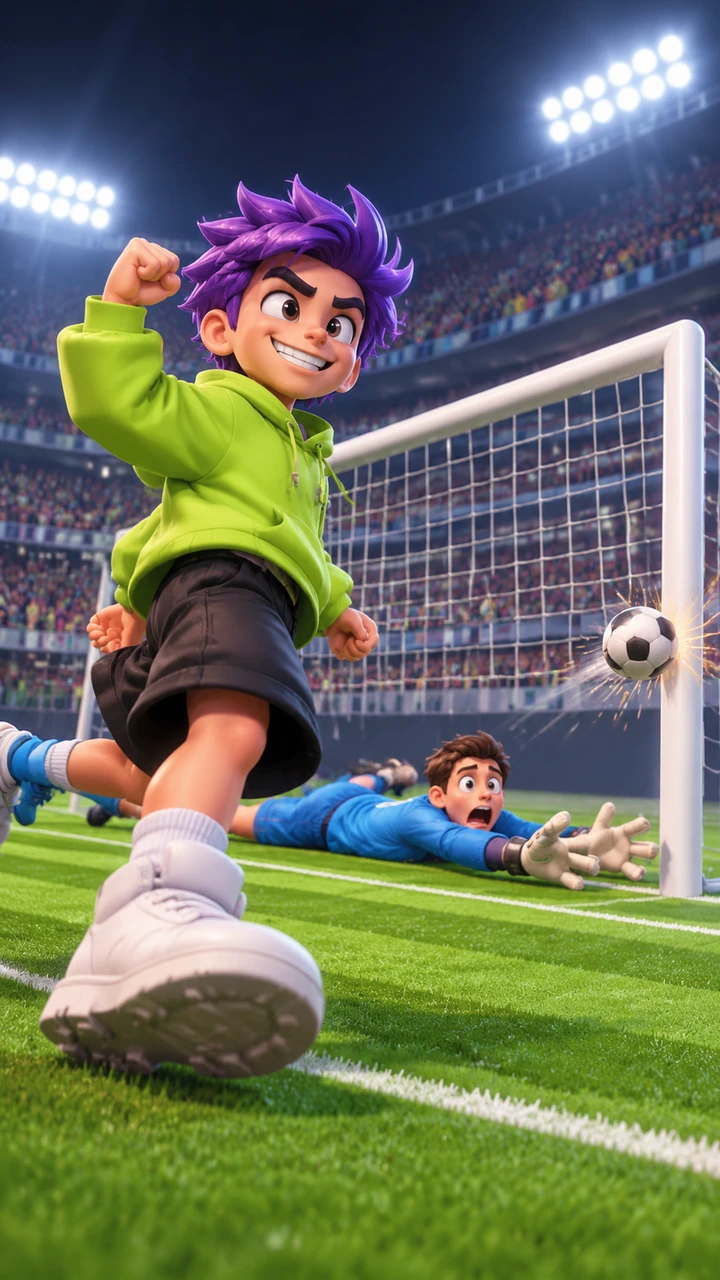
Here, an original game-style character taps the ball off the post while wearing their own lime hoodie.
Soccer Missed Shot Celebration Prompt vs a Football AI Video Prompt
A soccer missed shot celebration prompt that edits the trend's clip and a football AI video prompt that describes a match in words make two different videos.
Standard football AI video prompts create a new scene from scratch. They specify the scene, setting, mood, camera movement, and visual style in words, often aiming for a TV-broadcast look under floodlights. In contrast, prompt concepts for the celebrating too early meme describe humorous ideas, like a striker turning away before the ball crosses the line or a no-look shot sailing wide.
| The missed goal prompt above | A football AI video prompt | What it means for you | |
|---|---|---|---|
| What it starts from | The trend's 12-second clip + 1 photo | Words only | With the clip, the stadium and the bench are the ones people know |
| Who plays | The one in your photo, in their own clothes | A player the words describe | It's you, your friend or your dog who celebrates too early |
| The miss | The ball off the near post at about 4.4 seconds | Whatever the words describe | The miss lands on the trend's own beat |
| Shots and timing | Five shots, hard cuts at the same moments, 12 seconds | Set in words | The joke plays out the way people have seen it |
The prompt in this article edits the trend's 12-second clip directly, keeping the stadium, miss and timing that audiences recognize.
Can You Skip the Missed Goal Prompt? Yes, With One Photo
Yes: on Seadanse the clip, the prompt and the stadium sound are built in, so there's no prompt to write, no CapCut template and no app.
You only make three simple choices:
- Add one photo: upload a photo of one person 18 or older, a friend with their say, a character, or a pet, or scan the on-screen code with your phone.
- Pick your quality: choose 720p or 1080p right on the page.
- Create your video: leave the box under the photo ticked and press Create.
When you buy, you'll pay once at checkout with no account and no subscription.
One 12-second 720p video costs $9.90 through a 500-credit pack (credits are the site's own currency you buy in packs). The price shows on the Create button before you pay. You can review full details on Seadanse pricing.
To get started right away, make the miss from one photo or follow our three-step Yan Diomandé Missed Goal guide.
Yan Diomandé Missed Goal Prompt FAQ
Is this the prompt Seadanse actually uses?
Yes: word for word as our page runs it, copied on November 14, 2026, and it made the video at the top of this article. It edits the trend's 12-second clip using the subject in your photo.
Does the prompt name Yan Diomandé?
No: the prompt names no player; his name, also typed "Yann Diomande", comes from captions on the trend's TikTok posts. Read our guide on what the Yan Diomandé Missed Goal trend is to see the names people use.
Does the missed goal prompt add the stadium sound?
No. The prompt has no sound line.
On Seadanse, the clip's own stadium sound is laid under your video from the first second, and the crowd gets louder as the bottles fly in. You hear the packed crowd right away.
Can you use the prompt with a pet or a cartoon character?
Yes: one line covers both, "a character or a pet when @Image1 shows one"; on our page a dog, a cat or a cartoon or game character works the same way. The subject simply takes the player's place on the pitch.
Is there a CapCut template instead of a prompt?
The trend spread through CapCut AI templates that take one photo, which we break down in our guide on the Yan Diomandé Missed Goal CapCut template. You can also try other football clips. Ozil Goal AI turns one photo into a 15-second chip over the keeper, and Lamine Yamal Rabona AI makes a 9-second fake rabona video.
What does a 1080p missed goal video take?
A 1080p video takes 1,480 credits. Credit packs are a one-time buy with no subscription, and they're valid for 12 months. You can read how pay-once credits work in our credit guide.
Ready to Skip the Missed Goal Prompt?
The copy-ready missed goal prompt handles the full 12-second clip, but our generator lets you skip typing a prompt at all. You can skip the prompt with Yan Diomandé Missed Goal by adding one photo to get your finished vertical video.
By The Seadanse Team; we copied the prompt above from our page on November 14, 2026.
Related Articles
- What Is the Yan Diomandé Missed Goal Trend? Real or AI, Explained — what happens in the 12 seconds, the names people use, and why his name is on the clip.
- How to Make the Yan Diomandé Missed Goal Video From One Photo (3 Steps) — add one photo, pick a quality, press Create.
- Yan Diomandé Missed Goal CapCut Template: Which One It Is and Why It Won't Open — which templates carry the clip, how they open, and a way with no app.
- Celebrating Too Early Meme: Make Your Own Missed-Goal Version From One Photo — the meme behind the miss, and how to be the one who celebrated too early.


