
Seedance 2.5 官网:搜索结果前 9 位,只有 3 个真正属于字节跳动
Seedance 2.5 没有独立官网。字节跳动将其部署在即梦、Dreamina 和火山引擎(BytePlus ModelArk)中。本文带你认清所有正规入口。
 The Seadanse Team5 分钟阅读
The team behind Seadanse. We run the models we write about, and we publish the specs, prices and limits the marketing leaves out.

TL;DR — Seedance 2.5 没有独立的官方网站,因为字节跳动根本没建过。真正能用上它的正规入口只有三个:面向海外用户的 Dreamina、面向国内用户的即梦(以及豆包专业版),以及面向开发者的 BytePlus ModelArk API。搜索结果页上的其他所有网站(包括我们在内),都只是调用该模型的第三方平台,并不是它的“官方大本营”。
在搜索引擎里搜这个模型,翻开第一页,你会看到 9 个都声称自己是“官方”的结果。但其中有 6 个跟字节跳动毫无关系,而且标题里全都不写自己到底是谁运营的。更离谱的是,这些网站都在宣传的一项核心规格,在官方报价卡(各平台用来扣费的计费标准)里根本找不到。
本文会直截了当地告诉你:这套工具究竟是谁做的、现在去哪里能真正用上,以及如何在 30 秒内识破套壳第三方。
Seedance 2.5 到底是谁做的
它的开发者是字节跳动。2026 年 7 月 31 日,字节跳动宣布了该模型的发布,并在官方发布文章中明确写道:“Seedance 2.5 能够单次生成高质量的 30 秒音画同步片段”(“Seedance 2.5 can generate high-quality, 30-second audio-video clips in a single pass”)(详情参见 Seedance 2.5 到底带来了哪些改变)。
字节跳动表示,你可以同时向该模型输入三种参考素材:
- 最多 30 张图片
- 最多 10 条视频片段
- 最多 10 条音频素材
这就是宣传中“50 项参考输入”的由来:30 加 10 再加 10。同一天,字节跳动在即梦 AI 和豆包专业版上线了该模型。模型官方页面介绍,单次生成的视频长度最高可达 30 秒,并支持进行两次延长。

位于 seed.bytedance.com 的字节跳动 Seedance 2.5 模型介绍页,截取于 2026 年 8 月 21 日。这只是一个科研展示页——上面没有任何能直接生成视频的操作入口。
字节跳动的科研站点 seed.bytedance.com 只提供了 Home(首页)、Models(模型列表)、Blog & Publication(博客与论文)、Seed Edge 以及 Join Us(加入我们)几个导航项。你无法在上面制作片段或生成视频。那只是用来发布研究论文和版本公告的学术站点,并不是供用户操作的在线工具。
Google 搜索早已给出结论,且完全一致
Google 自己的搜索摘要也给出了相同的答案。以下是 2026 年 8 月 21 日 Google AI Overview(AI 概览)呈现的内容:
Seedance 2.5 并没有独立的专用官方网站。相反,该模型由字节跳动开发,并在全球范围内通过字节跳动的 AI 创作平台 Dreamina 正式托管与访问。企业及开发者访问则通过 BytePlus ModelArk 进行管理。(“Seedance 2.5 does not have a standalone dedicated official website. Instead, the model is developed by ByteDance and officially hosted and accessed globally through ByteDance's AI creation platform, Dreamina. Enterprise and developer access is also managed through BytePlus ModelArk.”)
该摘要还提到其输出支持“具备原生音效能力的高清 4K 电影级视频”(“High-definition 4K cinematic video with native audio capabilities”)。但只要你查看真实的报价卡,就会发现关于 4K 的说法根本站不住脚,下文会详细解释原因。
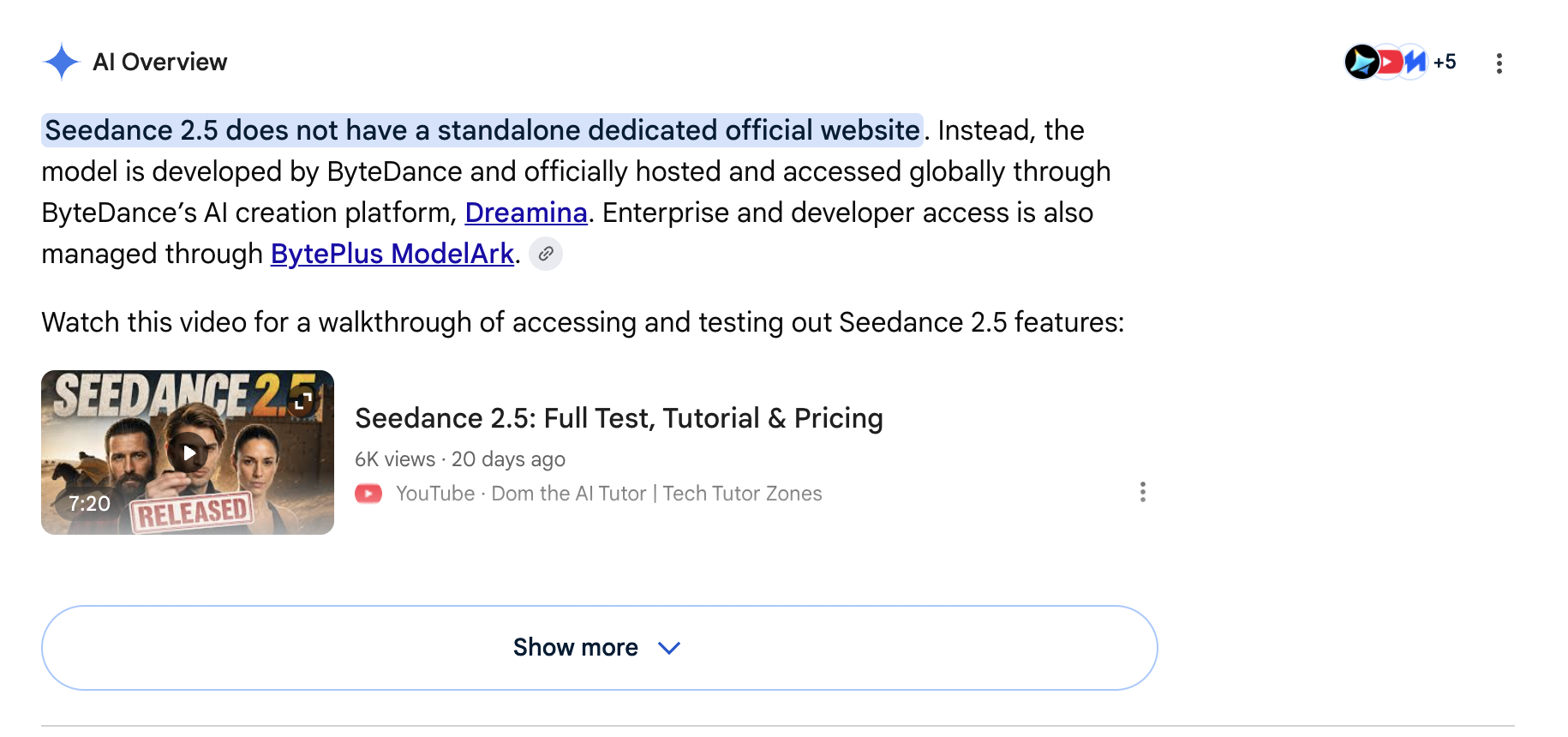
针对“seedance 2.5 official website”的 Google 官方搜索摘要,截取于 2026 年 8 月 21 日。它点名了 Dreamina 和 BytePlus ModelArk,同时也重复了关于 4K 的宣传。
所有正规入口一览
在 2026 年 8 月 21 日,搜索首页共展示了 9 条自然排名结果。这 9 个结果里,仅有 3 个属于字节跳动——也就是说,该页面上每三个结果中就有两个是第三方。
以下是各正规入口在访问方式、功能支持及导出限制方面的对比:
| 入口 | 运营方 | 核心功能 | 主要限制 | 综合评分 |
|---|---|---|---|---|
| Dreamina | ByteDance | 海外官方第一方应用,支持 30 秒片段,带有 180 秒测试模式 | 未登录状态下,默认生成器模型列表中找不到该模型 | ★★★★☆ |
| 即梦与豆包专业版 | ByteDance | 国内第一方应用;默认即为 2.5 模型 | 面向中国大陆;界面为全中文 | ★★★★☆ |
| BytePlus ModelArk | ByteDance | 官方 API,模型标识为 dreamina-seedance-2-5-260628 | 需要开发者自行编写代码调用 | ★★★★☆ |
| Higgsfield | Higgsfield | 包含 2.5 模型的全功能视频套件 | 入门级订阅方案不包含 Seedance 2.5 | ★★★☆☆ |
| kie.ai | Kie | API 分销商,接入配置速度比官方更快 | 在你与字节跳动之间多了一层转接 | ★★★☆☆ |
| Seadanse | 我们 | 浏览器单次即用,无需按月订阅,导出无水印 | 最高支持 1080p 与 30 秒;不支持参考音频 | ★★★☆☆ |
我们的评分标准——满足以下每项各计一星:
- 无需订阅即可直接使用。
- 在开始生成前明确展示所需费用。
- 导出的视频不带任何水印。
- 明确公开实际支持的规格参数。
- 支持在海外无障碍直接访问。
各行对应的数据来源已附带链接。
如果你现在就需要 4K 级别的视频输出,该功能目前仅由 Seedance 2.0 预设 提供,2.5 暂不支持。
两分钟内快速生成 Seedance 2.5 片段
如果你不想写代码接 API,也不想背负按月订阅的扣费负担,可以直接在浏览器里体验该模型。
使用我们的 Web 端工具非常简单:
- 直接打开 Seedance 2.5 生成器,操作工作区会自动在浏览器中载入。
- 输入提示词,按需上传参考图片或视频素材。如果不确定文本该怎么写,可以参考Seedance 2.5 提示词编写指南。
- 选择宽高比,将生成时长设定在 5 至 30 秒之间,点击生成。

Seadanse 编辑器界面,截取于 2026 年 8 月 21 日。按钮上的数值代表本次生成需要扣除的积分,点击之前一目了然。
新用户注册即可领取免费的起步积分,无需绑定信用卡。后续如果需要更多积分,可以购买 $9.9 的免订阅积分包,积分有效期长达 12 个月。按钮在每次点击前都会明确标出扣费数额,任务如果生成失败会自动退款。
两大第一方应用:Dreamina 与即梦
针对不同地区的用户,字节跳动将该模型分别集成到了两款不同的消费级产品中。
Dreamina:面向海外的入口,但默认列表中没有 2.5
Dreamina 是字节跳动面向海外创作者推出的应用。其落地页标题为“官方 Seedance 2.5:支持音频的 4K 30 秒 AI 视频生成器”(“Official Seedance 2.5: 4K & 30s AI Video Generator with Audio”),并宣称该模型已在海外正式上线。
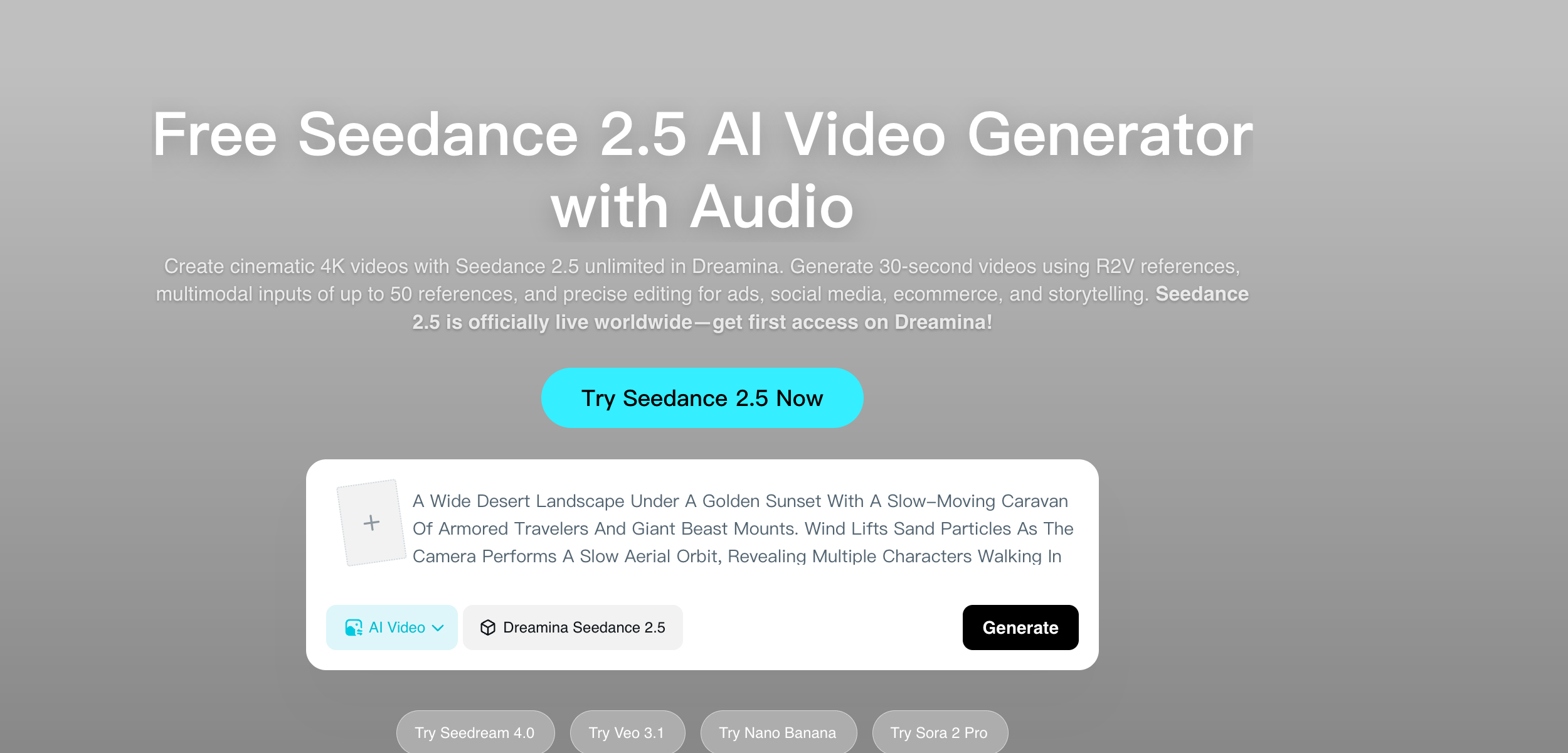
Dreamina 的 Seedance 2.5 落地页,截取于 2026 年 8 月 21 日,自带的生成框已预设为 Seedance 2.5。
该页面包含一个默认指定为 Dreamina Seedance 2.5 的生成框。文案中提到了 30 秒片段生成能力,以及最高支持 180 秒的测试版长视频模式。页面同时标明,付费方案提供无水印下载以及最高 60 FPS 的流畅度支持——这意味着免费版导出的视频带有水印。
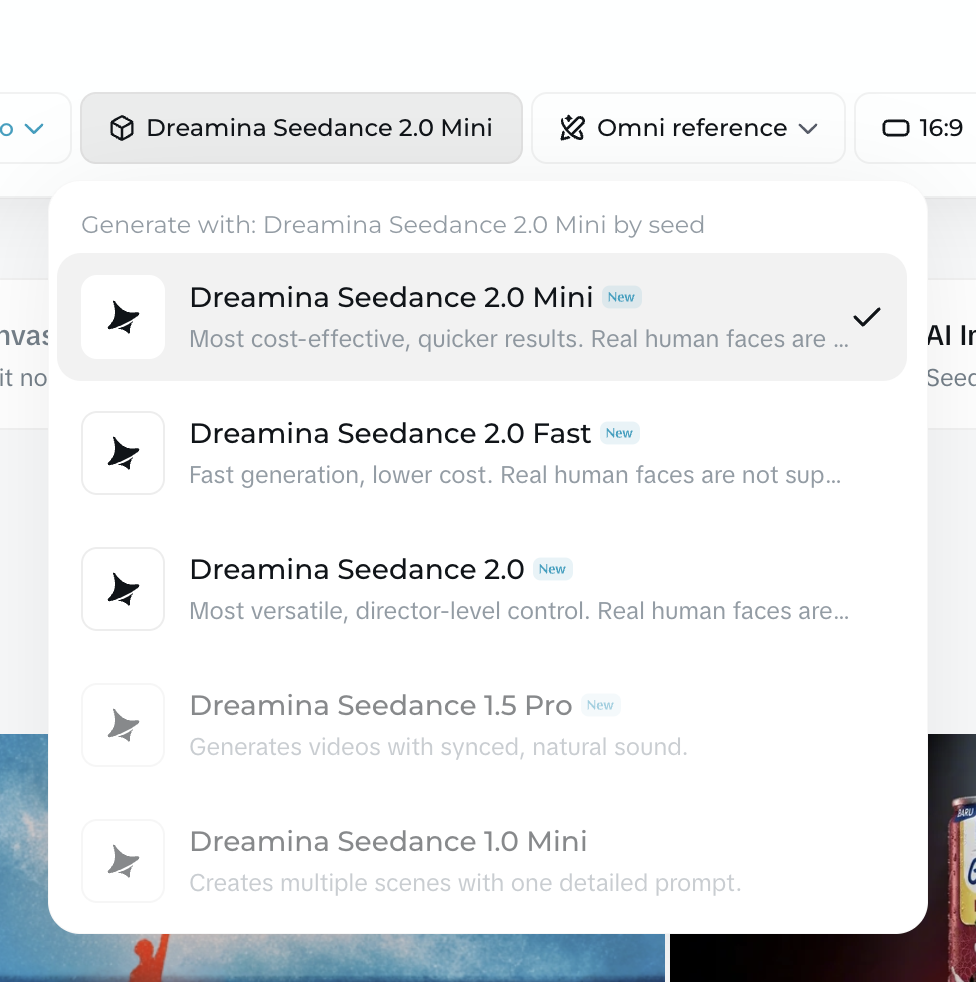
未登录状态下 Dreamina 主视频生成器的模型下拉列表,截取于 2026 年 8 月 21 日。列表仅有 5 个模型,且不支持向下滚动。
然而,当你在未登录状态下打开 Dreamina 的主视频生成器时,模型选择器中展示的却是另一番景象。在 2026 年 8 月 21 日,列表中只有 5 款模型可选:2.0 Mini、2.0 Fast、2.0、1.5 Pro 和 1.0 Mini。该列表无法向下滚动,里面根本没有 Seedance 2.5。
即梦与豆包专业版:国内入口,2.5 为默认模型
即梦是字节跳动面向国内推出的对应应用。在未登录状态下打开即梦的视频创作界面,Seedance 2.5 就已经是默认选中的模型。
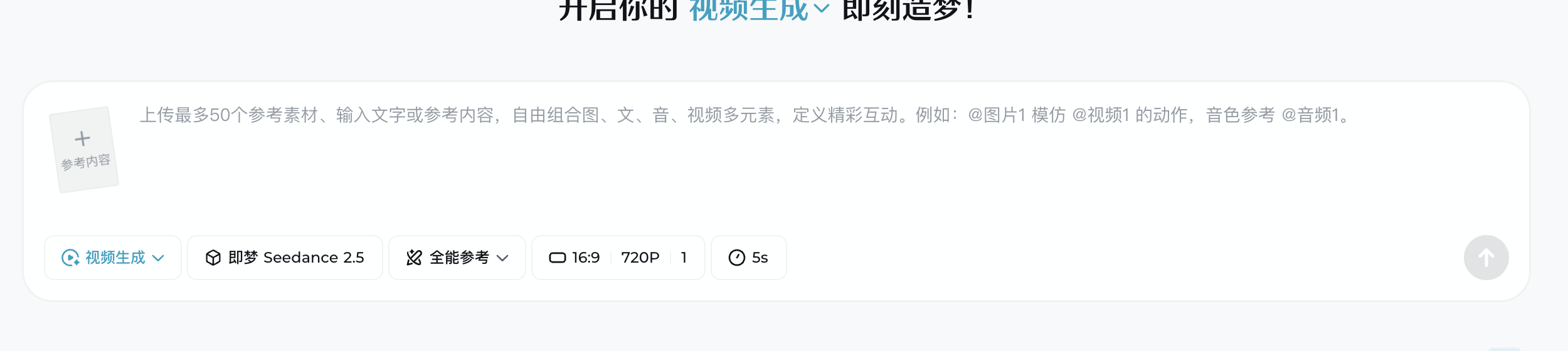
未登录状态下的即梦视频编辑区,截取于 2026 年 8 月 21 日。系统默认为你分配的就是 Seedance 2.5。
截至 2026 年 8 月 21 日,即梦默认生成参数为 16:9 比例、720P 分辨率、时长 5 秒。其输入框提示表明,支持上传最多包含文本、图片、视频片段和音频在内的共 50 项参考素材。此外,字节跳动也在豆包专业版中同步上线了该模型。
国内版本与海外版本之间的这种体验差异,正是许多用户在网上四处寻找“独立官网”的主因。
官方 API 接口:BytePlus ModelArk
如果你正在从事技术开发,字节跳动通过 BytePlus ModelArk 提供底层接口支持。官方文档中注明的模型标识为 dreamina-seedance-2-5-260628。作为参考,上一代 2.0 模型的标识为 dreamina-seedance-2-0-260128。
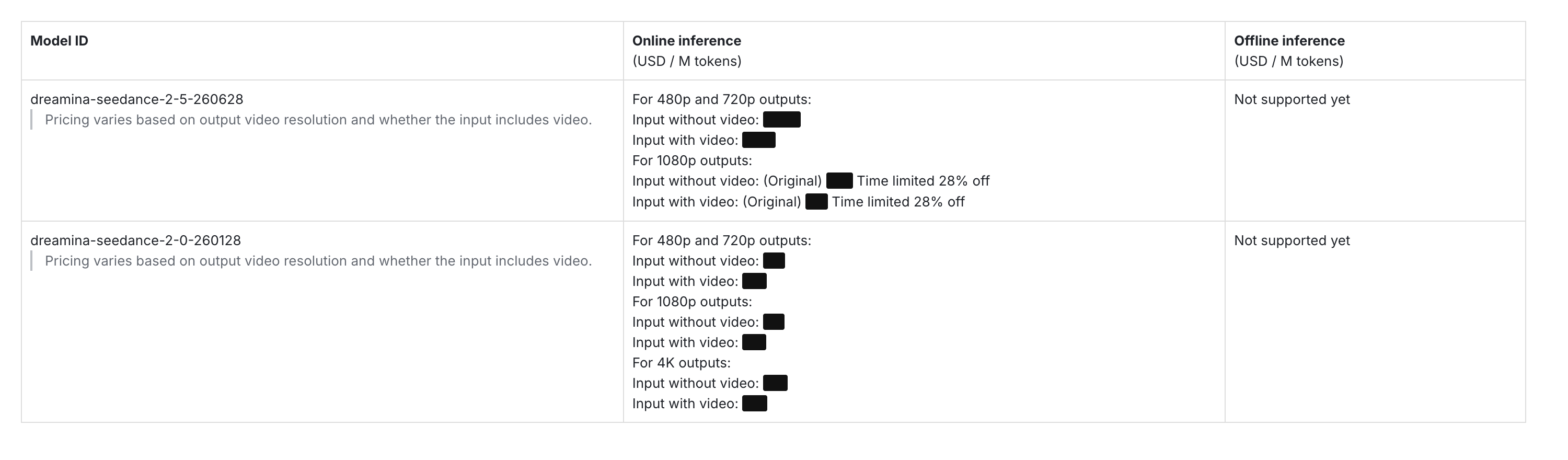
字节跳动官方 ModelArk 价格表,截取于 2026 年 8 月 21 日。费率数值已做遮挡处理——真正关键的是列出了哪些分辨率档位。Seedance 2.5 没有 4K 档,而其下方的 Seedance 2.0 却有。
ModelArk 的计费卡完全基于 token 消耗计费。具体费率会随输出分辨率以及是否使用了视频参考素材而有所变动。
针对 Seedance 2.5,表中仅划分了两个分辨率档位:
- 480p 与 720p
- 1080p
该清单中根本没有针对 Seedance 2.5 的 4K 计费项。
所谓 4K 的真相
众多搜索结果和产品页面都在将 Seedance 2.5 与 4K 视频绑在一起宣传。我们在 2026 年 8 月 21 日核实了四处来源,还原真实的技术现状。
字节跳动的 ModelArk 报价卡中只列出了 480p/720p 和 1080p 两档,没有 4K 计费项。然而,位于其正下方的 Seedance 2.0 却清清楚楚列出了三档:480p/720p、1080p 和 4K。
再看其他第三方平台,标题与价格表之间存在明显的自相矛盾。
在 kie.ai 上,网页标题写着“Seedance 2.5 API 现已上线 - 在 Kie.ai 体验 30 秒 4K AI 视频”(“Seedance 2.5 API Now Available - 30s 4K AI Video on Kie.ai”)。但翻到实际的报价卡,上面只列出了 480P、720P 和 1080P。
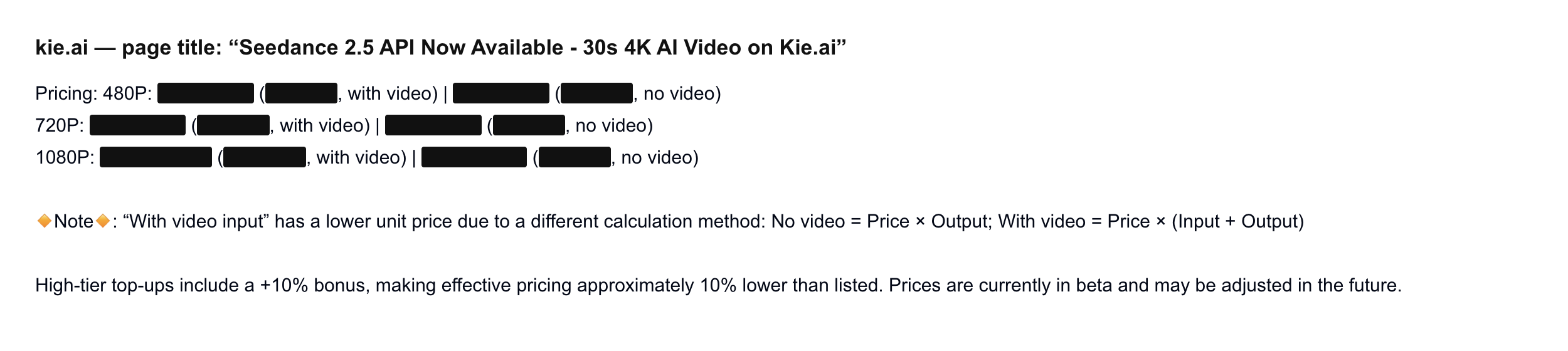
kie.ai 上的 Seedance 2.5 报价卡,截取于 2026 年 8 月 21 日。具体费用已遮挡。标题醒目写着 4K,实际档位却止步于 1080P。
Higgsfield 则采取了更务实的口径。其页面主标题写着:“单次成片 30 秒。一次处理 50 项参考。原生 1080p”(“30 seconds in one take. 50 references in one pass. Native 1080p”)。
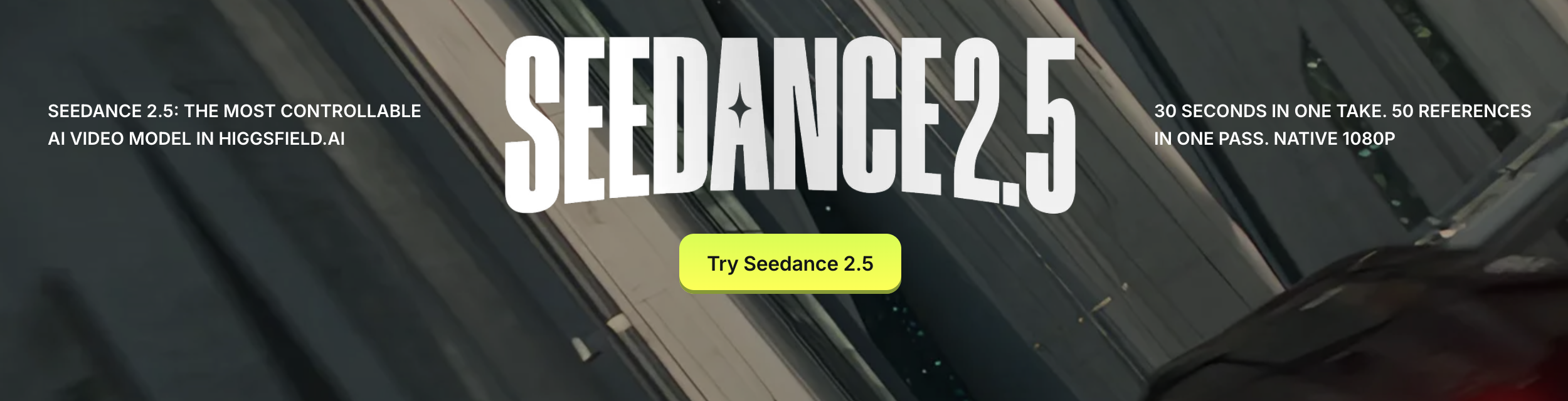
Higgsfield 的 Seedance 2.5 产品页,截取于 2026 年 8 月 21 日。这是本次盘点中唯一明确标注 1080p 且没有虚标 4K 的平台。
Dreamina 的营销页面写着“在 Dreamina 使用 Seedance 2.5 无限创作 4K 电影级视频”(“Create cinematic 4K videos with Seedance 2.5 unlimited in Dreamina”)。
结论究竟如何?所有按像素计费的真实报价卡,最高全部只到 1080p。
字节跳动官方如此。kie.ai 如此。Higgsfield 压根就没宣称支持 4K。
“4K”更多是作为营销宣传字眼出现在标题中,如果落实到底层报价卡,4K 输出目前依然属于 Seedance 2.0 预设。
辨别第三方站点的四条核对原则
当你打开一个提供 AI 视频生成的网站时,建议依次核对这四点:
- 页面是否如实标注了该模型的真正开发商?
- 是否在点击生成前就透明展示了全部扣费成本?
- 导出的视频文件是否干净无水印?
- 是否支持将视频文件直接下载保存到本地设备?
这四条标准适用于任何 AI 模型页面,不仅仅是针对当下这款——在 Wan 3.0 或 Hailuo 3 上同样适用。
我们用这四条规则来检验一下 Seadanse 本身:
- 第 1 条:我们明确声明该模型由字节跳动开发。
- 第 2 条:在点击生成前,操作按钮上会精确显示所需的积分消耗。
- 第 3 条:我们绝不在导出的视频上添加任何额外水印。
- 第 4 条:你可以直接将生成的视频下载到本地。
与此同时,我们也必须说明目前的不足之处:我们暂时不支持音频参考输入、不支持 180 秒长模式,并且 2.5 暂不提供 4K 输出。如果你有这三项刚需,本站目前可能不是你的最佳选择。
其他可以运行 Seedance 2.5 的渠道
视工作流的不同,你还可以选择以下三处渠道:
kie.ai:适合需要自行写代码调用的开发者
kie.ai 通过 API 提供该模型的转售服务。其价格表包含 480P、720P 和 1080P 档位。最主要的代价在于:你的代码调用和字节跳动官方服务之间多了一道第三方转接。
Higgsfield:适合已经订阅了该平台视频套件的用户
Higgsfield 将该模型打包进了自家的视频创作套件中。如果你本就是该平台的日常重度用户,这是个不错的方案。不过其入门级方案不包含 Seedance 2.5,必须升级到更高阶方案才能解锁。
我们曾亲自测试并购买了该平台方案长达一个月,并撰写了平台所谓“无限量生成”背后的条款分析。
Seadanse:适合单次生成、不想绑定月结订阅的用户
如果你想在 Seadanse 上运行 Seedance 2.5,直接通过浏览器就能单次出片,没有任何周期性自动扣费的后顾之忧。
在这里你可以获得:
- 480p、720p 或 1080p 输出分辨率
- 六种生成时长可选:5、10、15、20、25 或 30 秒
- 六种画面比例:16:9、9:16、1:1、4:3、3:4 以及 21:9
- 支持上传图片和视频参考素材
- 支持长达 10,000 字符的提示词输入框
- 导出的视频文件无任何附加水印
如果想了解积分包的具体使用机制,请查看 Seadanse 片段生成资费详情。
尚未公布的细节
目前部分技术细节在公开文档中仍未明确:
- Dreamina 上的 Seedance 2.5 是原生渲染 4K,还是通过超分辨率算法从低分辨率放大而来。
- Dreamina 是否会根据地区、账号注册时间或付费等级来限制 2.5 的使用权限。
- 180 秒长视频模式后续是会转为正式功能,还是继续保持内测受限状态。
- 国内火山引擎控制台内部针对该模型的具体 model id 字符串。
- 价格随时间调整的趋势,这也是我们未在文中直接罗列上游 API 具体数值的原因。
评估方式
我们在 2026 年 8 月 21 日对每个平台进行了人工实测,在主流浏览器中分别以登录和未登录状态进行界面核验。我们查阅了字节跳动的研究团队发布文章、核对了 ModelArk 官方报价卡,并逐一分析了六家第三方平台的产品页。文中所呈现的所有信息均以该日期实际在线运行的状态为准。
总结
Seedance 2.5 没有独立的专属官网。它由字节跳动开发,在海外通过 Dreamina 托管,在国内通过即梦提供,并通过 BytePlus ModelArk 对外销售 API。
搜索结果里的其他网站,本质上都只是依托这些官方底层接口构建的第三方平台。
如果你想制作视频又不想背负按月订阅的麻烦,可以随时打开 Seedance 2.5 生成器。该入口位于 Seedance 2.5 AI 视频制作器 首页,每次点击生成前,消耗成本都会在按钮上明确显示。
相关文章
- 深入了解 Seedance 2.5 —— 逐项解析模型的各项新增功能。
- Seedance 2.5 提示词实战指南 —— 包含实测生成效果的即用提示词模板。
- Higgsfield 的 Seedance 2.5 无限量真相:33 天条款细则实测 —— 揭开所谓“无限量生成”订阅的真实面目。
- 2026 年 7 款最佳 Runway 替代方案测评 —— 用相同的四条核对原则横向对比其他候选工具。


