
Charlie Wilson Tiny Desk AI Template: Which Photo Goes Where
Seadanse: the Charlie Wilson Tiny Desk AI template has five spots in the 'Outstanding' finale. See which photo goes where; one photo is enough for 19 s.
 The Seadanse Team11 min read
The team behind Seadanse. We run the models we write about, and we publish the specs, prices and limits the marketing leaves out.

TL;DR — The Charlie Wilson Tiny Desk AI template has five spots in the "Outstanding" finale, and only photo 1, the lead singer, is needed. Photo 2 is the sax player, photo 3 the keyboard player, and photos 4 and 5 the backup singers on the left and right. On Seadanse's Charlie Wilson Tiny Desk AI page you get a 19-second 9:16 video with the original "Outstanding" sound, $9.90 for 720p with no sign-up.
Every group chat hits the same wall when they're looking at this clip. Everyone wants the lead mic, and two people think they're entitled to the sax solo. Nobody's trying to get stuck in the back row.
The Charlie Wilson Tiny Desk AI template solves that debate before you press Create. Each spot gets its own dedicated moment on screen, and you'll only need one photo to make it work.
We'll show you all five band spots and walk through the 19 seconds shot by shot. You'll see our four simple steps, along with casting ideas for your friends.
What Is the Charlie Wilson Tiny Desk AI Template?
The Charlie Wilson Tiny Desk AI template is a ready-made video of the "Outstanding" finale from Charlie Wilson's June 2023 NPR Tiny Desk concert. You fill it with your own photos. "Outstanding" is a 1982 song by The Gap Band, which Charlie Wilson formed and fronted with his brothers.
The finale, its five shots, the office desk set and the original "Outstanding" sound are all built in. There's no clip to find, no song to add and no prompt to write.
The scene shows an office desk concert in warm daylight, with the band squeezed behind a desk. You'll see a red stage keyboard on the desk and small microphones on stands. Wooden shelves behind the band are packed floor to ceiling with records, books, plush toys and caps.
The trend took off when The Burner posted an AI version with five college football coaches as the band on October 18, 2026. That post passed 2.3 million views.
You don't need any editing tools or an account to build yours. Add your photo to our Charlie Wilson Tiny Desk AI generator and press Create.
Which Photo Goes Where in the Charlie Wilson Tiny Desk AI Template
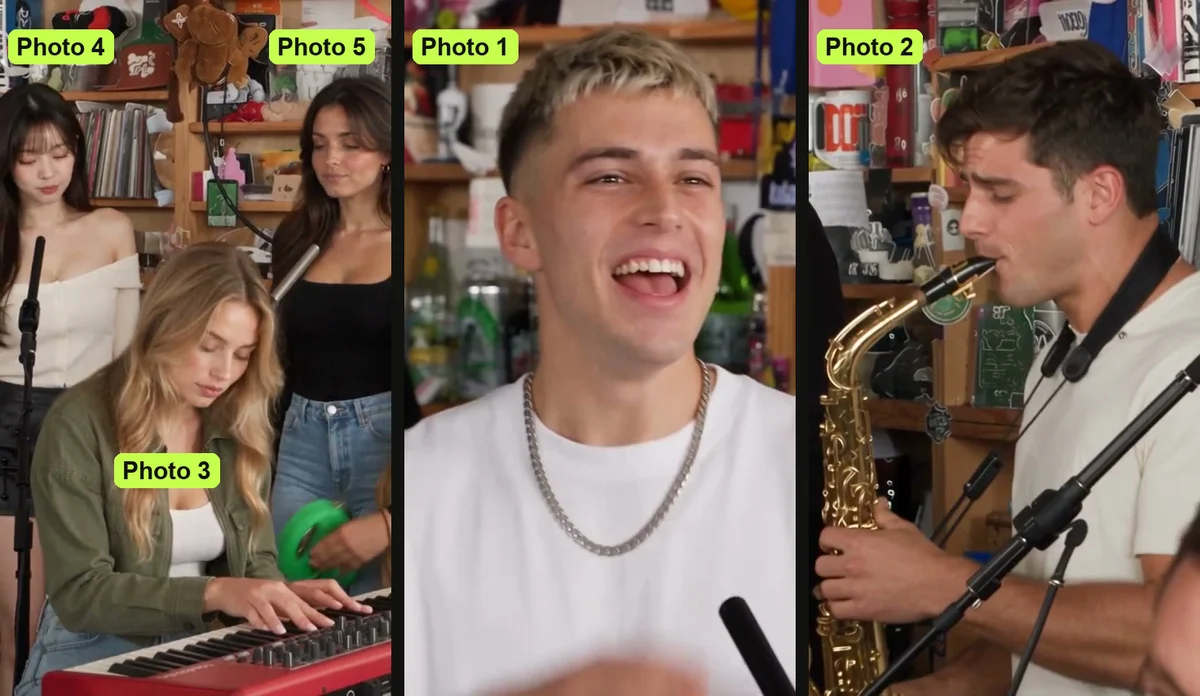
The Charlie Wilson Tiny Desk AI template has one spot for each photo, and photo 1 is the only one you'll need. Photo 1 takes the lead vocals, while the other four spots fill out the rest of the band:
- Photo 1 — lead singer: The lead singer is the only one in the side-on opening line and in the big laughing close-up. This person laughs with head thrown back, then sings straight to the camera with one hand raised.
- Photo 2 — sax player: The sax player is the only one in the sax solo, appearing alone in profile playing a gold saxophone.
- Photo 3 — keyboard player: The keyboard player sits front and centre at the red keyboard in both band shots.
- Photo 4 — backup singer, left: This singer stands behind on the left in both band shots, singing and moving to the beat.
- Photo 5 — backup singer, right: This singer stands behind on the right in both band shots, singing and moving to the beat.
Every spot without a photo gets one of the page's own built-in band members, so the band's always full. Each photo stays in the spot you put it in. Everyone keeps their own face, hair and clothes.
In the first AI version, the coach singing lead was Kalen DeBoer and the one on the sax was Marcus Freeman.
What Each Spot Gets in the 19-Second Charlie Wilson Tiny Desk AI Video
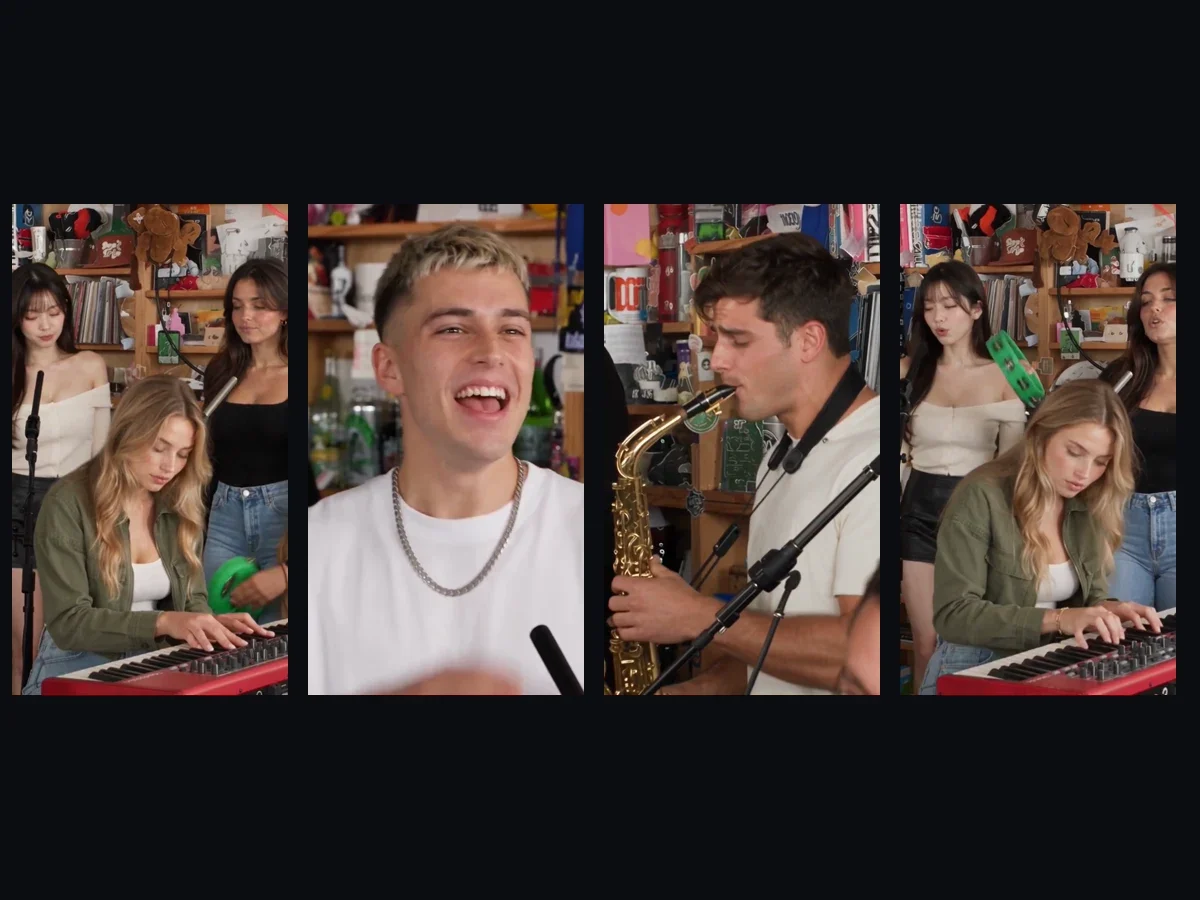
The Charlie Wilson Tiny Desk AI video runs 19 seconds in five shots, and the template puts each photo in its own shots. The cuts land right on the beat of the music:
- The opening line: The lead singer from photo 1 appears side-on in close-up, turning into the first line from about 0 to 1.5 seconds.
- The band shot: The keyboard player sits front and centre while backup singers move to the beat behind them from about 1.5 to 6.5 seconds.
- The laughing close-up: The lead singer laughs alone with head thrown back, then sings straight into the camera from about 6.5 to 13 seconds.
- The sax solo: The sax player stands alone in profile, playing a gold saxophone from about 13 to 16.5 seconds.
- The closing band shot: The camera returns to the full band at the red keyboard from about 16.5 to 19 seconds.
Photo 1 is the face people remember, because the lead singer gets the opening line and the big laughing close-up. The original "Outstanding" sound plays from the first second, so the vocals, horn line and keys are already covered. Nobody in your photos needs to sing or play.
Use the Charlie Wilson Tiny Desk AI Template in 4 Steps
You can fill our Charlie Wilson Tiny Desk AI template in four picks and presses on our page. It all runs directly in your browser.
Step 1: Add the lead singer's photo
Add the photo for your lead vocalist to the first box. This photo takes the opening line and the laughing close-up.
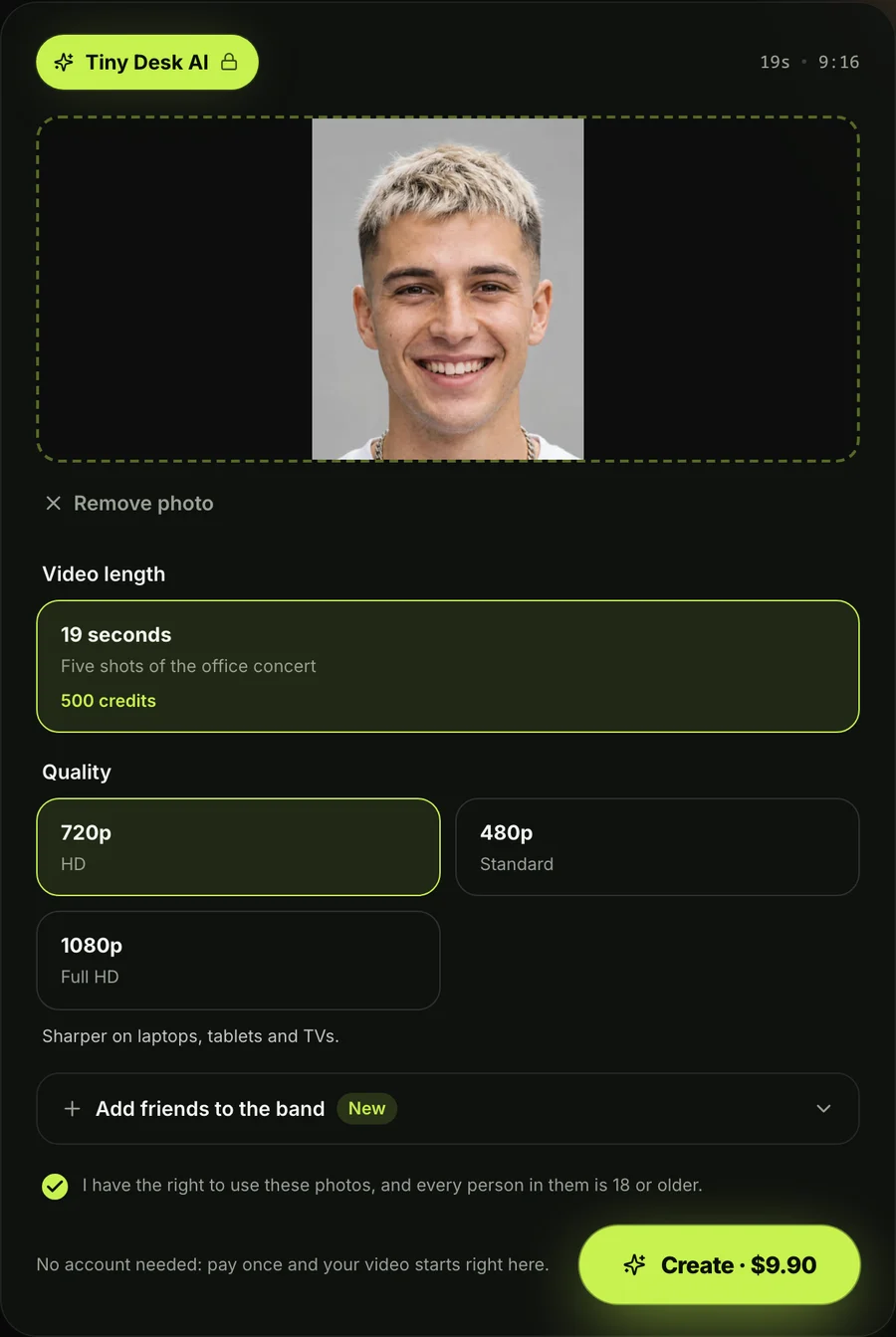
Step 2: Add up to four more photos, or leave the spots
Add extra pictures for the sax player, keyboard player and two backup singers. You can leave any of these spots empty. Don't worry about gaps: our page fills empty spots with built-in band members.
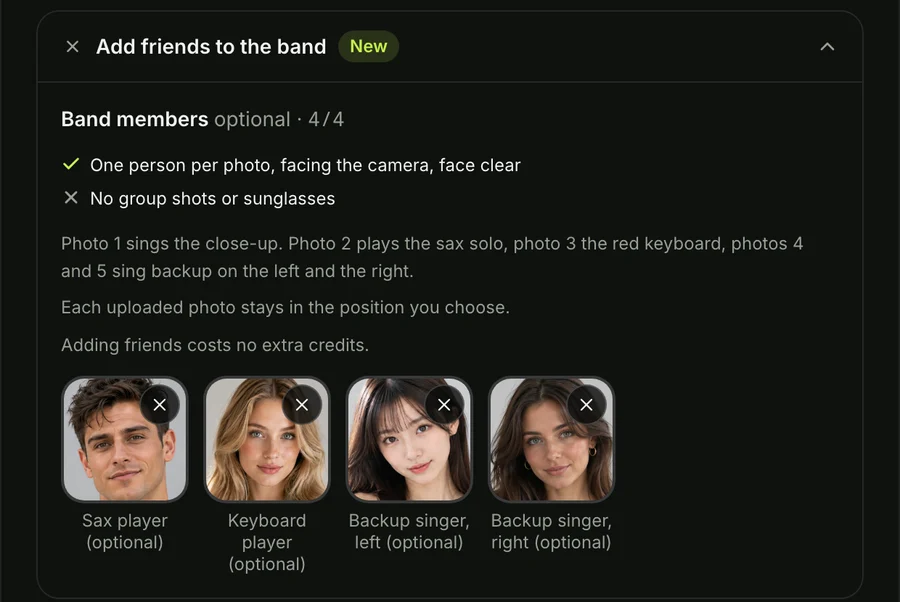
Step 3: Pick 720p, 480p or 1080p
Pick 720p, 480p or 1080p from the resolution choices on screen. The page has 720p picked when it opens.
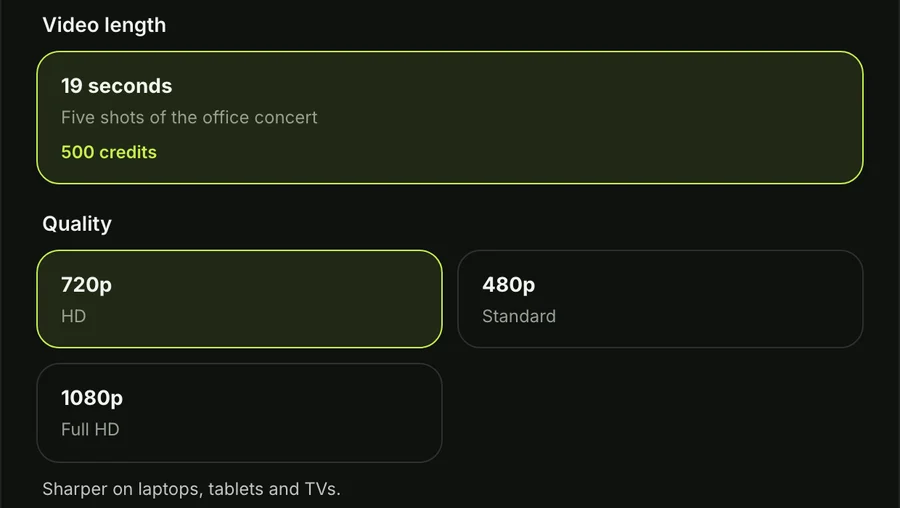
Step 4: Keep the box ticked and press Create
Keep the single box ticked before pressing Create. This confirms you've got the right to use the photos and everyone in them is 18 or older. The price shows on the Create button before you pay.
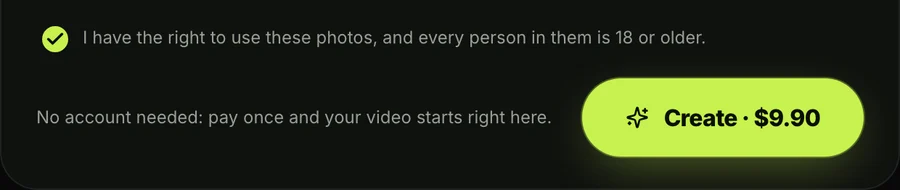
One 19-second 720p video is $9.90, paid once with no account needed. Picking 480p uses less from that same pack, while 1080p is $39.90.
Every pack is a single payment rather than a recurring subscription. Unused credits last 12 months, and you can see every option on Seadanse pricing.
If a video doesn't finish, its credits go back to your balance on their own. You won't lose credits on an unfinished run.
What you download is an MP4 video running 19 seconds in a vertical 9:16 frame.
It includes the original "Outstanding" sound and carries no watermark on exported video. That's what makes it ready to share on TikTok and Reels.
Who to Cast in Each Charlie Wilson Tiny Desk AI Spot
The best Charlie Wilson Tiny Desk AI casts put the friend with the biggest laugh in spot 1. Here's how you can line up the rest of the band:
- Spot 1: Pick the friend who loves the spotlight, because the lead singer gets the opening line and the laughing close-up.
- Spot 2: Choose someone who likes being dramatic, since they'll get the solo in profile playing a gold saxophone.
- Spot 3: Put your pet at the red keyboard, where they'll sit upright with front paws on the keys.
- Spot 4: Pick a friend in a team jersey or hoodie, and that look will show up behind the desk on the left.
- Spot 5: Use a cartoon or game character on the right to restyle the entire room and band in that look.
Check out the casts people put in the Tiny Desk AI meme for more fun ways to cast your group.
Which Photos Work Best in the Charlie Wilson Tiny Desk AI Template
The photos that work best in the Charlie Wilson Tiny Desk AI template show one person, character or pet. Keep the face clear, facing the camera, in good light:
- Faces: Keep the face centered and looking straight at the camera. The template takes the face and hair from each photo and leaves out the background.
- Clothes: Pick pictures with outfits you like, because everyone plays in their own clothes like suits, hoodies or team jerseys.
- Characters: Use a cartoon, anime or game character, which restyles the whole video, room and band to match that character's world.
- Pets: Use a front-facing photo of your pet, so they sit upright at the keyboard with front paws on the keys.
Anyone in a real photo has to be 18 or older.
How Other Charlie Wilson Tiny Desk AI Templates Fill the Band
Other Charlie Wilson Tiny Desk AI templates on the web ask for different photos and give different videos. That's what their own pages showed on October 27, 2026:
- Summrs: Its Charlie Wilson Tiny Desk template takes exactly five photos, and all five are needed. It needs a lead singer, three backup dancers and a sax player at 480p or 720p for 430 credits.
- makeviral.ai: Its Tiny Desk AI template takes one to five photos. It makes a 10-second 720p vertical video with an AI-made song in place of "Outstanding" for 126 credits.
- Starrd: Its Outstanding template takes five photos. It makes a video of about 14 seconds in three shots at 480p with the original sound for 150 credits.
- tinydeskai.video: This tool takes one lead photo plus an optional sax friend, using AI musicians at the keys and in the back row. The video starts from the band shot and runs about 18 seconds for $9.99.
Our template lets you pick each spot from one to five photos. You'll get the full 19-second finale in five shots with the original sound on Tiny Desk AI.
Charlie Wilson Tiny Desk AI Template FAQ
How many photos does the Charlie Wilson Tiny Desk AI template need?
The Charlie Wilson Tiny Desk AI template needs only one photo to make a video. You can add up to five photos if you'd like to fill all five spots.
Can I choose which spot my friend goes in?
You can choose which spot your friend goes in because each photo box represents a distinct band spot. Each photo stays in the spot you put it in.
Does the Charlie Wilson Tiny Desk AI template have the original sound?
The Charlie Wilson Tiny Desk AI template has the original "Outstanding" sound from the first second. The cuts land on the beat, so nobody has to sing or play an instrument.
Can I use the Charlie Wilson Tiny Desk AI template on my phone?
You can make a Charlie Wilson Tiny Desk AI video in the browser on your phone, tablet or computer. There's nothing to install, and the page works across all devices.
How much does the Charlie Wilson Tiny Desk AI template cost?
The Charlie Wilson Tiny Desk AI template costs $9.90 for one 720p video, the same for one photo or five. If you want 1080p, that's $39.90 as a single payment without a recurring subscription. You can try other group styles like Uptown Funk AI on our full list of AI video effects.
Make Your Band With the Charlie Wilson Tiny Desk AI Template
The Charlie Wilson Tiny Desk AI template gives your group five spots in the finale, but only one photo is needed to start. Photo 1 sings lead on the opening line and close-up, leaving the sax solo and keys for your friends. Build your clip today on our Charlie Wilson Tiny Desk AI video maker.
For the background story, check out the Charlie Wilson Tiny Desk meme and how it spread. You can also follow our walkthrough on how to make a Tiny Desk AI video.
Written by The Seadanse Team, the team that built the Charlie Wilson Tiny Desk AI page.
Related Articles
- What Is the Charlie Wilson Tiny Desk Meme? Explained — the singer, the 2023 finale and how the AI meme took off.
- How to Make a Tiny Desk AI Video From One Photo (4 Steps) — the four picks and presses, step by step.
- Tiny Desk AI Meme Ideas: Who Goes on the Sax (and How) — the casts people have made, and who to put in yours.
- Outstanding Tiny Desk AI Template: What the CapCut One Does — the template the TikTok tutorials link, and what it does with your photo.


