
How to Make a Tiny Desk AI Video From One Photo (4 Steps)
Seadanse: how to make a Tiny Desk AI video from 1 to 5 photos: the band, sax solo and 'Outstanding' sound built in, in browser, 720p for $9.90, no sign-up.
 The Seadanse Team13 min read
The team behind Seadanse. We run the models we write about, and we publish the specs, prices and limits the marketing leaves out.

TL;DR — You make a Tiny Desk AI video by adding 1 photo, or up to 5, to Seadanse's Tiny Desk AI for TikTok and Reels page and pressing Create. You get a 19-second vertical video in four shots: the band at the red keyboard, your singing close-up, the sax solo and the band again, with the "Outstanding" sound. You won't need CapCut, an editor or a prompt, and one 720p video costs $9.90, paid once with no sign-up.
Under a TikTok copy with NFC East coaches, a viewer asked "What are people using to make these". Under that same post, another viewer asked "Bro how do you make this".
Most of the TikTok tutorials send you bouncing between different apps, right into a CapCut template.
On our Tiny Desk AI page, we've built the office set, the four camera shots and the "Outstanding" sound into the page. You just add your pictures, pick your quality and press Create. You'll see the price clearly on the button before you pay.
You'll get a finished 19-second 9:16 MP4 with no watermark on exported video. With one photo, you star in the laughing close-up, sit at the red keyboard and play the sax solo.
Everything runs in your web browser on your phone, tablet or computer, with nothing to install.
Here's what's below:
- The 4 steps: your photo, your friends, the quality, Create.
- Who plays what: which photo sings the close-up, plays the sax and the keys, and sings backup.
- The other routes: how other people make these videos.
- The right photos: the pictures that put your band behind the desk.
How Do You Make a Tiny Desk AI Video?
To make a Tiny Desk AI video, you add 1 to 5 photos to our page, pick a quality and press Create. You'll get back a 19-second 9:16 MP4 in the desk-concert set.
Everything happens in your web browser, and the "Outstanding" sound's already in the file.
You won't have to cut video clips, write prompts or edit tracks. We've built the concert setting directly into the page:
- What changes: The band members change to match your photos, giving each person their own face, hair, build and clothes.
- What stays: The cluttered office-concert set, red keyboard, packed wooden bookshelves, warm daylight, four camera shots and three cuts stay identical.
- What you hear: The "Outstanding" sound plays from the very first second of the clip.
The page puts your people into the concert clip's own shots, cuts and moves, rather than building new shots from scratch.
You can add your photo to our Tiny Desk AI generator, pick 720p and press Create to start your clip.
What Happens in Your 19-Second Tiny Desk AI Video
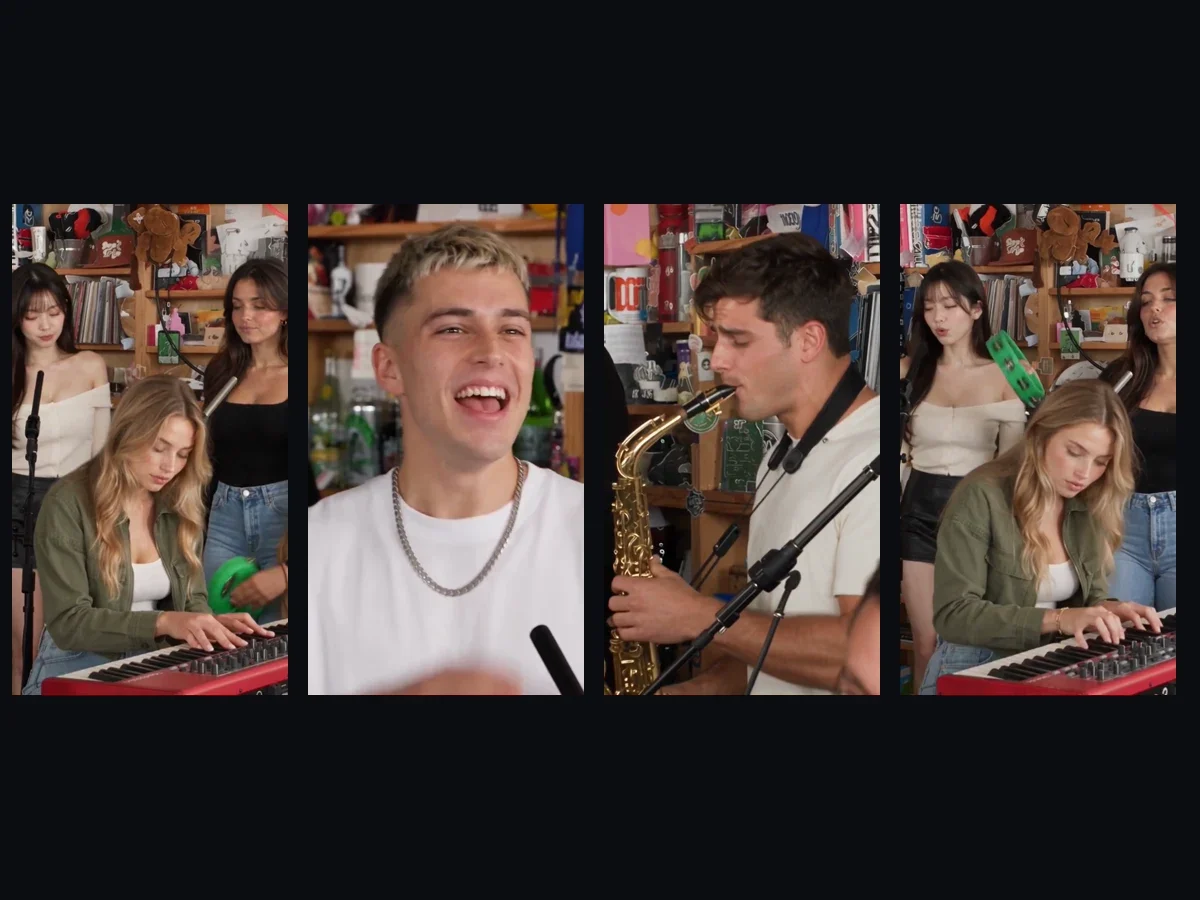
Your 19-second Tiny Desk AI video is a desk concert in four shots, with you in the close-up. The room features wooden bookshelves packed floor to ceiling with records, books and toys in warm daylight.
Here's how your 19 seconds play out:
- The band (0 to 5.3 seconds): The keyboard player sits at the front in the middle, head down over the red keyboard, playing and nodding to the beat. One backup singer stands behind on the left singing, and the other stands on the right singing and shaking a small tambourine.
- Your close-up (5.3 to 11.5 seconds): You appear alone as head and shoulders fill the frame. You throw your head back laughing, sing with a huge grin, turn to sing straight into the camera, and lift a hand at the end.
- The sax solo (11.5 to 15 seconds): The sax player stands alone from the side, playing a gold sax into a microphone on a long arm with the crowded bookshelves behind.
- The band again (15 to 19 seconds): The band shot comes back, with the keyboard player at the red keyboard and the two backup singers singing behind.
There are three hard cuts, and with one photo you're in every shot. You can read how the Tiny Desk AI trend started to see where the viral meme began.
Make a Tiny Desk AI Video in 4 Steps
To make a Tiny Desk AI video, you add your photo, add up to four friends, pick 480p or 720p, and press Create, all on one page. You don't have to install any apps or edit any audio.
Step 1: Add Your Photo
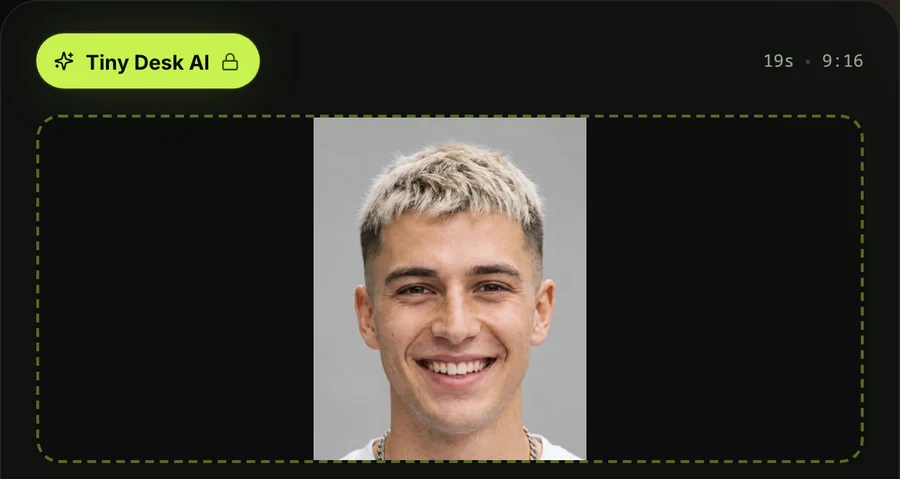
Open Seadanse's Tiny Desk AI in your browser. Tap the first photo box and pick the photo of the person who'll sing the close-up, from your camera roll or your computer.
That's the one photo the page needs. A real photo makes a photoreal video right behind the desk.
Step 2: Add Up to Four Friends, or Leave the Spots
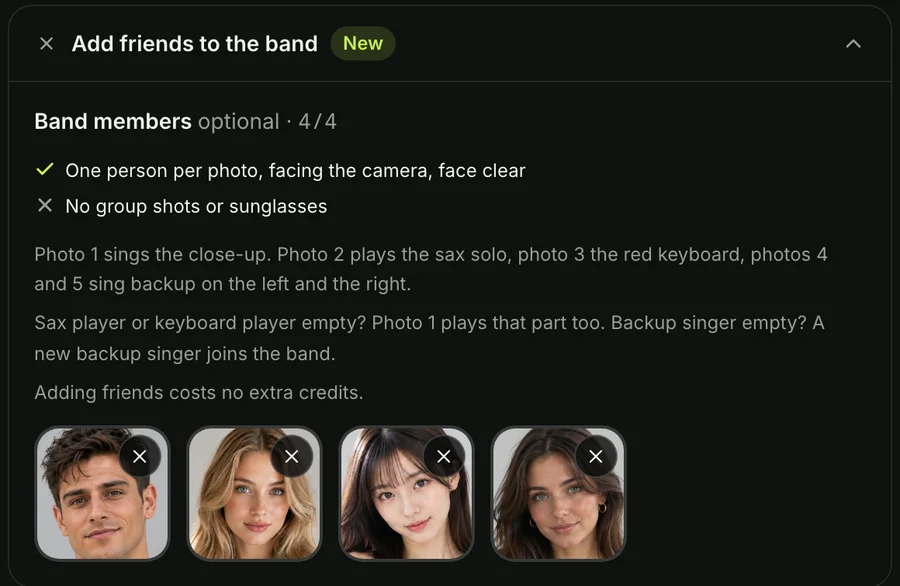
Open the band-members section under your photo with one tap. Add photos for the sax player, the keyboard player, the backup singer on the left and the backup singer on the right, in that order, or leave any of them empty.
An empty sax or keyboard spot goes to photo 1, and an empty backup spot gets a backup singer the AI makes up. Check who to put on the sax in your Tiny Desk AI meme to pick great roles for your friends.
Step 3: Pick 480p or 720p
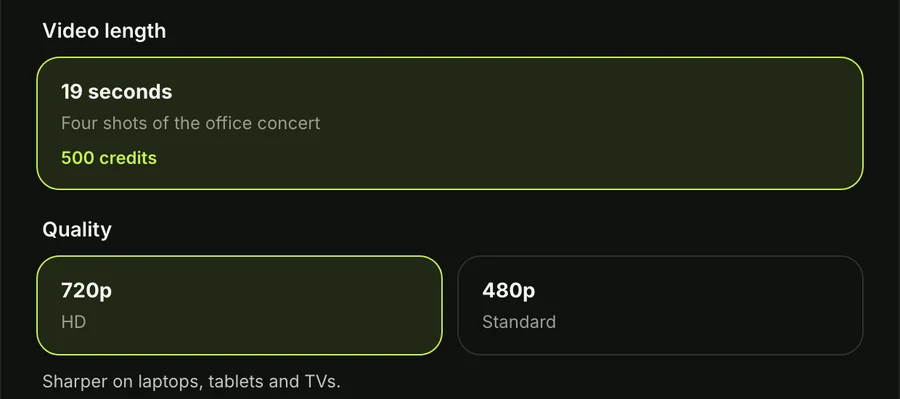
The page opens on 720p when you load it. Tap the quality setting you want for your video.
At both qualities, your video's the same 19 seconds in 9:16. The price shows on the Create button before you pay, so you'll always know the cost ahead of time.
Step 4: Keep the Box Ticked and Press Create
The tick box confirms you've got the right to use the photos and that every person in them is 18 or older. It's already ticked when the page opens, so leave it ticked.
Then press the Create button. You don't need an account, since you pay once and the video starts on the page.
When you tap Create, a window opens showing the credit packs. You pay once at checkout with no recurring subscription, and you can see how pay-once credits work on our site.
The checkout email brings a sign-in link right to your inbox. That link lets you open and check your video on any phone, tablet or computer.
When your video's ready, you download the 19-second 9:16 MP4 file. It carries the "Outstanding" sound and has no watermark on exported video.
Who Plays What in Your Tiny Desk AI Video
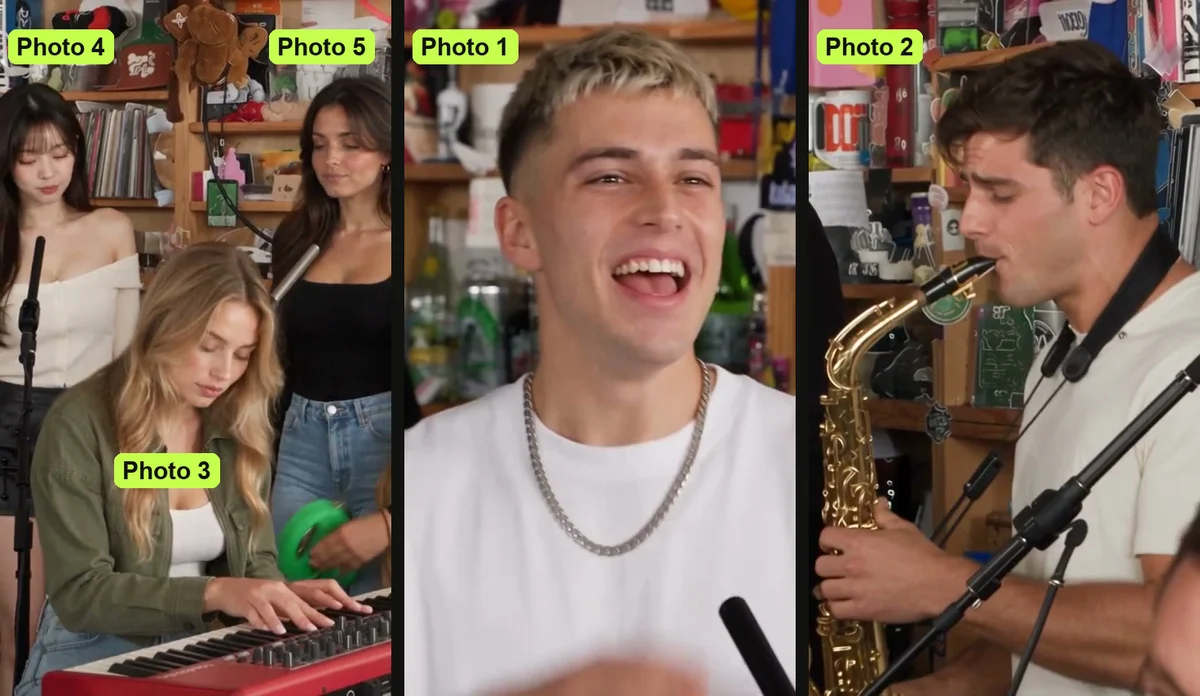
In your Tiny Desk AI video, each photo plays a fixed role in the band, set by the order you add them. You'll always know who takes center stage and who backs them up.
Here's the band:
- Photo 1: You're the lead singer, the one in the close-up.
- Photo 2: The sax player plays alone in the sax solo.
- Photo 3: The keyboard player sits front and centre at the red keyboard in both band shots.
- Photo 4: The backup singer on the left stands behind in both band shots, singing.
- Photo 5: The backup singer on the right stands behind in both band shots, singing and shaking a small tambourine.
An empty sax or keyboard spot goes to photo 1, and an empty backup spot gets a backup singer the AI makes up. That singer looks the same in both band shots, so one photo still gives you a full band.
Photo 1 takes the close-up, so it goes to whoever you want in the spotlight. Photo 2 goes to whoever you want on the sax solo.
Everyone keeps their own face, hair and clothes from their photo, so a team hoodie, jersey or cap stays on them in the clip.
How Other People Make Tiny Desk AI Videos
Most Tiny Desk AI videos online are made with an AI video tool by hand, with an app's ready-made template, or with a CapCut template from a TikTok tutorial. Each method needs different steps and setup.
Here are the three routes:
- An AI video tool, by hand: The creator of the first Tiny Desk AI video used a motion reference (a clip the AI copies the moves and camera from). He paired the concert clip with pictures of five college football coaches. He told Sport & State that the whole job took about 30 minutes, adding that the video took "about a minute for each second of the video".
- An app's ready-made template: One app sells a pre-set template for this clip that needs a picture in every one of its five slots before it runs.
- A CapCut template from a TikTok tutorial: Around 20 TikTok accounts share the same tutorial. You copy a video link, open the CapCut template from the corner, import photos and tap next. You can check what the Outstanding Tiny Desk AI template does to see how its single clipping slot works.
Our Tiny Desk AI video maker needs no clip to cut, no prompt to write and no template to fill. The shots, roles and sound are built into the page.
You can read the full Tiny Desk AI prompt to study every shot and role. You can also see the Tiny Desk AI video generators compared across the web.
Which Photos Work Best for a Tiny Desk AI Video
The photos that work best for a Tiny Desk AI video show one person, character or pet each, with the face clear, facing the camera and in good light. Clear lighting helps create clean, natural movement.
Here's what works best when picking pictures:
- One subject per photo: Choose a picture with one person, character or pet so the AI casts the right subject.
- A clear face: Pick a photo where the face's well lit and looking straight ahead, with no sunglasses hiding the eyes.
- Your team gear: Wear a team hoodie, jersey or cap, because each person plays in the clothes from their own photo.
- The star in photo 1: Place your lead subject in the first box so they take the close-up.
- 18 or older: Make sure every real person in your uploaded photos is 18 or older.
The background of your photo's left out, so you sit right in the office-concert set. A real photo makes a photoreal video.
A cartoon character, anime character, game character, AI-made character picture, or pet all work.
A character in photo 1 turns the whole video into that style, transforming the band and room to match. A pet stays a real animal, and at the red keyboard it sits up with its paws on the keys.
Tiny Desk AI Video FAQ
What are people using to make these Tiny Desk AI videos?
People make Tiny Desk AI videos using an AI video tool by hand, an app's template, or a CapCut template from TikTok tutorials. You can also use our page, where the set, shots and sound are built in so you only add photos.
Can I put my friends in the Tiny Desk AI video?
You can put your friends in your Tiny Desk AI video with up to five photos in all. Photo 1 sings the close-up, photo 2 plays the sax, photo 3 plays the red keyboard, and photos 4 and 5 sing backup, each keeping their own face and clothes.
Adding photos doesn't cost extra, and everyone must be 18 or older.
What if I only have one photo?
One photo's enough to create your Tiny Desk AI video. You take the close-up, the red keyboard and the sax solo, and the AI makes up the two backup singers to fill the band.
What song plays in the Tiny Desk AI video?
The "Outstanding" sound plays in your Tiny Desk AI video from the first second. The song's by The Gap Band from 1982, and the trend comes from Charlie Wilson's NPR Tiny Desk concert.
Do I need CapCut, an account or a prompt?
You don't need CapCut, an account or a prompt to make a Tiny Desk AI video on Seadanse. You press Create, pay once, and your video starts on the page, with checkout emailing a link to open it anywhere.
The set, shots and sound are built in, so photos are all you'll add.
How much does a Tiny Desk AI video cost?
A 19-second 720p Tiny Desk AI video costs $9.90 through the 500-credit pack, paid once with no subscription, which also covers 480p. A 720p video takes 500 credits, and a 480p video takes 375. One photo or five cost the same.
Pack credits last 12 months, and if a video fails, its credits come back automatically. You'll find every pack on Seadanse pricing.
Can I make an AI video of myself?
You can make an AI video of yourself, as one photo of you is all our page needs, and you're in every shot. Try No Scrubs AI for that chorus, or our AI Rap Duo Video Maker to share a hanging mic.
Browse all of our AI video effects to turn photos into videos without writing prompts.
Make Your Tiny Desk AI Video Now
You'll only need one photo to put yourself in every shot of a cluttered office concert. Sing straight into the camera in the laughing close-up, let your friend blow the sax solo, and play the "Outstanding" sound in your browser.
You can make a Tiny Desk AI video right now for $9.90 at 720p.
Written by The Seadanse Team, the team that built the Tiny Desk AI page.
Related Articles
- What Is the Tiny Desk AI Trend? The Coaches Video, Explained — who made the first one, when, and how it spread past college football.
- Outstanding Tiny Desk AI Template: What the CapCut One Does — the template the TikTok tutorials link, and what it does with your photo.
- Best Tiny Desk AI Video Generators (2026): 8 Ways Compared — the sites, apps and templates that make this video, side by side.
- Tiny Desk AI Prompt (Copy-Ready): Every Shot, Every Role — the full prompt behind the video, to use in a video tool yourself.
- Tiny Desk AI Meme Ideas: Who Goes on the Sax (and How) — the casts people have made, and who to put in yours.


