
Nightwing AI Prompt (Copy-Ready), and How to Skip It
Seadanse's Nightwing AI prompt, copy-ready: the prompt behind our 15-second Beth Cast mask-reveal video, plus a costume version, or skip it with 1 photo.
 The Seadanse Team23 min read
The team behind Seadanse. We run the models we write about, and we publish the specs, prices and limits the marketing leaves out.

TL;DR — The Nightwing AI prompt behind Seadanse's Nightwing AI trend page asks for a 15-second, 9:16 costume-reveal dance with one person. You lift a small blue eye mask, the camera whips, and on a hard cut at 3.7 seconds you're in the black bodysuit with the blue V panel. You dance with two glowing batons in a purple-lit living room.
It keeps your face, hair, skin tone and build in every shot and cuts the suit to your body. It's copy-ready below, with a version for your own costume.
Or skip it on Seadanse's Nightwing AI Trend for TikTok and Reels page, where you add 1 photo and one 15-second 720p video is $9.90.
Promo posts for the trend sell a prompt they never show. Captions promise a "Prompt exacto Nightwing Bethcast Gemini" (exact prompt Nightwing Bethcast Gemini) or tell you "Prompt secreto en mi biografía" (secret prompt in my bio), but neither prints the words.
Nobody's posted a prompt for the October Beth Cast clip. The prompts you'll find online are from the March wave, and they start with a still picture first.
Here's the copy-ready Nightwing AI prompt behind our page, a version for your own costume, what each part asks for, and the way to skip it.
The Nightwing AI Prompt Behind the Beth Cast Trend Video
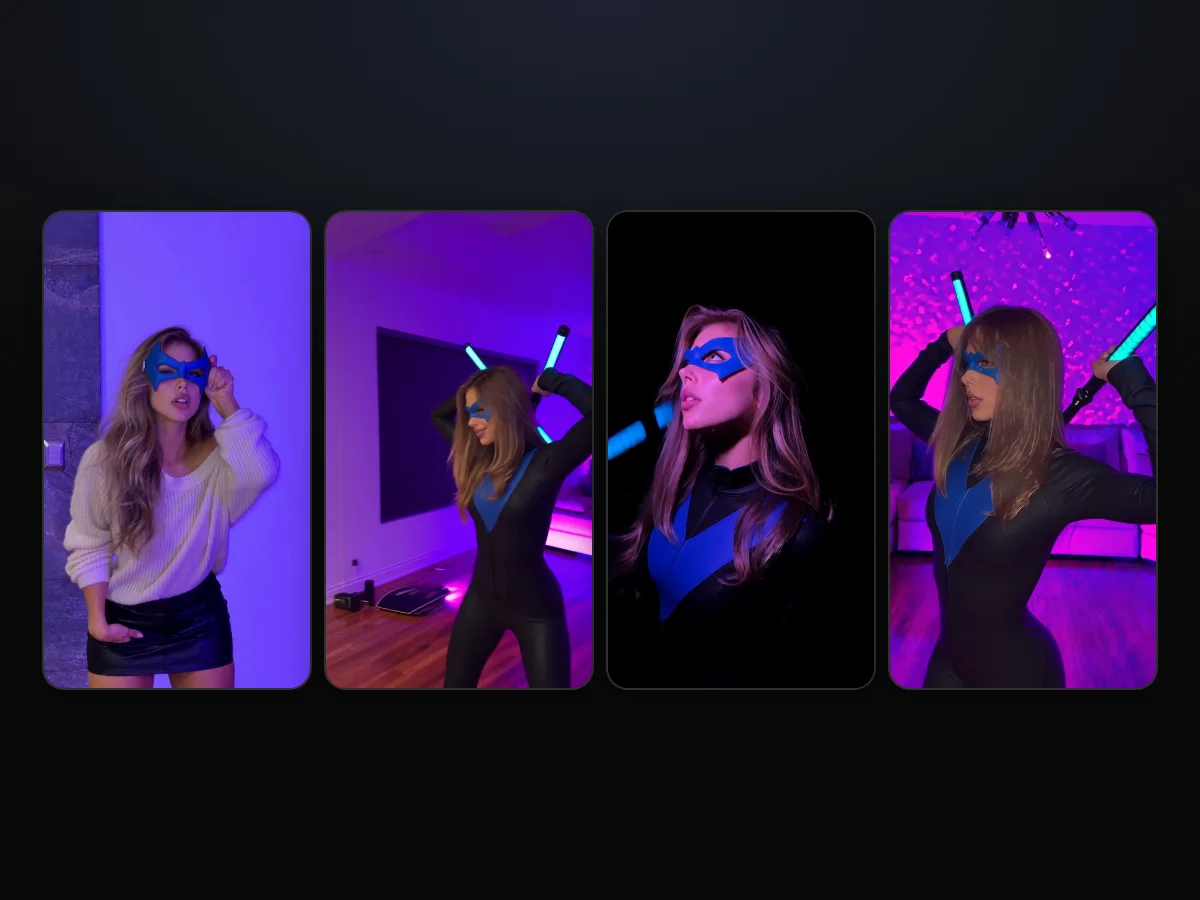
The Nightwing AI prompt behind Seadanse's page describes a whole 15-second video, shot by shot. It creates a single video with one person, starting in your own clothes against a lavender wall. You lift the blue eye mask, the camera whips, and a hard cut lands at 3.7 seconds.
On that cut, you're in the suit: a black bodysuit with a blue V panel and two glowing batons. You dance in a modern, purple-lit living room, move through a close-up and a spin, and hit the closing pose.
The five shots follow the beats of Beth Cast's October clip, which she posted on TikTok on October 6, 2026. On Seadanse's Nightwing AI trend page, it's a new video with you in it, made from your photo.
Copy the Full Nightwing AI Prompt
The Nightwing AI prompt comes in two copy-ready versions: one for the suit, one for your own costume.
The first one's for when you want the trend's suit.
subject_definitions:
Subject 1 is the one person in @Image 1 and @Image 2 (a person, or a cartoon or game character when the images show one): [one sentence describing the person or character in your photo: age range, hair, build] Before the cut Subject 1 wears their own outfit from @Image 1: [what they wear, piece by piece] After the cut Subject 1 wears the suit shown in @Image 2. Subject 1 keeps exactly this face, hair, skin tone and build in every shot.
The suit: a long-sleeved black zip-front bodysuit with a high collar and a plain blue V-shaped panel running from both shoulders down to a point below the chest, black boots, a blue eye mask with pointed outer corners over the eyes, and two black batons with glowing blue segments, one in each hand. The bodysuit is cut for Subject 1's own body as @Image 1 shows it: their own shoulders, chest, waist, hips and height; a man gets a man's cut with a man's build, and no other person's figure is used.
If the images show a cartoon, anime or game character, the whole video is rendered in that same style and the rooms are rendered to match; if they are real photos, the whole video is photoreal.
Subject 2 is the set. Shot 1 is the wall and grey stone panel: the whole frame is bathed in saturated blue-violet light; the wall, the grey stone panel and the skin all take a cool violet cast; no white or daylight anywhere. Every later shot is in the living room: a starburst chandelier hanging from the ceiling, a white sectional sofa along the back wall, a wall covered in tiny glittering lights, a dark polished wooden floor and a white air conditioner high on the wall; a dark room lit by magenta and blue-violet LED light, deep shadows, mostly blue-violet, magenta glow behind the sofa. The close-up is against a near-black background, a blue-violet rim light on the face and hair. The batons glow blue.

summary:
A 15-second vertical costume-reveal dance with exactly one person, four hard cuts: Subject 1 in their own outfit raises a small blue eye mask to their eyes, takes it off and swings it out to the side as the camera whips after it; on a hard cut at 3.7 seconds they are in the suit in the purple living room, dancing with the two glowing batons, then a close-up in profile, a spin with one baton raised, and a closing pose facing the lens.

retention_analysis:
Subject 1 (appears in [Shot 1], [Shot 2], [Shot 3], [Shot 4], [Shot 5]): fully_preserved - face, hair, skin tone and build from @Image 1 and @Image 2; in [Shot 1] the outfit from @Image 1, in [Shot 2] to [Shot 5] the suit from @Image 2.

detailed_description:
Vertical 9:16 frame. Handheld phone-video look, natural motion blur on the fast moves.
[Shot 1] 0-3.7 s: the blue-violet wall and grey stone panel, the whole frame bathed in saturated blue-violet light, skin and wall with a cool violet cast, no white or daylight. 0-0.5 s: a still medium shot from the thighs up, the camera does not tilt or move. Medium shot from the thighs up, camera at chest height straight in front, still, level horizon; Subject 1 alone and centred against the wall in their own outfit from @Image 1, one hand in a pocket, holding a small blue eye mask at the waist with the other hand. About 0.9 s: lifts the mask up to the eyes. 1.0-2.6 s: holds the mask over the eyes with one hand and looks straight into the camera lens with both eyes. 2.7 s: pulls the mask away from the face. 3.0-3.6 s: swings the mask out wide to the side at shoulder height; from 3.3 s the camera whips fast to the right after the mask, the picture smeared with motion blur.
Hard cut at 3.7 s, inside the whip pan: from here on Subject 1 is in the suit from @Image 2.
[Shot 2] 3.7-11.2 s: the living room, dark, lit by magenta and blue-violet LED light, deep shadows, mostly blue-violet, magenta glow behind the sofa; wide handheld shot from chest height, Subject 1 full figure in the suit with the blue eye mask on and a glowing baton in each hand; the shot opens dark and brightens within a tenth of a second. 3.7-5.0 s: facing the lens, both batons crossed behind the head, hips swaying, smiling. 5.0-7.3 s: turns their back to the camera, batons crossed high overhead, hips swaying, the hair moving. 7.5-8.3 s: the camera whips and passes close at their side as they swing one baton down. 8.5-11.1 s: facing the lens in front of the white sofa under the chandelier, swinging the batons low and wide to the beat, ending with a quick spin.
[Shot 3] 11.2-12.6 s: hard cut to a still close-up in profile against a near-black background, a blue-violet rim light on the face and hair: Subject 1's face with the blue eye mask on, turned up and to the side, the high collar and the top of the blue panel at the bottom of the frame.
[Shot 4] 12.6-14.2 s: hard cut to a medium shot in the corner by the white sofa and the air conditioner, magenta and blue-violet light: Subject 1 spins in place with one baton raised straight overhead.
[Shot 5] 14.2-15 s: hard cut to the closing pose in the same corner, medium shot: Subject 1 faces the camera lens with both eyes, both batons crossed behind the head, holding still to the end.

overall_soundscape:
The soft swish of the batons on the fast moves.

non_diegetic_music:
A bouncy dance-pop beat at about 86 beats per minute; the cut at 3.7 seconds and every move land on the beat.

Reference handling: @Image 1 and @Image 2 set Subject 1's identity: face, hair, skin tone, age and build; @Image 1 sets the outfit before the cut and @Image 2 the suit after it; ignore each image's background, pose and framing.

Final rules override conflicting customization: Subject 1 is recognizable as the one in @Image 1 and @Image 2 in every shot; until the cut at 3.7 s Subject 1 wears only their own outfit from @Image 1, and from the cut to the last frame only the suit from @Image 2 — never their own clothes after the cut; exactly one person in every shot, no one added; the suit carries no logo, emblem, bird or letters beyond the plain blue V panel; never a white, daylight or neutral-grey look; keep it physically coherent; no captions, subtitles, watermarks or other text on screen.The second one's for when you've got a picture of you in your own costume.
subject_definitions:
Subject 1 is the one person in @Image 1 and @Image 2 (a person, or a cartoon or game character when the images show one): [one sentence describing the person or character in your photo: age range, hair, build] Before the cut Subject 1 wears their own outfit from @Image 1: [what they wear, piece by piece] After the cut Subject 1 wears their own costume shown in @Image 2, with a blue eye mask with pointed outer corners over the eyes (unless @Image 2 shows a mask, helmet or headpiece of its own) and two black batons with glowing blue segments, one in each hand. Subject 1 keeps exactly this face, hair, skin tone and build in every shot.
The costume from @Image 2 fits Subject 1's own body as @Image 1 and @Image 2 show it; no other person's figure is used.
If the images show a cartoon, anime or game character, the whole video is rendered in that same style and the rooms are rendered to match; if they are real photos, the whole video is photoreal.
Subject 2 is the set. Shot 1 is the wall and grey stone panel: the whole frame is bathed in saturated blue-violet light; the wall, the grey stone panel and the skin all take a cool violet cast; no white or daylight anywhere. Every later shot is in the living room: a starburst chandelier hanging from the ceiling, a white sectional sofa along the back wall, a wall covered in tiny glittering lights, a dark polished wooden floor and a white air conditioner high on the wall; a dark room lit by magenta and blue-violet LED light, deep shadows, mostly blue-violet, magenta glow behind the sofa. The close-up is against a near-black background, a blue-violet rim light on the face and hair. The batons glow blue.

summary:
A 15-second vertical costume-reveal dance with exactly one person, four hard cuts: Subject 1 in their own outfit raises a small blue eye mask to their eyes, takes it off and swings it out to the side as the camera whips after it; on a hard cut at 3.7 seconds they are in the costume in the purple living room, dancing with the two glowing batons, then a close-up in profile, a spin with one baton raised, and a closing pose facing the lens.

retention_analysis:
Subject 1 (appears in [Shot 1], [Shot 2], [Shot 3], [Shot 4], [Shot 5]): fully_preserved - face, hair, skin tone and build from @Image 1 and @Image 2; in [Shot 1] the outfit from @Image 1, in [Shot 2] to [Shot 5] the costume from @Image 2.

detailed_description:
Vertical 9:16 frame. Handheld phone-video look, natural motion blur on the fast moves.
[Shot 1] 0-3.7 s: the blue-violet wall and grey stone panel, the whole frame bathed in saturated blue-violet light, skin and wall with a cool violet cast, no white or daylight. 0-0.5 s: a still medium shot from the thighs up, the camera does not tilt or move. Medium shot from the thighs up, camera at chest height straight in front, still, level horizon; Subject 1 alone and centred against the wall in their own outfit from @Image 1, one hand in a pocket, holding a small blue eye mask at the waist with the other hand. About 0.9 s: lifts the mask up to the eyes. 1.0-2.6 s: holds the mask over the eyes with one hand and looks straight into the camera lens with both eyes. 2.7 s: pulls the mask away from the face. 3.0-3.6 s: swings the mask out wide to the side at shoulder height; from 3.3 s the camera whips fast to the right after the mask, the picture smeared with motion blur.
Hard cut at 3.7 s, inside the whip pan: from here on Subject 1 is in the costume from @Image 2.
[Shot 2] 3.7-11.2 s: the living room, dark, lit by magenta and blue-violet LED light, deep shadows, mostly blue-violet, magenta glow behind the sofa; wide handheld shot from chest height, Subject 1 full figure in the costume with the blue eye mask on and a glowing baton in each hand; the shot opens dark and brightens within a tenth of a second. 3.7-5.0 s: facing the lens, both batons crossed behind the head, hips swaying, smiling. 5.0-7.3 s: turns their back to the camera, batons crossed high overhead, hips swaying, the hair moving. 7.5-8.3 s: the camera whips and passes close at their side as they swing one baton down. 8.5-11.1 s: facing the lens in front of the white sofa under the chandelier, swinging the batons low and wide to the beat, ending with a quick spin.
[Shot 3] 11.2-12.6 s: hard cut to a still close-up in profile against a near-black background, a blue-violet rim light on the face and hair: Subject 1's face with the blue eye mask on, turned up and to the side, the neckline of their own costume from @Image 2 at the bottom of the frame.
[Shot 4] 12.6-14.2 s: hard cut to a medium shot in the corner by the white sofa and the air conditioner, magenta and blue-violet light: Subject 1 spins in place with one baton raised straight overhead.
[Shot 5] 14.2-15 s: hard cut to the closing pose in the same corner, medium shot: Subject 1 faces the camera lens with both eyes, both batons crossed behind the head, holding still to the end.

overall_soundscape:
The soft swish of the batons on the fast moves.

non_diegetic_music:
A bouncy dance-pop beat at about 86 beats per minute; the cut at 3.7 seconds and every move land on the beat.

Reference handling: @Image 1 and @Image 2 set Subject 1's identity: face, hair, skin tone, age and build; @Image 1 sets the outfit before the cut and @Image 2 the costume after it; ignore each image's background, pose and framing.

Final rules override conflicting customization: Subject 1 is recognizable as the one in @Image 1 and @Image 2 in every shot; until the cut at 3.7 s Subject 1 wears only their own outfit from @Image 1, and from the cut to the last frame only the costume from @Image 2 — never their own clothes after the cut; exactly one person in every shot, no one added; the costume adds no logo, emblem or letters that @Image 2 does not show; never a white, daylight or neutral-grey look; keep it physically coherent; no captions, subtitles, watermarks or other text on screen.To run either version, fill the two square-bracket lines in the first paragraph:
- The person line: Replace
[one sentence describing the person or character in your photo: age range, hair, build]with your details. - The outfit line: Replace
[what they wear, piece by piece]with the clothes you wear before the cut.
Version 1 runs 1,118 words and 6,113 characters. Version 2 runs 1,085 words and 5,946 characters. On our Nightwing AI trend generator, you don't paste anything, because the prompt is built in.
What Each Part of the Nightwing AI Prompt Does
The Nightwing AI prompt has seven labelled parts, and each asks for one thing.
| Part | What the prompt says (word for word) | What it does for you |
|---|---|---|
| Who's in it | "Subject 1 is the one person in @Image 1 and @Image 2" | One person, you, and no one added |
| Your look | "Subject 1 keeps exactly this face, hair, skin tone and build in every shot" | Your face from the first second to the last |
| Before the cut | "Before the cut Subject 1 wears their own outfit from @Image 1" | You start the mask beat in your own clothes |
| The suit | "a long-sleeved black zip-front bodysuit with a high collar and a plain blue V-shaped panel" | The trend's black suit with the blue V |
| Mask and batons | "a blue eye mask with pointed outer corners over the eyes, and two black batons with glowing blue segments" | The mask and the two glowing batons |
| Your build | "a man gets a man's cut with a man's build" | The suit fits your own body |
| Style | "the whole video is rendered in that same style" | A cartoon or game character stays in its own style |
| The room | "a dark room lit by magenta and blue-violet LED light" | The purple-lit living room from the trend |
| The last rules | "never their own clothes after the cut" | After the cut, you're only in the suit |
| On screen | "no captions, subtitles, watermarks or other text on screen" | A clean video, ready to post |
The timing sits in five shots.
| Shot | Seconds | What happens | What it means for you |
|---|---|---|---|
| 1 | 0-3.7 s | Against the lavender wall in your own outfit, you lift the mask at about 0.9 s, hold it to 2.6 s, pull it away at 2.7 s and swing it out; the camera whips after it from 3.3 s | The mask beat, in your own clothes |
| 2 | 3.7-11.2 s | Hard cut into the living room: batons crossed behind your head, your back turned with batons overhead, a close camera pass, batons swung low in front of the white sofa, a quick spin | You're in the suit, dancing |
| 3 | 11.2-12.6 s | A still close-up in profile, the mask on, against the dark part of the room | Your face up close, behind the mask |
| 4 | 12.6-14.2 s | By the white sofa in magenta light, you spin with one baton raised straight overhead | The spin |
| 5 | 14.2-15 s | The closing pose, facing the lens, both batons crossed behind your head | The last frame of the video |
The cut lands at 3.7 seconds, inside the whip pan. Here's what that means: the camera swings fast to the right from 3.3 seconds, so the change happens while the picture is a blur.
How to Change the Nightwing AI Prompt for Your Own Costume
To change the Nightwing AI prompt for your own costume, you'll use the second version, where a picture of you in that costume replaces the suit.
- The costume: The prompt says "After the cut Subject 1 wears their own costume shown in @Image 2".
- The mask: You'll keep the blue eye mask "unless @Image 2 shows a mask, helmet or headpiece of its own".
- The batons: You'll still dance with "two black batons with glowing blue segments, one in each hand".
- The fit: The prompt states "The costume from @Image 2 fits Subject 1's own body as @Image 1 and @Image 2 show it".
The October remakes changed into a lilac fairy-princess dress, a maid outfit and a teal-pigtail idol cosplay.
On our page, that's the optional second photo, and it doesn't cost any extra credits.
We explain the steps in our guide on how to do the Nightwing AI trend. If you like costume swaps on a cut, we've also got the Devil Wears Prada trend.
Where to Use the Nightwing AI Prompt
You'll use the Nightwing AI prompt in a video tool that takes your photo as a reference picture.
- @Image 1: Attach a clear photo of you, where a face close-up plus a full-body view works best.
- @Image 2: Attach a picture of you in the suit, or in your own costume for version 2.
- The prompt: Paste the whole text, keeping the timing lines and filling the two bracketed lines.
- The frame: Pick a vertical 9:16 frame and set the length to 15 seconds.
The prompt's music line asks for a bouncy dance-pop beat at about 86 beats per minute, and it doesn't name a song. The trend's sound is "STEREO LOVE FUNK", and on Seadanse's page your video has it from the first second. You can compare tools in our review of the best Nightwing AI video generators.
Other Published Nightwing Prompts Are March Image Prompts
The other Nightwing prompts you'll find online come from the March 2026 wave, and they start with a still picture.
On media.io's March suit prompt, the text asks to "Preserve the subject’s exact facial identity" in a "matte black tactical bodysuit with the glowing blue V-shaped chest symbol, black domino mask, white glowing eyes, and blue escrima sticks" against a "blurred city background". It makes a still picture first, then asks you to upload a dance clip to copy.
In Priyam Bose's prompt PDF, the image prompt asks to "swap the face of the person with the face from the reference photo", and the video prompt tells the tool to "Animate the generated Nightwing character to perform a dance synced perfectly with the reference dance video."
With Prathamm's March prompt, the image step asks "can you swap my face with the other picture", while the video part "Makes the person in the photo dance in sync with the video dance".
In Alessandro Dias's Portuguese tutorial, the prompt commands "ME COLOQUE NO LUGAR DESSE HOMEM DA IMAGEM 1 QUE ESTÁ DE PRETO" (put me in the place of this man in image 1 who is in black).
They put your face on a still picture of someone in the suit, then copy a dance onto it. That's the March way of doing it. We break down the differences in what the Beth Cast Nightwing AI trend is.
Why "Prompt Secreto" Posts Don't Show a Nightwing AI Prompt
The "prompt secreto" posts don't show a Nightwing AI prompt because they point you to a CapCut template.
Creators use tags like #capcutpioneer or #dreaminapioneer to push CapCut promo programs. In our check of 41 trend TikToks from October 21 to 23, 2026, 32 carried those pioneer tags.
Their captions promise a secret prompt, but the link leads to a template where there's no prompt box. The prompt above is the full picture, and our page makes the Beth Cast Nightwing AI transformation from one photo.
Skip the Nightwing AI Prompt: One Photo Does It
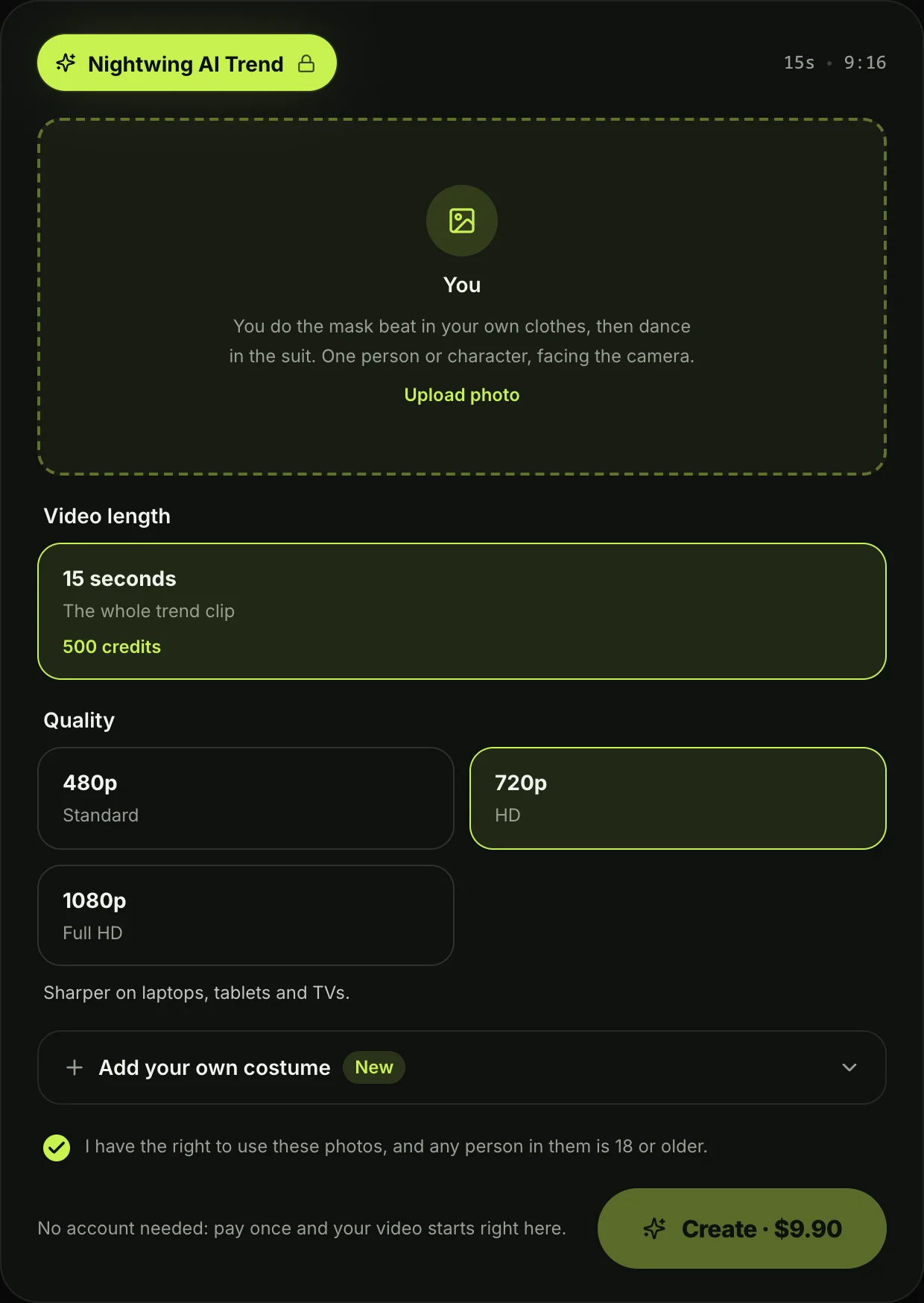
You can skip the Nightwing AI prompt on Seadanse, where the moves, the cut and the trend's sound are built in.
- Add your photo: Upload one picture of yourself facing the camera in good light.
- Add a costume photo if you like: Add an optional second picture if you want your own costume after the cut.
- Pick 480p, 720p or 1080p: Choose your video resolution.
- Press Create: The price shows on the button before you pay.
One 15-second 720p video costs $9.90 through the 500-credit pack, which also covers 480p. A 1080p video uses 1,480 credits. You pay once at checkout right on the effect page after you press Create, with no account and no subscription, and pack credits stay valid for 12 months. The Seadanse pricing page lists every pack.
Your video starts right on the page, and we'll email you a sign-in link so you can access your download on any device. You can skip the prompt and make the Nightwing AI video directly, or browse our other AI video effects.
Nightwing AI Prompt FAQ
Is there a Gemini prompt for the Nightwing AI trend?
Gemini prompts from tutorials only make still pictures. In the March wave, the March workflow used Gemini for the still, while October captions that mention Gemini don't give a prompt. The copy-ready prompt above is built for a video tool.
Can I use the Nightwing AI prompt in CapCut?
CapCut templates don't accept text prompts. The trend's CapCut templates only take uploaded photos or clips, as we explain in our look at the Nightwing CapCut template.
Does the Nightwing AI prompt keep my face?
Yes, the prompt instructs that "Subject 1 keeps exactly this face, hair, skin tone and build in every shot". Your face stays recognizable behind the mask across every scene.
Can a man use the Nightwing AI prompt?
Yes, the prompt explicitly states that "a man gets a man's cut with a man's build". The bodysuit shapes directly to your own body.
Does the Nightwing AI prompt work for cartoon characters?
Yes, the prompt includes a style rule for characters. If your reference picture is a cartoon, anime or game character, the whole video and the rooms render in that matching style.
Is there a prompt for the Nightwing trend song?
No, the prompt describes a dance beat, but it doesn't name a track. The October clip uses "STEREO LOVE FUNK" by Cotneus, PVNZER and Kngmn, while the March wave used "FAZ 360 E SENTA". You'll find more on both sounds in our guide to the Nightwing trend song.
Ready to Skip the Nightwing AI Prompt?
The prompt above writes out the entire 15-second costume reveal, keeping your face and build through every cut. You're free to run that full text yourself, or head to Seadanse to make a Nightwing AI trend video from a single photo.
By The Seadanse Team; we built the Nightwing AI trend into our page, and the prompt above is the copy-ready version of the one behind it.
Related Articles
- How to Do the Nightwing AI Trend From One Photo (3 Steps) — the presses on the page, from your photo to the download.
- What Is the Beth Cast Nightwing AI Trend? (Real Clip, AI Remakes) — the October clip, the AI remakes, and the March wave with the same name.
- Nightwing CapCut Template: Why Your Clothes Never Change (and the Fix) — the two templates the tutorials link, and what each one does.
- Best Nightwing AI Video Generators (2026): 9 Ways Compared — the tools that make the Nightwing AI trend video, side by side.
- Nightwing Trend Song: Stereo Love Funk (and the March One) — the sound behind the October trend, and the March wave's song.


