
How to Do the Nightwing AI Trend From One Photo (3 Steps)
Seadanse: how to do the Nightwing AI trend from 1 photo: the mask flip, the suit change and the trend's song in your browser. 720p for $9.90, no sign-up.
 The Seadanse Team15 min read
The team behind Seadanse. We run the models we write about, and we publish the specs, prices and limits the marketing leaves out.

TL;DR — You do the Nightwing AI trend by adding 1 photo to Seadanse's Nightwing AI Trend for TikTok and Reels page, picking a quality and pressing Create. You'll get a 15-second vertical 9:16 video of you lifting the blue mask. On the cut, you change into the black-and-blue suit in the purple-lit living room, with the trend's song. You don't need CapCut, another app, a template link or a prompt. One 720p video costs $9.90, paid once with no sign-up.
Under the AI streamer remakes on TikTok, viewers keep asking the same thing. You'll see comments like "Como lo hacen ?" and "cómo lo hacen 😞" (Spanish for "how do they do it?").
Most people who try to make one hit a wall.
In a Spanish CapCut tutorial with 151,000 views, you're told to copy a link and hunt across a creator profile. Then you drop clips into an editing template. That template is only an editing tool, so it won't put you into the suit on its own.
We've built our Nightwing AI Trend page so you don't have to piece clips together. We've put the mask flip, the cut, the purple-lit living room, the glowing batons and the trend's song right into the page. You add 1 photo, and you see the price before you pay.
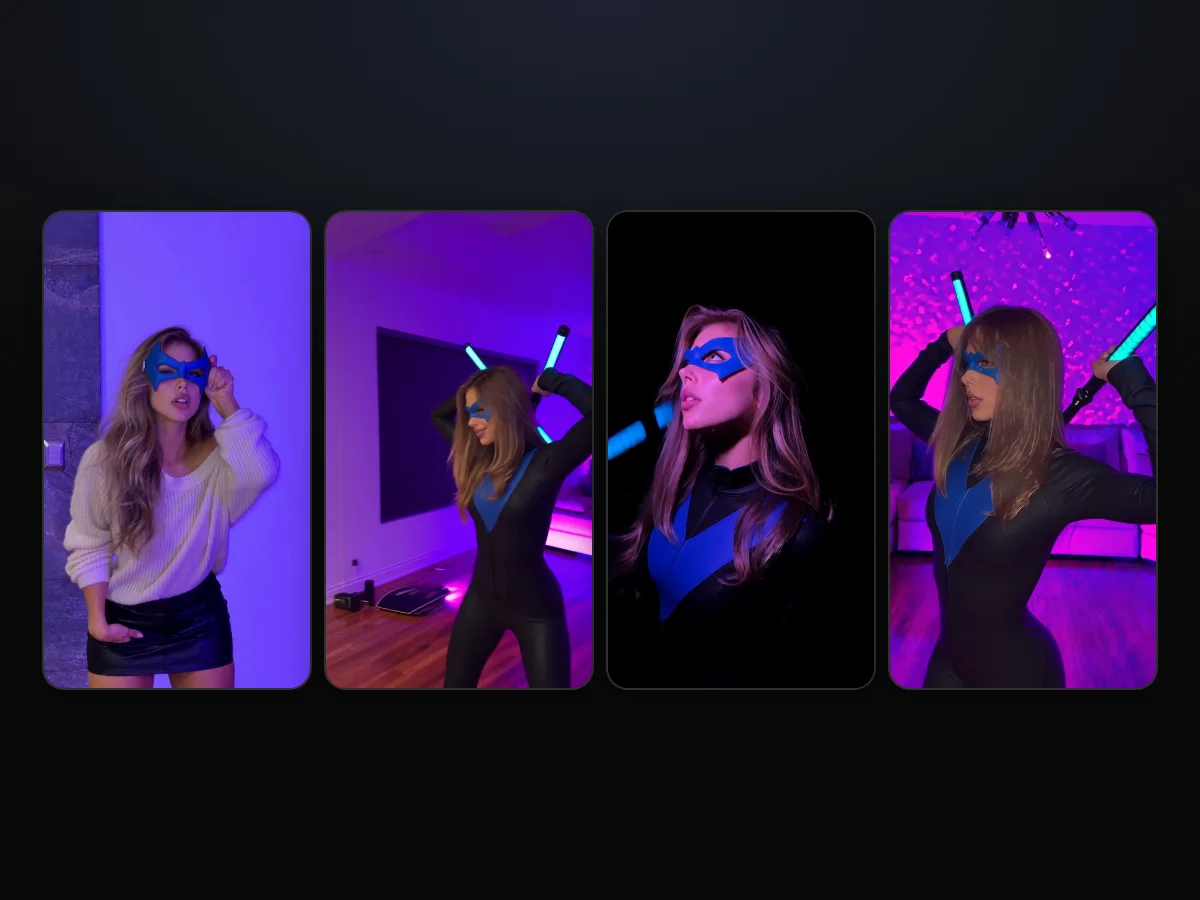
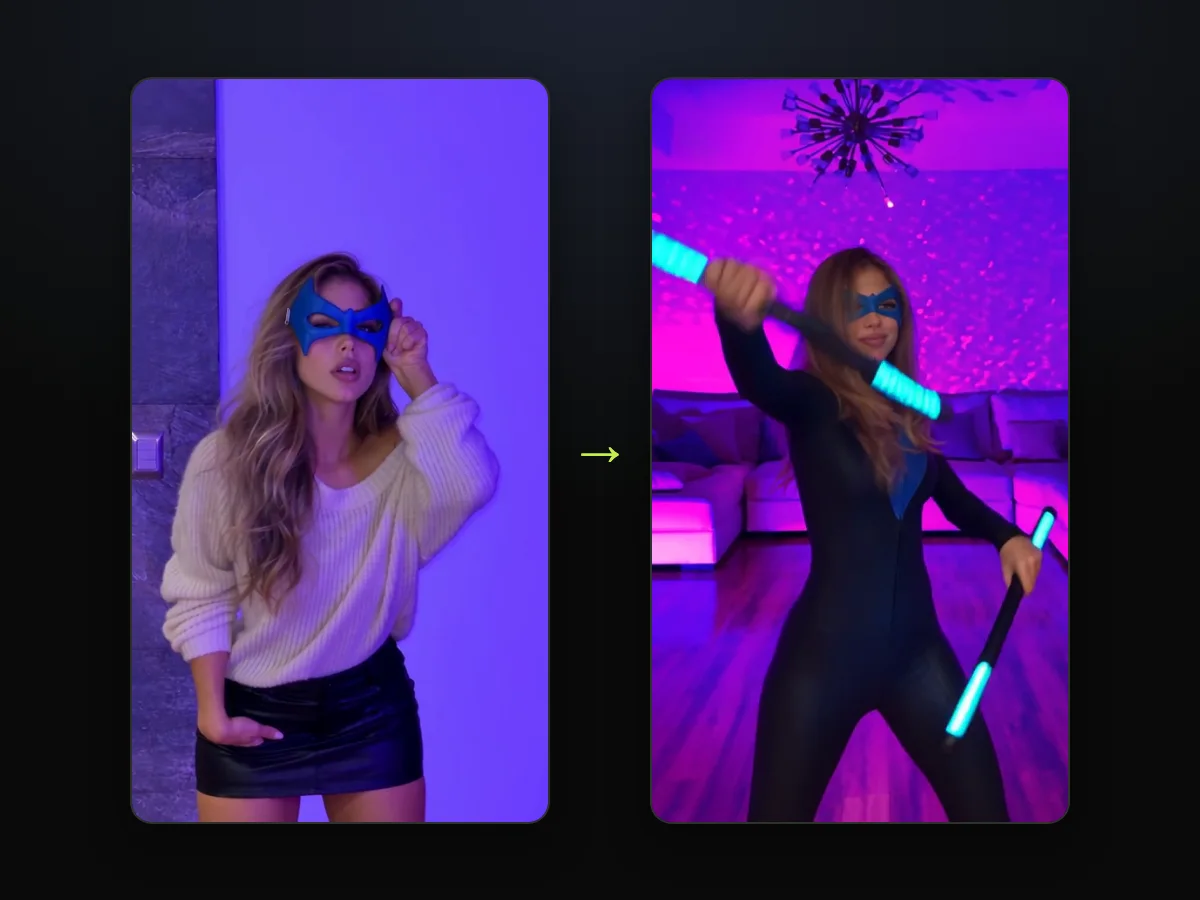
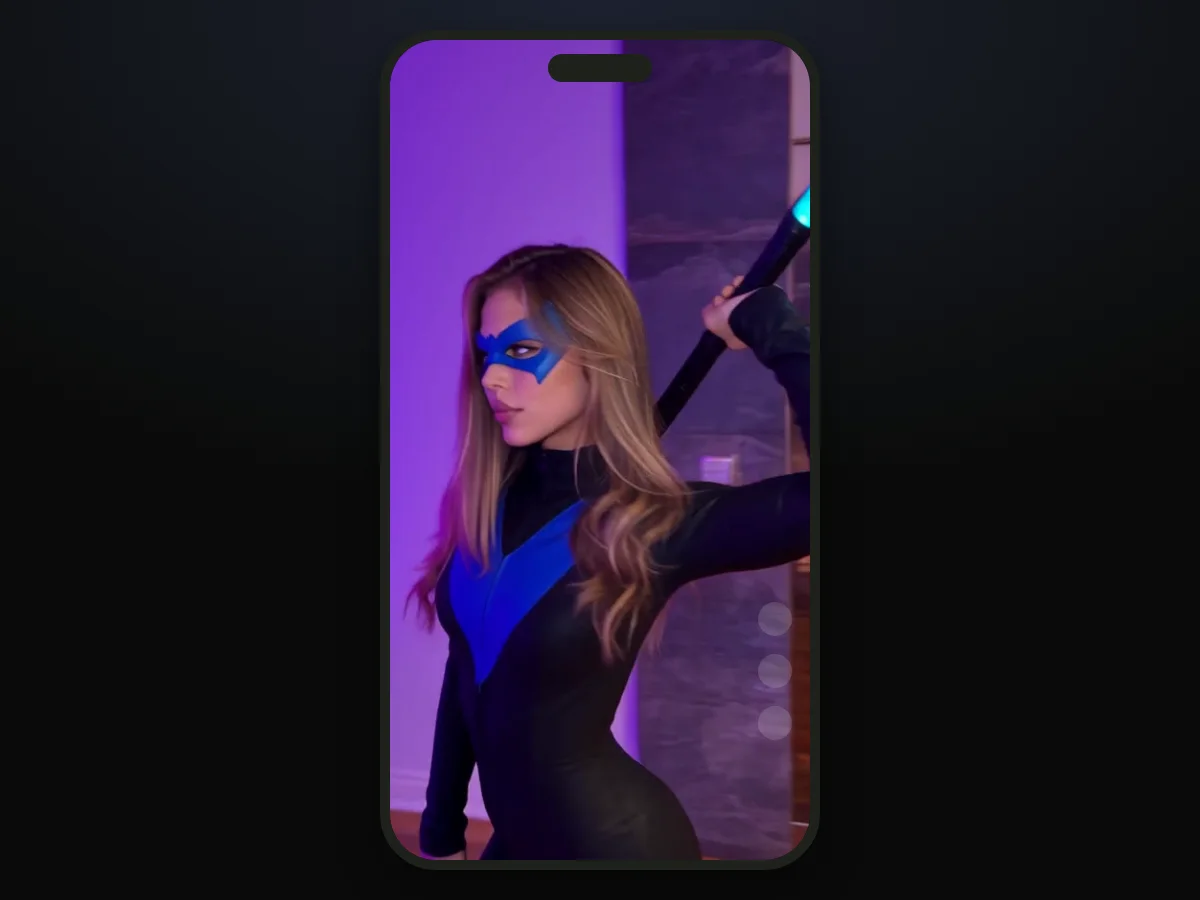
Your finished video shows you in your own everyday clothes lifting the domino mask. Right on the camera whip, you land in the suit with the batons, and your face stays yours behind the mask.
Here's what's below:
- The 3 steps: how to add your photo, choose a quality and press Create.
- The TikTok route: how CapCut templates and separate video tools handle the trend.
- Your look: how to wear the trend's suit or switch to a custom costume.
- The price: what one video costs, clearly displayed before checkout.
How Do You Do the Nightwing AI Trend?
To do the Nightwing AI trend, you add 1 photo to our page. You'll get back a new 15-second, vertical 9:16 MP4 that recreates the trend with you in it.
It's the full video rather than a simple photo edit. You'll get the mask flip, the whip cut, the suit change and the dance, with the trend's song playing from the start.
- What changes: your outfit swaps on the cut, switching from your own clothes into the black-and-blue suit, or into your chosen costume.
- What stays: your face, your facial features behind the mask and your build stay yours. The purple-lit room, camera moves and batons match the trend.
- What you hear: the song "STEREO LOVE FUNK" plays straight from the first second of the video file.
To make yours, add your photo to our Nightwing AI trend generator, pick a quality and press Create.
What Happens in Your 15-Second Nightwing AI Trend Video
Your 15-second Nightwing AI trend video follows the beats of Beth Cast's original clip, with you in every shot. The action moves fast, jumping straight from the lavender wall to the dance in the suit.
Here's how your 15 seconds play out:
- The mask: against a lavender wall, in your own clothes, you lift a blue domino mask to your eyes and hold it. Then you pull it off and swing it out to the side.
- The whip: the camera whips after the mask, and on the cut you're in the purple-lit living room, in the suit, mask on.
- The dance: in front of the white sofa, under the starburst chandelier, you spin the two glowing batons. You cross them behind your head, sway your hips, turn your back with the batons overhead, and spin.
- The close-up: a close-up of you in profile in the dark.
- The finish: a spin with one baton raised, then the closing pose with both batons crossed behind your head.
Your face stays yours behind the blue mask, and the suit fits your build.
The whole trend took off after Beth Cast's original TikTok went live on October 6, 2026. It pulled in 14.5 million views by October 24.
You can see where the Beth Cast Nightwing trend started to explore the original post and how it spread.
What You Need for the Nightwing AI Trend
To do the Nightwing AI trend, you'll need 1 photo, a web browser and $9.90 for one 720p video. You don't have to prep complicated files or record yourself dancing.
- A photo: one clear photo of you, a friend who's 18 or older, or a cartoon, anime or game character.
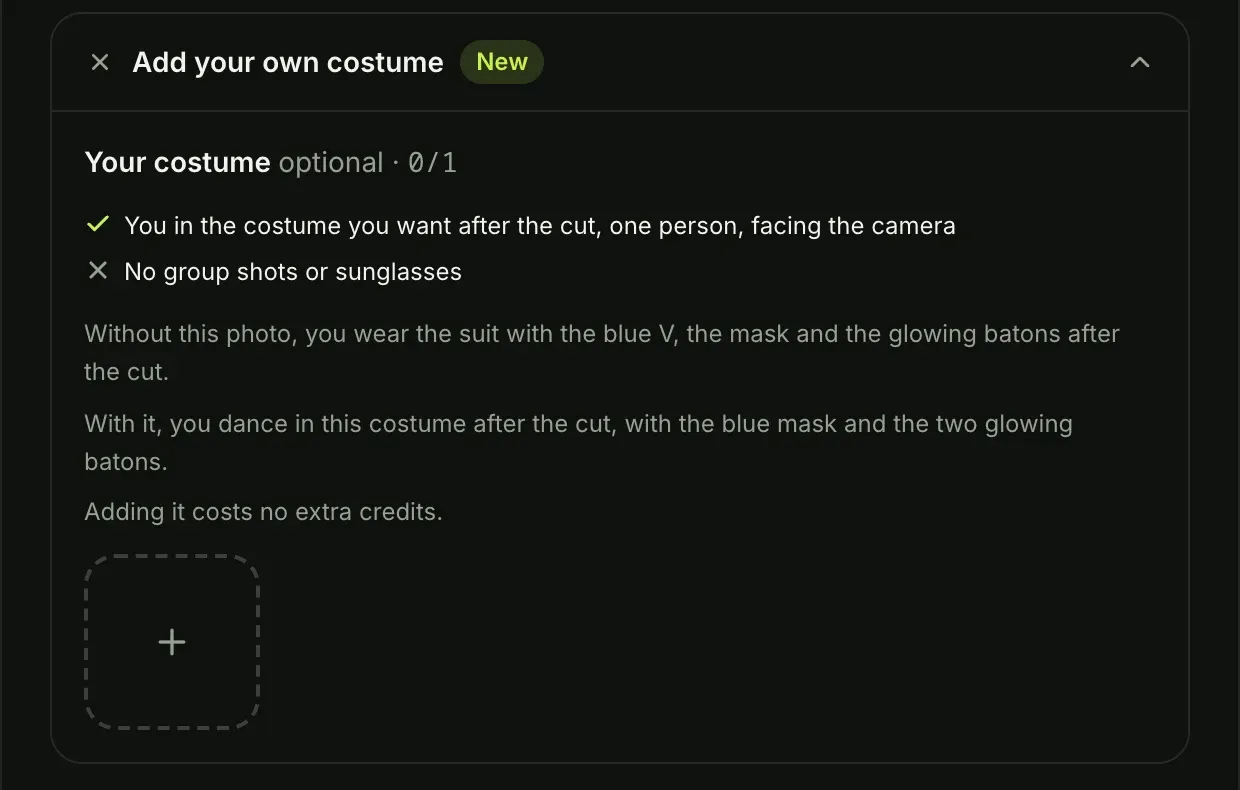
- A costume photo (optional): a photo of any outfit you want to wear instead of the default suit.
- A browser: the web browser on your phone (iPhone or Android), tablet or desktop computer, with nothing extra to install.
- $9.90: one 15-second 720p video, paid once with no recurring fees. You'll find the details in our guide to how pay-once credits work.
You don't need CapCut, a template link, a prompt, an app, any editing, or to learn the moves yourself.
Do the Nightwing AI Trend in 3 Steps
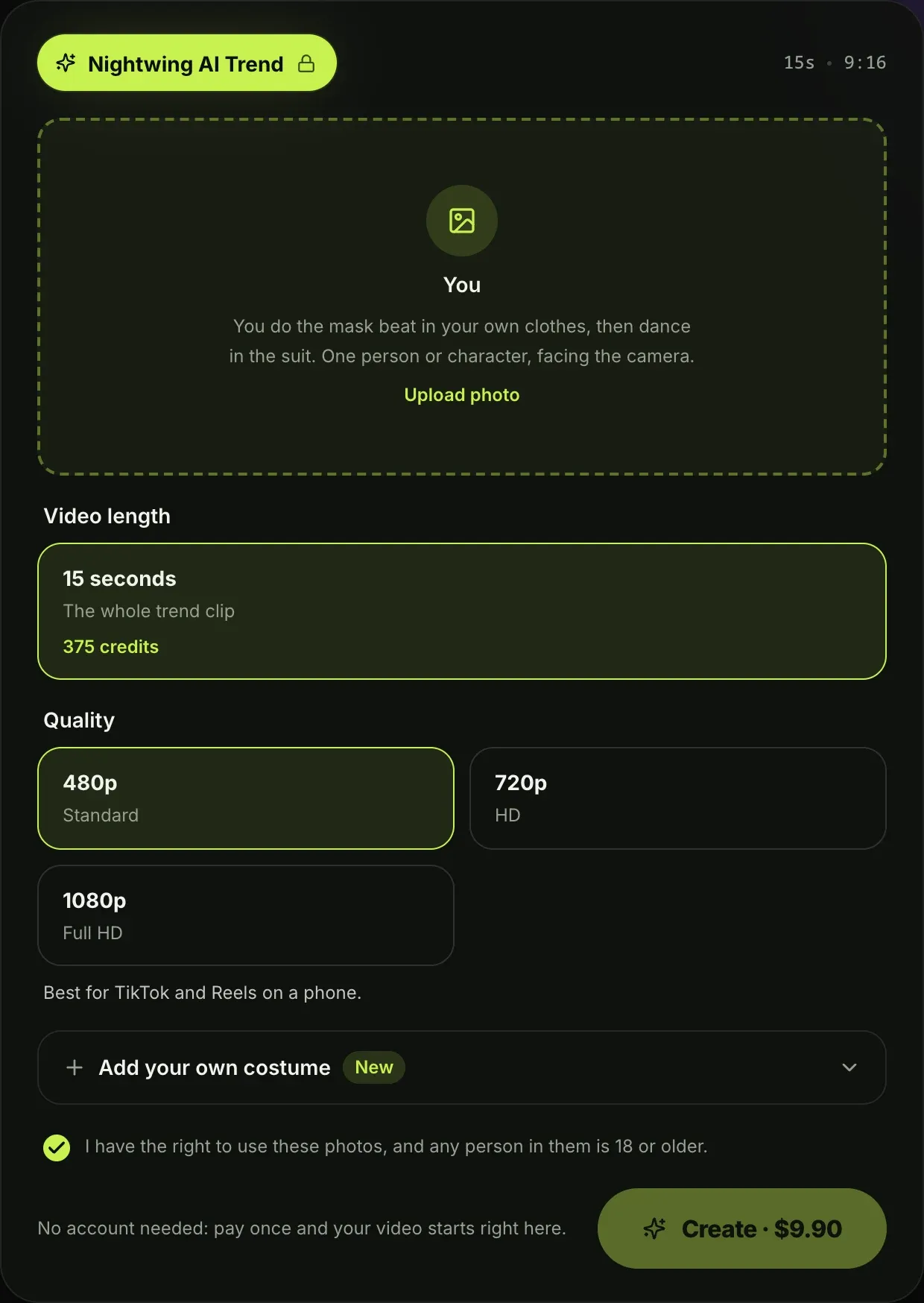
To do the Nightwing AI trend, you add your photo, pick 480p, 720p or 1080p, and press Create, all on one page. Everything's done right inside your web browser.
Step 1: Add Your Photo
Open Seadanse's Nightwing AI Trend page in your mobile or desktop browser. Tap the first photo box and pick 1 photo from your device's camera roll or computer folders.
If you'd like to wear your own custom outfit, open the costume section under the quality switch and upload a picture of it into the second photo box. If you leave that box empty, you'll change into the classic black-and-blue suit automatically.
The tick box beneath the photo fields confirms that you have the right to use the pictures. It also confirms that anyone pictured is at least 18 years old. It's already ticked when the page loads, so you can leave it ticked.
Step 2: Pick 480p, 720p or 1080p
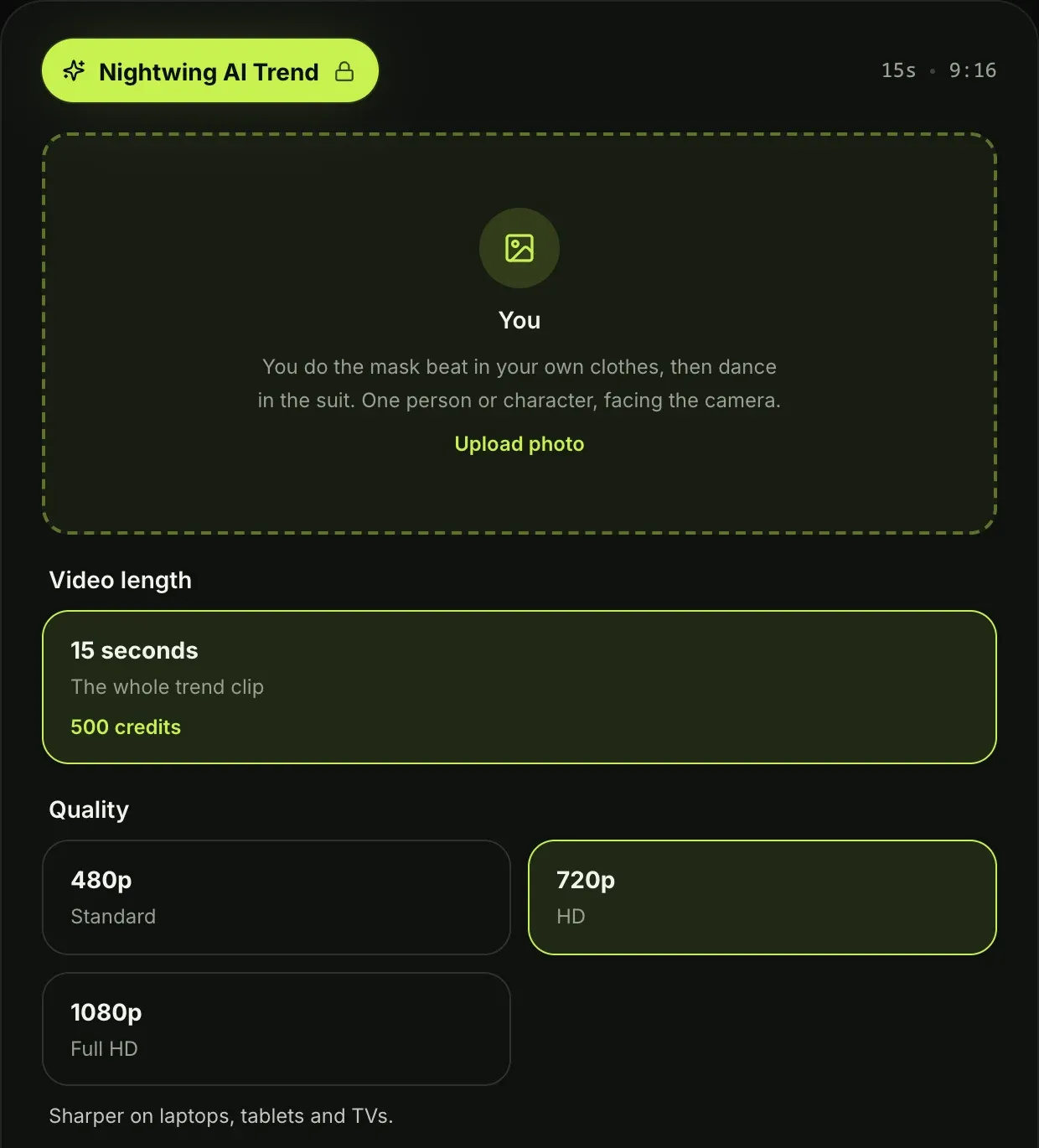
The generator opens with 480p picked by default. Tap the quality button you prefer for your project.
Every quality option gives you the exact same 15-second runtime, tall 9:16 frame and built-in music track. The total cost updates right on the Create button so you know what you're paying before checkout.
Step 3: Press Create
Tap the Create button at the bottom of the form. You don't need to register an account ahead of time. You pay once, and your video's processing right on the page.

When you press the button, a small window opens displaying the available credit packs. You pay once at checkout without setting up an account or recurring subscription, and the video starts right on the screen.
The receipt email sent after you buy includes a direct sign-in link. That link lets you reopen your project and watch your clip from any phone, tablet or desktop computer whenever you like.
Once the video finishes, tap the download button to save your vertical 9:16 MP4 file. The finished export includes the full soundtrack, and there's no watermark.
How TikTok Does the Nightwing AI Trend (CapCut, Kling AI, PixVerse)
On TikTok, people do the Nightwing AI trend three ways: a CapCut template, an AI app like Kling AI, or the March-style two-step edit.
Each method handles the video differently, and some skip the suit change completely.
Many creators try the trend through CapCut templates. A CapCut template is a ready-made edit someone else built in the CapCut app, with empty spots for your clips or photos.
For example, the template most tutorials link was posted by Blanc15 on October 21, 2026. It runs 13.24 seconds and reached 13,769 uses by October 24.
Its template listing features standard video tools like clipping, curve speed and picture-in-picture, with no AI creation built in. It edits whatever clips you give it and doesn't dress you in the suit.
Here's the route the Spanish tutorial walks you through:
- Tap the share button on the TikTok clip and copy the video's web link.
- Open the CapCut app to locate the photo template, or visit the creator's profile page if it fails to appear.
- Tap the button to load the template, pick your media files, press confirm and export your draft.
That tutorial claims in its opening that you only need one photo and calls the whole thing super easy.
Yet the template itself demands 4 separate clip slots, leaving creators wondering how to get the costume footage.
Other creators turn to standalone video tools. In the first AI remake, posted October 18, 2026, streamer AuronPlay gets swapped into a fairy dress, tiara and wings.
That remake gained 2.2 million views and credited Kling AI 4.0 in its caption.
Meanwhile, a PixVerse promo post advertised the trend by telling viewers that one photo is all they need.
Earlier in March 2026, people made a different wave of clips by following TechTudo's March step-by-step guide. That March method needed filming a dance, making an image in Gemini, animating it in Kling AI, and stitching clips inside CapCut.
On Seadanse, you can make the Beth Cast Nightwing AI transformation without hunting for links, joining clips or pasting prompts.
The mask lift, costume cut and soundtrack are ready to go, and you'll see the clear price before you start.
If you're curious about the app route, read which Nightwing CapCut template the tutorials use to see why those edits work the way they do. You can also see the Nightwing AI video generators compared for a complete breakdown of current tools.
Suit or Your Own Costume: Looks for the Nightwing AI Trend
The Nightwing AI trend puts you in the suit by default. A second photo lets you change into a costume of your own instead, and it's the same price.
You aren't locked into a single style if you'd rather try a different look.
Viral remakes proved how versatile the visual gag can be. Beyond the classic suit, creators put streamers into a maid-outfit remake with 1.2 million views and a teal-pigtail idol costume with over 500,000 views.
With October celebrations approaching, viewers quickly saw the costume potential.
One viewer remarked, "hay tiempo lo haré con esto" (Spanish for "there's time, I'll do it with this"). That's how simple it is to test party looks.
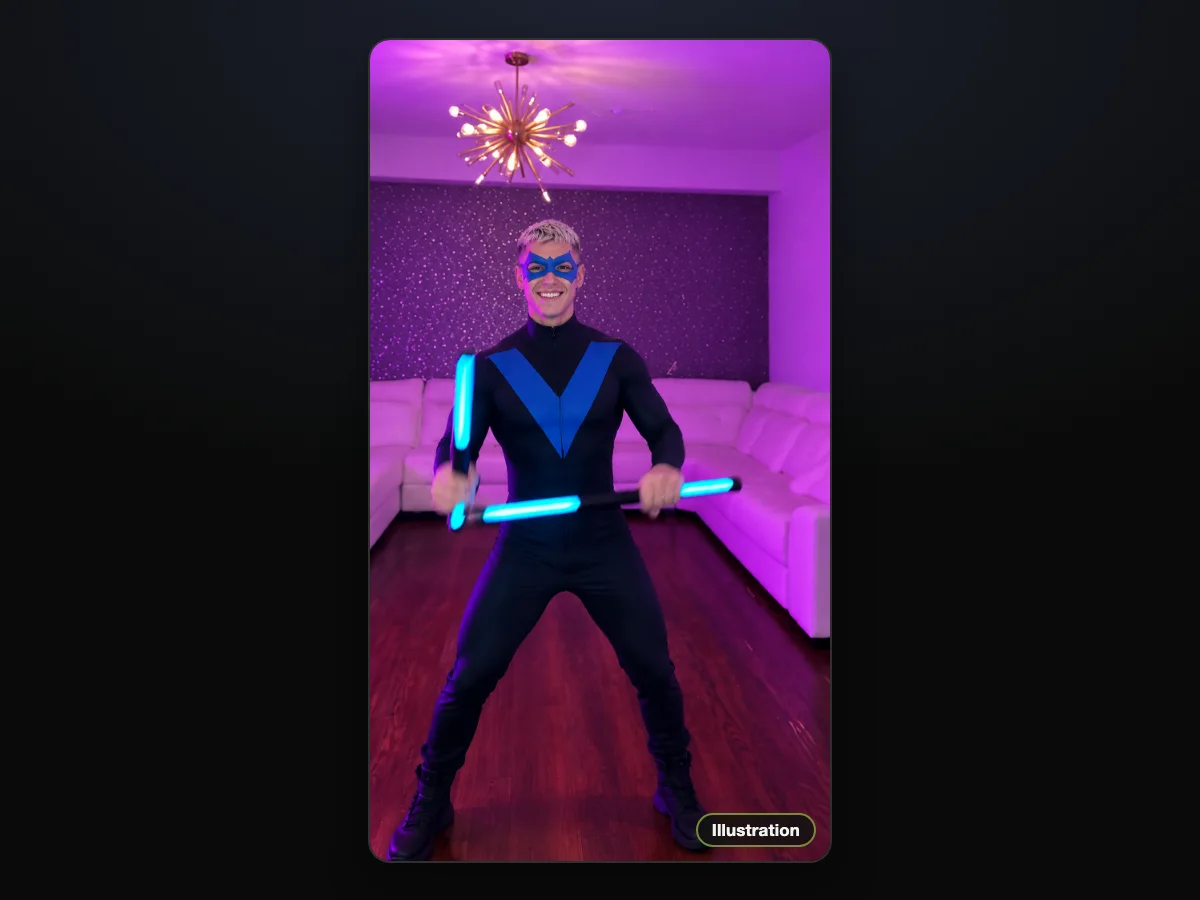
- The suit: upload 1 photo to wear the black bodysuit with the blue chest V, matching blue domino mask and glowing cyan batons.
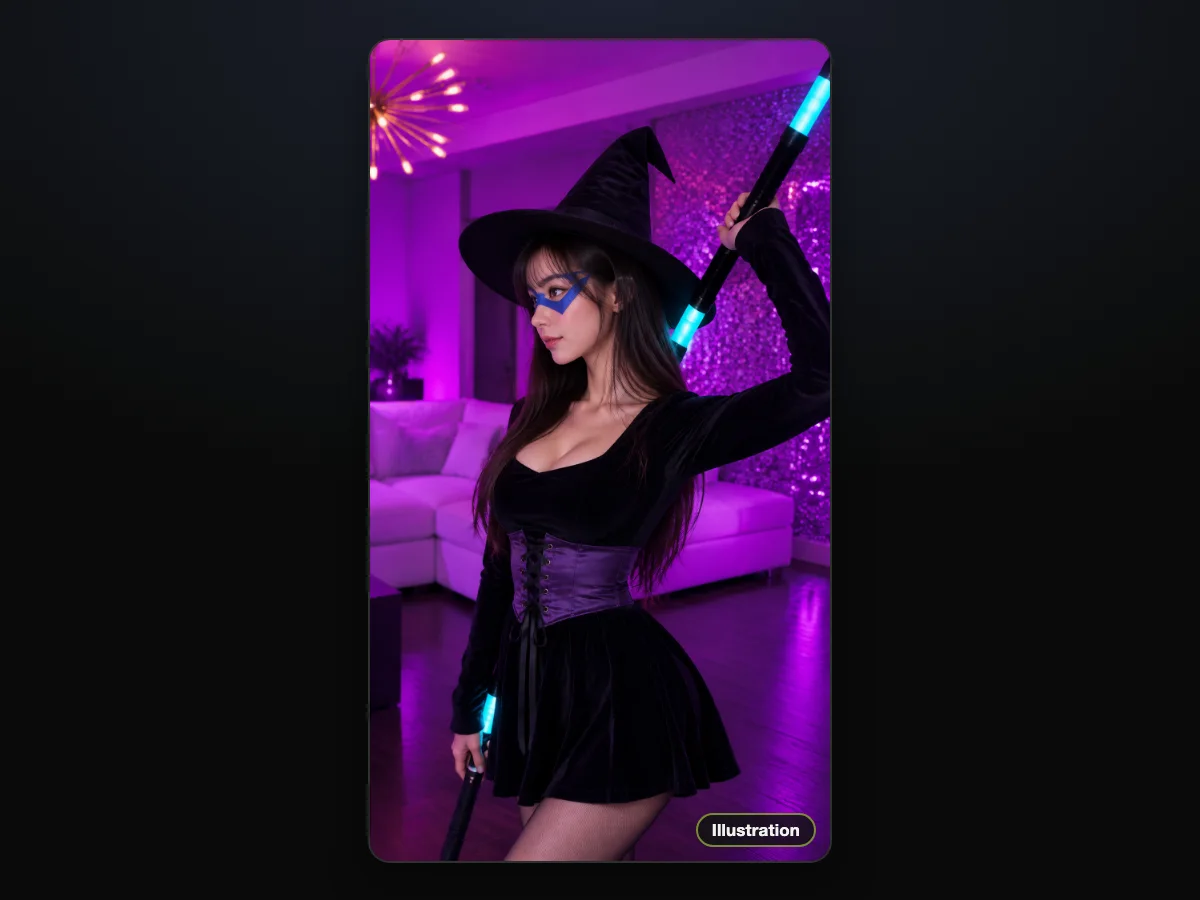
- Your own costume: add a second photo showing any outfit you like, such as a dress or cosplay. You'll wear it with the mask and batons on the cut.
- Guys: the suit cut naturally reflects the body build in your picture, giving male photos an athletic, masculine suit fit.
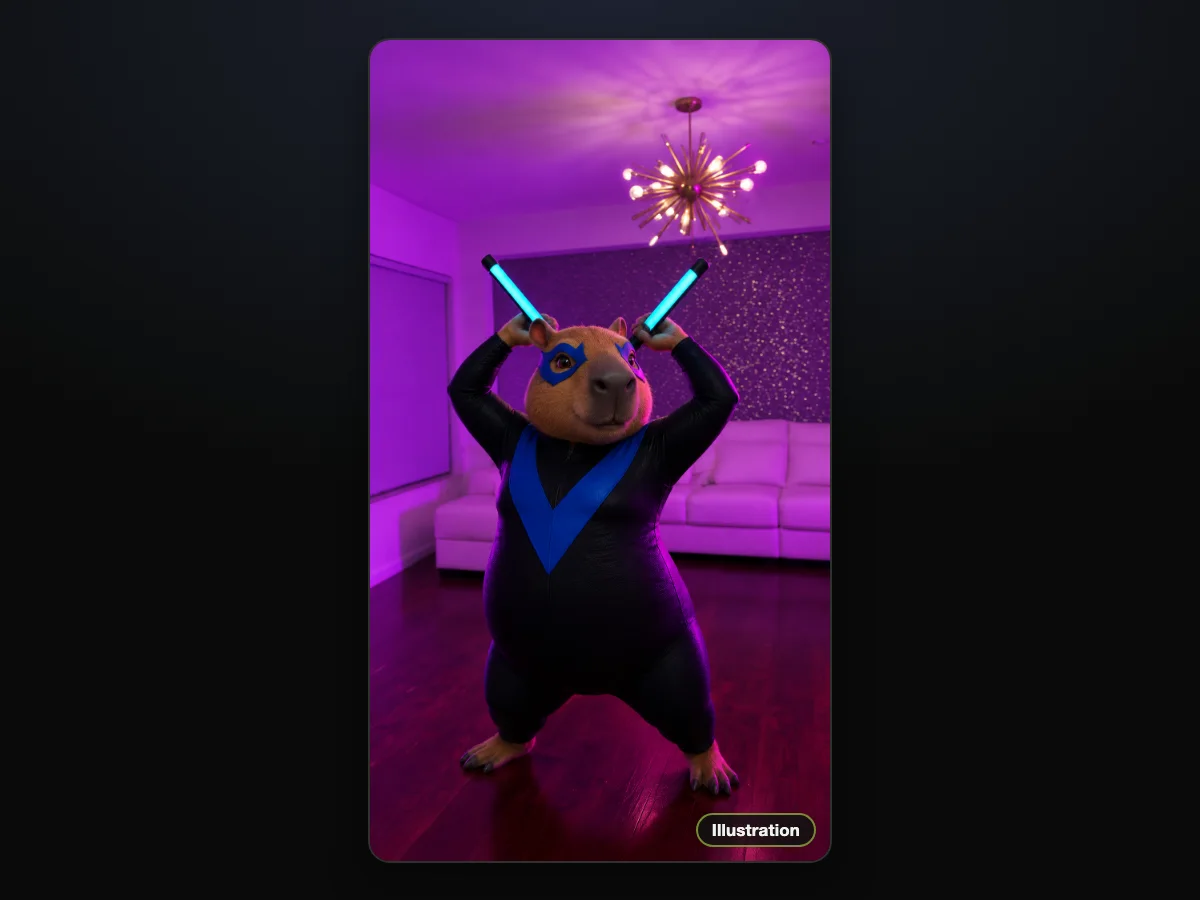
- A character: animated game figures, anime drawings and cartoon characters can perform the exact same mask drop and baton routine.
If you enjoy costume transformations, you can also try our Devil Wears Prada trend for another dramatic outfit jump on the cut. It's part of our wider library of browser-based AI video effects.
Which Photo Works Best for the Nightwing AI Trend
The photo that works best for the Nightwing AI trend shows one person or character facing the camera. The face and eyes are clear, the light is good, and full body works best.
Following a few simple guidelines helps the generator make your video cleanly.
- One person: upload an image featuring a single person or character so the generator knows who to focus on.
- The face: pick a picture where the subject's facing forward with eyes visible and unobstructed by heavy shadows.
- Full body: choose a standing or head-to-toe shot to help the generator shape the costume to your natural frame.
- The costume photo: show a clear, full view of the clothing item if you've decided to upload a custom second picture.
Make sure anyone who's in your uploaded pictures is 18 or older.
Nightwing AI Trend FAQ
How do you do the Nightwing AI trend on TikTok?
Make the video on our page in your browser, download the MP4, and post it on TikTok or Reels.
The trend's song plays straight from the file's first second, so you don't even need to sync the audio yourself.
Is this the same as the Asa Noturna trend?
No. The "Asa Noturna" trend's the March 2026 Nightwing dance trend from Brazil. It has a different clip and the song "FAZ 360 E SENTA".
The October 2026 Nightwing AI trend recreates Beth Cast's mask flip and baton routine, and that's what our page makes.
What song is in the Nightwing AI trend?
The song's "STEREO LOVE FUNK" by Cotneus, PVNZER and Kngmn, and it plays right from the very first frame of your video.
Read more on the Nightwing trend song to check out the sound's background and artists.
Do I need CapCut, an account or a prompt?
No, you don't need any of those three. Press Create, pay once, and your video begins processing right on the page without sign-ups or complex prompt boxes.
The checkout email brings a link that opens your video on any device. The moves, the room and the song are built in, so 1 photo is all you add.
You can read our guide to the Nightwing AI prompt if you want to see how prompt-based generation works elsewhere. It shows a copy-ready prompt for the trend's video, which you'd paste into a video tool that takes your photo as a reference picture.
Does it work on a phone?
Yes, the tool runs directly inside your web browser on an iPhone, Android device, tablet or computer with nothing to download.
When the file's finished, you can save the MP4 straight to your device storage.
How much does a Nightwing AI trend video cost?
A single 15-second 720p video costs $9.90 through our 500-credit pack, paid once with no recurring subscription. That same $9.90 pack easily covers a 480p video, which takes 375 credits. Adding a custom costume photo doesn't use any extra credits.
A 1080p export uses 1,480 credits from the $39.90 pack of 2,500 credits, leaving the remainder in your credit balance.
Pack credits stay valid for 12 months, and if a video fails, you'll get your credits back automatically. You can review all options on our Seadanse pricing page.
Make Your Nightwing AI Trend Video Tonight
To join the trend, add 1 photo to our page. You'll get your 15-second vertical clip with the blue mask flip, the sudden suit change, the dual batons and the trend's original song. It runs smoothly right in your mobile or desktop browser for $9.90 at 720p with no subscription needed.
Visit the generator to make your Nightwing AI trend video and share it to your feed today.
Written by The Seadanse Team, the team that built the Nightwing AI Trend page.
Related Articles
- What Is the Beth Cast Nightwing AI Trend? (Real Clip, AI Remakes) — where Beth Cast's clip came from, and how the AI remakes took it across TikTok.
- Nightwing CapCut Template: Why Your Clothes Never Change (and the Fix) — the two templates the tutorials link, and why people get stuck.
- Best Nightwing AI Video Generators (2026): 9 Ways Compared — the tools that make this trend, compared on length, sound and price.
- Nightwing AI Prompt (Copy-Ready), and How to Skip It — a prompt for the trend's video, to paste into a video tool yourself.
- Nightwing Trend Song: Stereo Love Funk (and the March One) — the October trend's song, and the different one from March.


