
Tiny Desk AI Cat Prompt (Copy-Ready): 5 Prompts for Every Shot
Seadanse: the Tiny Desk AI cat prompt guide gives you five copy-ready prompts, one per shot of the 19-second finale, or skip the prompt with one cat photo.
 The Seadanse Team17 min read
The team behind Seadanse. We run the models we write about, and we publish the specs, prices and limits the marketing leaves out.

TL;DR — A Tiny Desk AI cat prompt describes your cat in one shot of the 19-second "Outstanding" finale, and the five below cover every shot. You paste each one into a video tool that takes your cat's photo and a prompt, then join the shots and add the "Outstanding" sound yourself. Or skip the prompts: on Seadanse's Cat Tiny Desk AI page, one cat photo gets you the whole 19-second 9:16 video with the original sound. It's $9.90 for 720p, with no sign-up.
You've watched the Tiny Desk AI cat videos take over your social feeds all week. Now you're staring at a blank prompt box in a video tool, wondering what words will put your own cat behind that desk microphone.
Typing one long prompt for the whole video gives the tool too much at once. That's because the finale runs through five distinct shots, and each shot gives the cats a completely different job.
Here's the practical guide that solves it. You'll get the five-part formula, five copy-ready prompts for every shot, the exact cut order, and the faster no-prompt option on our site.
This is the video the prompts below aim for, made on our page:
What Is a Tiny Desk AI Cat Prompt?
A Tiny Desk AI cat prompt is the text you give a video tool to put your cat in the "Outstanding" finale, one shot at a time. That finale comes from Charlie Wilson's June 2023 NPR Tiny Desk concert. The prompt describes the camera angle, the cat's physical actions, and the crowded office desk set.
The trend took off when The Burner posted an AI version with five college football coaches as the band on October 18, 2026. That clip passed 2.3 million views. Since then, creators have remade the finale with friend groups, dogs, and cats.
Our prompts here are written strictly for cats. If you want to put your friends in the band instead, check out the Tiny Desk AI prompt for people.
You don't even have to write prompts if you don't want to. You can simply add your cat's photo to our Cat Tiny Desk AI generator and press Create.
The Tiny Desk AI Cat Prompt Formula: Five Parts
Every Tiny Desk AI cat prompt below is built from five parts: the subject, the action, the set, the look and the camera. Stick to these five and you'll keep your shots matching across every cut.
| Part | What it tells the tool | Example from our prompts | What it means for you |
|---|---|---|---|
| Subject | Your cat, described from its photo: coat colour, markings, eye colour, fur length, build | "a ginger tabby with amber eyes and a white chest" | The tool keeps your cat looking like your cat. |
| Action | What the cat does in that one shot | "sings with its mouth wide open, one front paw raised" | Each shot gets one clear job. |
| Set | The office desk concert | "a red stage keyboard on a desk, wooden shelves of records and plush toys behind" | Every shot looks like the same room. |
| Look | Photoreal, warm daylight | "photoreal, warm soft daylight, a real cat" | A real cat photo gives a real-looking cat. |
| Camera | The frame and the angle | "vertical 9:16 close-up, camera still" | The shot fits TikTok and Reels with no cropping. |
The order of the parts matters less than putting all five in every prompt. When a video tool gets all five pieces of information, it produces cleaner motion and keeps the background steady.
6 Rules for a Tiny Desk AI Cat Prompt That Works
Six habits make a Tiny Desk AI cat prompt easier for a video tool to follow. You'll want these six rules beside you whenever you build or tweak your text.
- One shot per prompt: Write a separate prompt for each of the five shots instead of trying to pack the entire video into one prompt box.
- The cat from its photo: Pick a clear photo of your cat sitting upright in good light with both eyes open. Then name its exact coat, markings and eye colour in your prompt.
- The paws: Tell the tool where the paws rest in every scene, whether raised at the microphone, resting on keyboard keys, or clutching a saxophone.
- The frame: State vertical 9:16 framing in every prompt so your clips match mobile video formats without side bars.
- The same set every time: Copy the exact same set sentence into all five prompts so the shelves and office props don't change between cuts.
- The sound last: Avoid mentioning singing, music, or instruments making noise in your prompt text, and sync the audio track after you join the video clips.
Tiny Desk AI Cat Prompts for One Cat Photo
Three of the five Tiny Desk AI cat prompts need only one photo of your cat, because they're the shots where one cat is alone on screen. You'll run all three with the same clear, front-facing picture of your cat.
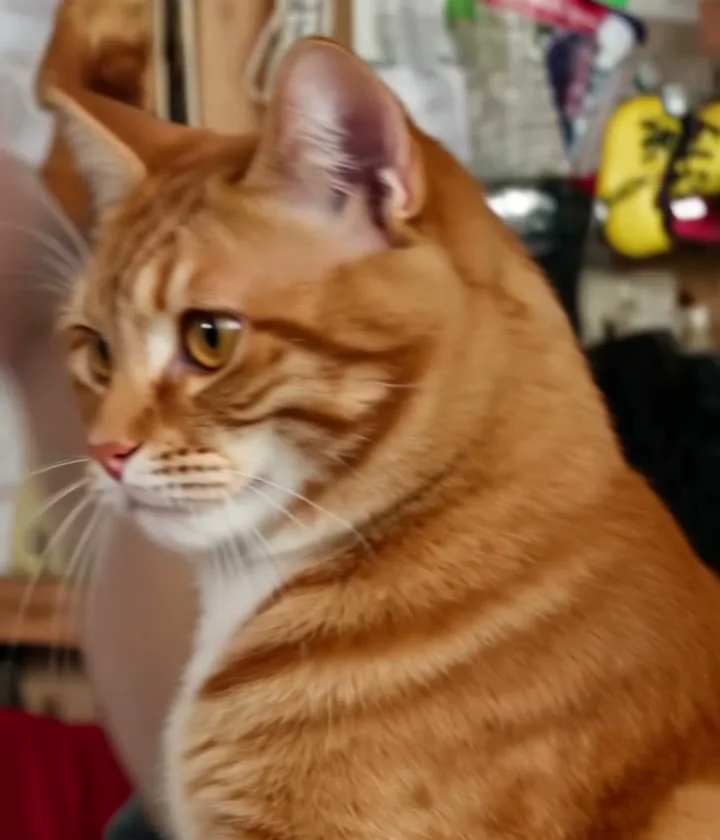
Prompt 1: The opening line, side-on at the mic
The opening line shot runs for about 1.5 seconds as your cat steps up to deliver the first vocal phrase.
A vertical 9:16 video running 1.5 seconds of a real cat based on the uploaded photo of [your cat: coat colour, markings, eye colour]. The cat stands side-on in a close-up profile view, turning its head toward a small microphone on a stand to deliver the opening line. The setting is an office desk concert filled with warm soft daylight. Behind the cat stand packed wooden shelves displaying vinyl records, books, plush toys, and baseball caps. A red stage keyboard rests on the wooden desk nearby. The cat keeps its exact coat colour, markings, fur length, and eye colour from the photo. Photoreal quality with natural fur texture and subtle, realistic movements. No people, no human hands, no hats, no headphones, no captions, no watermarks, no logos.Replace the bracketed phrase with your cat's visual details, such as a short-haired grey tabby with green eyes.
Prompt 2: The big close-up, mouth open and paw raised
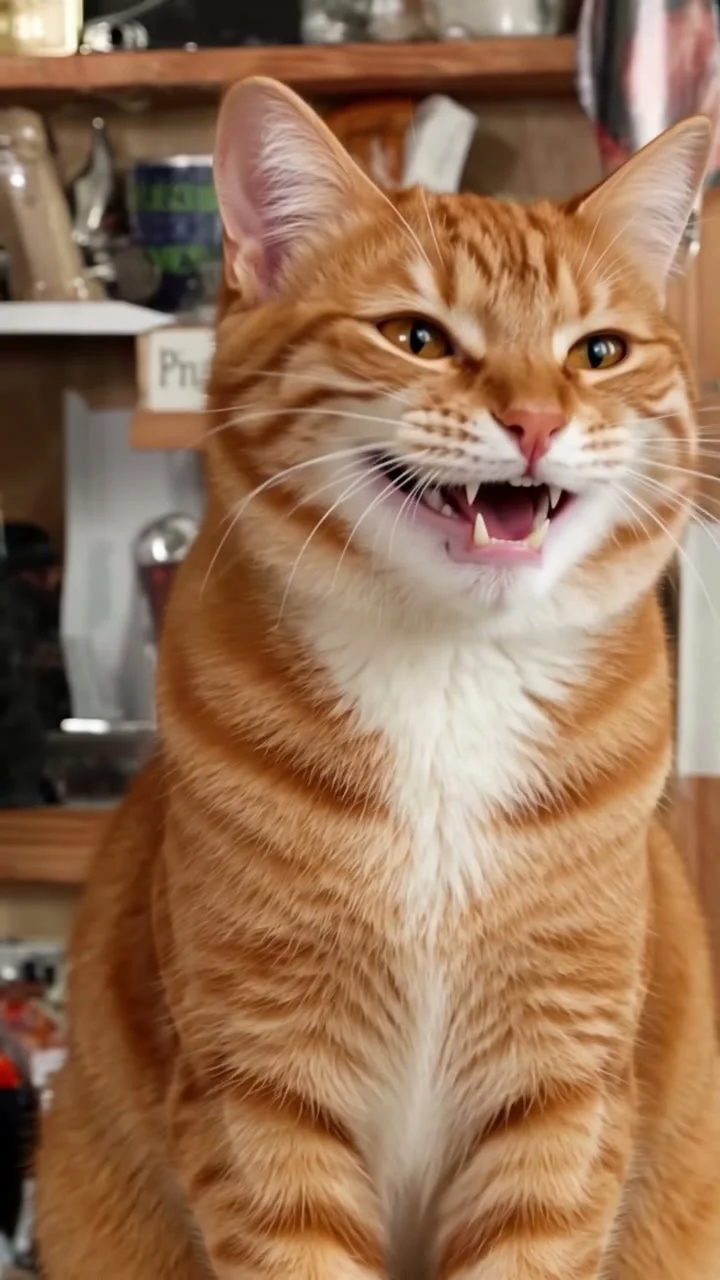
The big close-up is the iconic shot that viewers remember, lasting about 6.5 seconds during the emotional vocal peak.
A vertical 9:16 video running 6.5 seconds of a real cat based on the uploaded photo of [your cat: coat colour, markings, eye colour]. The cat is in a tight front-facing close-up, singing straight into the camera. Its mouth is wide open as if laughing and singing joyfully, with one front paw raised high in the air beside a small desk microphone on a stand. The setting is an office desk concert in warm daylight. Wooden shelves filled with books, vinyl records, plush toys, and caps fill the background. The cat keeps its distinct markings, coat colour, ear shape, and eye colour from the photo. Photoreal detail with smooth fur movement and expressive eyes. No people, no hats, no headphones, no captions, no watermarks, no logos.Fill in your cat's specific coat colours and eye shade inside the brackets before running the prompt.
Prompt 3: The sax solo, gold saxophone in its paws
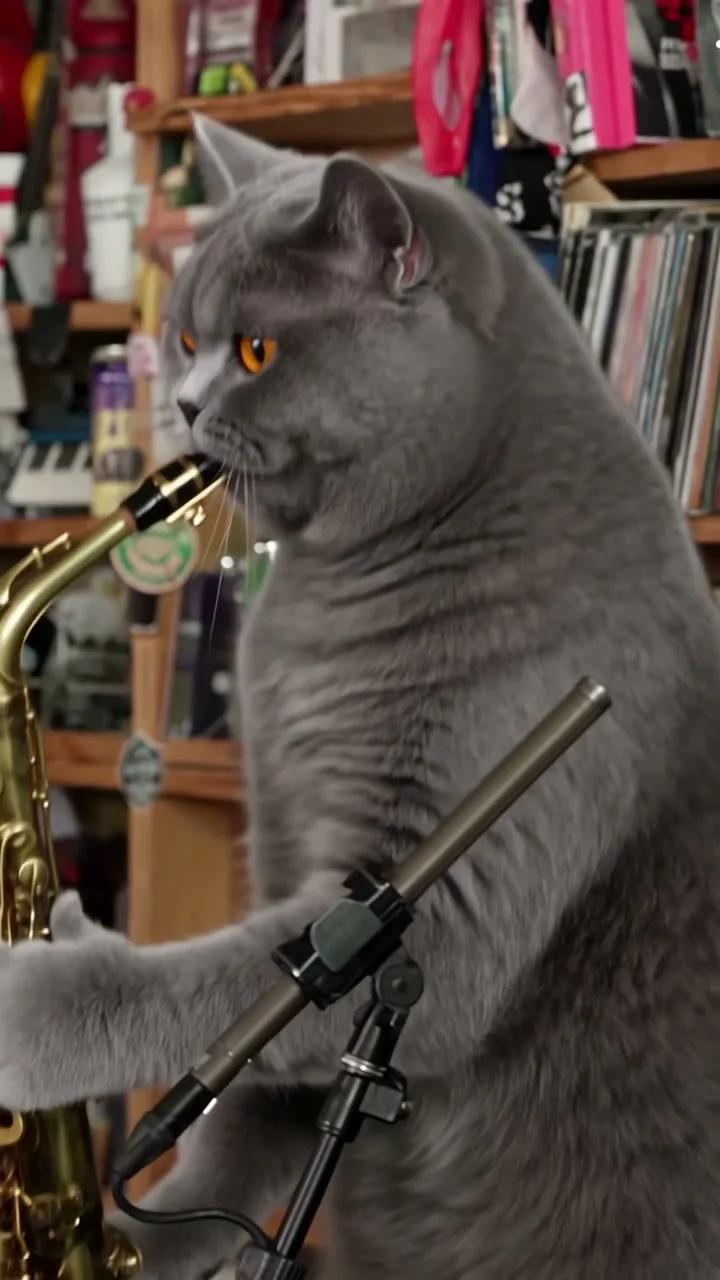
The sax solo runs for about 3.5 seconds and features a single cat jamming alone in profile.
A vertical 9:16 video running 3.5 seconds of a real cat based on the uploaded photo of [your cat: coat colour, markings, eye colour]. The cat appears in a side-profile medium shot, holding a shining gold saxophone in its two front paws as it plays. The scene takes place at an office desk concert illuminated by warm soft daylight. Tall wooden shelves packed floor to ceiling with vinyl records, books, caps, and plush toys sit in the background behind the desk. The cat preserves the exact coat pattern, markings, fur texture, and eye colour shown in the photo. Photoreal look with natural lighting and believable paw positioning. No human beings, no hats, no headphones, no text overlays, no watermarks, no logos.You can keep your lead cat in this role or swap in a photo and description of a second pet.
Tiny Desk AI Cat Prompts for a Band of Cats
The band shots need three cats on screen at once. So these two Tiny Desk AI cat prompts are for homes with more than one cat, or for an invented band. They place three distinct feline performers around the red desk keyboard.
Prompt 4: The band shot at the red keyboard
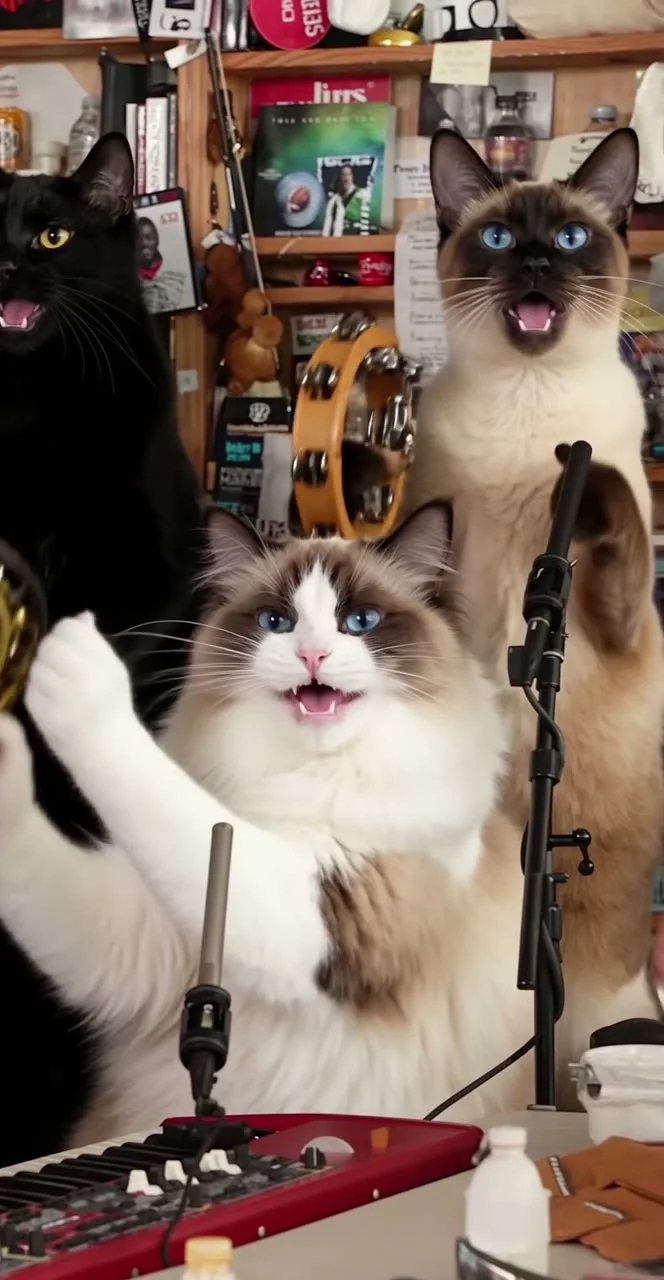
The band shot shows three cats performing together, with the keyboardist down front and two backup singers swaying behind.
A vertical 9:16 video running 5 seconds showing three cats performing together at an office desk concert in warm daylight. In the center foreground sits cat 1, [cat 1: coat colour, markings, eye colour]. It sits upright with its front paws on the keys of a red stage keyboard on a wooden desk. Behind the desk on the left stands cat 2, [cat 2: coat colour, markings, eye colour]. On the right stands cat 3, [cat 3: coat colour, markings, eye colour]. Both backup cats sing and sway rhythmically to the beat near small microphones on stands. Wooden shelves packed with records, books, plush toys, and caps fill the wall. Photoreal quality with consistent fur markings from the photos. No people, no hats, no headphones, no watermarks.Insert descriptions for your three cats, and remember this prompt works for both shot 2 and the closing shot.
Prompt 5: An all-cat band from words alone
Prompt 5 builds the entire ensemble without source photos by describing every cat directly in the text.
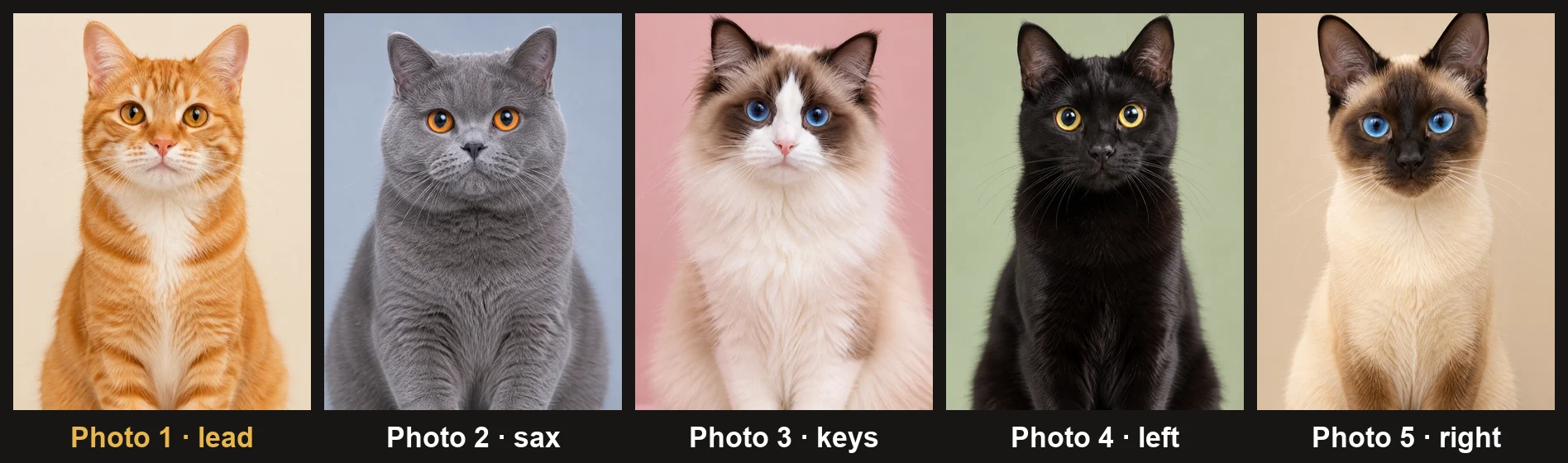
A vertical 9:16 video running 5 seconds showing a band of cats performing at an office desk concert in warm daylight. An orange tabby cat sits in front behind a wooden desk with its paws on a red stage keyboard. Behind the keyboard cat stand two backup singers: a sleek black cat on the left, and a Siamese cat with dark points on the right. Both move to the music beside small microphones. In the background corner sits a grey British Shorthair with a gold saxophone, while a fluffy ragdoll cat observes nearby. Tall wooden shelves packed with vinyl records, books, and plush toys line the office wall. Photoreal look with natural cat movement. No human beings, no hats, no headphones, no captions, no logos.Adjust the feline breeds, coat patterns, and fur lengths to assemble whichever cat lineup you'd like to see.
For a band that mixes cats and dogs, there's Pet Tiny Desk AI, and for a band of dogs, Dog Tiny Desk AI. A Tiny Desk AI pet video shows the cat-and-dog version in more detail.
How to Turn Five Tiny Desk AI Cat Prompts Into One Video
The five Tiny Desk AI cat prompts give you separate shots, so you put them in the finale's order and add the sound last. Here's how the timeline fits together:
- The opening line: Your lead cat turns side-on toward the microphone (about 0-1.5 seconds).
- The band shot: The keyboard cat plays while two backup cats sway behind (about 1.5-6.5 seconds).
- The big close-up: The lead cat sings open-mouthed with a paw in the air (about 6.5-13 seconds).
- The sax solo: The solo cat grooves in profile with a gold saxophone (about 13-16.5 seconds).
- The closing band shot: The camera cuts back to the keyboard cat and backup singers (about 16.5-19 seconds).
Take your five exported clips and drop them into a video editor in this exact sequence. Trim the ends so the whole video runs 19 seconds.
When you upload the joined video to TikTok or Instagram, search for "Outstanding" by The Gap Band in the platform's audio library. Align the sound to match the cuts.
If you don't want to edit clips or line up sound, our page builds all five shots in order with the original sound automatically synced.
What to Keep Out of a Tiny Desk AI Cat Prompt
A short "keep out" line at the end of every Tiny Desk AI cat prompt stops the tool adding things the finale doesn't have. Unwanted items break the visual charm of the concert scene.
- People: Block human faces, stray hands, and office workers so the concert remains an all-cat performance.
- Hats and headphones: Exclude costume hats, caps, and bulky headphones that crowd the cats' heads.
- Text on screen: Ban visible captions, subtitles, logos, and digital watermarks across the frame.
- Extra cats: Keep cat counts strict so solo shots stay solo and band shots don't overcrowd.
Paste this brief exclusion line at the end of any prompt text:
No human beings, no human hands, no costume hats, no headphones, no headsets, no subtitles, no captions, no watermarks, no logos, no extra background animals.Prompts or No Prompts: Two Ways to Make a Tiny Desk AI Cat Video
You can make a Tiny Desk AI cat video with the five prompts in a video tool, or with no prompt on our Cat Tiny Desk AI page. Compare both paths and pick the way you like:
| Five prompts in a video tool | Seadanse's Cat Tiny Desk AI page | What it means for you | |
|---|---|---|---|
| What you write | Five prompts, one per shot | Nothing | You never spend time writing prompt text on our page. |
| What you add | Your cat's photo for each shot | 1 to 5 cat photos, once | You upload your pictures a single time in one screen. |
| Shots | Made one at a time | All five, in order | You skip waiting on five separate clips. |
| Joining | In a video editor | Done for you | You don't have to splice clips in an editing timeline. |
| Sound | Added when you post | The original "Outstanding" sound from the first second | You get synced music without digging through app sound menus. |
| Frame and length | 9:16, as long as your joined shots | 9:16, 19 seconds | You receive a finished mobile video ready to share. |
The prompt route gives you detailed control over each scene, while our generator gives you a finished 19-second video in seconds without prompt writing.
Skip the Prompt: Make a Tiny Desk AI Cat Video With One Photo
You can make a Tiny Desk AI cat video on Seadanse without typing a word, because the finale, its five shots and the original sound are built in. The set, the timing and the cuts are already there, so there's nothing for you to set up.
- Lead cat photo: Add photo 1 of your lead cat, which anchors the opening vocal shot and the big close-up.
- Extra band spots: Add up to four more cat photos for the saxophone, keyboard, and backup vocalists, or leave them empty to use our built-in musicians.
- Video resolution: Pick 720p, 480p, or 1080p from the resolution selector.
- The Create press: Keep the rights confirmation box ticked and press Create.
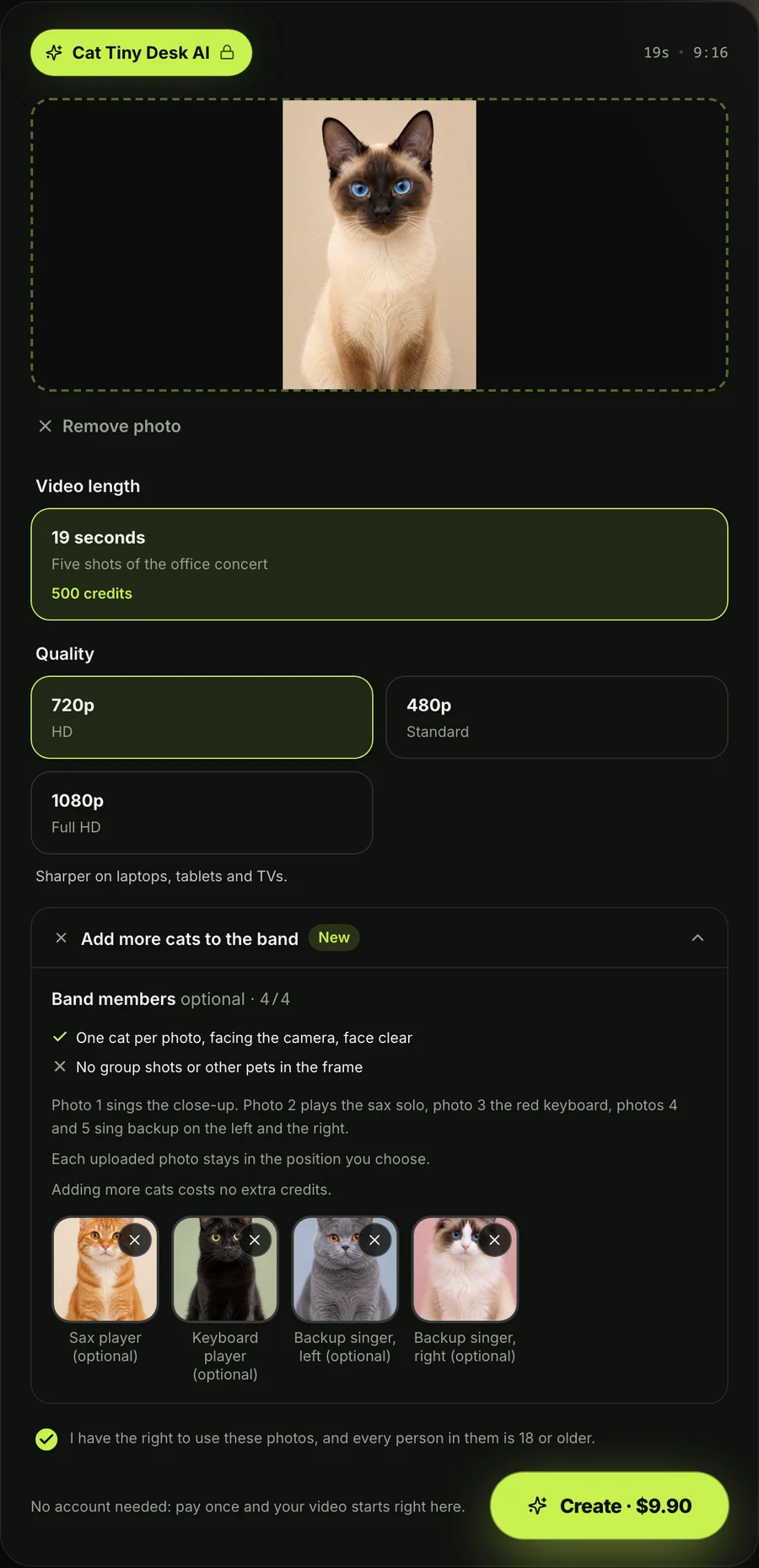
One 720p video costs $9.90, paid once, whether you add one cat photo or five. If you want high-definition 1080p, it costs $39.90. You don't need to create an account or commit to a monthly subscription, and full details sit on the Seadanse pricing page.
If your video doesn't finish processing, the credits return straight to your account balance automatically. You never lose credits on an incomplete job.
You'll download an MP4 file framed in vertical 9:16. It includes the original "Outstanding" sound starting from the first second, with zero watermarks on the exported file.
If you want a step-by-step walkthrough of the entire interface, read how to make a Tiny Desk AI cat video.
Tiny Desk AI Cat Prompt FAQ
Do I need a prompt to make a Tiny Desk AI cat video?
No, you don't need a prompt at all on our page. You simply add a photo of your cat and press Create, while prompts are only necessary if you're assembling clips in third-party video software.
Which video tools take a Tiny Desk AI cat prompt?
Any image-to-video tool that accepts an image along with a text prompt can run Prompts 1 through 4. If you don't have cat photos and want to generate clips purely from text, use Prompt 5 in a text-to-video tool.
Can I use a Tiny Desk AI cat prompt for TikTok?
Yes, every prompt specifies the vertical 9:16 frame that TikTok and Instagram Reels use. When you use the prompt method, you add the song from TikTok's audio library during posting, whereas our tool exports the audio already embedded.
Is the Tiny Desk AI cat the same as the wizard-hat cat meme?
No, the wizard-hat meme is a completely different viral video featuring a tired ginger kitten in a pointed hat sitting at a computer desk. The Tiny Desk AI cat puts your pet into the "Outstanding" concert finale, and you can explore the human version at Tiny Desk AI.
How much does a Tiny Desk AI cat video cost on Seadanse?
A 720p video costs $9.90 paid once, whether you feature a single cat or fill all five band spots, while 1080p costs $39.90. You can try the generator on the Cat Tiny Desk AI page today. If you want other fun feline transformations, try our AI Zombie Cat Video Generator, or browse our wider catalog of AI video effects.
Put Your Cat at the Mic, With or Without a Prompt
Writing five separate prompts lets you direct every cut of the 19-second concert finale across different video tools. But maybe you'd rather skip the typing, splicing and audio syncing. Then one photo on our Cat Tiny Desk AI video maker builds the complete five-shot video with the original sound in one go. You'll find how the craze spread in our explainer on the Tiny Desk AI trend.
Written by The Seadanse Team, the team that built the Cat Tiny Desk AI page.
Related Articles
- How to Make a Tiny Desk AI Cat Video (4 Steps) — the no-prompt way, step by step.
- Tiny Desk AI Prompt (Copy-Ready): Every Shot, Every Role — the prompt set for people and friend groups.
- Tiny Desk AI Pet Video: Put Your Cats and Dogs in the Band — cats and dogs in one band.
- What Is the Tiny Desk AI Trend? The Coaches Video, Explained — where the trend started and why it spread.


