
Tiny Desk AI Prompt (Copy-Ready): Every Shot, Every Role
Seadanse: the Tiny Desk AI prompt with the keyboard, close-up and sax solo timed shot by shot. Learn how to use it, or skip writing it entirely.
 The Seadanse Team30 min read
The team behind Seadanse. We run the models we write about, and we publish the specs, prices and limits the marketing leaves out.

TL;DR — The Tiny Desk AI prompt below is the full set our Tiny Desk AI page runs: four prompts, one per shot, with five roles across a 19-second video. It also lists what never carries over from the concert clip. You run each one in a video tool with that shot's photos and motion-reference clip, join the four shots, then add the "Outstanding" sound yourself. Or skip the prompt on Seadanse's Tiny Desk AI for TikTok and Reels, where one 720p video is $9.90.
Each shot has its own prompt, so you copy the one for the shot you're making.
Shot 1, the band: photos 3, 4 and 5
subject_definitions:
Subject 1 is the person in @Image 1 (a person, or a cartoon or game character, or a pet when @Image 1 shows one): [one sentence describing the person or character in photo 3: age range, hair, build] [what the person in photo 3 wears, piece by piece] Subject 1 keeps exactly this face, hair, skin tone, build and this outfit, piece by piece, in every shot. If @Image 1 shows only part of the body, the rest of the outfit continues naturally from what it shows. Subject 1 is the band's keyboard player, seated at the front in the middle playing the red stage keyboard.
Subject 2 is the person in @Image 2 (a person, or a cartoon or game character, or a pet when @Image 2 shows one): [one sentence describing the person or character in photo 4: age range, hair, build] [what the person in photo 4 wears, piece by piece] Subject 2 keeps exactly this face, hair, skin tone, build and outfit in every shot where they appear.
Subject 3 is the person in @Image 3 (a person, or a cartoon or game character, or a pet when @Image 3 shows one): [one sentence describing the person or character in photo 5: age range, hair, build] [what the person in photo 5 wears, piece by piece] Subject 3 keeps exactly this face, hair, skin tone, build and outfit in every shot where they appear.
The band has fixed places and never swaps them: Subject 1 sits at the front in the middle behind the red stage keyboard; Subject 2 stands behind Subject 1 on the left of the frame singing backup, both hands free, holding no instrument; Subject 3 stands behind Subject 1 on the right of the frame singing backup with a small green tambourine.
Each of Subject 1, Subject 2 and Subject 3 has a face of their own; no face appears on two band members, and nobody but Subject 1 has Subject 1's face.
If @Image 1 shows a video-game, cartoon or anime character, the whole video is rendered in that same style: any invented band member is a character of the same kind, and the room is rendered to match. If @Image 1 is a real photo, the whole video is photoreal. If @Image 1 shows a pet, Subject 1 stays that real animal, sitting up at the keyboard in the lead's place with its paws on the keys.
Subject 4 is the set: an intimate office concert filmed in daylight, the band squeezed in behind a desk in a cramped work corner: on the desk at the front a red stage keyboard; slim black microphone stands with small pencil microphones; behind the band tall wooden bookshelves packed floor to ceiling with vinyl records, books, plush toys, caps, figurines, bottles, mugs and colourful boxes; warm, soft, even office light, no stage lights, no audience in frame. No sign, poster, label or sticker is readable.
@Video 1 is a motion reference only: copy its shots, its cuts and their timing, its camera angles, lenses and camera moves, and every pose, gesture, head turn, mouth movement and hand on the instruments at the same moment. @Video 1 is already framed vertically in 9:16: copy its framing shot by shot, how large each person is in the frame and where the frame edges cut them. Take no person, face, hair, body, clothing, jewellery, glasses or headphones from @Video 1; none of its people appear.

summary:
[reference generation] A 6-second shot of an intimate office concert in Subject 4, following @Video 1: Subject 1 plays the red stage keyboard at the front, with Subject 2 and Subject 3 singing backup behind on the left and on the right.

retention_analysis:
Subject 1 (appears in [Shot 1]): fully_preserved - face, hair, skin tone, body and outfit from @Image 1.
Subject 2 (appears in [Shot 1]): fully_preserved - face, hair, skin tone, body and outfit from @Image 2.
Subject 3 (appears in [Shot 1]): fully_preserved - face, hair, skin tone, body and outfit from @Image 3.
Subject 4 (all shots): weak_reference - built from the text only; layout and camera from @Video 1.

detailed_description:
Vertical 9:16 frame. Natural documentary concert look, warm colour, sharp focus on the faces, soft background, one continuous shot following @Video 1, no cut.
[Shot 1] 0-6 s: medium shot at seated head height, camera locked off; Subject 1 sits at the front in the middle, seen from the chest up, head bowed over the red stage keyboard, both hands on the keys, nodding to the beat; Subject 2 stands behind on the left, half cut by the left frame edge, singing backup with both hands free, holding no instrument; Subject 3 stands behind on the right, from the waist up, singing backup and shaking a small green tambourine at shoulder height. Heads near the top of the frame against the shelves.

overall_soundscape:
A small room: soft keyboard clicks, breath on the saxophone, a little laughter between lines.

non_diegetic_music:
A warm live early-1980s funk-R&B groove at about 98 beats per minute, a male lead vocal with backing vocals, keyboard and a saxophone line; every gesture and cut lands on the beat.

Reference handling: @Image 1 sets Subject 1's identity, @Image 2 Subject 2's and @Image 3 Subject 3's: face, hair, skin tone, age, build and outfit; ignore each photo's background, pose and framing. @Video 1 sets only the shots, cuts, camera and performance.

Final rules override conflicting customization: Subject 1 is recognizable as the one in @Image 1, Subject 2 as the one in @Image 2 and Subject 3 as the one in @Image 3 in every shot where they appear, each in their own outfit from their photo throughout; nobody from @Video 1 appears; no blue knit beanie, no gold aviator sunglasses, no gold chain with a square pendant, no green, gold and blue patterned bomber jacket, no black knit beanie, no silver chain with a cross pendant, no blue wristband, no shaved head, no glasses, no black hoodie, unless a photo shows them; exactly three people in the shot, no one added; every band member keeps their place; Subject 2 holds no instrument and nothing at the mouth; keep it physically coherent; no captions, subtitles, watermarks, logos or brand names on screen or on anyone's clothes unless a photo shows them; no readable writing anywhere in the room.Shot 2, your close-up: photo 1
subject_definitions:
Subject 1 is the person in @Image 1 (a person, or a cartoon or game character, or a pet when @Image 1 shows one): [one sentence describing the person or character in photo 1: age range, hair, build] [what the person in photo 1 wears, piece by piece] Subject 1 keeps exactly this face, hair, skin tone, build and this outfit, piece by piece, in every shot. If @Image 1 shows only part of the body, the rest of the outfit continues naturally from what it shows. Subject 1 is the band's lead singer, singing alone in close-up.
If @Image 1 shows a video-game, cartoon or anime character, the whole video is rendered in that same style: any invented band member is a character of the same kind, and the room is rendered to match. If @Image 1 is a real photo, the whole video is photoreal. If @Image 1 shows a pet, Subject 1 stays that real animal, singing to the lens in the close-up.
Subject 2 is the set: an intimate office concert filmed in daylight, the band squeezed in behind a desk in a cramped work corner: on the desk at the front a red stage keyboard; slim black microphone stands with small pencil microphones; behind the band tall wooden bookshelves packed floor to ceiling with vinyl records, books, plush toys, caps, figurines, bottles, mugs and colourful boxes; warm, soft, even office light, no stage lights, no audience in frame. No sign, poster, label or sticker is readable.
@Video 1 is a motion reference only: copy its shots, its cuts and their timing, its camera angles, lenses and camera moves, and every pose, gesture, head turn, mouth movement and hand on the instruments at the same moment. @Video 1 is already framed vertically in 9:16: copy its framing shot by shot, how large each person is in the frame and where the frame edges cut them. Take no person, face, hair, body, clothing, jewellery, glasses or headphones from @Video 1; none of its people appear.

summary:
[reference generation] A 7-second close-up from an intimate office concert in Subject 2, following @Video 1: Subject 1 sings alone to the lens.

retention_analysis:
Subject 1 (appears in [Shot 1]): fully_preserved - face, hair, skin tone, body and outfit from @Image 1.
Subject 2 (all shots): weak_reference - built from the text only; layout and camera from @Video 1.

detailed_description:
Vertical 9:16 frame. Natural documentary concert look, warm colour, sharp focus on the faces, soft background, one continuous shot following @Video 1, no cut.
[Shot 1] 0-7 s: close-up of Subject 1 alone, head and shoulders filling the frame, camera close at eye level, slowly pushing in, the shelves blurred behind; Subject 1 throws the head back laughing, sings with a huge grin looking toward the left of the frame, then turns to look straight into the camera lens with both eyes while still singing, keeps singing to the lens, and at the end lifts one hand beside the face. No other face in frame.

overall_soundscape:
A small room: soft keyboard clicks, breath on the saxophone, a little laughter between lines.

non_diegetic_music:
A warm live early-1980s funk-R&B groove at about 98 beats per minute, a male lead vocal with backing vocals, keyboard and a saxophone line; every gesture and cut lands on the beat.

Reference handling: @Image 1 sets Subject 1's identity: face, hair, skin tone, age, build and outfit; ignore its background, pose and framing. @Video 1 sets only the shots, cuts, camera and performance.

Final rules override conflicting customization: Subject 1 is recognizable as the one in @Image 1 in every shot where they appear and wears their own outfit from @Image 1 throughout; nobody from @Video 1 appears; no blue knit beanie, no gold aviator sunglasses, no gold chain with a square pendant, no green, gold and blue patterned bomber jacket, no black knit beanie, no silver chain with a cross pendant, no blue wristband, no shaved head, no glasses, no black hoodie, unless a photo shows them; no other face in the shot, no one added; keep it physically coherent; no captions, subtitles, watermarks, logos or brand names on screen or on anyone's clothes unless a photo shows them; no readable writing anywhere in the room.Shot 3, the sax solo: photo 2
subject_definitions:
Subject 1 is the person in @Image 1 (a person, or a cartoon or game character, or a pet when @Image 1 shows one): [one sentence describing the person or character in photo 2: age range, hair, build] [what the person in photo 2 wears, piece by piece] Subject 1 keeps exactly this face, hair, skin tone, build and this outfit, piece by piece, in every shot. If @Image 1 shows only part of the body, the rest of the outfit continues naturally from what it shows. Subject 1 is the band's saxophonist, playing a gold alto saxophone solo. Subject 1's face is exactly the face in @Image 1.
If @Image 1 shows a video-game, cartoon or anime character, the whole video is rendered in that same style: any invented band member is a character of the same kind, and the room is rendered to match. If @Image 1 is a real photo, the whole video is photoreal. If @Image 1 shows a pet, Subject 1 stays that real animal, sitting up with the gold alto saxophone at its mouth and its paws on the keys.
Subject 2 is the set: an intimate office concert filmed in daylight, the band squeezed in behind a desk in a cramped work corner: on the desk at the front a red stage keyboard; slim black microphone stands with small pencil microphones; behind the band tall wooden bookshelves packed floor to ceiling with vinyl records, books, plush toys, caps, figurines, bottles, mugs and colourful boxes; warm, soft, even office light, no stage lights, no audience in frame. No sign, poster, label or sticker is readable.
@Video 1 is a motion reference only: copy its shots, its cuts and their timing, its camera angles, lenses and camera moves, and every pose, gesture, head turn, mouth movement and hand on the instruments at the same moment. @Video 1 is already framed vertically in 9:16: copy its framing shot by shot, how large each person is in the frame and where the frame edges cut them. Take no person, face, hair, body, clothing, jewellery or headphones from @Video 1; none of its people appear.

summary:
[reference generation] A 4-second shot from an intimate office concert in Subject 2, following @Video 1: Subject 1 plays a saxophone solo.

retention_analysis:
Subject 1 (appears in [Shot 1]): fully_preserved - face, hair, skin tone, body and outfit from @Image 1.
Subject 2 (all shots): weak_reference - built from the text only; layout and camera from @Video 1.

detailed_description:
Vertical 9:16 frame. Natural documentary concert look, warm colour, sharp focus on the faces, soft background, one continuous shot following @Video 1, no cut.
[Shot 1] 0-4 s: medium close-up of Subject 1 alone in three-quarter profile facing the left of the frame, camera at shoulder height on Subject 1's left-front, locked off; Subject 1 plays the gold alto saxophone into a microphone on a long boom arm that crosses the frame diagonally, fingers moving on the keys, eyes down on the instrument; in the lower right corner the out-of-focus top of another band member's head, no face. The shelves behind.

overall_soundscape:
A small room: soft keyboard clicks, breath on the saxophone, a little laughter between lines.

non_diegetic_music:
A warm live early-1980s funk-R&B groove at about 98 beats per minute, a male lead vocal with backing vocals, keyboard and a saxophone line; every gesture and cut lands on the beat.

Reference handling: @Image 1 sets Subject 1's identity: face, hair, skin tone, age, build and outfit; ignore its background, pose and framing. @Video 1 sets only the shots, cuts, camera and performance.

Final rules override conflicting customization: Subject 1 is recognizable as the one in @Image 1 in every shot where they appear and wears their own outfit from @Image 1 throughout; nobody from @Video 1 appears; no blue knit beanie, no gold chain with a square pendant, no green, gold and blue patterned bomber jacket, no black knit beanie, no silver chain with a cross pendant, no blue wristband, no shaved head, no black hoodie, unless a photo shows them; no other face in the shot, no one added; keep it physically coherent; no captions, subtitles, watermarks, logos or brand names on screen or on anyone's clothes unless a photo shows them; no readable writing anywhere in the room.Shot 4, the band again: photos 3, 4 and 5
subject_definitions:
Subject 1 is the person in @Image 1 (a person, or a cartoon or game character, or a pet when @Image 1 shows one): [one sentence describing the person or character in photo 3: age range, hair, build] [what the person in photo 3 wears, piece by piece] Subject 1 keeps exactly this face, hair, skin tone, build and this outfit, piece by piece, in every shot. If @Image 1 shows only part of the body, the rest of the outfit continues naturally from what it shows. Subject 1 is the band's keyboard player, seated at the front in the middle playing the red stage keyboard.
Subject 2 is the person in @Image 2 (a person, or a cartoon or game character, or a pet when @Image 2 shows one): [one sentence describing the person or character in photo 4: age range, hair, build] [what the person in photo 4 wears, piece by piece] Subject 2 keeps exactly this face, hair, skin tone, build and outfit in every shot where they appear.
Subject 3 is the person in @Image 3 (a person, or a cartoon or game character, or a pet when @Image 3 shows one): [one sentence describing the person or character in photo 5: age range, hair, build] [what the person in photo 5 wears, piece by piece] Subject 3 keeps exactly this face, hair, skin tone, build and outfit in every shot where they appear.
The band has fixed places and never swaps them: Subject 1 sits at the front in the middle behind the red stage keyboard; Subject 2 stands behind Subject 1 on the left of the frame singing backup, both hands free, holding no instrument; Subject 3 stands behind Subject 1 on the right of the frame singing backup with a small green tambourine.
Each of Subject 1, Subject 2 and Subject 3 has a face of their own; no face appears on two band members, and nobody but Subject 1 has Subject 1's face.
If @Image 1 shows a video-game, cartoon or anime character, the whole video is rendered in that same style: any invented band member is a character of the same kind, and the room is rendered to match. If @Image 1 is a real photo, the whole video is photoreal. If @Image 1 shows a pet, Subject 1 stays that real animal, sitting up at the keyboard in the lead's place with its paws on the keys.
Subject 4 is the set: an intimate office concert filmed in daylight, the band squeezed in behind a desk in a cramped work corner: on the desk at the front a red stage keyboard; slim black microphone stands with small pencil microphones; behind the band tall wooden bookshelves packed floor to ceiling with vinyl records, books, plush toys, caps, figurines, bottles, mugs and colourful boxes; warm, soft, even office light, no stage lights, no audience in frame. No sign, poster, label or sticker is readable.
@Video 1 is a motion reference only: copy its shots, its cuts and their timing, its camera angles, lenses and camera moves, and every pose, gesture, head turn, mouth movement and hand on the instruments at the same moment. @Video 1 is already framed vertically in 9:16: copy its framing shot by shot, how large each person is in the frame and where the frame edges cut them. Take no person, face, hair, body, clothing, jewellery, glasses or headphones from @Video 1; none of its people appear.

summary:
[reference generation] A 5-second shot of an intimate office concert in Subject 4, following @Video 1: Subject 1 plays the red stage keyboard at the front, with Subject 2 and Subject 3 singing backup behind on the left and on the right.

retention_analysis:
Subject 1 (appears in [Shot 1]): fully_preserved - face, hair, skin tone, body and outfit from @Image 1.
Subject 2 (appears in [Shot 1]): fully_preserved - face, hair, skin tone, body and outfit from @Image 2.
Subject 3 (appears in [Shot 1]): fully_preserved - face, hair, skin tone, body and outfit from @Image 3.
Subject 4 (all shots): weak_reference - built from the text only; layout and camera from @Video 1.

detailed_description:
Vertical 9:16 frame. Natural documentary concert look, warm colour, sharp focus on the faces, soft background, one continuous shot following @Video 1, no cut.
[Shot 1] 0-5 s: the same medium shot at seated head height, camera locked off; Subject 1 sits at the front in the middle, head down over the red stage keyboard, playing with both hands; Subject 2 stands behind on the left, half cut by the left frame edge, singing backup toward a microphone with both hands free, holding no instrument and nothing at the mouth; Subject 3 stands behind on the right, from the waist up, singing backup with a small green tambourine. Heads near the top of the frame against the shelves.

overall_soundscape:
A small room: soft keyboard clicks, breath on the saxophone, a little laughter between lines.

non_diegetic_music:
A warm live early-1980s funk-R&B groove at about 98 beats per minute, a male lead vocal with backing vocals, keyboard and a saxophone line; every gesture and cut lands on the beat.

Reference handling: @Image 1 sets Subject 1's identity, @Image 2 Subject 2's and @Image 3 Subject 3's: face, hair, skin tone, age, build and outfit; ignore each photo's background, pose and framing. @Video 1 sets only the shots, cuts, camera and performance.

Final rules override conflicting customization: Subject 1 is recognizable as the one in @Image 1, Subject 2 as the one in @Image 2 and Subject 3 as the one in @Image 3 in every shot where they appear, each in their own outfit from their photo throughout; nobody from @Video 1 appears; no blue knit beanie, no gold aviator sunglasses, no gold chain with a square pendant, no green, gold and blue patterned bomber jacket, no black knit beanie, no silver chain with a cross pendant, no blue wristband, no shaved head, no glasses, no black hoodie, unless a photo shows them; exactly three people in the shot, no one added; every band member keeps their place; Subject 2 holds no instrument and nothing at the mouth; keep it physically coherent; no captions, subtitles, watermarks, logos or brand names on screen or on anyone's clothes unless a photo shows them; no readable writing anywhere in the room.Jake Whipple, maker of the first Tiny Desk AI video, told Sport & State "I just prompted this." But he didn't publish the prompt he used.
Most desk concert prompts you'll find online are one generic paragraph about a cosy desk. They don't set shot cuts, assign band roles, or time the sax solo.
Our four prompts are above, one per shot. You'll see every part of them explained, how to run them yourself, and how to skip writing prompts altogether.
What Is the Tiny Desk AI Prompt?
The Tiny Desk AI prompt is a set of four written plans, one per shot, for a 19-second, 9:16 desk-concert video. Together they give a role to each of up to five photos. You don't have to guess how to structure the scene.
- What you give the tool: For each shot, only the photos of the people in it (people, pets or characters), plus that shot's own vertical motion-reference clip.
- What the prompt fixes: Four shots with a prompt each, fixed band roles, office set details, camera moves, and a list of excluded items.
- What you add after: The four shots joined in order in an editor, with the "Outstanding" sound laid under from the first second.
How the Tiny Desk AI Prompt Is Built
The Tiny Desk AI prompt is built in parts, from who plays what to the shots and the things that never appear. Every prompt uses the same labelled parts, from subject_definitions through Final rules; the band prompts run about 1,060 words each, the close-up and sax prompts about 710.
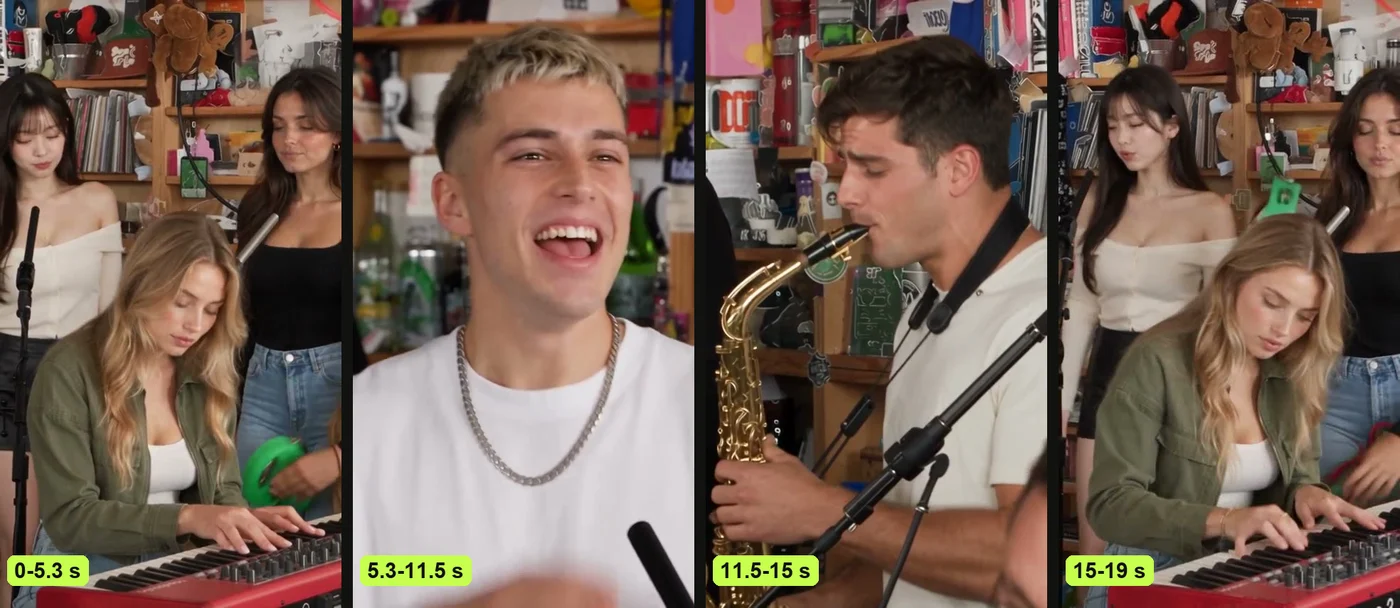
- One prompt per shot: Our page makes each of the four shots on its own, from its own prompt and motion reference, sending only the photos of the people in it, then joins them. Each prompt asks for a shot a little longer than its cut (6, 7, 4 and 5 seconds), and each is trimmed back to its cut at the join, so the video runs 19 seconds.
- The five people: Each prompt numbers only the people in its shot, so Subject 1 is photo 3 (the keyboard player) in shots 1 and 4, photo 1 (the lead singer) in shot 2 and photo 2 (the sax player) in shot 3; in the band shots Subject 2 is photo 4 and Subject 3 is photo 5. They'll keep their own face, hair, build, and outfit across every shot. Each photo can be a person, a cartoon or game character, or a pet, and the tool ignores its background, pose and framing.
- The style: A character turns the shot and the room into that style. A pet stays a real animal, at the keyboard with its paws on the keys, singing to the lens in the close-up, or sitting up with the sax at its mouth in the solo.
- The fixed roles: In the band prompts, Subject 1 sits front and center at the red keyboard; Subject 2 stands behind on the left singing backup, both hands free, holding no instrument; Subject 3 stands behind on the right singing backup with a small green tambourine. Nobody's swapping positions. Each band shot has exactly three people. The close-up prompt has only the lead singer, and the sax prompt has only the sax player.
- The made-up band members: These are the five-photo versions, so every spot has a photo. With no sax or keyboard photo, our page sends photo 1 for that shot. An empty backup spot gets an invented backup singer aged 22 to 40 with a fixed look written the same in both band prompts, so they match in shots 1 and 4 (back left: close-cropped dark hair, a plain burgundy top; back right: shoulder-length dark curls, gold hoop earrings, a mustard-yellow top), styled to match the keyboard player.
- The set: Every prompt describes an office concert in daylight with a red keyboard, slim microphone stands, soft office light, and bookshelves packed with vinyl and toys.
- The shots: Four vertical 9:16 shots, each one continuous with no cut: the band (about 5.3 seconds), the close-up (about 6.2), the sax solo (about 3.4) and the band again (about 4). In the close-up, the camera slowly pushes in while you laugh, then sing straight into the lens.
- The motion reference: In each prompt, @Video 1 is that shot's own short clip, and it gives the camera framing, head turns and hand movements. It doesn't pull any face, clothing, jewellery, or headphones from the clip.
- What never appears: Ten items from the concert clip stay out of the band and close-up prompts, including beanies, aviator sunglasses, chains, a patterned bomber jacket and a wristband. The sax solo prompt lists eight of them, with no glasses. It also says Subject 1's face is exactly the face in @Image 1. All readable text stays out too.
- The sound lines: The prompt describes room clicks, breath on the sax and a funk groove at about 98 beats per minute. That's so every move lands on the beat. It never names the song.
How Do You Use the Tiny Desk AI Prompt?
You use the Tiny Desk AI prompt in a video tool that takes several reference photos plus one reference video in the same request. Here's how you set it up:
- Fill in the brackets: Describe each person in one sentence, listing their age range, hair, build, and exact outfit piece by piece.
- Add each shot's photos: Each prompt gets only its own shot's photos, as @Image 1, 2 and 3 in this order: shots 1 and 4 take photos 3, 4 and 5; shot 2 takes photo 1; shot 3 takes photo 2.
- Add each shot's motion reference: Upload a short vertical clip of that one shot, which the tool copies the camera angles, poses and hand movements from. Our page uses one per shot, drawn as lines so no person or outfit carries over.
- Join the four shots: Make the four shots, then join them in order in an editor, each trimmed to its cut, for 19 seconds in all.
- Lay the sound back: Switch off the tool's generated audio, join the shots, and place the "Outstanding" sound underneath from the first second.
The prompts here are written for five photos, and our page handles one to four too.
If you'd rather skip the manual setup, add your photo to our Tiny Desk AI generator and press Create.
Habits That Keep the Tiny Desk AI Prompt on the Beat
The habits that keep a Tiny Desk AI prompt on the beat are the ones our four prompts already follow. They'll keep your cuts sharp and every instrument in place.
Name Every Role in Every Shot
Every role in every shot needs an explicit assignment so nobody wanders into the wrong position. As a viewer noted in a r/cfbmemes thread about the first video, "Nah, it's an alto in the TinyDesk video." That's why the sax solo prompt names a gold alto sax.
Time Each Shot to the Cuts
Each shot gets its own prompt, cut on the concert's own hard cuts, so no seam shows when you join them. Hard cuts keep your pacing tight. They don't shift unexpectedly between scenes.
Send the Close-Up Into the Lens
The close-up shot directs the singer to turn and look straight into the camera lens with a huge grin while singing. That direct eye contact gives you the exact moment people love to share.
Give Every Made-Up Band Member Their Own Face
Every made-up backup singer gets a face of their own when you leave a backup spot empty, and their look is written the same in both band prompts. The prompt states that "nobody but Subject 1 has Subject 1's face", keeping your bandmates distinct.
List What Never Carries Over
A list of left-out items stops unwanted clothes and accessories from showing up in your video. It specifically blocks beanies, aviators, chains, and a patterned bomber jacket. They won't appear unless a photo has them.
Our Tiny Desk AI Prompt vs a One-Paragraph Desk Concert Prompt
A one-paragraph desk concert prompt describes a cosy office and a performer. Our Tiny Desk AI prompt also sets four shots, one prompt each, and a role per photo. It isn't just a broad visual summary.
You'll see the exact differences below.
| A one-paragraph desk concert prompt | Our Tiny Desk AI prompt | What it means for you | |
|---|---|---|---|
| Shots | One scene | Four shots, one prompt each | Your video cuts where the clip cuts. |
| Roles | A blank for one performer | A role for each of five photos | You decide who plays the keys and who gets the sax solo. |
| Close-up | Not set | The singer turns and sings into the lens | You get the moment people share. |
| Backup singers without a photo | Not set | Made-up, the same look in both band shots | One photo still gives you a full band. |
| What never appears | Not set | A list of the clip's clothes and any writing | Nothing from the concert's people shows up. |
Read on the prompts people posted, October 25, 2026.
Can You Make a Tiny Desk AI Video Without a Prompt?
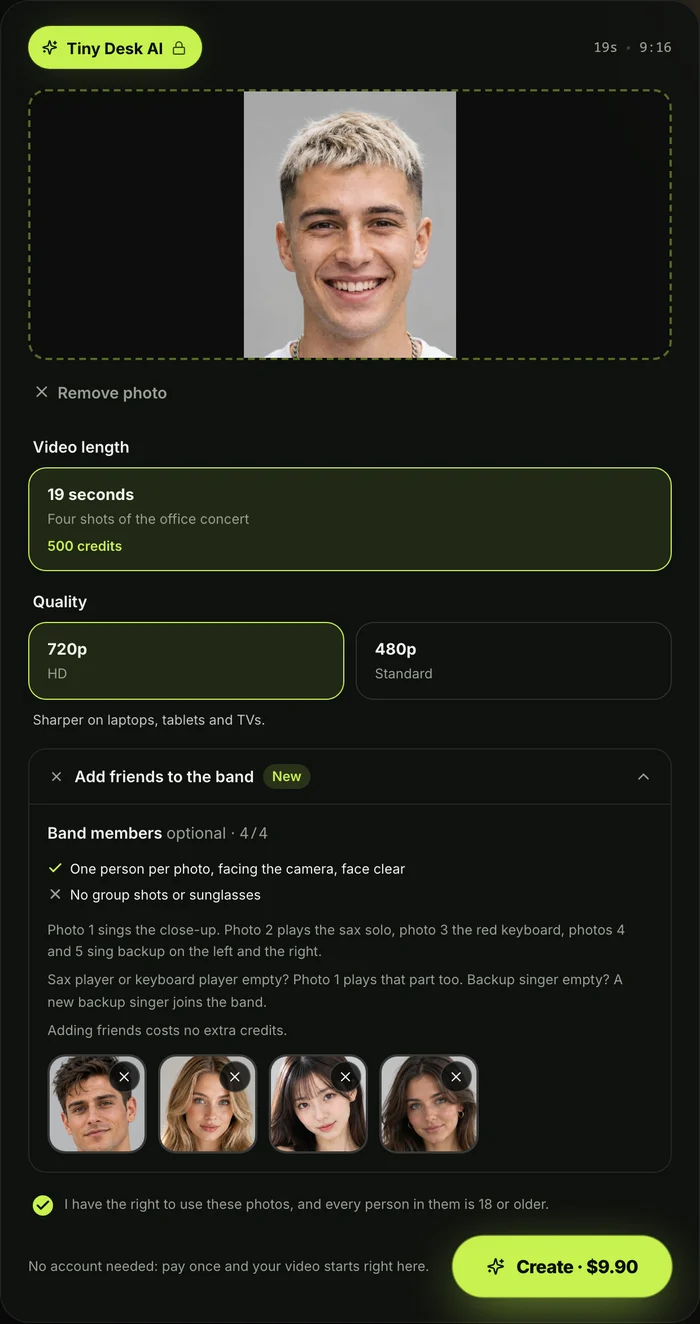
Yes, you can make a Tiny Desk AI video without a prompt on our Tiny Desk AI page. You upload one photo of yourself, add up to four friends for the sax, the keyboard and backup vocals, pick 720p, and press Create. Keep the box ticked to confirm you have the right to use the photos and everyone in them is 18 or older.
The prompt, motion reference, and "Outstanding" sound are completely built into Seadanse's Tiny Desk AI. One 720p video is $9.90, paid once with no subscription and no sign-up.
Every credit pack's listed on Seadanse pricing. With one photo, you sing the close-up, play the keyboard and take the sax solo yourself; an empty backup spot gets a backup singer the AI makes up, dressed to match the keyboard player. If a video fails, its credits come back automatically.
Check out the four steps to a Tiny Desk AI video to see how the whole process runs.
Tiny Desk AI Prompt FAQ
The questions below cover how our prompt works, tool requirements, and audio setup.
Is this the prompt Seadanse actually uses?
Yes. They're the exact four Tiny Desk AI prompts our page runs. We've bracketed the details so you can drop in your own descriptions.
Which AI video tools accept the Tiny Desk AI prompt?
Any AI video tool that accepts several reference photos plus a reference video in one request can run this prompt. We've reviewed the top options in our guide to Tiny Desk AI video generators compared.
Does the Tiny Desk AI prompt add the "Outstanding" sound?
No, the Tiny Desk AI prompt doesn't add the "Outstanding" sound directly to your clip. It describes a groove so movement hits the beat, but it doesn't add the track. You'll lay the song underneath in an editor yourself, though our page includes it from the start.
Can I use the prompt for a band of five?
Yes, you can use the Tiny Desk AI prompt for a band of five by filling all five photos; photo 1 sings the close-up, photo 2 plays the sax solo, photo 3 plays the keyboard, and photos 4 and 5 sing backup on the left and the right; the prompts here are written for five photos.
Is there a funny version of the Tiny Desk AI prompt?
The funny version of a Tiny Desk AI video comes from your casting choices rather than changing the prompt. Who you'll put at the keys and on the sax creates the laugh.
You can explore fun ideas in Tiny Desk AI meme casts, or see where the Tiny Desk AI trend started. If you want other styles, try our Uptown Funk AI effect among our wider AI video effects.
Ready to Skip the Tiny Desk AI Prompt?
The Tiny Desk AI prompt is four prompts, one per shot, with five roles and the close-up sung right to the camera; you get five band roles and four joined shots automatically, or you can add one photo and make a Tiny Desk AI video in your browser. One 720p video is $9.90 paid once, with no account needed.
If you're coming from TikTok, explore the Outstanding Tiny Desk AI template to see what mobile templates do with your photos.
Written by The Seadanse Team, the team that wrote this prompt.
Related Articles
- How to Make a Tiny Desk AI Video From One Photo (4 Steps) — the four picks and presses, and who plays what in your band.
- What Is the Tiny Desk AI Trend? The Coaches Video, Explained — who made the first one, when, and how it spread past college football.
- Outstanding Tiny Desk AI Template: What the CapCut One Does — the template the TikTok tutorials link, and what it does with your photo.
- Best Tiny Desk AI Video Generators (2026): 8 Ways Compared — the sites, apps and templates that make this video, side by side.
- Tiny Desk AI Meme Ideas: Who Goes on the Sax (and How) — the casts people have made, and who to put in yours.


