
Tiny Desk AI Pet Video: Put Your Cats and Dogs in the Band
Seadanse: make a Tiny Desk AI pet video with one to five pet photos, cats and dogs in one band, 19 seconds with the 'Outstanding' sound, for $9.90.
 The Seadanse Team10 min read
The team behind Seadanse. We run the models we write about, and we publish the specs, prices and limits the marketing leaves out.

TL;DR — A Tiny Desk AI pet video puts one to five pets in the five "Outstanding" finale spots, and only one photo is needed. Cats and dogs can share the band, and photo 1 sings lead in both close-ups. On Seadanse's Pet Tiny Desk AI page you get a 19-second 9:16 video with the original "Outstanding" sound, $9.90 for 720p with no sign-up.
Every Tiny Desk AI video in your feed has people behind the desk. They've sat on your keyboard for years, but your pets haven't had credit.
The Pet Tiny Desk AI page fills the band with your pets, one photo per spot. There's room for each pet, and each gets its own moment on screen.
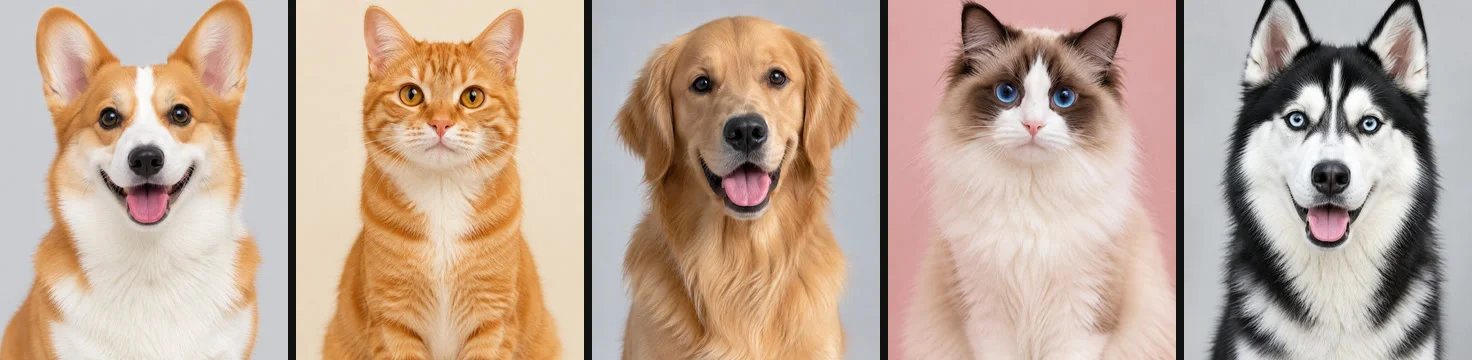
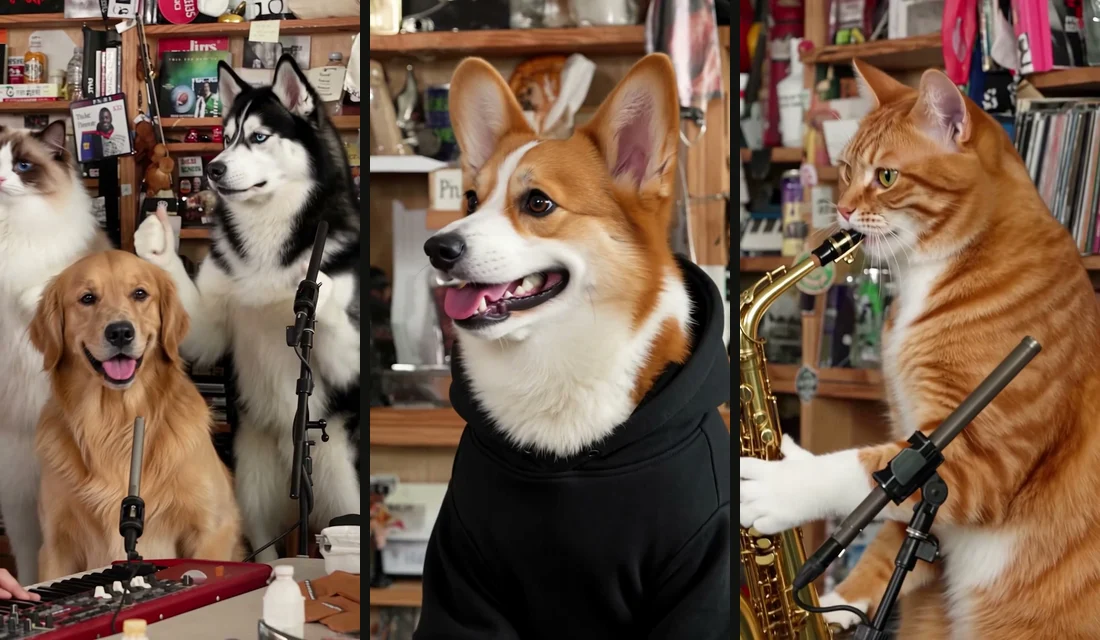
We've built our own pet band with five photos. Our sample puts a corgi on lead vocals and an orange tabby on the sax. A golden retriever sits at the red keyboard, while a ragdoll cat and a husky sing backup.
You'll see which pet fits each spot, how the 19 seconds play out, and the four steps to make yours. We've also added casting ideas for your cats and dogs.
What Is a Tiny Desk AI Pet Video?
A Tiny Desk AI pet video remakes the 19-second "Outstanding" finale from Charlie Wilson's June 2023 NPR Tiny Desk concert with your pets as the band. It's a vertical video for TikTok and Reels, not a toy desk robot.
The finale, its five shots, the office desk set and the original "Outstanding" sound are built in. There's no clip to find, no song to add and no prompt to write.
To start, add your pet's photo to our Pet Tiny Desk AI generator and press Create. You can also visit our Tiny Desk AI page if you'd like people in your band.
Which Pet Goes Where in a Tiny Desk AI Pet Video
A Tiny Desk AI pet video has one spot for each photo, and photo 1 is the only one you'll need.
- Photo 1 — lead singer: Your lead singer is the only pet in the side-on opening line and in the big close-up, head thrown back, then singing straight to the camera.
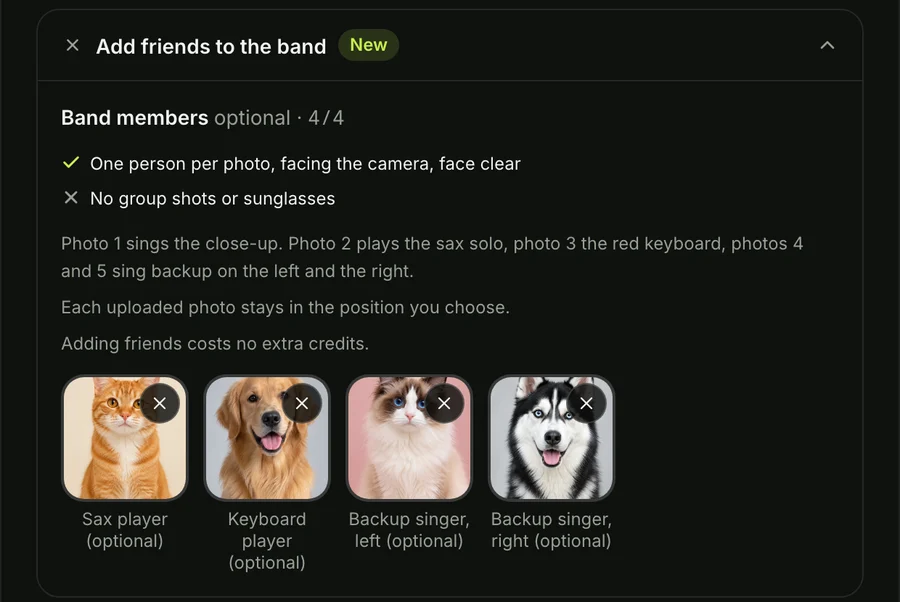
- Photo 2 — sax player: Your sax player is the only pet in the sax solo, alone in profile playing a gold saxophone.
- Photo 3 — keyboard player: Your keyboard player sits front and centre at the red keyboard in both band shots, sitting up with paws on the keys.
- Photo 4 — backup singer, left: Your left backup singer stands behind on the left in both band shots, singing and moving to the beat.
- Photo 5 — backup singer, right: Your right backup singer stands behind on the right in both band shots, singing and moving to the beat.
Every spot without a photo gets a built-in band member, so the band is always full. Each photo stays in the spot you put it in, and cats, dogs and other pets can share one band.
What Each Pet Gets in the 19-Second Tiny Desk AI Pet Video
Your Tiny Desk AI pet video runs 19 seconds in five shots, and you'll see each pet in its own shots.
- The opening line: Your lead singer from photo 1 gets about 0 to 1.5 seconds, side-on in close-up as the song starts.
- The band shot: You get about 1.5 to 6.5 seconds with your keyboard player at the red keyboard and your backup singers moving behind.
- The big close-up: Your lead singer takes about 6.5 to 13 seconds, head back, singing straight to your camera.
- The sax solo: Your sax player gets about 13 to 16.5 seconds alone in profile with a gold saxophone.
- The closing band shot: You're back with the band at the red keyboard for about 16.5 to 19 seconds.
Photo 1 is the pet people remember, because that's who gets the opening line and the big close-up.
Make a Tiny Desk AI Pet Video in 4 Steps
You can make a Tiny Desk AI with pets video in four picks and presses on our page.
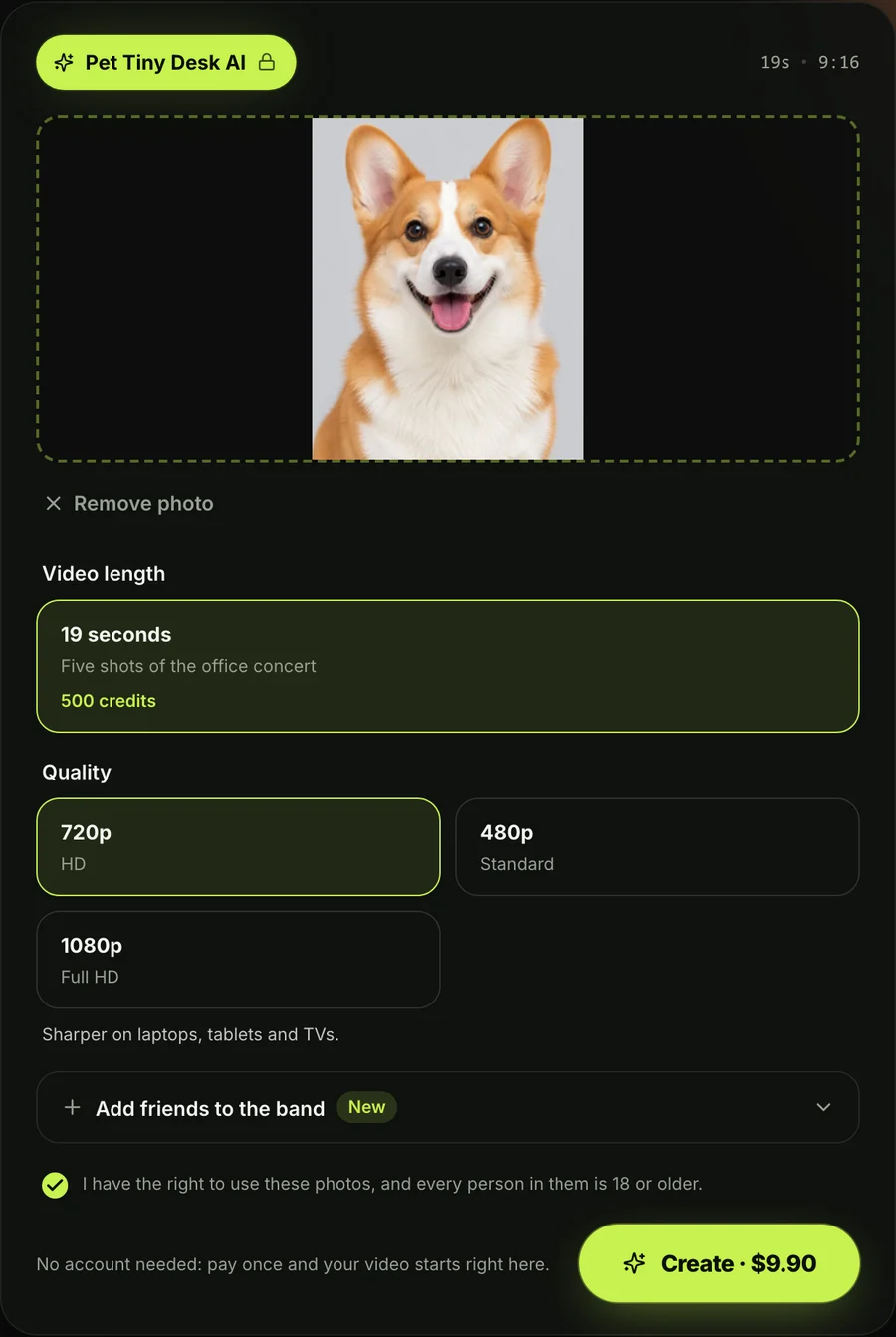
Step 1: Add your lead pet's photo
Add photo 1 into the lead singer box on our page. That's the pet who takes the opening line and the main close-up.
Step 2: Add up to four more pets, or leave the spots
Add up to four more photos for your sax player, keyboard player and two backup singers. Empty spots get built-in band members, so you won't need to fill every box.
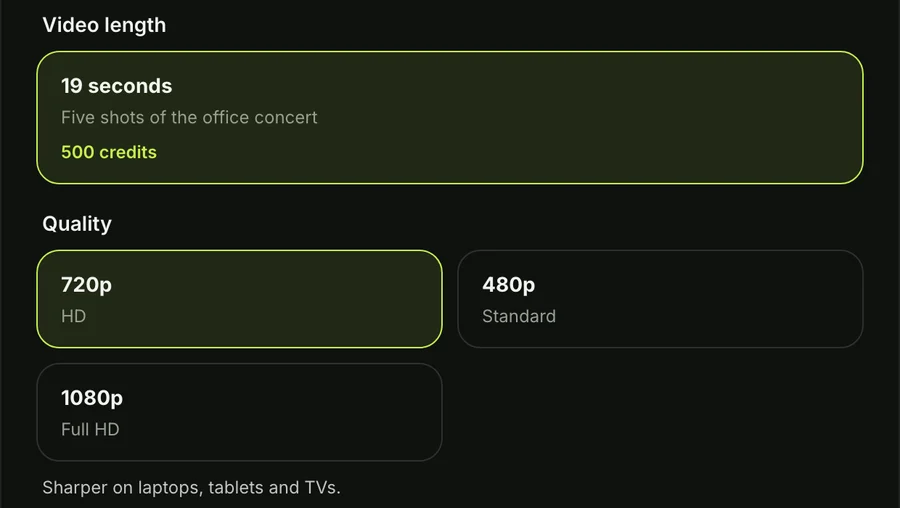
Step 3: Pick 720p, 480p or 1080p
Pick 720p, 480p or 1080p for your video resolution. The 720p option is already picked when the page opens.
Step 4: Keep the box ticked and press Create
Keep the one box ticked to confirm you've got the right to use the photos. It also confirms that everyone in your photos is 18 or older. Check the price on the Create button and press it.
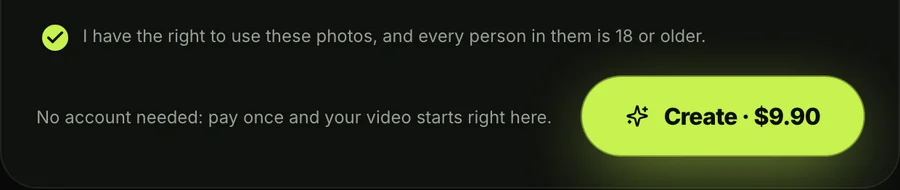
Paying is simple because you won't need to set up an account. One 19-second 720p video is $9.90, the same for one photo or five. 1080p is $39.90, and 480p uses less from the same pack. You'll find every credit pack on Seadanse pricing.
If a video doesn't finish, its credits go back to your balance on their own. You won't lose credits on an unfinished run.
Your download is an MP4 video, 19 seconds long, in vertical 9:16 format with no watermark. It carries the original "Outstanding" sound and it's ready for TikTok and Reels.
Who to Cast in Your Pet Tiny Desk AI Band
The best Pet Tiny Desk AI bands put the pet with the most expressive face in spot 1.
- Photo 1 — lead singer: Give this spot to your boldest cat or loudest dog, since your lead sings both close-ups.
- Photo 2 — sax player: Pick a calm pet for this spot, because your sax player plays a gold saxophone alone in profile.
- Photo 3 — keyboard player: Pick the pet who loves sitting up, since the keyboard player sits up with its paws on the keys.
- Photo 4 — backup singer, left: Pick an energetic pet who looks great moving to the rhythm behind the keyboard on the left.
- Photo 5 — backup singer, right: Add a friendly cat, dog or even yourself to fill out the choir on the right.
If your pets want a spooky role next, you'll love our AI Zombie Pet effect.
Which Pet Photos Work Best for Tiny Desk AI
The pet photos that work best for Tiny Desk AI show one pet, face clear, facing the camera, in good light.
- Faces: Clear, front-facing pet portraits in good daylight work best for sharp facial expressions on screen.
- Fur and markings: Distinct patterns, spots and coat colors work best. Each pet keeps its markings while backgrounds are dropped.
- Mixed bands: Solo shots of each animal work best. You can pair cats, dogs and other pets together in one band.
- People: Well-lit portraits facing forward work best. You can place yourself or a friend next to your pets.
Anyone in a real photo of a person must be 18 or older.
How Other Tiny Desk AI Pet Tools Compare
Other Tiny Desk AI pet tools make videos of a different length and price, as their pages showed on November 1, 2026.
- Tiny Desk AI Trend (tinydeskaitrend.com): This site has a "Pet Lead Singer" template and a switch for pet photos. It replaces 1 to 5 people in 15-second videos for $6.99 in a single pack, and you'll sign in before making one.
- tinydeskai.watch: This tool puts friends, pets or characters into five positions from 1 to 5 photos. It makes an 18-second 720p 9:16 video for $9.98, and you'll sign in with Google.
- Pet.Video: This pet video site features a Tiny Desk AI effect for pets among its pet effects. You'll have to sign up before you can start.
Our page lets you add one to five pet photos with every spot pickable, and cats and dogs can share one band. You get the full 19-second finale in five shots with the original sound, for $9.90 at 720p with no sign-up.
Tiny Desk AI Pet Video FAQ
Can I put my dog and my cat in the same Tiny Desk AI video?
Cats and dogs can play in the same Tiny Desk AI pet video without any issues. Each photo box is its own spot, so you can mix your pets in one band.
How many pet photos does a Tiny Desk AI pet video need?
A Tiny Desk AI pet video needs only one photo to make the band clip. You can add up to five photos to fill all spots, and the price doesn't change either way.
Does the Tiny Desk AI pet video have the original sound?
The Tiny Desk AI pet video includes the original "Outstanding" sound right from the first second. The cuts land on its beat, and the music's built in so your pets don't need to sing or play.
Can I make a Tiny Desk AI pet video on my phone?
You can make a Tiny Desk AI pet video directly in the browser on your phone, tablet or computer. You won't have to install any apps.
How much does a Tiny Desk AI pet video cost?
A Tiny Desk AI pet video costs $9.90 for one 720p video, whether you upload one photo or five. The 1080p option is $39.90, and both are single payments with no subscription. The same packs work across all our AI video effects.
Put Your Pets on Stage With Pet Tiny Desk AI
Pet Tiny Desk AI videos let you assemble your pets behind the office desk in five distinct spots. Only one pet photo is needed, and photo 1 sings lead during the full 19-second "Outstanding" finale. Cats and dogs can share the stage, with the original sound playing under every shot.
Make yours on our Pet Tiny Desk AI video maker today. You'll find how to make a Tiny Desk AI video in our step-by-step guide, or check our Tiny Desk AI meme ideas for inspiration.
Written by The Seadanse Team, the team that built the Pet Tiny Desk AI page.
Related Articles
- How to Make a Tiny Desk AI Video From One Photo (4 Steps) — the four picks and presses, step by step.
- Tiny Desk AI Meme Ideas: Who Goes on the Sax (and How) — the casts people have made, and who to put in yours.
- What Is the Tiny Desk AI Trend? The Coaches Video, Explained — where the trend started.
- Tiny Desk AI Song: "Outstanding" by The Gap Band, Explained — the song under every Tiny Desk AI video.


