
Zombie AI Trend Prompt: Copy-Paste Prompts + Why Yours Looks Slow or Scary
Zombie AI trend prompt copy-paste templates for couples, dogs and cats, plus practical fixes when your video comes out slow, scary or gets refused.
 The Seadanse Team18 min read
The team behind Seadanse. We run the models we write about, and we publish the specs, prices and limits the marketing leaves out.

TL;DR — A zombie AI trend prompt that works puts the whole story into one timed shot list of about 20 seconds. It keeps the zombie recognisable, makes the lunge fast and cuts the instant the bodies meet. Below are two prompts for your own photos (couple, and dog or cat), two creator prompts from the viral videos, and the four fixes. If you'd rather not write a prompt at all, the AI Zombie Trend effect makes it from two photos in vertical 9:16 for TikTok, Instagram Reels and YouTube Shorts, $9.90 for a 720p video.
If you commented "PROMPT" under a zombie video on TikTok or Instagram, you're not alone. There were 12,400 comments under one couple version on Instagram alone, mostly from people asking for the text.
When you copy a prompt from a direct message or a tutorial, the clip often comes back wrong. The lunge drifts in slow motion, your partner turns into a monster nobody recognises, or the cut to the memory blurs into a mushy fade.
Most shared prompts cause these problems because they never set a clip length, never time the lunge, and never explain which photo plays which role.
Here are the prompts that fix that, with the exact timings you'll need.
What a zombie AI trend prompt has to tell the model
A working prompt gives the model six story beats, and you give each one an exact time.
| Beat | Time in a 20-second clip | What the prompt must say | Why it matters |
|---|---|---|---|
| The standoff | 0-4 s | Who holds the gun (photo 1), tears, shaking hands | Sets up the choice in the first seconds, before people scroll |
| The zombie | 4-6 s | Who turned (photo 2), light makeup, face still theirs | The viewer has to recognise them, or the memory means nothing |
| The choice | 6-9 s | Lower the gun, drop it, open both arms | The turn of the story; no shot is ever fired |
| The lunge | 9-10.5 s | Sprint and leap in under half a second | A slow leap looks like a float, not an attack |
| The cut | at 10.5 s | Hard cut the instant their bodies touch, same angle | The match cut is the whole payoff |
| The memory | 10.5-20 s | Same leap ends in a hug, healthy and laughing | Gives the viewer the release |
The times are for a 20-second clip; for any other length, move every time so the last beat ends where your clip ends.
Every beat in one clip: the standoff, the choice, the lunge, the hard cut on contact and the memory. Made on Seadanse with Seedance 2.5 on October 6, 2026, from two photos: 15 seconds, 480p, 9:16, with sound. This is our earlier 15-second version of the effect.
Every row in your prompt needs an exact time window. Your timestamps have to add up to the length you pick, or the model stretches the action to fill the empty seconds. So the whole job comes down to four things: a time for every beat, a zombie you still recognise, a fast lunge, and a cut the instant they touch.
Zombie love story prompt for your own two photos (copy this)
We wrote this couple prompt for this article, timed for a 20-second vertical clip from two reference photos (the pictures the AI copies the faces from).
Exactly 20 seconds, vertical 9:16, photoreal live-action film, hard cuts only, everything at normal real-time speed, no slow motion, no text, no logos, no watermark. Two people: the person in photo 1 holds the gun; the person in photo 2 has turned. Keep both faces, hair and build exactly as in their photos in every shot.

0-2 s: an abandoned wooden cabin in cold daylight. Close-up of the person in photo 1, tears on their face, aiming a pistol with shaking hands.
2-4 s: over their shoulder, the person in photo 2 stands across the room.
4-6 s: close-up of the person in photo 2, lightly infected: pale greyish skin, faint dark veins at the neck, red-rimmed eyes, torn clothes. The face is still clearly theirs. No blood, no wounds.
6-9 s: the person in photo 1 lowers the pistol, drops it and opens both arms.
9-10.5 s: wide side view. The person in photo 2 sprints and leaps at them; the leap takes less than half a second. Hard cut the instant their bodies touch.
10.5-20 s: the same leap from the same camera angle, now on a snowy slope at golden hour. Both are healthy and laughing. They fall into the snow together, then a close-up of them holding each other.

Sound: wind and shaky breathing in the cabin, one short human growl at 9 s, no screams, no monster roar. After the cut: soft piano and strings, quiet laughter.How to use it:
- Photo order: upload the person holding the gun as photo 1, and the person who has turned as photo 2.
- Photos: use one adult per photo, looking straight at the camera with their whole head in frame and even light.
- Where to paste: open the Seedance 2.5 generator on Seadanse, add your two reference photos, paste the text into the box, and set the length to 20 seconds.
- Length setting: if you generate 15 or 30 seconds instead, rewrite every timestamp in the text so the final beat matches your clip's length.
- Swap roles: swap which photo you put in slot 1 and slot 2 instead of editing the text.
- Memory place: replace "a snowy slope at golden hour" with "a summer meadow" or any location you prefer.
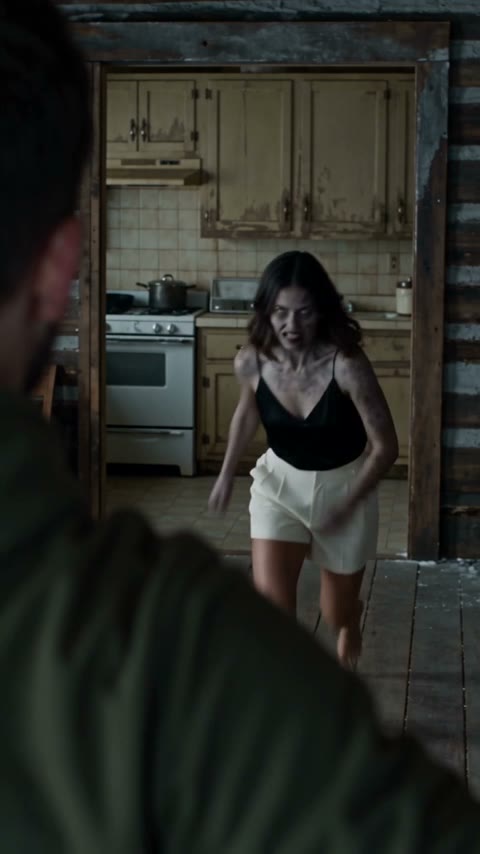
The lunge, a moment before the hard cut. From the same October 6 clip as above, made on Seadanse with Seedance 2.5.
The clip above comes from our zombie effect, built on the same ideas as this prompt.
Zombie dog and zombie cat prompt (copy this)
Our zombie dog prompt sets up the same standoff between you and your turned pet, then cuts to a healthy memory.
Exactly 20 seconds, vertical 9:16, photoreal live-action film, hard cuts only, everything at normal real-time speed, no slow motion, no text, no logos, no watermark. The person in photo 1 is the owner; the animal in photo 2 is their dog. Keep the owner's face and the dog's breed, coat colour and markings exactly as in the photos.

0-2 s: an abandoned farmhouse kitchen in cold daylight. Close-up of the owner, tears on their face, aiming a pistol with shaking hands.
2-5 s: the dog stands in the doorway, turned into a zombie: milky white eyes, patches of missing fur showing grey skin, a matted coat, drool, bared teeth. It is still clearly the same dog.
5-8 s: the owner lowers the pistol, puts it on the floor, kneels and opens both arms.
8-9.5 s: the dog sprints across the floor and jumps; the jump takes less than half a second. Hard cut the instant it reaches the owner's chest.
9.5-20 s: the same jump from the same camera angle, now in a green summer meadow. The dog is healthy and happy and lands in the owner's arms. They roll in the grass, then a close-up of the dog licking the owner's laughing face.

Sound: wind and breathing in the kitchen, one short real dog growl at 8 s, no monster sounds. After the cut: soft piano, birdsong, laughter.For a cat: replace every "dog" with "cat", "jumps" with "pounces", "jump" with "pounce", and "dog growl" with "cat hiss".
Pets fall into a different visual trap than humans. While people need light infection details to stay recognisable, pets need heavy infection details. If you describe a turned dog vaguely, the model generates a normal dog that is simply angry.
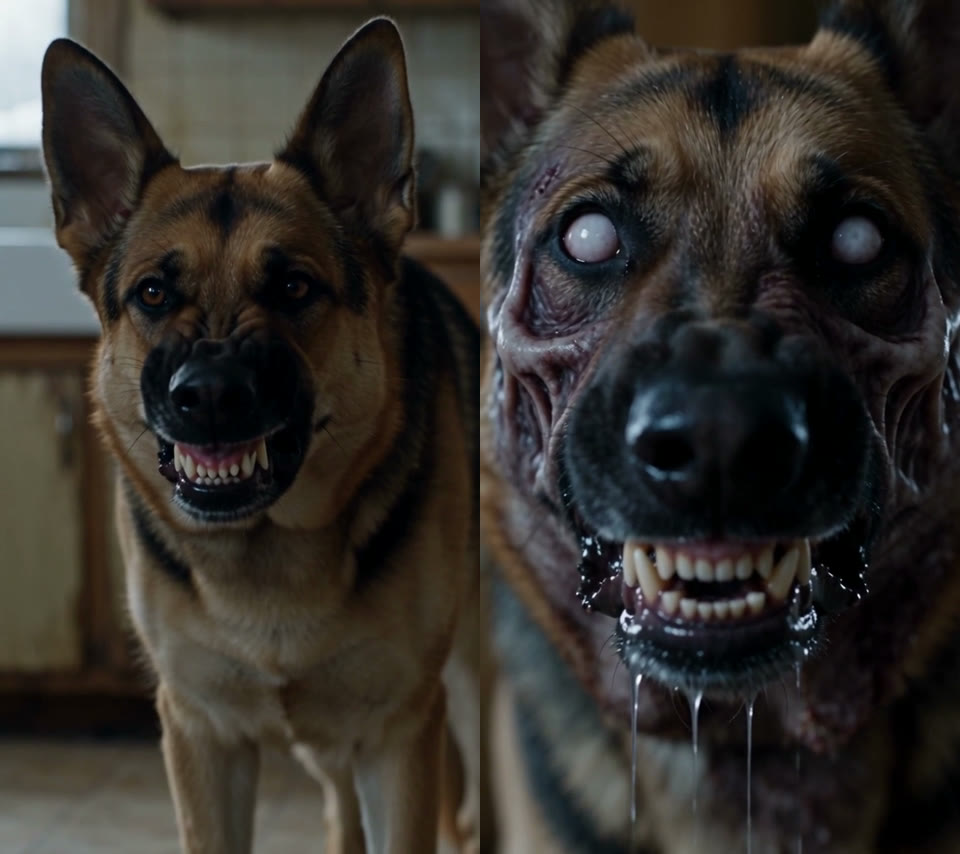
Same two photos, two prompt versions, both Seedance 2.5, 15 seconds, 480p, October 6, 2026. Left: the zombie look described loosely. Right: milky eyes, missing fur, matted coat, drool and bared teeth written out.
The dog version, made on Seadanse with Seedance 2.5 on October 6, 2026, from a photo of a man and a photo of his dog: 15 seconds, 480p, 9:16, with sound.
You can also run these pet stories directly on the AI zombie dog video generator page or the zombie cat video page without writing any text.
Skip the prompt: make it from two photos
If you don't want to balance seconds or adjust prompt lines, you can make the AI zombie trend video from two photos directly.
Upload one photo of an adult holding the weapon and one photo of the person who has turned. Photo 2 can be a person, a dog or a cat, on the same page. The tool uses Seedance 2.5 to build a 20-second video with sound. A 720p video costs $9.90, one 500-credit pack, and a 480p video costs 375 credits, with no subscription. No account is needed: you pay right from the Create button and the video starts on the same page. One generation gives the whole story: 15 shots in one 20-second video, with no editing.
Exported videos carry no watermark. If a generation fails, the system returns your credits automatically.
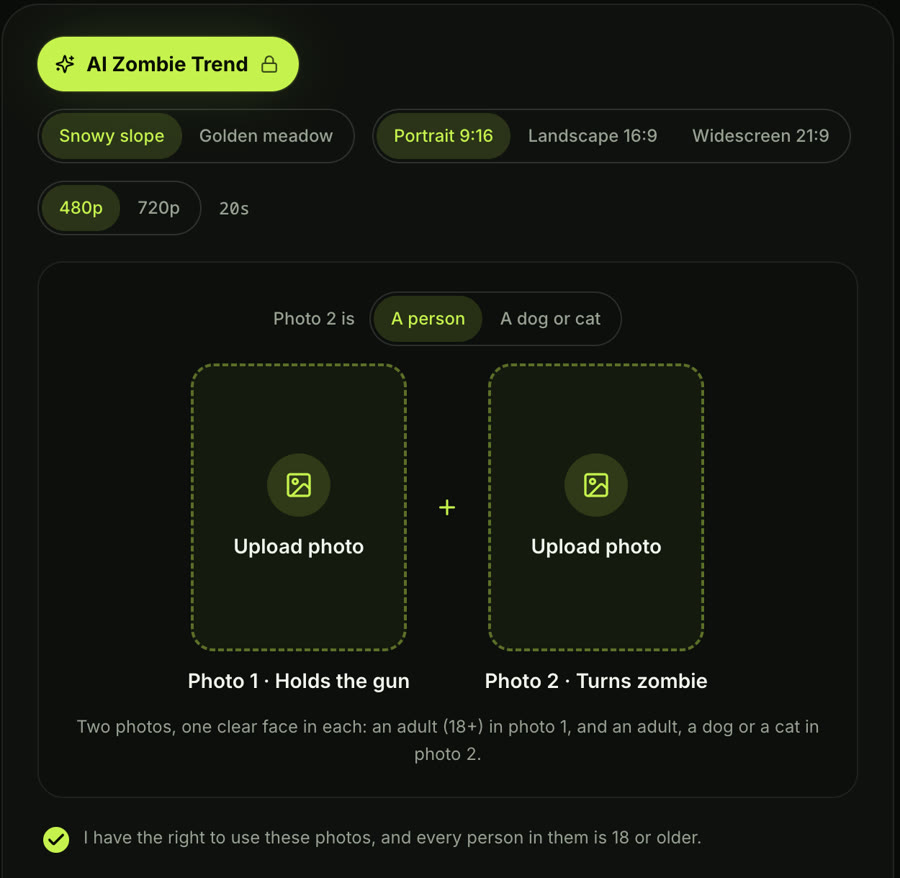
The AI Zombie Trend effect on Seadanse, captured October 6, 2026: pick the memory place and the shape, add two photos, and press Create. Photo 2 can be a person, a dog or a cat.
Made on Seadanse with the AI Zombie Trend effect on October 6, 2026, from two photos: Seedance 2.5, 20 seconds, 480p, 9:16, with sound.
If you still want full manual control over every shot, you can paste a prompt into Seedance 2.5 in the main generator box.
Prompts from the creators behind the viral videos
Several creators shared their full prompts publicly, and we keep them credited in our viral AI video prompts library.
Synthia posted this prompt on September 25, 2026, under the title "She lowered the gun… but he wasn't done." It generated a 30-second, 16:9 clip using Seedance 2.5 that reached 23,449 views.
Create a short 16 9 photorealistic Korean cinematic zombie-horror scene in an abandoned farmhouse kitchen. A crying female survivor from Korea with messy dark hair, dried blood on her forehead, and a dirty olive-green hooded anorak aims a black pistol at her infected lover. She is trembling, tears running down her face, but cannot pull the trigger.

The infected man has tangled dark hair, pale dirty skin, milky-white eyes, dark veins, torn clothing, and an increasingly feral expression. He snarls loudly and screams directly at her. She slowly lowers the pistol, drops it beside her, and opens her arms toward him. He suddenly screams again, lunges forward and violently grabs her face.

Hard smash-cut to warm golden-hour memories of the same couple happily together in a vast wheat field — laughing, holding each other, walking hand-in-hand through the golden grass, and sitting together beneath the sunset. Make the contrast between the cold present and beautiful memories emotionally powerful.

Photorealistic live-action cinema, natural skin and tears, realistic infected eyes and facial expressions, handheld camera, practical-effects horror, 35mm film grain, believable movement and lighting. No gunshot, no gore, no dialogue, no slow motion, no extra plot, no CGI look, no animation, no distorted anatomy, no duplicate characters, no subtitles, no text, no watermark.Synthia's own clip from the prompt above, posted on X by @AIwithSynthia on September 25, 2026: Seedance 2.5, 30 seconds, 16:9.
What to change before you use it:
- Roles: replace the text descriptions with "the person in photo 1" and "the person in photo 2".
- Screams: remove "screams directly at her" and "screams again" so the scene doesn't read like a standard monster horror film.
- Violent grab: change "violently grabs her face" to "runs into her arms" to avoid content review flags.
- Dried blood: delete "dried blood on her forehead" to prevent moderation refusals.
- Timing: add second markers for each shot so the model doesn't drift.
Alpha Mom's zombie love story prompt, posted on September 29, 2026, runs 1,648 words and breaks down every beat to the tenth of a second. The confrontation lasts 11 seconds before cutting to the memory, prompting @Alexneyef to comment, "Wasn't expecting a zombie video to make me cry". Here is an excerpt from her timing breakdown:
00:09.5–00:10.1 — HE RUSHES FORWARD

Cut to the man’s close-up.

He opens his mouth and suddenly lunges toward her. His face rapidly approaches the lens with natural motion blur.

00:10.1–00:10.7 — SHE CLOSES HER EYES

Cut to the woman’s face.

She closes her eyes and stays in place, her arms still open outside the close framing.

00:10.7–00:11 — CONTACT

Cut to a medium side view of the kitchen.

The woman stands on SCREEN LEFT. The man rushes in from SCREEN RIGHT.

Cut at the moment they come together. The consequences of the attack remain outside the image.

00:11–00:12.6 — MATCH CUT INTO THEIR PAST

Cut directly to the SAME couple in the sunlit field, already meeting in a loving embrace.Alpha Mom's own clip, posted on X by @YourAlphaMom on September 29, 2026: Seedance 2.5, 30 seconds, 16:9.
Alpha Mom gives the rush 0.6 seconds and the contact shot 0.3 seconds, so the rush looks like a real sprint. You can load Alpha Mom's full prompt in our library directly into the generator with one click.
Our library also features ShamiWeb3's 60-second version with a dark-comedy twist (486,018 views) and Ciri_ai's 17-second chase version.
Why your zombie video looks slow (and how to fix it)
Your clip goes slow when your prompt's times don't match the clip's length, or when it uses slow words.
- Timings that don't match the length: on October 6, 2026, we tested a 12-second story in a 15-second box. The model stretched every action to fill the extra three seconds, turning the lunge into slow motion.
- Slow words in the prompt: words like "slowly", "staggers" and "slow motion" slow down the whole camera movement and kill the momentum of the attack.
- A lunge with no duration: if you write "lunges" without a time window, the model floats the body through the air.
Set an exact duration by writing "the leap takes less than half a second", and make sure your shot times add up to the clip's length.
Why your zombie looks too scary (and how to fix it)
Heavy horror makeup hides who the zombie is, and once you can't recognise your partner, the video stops being sad.
- Unrecognisable features: white pupils, rotting skin, deep wounds, and wide screaming mouths stop the subject from looking like your partner.
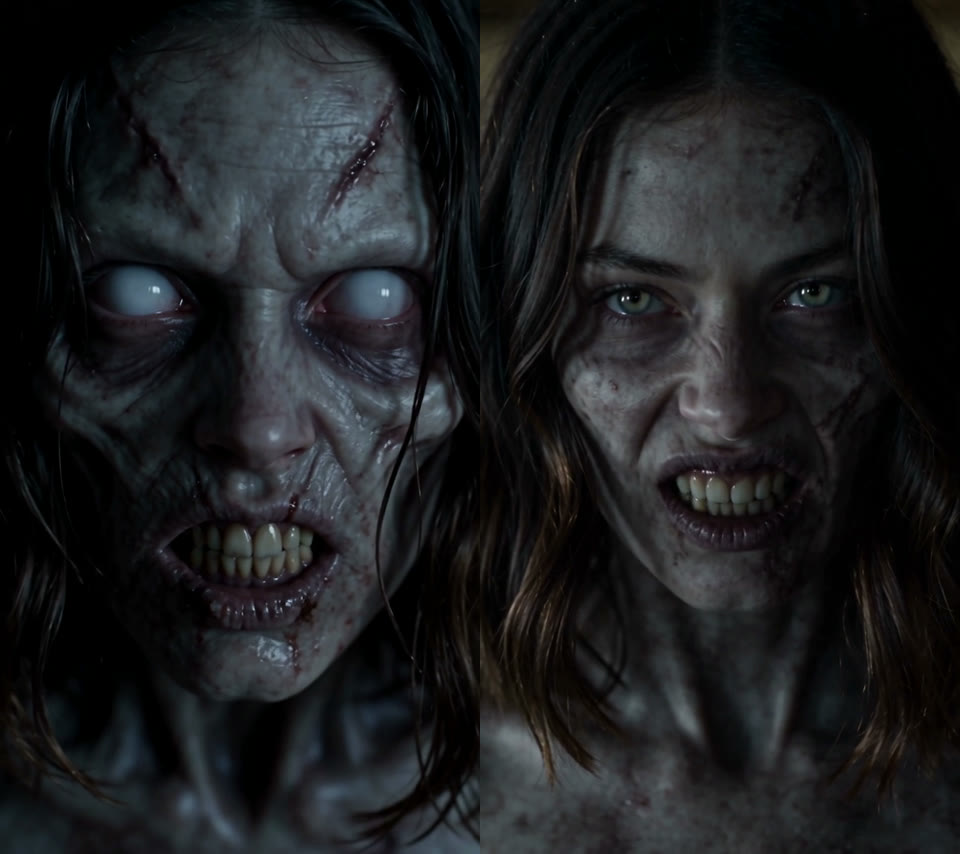
Same two photos, two prompt versions, both Seedance 2.5, 15 seconds, 480p, October 6, 2026. Left: heavy zombie makeup. Right: light infection, with the prompt saying her face must stay recognisable.
Ask for light infection only: pale skin, faint neck veins, red-rimmed eyes, and normal hair. Add the line "the face is still clearly theirs" and forbid blood or open wounds. Alpha Mom's prompt does the same job in one line: "His face remains recognizably human beneath the signs of infection." Pets are the one exception, as the dog section shows. They need heavy zombie traits, or they just look like normal pets.
Why the sound feels fake
Your clip sounds fake when the prompt asks for creature screams or plays music in the wrong place.
- Monster roars: asking for creature roars produces cartoonish sound effects. Ask for "one short human growl" instead.
- Screams: prompt lines calling for screams turn the emotional standoff into standard horror movie noise.
- Music timing: don't play music during the standoff. Keep ambient room sounds first (wind and breathing), then cue soft piano and strings only after the cut.
Why the cut feels flat: cut on contact, not a fade
A match cut is a cut that joins two shots on the same movement, so the lunge in the dark room becomes the hug in the sunlit memory. The emotional impact of the zombie match cut relies entirely on a hard cut at the exact moment of physical contact.
Anything that softens this cut ruins the effect, and you'll see it in common prompts. Google's AI Overview, for example, suggests "Flashbacks of happy memories appear as soft light transitions". And a published dog-version prompt asks for a dissolve, stating "Do not use a hard cut." Fades and dissolves blend the two scenes together, destroying the sharp contrast between danger and memory.
Write "Hard cut the instant their bodies touch" and repeat the camera angle in both shots. As Alpha Mom wrote in her prompt, "Cut at the moment they come together. The consequences of the attack remain outside the image."
Why the generator refuses your zombie prompt
Your prompt gets refused when the generator spots violence, gore or someone else's video.
- Refused actions: users follow tutorials and see runs refused for the gun or the hug. Specify that the character "cannot pull the trigger", state "no gunshot, no gore", and use "runs into her arms" instead of "grabs her face".
- Gore wording: take out every mention of blood, biting, open wounds and flesh tearing, or you'll likely get refused.
- Celebrity drift: ByteDance's own Seedance prompt guide warns that faces can drift midway through a video and resemble a celebrity, causing automatic moderation blocks. Use clear, well-lit reference photos of adults and explicitly assign photo 1 and photo 2 to their roles.
- Copyrighted stills: upload your own original photos rather than screenshots from other creators' viral videos.
One prompt or two clips joined in CapCut?
Many creators search for a "zombie apocalypse AI video editing prompt" because YouTube tutorials often recommend generating two separate clips and splicing them manually.
Two separate clips let you decide where the cut lands in your video editor. But the model reads the photos again for each clip, which can cause the faces to look slightly different before and after the cut.
Using one prompt generates the standoff, the attack, and the memory inside a single video file. You don't need to edit anything by hand, but you'll have to time the cut inside the prompt.
FAQ
Is the zombie AI trend free?
No. Video generation uses paid GPU processing across every major platform. As one tutorial creator noted, "Seedance 2.5 is paid everywhere". On Seadanse, a 20-second video needs credit packs: $9.90 makes one 720p video.
Can I make it with one photo?
No. The trend's built on the standoff between the one who holds the gun and the one who's turned. With one photo, you'd only get a zombie filter, which is a different thing.
Which app are people using?
Most creators use Seedance 2.5 through tools like Seadanse, Higgsfield, Dreamina, Pollo, Google Flow, or templates on CapCut and PixVerse.
How long should the video be?
A single-prompt generation works best at 15 to 20 seconds, which gives enough time for the standoff, the lunge, and the memory. Clips running 30 to 60 seconds are edited together from multiple separate generations.
Can I make it with a pet who has died?
Yes. Many people use a clear old photo of a lost pet. The video transitions from the zombie standoff into a bright memory where the pet appears healthy and happy again.
Make your zombie video today
A zombie prompt succeeds when it assigns exact seconds to every beat, keeps the face recognisable, makes the leap fast, and cuts on contact. When those pieces align, the shift from danger to memory delivers the emotional punch that made the trend viral. You can paste the prompts above into the generator, or make an AI zombie trend video with your own photos directly.
Written by The Seadanse Team. We rewrote our own zombie effect for a 15-second clip on October 6, 2026, kept every take, and checked every prompt quoted here against its original post.


