
Window Dance CapCut Template Not Working? Where It Is and Why
The window dance CapCut template: the two real templates with their dates and use counts, why the tag, the region or a search fails, and a way with one photo.
 The Seadanse Team8 min read
The team behind Seadanse. We run the models we write about, and we publish the specs, prices and limits the marketing leaves out.

TL;DR — The window dance CapCut template most people use has no title, was made November 1, 2026, and had 2,093,641 uses on November 4, 2026. You open it from the CapCut tag on a how-to video, and when that fails it's usually the tag, your region, a search by name or the wrong template. Seadanse's Window Dance AI page makes the 10-second video from one photo with no app, for $9.90 at 720p.
The window dance spreads through how-to videos that send you to a CapCut template. On November 4, 2026, the top how-to video, with 2.0 million plays guided viewers straight to the effect.
A template called "To the window dance" turns up when people look for the link, but it's a different template from 2024.
Below, we'll cover the two real templates, how the how-to video says to open them, five reasons it stalls, and a way with one photo and no app.
Is There a Window Dance CapCut Template?
Yes, there are two window dance CapCut templates, and we opened both on November 4, 2026. A CapCut template is an edit someone already built in the CapCut app, with a slot for your photo.
Here they are:
- The November 1 template: the November 1 template page has no title, and it was made November 1, 2026. It's got 1 clip slot (the place your photo goes), 10 seconds of runtime and a 9:16 frame, with 2,093,641 uses at 13:58 UTC on November 4, 2026.
- "Window Dance": the October 22 'Window Dance' template was made October 22, 2026. It's got 1 clip slot, 12.9 seconds of runtime and a 9:16 frame, with 46,129 uses on November 4, 2026.
The November 1 template went from 1,395,318 uses that morning to 2,093,641 that evening, about 700,000 more in under 11 hours, so it's the one nearly everyone is using.
"To the window dance" is a different template, a 6.6-second meme from September 1, 2024.
How to Use the Window Dance CapCut Template, Step by Step
The window dance CapCut template opens from the CapCut tag at the bottom left of a TikTok how-to video, not from a search in CapCut. That tag links straight into the editor.
Here's what the top how-to video's caption says, in order (translated from Urdu):
- Tap the tag: tap "Template" in the bottom-left corner.
- No tag? if it isn't there, tap my profile picture.
- Open the video: open this video.
- Find the link: find the template link in the bottom-left corner.
- Use it: tap "Use Template".
- Add your photo: upload your photos.
- Wait: wait a few seconds while it makes itself.
- Export: tap "Export" and you're done.
As a viewer under the top how-to video put it, "no need to copy or share anything, just go into the CapCut effect and it's done".
Why the Window Dance CapCut Template Is Not Working
The window dance CapCut template is not working for most people for one of five reasons, and each one has a fix. Here's what stops the flow and how you'll get past it.
The CapCut tag doesn't show up
The how-to caption itself says what to do: tap the poster's profile picture and open the video again. That refresh often reloads the missing link on your screen.
If that doesn't fix it, update the CapCut app and open the tag from the TikTok app on your phone.
The template page says it isn't for your region
When we opened the template pages from Singapore on November 4, 2026, each one marked the template as not valid for that region, so the page checks where you are.
To fix this, open the tag from the TikTok video on the phone you're using, with CapCut updated, or make the video without CapCut.
You can't find it by searching CapCut
The November 1 template has no title on its page, so a search for "window dance" won't bring it up by name.
You'll need to open it from the tag on the how-to video, or from the link in this article.
You opened the wrong template
"To the window dance" from September 1, 2024 is a 6.6-second meme. It isn't the lit-window dance.
The trend's templates are the November 1 one (10 seconds) and "Window Dance" from October 22, 2026 (12.9 seconds).
It asks you to pay
CapCut's help page on credits says credits are a virtual currency for its AI features, and each credit equals $0.01. Neither template page shows a price, so we don't give one.
A viewer under an October 22 template post noted, "It's not free".
If you want the burger version instead, check out the Window Peeper CapCut template.
Make the Window Dance Without a CapCut Template
You can make the window dance without a CapCut template on our page, Window Dance AI for TikTok and Reels. It works from one photo, in the web browser, and there's nothing to install. It handles the whole scene for you.
Here are the three steps:
- Add your photo: pick a person 18 or older, a cartoon or game character, or a pet.
- Pick a quality: choose 480p, 720p or 1080p; 480p is picked to start.
- Leave the box ticked and press Create: the price shows on the button before you pay.
A window with the packs opens, you pay once with no account and no subscription, and your video starts on the page.
Here's what you get:
- The length: 10 seconds, vertical 9:16.
- The sound: the trend's sound under all 10 seconds.
- The look: at night the camera pushes in from the beige-stone apartment block across the street to a lit floor-to-ceiling window. Inside, the one from your photo dances next to a black party speaker with a glowing ring. Then they stop dead, stare straight into the camera, spread both arms and pull the dark grey curtains shut.
- You: your own face, hair and outfit, in every second.
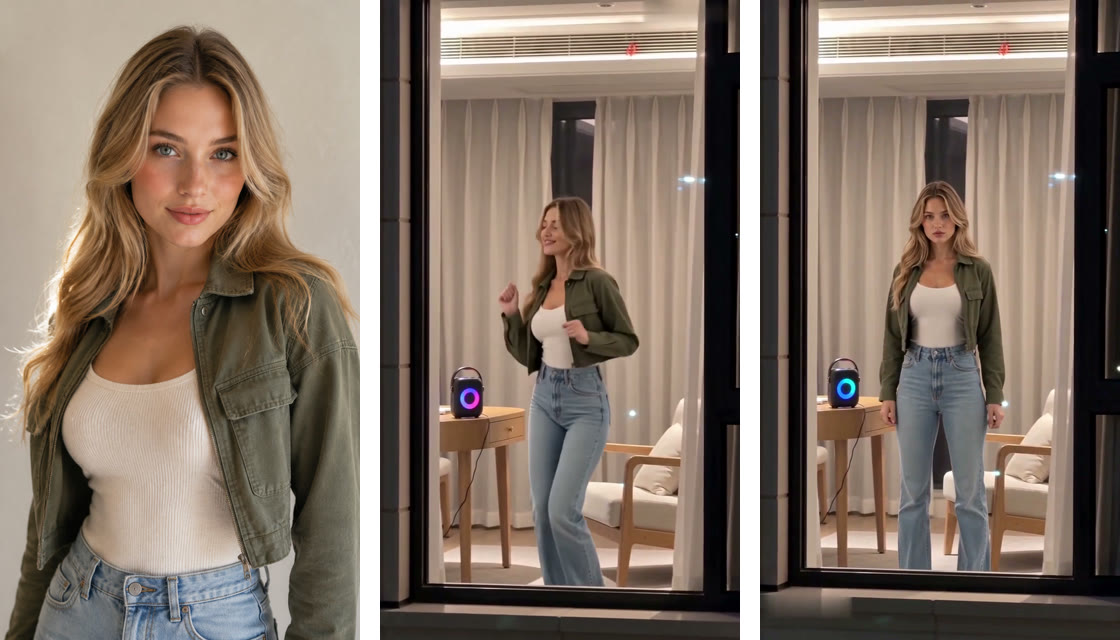
You can make the window dance from one photo right now on our site. You'll also find how to make a Window Dance AI video, step by step if you'd like to see the setup in more detail.
Window Dance CapCut Template FAQ
Which window dance CapCut template is the real one?
Both are templates for the trend. The untitled November 1 one (2,093,641 uses on November 4, 2026) is the one most people use. "Window Dance" (made October 22, 2026, with 46,129 uses on November 4) came first. "To the window dance" is a different template from 2024.
Is the window dance CapCut template free?
Neither template page shows a price. CapCut's help center says its AI features use credits worth $0.01 each.
Can I do the window dance with my dog or cat?
Yes, on our page. Add one photo of your dog or cat, and your pet dances next to the glowing speaker, stops dead to stare into the camera and pulls the curtains shut.
How much does a window dance video cost on Seadanse?
It's a one-time payment: $9.90 buys 500 credits, which covers one 720p video with no subscription. That same pack covers a 480p video for 375 credits, while a 1080p video takes 1,480 credits.
Your pack credits stay valid for 12 months, and if a video fails, its credits come back automatically. See full details on Seadanse pricing.
Can I make other trends without CapCut?
Yes, you can create the burger scene using Window Peeper AI. You can also make a football dance video with Neymar AI Dance. Both sit with our other AI video effects, where you turn one photo into video without writing prompts.
Skip the Window Dance CapCut Template
There are two real templates for the trend, and you'll open them from the TikTok tag. When the tag, your region, an empty search or the wrong template gets in your way, skip the template with Window Dance AI. It makes the 10-second window dance from one photo for $9.90 at 720p, right in your browser.
Written by The Seadanse Team, the team that built the Window Dance AI page.
Related Articles
- What Is the Window Dance AI Trend? The Lit Window, the Stare and the Song — Window Peeper, the templates, the song and real vs AI, dated.
- How to Make a Window Dance AI Video From One Photo (3 Steps) — the 10 seconds timed, the photo that works best, and three steps on our page.
- 9 Best Window Dance AI Generators, Compared (2026) — nine ways to make the window dance, what each asks for and what it costs.


