
Gangnam Style CapCut Template: Which One Is the Trio and Why It Fails
The Gangnam Style CapCut template for the trio trend is "Hh" (236,600 uses). Why it asks you to pay or rejects photos, 5 fixes, and Seadanse's page.
 The Seadanse Team11 min read
The team behind Seadanse. We run the models we write about, and we publish the specs, prices and limits the marketing leaves out.

TL;DR — The Gangnam Style CapCut template behind the trio trend is "Hh" by Esme70275, with 236,600 uses on October 28, 2026, one photo and 21.5 seconds. Viewers under CapCut tutorials say it asks them to pay, won't take their photo, or doesn't work. If you'd rather skip templates, Seadanse's Gangnam Style AI makes the 20-second three-friend video from 1 to 3 photos with the song built in.
You tap a template link expecting a fun clip with your friends, but the edit breaks. "كذب مصار" (Arabic for "lies, it didn't work") wrote a viewer under a CapCut tutorial for the Hh template. Another viewer added "كذذبب" (Arabic for "liiies").
Other viewers run into surprise pay screens or photos that won't go in. "مارضا ليه" (Arabic for "it won't accept mine") wrote one user when the slot rejected their picture. "مارضي فهمووني" (Arabic for "it won't take it, someone explain") wrote another.
We opened every Gangnam Style CapCut template we could find on October 28, 2026, and here's which one does what and how to fix each problem.
Where Is the Gangnam Style CapCut Template?
The Gangnam Style CapCut template lives in the CapCut app and on capcut.com, and most people reach it from a "CapCut · Try this template" link on a TikTok video of the trend. Most of those TikTok clips are tutorials. On October 27, 2026, 27 accounts had linked the main template across 34 videos with 2.15 million views between them.
The trio template's name is just "Hh", with "#fyp" as its description, so the words "Gangnam Style" aren't in its name.
Typing "Gangnam Style" into CapCut brings up older edits from before the trend, like Gangnam style slowmo by KARL_TEMPLATES, an April 2024 slow-motion edit with 113,311 uses. Another result is "GANGNAM STYLE" by Ten Twelve from November 2025 with 699 uses. None of those older edits is the three-friend selfie.
Which Gangnam Style CapCut Template Makes the Trio?
Two Gangnam Style CapCut templates make the three-friend selfie, "Hh" and BatToS's "Gangnam style Trend"; the rest are other edits.
Here are the ones we found, by uses:
- "Hh" by Esme70275 (236,600 uses): the trio template most people use, made October 21, 2026. It has one photo slot and runs 21.5 seconds, wide screen. Its template video shows three young women on a Seoul street at night taking turns at one phone. You can find it on Esme70275's Hh template page.
- "Gangnam style Trend" by BatToS (6,599 uses): the first AI template for the trend, made October 19, 2026, with CapCut's "Ai" badge. It runs 14 seconds, wide screen, and shows three young women on a lit city square at night. You can view it on BatToS's Gangnam style Trend page.
- "Gangnam Stye Remix" by AITrendStudio (1,529 uses): an edit of about 10 seconds. It shows the horse-riding dance to a remix rather than the trio selfie. It's on AITrendStudio's Gangnam Stye Remix page.
- "gangnam style" by GG-Bond (515 uses): a 9-second edit made during the trend.
- "Gangnam Style Trend" by BatToS (57 uses): BatToS's second version of the edit, running about 13 seconds.
"Hh" grew from 1,494 uses on October 22 to 50,019 on October 24, 170,388 on October 26 and 236,600 on October 28. Gaining more than 235,000 uses in six days means it's the one most people land on, so it's the one most people get stuck on.
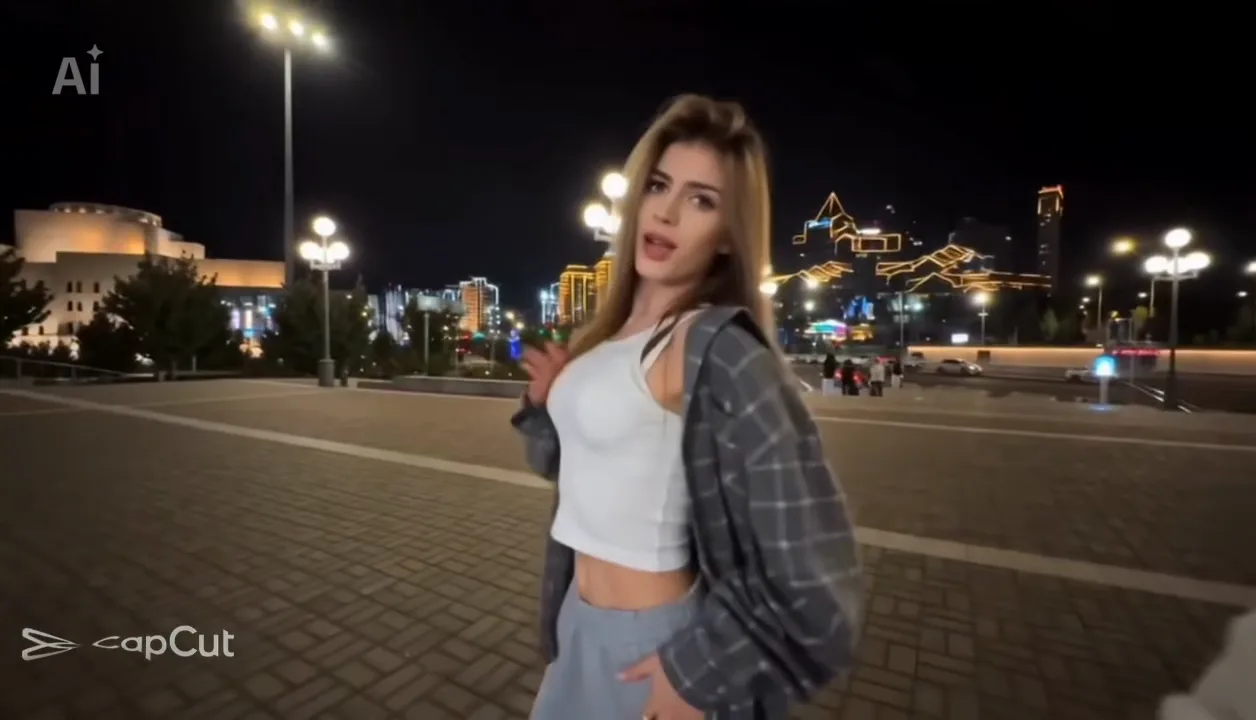
If you want each of your three friends from their own photo, add up to three photos to the Gangnam Style AI generator.
How Do You Use the Gangnam Style CapCut Template?
You use the Gangnam Style CapCut template by opening its link in the CapCut app, tapping Use template, picking one photo and tapping Next. A CapCut template is an edit someone built in the CapCut app, with a slot for your photo.
- Open the link: tap "CapCut · Try this template" on the TikTok video, or open the capcut.com page.
- Tap Use template in CapCut: this launches the project screen inside your installed CapCut app.
- Pick one photo: pick a single picture from your camera roll for the open slot.
- Tap Next: let the app generate the video, then export your clip.
A CapCut tutorial with 360,400 views tells you to copy the video link first. But as a viewer under another CapCut tutorial said, "ترا ما يحتاج نسخ رابط و لا اي شي هو اصلاً موجود" (Arabic for "you don't need to copy a link or anything, it's already there", 73 likes).
Why Isn't the Gangnam Style CapCut Template Working?
The Gangnam Style CapCut template usually fails in one of five ways, and each has a plain cause. Here's how to fix each one.
The Template Keeps Asking You to Pay
Viewers get hit with a payment wall right when they try to export.
Under a video showing the template, a viewer asked "ليش بفلوس" (Arabic for "why does it cost money", 13 likes). Another asked "طيب ليش لزم تدفع فلوس" (Arabic for "so why do you have to pay", 6 likes). The AI part spends CapCut credits, so the app asks you to buy more when your balance is empty.
Fix: check the credit cost on the template before you add your photo.
The Template Won't Take Your Photo
The app rejects your upload or stalls out on the picker screen. Viewers ran into this exact wall: "مارضا ليه" (Arabic for "it won't accept mine") and "مارضي فهمووني" (Arabic for "it won't take it, someone explain"). "Hh" has one photo slot, and the tutorials pick one photo, then Next. When an image contains multiple faces or isn't centered, the slot often fails to process it.
Fix: pick one photo, one person, face clear and facing the camera.
You Get Your Photo With the Song Over It
You wait for the edit to finish, but the camera never moves. A viewer reported: "جربت ماصار لي بس صوت ع صوره" (Arabic for "I tried it — all I got was sound over my photo"). The AI part didn't run, so you're left with your still photo and the template's song.
Fix: check that you're on a trio template from the list and that the credit step went through before you export.
You Got the Horse-Riding Dance Instead of the Trio
The template shows three dancers doing the horse-riding dance rather than three friends sharing a camera. "Gangnam Stye Remix" by AITrendStudio is the horse-riding dance to a remix. It runs about 10 seconds and isn't the three-friend selfie.
Fix: open "Hh" or BatToS's "Gangnam style Trend" by its link.
You Can't Find the Gangnam Style CapCut Template
A search inside the app returns unrelated clips or leaves you stuck.
Under a tutorial with broken links, a viewer commented "not working". Another pointed out: "عندكم التطبيق Cab Cut اذا ما عندكم ما يصير" (Arabic for "do you have the CapCut app? If you don't, it won't work"). The trio template is named "Hh", and a search for "Gangnam Style" brings up the older edits.
Fix: open it from the TikTok video's template link or from its capcut.com page, inside the CapCut app.
How to Make the Gangnam Style AI Trio Without a CapCut Template
You can make the Gangnam Style AI trio without a CapCut template on Seadanse's Gangnam Style AI page, where you add 1 to 3 photos and press Create.
You get a wide 16:9 MP4 of about 20 seconds, the full trend from the first selfie to the wave goodbye, at night. Photo 1 is the friend who holds the phone, photo 2 is the friend on the left, and photo 3 is the friend on the right.
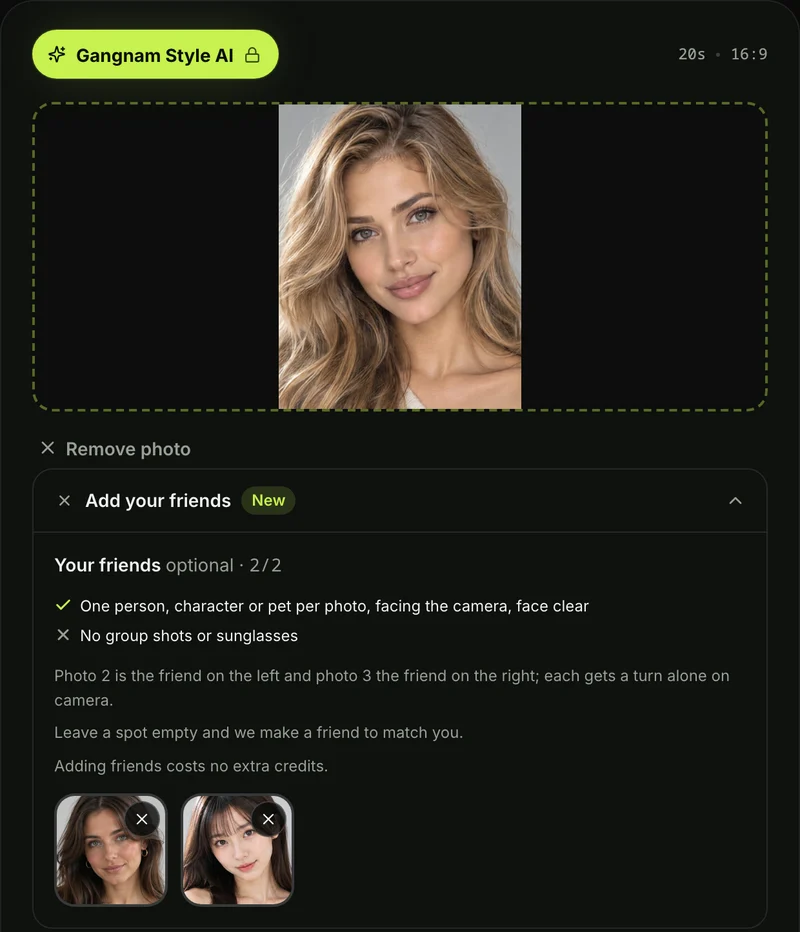
Here's what you get:
- The selfie: all three squeeze into the night selfie at the start, then photo 1 sings alone up close into the phone held at arm's length; at the end both friends squeeze back in and all three wave goodbye together.
- The two solo turns: the camera whips (swings fast) to the friend on the left alone on the plaza, then to the friend on the right alone with a hair flip at the stone wall, then back to photo 1, who waves an open hand at the lens.
- The missing friends: with fewer photos, the page makes the missing friends to match. That's another pet of the same kind with a different coat, a character in the same drawing style, or an adult friend for a person.
- The song: the "Gangnam Style" song plays from the first second, already in the file.
People 18 or older, pets, and cartoon, anime, game and superhero-style characters all work. Faces, hair and outfits come from your photos, and there's no watermark on exported video.
One 720p video costs $9.90, paid once, with no sign-up, and one, two or three photos cost the same. The Seadanse pricing page lists every credit pack.
You can follow our step-by-step guide on how to make a Gangnam Style AI video for best results. You can also see every Gangnam Style AI video generator compared across features and pricing.
Gangnam Style CapCut Template FAQ
Is the Gangnam Style CapCut template free?
Viewers say it asks them to pay: "طيب ليش لزم تدفع فلوس" (Arabic for "so why do you have to pay"). The AI part spends CapCut credits, so you'll have to pay when credits run out.
Can I use three photos in the Gangnam Style CapCut template?
"Hh" takes one photo for the sequence. With our Gangnam Style AI video maker, you can upload 1 to 3 photos, and it'll make any missing friends to match.
Is the Gangnam Style CapCut template the horse-riding dance?
No, the Gangnam Style AI trio trend is three friends taking turns at one phone, not the horse-riding dance. That's a separate remix template. We've documented how the Gangnam Style AI trend started from an October 5, 2026 TikTok video filmed in Seoul with 19.6 million views.
Can I make the Gangnam Style AI trio with a prompt instead?
Yes, you can follow the route tutorials use. You'll download a reference reel of about 20 seconds and cut it into two muted parts of about 10 seconds each. Then you'll upload three photos and use a copy-ready Gangnam Style AI video prompt. After that, you'll join the parts in an editor and lay the song back over it yourself.
What song is in the Gangnam Style CapCut template videos?
The template videos use PSY's 2012 song "Gangnam Style". The song is embedded right into the template audio track.
Make Your Gangnam Style AI Video Without the Template
The main trio edit in CapCut is "Hh", but it takes one photo and viewers say it asks to pay or won't work. If you'd rather skip templates, you can make a Gangnam Style AI video directly in your browser. We'll make all three turns from your photos with the song for $9.90 at 720p.
You can also create a dance clip with Uptown Funk AI or explore our full library of AI video effects.
Written by The Seadanse Team, the team that built the Gangnam Style AI page.
Related Articles
- How to Make a Gangnam Style AI Video With Your Friends (4 Steps) — the four steps, which photo goes where, and the photos that work best.
- What Is the Gangnam Style AI Trend? The 'Open Gangnam Style' Trio, Explained — where the three-friend selfie came from and how the AI versions spread.
- Best Gangnam Style AI Video Generators (2026): 10 Ways Compared — the sites and apps that make this video, side by side on photos, sound and price.
- Gangnam Style AI Video Prompt (Copy-Ready): All Three Turns, Shot by Shot — a full prompt for all six parts, to use in a video tool yourself.


