
Pika 免费吗?免费计划包含什么(以及不包含什么)
Pika 免费吗?是的,Basic 计划完全免费,但输出分辨率限制在 480p,下载带有水印,且禁止任何商业用途。
 The Seadanse Team2 分钟阅读
The team behind Seadanse. We run the models we write about, and we publish the specs, prices and limits the marketing leaves out.

速览 — 是的,Pika 提供名为 Basic 的免费计划,无需任何费用,每月赠送 80 视频积分,但仅支持以 480p 分辨率运行 Pika 2.5,下载的所有视频都带有水印,且不授予任何商业使用权。这 80 积分每月仅够生成 6 条 5 秒的片段。用它来测试提示词框还可以,但无法将这些文件用于客户项目或公开干货发布。
“免费”是 Pika 报价卡上最醒目的字眼,但真正的限制往往藏在几次点击之后。其中一个限制就是:你无法将在免费层级上生成的任何内容用于工作。以下是基于 2026 年 8 月 26 日 Pika 价格页面整理的完整免费计划解析。
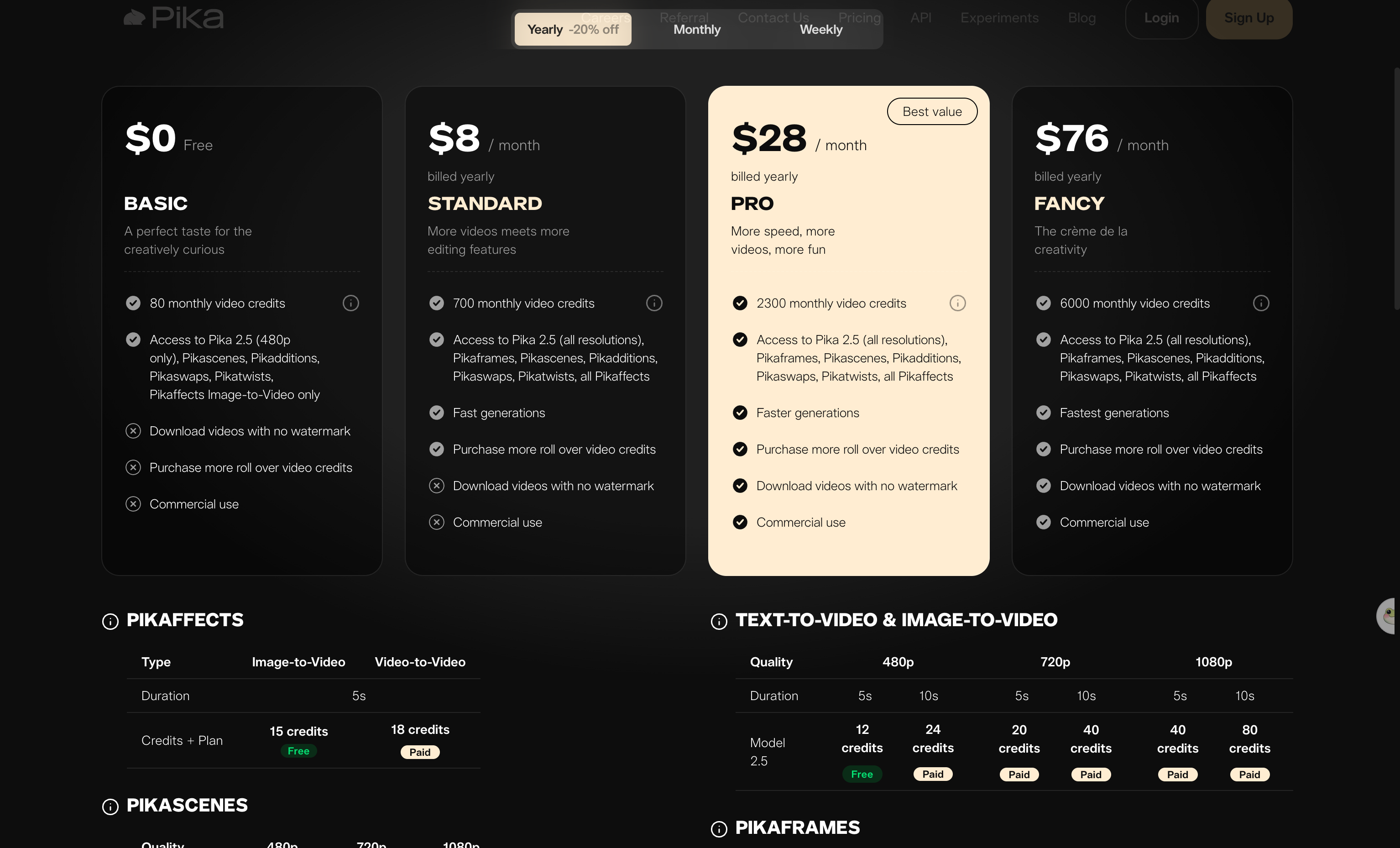
Pika 的四档计划 — 查看于 2026 年 8 月 26 日。Basic 费用为零,但带有三个叉号。
免费计划究竟包含什么
Pika 的免费层级名为 Basic 计划,费用为 $0。登录后包含以下内容:
- 每月 80 视频积分(每次生成所消耗的代币)
- 支持使用 480p 分辨率的 Pika 2.5
- Pikascenes、Pikadditions、Pikaswaps 和 Pikatwists
- Pikaffects,但仅支持图生视频
无需绑定银行卡即可试用生成器。
免费计划的限制在哪里
Pika 价格页面上的 Basic 报价卡在三项具体内容旁标注了叉号。你无法获得无水印下载,无法获得商业使用权,也无法购买可结转的额外积分。Pikaffects 仅限图生视频,因此视频生视频版本不在免费计划内。
免费计划不包含商业使用权。Pika 服务条款授予的是个人许可:
“一项有限的、非排他性的、不可转让的、不可再许可的、可撤销的许可,仅供你个人非商业用途访问和使用本服务——除非你的订阅计划明确允许商业用途。”(a limited, nonexclusive, nontransferable, nonsublicensable, revocable license to access and use the Service solely for your personal, noncommercial use—except where your subscription Plan expressly permits commercial use.)
如果 Basic 计划的积分用尽,你只能等待下个月的重置。在免费层级上无法购买加量包,因为增购积分必须基于付费计划。
未使用的计划积分也不会结转到下一个计费周期。如果你需要无水印且没有订阅绑定的纯净成片,像 Seedance 2.5 AI 视频生成器 这样的工具提供了不同的额度方案。
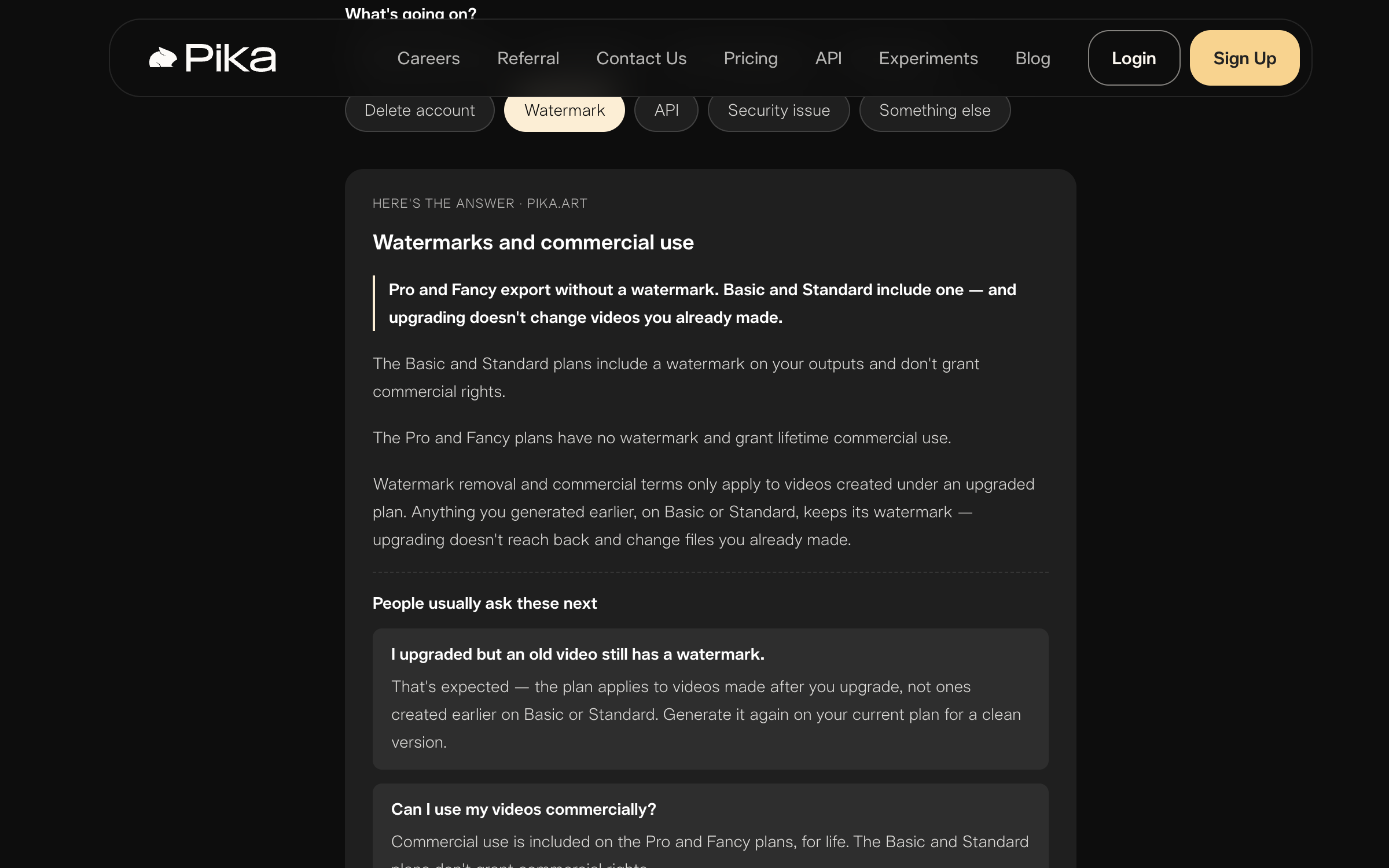
Pika 官方关于水印的回复 — 查看于 2026 年 8 月 26 日。后期升级无法去除已生成片段的水印。
80 积分能生成多少条片段
Pika 2.5 生成文生视频和图生视频片段仅有两种时长:5 秒或 10 秒。在免费层级上,你只能生成 480p 分辨率的内容。
以下是 Basic 计划的生成成本:
- 一条 5 秒的 480p 文生视频或图生视频片段消耗 12 积分。
- 一条 10 秒的 480p 文生视频或图生视频片段消耗 24 积分。
- 一条 5 秒的 Pikaffects 图生视频片段消耗 15 积分。
- 一次 480p 的 Pikascenes、Pikadditions 或 Pikaswaps 生成消耗 20 积分。
- 一次 Pikatwists 生成消耗 60 积分。
那么你每月 80 积分的额度究竟能买到什么?你可以生成 6 条 480p 的 5 秒片段,或者 5 条 Pikaffects 片段,或者 4 条 Pikascenes 片段,或者 1 条 Pikatwists 片段并剩下 20 积分。
更高的分辨率(如 5 秒片段 720p 需 20 积分,1080p 需 40 积分)在报价卡上均标记为付费专享。在 Basic 计划中无法选择它们。我们整理了七个步骤以及每一步的消耗拆解,方便你精细规划积分用量。
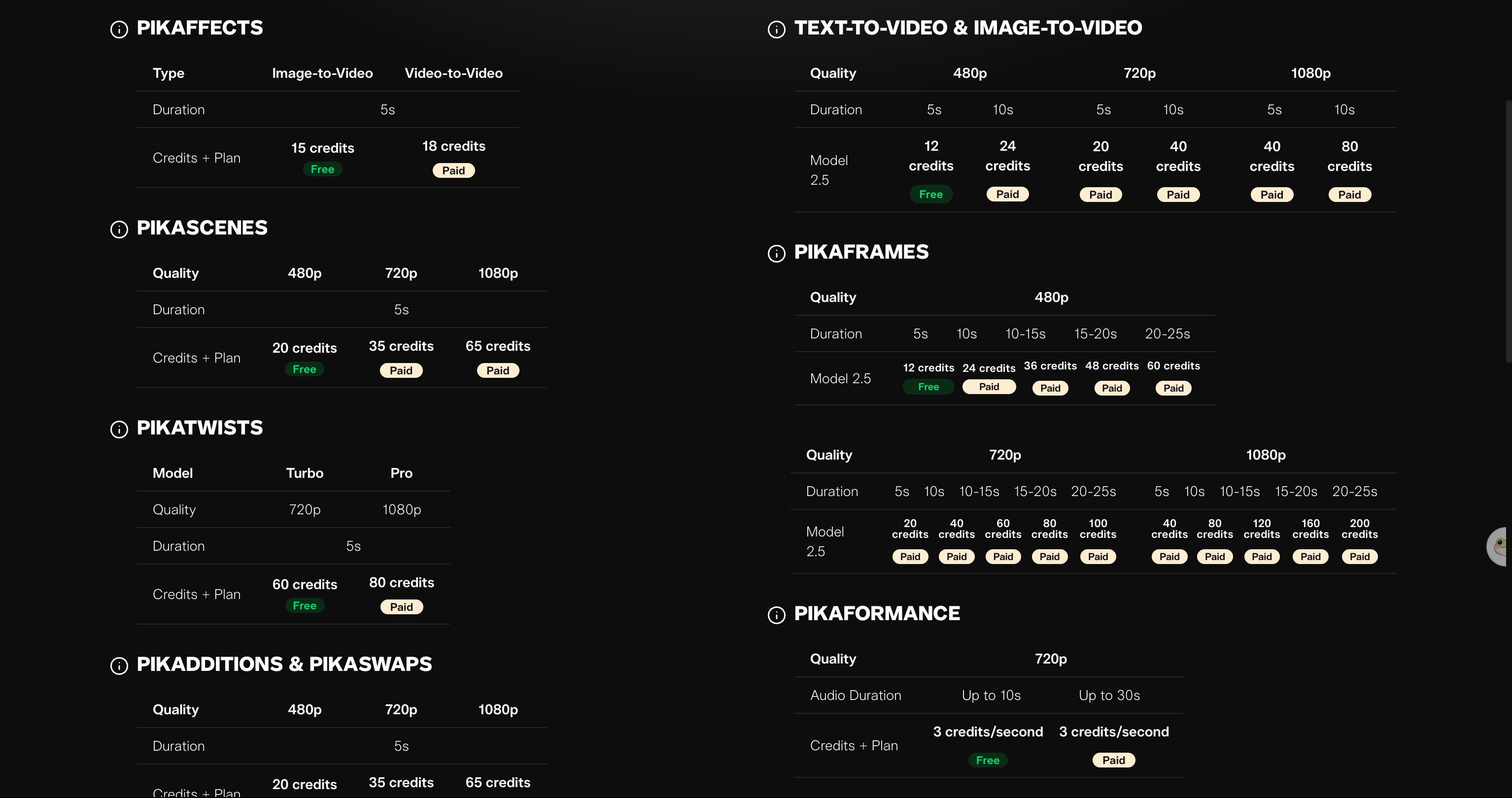
Pika 公布了各项功能的具体开销 — 查看于 2026 年 8 月 26 日。只有 480p 5 秒选项带有免费徽章。
依然带有水印的付费计划
Pika 价格页面上最大的意外出现在最基础的付费层级。Standard 计划年付折合每月 $8,月付为每月 $10,每月提供 700 积分。
此外还有按周计费的 Standard 选项,每周 $8.99 提供 175 积分。购买四周的周付 Standard 计划获得的积分与一个月付 Standard 相同(700 积分),但价格大约是后者的 3.6 倍。
然而即使你为 Standard 付费,视频上的水印依然存在。Standard 计划在无水印下载和商业使用权旁同样标有两个叉号。
Pika 客服页面明确说明 Basic 和 Standard 包含水印:“Basic 和 Standard 计划的输出包含水印,且不授予商业使用权。Pro 和 Fancy 计划没有水印,并授予终身商业使用权。”(The Basic and Standard plans include a watermark on your outputs and don't grant commercial rights. The Pro and Fancy plans have no watermark and grant lifetime commercial use.)
要获得无水印导出和商业权利,必须升级到 Pro(年付折合每月 $28,月付每月 $35)或 Fancy(年付折合每月 $76,月付每月 $95)。我们对比了根据各平台价格页面核实的六款工具,展示了不同工具从哪一档开始真正提供无水印下载。
用户很晚才发现的三条规则
Pika 平台上有三条容易让人措手不及的规则:
- 高峰期免费队列处理较慢。Pika 客服团队指出,流量较大时免费生成可能需要排队,刷新浏览器或重启应用并不能加快排队任务的速度。
- 升级计划不会消除旧视频的水印。Pika 客服文档解释称,去水印仅适用于升级后新生成的视频。如果你在 Basic 计划下制作了片段,必须在 Pro 计划下消耗积分重新生成,才能拿到无水印文件。
- 直接分享链接始终带有水印。直接从 Pika 分享的视频在所有层级上均带有水印,付费层级也不例外。
Pika 自身页面存在冲突之处
我们在核对 Pika 网站时发现,其中两个页面存在出入。Pika 的 FAQ 称 Basic 每月提供 150 积分。但当前生效的价格页面显示 Basic 仅提供 80 积分。
该 FAQ 仍将 Pika 2.2 称为“我们的最新模型”(our latest model),并列出了 2.2 版本的积分消耗标准。而价格页面和实际的生成器均已更新为 Pika 2.5。
本指南全程采用价格页面的 80 积分数据,因为这与当前生成器中显示的内容一致。我们于 2026 年 8 月 26 日在未登录状态下查阅了 Pika 的价格页、FAQ、客服页面以及服务条款,未注册 Pika 账号。
外部评分方面同样存在两极分化。在 Trustpilot 上,Pika 获得 67 条评价,评分 1.7 / 5,该主页被 Trustpilot 标记为未认领且可能不具代表性;而在 Pika 自己的 iOS 应用中,3,814 个评分给出了 4.7 / 5。
这两项评分都不能代表对免费计划的最终定论,而后者正是本文讨论的重点。
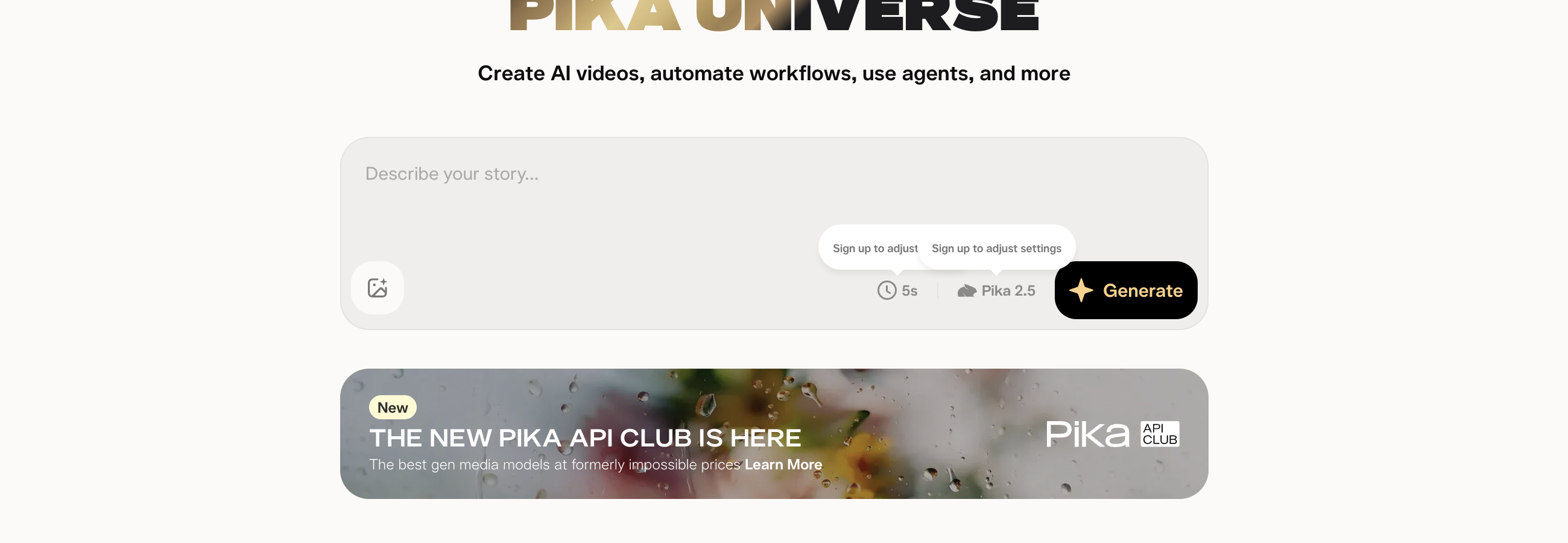
未登录状态下的 Pika 生成器 — 查看于 2026 年 8 月 26 日。模型标签显示为 Pika 2.5,与价格页面一致。
如果你今天只想要一条无水印片段
Seadanse 生成器 可直接在浏览器中运行 Seedance 2.5,提供免费起步积分,无需绑定银行卡。
导出的视频不带任何水印,单条片段支持 480p、720p 或 1080p,时长 5 到 30 秒,渲染失败或中断会自动退还积分。
平台还提供 $9.9 的免订阅积分包。你可以使用 Seedance 2.0 AI 图生视频 从静态图起步,并查看 Seadanse 积分价格。
相关文章
- 如何使用 Pika:7 个步骤及每一步的成本 — 详细操作流程及各步骤积分开销。
- 2026 年 6 大 Pika 替代工具(价格核实) — 六款平台、方案价格以及各产品无水印导出的门槛对比。
- Pika 无法使用?来自 Pika 官方客服的 6 个解决方法 — 卡在生成中、积分缺失以及看似掉订阅的登录陷阱排查。

