
Best Uptown Funk AI Generators (2026): 9 Tools Compared
The best Uptown Funk AI generators: 9 tools compared on photos, the song and the price, read on October 25, 2026. Find the right one for your crew.
 The Seadanse Team20 min read
The team behind Seadanse. We run the models we write about, and we publish the specs, prices and limits the marketing leaves out.

TL;DR — Seadanse's Uptown Funk AI for TikTok and Reels is the best of the 9 Uptown Funk AI generators we compared on October 25, 2026. It turns 1 to 5 photos into a 15-second, five-person street dance with the "Uptown Funk" song and 4 outfit themes. You'll get one 15-second 720p video for $9.90, paid once, with no sign-up, and the page also makes 480p and 1080p.
The sites uptownfunkai.com, uptownfunkaivideo.com and uptownfunkai.org also put the song in the file. MakeViral, Media.io, Magic Hour, Dreamina and PixVerse start from their own beat, a prompt, a different clip or a TikTok link.
The Uptown Funk AI trend took off after an AI clip of tech CEOs dancing the music video's street routine went up on X on October 7, 2026. Then three sites named after it went up between October 16 and October 23, 2026. We've written a breakdown of how the Uptown Funk AI trend started if you want the backstory.
We opened every tool's own page on October 25, 2026. We wrote down how many photos it takes, what fills a spot you leave empty, what plays in the file and how you pay. We've checked the settings and buttons across all 9 options.
You want your crew in that row tonight. Here's what each route gives you before you pay for anything.
The Best Uptown Funk AI Generators at a Glance
The 9 Uptown Funk AI generators differ on how many faces you add, what fills the empty spots, the sound in the file and how you pay. Here's how they compare side by side.
| Tool | Photos | Empty spots | Outfits | Length | Sound in the file | How you pay | Best for |
|---|---|---|---|---|---|---|---|
| Seadanse Uptown Funk AI | 1 lead + up to 4, each in a fixed spot | A new dancer in your style or theme | 4 themes, or everyone's own clothes | 15 s, 7 shots | The "Uptown Funk" song | $9.90 for one 720p video, no sign-up | A five-person crew with the real song |
| uptownfunkai.com | 1-9, lead first | Not stated | From your photos | About 15 s | "Original soundtrack" | $9.90 for 255 credits, after you sign in | The biggest cast |
| uptownfunkaivideo.com | 1 lead + up to 4, in upload order | "keep the template dancers" | From your photos | 15 s | "with the song" | Packs from $9.99, PayPal only | Paying with PayPal |
| uptownfunkai.org | 1, the lead only | The crew stays in "their stage suits" | Your own clothes | 12 s | "the trend's soundtrack" | $8.90 for 1 video | A solo lead |
| MakeViral | 1, 2 or 3 | Solo: four AI-made dancers in charcoal suits | Retro funk suits for everyone | 10 s | "an original funk groove" | 126 credits; packs from $14.99 | A quick clip in retro suits |
| Media.io | One photo per person, in your own prompt | You write it | You write it | 8 s (its first prompt) | You add your own | Not on the page | Writing your own prompts |
| Magic Hour | Your character photo | Not listed | From your photo | 10 s | Not listed | Free daily credits; Creator plan $19 a month | The Grammy-stage clip |
| Dreamina | You write it | You write it | "distinctly your own" | You set it | You add your own music | US$0.29 first month, then US$15.00 a month | An original retro-funk dance |
| PixVerse | 1 photo (TikTok tutorials) | Not listed | Not listed | Not listed | Not listed | Not listed | Starting from a TikTok link |
Prices and specs are as each tool's own page showed them on October 25, 2026, and "Not listed" or "Not stated" means the page doesn't say.
What to Look for in an Uptown Funk AI Generator
A good Uptown Funk AI generator puts your crew into the music video's own street routine with the "Uptown Funk" song in the file. Here are the seven things that matter most when you pick one:
- The song in the file: The "Uptown Funk" song plays from the first second, so you don't add it in TikTok.
- The video's own shots: The arms-up wide shot, the low-angle crouch, the kick step and the lean-in finish, cut the way the music video cuts them. That's seven shots in 15 seconds, so it cuts like the music video does, not like one long take.
- A spot for every friend: Up to five faces, each in a spot you know before you press anything.
- Empty spots that match: A spot you leave empty gets a dancer who fits your crew, not a leftover dancer from the 2014 video in a stage suit.
- One look for the whole crew: A theme dresses all five, or everyone keeps their own clothes.
- A template, not a prompt: You use a template (a ready-made video with slots for your photos) and press one button. There's no prompt to write, no clip to find and no editing.
- The price before you pay: You see it on the button, you pay once, and you don't need to sign up.
Seadanse's version, the Uptown Funk AI generator, covers all seven.
1. Seadanse Uptown Funk AI: Best for a Five-Person Crew, Themes and the Real Song
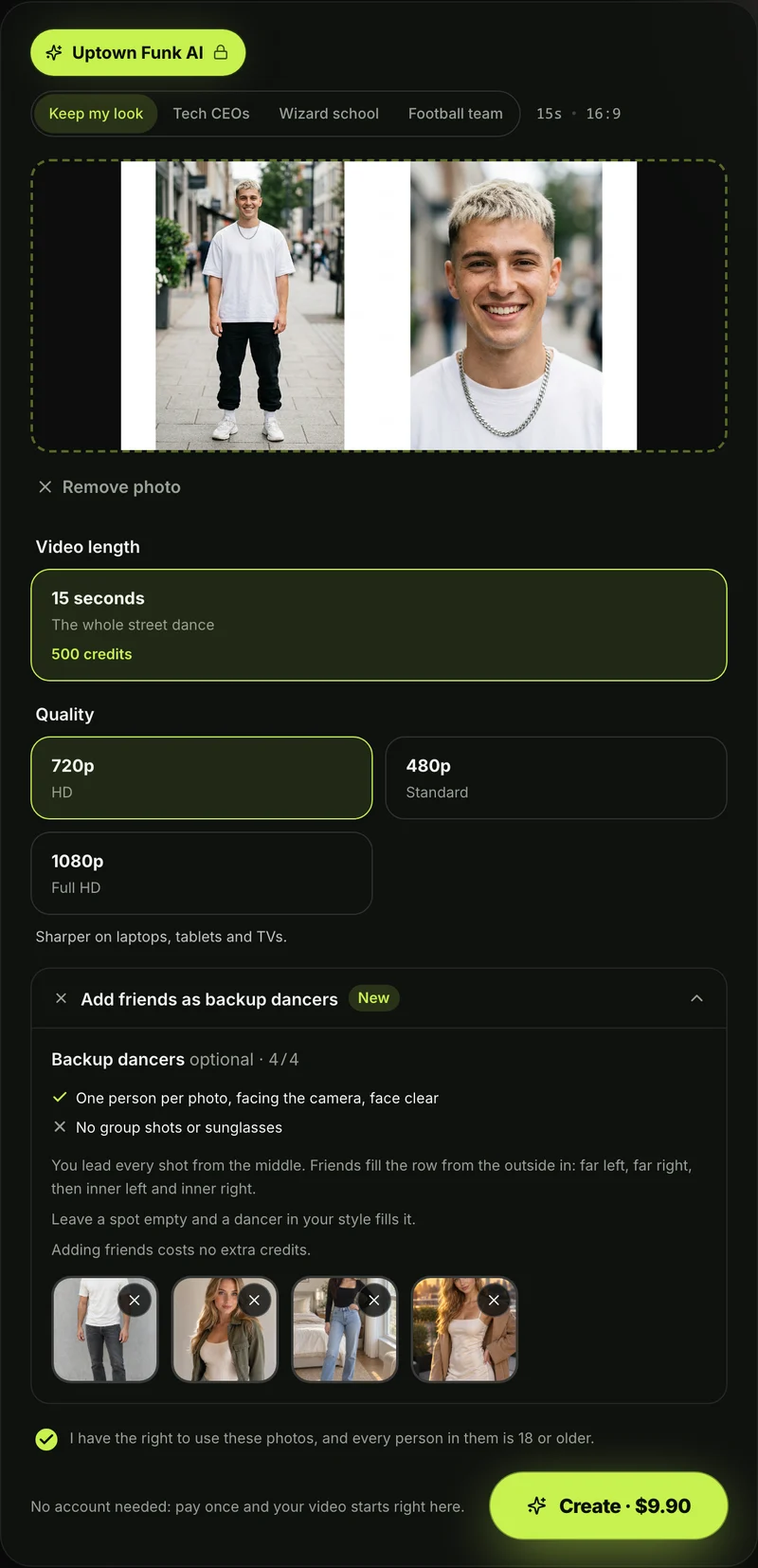
Seadanse's Uptown Funk AI is the best choice if you want up to five custom dancers, a unified theme and the music video's street routine cut to the beat. It's the one that turns 1 to 5 photos into a 15-second street dance for five, with the "Uptown Funk" song and 4 outfit themes.
- What you add: You'll add 1 photo for the lead in the "Lead (middle)" box, and up to 4 more photos for the backup dancers if you like. The page says: "One photo is enough: you lead in the middle. Add up to four more for the backup dancers."
- Who stands where: Friends fill the row from the outside in. That's photo 2 far left, photo 4 inner left, photo 1 the lead in the middle, photo 5 inner right, photo 3 far right.
- Empty spots: "Leave a spot empty and a dancer in your style fills it." The row always has five, so with one photo, you'll lead four new dancers.
- The lead: Your lead stays in the middle of every group shot. They're the one who gets the solo shot and the close-up. The far-left and far-right dancers show up biggest in the low-angle crouch shots.
- The themes: You can pick "Keep my look" where everyone dances in their own clothes, "Tech CEOs" to match the AI CEO dance, "Wizard school" or "Football team". "Keep my look" is the default. The theme changes the outfits, while every face and hairstyle stays from its own photo.
- The outfits: Tech CEOs puts the crew in dark tailored suits with slim ties, a black leather jacket over a black T-shirt, and a grey T-shirt with jeans. Wizard school brings long black robes and striped scarves, and Football team brings navy jerseys with big gold numbers. It's the same price whichever theme you pick.
- What you get: You'll get a 15-second widescreen 16:9 MP4 of the street routine on a city street. It's cut into seven shots: the arms-up wide shot, the lead's solo shot, the low-angle crouch, the kick step, the lowest-angle crouch, the lead's close-up, and the lean-in finish.
- The sound: The "Uptown Funk" song plays from the first second, with every cut and move on its beat.
- Characters and pets: People, cartoon characters, anime characters, game characters, AI-made characters and pets can join the row. A character in photo 1 turns the whole video into that art style. A pet dances in its own spot, and a real photo comes out photoreal.
- The video: You can pick 480p, 720p or 1080p, with no watermark on exported video. It runs in the web browser on a phone, tablet or computer, and there's nothing to install.
- How you pay: One 15-second 720p video costs $9.90 (500 credits), and you don't need to sign up. The price shows on the Create button before you pay, and Seadanse pricing lists every credit pack.
- Other qualities: The same $9.90 pack covers a 480p video (375 credits). A 1080p video uses 1,480 credits from the $39.90 pack of 2,500 credits, and the rest stays in your balance.
- The credits: Credit packs are a one-time payment with no subscription, and pack credits stay valid for 12 months. One photo or five photos cost the same. The same credits (the site's own currency you buy in packs) work on every one of Seadanse's AI video effects.
- If a video fails: You'll get its credits back automatically.
- Your photos: Seadanse runs no facial recognition on your photos, collects no biometric data and never sells your personal information. Your photos and videos stay in your account until you delete them.
To make it, add the lead photo, then add up to four more or leave those spots empty. Pick a theme, pick 480p, 720p or 1080p, keep the consent box ticked and press Create. It's all in our step-by-step Uptown Funk AI video guide.
2. uptownfunkai.com: Best Uptown Funk AI Generator for Up to Nine Photos
The site uptownfunkai.com is the best Uptown Funk AI generator if you've got a huge group and want to add as many as nine faces.
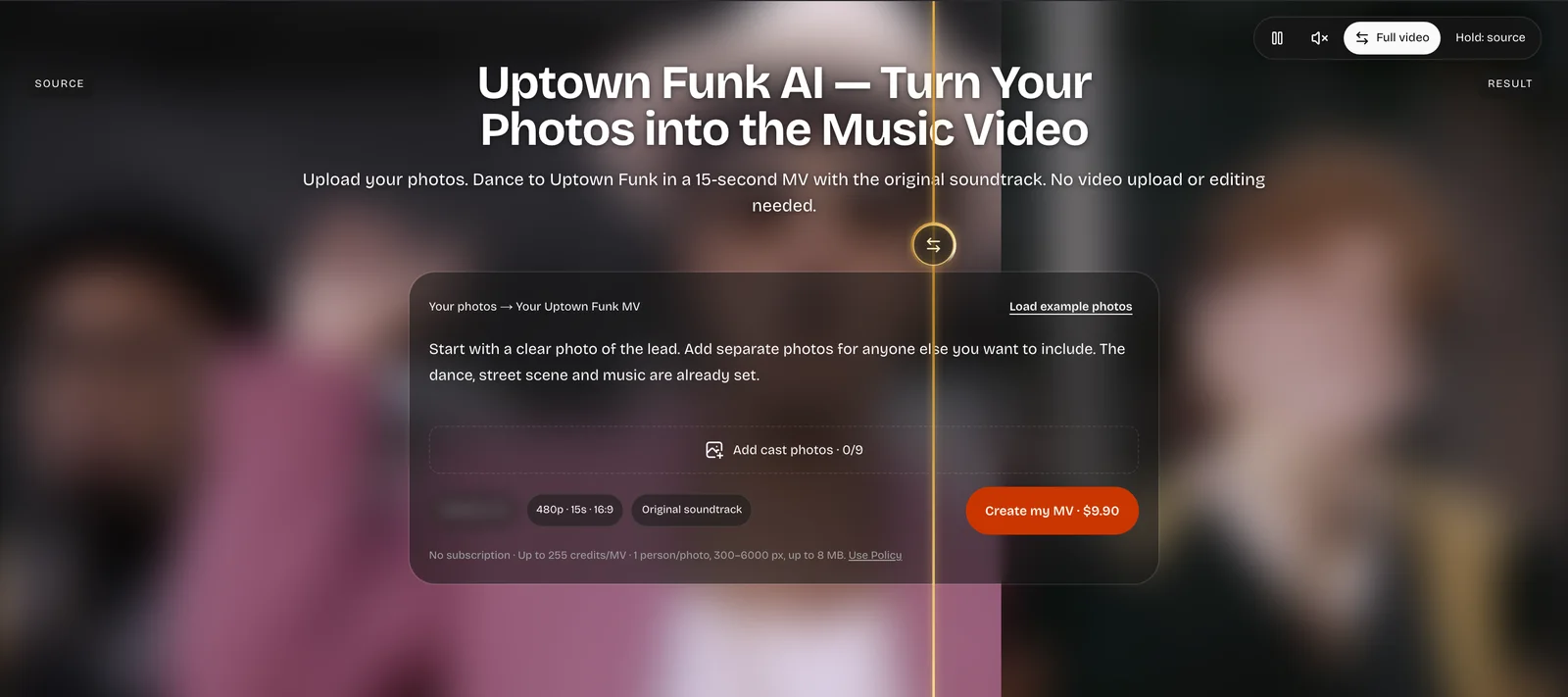
- What you add: You add one lead photo first and separate photos for the rest of your group, up to 9 in total. The composer shows "Add cast photos · 0/9".
- Empty spots: The site doesn't say what happens if you leave spots empty. Its FAQ says "there is no model, duration or resolution to choose."
- The outfits: "Your photos guide the people and outfits." There's no theme switch on the site, though its "Load example photos" button loads photo sets like wizards and a football team.
- What you get: A 15-second widescreen 16:9 video at 480p. The page lists "Original soundtrack" for its audio.
- How you pay: You'll sign in to create. One MV costs $9.90 for 255 credits, and the site states that "One MV reserves up to 255 credits."
3. uptownfunkaivideo.com: Best Uptown Funk AI Video Generator if You Pay With PayPal
The site uptownfunkaivideo.com is the best Uptown Funk AI video generator if you'd rather pay for credits through PayPal.
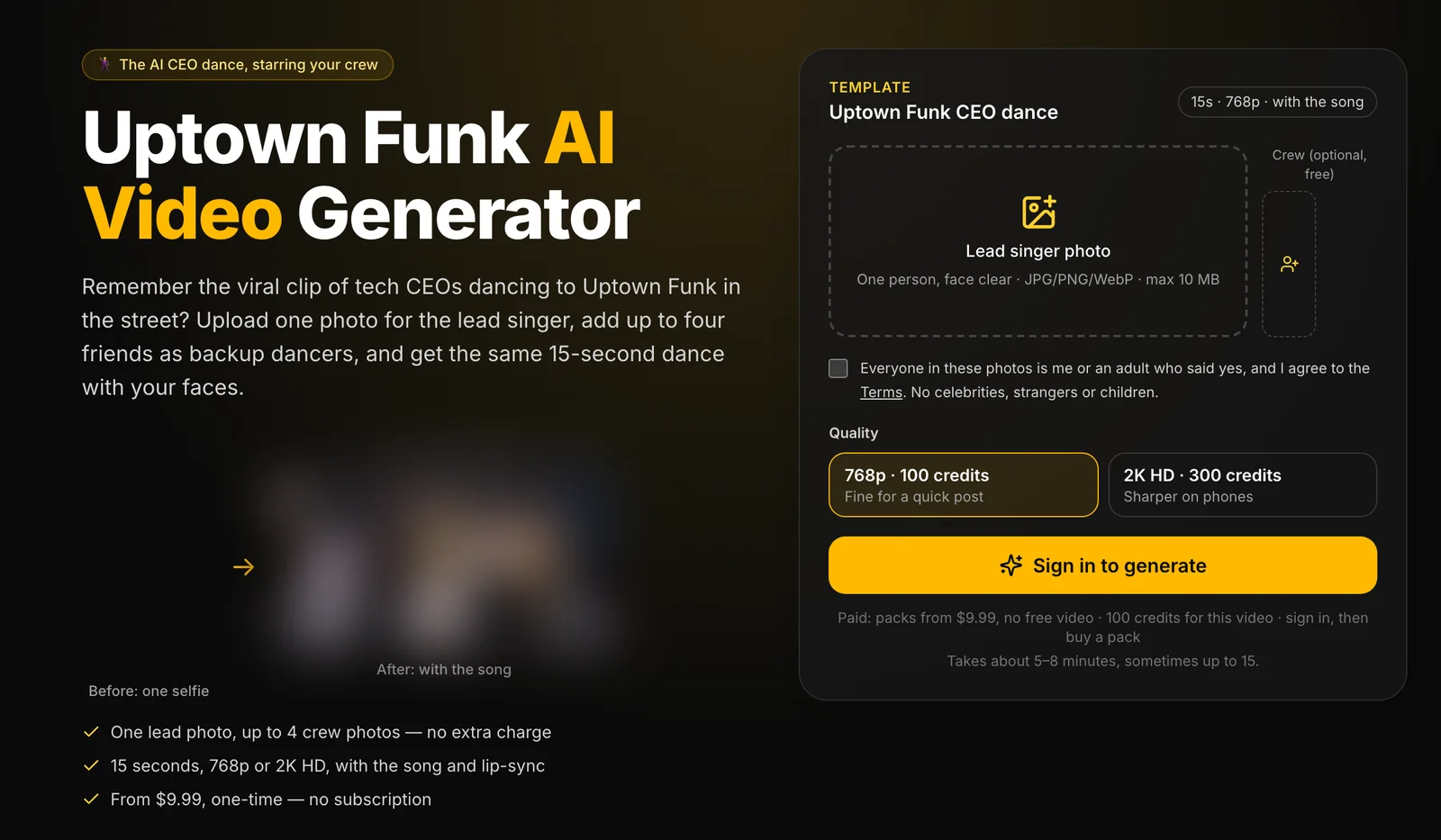
- What you add: You'll add one lead photo and up to four crew photos in the "Crew (optional, free)" slots.
- Empty spots: Empty spots keep the template dancers. In our look at its downloaded sample video, the crew dancers are the 2014 music video's dancers in their stage outfits.
- The video: It makes a 15-second video "with the song", and its sample plays as one continuous camera move with no cuts. Face, hair, glasses and clothes come from your photos, and there's no theme switch.
- The rules: The button reads "Sign in to generate", its rule is "No celebrities, strangers or children.", and its FAQ says "There is no free video".
- How you pay: You'll buy one-time credit packs through PayPal with no subscription, starting at $9.99 for 100 credits for 1 video in 768p. Packs go up to $19.99 for 300 credits and $49.99 for 1,000 credits, and credits stay valid for 12 months.
4. uptownfunkai.org: Best for a Lead-Only Uptown Funk AI Video
The site uptownfunkai.org is the best Uptown Funk AI tool if you've only got one photo of yourself. You'll dance in front of the template's backup dancers.
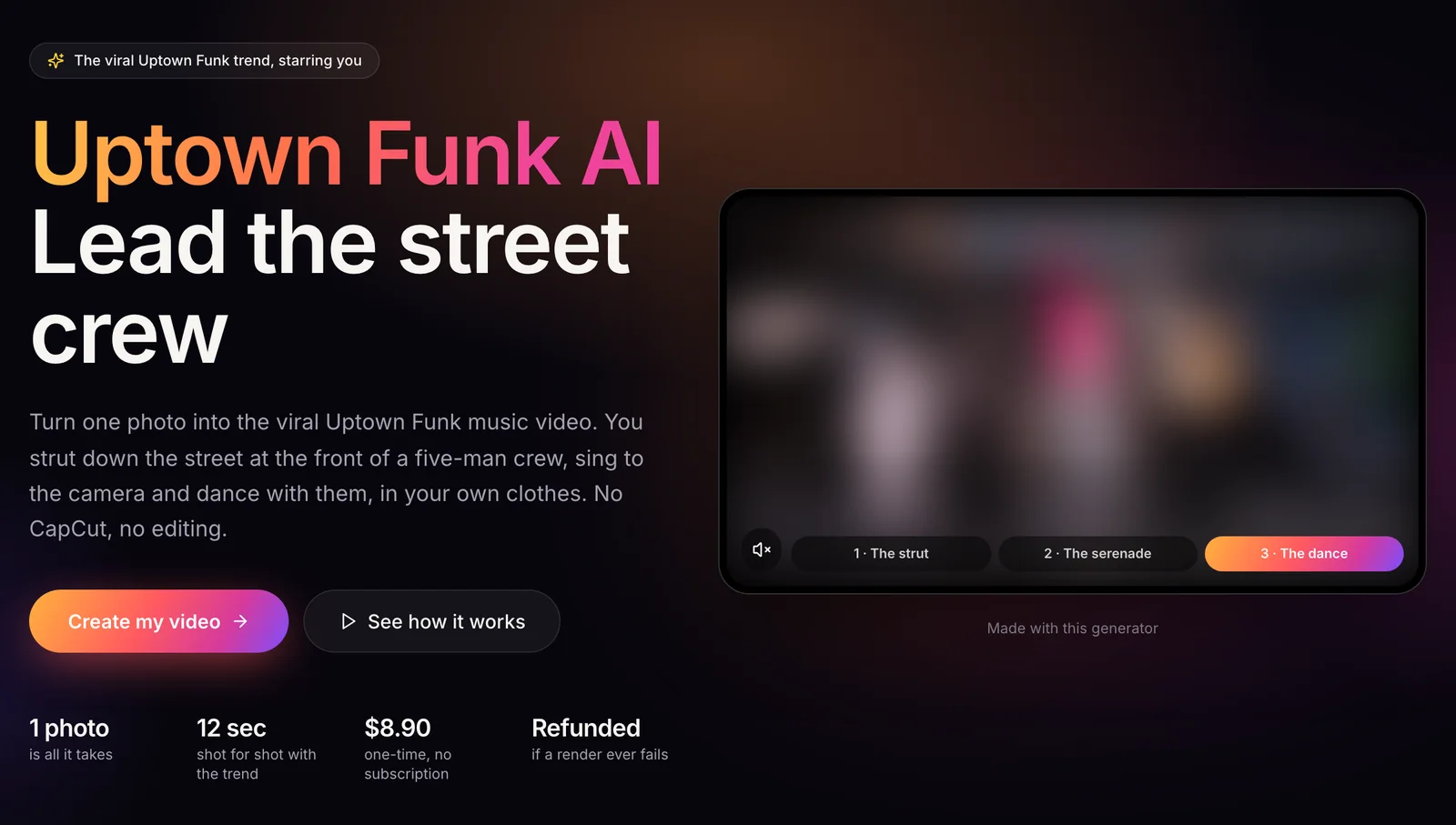
- What you add: You'll add 1 photo for the lead. The site runs in 13 languages and states that "1 photo is all it takes".
- Empty spots: You don't add friends to this tool. Its FAQ explains that "you stay in your own clothes while the crew around you is in their stage suits".
- What you get: A 12-second widescreen MP4 (16:9) with the trend's soundtrack, advertised as 12 sec shot for shot with the trend. It splits the clip into "The strut" (0-5.5 s), "The serenade" (5.5-8.2 s) and "The dance" (8.2-12 s).
- How you pay: You'll sign in to create. It's $8.90 for 1 video, $19.90 for 3 videos, or $29.90 for 5 videos, as a one-time payment with no subscription.
5. MakeViral: Best for a 10-Second Uptown Funk AI Clip With Its Own Beat
MakeViral is the best Uptown Funk AI option if you'd like a short retro clip with slap bass instead of the real song.
- What you add: You'll add one photo for Solo, two for Duo, or three for Crew. In Crew, photo 1 leads in the middle, photo 2 is on the left, and photo 3 is on the right.
- Empty spots: In Solo, you'll lead four AI-made backup dancers in charcoal suits.
- The outfits: Everyone wears retro funk suits in cream, mustard yellow or burgundy on a sunny retro street. Your own clothes don't matter.
- What you get: A 10-second 720p video formatted as one continuous shot with no cuts. The audio is an original funk groove with slap bass, horns, claps and snaps.
- How you pay: You'll sign in to buy credits. One video uses 126 credits, so the smallest one-time pack is $14.99 for 150 credits.
6. Media.io: Best for Uptown Funk AI Prompts You Run Yourself
Media.io is the best Uptown Funk AI choice if you'd like to write and run your own text prompts in a general video tool.
- What you add: Media.io gives you Four Uptown Funk AI Video Prompts. You'll add a prepared street image or bring a reference video with one identity photo per person.
- Empty spots: You write the dancers and their actions into your prompt. If you'd like a prompt with every dancer's spot laid out, take a look at our copy-ready Uptown Funk AI prompt.
- What you get: The first prompt makes an 8-second continuous dance shot. Its FAQ notes that "The prompts do not supply the original recording", and separate shots need manual editing.
- How you pay: The prompt page doesn't list a price for making the videos.
7. Magic Hour: Best for the Grammy-Stage Uptown Funk AI Version
Magic Hour is the best Uptown Funk AI pick if you'd like an award-show stage setting rather than the classic street routine.
- What you add: You'll upload your character photo to the "Bruno Mars Uptown Funk Grammy" template, which its page labels an AI Character Swap. The page says it supports multiple character replacements.
- Empty spots: The site doesn't list what fills unassigned spots.
- What you get: A 10-second 480p video in any aspect ratio, using the Grammy performance clip on an award-show stage instead of the city street. The page doesn't list the audio in the file.
- How you pay: The page lists free daily credits. Paid plans include the Creator plan at $19 a month, or $12 a month billed yearly.
8. Dreamina: Best for an Original Retro-Funk AI Dance
Dreamina (CapCut's AI video site) is best if you'd like to create an original street dance scene from text prompts and add your own music.
- What you add: You'll use copy-and-paste prompts for 16:9 street scenes with invented dancers. The site prompts you to create a street performance while keeping the choreography, setting and cast distinctly your own.
- Empty spots: Dancers come purely from your text prompt.
- What you get: A video made on Dreamina's own generator from the prompt you paste in. Its final instruction tells you to add your own music to the clip.
- How you pay: A subscription costs US$0.29 for the first month, then US$15.00 a month for 1,575 credits.
9. PixVerse: Best Uptown Funk AI Route From a TikTok Link
PixVerse is the best Uptown Funk AI route if you'd rather run templates through a phone app. You start from a video link on social media.
- What you add: You'll copy the link from a TikTok tutorial posted on October 22, 2026, open the PixVerse phone app, and upload one photo.
- Empty spots: The TikTok captions don't list what fills empty dancer spots.
- What you get: The tutorial captions name no video length and no included sound.
- How you pay: The tutorial captions list no pricing details.
How We Picked These Uptown Funk AI Generators
We picked these Uptown Funk AI generators from Google's first page for "uptown funk ai generator" on October 25, 2026, the sites named after the trend, and the newest TikTok tutorials for a phone app.
Every fact about another tool comes from that tool's own pages, read on October 25, 2026. We checked how many photos each tool takes, what fills an empty spot, the video length, the sound in the file and how you pay. For uptownfunkaivideo.com, we've also downloaded its sample video to check the camera cuts.
We ordered the list by starting with Seadanse. Next come the three sites that include the "Uptown Funk" song in the exported file, from the most photos down to one. After those, we listed MakeViral's one-tap template, the prompt pages, the Grammy template, and finally the phone app.
We left out AI music generators. Those sites make an original funk track from text, but they don't make a dance video.
Uptown Funk AI Generator FAQ
Is there a free Uptown Funk AI generator?
None of the three sites named after the trend gives a free video. The site uptownfunkaivideo.com says "There is no free video", and uptownfunkai.org answers its "Is it free?" question with "No".
Magic Hour lists "Free daily credits", but its template uses the Grammy-stage clip instead of the street routine. Media.io gives you text prompts that still need a video tool and your own audio. Dreamina makes the video on its own generator, and you add your own music.
On Seadanse, one 15-second 720p video is $9.90, paid once with no subscription. You can see how pay-once credits work on our blog.
Which Uptown Funk AI generator keeps the real song?
Seadanse, uptownfunkai.com, uptownfunkaivideo.com and uptownfunkai.org put the song in the file. The site uptownfunkai.com lists an "Original soundtrack", uptownfunkaivideo.com exports "with the song", and uptownfunkai.org includes "the trend's soundtrack".
In contrast, MakeViral uses "an original funk groove", Media.io notes that "The prompts do not supply the original recording", and Dreamina tells you to add your own music.
Which Uptown Funk AI generator lets me add my friends?
Seadanse takes up to four friends next to your lead, each in a fixed spot. It fills any empty spot with a dancer in your style or theme.
Here's how the others handle friends:
- uptownfunkai.com: It takes up to 9 photos in total.
- uptownfunkaivideo.com: It takes up to four crew photos and keeps the template dancers in empty spots.
- MakeViral: Its Crew takes three photos.
- uptownfunkai.org: It takes only one photo, for the lead.
If your crew has three people, No Scrubs AI puts you in the lead of the 15-second "No Scrubs" chorus routine from one to three photos with the chorus sound.
Is an Uptown Funk AI generator the same as an AI cover?
No. An AI cover swaps the singer's voice on the song, and an AI music generator makes a funk track from a text prompt. An Uptown Funk AI generator makes a dance video.
Seadanse's Uptown Funk AI is a dance video effect with the "Uptown Funk" song playing as your crew performs the street routine. You'll find more on Uptown Funk AI covers and cast remakes in our guide.
Which Uptown Funk AI Generator Should You Use?
The right Uptown Funk AI generator depends on your group size, whether you're after the real song, and how you'd like to pay.
- A five-person crew with the real song and one theme: Seadanse's Uptown Funk AI gives you fixed spots, four outfit themes, and the music video's cuts.
- The biggest cast: uptownfunkai.com lets you upload up to 9 photos.
- Paying with PayPal: uptownfunkaivideo.com lets you buy credit packs through PayPal.
- Just you up front, in your own clothes: uptownfunkai.org lets you lead the template dancers from a single upload.
- A quick 10-second clip in retro suits: MakeViral dresses everyone in retro suits with an original funk beat.
- Writing your own prompts: Media.io gives you prompt text to run yourself.
Add your photo, add your friends or leave the spots, pick a theme, keep the box ticked and press Create to make an Uptown Funk AI video.
Out of the 9 Uptown Funk AI generators we checked on October 25, 2026, it's the one that gives up to five faces fixed spots. It fills the rest to match, dresses the whole crew in one theme and plays the "Uptown Funk" song, with no sign-up.
Written by The Seadanse Team. We read every tool's page on October 25, 2026. Prices change, so each tool's own page has the last word.
Related Articles
- How to Make an Uptown Funk AI Video With Your Crew (4 Steps) — add your photos, pick a theme and a quality, press Create.
- What Is the Uptown Funk AI Trend? The CEO Video, Explained — where the AI version started, who's in it, and how it spread.
- AI CEO Dance to Uptown Funk: Make Your Own With Your Team — the Tech CEOs look, with your boss leading in the middle.
- Uptown Funk AI Prompt (Copy-Ready): Every Dancer's Spot, Shot by Shot — the prompt, if you'd rather write it yourself.
- Uptown Funk AI Cover Videos: CEOs, Emperors, Wizards and Your Crew — the casts people made, and how to make yours.

