
Uptown Funk AI Prompt (Copy-Ready): Every Dancer's Spot, Shot by Shot
The Uptown Funk AI prompt is Seadanse's copy-ready prompt: 5 dancers in fixed spots, 7 timed shots in 15 seconds. Skip it and add your photos for $9.90.
 The Seadanse Team26 min read
The team behind Seadanse. We run the models we write about, and we publish the specs, prices and limits the marketing leaves out.

TL;DR — The Uptown Funk AI prompt is the full prompt Seadanse's Uptown Funk AI page runs to put 5 dancers in fixed spots across 7 timed shots in 15 seconds. It puts the person from photo 1 in the middle and gives every other photo its own spot. It also dresses the crew with one look and lists what never carries over from the 2014 video.
On Seadanse's page, Uptown Funk AI for TikTok and Reels, the prompt's built in, so you add your photos instead. One 15-second 720p video is $9.90.
The trend kicked off when Gary Lau posted the AI version on X on October 7, 2026. That first video passed 1.5 million plays on Bilibili and sparked over 81 remakes in October. You can see where the Uptown Funk AI trend started to watch how each group picked its dancers.
Yet the creator's never shared a prompt. Most prompts you'll find online are single paragraphs that don't name a shot or give a cut its second.
Hand-made remakes also struggle to hold faces steady. A viewer left the on-screen comment 「胖灵的模型有点不稳定啊」 ("the model for Pang Ling is a bit unstable") under the Ming dynasty emperors remake.
In a Chinese YouTube explainer, the host estimates that the maker may have thrown away dozens to more than a hundred videos to get the smooth shots. After that, they cut the broken bits out frame by frame in an editing app.
Here's the exact prompt our page runs, how it's built, how to use it, the seven habits that keep it in step, and the way to skip it.
What Is the Uptown Funk AI Prompt?
The Uptown Funk AI prompt is the written instruction a video tool reads to remake the music video's street dance with your photos. It says who stands where, what each shot shows, when it cuts, and what never carries over.
Here it is, word for word as our page runs it, in the five-photo version where everyone keeps their own clothes:
subject_definitions:
Subject 1 is the person in @Image 1 (a person, or a cartoon or game character, or a pet when @Image 1 shows one): [one sentence describing the person or character in photo 1: age range, hair, build] [what the person in photo 1 wears, piece by piece] Subject 1 keeps exactly this face, hair, skin tone, build and this outfit, piece by piece, in every shot. If @Image 1 shows only part of the body, the rest of the outfit continues naturally from what it shows.
Subject 2 is the person in @Image 2 (a person, or a cartoon or game character, or a pet when @Image 2 shows one): [one sentence describing the person or character in photo 2: age range, hair, build] [what the person in photo 2 wears, piece by piece] Subject 2 keeps exactly this face, hair, skin tone, build and outfit in every shot where they appear. Subject 2 always stands at the far left of the row, the outermost dancer on the left.
Subject 3 is the person in @Image 3 (a person, or a cartoon or game character, or a pet when @Image 3 shows one): [one sentence describing the person or character in photo 3: age range, hair, build] [what the person in photo 3 wears, piece by piece] Subject 3 keeps exactly this face, hair, skin tone, build and outfit in every shot where they appear. Subject 3 always stands at the far right of the row, the outermost dancer on the right.
Subject 4 is the person in @Image 4 (a person, or a cartoon or game character, or a pet when @Image 4 shows one): [one sentence describing the person or character in photo 4: age range, hair, build] [what the person in photo 4 wears, piece by piece] Subject 4 keeps exactly this face, hair, skin tone, build and outfit in every shot where they appear. Subject 4 always stands inner left, between Subject 2 and Subject 1.
Subject 5 is the person in @Image 5 (a person, or a cartoon or game character, or a pet when @Image 5 shows one): [one sentence describing the person or character in photo 5: age range, hair, build] [what the person in photo 5 wears, piece by piece] Subject 5 keeps exactly this face, hair, skin tone, build and outfit in every shot where they appear. Subject 5 always stands inner right, between Subject 1 and Subject 3.
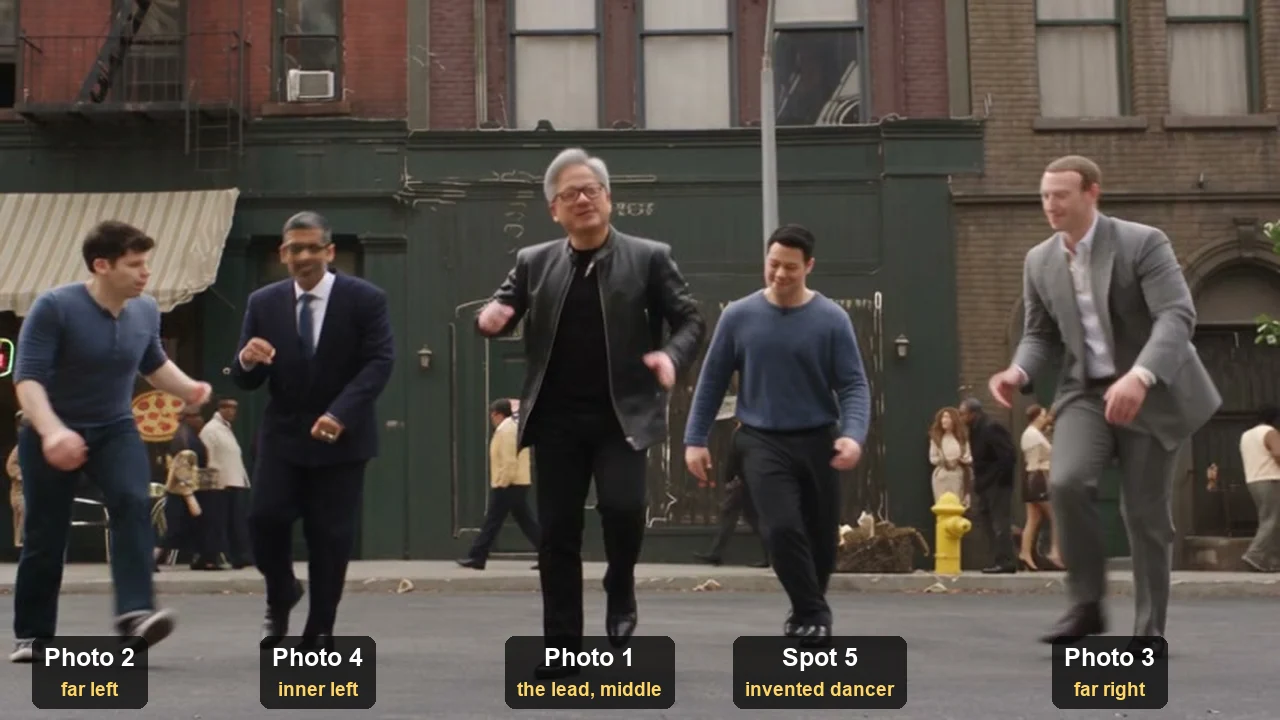
The five dancers always stand in one row in this order, left to right as the camera sees it: Subject 2 at the far left, Subject 4 inner left, Subject 1 in the middle, Subject 5 inner right, Subject 3 at the far right. Nobody changes place at any moment, in any shot.
Each of Subject 1, Subject 2, Subject 3, Subject 4 and Subject 5 has a face of their own; no face appears on two dancers, and nobody but Subject 1 has Subject 1's face.
If @Image 1 shows a video-game, cartoon or anime character, the whole video is rendered in that same style: any invented dancer is a character of the same kind, and the street is rendered to match. If @Image 1 is a real photo, the whole video is photoreal. If @Image 1 shows a pet, Subject 1 stays that real animal on four legs, moving to the beat in the lead's place.
Subject 6 is the set: a 1960s-style New York street on a film backlot in soft early-evening light: dark red-brick and brownstone row buildings with fire escapes, arched doorways and stone cornices; a café with a striped canvas awning and small metal tables on the pavement on the left; a pizzeria window with a neon pizza sign; a pawn-shop neon sign; a yellow fire hydrant at the kerb; an old blue-and-white police sedan parked by the kerb; a few passers-by in period clothes far back on the pavement; grey asphalt in front of the dancers; a pale overcast sky.
@Video 1 is a motion reference only: copy its shots, its cuts and their timing, its camera angles, lenses and camera moves, and every dance move, pose and gesture at the same moment. Take no person, face, hair, body, clothing, hat, sunglasses, jewellery or make-up from @Video 1; none of its people appear. The hat, glasses and chain outlines in @Video 1 belong to nobody's outfit.

summary:
[reference generation] A 15-second street-dance music video in Subject 6, six hard cuts following @Video 1 shot for shot: Subject 1 is the lead, always in the middle of a row of five — Subject 2, Subject 4, Subject 1, Subject 5 and Subject 3 from left to right — dancing in unison in wide shots and under a very low camera, and alone in a medium shot and a close-up.

retention_analysis:
Subject 1 (appears in [Shot 1], [Shot 2], [Shot 3], [Shot 4], [Shot 5], [Shot 6], [Shot 7]): fully_preserved - face, hair, skin tone and body from @Image 1; outfit from @Image 1.
Subject 2 (appears in [Shot 1], [Shot 3], [Shot 4], [Shot 5], [Shot 7]): fully_preserved - face, hair, skin tone and body from @Image 2; outfit from @Image 2.
Subject 3 (appears in [Shot 1], [Shot 3], [Shot 4], [Shot 5], [Shot 7]): fully_preserved - face, hair, skin tone and body from @Image 3; outfit from @Image 3.
Subject 4 (appears in [Shot 1], [Shot 2] glimpsed, [Shot 3], [Shot 4], [Shot 5], [Shot 7]): fully_preserved - face, hair, skin tone and body from @Image 4; outfit from @Image 4.
Subject 5 (appears in [Shot 1], [Shot 3], [Shot 4], [Shot 5], [Shot 7]): fully_preserved - face, hair, skin tone and body from @Image 5; outfit from @Image 5.
Subject 6 (all shots): weak_reference - built from the text only; layout and camera from @Video 1.

detailed_description:
Horizontal 16:9 frame. Cinematic music-video look, natural film colour, sharp focus, hard cuts exactly where @Video 1 cuts. In every group shot the row keeps the order Subject 2, Subject 4, Subject 1, Subject 5, Subject 3 from left to right as the camera sees it, with Subject 1 exactly in the middle.
[Shot 1] 0-3.4 s: wide frontal shot from across the street at standing height, camera locked off; the full row of five, full bodies head to feet, left to right Subject 2 at the far left, Subject 4, Subject 1 in the middle, Subject 5, Subject 3 at the far right; on the first beat all five throw one arm up pointing at the sky, then bend forward bouncing and strut in step-slides to the beat, Subject 3 bending deepest.
[Shot 2] 3.4-5.3 s: medium shot of Subject 1 alone from the waist up, slightly low angle, handheld; the café awning, the parked police sedan and the pizza neon behind; Subject 1 throws one hand high, then kisses their fingertips and turns their head, singing; in the last moment Subject 4's head is glimpsed behind Subject 1's shoulder on the left of the frame. No other dancer is in this shot.
[Shot 3] 5.3-7.0 s: very low wide-angle camera just above the asphalt, close in front of the row, sky and building tops behind; all five crouch low with bent knees and bounce on the beat, hands patting the air low in front; left to right Subject 2 nearest the lens and large at the left edge, Subject 4 a step behind, Subject 1 in the middle singing up into the lens, Subject 5 a step behind and half hidden, Subject 3 nearest the lens and large at the right edge.
[Shot 4] 7.0-9.1 s: the wide frontal shot again, camera locked off, full bodies; the same row left to right Subject 2, Subject 4, Subject 1, Subject 5, Subject 3; side-steps and kicks — Subject 2 and Subject 4 kick a leg out, Subject 1 swings both arms — then all five step forward toward the camera together.
[Shot 5] 9.1-11.6 s: very low wide angle again, the closest of all; left to right Subject 2 at the left edge, Subject 4, Subject 1 in the middle, Subject 5, and Subject 3 largest in the right foreground; all five crouch and shake their hands low on the beat, then spring up as the camera pulls back and Subject 3 hops.
[Shot 6] 11.6-12.6 s: close-up of Subject 1 alone, head and chest, shallow focus, blurred shop signs behind; Subject 1 turns their head toward the right of the frame and sweeps one arm out to the right, singing. No other face in frame.
[Shot 7] 12.6-15 s: low-angle medium shot, handheld, moving in; left to right Subject 2 cut by the left edge, Subject 4, Subject 1 in the middle and largest, leaning toward the lens and pointing down at it, Subject 5 crouched low, Subject 3 at the right edge; all five bounce low on the beat, then Subject 1 straightens with their head tipped back, singing.

overall_soundscape:
Dress shoes tapping and scuffing on the asphalt on the beat; light street ambience.

non_diegetic_music:
An upbeat funk-pop groove at about 115 beats per minute with punchy horns; every move and cut lands on the beat.

Reference handling: @Image 1 sets Subject 1's identity, @Image 2 Subject 2's, @Image 3 Subject 3's, @Image 4 Subject 4's and @Image 5 Subject 5's: face, hair, skin tone, age, build and outfit; ignore each photo's background, pose and framing. @Video 1 sets only the shots, cuts, camera and choreography.

Final rules override conflicting customization: Subject 1 is recognizable as the one in @Image 1, Subject 2 as the one in @Image 2, Subject 3 as the one in @Image 3, Subject 4 as the one in @Image 4 and Subject 5 as the one in @Image 5 in every shot where they appear, each in their own outfit from their photo throughout; nobody from @Video 1 appears; no pink or mauve blazer, no white tank top, no white fedora with a black band, no bandana under a hat, no bucket hat, porkpie hat or white flat cap, no aviator or gold-rimmed sunglasses, no gold rope chains or cross pendant, no white suit open at the chest, no grey-brown suit with clear glasses, no cream, black and tan panelled shirt, no mustard-gold jacket over a black polka-dot shirt, unless a photo shows them; exactly five dancers in the group shots, no one added, and the passers-by never dance or come close; every dancer keeps their place in the row; keep it physically coherent; no captions, subtitles, watermarks or logos on screen; the only lettering is small street signage (the neon pizza sign, POLICE on the parked car).The parts in square brackets are yours to fill in, so you'll write one short description per photo. On our page, we write those descriptions from each photo for you.
Here, @Image 1 is your lead's photo, and @Image 2 to @Image 5 are your other photos in order. @Video 1 is the 15-second motion reference (a clip used only for its moves and camera, never its people). On our page, it's a muted line drawing of those 15 seconds.
On our page, you'll get back a 15-second widescreen video with the "Uptown Funk" song under it from the first second.
How the Uptown Funk AI Prompt Is Built
The Uptown Funk AI prompt's built in eight labelled parts, and the two longest are the dancers and the seven shots.
| Part | What the prompt says (word for word) | What it does for you |
|---|---|---|
| The dancers | "Subject 1 is the person in @Image 1" | Photo 1 is always the lead |
| The row | "Subject 2 at the far left, Subject 4 inner left, Subject 1 in the middle, Subject 5 inner right, Subject 3 at the far right" | Every photo gets its own fixed spot |
| The faces | "no face appears on two dancers" | Each friend's face stays on that friend |
| The style | "If @Image 1 is a real photo, the whole video is photoreal." | A cartoon or game lead turns the whole video into that style |
| The street | "a 1960s-style New York street on a film backlot" | The set is written out, so it doesn't depend on the clip |
| The motion reference | "@Video 1 is a motion reference only" | The moves and the camera come from the clip, the people don't |
| The shots | "[Shot 1] 0-3.4 s: wide frontal shot from across the street" | Seven shots, each with its seconds |
| The final rules | "every dancer keeps their place in the row" | The last word on spots, outfits and text on screen |
Each photo number has its own spot, and the spot never changes:
| Photo | Spot in the row (as the camera sees it) | Where you see them |
|---|---|---|
| Photo 1 | The middle: the lead | All seven shots, and alone in Shot 2 (waist up) and Shot 6 (close-up) |
| Photo 2 | Far left | The five group shots; nearest the lens at the left edge in Shot 3 |
| Photo 3 | Far right | The five group shots; nearest the lens in Shot 3 and largest in Shot 5 |
| Photo 4 | Inner left | The five group shots, plus a glimpse behind the lead in Shot 2 |
| Photo 5 | Inner right | The five group shots |
The outer spots fill first, since they're nearest the lens in the two very low shots, Shots 3 and 5.
When a spot doesn't have a photo, our page creates "an invented backup dancer, an adult aged 22 to 40" who matches the lead's presentation. With Keep my look, they dress in the lead's style family, in different colours.
How Do You Use the Uptown Funk AI Prompt?
To use the Uptown Funk AI prompt, you'll need a video tool that takes up to five photos and one reference clip together. You'll also need the 15-second clip of the street dance and your photos.
- The tool: Pick a video tool that takes several reference pictures and one reference video in a single generation. It needs to take up to five photos plus one 15-second clip, making a 15-second, 16:9 video.
- @Image 1 to @Image 5: Attach your photos in spot order, starting with photo 1 for the lead. Then add photos 2 to 5 for the far left, far right, inner left and inner right. Use one person, character or pet per photo, with the face clear, facing the camera, in good light. Full body works best.
- @Video 1: Use the 2014 music video's street dance from 28.3 s to 43.3 s as your motion reference (a clip used only for its moves and camera, never its people). On our page, this clip's a muted line drawing.
- The fill-ins: Add one short description per photo in the square brackets. You'll write each one from what you see in that photo.
- The song: The prompt doesn't name a song, so you'll lay the audio under the finished video from the first second.
If you'd rather skip the setup, the Uptown Funk AI generator runs the same prompt from your photos.
Habits That Keep the Uptown Funk AI Prompt in Step
Seven habits keep the Uptown Funk AI prompt in step with the music video, and you can see each one in the prompt above.
Name Every Spot in Every Shot
The prompt spells out the row line: "Nobody changes place at any moment, in any shot."
The row order's written out 8 times, so you don't leave any shot guessing who stands where. It appears in the row sentence, the summary, the line above the shots, and all five group shots.
Time Each Shot to the Cut
The prompt demands "hard cuts exactly where @Video 1 cuts", hitting cuts at 3.4, 5.3, 7.0, 9.1, 11.6 and 12.6 seconds. Why? Because the song goes under from the first second. So the moves land on the beat when your shots keep the clip's timing:
- Shot 1 (0-3.4 s): A wide frontal shot of the five dancers pointing up, bouncing, and strutting in step-slides.
- Shot 2 (3.4-5.3 s): A medium shot of the lead from the waist up, throwing a hand high and kissing their fingertips.
- Shot 3 (5.3-7.0 s): A ground-level wide angle where all five crouch low and bounce to the beat.
- Shot 4 (7.0-9.1 s): A wide frontal shot where the dancers kick their legs out and step forward together.
- Shot 5 (9.1-11.6 s): The lowest, closest crouch shot, shaking hands low before popping up as the camera pulls back.
- Shot 6 (11.6-12.6 s): A close-up of the lead alone, head and chest, sweeping an arm out to the right.
- Shot 7 (12.6-15 s): A low-angle medium shot where the lead leans down toward the lens while the row bounces behind.
Keep the Solo Shots for the Lead
Solo shots put the focus squarely on your lead. Shot 2 insists "No other dancer is in this shot.", while Shot 6 ends with "No other face in frame."
There's one exception at the very tail of Shot 2, where you'll glimpse the inner-left dancer behind the lead's shoulder.
Dress All Five With One Look
Under Keep my look, each of your photos keeps its own outfit, piece by piece.
If you don't supply five photos, invented dancers dress in the lead's style family, matching "a suit with a suit, streetwear with streetwear" in different colours.
List What Never Carries Over
The prompt lists 2014 items to leave out, including "no pink or mauve blazer" and "no white fedora with a black band". It reminds the tool that "nobody from @Video 1 appears" and that "The hat, glasses and chain outlines in @Video 1 belong to nobody's outfit."
Each one holds "unless a photo shows them", so if you're wearing sunglasses in your photo, they stay on. This list does the job a negative prompt (a list of things the video must not show) does in other tools.
Give Every Dancer a Face of Their Own
The prompt commands that "no face appears on two dancers, and nobody but Subject 1 has Subject 1's face."
Each of your pictures fixes face, hair, skin tone, age, build and outfit. It instructs the generator to "ignore each photo's background, pose and framing".
Add the Song After the Video
The music lines call for "An upbeat funk-pop groove at about 115 beats per minute with punchy horns".
The prompt doesn't name a song, so it keeps the focus on choreography and tempo. On our page, the "Uptown Funk" song plays under the video from the first second.
Theme Lines for the Uptown Funk AI Prompt
The Uptown Funk AI prompt has three theme lines, one each for Tech CEOs, Wizard school and Football team, and a theme dresses all five dancers at once.
Here they are, word for word:
Tech CEOs: Theme outfit, worn by every dancer, Subject 1 included: a tech-company CEO look. Subject 1 wears a tailored navy suit, Subject 2 a black suit and Subject 5 a charcoal suit, each with a crisp white shirt, a slim dark tie and black leather dress shoes; Subject 4 wears a black leather jacket over a black T-shirt with black jeans and black shoes; Subject 3 wears a plain heather-grey crew-neck T-shirt, dark jeans and grey sneakers. No hats, no sunglasses, no chains.

Wizard school: Theme outfit, worn by every dancer, Subject 1 included: a wizard-school uniform — a long black robe worn open over a grey V-neck jumper, a white shirt and a striped tie, a long knitted striped scarf around the neck, black trousers and black shoes, hands empty with no wands. Subject 1, Subject 2 and Subject 5 wear deep red and gold stripes; Subject 4 and Subject 3 wear yellow and black stripes. No hats, no sunglasses, no chains.

Football team: Theme outfit, worn by every dancer, Subject 1 included: an American football team's home uniform — a navy-blue jersey with large gold numbers on the front, white football pants, black cleats and white tape on the wrists; no helmets and no bulky pads beyond the jersey's shape. Numbers: Subject 2 wears 34, Subject 4 wears 21, Subject 1 wears 7, Subject 5 wears 55, Subject 3 wears 88. No hats, no sunglasses, no chains.Keep my look doesn't have a theme line, since everyone keeps their own clothes.
When you pick a theme, the theme line sits right after the row sentence, and clothing fill-ins drop out as outfits get replaced. Invented dancers wear the theme look too.
The Tech CEOs line puts the lead in a navy suit, two dancers in black and charcoal suits, one in a leather jacket, and one in a grey T-shirt with jeans. People often call this style the AI CEO dance prompt, and you can see how to put your own team in it in the AI CEO dance version.
Wizard school adds black robes, grey jumpers, and striped scarves. Football team gives everyone navy jerseys and white pants, numbering the dancers 34, 21, 7, 55 and 88 from left to right, putting number 7 on your lead.
Every theme line ends with "No hats, no sunglasses, no chains." That's because the original dancers wore hats, and line drawings keep those outlines unless you block them. You can switch between looks on our Uptown Funk AI video maker.

Our Uptown Funk AI Prompt vs Other Published Prompts
Two other prompts for this kind of remake are public: Media.io's four copy-ready prompts and a Bilibili character-replacement tutorial.
Media.io publishes four one-paragraph prompts:
- The 8-second shot: It animates a prepared street-scene picture "into an 8-second continuous dance shot".
- The lead swap: Here, "Image 1 replaces only the central lead performer" while "retaining the reference performer's outfit".
- The friend: This prompt adds a friend as "the supporting dancer immediately to the lead's left".
- The crew of five: It maps a crew from one prepared picture: "Map the five people in Image 1 to the five reference performers by their opening-frame positions".
Their page notes that "The prompts do not supply the original recording".
The Bilibili tutorial went up on October 1, 2026, and it's reached about 204,000 views. It starts with "no text, no subtitles, no music" and sets positions with extra layout pictures rather than words.
| Media.io's five-person prompt | The Bilibili replace prompt | Our Uptown Funk AI prompt | What it means for you | |
|---|---|---|---|---|
| Who goes where | "by their opening-frame positions", from one prepared picture of five people | "for the characters' positions refer to" three layout pictures | Each photo number has its own spot, named in every group shot | You pick spots by photo order |
| Shots and timing | Follows the clip's "shot order, and timing", no shot named | Not named | Seven shots, each with its seconds | Every cut is written down |
| Outfits | "outfit from Image 1" | Not named | Each photo's own clothes, or one theme line for all five | One look for the whole crew |
| What never carries over | Not named | Not named | The 2014 outfits by name, plus hats, sunglasses and chains | None of the 2014 costumes end up on your crew |
| Music | "The prompts do not supply the original recording" | "no music" | Tempo only, about 115 beats per minute | On our page, the song goes under from the first second |
Our prompt names every dancer's spot by photo number in every shot, and gives every shot its exact seconds.
Can You Make an Uptown Funk AI Video Without a Prompt?
Yes, you can make an Uptown Funk AI video without a prompt on Seadanse, where the prompt, the 15-second motion reference and the song are built in.
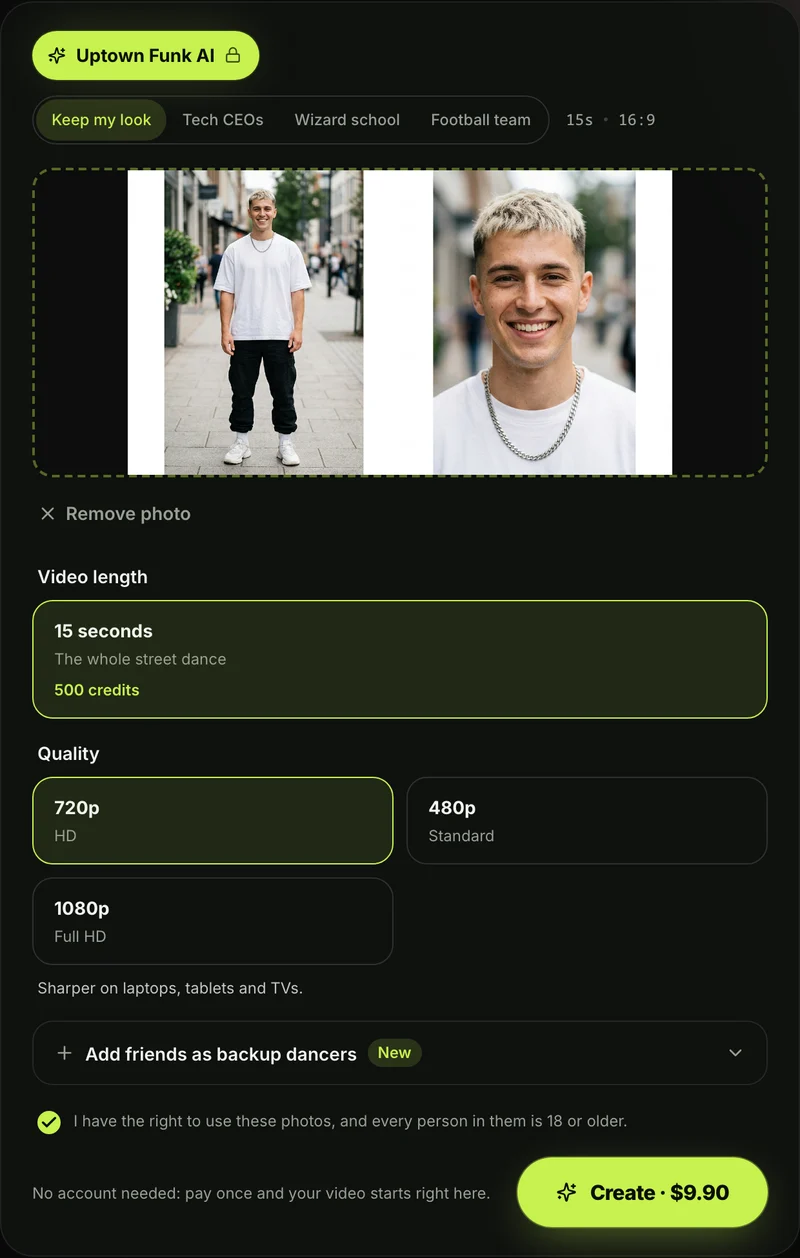
- Add your lead photo: Put your main dancer in the first spot.
- Add up to four more: Fill spots 2 through 5, or leave them blank for invented dancers.
- Pick a theme: Choose Keep my look, Tech CEOs, Wizard school, or Football team.
- Pick 480p, 720p or 1080p: Choose the export quality you want.
- Keep the box ticked: Confirm you have the right to use the photos and that everyone in them is 18 or older.
- Press Create: The price shows on the Create button before you pay.
One 15-second 720p video costs $9.90. The 500-credit pack covers it, and the same pack covers 480p too. One photo costs the same as five, and every theme costs the same.
Pack credits stay valid for 12 months with no subscription on Seadanse pricing. If a video fails, you'll get its credits back automatically.
Once it's done, you'll download your 15-second widescreen MP4 with the "Uptown Funk" song and no watermark on exported video.
Get started on Seadanse's Uptown Funk AI, or follow the step-by-step Uptown Funk AI video guide to walk through the steps.
Uptown Funk AI Prompt FAQ
Is this the prompt Seadanse actually uses?
Yes, it's copied word for word from the page's code on October 25, 2026. Only the square brackets are fill-ins, and we write those from your photos automatically. We built No Scrubs AI much the same way, using a line drawing for its motion reference.
Which AI video tools accept the Uptown Funk AI prompt?
You'll need a tool that accepts up to five reference photos and one motion reference video in a single run. A tool that only animates one photo doesn't have a clip to follow. Compare capable tools in our rundown of the best Uptown Funk AI generators.
Does the Uptown Funk AI prompt add the song?
No. The prompt doesn't name a song, and its music lines only set the tempo. The track itself is a 2014 song by Mark Ronson featuring Bruno Mars. On Seadanse, the song plays under the video from the first second.
Can I use the prompt for five friends?
Yes. The five-photo prompt assigns each friend to a spot based on photo order. If you upload fewer photos, each empty spot gets an invented dancer.
Everyone in your photos needs to be 18 or older. You can see how other groups cast their friends in crews people cast in Uptown Funk AI covers.
Can I write an Uptown Funk AI prompt for text-to-video instead?
You can, but a prompt with no photos and no clip makes new faces, new spots and new moves. Our prompt keeps each face in its spot, and it matches the seven shots to the clip's seconds. On our page, everything's already set up.
Ready to Skip the Uptown Funk AI Prompt?
The prompt gives each photo a fixed spot across seven timed shots, but you don't have to run it by hand. When you're ready, make an Uptown Funk AI video right in your browser.
You'll also find more dance routines in our other AI video effects.
by The Seadanse Team; we copied the prompt above from our Uptown Funk AI page's code on October 25, 2026.
Related Articles
- How to Make an Uptown Funk AI Video With Your Crew (4 Steps) — the picks and presses on the page, from your lead photo to the download.
- What Is the Uptown Funk AI Trend? The CEO Video, Explained — who posted the first AI version, and how it spread.
- AI CEO Dance to Uptown Funk: Make Your Own With Your Team — the tech CEO version, and how to put your own boss in the middle.
- Best Uptown Funk AI Generators (2026): 9 Tools Compared — the tools that remake the street dance, side by side.
- Uptown Funk AI Cover Videos: CEOs, Emperors, Wizards and Your Crew — the crews people have cast, and how to cast yours.


