
How to Make an Uptown Funk AI Video With Your Crew (4 Steps)
Seadanse: how to make an Uptown Funk AI video from 1 to 5 photos: street dance and song built in, four themes, in your browser, 720p for $9.90, no sign-up
 The Seadanse Team14 min read
The team behind Seadanse. We run the models we write about, and we publish the specs, prices and limits the marketing leaves out.

TL;DR — You make an Uptown Funk AI video by adding 1 to 5 photos to Uptown Funk AI for TikTok and Reels and pressing Create. You'll get a 15-second, 16:9 remake of the street dance with five dancers in a row, your lead in the middle, and the "Uptown Funk" song. You don't need an editor, a prompt, or stitched clips, and one 720p video costs $9.90, paid once, with no sign-up.
Under a YouTube copy of the CEO video, a viewer asked: "which AI they used to create this?" Making that clip by hand takes hours of cutting, generating short pieces, and re-editing. As the maker of a Bilibili version starring CS:GO pros wrote: "这个视频参考素材一直出不来出错,前后花了三百才剪出来这么短" (Chinese for "the reference kept failing; it took 300 yuan to cut even this short one").
On our Uptown Funk AI page, we've built the street dance, its seven shots, and the "Uptown Funk" song right into the browser. You add your photos, pick a theme, and press Create. You'll always see the exact price before you pay.
You'll get a 15-second, 16:9 MP4 with seven shots and six hard cuts. Your lead takes the middle spot with two solo moments, flanked by four dancers on a 1960s-style New York street. The "Uptown Funk" song plays from the very first second.
Here's what's below:
- The 4 steps: add your photos, pick a theme, choose a quality, and press Create.
- Who stands where: see which photo lands in each spot across the five-dancer row.
- The hand-made route: how creators build these clips manually, and what it cost them.
- The right photos: the best pictures to carry your crew onto the street.
How Do You Make an Uptown Funk AI Video?
To make an Uptown Funk AI video, you add 1 to 5 photos to our page, pick a theme and a quality, and press Create. You'll get back a 15-second, 16:9 MP4 of your crew dancing the street routine.
Everything runs directly in your web browser, and the "Uptown Funk" song's already mixed into the file.
- What changes: the dancers change based on your photos, with your lead in the middle and the theme setting the outfits.
- What stays: the 1960s-style street, the camera angles and the cuts stay, so you get the same shots and moves as the music video.
- What you hear: the "Uptown Funk" song plays under your dance from the first frame, matched to every step.
Our page puts your crew directly into the music video's street dance routine rather than building random shots from scratch. To get started, add your lead photo to our Uptown Funk AI generator, pick a theme, and press Create.
What Happens in Your 15-Second Uptown Funk AI Video
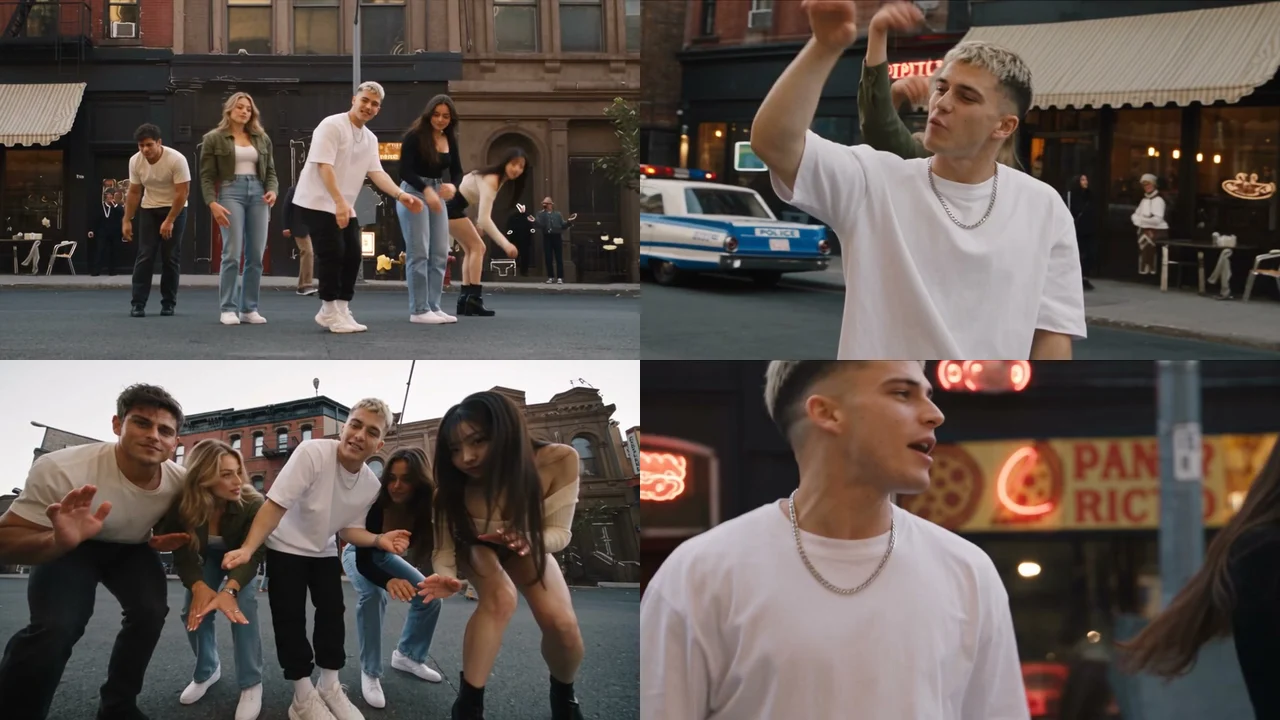
Your 15-second Uptown Funk AI video is the street dance from the 2014 "Uptown Funk" music video. It's remade shot for shot with your crew of five in one row on a 1960s-style New York street.
The choreography stays locked to the music the entire time.
Here's how your 15 seconds play out:
- Arms up (0 to 3.4 seconds): a wide shot from across the street shows all five dancers throw their arms up, bounce, and step-slide.
- Lead solo (3.4 to 5.3 seconds): your lead appears waist-up, throws a hand high, and blows a kiss off the fingertips.
- Low crouch (5.3 to 7.0 seconds): the camera drops to the pavement while all five dancers crouch and bounce together.
- Kick step (7.0 to 9.1 seconds): the wide camera returns as the dancers side-step, kick, and walk toward the lens.
- Lowest angle (9.1 to 11.6 seconds): the camera looks straight up from the ground as hands shake low before the row springs upward.
- Close-up (11.6 to 12.6 seconds): your lead gets a tight solo shot with a confident sweep of the arm.
- Lean-in finish (12.6 to 15 seconds): your lead leans down toward the camera and points while the row bounces behind.
You'll see six hard cuts across the clip. The row dances together for about 12 of the 15 seconds, and every move lands squarely on the beat. You can read about how the Uptown Funk AI trend started to see how this sequence took off online.
Make an Uptown Funk AI Video in 4 Steps
To make an Uptown Funk AI video, you add your photos, pick a theme, pick 480p, 720p or 1080p, and press Create, all on one page. You won't have to fiddle with complex settings or timeline editors.
Step 1: Add Your Lead Photo and Up to Four More
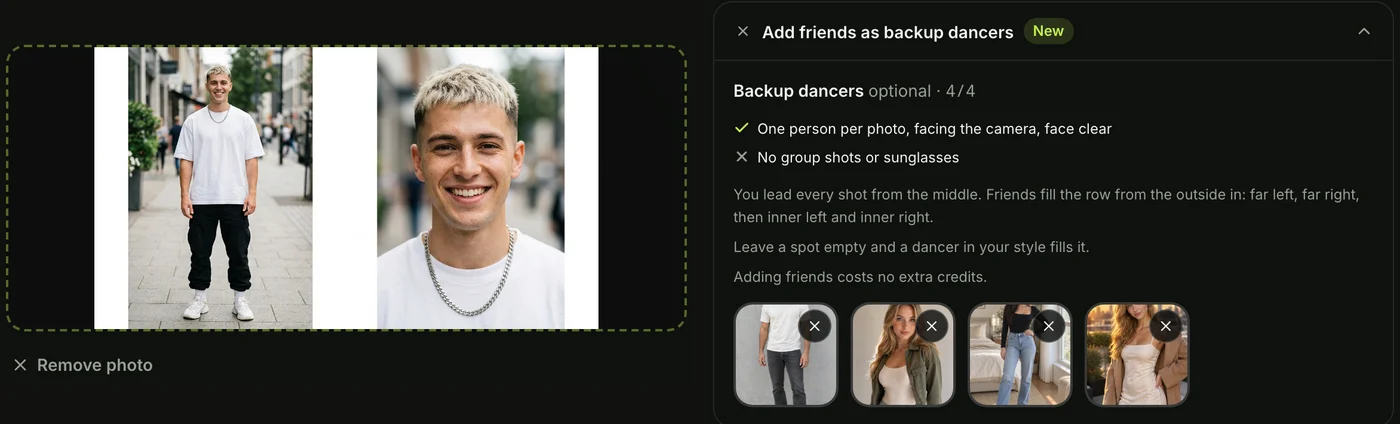
Open Seadanse's Uptown Funk AI in your browser. Tap the big photo box and upload the photo of the person who'll lead in the middle.
Next, open the backup dancers section right below the main box. You can upload up to four more photos for your crew, or leave the section closed.
Any empty spot gets a new dancer made to match your lead's look. We'll show you exactly which photo lands in each spot in the next section.
Step 2: Pick One Theme for the Whole Crew
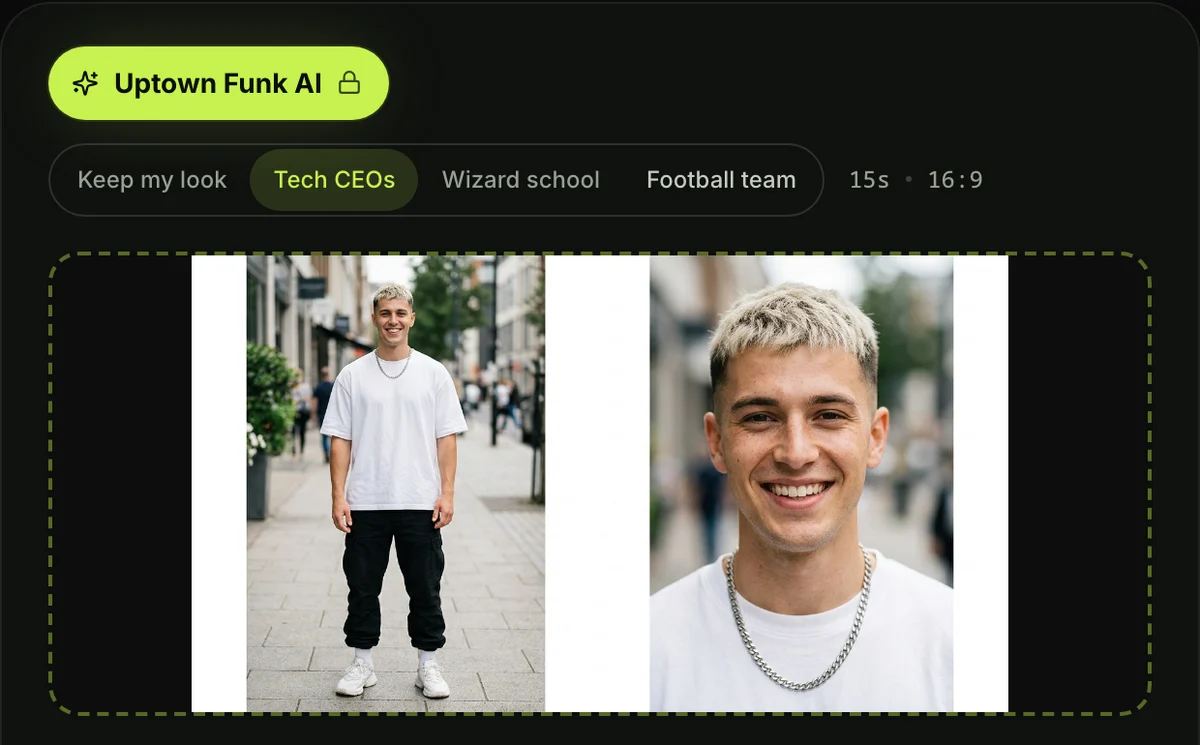
The theme sets what all five dancers wear, and every theme costs the exact same amount. Everyone keeps their own real face and hair under every option.
- Keep my look: everyone dances in the clothes from their own photo, while new dancers match your lead's style.
- Tech CEOs: dark tailored suits with white shirts and slim ties, a black leather jacket over a black T-shirt, and a grey T-shirt with jeans.
- Wizard school: long black robes over grey jumpers, striped ties, and knitted scarves in red and gold or yellow and black.
- Football team: navy home jerseys with big gold numbers and crisp white football pants.
If you're putting your coworkers together, you can put your boss in the middle of the AI CEO dance using the Tech CEOs theme.
Step 3: Pick 480p, 720p or 1080p
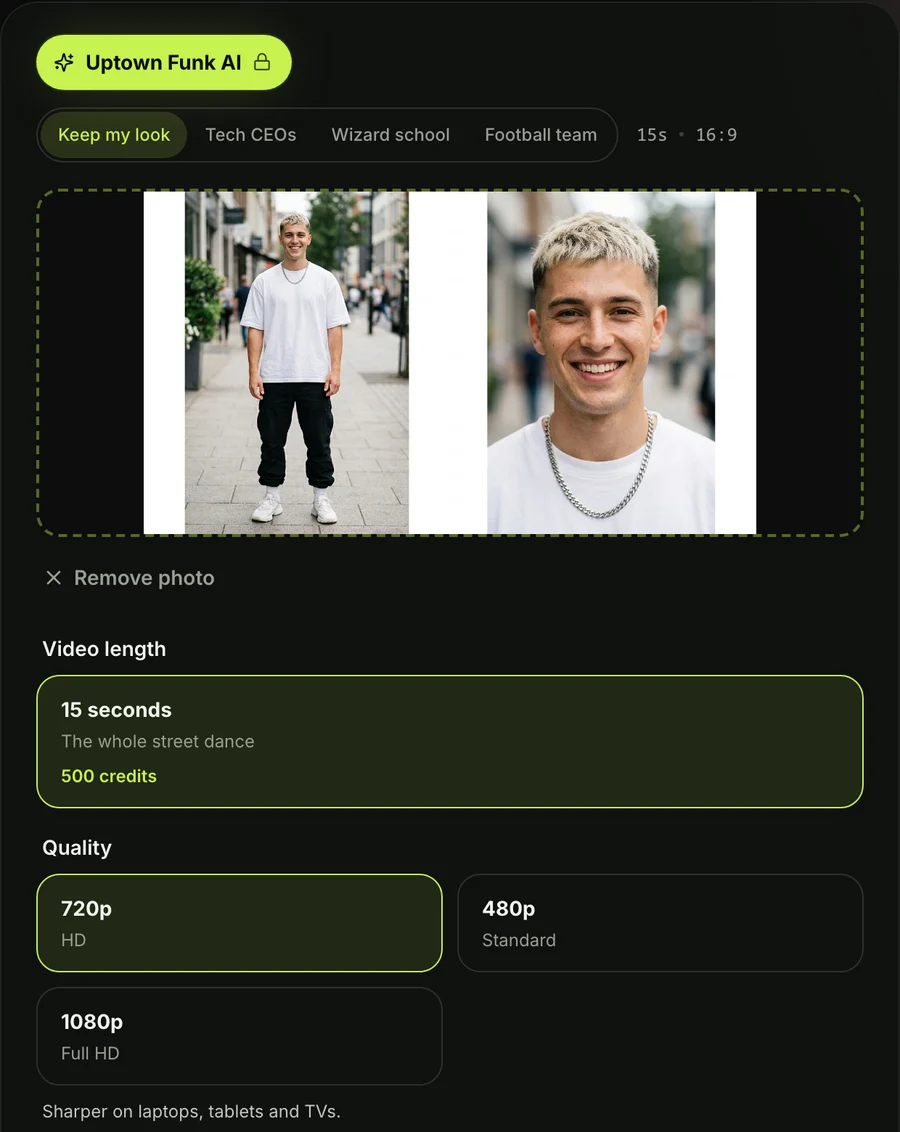
The page opens on 720p by default. Tap the resolution you want for your download.
At every quality level, you'll get the exact same 15 seconds in widescreen 16:9. The final price shows right on the Create button before you pay, so there are never any surprises.
Step 4: Keep the Box Ticked and Press Create
The consent box confirms you have the right to use the photos and that everyone pictured is 18 or older. It's already ticked when you open the page, so leave it ticked.
Tap the Create button to start. You don't need to sign up for an account beforehand, since you pay once and the video begins processing immediately on the page.
When you press Create, a checkout window opens for your credit pack. You pay once with no recurring subscription, and you can see how pay-once credits work across our tools.
Your checkout receipt arrives by email with a private sign-in link. That link lets you open your video on your phone, tablet, or laptop whenever you want.
Once the video's done, download your 15-second 16:9 MP4 file. The export includes the "Uptown Funk" song under all 15 seconds and has no watermark.
Who Stands Where in Your Uptown Funk AI Video
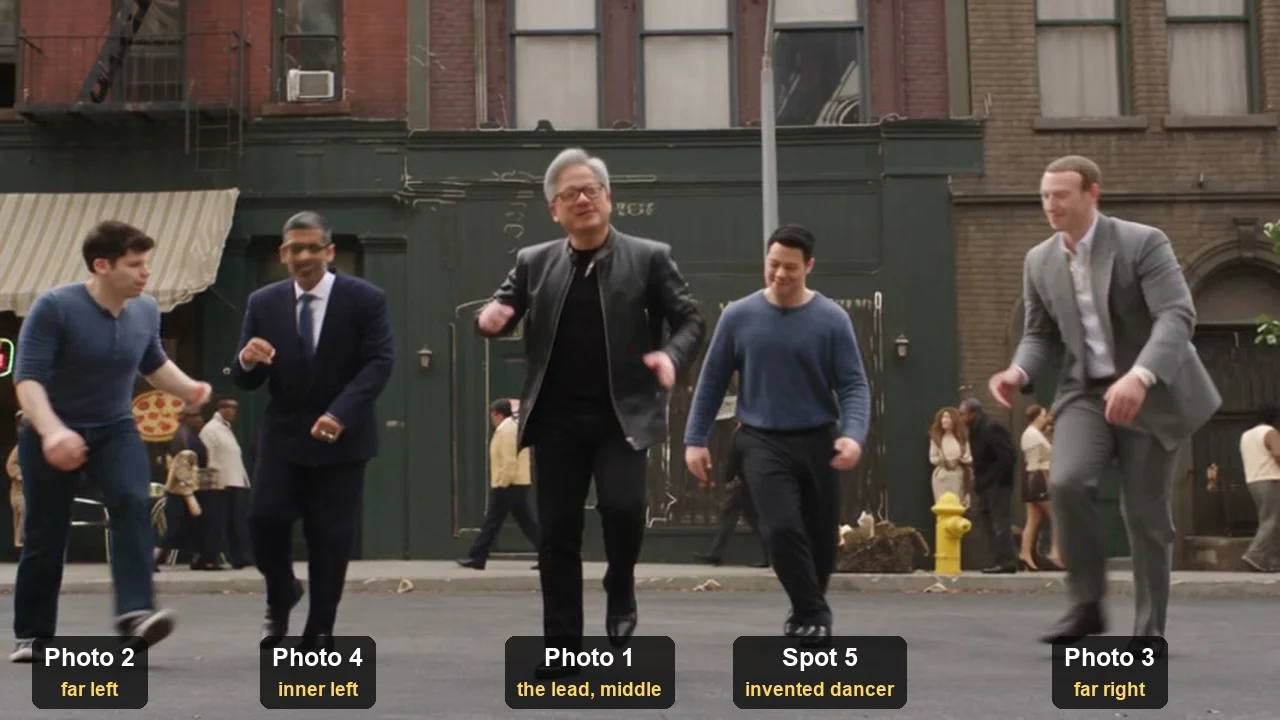
In your Uptown Funk AI video, each photo has a fixed spot in the row of five, set by the order you add them. You'll know who goes where before you press Create.
Here's the row, from the far left to the far right as the camera sees it:
- Photo 2: far left dancer on the pavement.
- Photo 4: inner left dancer, right next to the lead.
- Photo 1: the lead, holding the center spot for the entire routine.
- Photo 5: inner right dancer, right next to the lead.
- Photo 3: far right dancer on the pavement.
Every spot you leave empty gets a newly created dancer dressed in your lead's style or in your chosen theme. If you only upload one photo, four new dancers fill out the line. Five photos fill all five spots, so nobody in the row is made up.
Your lead photo gets the waist-up solo shot, the dramatic close-up, and center stage in every group move. Make sure to put whoever you want in the spotlight into the photo 1 box.
The far-left and far-right spots stand closest to the camera during the low-angle crouch shots.
How Other People Make Uptown Funk AI Videos
Most Uptown Funk AI videos online are made by hand, with a video tool that takes a reference clip and photos, and then finished in a video editor. A reference clip is a video the AI copies the moves and camera angles from.
Here's the hand-made route, step by step:
- Cut the clip: cut the street dance segment out of the music video and strip away the audio track.
- Prepare photos and a prompt: collect photos of each person and write a detailed prompt that spells out who stands in each spot.
- Generate in pieces: generate short clips of 5 to 8 seconds with the tool's sound disabled, re-running each clip whenever limbs warp or positions shift.
- Edit it back together: bring the generated clips into a video editor, align the cuts to the beat, and lay the song back underneath.
Gary Lau posted the first AI version on X on October 7, 2026, using two NVIDIA DGX Spark computers to produce the five-CEO clip.
That post quickly hit 404,000 views, while his Bilibili upload reached 1.565 million plays. An explainer about the original video noted that getting the dance right took dozens to hundreds of tries.
The cost adds up fast when you're generating clips manually. In a video of a VTuber reacting to a fan's version, the streamer shouted: "这花了多少?800!?" (Chinese for "How much did this cost? 800?!").
Some TikTok posts walk you through a three-step phone app route: copy the video link, open an app, and upload your photo.
Our Uptown Funk AI video maker skips all of that manual assembly. We've built the choreography, camera cuts, and audio into one screen, so you won't have to split clips or balance audio.
If you'd like to try manual generation yourself, check out the full Uptown Funk AI prompt. You can also look over the Uptown Funk AI generators compared to see other tools in action.
Which Photos Work Best for an Uptown Funk AI Video
The photos that work best for an Uptown Funk AI video show one person, character or pet each. Each face is clear, facing the camera and in good light, and full body works best. High-quality inputs give the best possible dance output.
- One subject per photo: upload a picture showing only one person or character so the dancer stays distinct.
- A clear face: choose a well-lit photo where the subject faces forward without sunglasses hiding their eyes.
- Full body: use a full-length shot whenever you can so the outfit details carry over cleanly.
- The outfit you want: pick the photo wearing the clothes you want to see if you choose the Keep my look theme.
- 18 or older: make sure every person in your uploaded photos is an adult.
You can also use cartoon figures, anime drawings, game characters, or pets. Putting a character in photo 1 styles the entire video into that art style, backup dancers included. A pet takes its own spot in the dance row.
Take a look at the crews people cast in Uptown Funk AI covers for more group lineup ideas.
Uptown Funk AI Video FAQ
How do people make those AI dancing videos?
People make these videos in two distinct ways. They either cut reference clips and generate short pieces through multiple tools before editing them, or use our dedicated page where the dance moves and music are already configured.
Can I put my friends in the Uptown Funk AI video?
You can upload up to five photos in total to build your full crew. Your first photo leads in the middle while up to four friends take the backup dancer spots, each keeping their own face and hair.
Five photos cost the same as one. Everyone pictured has to be 18 or older.
What if I only have one photo?
One photo's plenty to create your video. Your lead takes the center spot, and our page creates four new backup dancers dressed to match your lead's style or your chosen theme.
What song plays in the Uptown Funk AI video?
The "Uptown Funk" song plays under your video from the very first second. Every cut and step syncs directly to the rhythm.
It's the 2014 hit by Mark Ronson featuring Bruno Mars. On YouTube, its official music video has surpassed 5.9 billion views.
Do I need an editor, an account or a prompt?
You don't need an editor, an account, or a written prompt. You simply press Create and check out, and your video's made on the page while an email link lets you view it anywhere. The choreography, cuts, and song are already built into the tool.
How much does an Uptown Funk AI video cost?
A single 15-second 720p video costs $9.90 through our 500-credit pack, which also covers a 480p export. If you want a 1080p video, it uses 1,480 credits from our $39.90 pack of 2,500 credits, leaving the remaining balance in your account.
You'll pay the exact same price whether you upload one photo or five, under any theme. Your pack credits stay valid for 12 months, and credits return automatically if a video fails. You can review all options on Seadanse pricing.
Are my photos private?
Your photos stay private and under your control. We run no facial recognition, collect no biometric data, and never sell personal information. Everything you upload and export stays in your account until you choose to delete it.
Can I make other AI dance videos with the same photos?
You can drop the same photos into several other dance effects across our site. You can lead a three-person chorus lineup in No Scrubs AI with 15 seconds of music. You can also lead about eight dancers on a concert stage in Talk Dirty Dance AI with live clip sound.
Explore our full catalog of AI video effects to try more browser effects with no prompts needed.
Make Your Uptown Funk AI Video Now
You can make an Uptown Funk AI video right in your browser with 1 to 5 photos. Your lead steps into the middle of the five-dancer row for the arms-up opening, the low crouch, and the lean-in finish to the "Uptown Funk" song. It's just $9.90 at 720p with no subscriptions or software to install.
Written by The Seadanse Team, the team that built the Uptown Funk AI page.
Related Articles
- What Is the Uptown Funk AI Trend? The CEO Video, Explained — who posted the first AI version, where it took off, and why every crew wants its own.
- AI CEO Dance to Uptown Funk: Make Your Own With Your Team — the tech CEO version, and how to put your own boss in the middle.
- Best Uptown Funk AI Generators (2026): 9 Tools Compared — the sites and apps that make this video, side by side on photos, length, sound and price.
- Uptown Funk AI Prompt (Copy-Ready): Every Dancer's Spot, Shot by Shot — the full prompt behind the video, to use in a video tool yourself.
- Uptown Funk AI Cover Videos: CEOs, Emperors, Wizards and Your Crew — the casts people have put in the street dance, and how to make yours.


