
Charme Dance CapCut Template: Where It Is and Why It Fails
The charme dance CapCut template is "Ty" by Esme70275 (271K uses). Where to find it, why it fails or asks you to pay, and how to skip it for $9.90.
 The Seadanse Team10 min read
The team behind Seadanse. We run the models we write about, and we publish the specs, prices and limits the marketing leaves out.

TL;DR — The charme dance CapCut template is "Ty" by Esme70275, a template with one slot made on October 18, 2026, that reached 271,560 uses on October 20, 2026. Every big TikTok tutorial links it through a "CapCut · Try this template" button above the creator's name. Viewers under those tutorials say the button never shows, the app needs a download, or it asks them to pay.
To skip the template steps completely, you can add one photo to Seadanse's Charme Dance AI. You'll get back the first 15 seconds of the viral Seu Zé clip, with you in the dancer's place and its original party sound. It's $9.90 at 720p, and you don't need to sign up.
Five big tutorials with about 2.3 million plays between them send you straight to this one template.
Under the tutorial with 751.2K plays, the top text comment has 17 likes and reads "Y todo mundo descargando apps para nada" (and everyone downloading apps for nothing).
We opened the template page and checked the tutorials that link it on October 20, 2026. Here's where the template lives, how you open it, why yours stalls, and the direct way around it.
Where Is the Charme Dance CapCut Template?
The charme dance CapCut template is "Ty" by Esme70275, and you reach it through the "CapCut · Try this template" link on a TikTok tutorial.
It's a CapCut template (an edit someone already built in the CapCut app, with a slot you fill with your own photo).
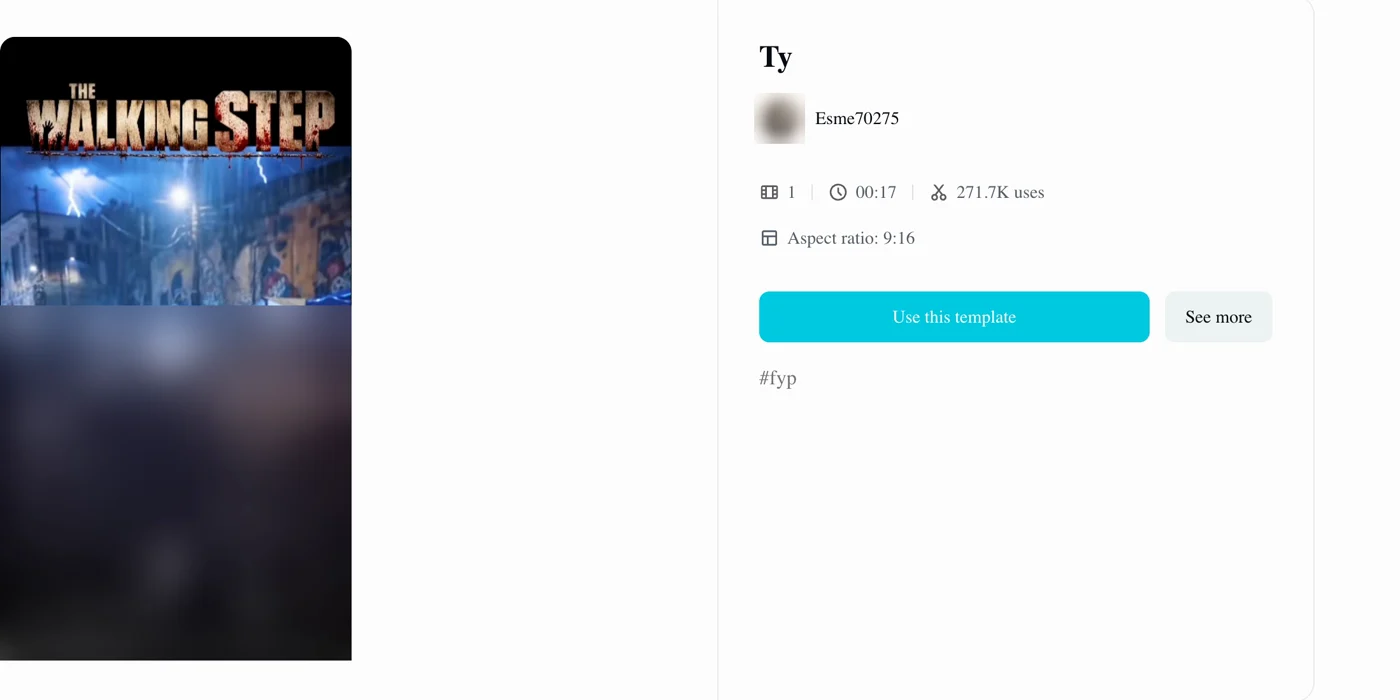
Here's what its page showed on October 20, 2026:
- Name: "Ty", built by creator Esme70275 on October 18, 2026.
- Slots: 1 slot for your photo.
- Length: 00:17.
- Uses: 271,560 at 15:10 UTC on October 20, 2026, up from 238,309 at 08:46 UTC that morning. That's about 33,000 more uses in six and a half hours, roughly 5,000 an hour.
- Shape: "Aspect ratio: 9:16", a tall video made for your phone screen.
- Preview: a video titled "THE WALKING STEP" showing other characters dancing at night in the same kind of square, in the rain under floodlights and lightning, with blue tents behind them.
- Buttons: "Use this template" and "See more", with the tag #fyp. You won't see a price listed.
Out of 16 charme dance tutorials we checked on TikTok, 15 link directly to "Ty".
The five biggest:
- @isolde3292: a Spanish tutorial with 751.2K plays, posted October 18, 2026.
- @isolde3292: a second Spanish tutorial with 747.3K plays, posted October 18, 2026.
- @rika318294: a Portuguese tutorial with 382K plays, posted October 18, 2026.
- @c0pe6zs0b9: a tutorial captioned in English, with 225.2K plays, posted October 19, 2026.
- @louise13002: an English tutorial with 215K plays, posted October 19, 2026.
Together that's about 2.3 million plays, and all five carry the tags #capcut and #capcutpioneer.
How Do You Use the Charme Dance CapCut Template?
You open the charme dance CapCut template from a tutorial and start it with "Use this template", in four steps:
- Open a tutorial that links it, such as the English tutorial by @c0pe6zs0b9, or search TikTok for #TendenciaIACapCut.
- Tap "CapCut · Try this template" in the bottom-left corner of the video, above the creator's name.
- Check that the page says "Ty" and Esme70275.
- Press "Use this template", sign in to CapCut, then add your photo to its one slot.
Why Isn't the Charme Dance CapCut Template Working?
The charme dance CapCut template stalls at five points, and the comments under the tutorials name three of them.
We read 135 text comments across six tutorials:
- 17 comments: it doesn't work, or the button never shows.
- 10 comments: it costs money.
- 8 comments: complaints about apps and extra steps.
That means about one comment in eight reports a dead end.
You can't find the template button
The link reads "CapCut · Try this template" and sits in the bottom-left corner of the tutorial video, above the creator's name and the caption. Under the tutorial with 747.3K plays, one viewer wrote "no me sale el botón rojo" (the red button doesn't show up for me).
Another viewer there gave the fix in a separate comment with 7 likes: "Nada de copiar o compartir o seguir" (no copying, sharing or following) and "SOLO SE TOCA DONDE DICE PLANTILLA Y YA" (you just tap where it says template, and that's it). You tap the link on the video itself.
"Use this template" asks you to sign in
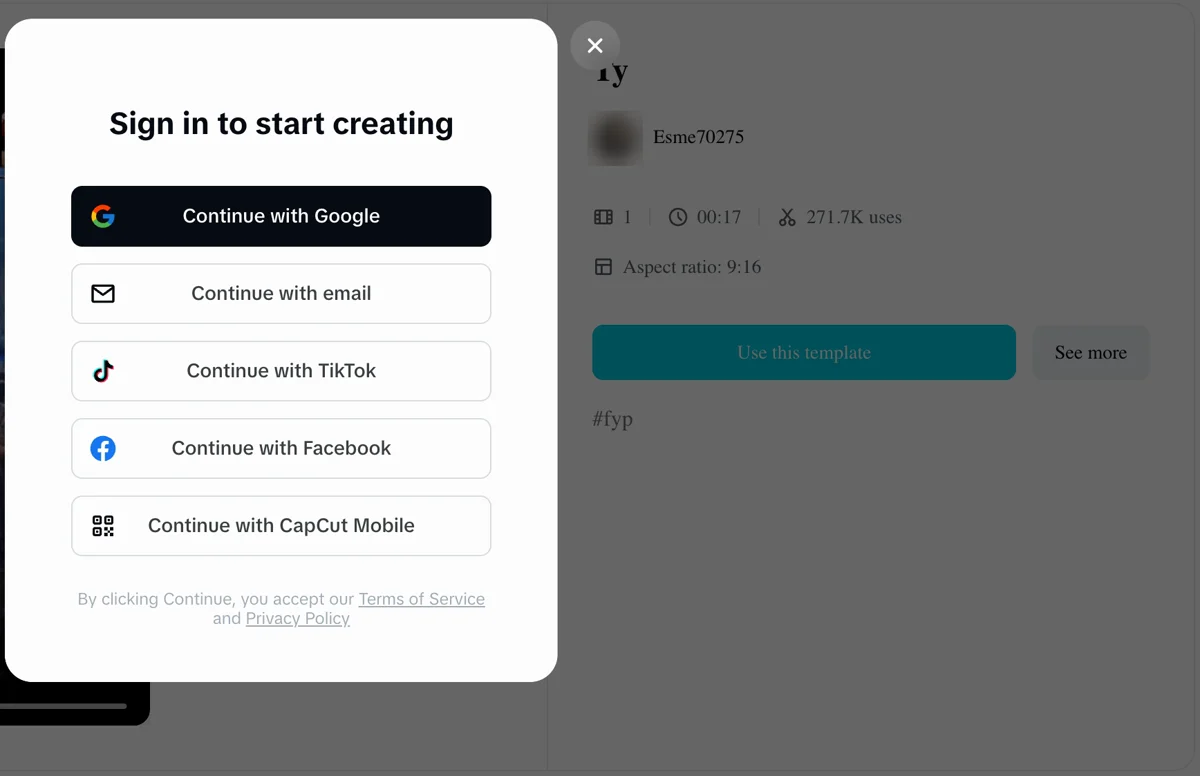
CapCut's website opens a pop-up box titled "Sign in to start creating" as soon as you press "Use this template" while signed out. The box gives you five options: "Continue with Google", "Continue with email", "Continue with TikTok", "Continue with Facebook" and "Continue with CapCut Mobile".
Viewers also hit an app step, with one commenter writing "pero tienes que descargar la aplicación" (but you have to download the app).
It still doesn't work after a few tries
Under the Portuguese tutorial by @rika318294, viewers say the template didn't work for them. One comment with 7 likes says "Não funciona" (it doesn't work). Another with 6 likes says "já tentei duas vezes e nada ou fiz errado ou não funciona." (I've tried twice and nothing, either I did it wrong or it doesn't work).
The template route simply ends there for many people, but you'll find the direct browser path below.
Your tutorial links a different template
A tutorial by creator @fflora77, with 6,721 plays, links to a template titled "Say It Right" by BatToS. That template was made on October 17, 2026, and its page shows 153 uses and a length of 00:15.
If the template page you open doesn't say "Ty" and Esme70275, you've landed on a different template.
Your video won't look like the Seu Zé clip
The original viral Seu Zé clip is a 27-second AI video. In it, an AI-made grandpa dances in the packed night crowd at Pedra do Sal.
The "Ty" template page's preview video is titled "THE WALKING STEP" and shows other characters in the same kind of night square, in the rain under lightning. It isn't Seu Zé, and it isn't the Seu Zé clip.
You'll find the background of the original party in how the Seu Zé clip became the charme dance AI trend.
How Do You Make the Charme Dance Video Without a CapCut Template?
You can use Charme Dance AI for TikTok and Reels on Seadanse. It has the first 15 seconds of the viral Seu Zé clip and its original sound built in. So one photo puts you in the dancer's place.
You don't need "Ty", a tutorial or an app for this.
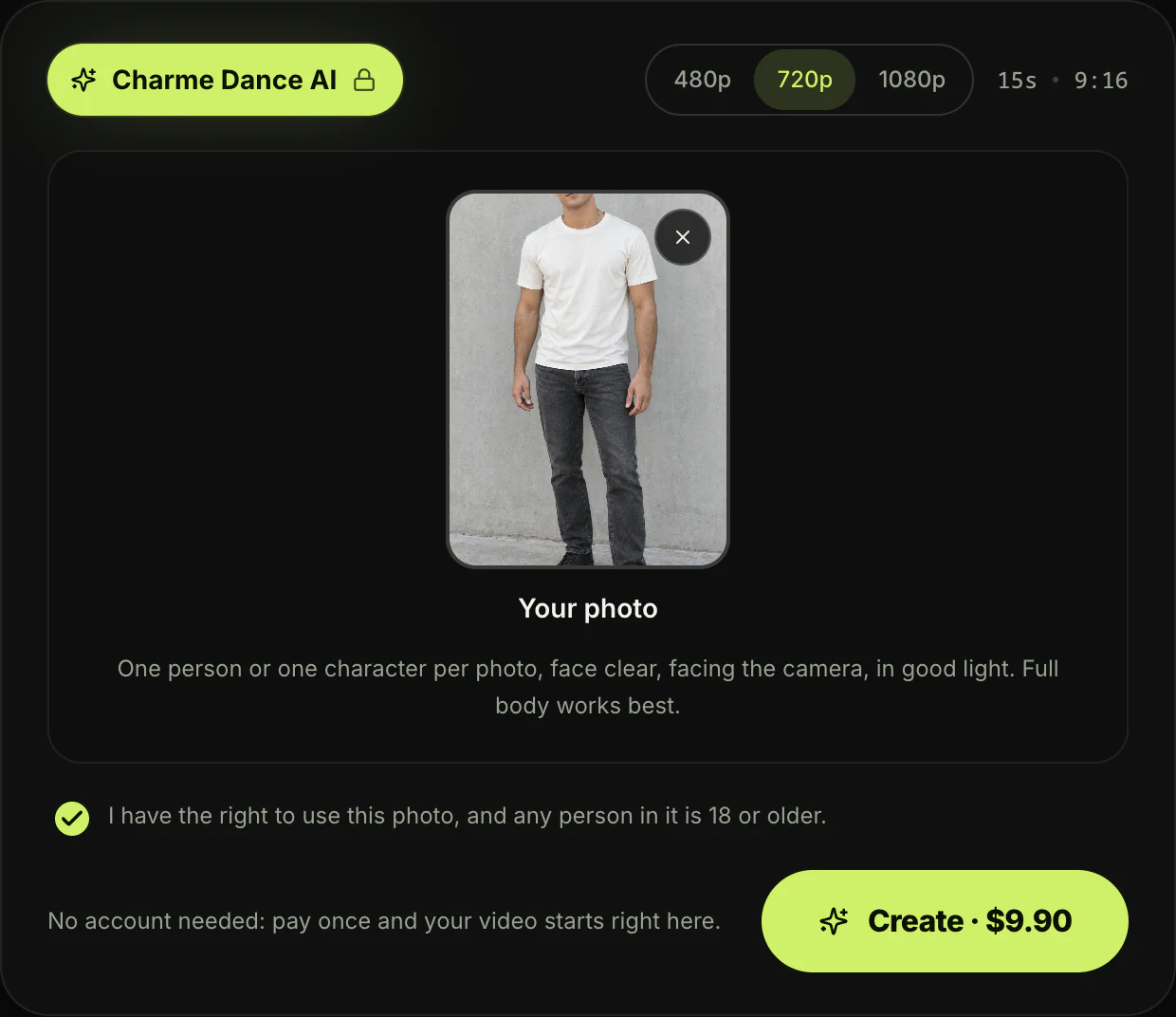
- One photo: you upload a photo of yourself, an adult friend or family member, or a cartoon, game or AI-made character. The face should be clear, facing the camera and in good light, and full body works best. Then you tick that you have the right to use it and that anyone in it is 18 or older.
- The real clip: you get the packed Pedra do Sal crowd and the man in the white tank top and brown hat at your shoulder. You also get the man with long braids and a shell necklace, the floodlights and the blue tents, all in one continuous handheld shot. Your face, hair and whole outfit come from your photo, and you hit every charme move on the beat.
- The sound: you keep the clip's original sound, with the party's music and crowd noise right from the first second.
- The file: you receive a 15-second vertical 9:16 MP4 without watermarks, available at 480p, 720p or 1080p.
Pick your quality, press "Create · $9.90", and pay once. That same $9.90 pack also covers a 480p video.
There's no account sign-up, no monthly subscription and no app to download. Your checkout email brings a link that signs you in on any device.
If a video fails, you'll get your credits back automatically, and you can view all options on Seadanse pricing.
You'll see the exact photo requirements in the step-by-step charme dance AI guide.
Charme Dance CapCut Template FAQ
Is the charme dance CapCut template free?
The "Ty" page doesn't show a price on its screen. Under @rika318294's Portuguese tutorial, one viewer wrote "tem que pagar" (you have to pay). Under the Spanish tutorial with 751.2K plays, another wrote "CapCut solo deja hacer unos cuantos videos gratis, después se convierte en una app de cobro" (CapCut only lets you make a few videos without paying, then it turns into an app that charges).
CapCut's help center says credits are CapCut's virtual currency for its AI features, where each credit equals $0.01. On Seadanse, one 720p charme dance video costs $9.90, paid once, and you can see how pay-once credits work.
What song is in the charme dance CapCut template videos?
Both tutorials by @isolde3292 play "Ice Ice Baby" by Vanilla Ice from TikTok's sound library, which many trend creators also pick for their posts. The Seu Zé clip uses its own sound, the party's music and crowd.
Every video you make with the charme dance AI generator keeps that original sound from the first second.
Where is the original charme dance video?
The original video is the Seu Zé de Madureira clip on TikTok, posted by @seuzerj on October 16, 2026. It runs 27 seconds and had 106.9K plays on October 20.
Its caption reads "Ninguém botou fé no vovô no baile charme" (nobody believed in grandpa at the baile charme).
Seu Zé is an AI-made grandpa character with a white afro, round glasses and suspenders, dancing at Pedra do Sal, a historic square in Rio de Janeiro's Saúde neighborhood.
Ready to Skip the Charme Dance CapCut Template?
You don't have to troubleshoot missing buttons, sign-in walls or the wrong template link to join the trend. You can skip "Ty" by Esme70275 and still dance in the real Seu Zé clip.
You can create your baile charme AI video directly in your browser for $9.90 at 720p, with the clip's original sound.
If you'd rather compare tools before you pick, here's every charme dance AI generator side by side. You can also explore other AI video effects you can make right now.
Related Articles
- How to Make the Charme Dance AI Video From One Photo (3 Steps) — the steps, the photo to use and what you get back.
- What Is the Charme Dance AI Trend? (Seu Zé, Real vs AI) — the real Pedra do Sal party, the AI grandpa and how the remakes took off.
- Best Charme Dance AI Generators (2026): 10 Tools Compared — the tools that make the trend, compared.
- Charme Dance AI Prompt (Copy-Ready) — and How to Skip the Prompt Entirely — the prompt behind the effect, and how to skip writing one.


