
Smalltown Boy AI Prompt (Copy-Ready): Both Close-Ups and the Trade
The Smalltown Boy AI prompt gives you both close-ups, the trade at 7 seconds, the red fence, a one-photo line, and how to run it in your video tool.
 The Seadanse Team21 min read
The team behind Seadanse. We run the models we write about, and we publish the specs, prices and limits the marketing leaves out.

TL;DR — The Smalltown Boy AI prompt below is a copy-ready prompt for the trend's two shots, in a 14-second 9:16 video. Photo 1 wails up close for 7 seconds. Then, on one hard cut at 7 seconds, the two trade places at a red wooden fence, and photo 2 takes the close-up. The prompt also has a line for one photo, the set, and what never carries over from your reference clip. To skip the prompt, Seadanse's Smalltown Boy AI builds the same two shots from your photos with the song in the file.
A viewer under a Smalltown Boy dance video asked, "alguien sabe cómo consigo el prompt del video?" (Spanish for "does anyone know how I get the video's prompt?"). That comment speaks for a lot of creators right now.
Most prompts you'll find online are only one paragraph, with no seconds and no trade.
The hand-made route burns through paid credits fast. In a maker's test on YouTube, the creator noted, "Custo do teste: 175 créditos" (Portuguese for "Cost of the test: 175 credits").
Under that video, a viewer replied, "sempre precisa de muito crédito, me desanima a comprar" (Portuguese for "it always takes a lot of credits, it puts me off buying"). That's what happens when a prompt leaves out the timing and the tool guesses the moves.
Here's the full prompt you can paste. We'll show how it's built, how you can use it, and five habits that keep it in step.
What Is the Smalltown Boy AI Prompt?
The Smalltown Boy AI prompt is the written instruction a video tool reads to remake the trend's two close-ups and the trade at 7 seconds with your photos.
We wrote it from the shot list our Smalltown Boy AI page is built on. A prompt like this tells the tool who's up close in each shot, what every move is, and where the cut lands.
It also defines the set and what never carries over from your reference clip (a short video the tool copies the moves and camera from).
The full prompt text for two photos appears right below.
Dancers:
Dancer 1 is the person in photo 1 (a person, a cartoon or game character, or a pet): [describe dancer 1's face, hair and outfit]. Dancer 1 keeps exactly this face, hair, skin tone, build and outfit in every second, up close and far away alike.
Dancer 2 is the person in photo 2 (a person, a cartoon or game character, or a pet): [describe dancer 2's face, hair and outfit]. Dancer 2 keeps exactly this face, hair, skin tone, build and outfit in every second, up close and far away alike.
Exactly two dancers. In Shot 1, Dancer 1 is up close in front of the camera and Dancer 2 dances behind, small, by the fence. At the hard cut at 7 seconds they trade places: in Shot 2, Dancer 2 is up close in front and Dancer 1 dances behind, small, by the fence. Nobody else is ever in frame.
Each dancer has a face of their own: Dancer 1's face never appears on Dancer 2, and Dancer 2's face never appears on Dancer 1, before or after the cut.
If photo 1 shows a cartoon, anime or game character, the whole video is in that same style and the yard matches it. If photo 1 is a real photo, the whole video is photoreal, like a real phone video. A pet stays a real animal of its own breed, face, ears and coat, standing upright on its hind legs and dancing like a person, with paws, never human hands.

Set:
A backyard in soft, even, overcast daylight. A tall fence of dark-red vertical wooden planks fills the whole background from edge to edge and the top half of the frame. A band of green ivy runs along the fence at about the far dancer's head height, with a few low green plants at its foot. The ground is plain grey concrete and asphalt.

Reference clip:
Your reference clip is for motion only: copy its two shots, the hard cut at 7 seconds, its camera position, wide-angle lens and handheld movement, and every move, pose, gesture and facial expression at the same moment. Take no person, face, hair, body, clothing or make-up from the reference clip; none of its dancers appear.

Summary:
A 14-second vertical phone video in the backyard, two shots with one hard cut at 7 seconds, following the reference clip move for move: up close to the lens, Dancer 1 clutches their head and wails to the music while Dancer 2 dances behind by the fence; then they trade places, and Dancer 2 wails up close while Dancer 1 dances behind.

Shots:
Vertical 9:16 frame. Handheld phone camera at chest height with a wide-angle lens, very close to the front dancer and slightly below their eye line. The front dancer fills the lower two-thirds of the frame from the waist up, and their hands grow large when they reach toward the lens. The dancer behind is seen full body, small, about four metres back against the fence. Natural daylight colour, sharp focus, exactly one hard cut at 7.0 seconds.
[Shot 1] 0-7.0 s: Dancer 1 up close in front; Dancer 2 behind at the upper left of the frame, against the fence. 0-0.5 s Dancer 1 leans in from the right in profile and turns to the lens; 0.5-3.5 s Dancer 1 presses both hands to the sides of their head, eyes shut, mouth wide open as if wailing the song, head rocking to the beat; 3.5-4.0 s the hands slide down the cheeks; 4.0-5.5 s Dancer 1 thrusts both open palms at the lens, fingers spread wide, eyes wide open, looking straight into the camera lens; 5.5-6.5 s the hands curl in front of the chest with fluttering fingers, eyes down; 6.5-7.0 s Dancer 1 hunches forward. All the while Dancer 2 dances an 80s routine behind: arms crossed over the chest, one arm swung high, a hand to the hair, side steps.
[Shot 2] 7.0-14.0 s: hard cut, same camera and lens; the dancers have traded places: Dancer 2 up close in front, Dancer 1 behind at the right of the frame, against the fence. 7.0-7.5 s Dancer 2 bows forward, head down, hands at the chest; 7.5-8.0 s the hands go up to the head; 8.0-11.5 s Dancer 2 clutches the top of the head with both hands, elbows raised high, mouth wide open wailing, head tipping back; 11.5-12.5 s the head tilts to one side and the hands slide down to the temples; 12.5-14.0 s both hands pressed to the cheeks, face tilted, looking straight into the camera lens with both eyes, mouth open. All the while Dancer 1 dances behind: a hand over the face, an arm swung overhead, side steps, arms flung out.

Sound:
Light outdoor backyard ambience. A 1980s synth-pop track with a pulsing synth bass line and a high falsetto vocal; every move lands on the beat.

Photos:
Photo 1 sets Dancer 1's face, hair, skin tone, age, build and outfit, and photo 2 sets Dancer 2's; ignore each photo's background, pose and framing. The reference clip sets only the shots, the cut, the camera and the moves.

Final rules:
Dancer 1 is recognizable as the one in photo 1 and Dancer 2 as the one in photo 2 in every second, in front and behind alike, each in their own outfit from their photo throughout. Dancer 1 is up close only in Shot 1 and behind only in Shot 2, Dancer 2 the reverse. Nobody from the reference clip appears. Exactly two dancers, no one added. Keep it physically coherent. No captions, subtitles, watermarks, logos or any text on screen.The parts in square brackets are yours to fill in, one short description per dancer. Everything else stays as it is.
The prompt locks each dancer to their original image. Dancer 1 keeps the face, hair, skin tone, build and outfit of photo 1 in every second.
Dancer 2 keeps the exact details of photo 2. That stops the tool from blending faces or swapping bodies at the cut.
The prompt also sets the camera as a handheld phone at chest height with a wide-angle lens.
That wide lens gives you the look of the viral clips. That's why the front dancer fills the lower two-thirds of the frame.
How the Smalltown Boy AI Prompt Is Built
The Smalltown Boy AI prompt is built in nine labelled parts, and the longest is the shot list.
Every part handles one specific job so the video tool doesn't invent random moves.
The prompt lays out dancers, set, reference clip, summary, shots, sound, photos, final rules, and an optional one-photo line.
The dancers section assigns photo 1 to Dancer 1 and photo 2 to Dancer 2. That's how it makes sure each dancer "keeps exactly this face, hair, skin tone, build and outfit in every second, up close and far away alike".
The places sentence keeps the positions clear. It specifies that "In Shot 1, Dancer 1 is up close in front of the camera and Dancer 2 dances behind, small, by the fence."
Then at 7 seconds "they trade places". It's strictly "Exactly two dancers".
The faces sentence protects each dancer's identity. The prompt states that "Dancer 1's face never appears on Dancer 2".
For style, a cartoon, anime or game character in photo 1 turns the whole video into that style. A real photo stays photoreal, "like a real phone video".
For animals, the pet sentence makes sure a pet "stays a real animal of its own breed", standing upright on its hind legs, "with paws, never human hands".
It's a backyard in soft overcast daylight with a tall fence of dark-red vertical wooden planks, a band of green ivy, grey concrete and asphalt.
The reference clip is marked "for motion only" to copy the two shots, the cut, the camera, the wide-angle lens and every move, while "none of its dancers appear".
What about the framing? It's vertical 9:16 with a handheld phone camera at chest height.
It places the front dancer filling the lower two-thirds of the frame from the waist up, with the dancer behind small, about four metres back.
It's got "exactly one hard cut at 7.0 seconds", timing each move in half-second steps.
The sound section calls for backyard ambience and "A 1980s synth-pop track with a pulsing synth bass line and a high falsetto vocal". There's no song named.
The photos section instructs the tool to "ignore each photo's background, pose and framing".
Finally, the final rules act like a negative prompt (a list of things you don't want) so there aren't captions, subtitles, watermarks, logos or text on screen.
| Part | What it says | Why it's there |
|---|---|---|
| Dancers | Photo 1 is Dancer 1, photo 2 is Dancer 2; who's up close in each shot | Keeps each face on its own dancer through the trade |
| Set | Red plank fence, ivy band, grey yard, soft daylight | Gives every version the same backyard |
| Reference clip | Copy the shots, the cut, the camera and every move; take no person | Moves come from the clip, faces from your photos |
| Summary | 14 seconds, two shots, one hard cut at 7 seconds | Tells the tool the whole video in one line |
| Shots | Each move timed in half-second steps | Lands the wail and the trade on the beat |
| Sound | An 80s synth-pop feel, no song named | Sets the mood; you add the song later |
| Photos | Each photo sets one dancer's face, hair, build and outfit | Ignores each photo's background and pose |
| Final rules | Who's up close when, nobody from the clip, no text on screen | Works like a negative prompt |
| One-photo line | A made-up partner of the same kind | Lets one photo make the duet |
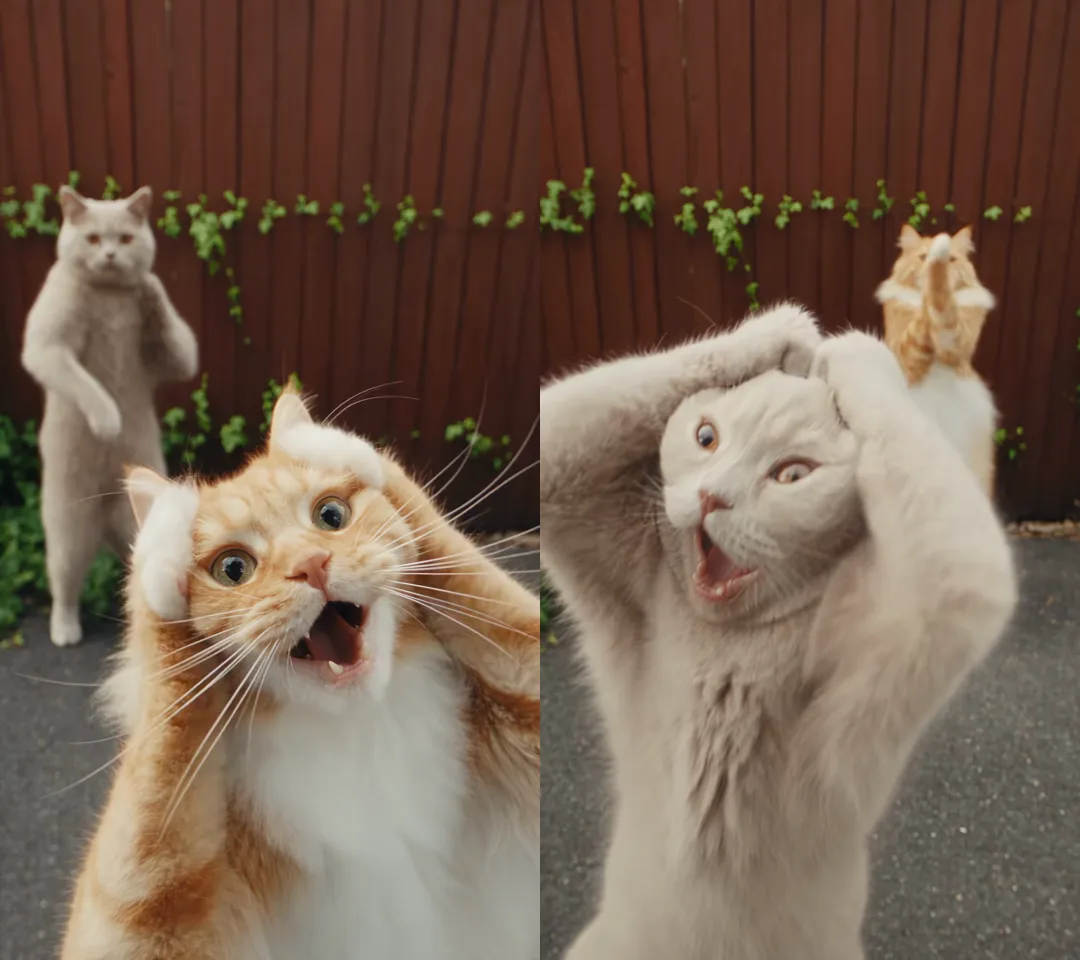
The trend's own first video shows the trade the prompt's built around, created by @bellvtrix.ai with a ginger cat and a grey cat taking turns at the camera.
How Do You Use the Smalltown Boy AI Prompt?
To use the Smalltown Boy AI prompt, you need a video tool that takes two photos and one reference clip together, a 14-second clip of the dance, and your photos.
You'll get your photos and clip ready, paste the text, and fill in the bracketed descriptions.
- The tool: A video tool that takes two photos and one reference clip in the same go. A tool that only animates one photo has no clip to follow.
- Photo 1 and photo 2: Photo 1 is the one who wails up close first. One person, pet or character per photo, face clear, facing the camera, in good light, and everyone in the photos is 18 or older.
- The reference clip: A 14-second vertical clip of the dance with the two close-ups and the trade at 7 seconds.
- The fill-ins: The square brackets, where you'll write one short description per dancer.
- The song: The prompt names no song, so you'll add the song in an editor after the video's made.
If you'd rather skip the setup, the Smalltown Boy AI generator does it from your photos.
Use the Smalltown Boy AI Prompt With One Photo
The Smalltown Boy AI prompt works with one photo if you swap the Dancer 2 line for the partner line below.
You'll keep every other line of the prompt exactly the same.
Dancer 2 is a made-up dance partner for Dancer 1: if Dancer 1 is an animal, another real animal of the same kind with a clearly different coat colour and pattern; if Dancer 1 is a cartoon, anime or game character, an original character of the same kind and drawing style; otherwise an adult aged 22 to 35, a friend of Dancer 1, with a clearly different face, hair and build, dressed in the same style family as Dancer 1 (streetwear with streetwear, a dress with a dress, a costume with a costume) in different colours. Dancer 2 never looks like Dancer 1.The partner line tells the tool to make another real animal of the same kind with a different coat for a pet, or an original character in the same drawing style for a character.
For a person, it creates an adult friend with a clearly different face, hair and build in the same style family in different colours, and Dancer 2 never looks like Dancer 1.
That means you don't need two portraits ready before you begin.
The tool uses your single upload to set the art style and invents a partner that fits right into the scene.
Habits That Keep the Smalltown Boy AI Prompt in Step
Five habits keep the Smalltown Boy AI prompt in step with the trend, and you can see each one in the prompt above.
Following these habits stops your generations from breaking down into strange motion errors.
When people run a prompt for the Smalltown Boy dance without these safeguards, the tool often makes mistakes.
Faces swap between bodies, dancers vanish, or the trade never happens at 7 seconds. Sticking to these five habits keeps your video locked to the trend.
Name Who's Up Close in Every Shot
Naming who stands up close in each shot stops the video tool from swapping faces between dancers.
The prompt relies on the places sentence: "Dancer 1 is up close only in Shot 1 and behind only in Shot 2, Dancer 2 the reverse."
In Shot 1, Dancer 1 is up close in front of the camera and Dancer 2 dances behind, small, by the fence.
In Shot 2, they trade places so Dancer 2 takes the front and Dancer 1 moves to the back.
When you name the exact dancer for each position, the tool doesn't mix up who gets the close-up.
It won't let extra dancers slip into the background. The prompt insists on "Exactly two dancers".
Time the Trade to 7 Seconds
Timing the trade to 7 seconds locks the cut to the beat of the song.
The prompt calls for "exactly one hard cut at 7.0 seconds", timing each move in half-second steps.
Here's how the prompt divides the choreography into two segments:
- Shot 1 (0 to 7 seconds): Photo 1 is up close. It leans in, presses both hands to the head with eyes shut and mouth wide open, then pushes both open palms at the lens. Photo 2 dances an 80s routine behind by the fence.
- Shot 2 (7 to 14 seconds): After the hard cut, photo 2 is up close. It bows, clutches the top of the head with elbows high and wails, then presses both hands to the cheeks and looks into the lens. Photo 1 dances behind.
One hard cut at 7 seconds makes sure the joke lands right where the music shifts.
If you don't specify the 7-second cut, tools often drift, blend the transition, or miss the trade entirely.
Give Each Dancer a Face of Their Own
Giving each dancer a face of their own keeps the two dancers looking different throughout the video.
The prompt includes the faces sentence: "Dancer 1's face never appears on Dancer 2".
It also tells the tool that photo 1 sets Dancer 1's face, hair, skin tone, age, build and outfit, while photo 2 does the same for Dancer 2.
That prevents the tool from averaging both faces into a single look.
The prompt instructs the tool to "ignore each photo's background, pose and framing".
That means your photos don't need matching lighting or poses before you start.
The tool lifts only the subject's identity and places them into the backyard scene.
Keep Pets on Their Hind Legs
Keeping pets on their hind legs protects animal videos from distorted human hands.
The prompt includes the pet sentence, ensuring an animal "stays a real animal of its own breed", standing upright on its hind legs, "with paws, never human hands".
That rule keeps the video funny and charming rather than distorted.
It lets cats and dogs hold their heads and wail using their own paws. The pet keeps its real fur patterns and breed traits across both shots.
Without this instruction, video tools often generate human fingers on animal forelegs.
Specifying paws on hind legs keeps the dancing animal looking believable.
Leave the Song Out of the Prompt
Leaving the song out of the prompt prevents video tools from failing on commercial audio requests.
The prompt names no song, describing only backyard ambience and "A 1980s synth-pop track with a pulsing synth bass line and a high falsetto vocal".
Those sound lines only set the feel and rhythm for motion generation.
They help the tool catch the energy of the dance without naming any song.
You'll add the actual audio track in an editor after your video's made.
Trying to force a specific commercial song into a prompt often leads to tool errors or ignored instructions.
Compare Our Smalltown Boy AI Prompt vs Media.io's Prompts
Media.io has four public prompts for this trend: one for cats, one for a cat and a dog, one for friends and one for characters. You'll find them in Media.io's four Smalltown Boy prompts.
Their prompts are titled "Smalltown Boy Dancing Cats AI Video Prompt", "Smalltown Boy Cat and Dog AI Dance Prompt", "Smalltown Boy Friends AI Dance Video Prompt", and "Smalltown Boy Character AI Dance Prompt".
Each of their prompts assigns photo 1 to "the opening left dancer" and photo 2 to the opening right one.
Their instructions keep the background, light and cut order from your reference clip, and each one ends with "NO NEW SCENES."
Their steps tell you to "Start with a supported 5–10-second segment" and "Add music separately".
None of their four prompts gives seconds for any move or names the trade at 7 seconds.
| Our Smalltown Boy AI prompt | Media.io's four prompts | |
|---|---|---|
| Who's up close | Named for each shot | Photo 1 follows "the opening left dancer" |
| Timing | Every move in half-second steps, one cut at 7 seconds | No seconds given |
| Length | 14 seconds, two shots | "a supported 5–10-second segment" |
| Set | Written out: red plank fence, ivy, grey yard | Kept from your reference clip |
| One photo | A partner line | Two photos |
| Song | You add it in an editor | "Add music separately" |
Our prompt adds the seconds of every move, the trade at 7 seconds, the set and a one-photo line.
Can You Make a Smalltown Boy AI Video Without a Prompt?
Yes, you can make a Smalltown Boy AI video without a prompt on Seadanse's Smalltown Boy AI page, where the shot list and the song are built in.
You don't gather reference clips or write out shot lists.
- Add photo 1: Upload your first photo of a person, pet or character to take the opening close-up.
- Add photo 2 or leave it: Upload a second photo for the dance partner, or leave it blank to let the page create a matching partner.
- Pick 480p, 720p or 1080p: Choose your preferred export resolution for the finished 9:16 vertical MP4 video.
- Press Create: Your video starts, and you never write a prompt.
One 720p video costs $9.90, paid once, with no sign-up.
One photo or two cost the same, and your video exports with no watermark. Check Seadanse pricing for details on our resolution tiers.
If you'd like a complete walkthrough of the upload flow, check our guide on how to make a Smalltown Boy AI video.
Smalltown Boy AI Prompt FAQ
Is this the prompt Seadanse's page uses?
The prompt here is written from the same shot list our Smalltown Boy AI page is built on.
It details who's up close in each shot, the trade at 7 seconds and the red fence.
On our page you never see or write a prompt, because you add photos and press Create.
Which AI video tools accept the Smalltown Boy AI prompt?
A video tool that takes two photos and one reference clip in the same run can accept the Smalltown Boy AI prompt.
Tools that animate only a single still photo without a reference clip can't follow the choreographed trade.
You can see the Smalltown Boy AI generators compared to see which platforms support multi-image motion steps.
Does the Smalltown Boy AI prompt add the song?
The Smalltown Boy AI prompt names no song and doesn't add audio to your finished file.
The music in the viral dance trend is Bronski Beat's 1984 single, which you'll add in an editor.
On Seadanse, the song's built in and plays from the first second of your export.
Can I use the Smalltown Boy AI prompt for my cats?
You can use the Smalltown Boy AI prompt for your cats by keeping the prompt's pet sentence in place.
The prompt makes sure an animal stays a real animal of its breed on hind legs with paws rather than human hands.
The trend started with two cats, and you can explore how the Smalltown Boy dance trend started to see the original video.
Can I use the Smalltown Boy AI prompt without a reference clip?
Using the Smalltown Boy AI prompt without a reference clip leaves the video tool to make up its own dance moves.
A tool with no clip has nothing to copy the choreography from, so it won't follow the specific 7-second trade.
Our Smalltown Boy AI page solves this by building the reference choreography right into the browser tool.
Ready to Skip the Smalltown Boy AI Prompt?
You can skip writing prompts and make a Smalltown Boy AI video directly in your browser from one or two photos.
Our browser generator builds both close-ups and the 7-second trade with the original 1984 track included for $9.90 at 720p.
Written by The Seadanse Team, the team that built the Smalltown Boy AI page.
Related Articles
- How to Make a Smalltown Boy AI Video From 1 or 2 Photos (4 Steps) — the four steps, who wails first, and the photos that work best.
- What Is the Smalltown Boy Dance Trend? The Wailing Cats, Explained — who posted the two cats, why the song came back, and how the dance spread.
- Smalltown Boy CapCut Template: Which One Is Real and Why It Fails — the six templates, the green-screen one, and the fixes.
- Best Smalltown Boy AI Generators (2026): 10 Ways Compared — the sites and apps that make this video, side by side on photos, length, sound and price.


