
How to Do the AI Crying Trend From One Photo
How to do the AI crying trend from one photo: get a 12-second 9:16 video with tears and a walk away, no CapCut. One 720p video is $9.90 on Seadanse.
 The Seadanse Team12 min read
The team behind Seadanse. We run the models we write about, and we publish the specs, prices and limits the marketing leaves out.

TL;DR — Seadanse's AI Crying Trend Generator does the AI crying trend from one photo: you get a 12-second, 9:16 farewell video with tears and a walk away. One 720p video costs $9.90, and you don't need CapCut, a template or a prompt.
- Photo: one clear photo of one adult, facing the camera.
- Pick: "Smile to Tears" or "Hilltop Tears", then "Facing Him" or "Facing Her".
- Get: sign in, press "Create" and download a 12-second MP4 with soft piano and no watermark on exported video.
You've probably seen the clip on TikTok or Instagram Reels. Filmed at night over someone's shoulder, a person smiles at them, the smile breaks, tears stream down, and they turn to walk away.
If you searched for an AI crying trend tutorial, you likely found videos pointing you toward a template. On October 7, 2026, the top Google result for "ai crying trend" was a TikTok tutorial with 582,300 plays and 4,967 saves that sends you into CapCut.
Here's what viewers write under those tutorials:
- TikTok: viewers asked "Did you pay" and "please do it for me", while others wrote "i has failed" and "mine is not going".
- Indonesian tutorial: one viewer wrote "kreditku ga cukup" [my credits weren't enough].
- Indonesian tutorial: another viewer asked "Kk klau yg ngk pro gimna kk?" [what if I'm not on Pro?].
- Bengali tutorial: viewers commented "Video is not available" and said it wasn't working.
On Seadanse, the entire scene lives on one page. You put one photo in, and you get a 12-second video out without searching for a crying AI video template. Here's the Smile to Tears sample from our AI Crying Trend page:
What is the AI crying trend?
The AI crying trend is a short AI video, about 10 seconds long, made from a single portrait. At night, the camera shoots over the shoulder (the camera looks past the back of the person you face), whose blurred outline sits at the frame's edge.
Your smile breaks, your eyes go red and fill with tears, a tear runs down your cheek, and you turn to walk away into the dark street.
The trend took off on TikTok in late September 2026 and spread in English, Spanish, Portuguese, Tagalog, Indonesian and Vietnamese. In Spanish, people call it the "trend de llorar". The scene feels like a quiet farewell from a K-drama.
By October 7, 2026, the CapCut template behind the tutorials had logged 94.6 million uses.
People often call this effect a filter, but it's a full video. A photo filter just paints tears on a portrait, while this effect builds a complete moving farewell. Seadanse's AI Crying Trend Generator is part of our browser-based AI video effects family.
What you need before you start
Going from photo to crying video doesn't take special software. You only need a few simple things ready:
- One photo: one clear portrait of one adult, facing the camera with both eyes visible in good light.
- A browser: everything runs right in your web browser on a phone, tablet or computer, so there's nothing to install.
- A Seadanse account: you sign in to use credits from your balance, with credit packs starting at $9.90.
- No prompt: the whole film-like scene is built in, so you don't need to write any instructions.
Step 1: Upload one clear photo of yourself
Open the AI crying trend effect on Seadanse in your browser. Under the heading "Your photo", you'll see a box labeled "Upload photo".
The text under the box asks for: "One clear photo of one adult, facing the camera with both eyes visible in good light." You can upload a JPG, PNG or WebP file up to 30 MB.
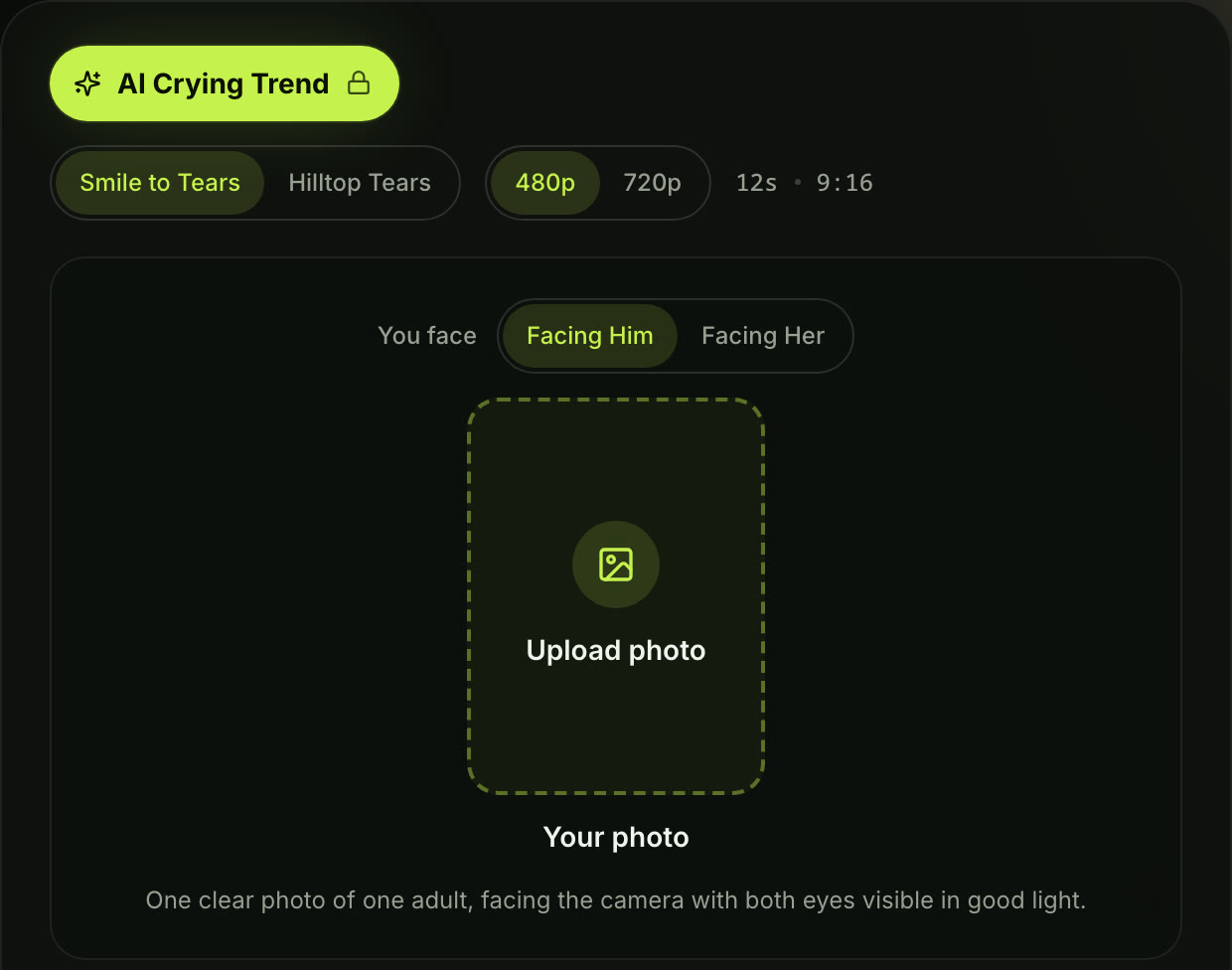
Step 1 on the live page, signed out, October 8, 2026: the "Upload photo" box and the photo rule under it.
Step 2: Choose Smile to Tears or Hilltop Tears, then who you face
The settings below your photo let you shape the scene with a few clicks:
- Version: pick "Smile to Tears" for a city street (it opens on a smile) or "Hilltop Tears" for an overlook above the city (it opens in tears).
- You face: choose "Facing Him" or "Facing Her" to pick whose blurred shoulder sits in front of you.
- Quality: choose "480p" or "720p".
- Length and shape: the page shows "12s · 9:16", meaning every clip runs 12 seconds in a vertical shape.
- Note: tap "Add a note (optional)" if you want to name a place, add rain or describe the one you face.
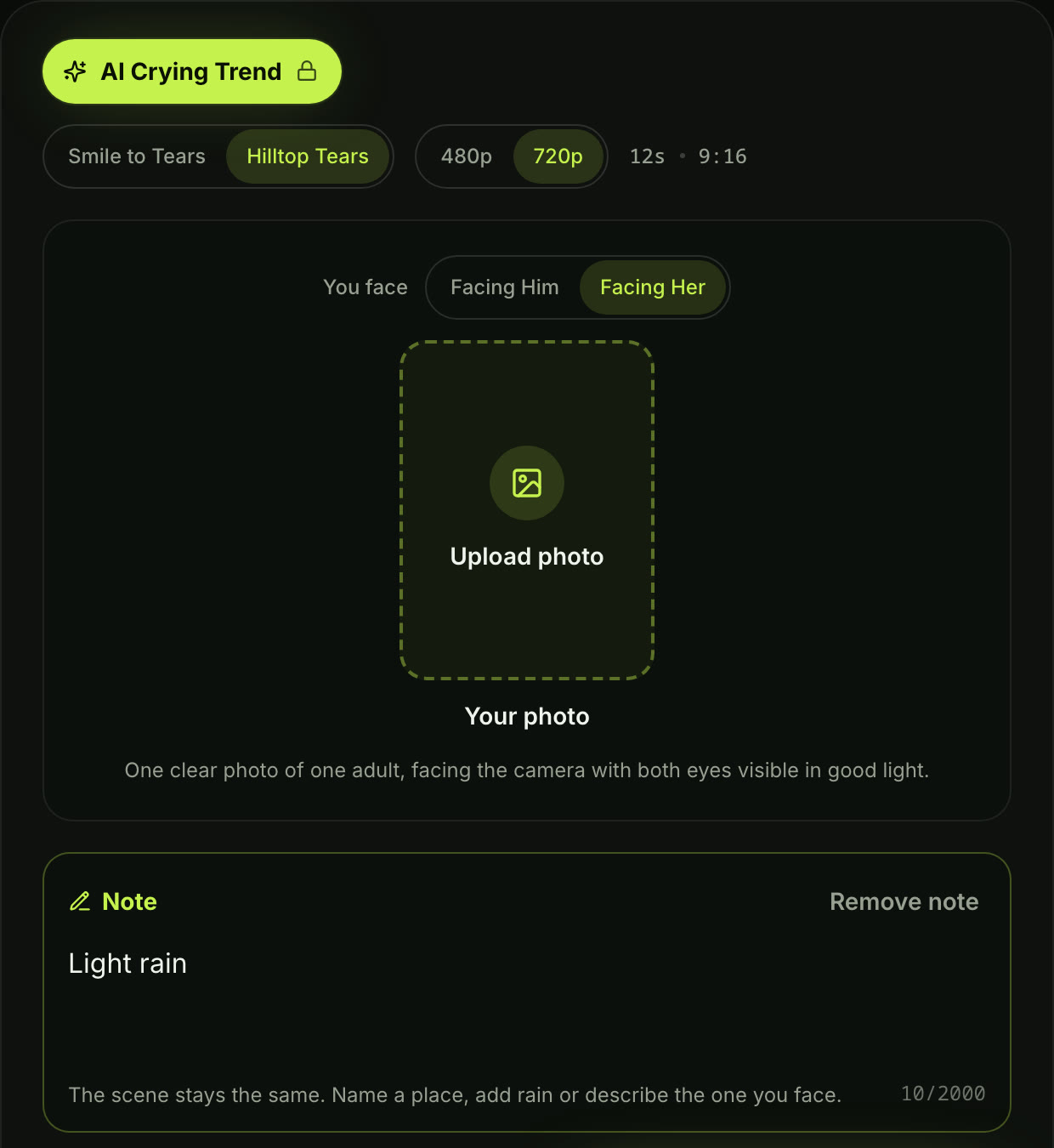
Step 2: Hilltop Tears, 720p and Facing Her picked, plus a one-line note asking for light rain. Length and shape stay at 12 seconds, 9:16.
Step 3: Press Create and your video starts
Press "Create", and your video starts right on this page. If you're signed out, the button reads "Sign in to create": sign in first or make an account if you're new, and your video uses credits you buy once, with no subscription. If a video fails, its credits come back automatically.

Step 3: signed out, the button reads "Sign in to create" and shows the price, 500 credits at 720p.
When it finishes, download your 12-second 9:16 MP4 file. Exported video carries no watermark. It's ready to post right away.
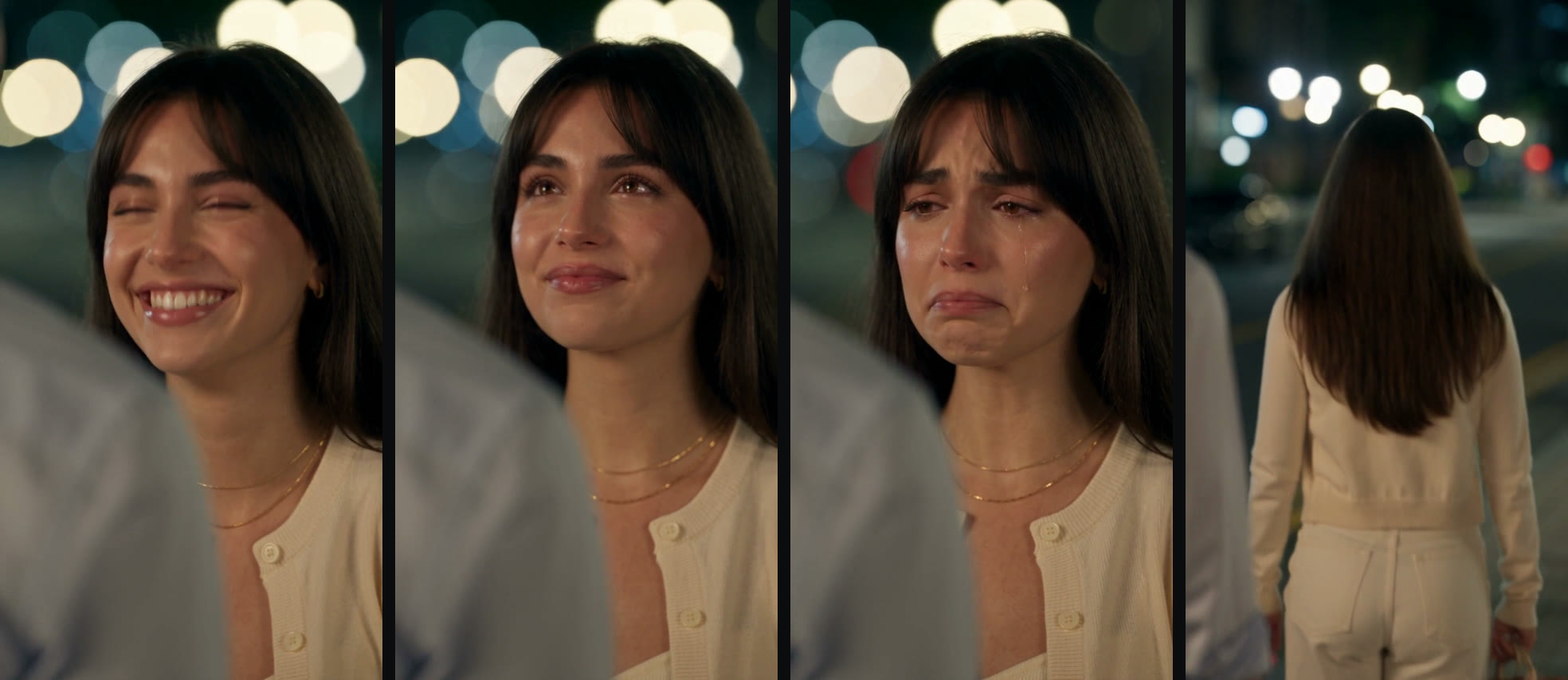
Four frames from the Smile to Tears sample above: the smile, the smile breaking, the tears and the walk away. All from one video.
Pick a photo that brings out the tears
Good input photos make the tearful transition look natural. Here's what works best:
- One adult: use a photo of one adult (18+) alone in the frame.
- Good light: pick a shot where both eyes are clearly visible without heavy shadows.
- Expression: a soft smile or a calm, neutral face produces the smoothest shift into tears.
- Background: any background works because the generator swaps it for glowing night lights.
Your face, hair and clothing carry over from your upload straight into the scene. Seedance 2.5 keeps you looking consistent throughout the entire clip.
As ByteDance stated when launching the model, "The main subject remains stable across multiple cuts, and the audio and visuals remain in sync."
People watching tutorials often ask "Gimana caranya biar keluar air mata kak" [how do I get the tears to come out?]. On Seadanse, the tears are built into both versions automatically.
Your eyes redden, fill with water, and a clear tear runs down your cheek before you turn.
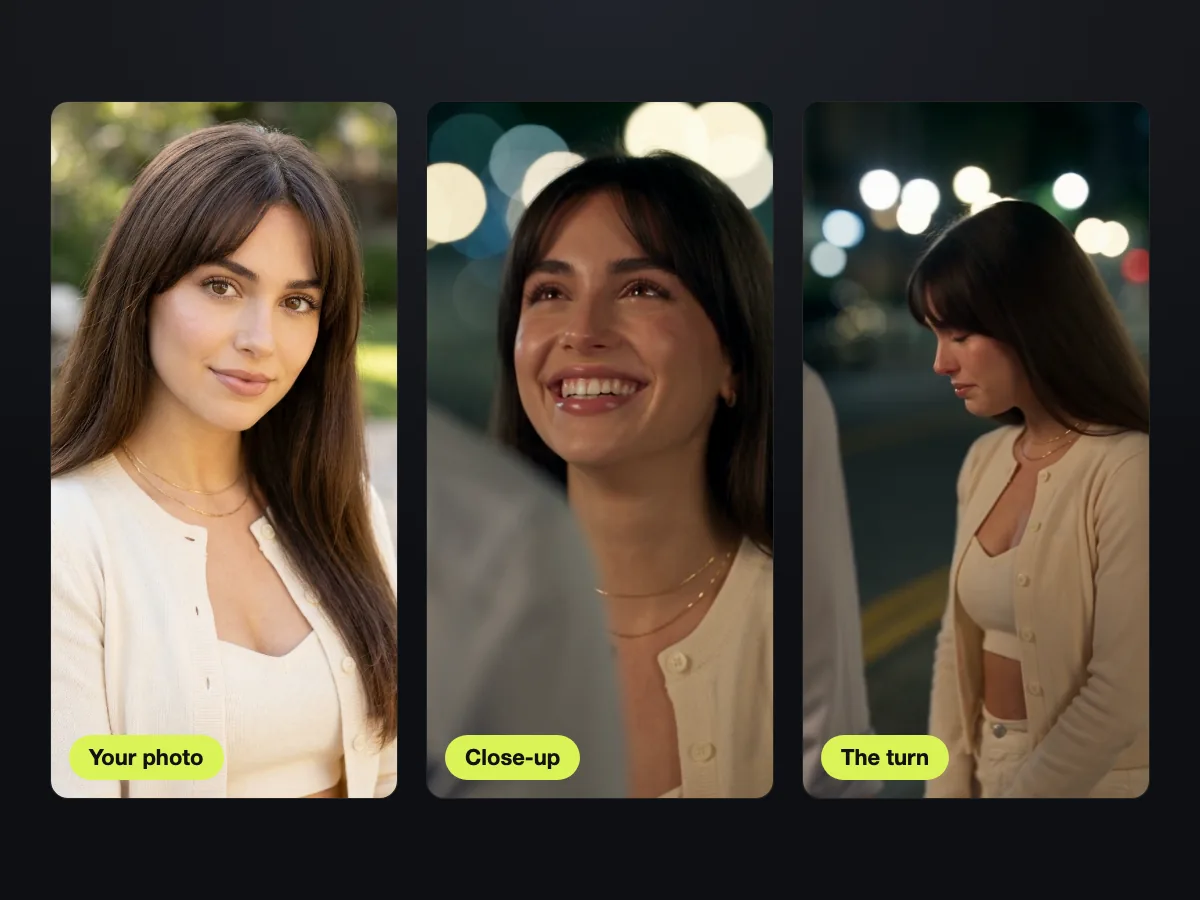
From our AI Crying Trend page: the photo that went in, then the same face, hair and cardigan in the close-up and the turn.
Smile to Tears or Hilltop Tears: which one fits your post?
Each version tells a slightly different story. Here's how they compare:
| Smile to Tears | Hilltop Tears | |
|---|---|---|
| Where | A city street at night, warm street lights behind you | A hilltop above the city at night, cool blue light |
| How it opens | A real, happy smile and a small laugh | Already in tears, trying to hold it together |
| The tears | The smile fades, eyes go red, a tear rolls down | Eyes close, a tear runs down and catches the light |
| The walk away | A side shot, then down the street toward the lights | A cut to a close shot, then toward the city lights below |
| Fits a post like | A twist: happy, then it hits you | A breakup or goodbye, sad from the first second |
Both versions run 12 seconds in vertical 9:16, cost the same and come with soft piano.
Smile to Tears starts with a genuine smile and a quiet laugh on a warm city street. Then your expression freezes, your eyes turn red, and a single tear drops as you look down and walk into the dark street.
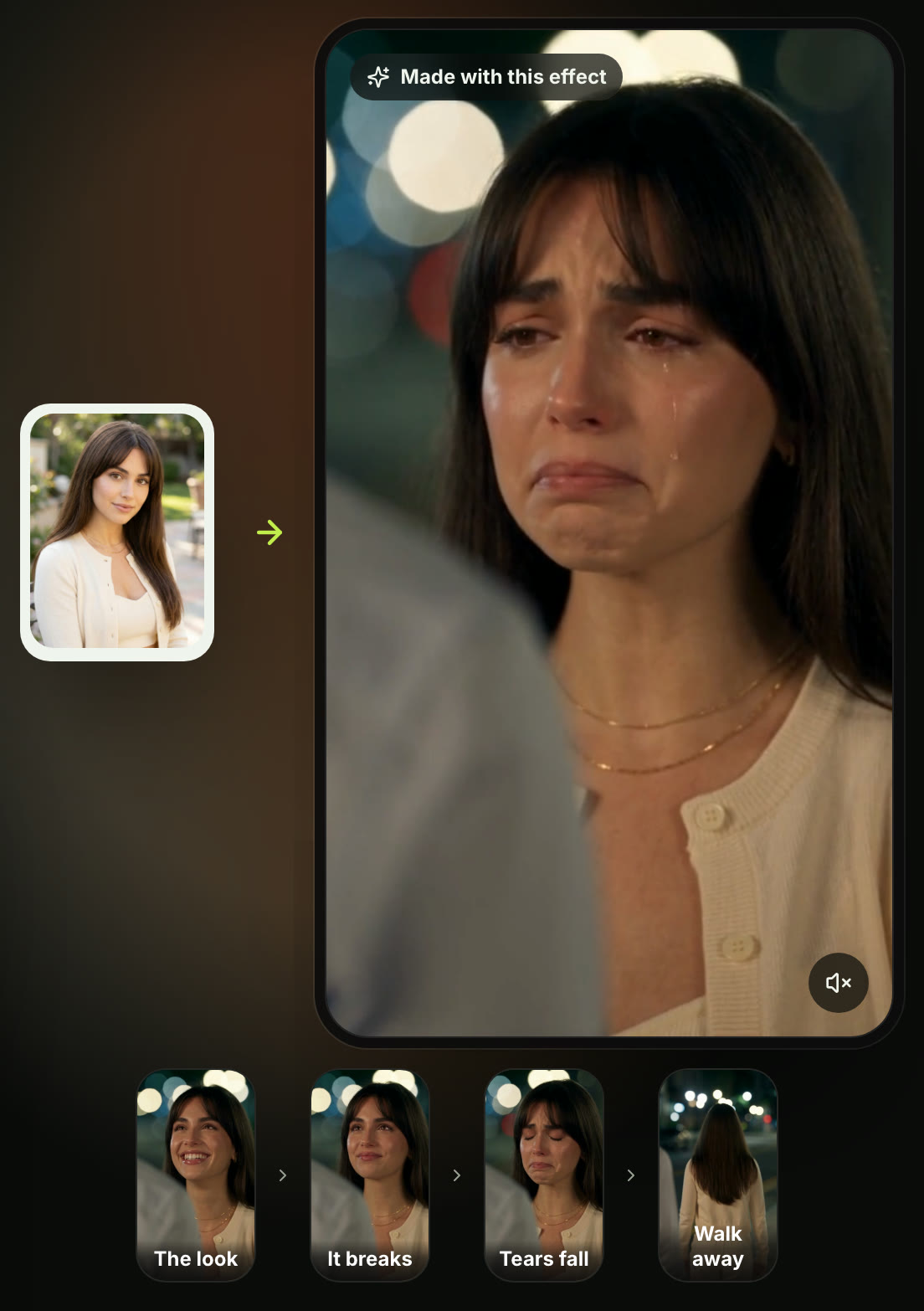
Smile to Tears on the live page, October 8, 2026: a city street at night, from a smile to tears.
Hilltop Tears puts you on a dark hill overlooking city lights in cool blue tones. You're already crying from the first second, biting your lip before turning your back to head toward the glowing skyline below.
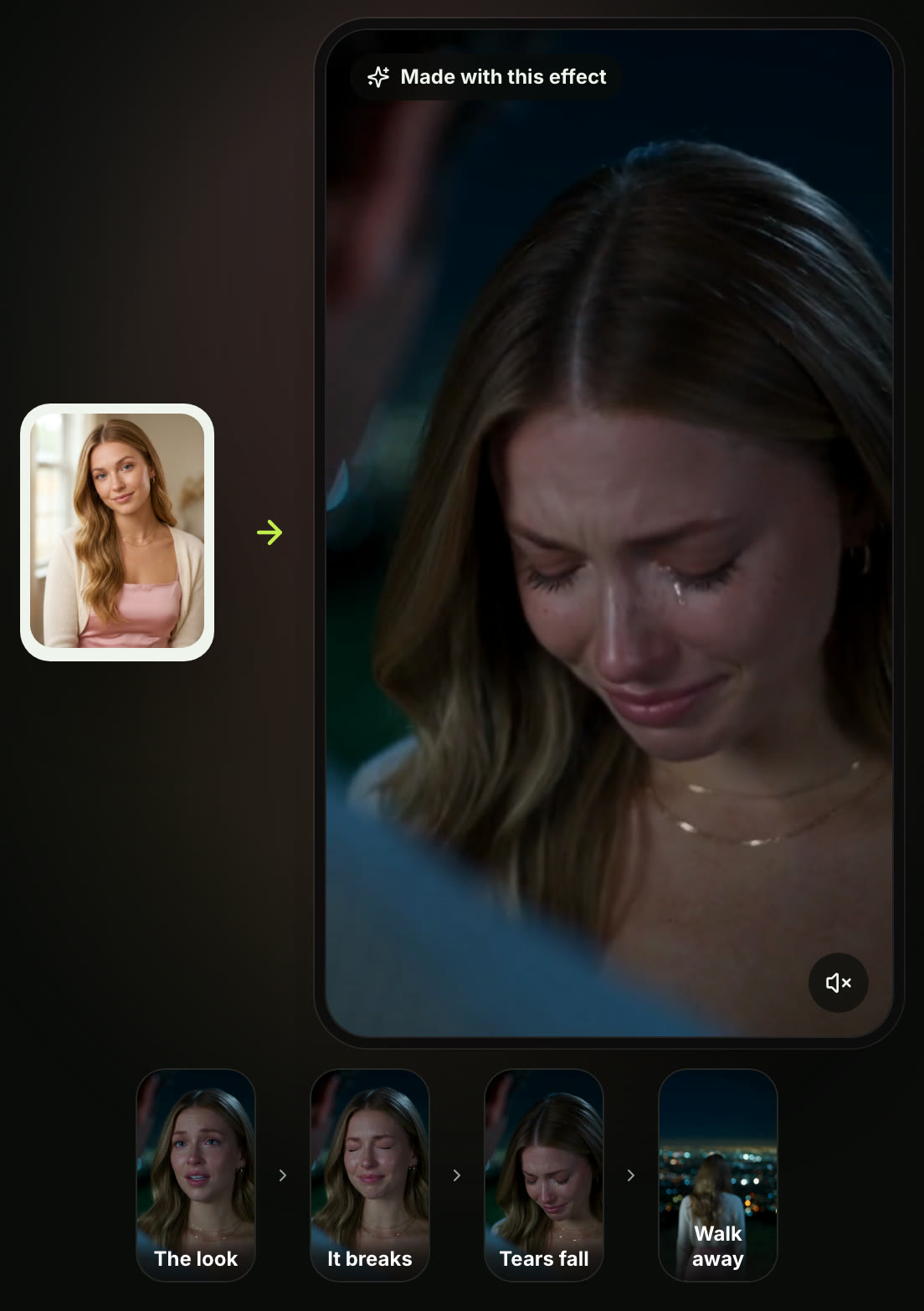
Hilltop Tears on the live page, October 8, 2026: in tears from the first frame, on a hill above the city.
Pick the mood that matches your idea, and you'll have your finished AI crying trend video in just a few clicks.
Add the trending song when you post
Every exported video includes ambient night sounds, a shaky breath and a slow solo piano track without vocals. There's no talking in the clip.
Creators on TikTok and Reels usually pair their video with a trending breakup song.
When you upload your MP4 to TikTok, Instagram Reels or YouTube Shorts, use the platform's audio picker to add your favorite sad track right over the video.
People often caption these posts with dramatic breakup lines, like "No pensé que doliera tanto" [I didn't think it would hurt this much]. Others turn them into relatable memes, like "me when the group chat leaves me on read".
FAQ
Do I need CapCut or another app?
You don't need CapCut or any editing app. The entire farewell scene runs right in your browser on Seadanse, so there's no template to search for and nothing to install.
Do I upload a photo or a video?
You upload one portrait photo, and you get a complete 12-second 9:16 video back. If you're curious about what each crying filter really does, our guide breaks down the difference between static photo edits and full video generations.
Is the AI crying trend free?
No, it isn't free. One 12-second 720p video costs $9.90, which is 500 credits on Seedance 2.5, ByteDance's most advanced video model. A 480p video takes 375 credits.
You can grab a one-time credit pack starting at $9.90 without any recurring subscription.
Can guys do the AI crying trend?
Yes, any adult looks great in this effect, including men, women, people with glasses or people wearing a hijab. You simply pick "Facing Her" or "Facing Him" to set who stands in front of you.
Can I cry facing my partner?
Yes, you can choose "Facing Him" or "Facing Her" depending on who you want in the shot.
You can also use the optional note field to describe them, like typing "a man in a white shirt". They're seen only from behind and softly blurred, the way the trend frames them.
Is there an AI crying trend prompt?
You don't need a prompt here because both versions have their storytelling built in. If you'd rather build a custom scene from scratch, our image to video AI lets you animate photos with your own prompts up to 30 seconds long.
You can also explore farewell prompts people have shared for extra inspiration.
How long is the AI crying trend video?
Every video runs exactly 12 seconds in vertical 9:16 format. Most social clips cut off around 10 seconds, so the extra length gives your character plenty of time to turn and walk away.
Make your AI crying trend video tonight
You don't need complex mobile templates or prompt writing to join the trend. Just upload a clear portrait to get a 12-second vertical farewell clip complete with glowing streetlights, authentic tears and a slow walk away.
Visit Seadanse right now to make your own AI crying trend video.
Written by The Seadanse Team. We captured every step on the live AI Crying Trend page, signed out, on October 8, 2026. The sample videos are the ones on that page, made with Seedance 2.5 from AI-generated photos.
Related articles
- AI Crying Filter vs AI Crying Video — the 2022 Snapchat lens, the photo tear filters and the trend video, and what each one makes.
- AI Crying Trend Prompt — farewell-scene prompts people have shared, for writing the scene yourself.


