
How to Make a Smalltown Boy AI Video From 1 or 2 Photos (4 Steps)
Seadanse: how to make a Smalltown Boy AI video from 1 or 2 photos. Get the wail, the trade at 7 seconds, and the Smalltown Boy song built in. 720p for $9.90, no sign-up.
 The Seadanse Team12 min read
The team behind Seadanse. We run the models we write about, and we publish the specs, prices and limits the marketing leaves out.

TL;DR — You make a Smalltown Boy AI video by adding 1 photo, or 2, to Seadanse's Smalltown Boy AI page and pressing Create. You'll get a 9:16 video of about 14 seconds. Dancer 1 wails up close, dancer 2 dances behind by the red fence, and on the cut at 7 seconds they trade places, with the 1984 "Smalltown Boy" recording under it. You don't need an app, a template or a prompt, and one 720p video costs $9.90, paid once, with no sign-up.
Under the original Smalltown Boy cat video, a viewer asked: "Como puedo hacer esto cuál es la aplicación???" (Spanish for "How can I make this, which app is it???"). People usually point to a CapCut template from a TikTok tutorial. But under a CapCut tutorial for the cat dance, another viewer wrote: "Nope. It just makes my pic the background".
We've built the two close-ups, the trade at 7 seconds, the red fence and the song right into our page. You add a photo, press Create, and see the price before you pay. That's it.
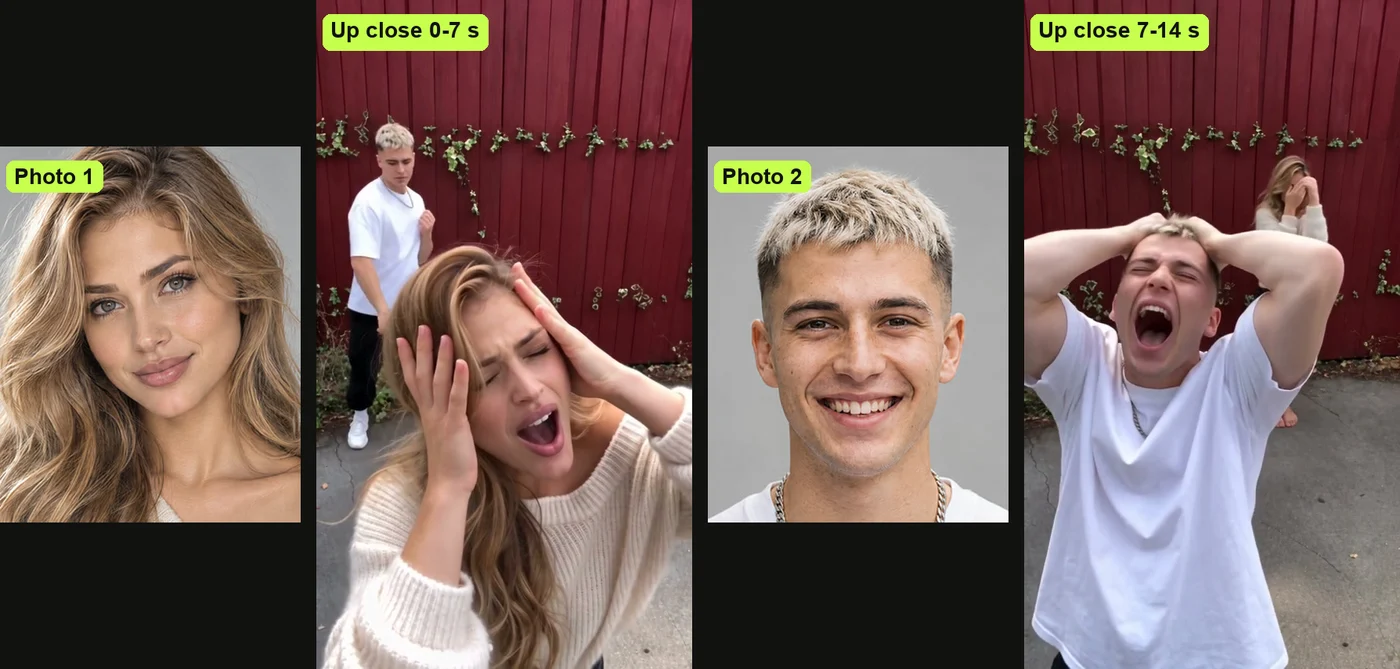
Your first photo wails up close for the first 7 seconds, and your second photo dances behind. On the cut, the two swap places, and the second dancer takes the close-up.
The 1984 recording plays from the first second. It's built right into the file.
Here's what's below:
- The 4 steps: add photos, pick your quality, and press Create.
- Who wails first: how the page assigns each close-up.
- The other routes: where templates and two-photo sites trip people up.
- The right photos: pictures that work best for people, pets and characters.
How Do You Make a Smalltown Boy AI Video?
To make a Smalltown Boy AI video, you add 1 or 2 photos to our page, pick a quality and press Create. You'll get back a vertical MP4 of about 14 seconds with your two dancers at the red fence.
Everything happens in your web browser, and the "Smalltown Boy" recording is already in the file. There's nothing to install.
- What changes: the faces, hair, build and outfits come directly from your photos.
- What stays: the red plank fence, the band of ivy, the handheld camera, and the hard cut at 7 seconds.
- What you hear: the 1984 recording of "Smalltown Boy" by Bronski Beat plays from the first second.
One photo's enough to create your clip, because the page makes a matching partner if you don't add a second one. Add your first photo to our Smalltown Boy AI generator and press Create.
What Happens in Your 14-Second Smalltown Boy AI Video
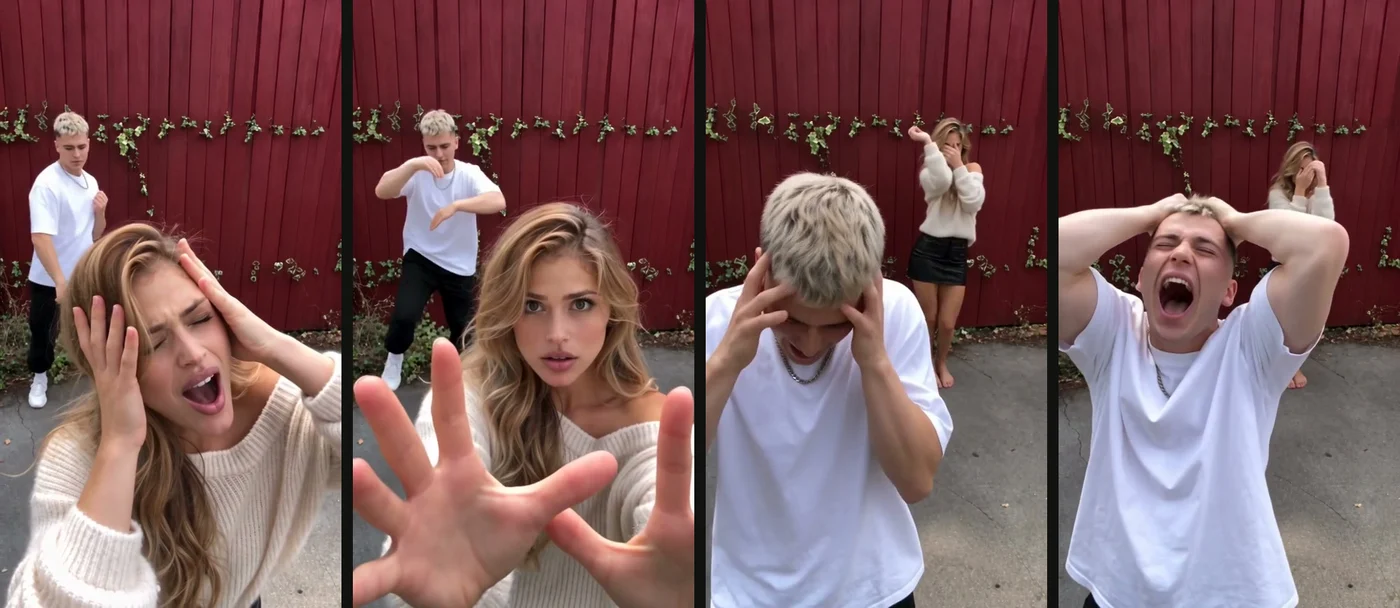
Your Smalltown Boy AI video is the viral cat clip's two close-ups and its trade at 7 seconds, remade with your dancers at a red wooden fence. Every move lands on the song's beat.
Here's how your 14 seconds play out:
- The first close-up (0 to 7 seconds): a handheld phone camera with a wide lens sits very close. Dancer 1 wails from the waist up, presses both hands to their head, shuts their eyes, and pushes both open palms at the lens.
- The dancer behind (0 to 7 seconds): dancer 2 dances an 80s routine small in the back against the red fence with crossed arms, high arm swings, and side steps.
- The trade (at 7 seconds): one hard cut swaps the two dancers.
- The second close-up (7 to 14 seconds): dancer 2 clutches the top of their head with high elbows. They press both hands to their cheeks and stare into the lens while dancer 1 dances behind.
The cut at 7 seconds is the joke, because the one who was dancing small at the back suddenly fills the screen. You can read how the Smalltown Boy dance trend started to see how the clip spread online.
Make a Smalltown Boy AI Video in 4 Steps
To make a Smalltown Boy AI video, you add your first photo, and add a second one if you want. Pick 480p, 720p or 1080p, and press Create, all on one page. You don't have to install any apps or write prompts.
Step 1: Add the Photo of Who Wails First
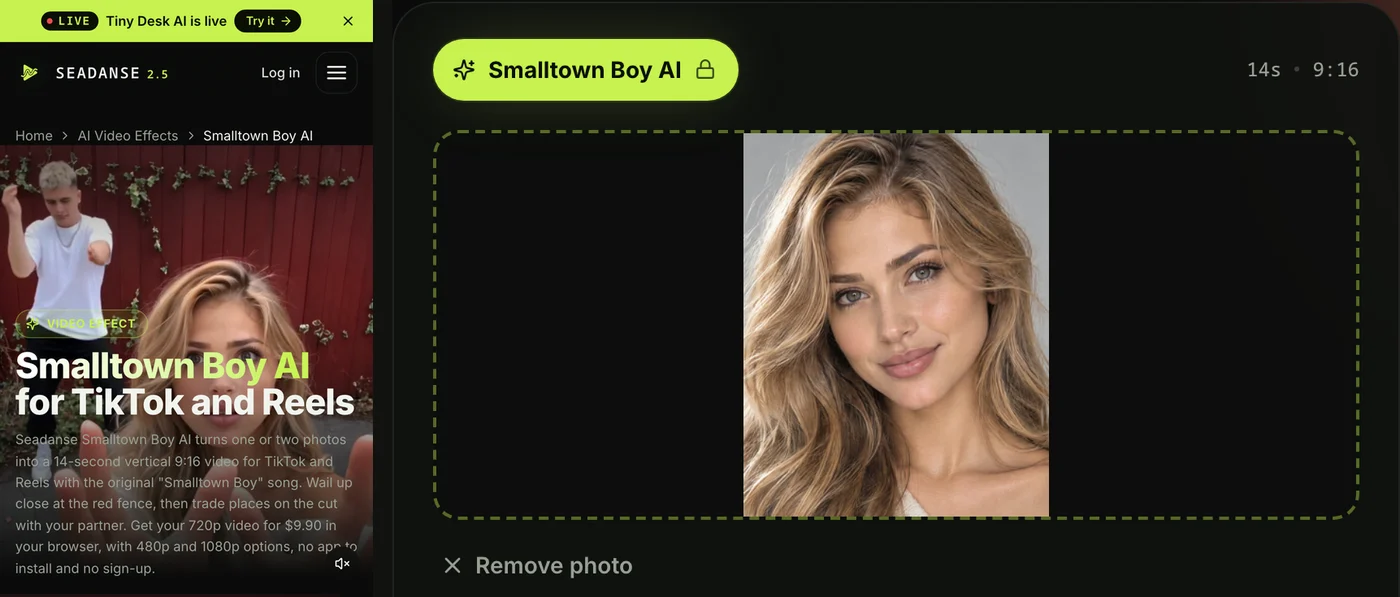
Open the Smalltown Boy AI page in your browser on your phone, tablet or computer. Tap the first photo box and pick a photo from your camera roll or your computer.
This photo wails up close first. That's dancer 1.
Step 2: Add a Second Photo or Leave It Empty
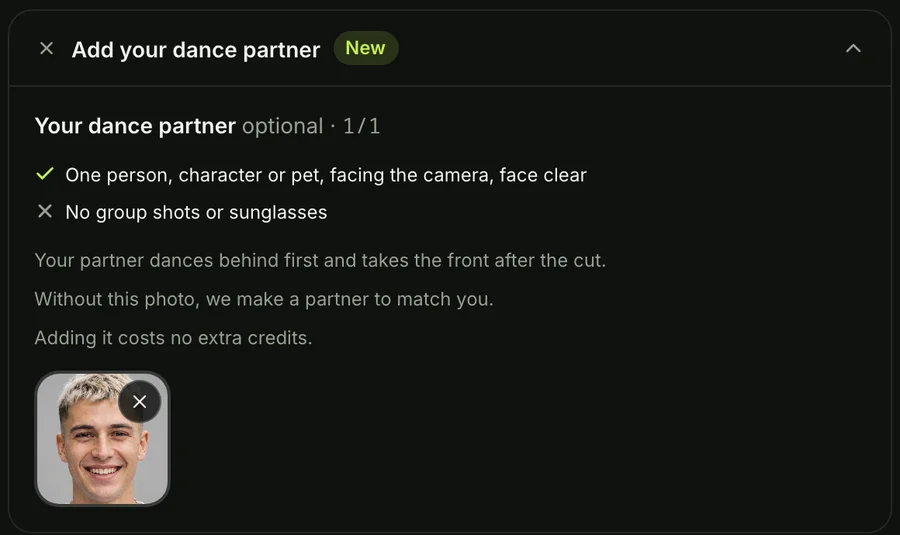
The second photo box is optional. Add the photo of the one who takes the close-up after the trade, or leave it empty.
If you leave it empty, the page makes a matching partner:
- A pet: another animal of the same kind.
- A character: a character in the same art style.
- A person: a friend in the same style of clothes.
One photo or two cost the same.
Step 3: Pick 480p, 720p or 1080p
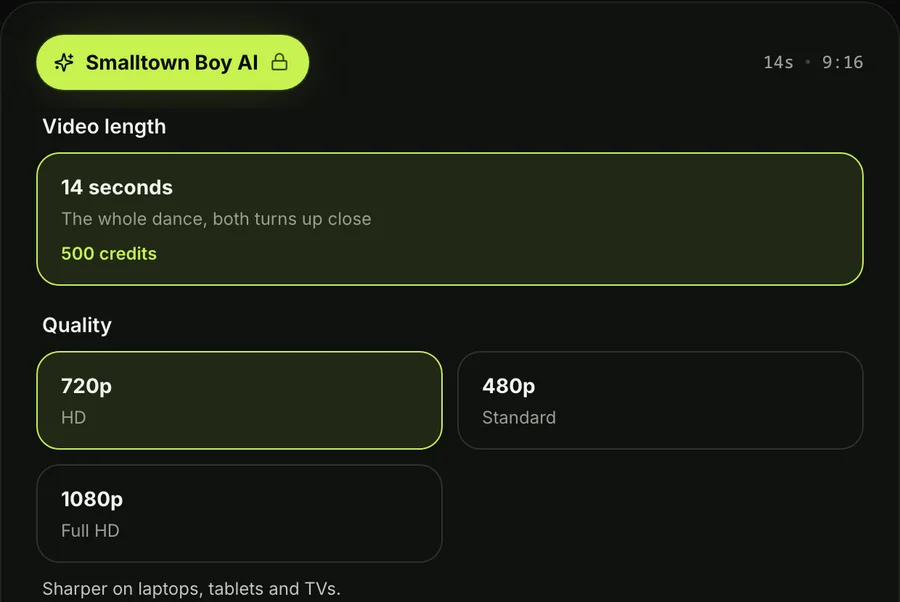
The page opens on 720p. Tap the quality switch to choose 480p, 720p or 1080p.
At every quality, your video's vertical 9:16 and about 14 seconds long. The price shows on the Create button before you pay.
Step 4: Keep the Box Ticked and Press Create
Leave the tick box ticked to confirm you have the right to use the photos and that every person in them is 18 or older. Press the Create button.
You don't need an account, since you pay once and your video starts right on the page.
A window with the credit packs opens. You pay once at checkout without a subscription, and your video starts on the page.
You can read how pay-once credits work if you want to see how credit packs run.
Your checkout email carries a sign-in link. That link lets you open and check your video on any phone, tablet or computer.
When your video's ready, download the 9:16 MP4 file. It's got no watermark, and the "Smalltown Boy" recording plays from the start. What you upload and what you make stays in your account until you delete it.
Who Wails First in Your Smalltown Boy AI Video
In your Smalltown Boy AI video, the photo you add first wails up close for the first 7 seconds, and the second photo takes the close-up after the trade. Under a Smalltown Boy dance video, a viewer asked: "cómo hago para ordenar quién aparece primero" (Spanish for "how do I choose who shows up first").
Here's who does what:
- Photo 1: wails up close from 0 to 7 seconds, then dances behind after the trade.
- Photo 2: dances behind at the start, then takes the close-up after the cut at 7 seconds.
- No photo 2: the page makes a matching partner for dancer 2, like another animal of the same kind or a friend in similar clothes.
Each dancer keeps their own face, hair and outfit from their photo, up close and at the back. Put the one with the best wailing face first.
How Other People Make Smalltown Boy AI Videos
Most Smalltown Boy AI videos online come from a CapCut template, a two-photo generator site, or an AI tool that copies a dance from a reference clip. Each route trips people up in its own way.
Here are the three routes:
- CapCut templates: a CapCut template is an edit someone already built in the CapCut app, with a slot for your photo. The most-used one pastes the original dancing cats over your picture as a background. One viewer under a CapCut tutorial wrote: "Didn't work for me it just put the original two dancing cats over my picture". Other templates spend credits inside the app, leading a viewer to say: "I cant use it, keeps asking me to pay".
- Two-photo generator sites: web pages built for this trend ask you to upload two photos, one for the dancer up front and one for the dancer behind. Most of them won't make a partner if you only have one photo.
- Reference-clip AI tools: an AI tool copies the moves of a reference clip onto your photos. But you bring the clip yourself, and you add the audio in an editor.
The hand-made route can also get expensive. In one maker's test video, a single try cost 175 credits on the tool he used.
Our Smalltown Boy AI video maker keeps everything simple. You don't have to hunt for a template, manage reference clips, write prompts, or edit audio tracks.
The two close-ups, the swap at 7 seconds, the red fence and the song are built into the page. That's why it's easy.
Read which Smalltown Boy CapCut template is the real one to see how the app templates compare.
You can also check the Smalltown Boy AI generators compared to see other tools side by side.
Which Photos Work Best for a Smalltown Boy AI Video
The photos that work best for a Smalltown Boy AI video show one person, pet or character each, with the face clear, facing the camera and in good light. Clear pictures help the page build your dancers cleanly.
Here's what works best:
- One subject per photo: pick a photo that has just one person, pet or character in the frame.
- A clear face: choose a picture where the subject faces forward without sunglasses, so the eyes show.
- The outfit you want: use a picture showing the clothes you want your dancer to wear, since they'll keep them throughout the video.
- 18 or older: make sure every person in your photos is an adult.
Pets and characters work great too. A cat or dog stays a real animal of its own breed, standing on its hind legs and dancing with its paws.
If you upload a cartoon or game character in photo 1, the video turns into that drawing style, fence included. You can even mix them, like pairing yourself with your cat. It's that flexible.
If you want to create the dance manually in another tool, grab the copy-ready Smalltown Boy AI prompt.
Smalltown Boy AI Video FAQ
How do I do the Smalltown Boy AI dance trend?
Add 1 or 2 photos to our Smalltown Boy AI page, pick a quality, and press Create. You can also search for a template inside CapCut or use a two-photo generator site. That's all there's to it.
Can I make a Smalltown Boy AI video with my cat or dog?
Yes, pets dance on their hind legs and keep their real breed, face, ears, and coat. If you upload one pet photo, the page makes another animal of the same kind with a different coat. You'll see paws instead of hands. A viewer asked: "can I create this with my dog?".
What if I only have one photo?
One photo's plenty to make the video. Your single photo wails up close first, and the page makes a matching partner who dances behind and takes the second close-up. You won't need a second picture.
What song plays in the Smalltown Boy AI video?
The audio in the video is the 1984 recording of Smalltown Boy by Bronski Beat, sung in falsetto by Jimmy Somerville. The video uses the synth hook and high wails from about 30 seconds into the original track. Under trend videos, "song title?" was asked at least six times.
Do I need an app, a template or a prompt?
No, you don't need an app, a template, or a prompt. The page runs right in your browser, and the camera work, the dance routine, and the song are built in. There's nothing extra to install.
How much does a Smalltown Boy AI video cost?
One 720p video costs $9.90, paid once without a subscription. That $9.90 pack gives you 500 credits.
- 720p: it takes 500 credits from the $9.90 pack.
- 480p: it takes 375 credits from that same $9.90 pack.
- 1080p: it takes 1,480 credits from the $39.90 pack of 2,500 credits, leaving the rest in your balance.
One photo or two cost the same. Pack credits stay valid for 12 months, and failed video credits return automatically. Check Seadanse pricing for more details.
Can I make other AI dance videos with the same photos?
Yes, you can use your photos in Uptown Funk AI to join a 15-second street dance with up to four friends. You can also pick No Scrubs AI to take the lead in a 15-second chorus routine. Explore our other AI video effects to turn photos into dance clips without writing prompts. You'll have plenty of options.
Make Your Smalltown Boy AI Video Now
You can make your own video in your browser by adding 1 or 2 photos to our page. Dancer 1 wails up close, dancer 2 dances behind, and the two swap places at 7 seconds by the red fence to the classic 1984 song.
Head over to make a Smalltown Boy AI video for $9.90 at 720p. You'll have your dance clip ready to share.
Written by The Seadanse Team, the team that built the Smalltown Boy AI page.
Related Articles
- What Is the Smalltown Boy Dance Trend? The Wailing Cats, Explained — who posted the two cats, why the song came back, and how the dance spread.
- Smalltown Boy CapCut Template: Which One Is Real and Why It Fails — the six templates, the green-screen one, and the fixes.
- Best Smalltown Boy AI Generators (2026): 10 Ways Compared — the sites and apps that make this video, side by side on photos, length, sound and price.
- Smalltown Boy AI Prompt (Copy-Ready): Both Close-Ups and the Trade — a full prompt for the two shots, to use in a video tool yourself.


