
Police Arrest AI Prompt: 3 Video and 2 Photo Prompts to Copy
Seadanse police arrest AI prompts: 3 video prompts with 10-second test clips, 2 photo prompts for Gemini, or 1 photo makes the video for $9.90 at 720p.
 The Seadanse Team25 min read
The team behind Seadanse. We run the models we write about, and we publish the specs, prices and limits the marketing leaves out.

TL;DR — A police arrest AI prompt turns your photo into a staged arrest, either a 10-second video or a photo. Two officers cuff you under red and blue lights, and you smirk at the camera. Below are three video prompts (solo, group and pet), each with the clip we made from it on Seedance 2.5, plus two photo prompts for Nano Banana 2 or Gemini. If you'd rather not write a prompt, the AI Arrest Video Generator makes the clip from one photo, $9.90 for one 10-second 720p video, with no account needed.
The "Not bro, getting arrested again" clip took off on TikTok in mid-September 2026. Most of those clips come from one CapCut template, which showed 26,570,873 uses on October 7, 2026.
Under one big tutorial, 17 of the 83 comments ask for "CapCut Pro", and at least six ask the creator to make the video for them.
A prompt fixes that problem: you paste it with your own photo into whatever tool you like. That's why people search for one, and Google's suggestions on October 7, 2026 included "ai police arrest prompt" and "gemini ai police arrest prompt".
Below you'll find three video prompts with the test clips we made from them, plus two photo editing prompts. You'll also get the steps to run them on Seadanse and the habits that keep your face intact.
What a police arrest AI prompt needs: 8 parts
A police arrest AI prompt names who is in your photo, the officers, the place and the camera. It also times the walk second by second, then adds the look into the lens, the sound and the rules that keep it staged.
| Part | What to write | From our solo prompt |
|---|---|---|
| Who | The person in your photo, and what must stay the same | "Keep their face, hairstyle, skin tone, body proportions, age and clothing exactly as in the photo" |
| The officers | Two strangers in uniform, described so they look the same all through | "a tall man in his 40s with a buzz cut and a stocky woman in her 30s" |
| Place and light | Where it happens and what lights it | "a two-storey suburban house", "flashing red and blue lights" |
| Camera | Who is filming, and how | "as if a neighbour is filming casually" |
| Timed beats | What happens second by second, adding up to the clip length | "0-3s", "3-7s", "7-9s", "9-10s" |
| The look | The punchline: the look into the lens | "a knowing, mischievous smirk with the lips closed" |
| Sound | What you hear, and what you don't | "a police radio crackle", "No music" |
| Rules | What must never happen | "The arrest is staged and fictional" |
Every quote in the last column is copied from the solo prompt below.
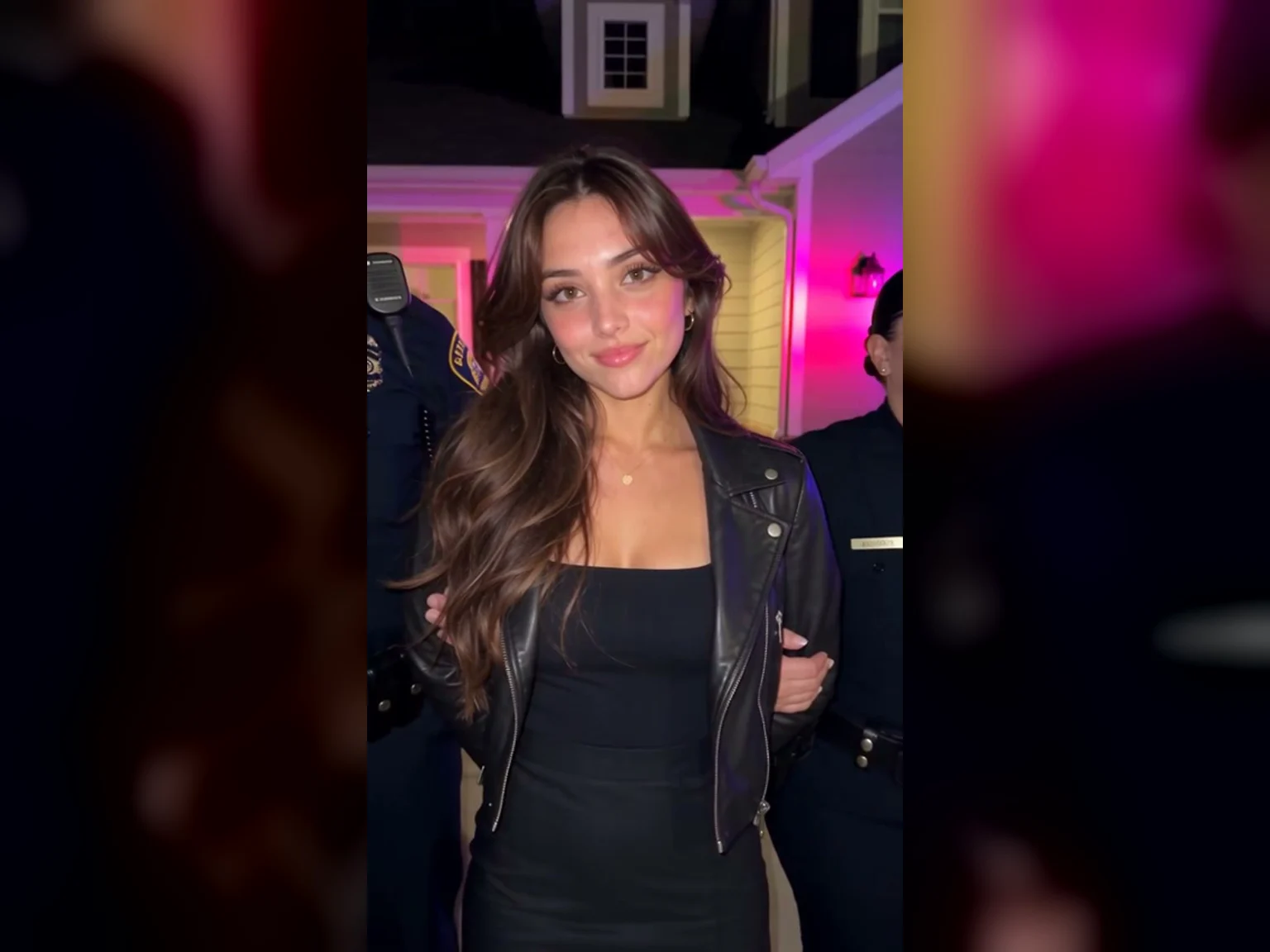
The look, in a frame from the sample on our AI Arrest Video page: a closed-mouth smirk straight into the lens.
You'll find all eight parts, in this order, in each of the three video prompts below.
Skip the prompt: make an AI arrest video from one photo
Our AI arrest video effect builds the scene in advance, so you don't have to write a prompt. It sits among our browser-based AI video effects and uses Seedance 2.5 to turn a single photo into a full video.
- Photo: you upload one photo of an adult aged 18 or older with a clear face, where a knee-up or full-body view works best.
- Scenes: the page offers Solo, Group for two to six adults where an officer cuffs one person, and Pet for a dog or cat.
- Shapes: you can pick Portrait 9:16 or Landscape 16:9.
- Quality: one 10-second video costs 375 credits at 480p, 500 credits at 720p or 1,480 credits at 1080p.
- Pricing: $9.90 buys the 500-credit pack, which covers exactly one 10-second 720p video.
- Button: when signed out, the main button at 720p reads "Create · $9.90".
- Account: you don't need an account, because you pay once and your video starts right on the page.
- Note: an optional note lets you change the setting or outfit, like "walking out of a glass office lobby in a suit".
- Consent: you check a box confirming you have the right to use the photos and that everyone pictured is 18 or older.
- Output: you download a 10-second MP4 with native sound, including sirens, radio chatter and footsteps.
- Watermark: there's no watermark on exported video.
- Credits: a video that fails returns its credits automatically, and credit packs stay valid for 12 months.
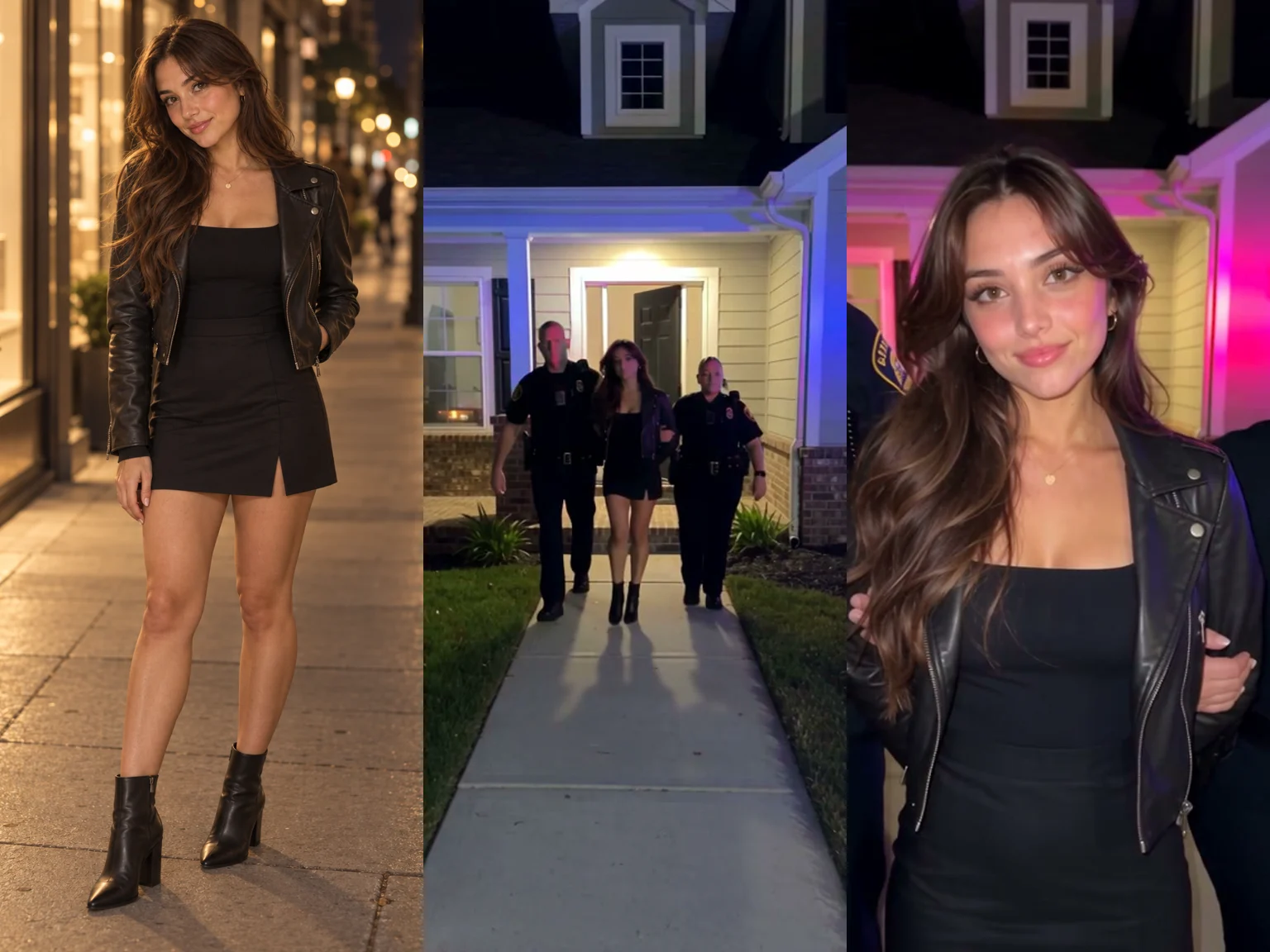
Left: one photo of an AI-made woman. Middle and right: two frames from the sample on our AI Arrest Video page, made from that photo.
You can read our step-by-step guide to the AI arrest trend for a complete run-through of that effect. If you'd rather direct the whole clip yourself, the prompts below show you how.
Solo police arrest AI prompt: getting arrested again
The solo prompt generates a continuous 10-second handheld take at night from the point of view of a neighbour on the front path. Two officers walk you out of a suburban house in handcuffs without stopping.
At seven to nine seconds, you're still walking when you give a closed-mouth smirk straight into the camera. Then you walk past the lens toward the squad car under red and blue emergency lights. Distant sirens, radio crackles, crickets and footsteps play in the background without speech or music.
We built this prompt from the prompt SHERRY2.0 shared on YouTube in his October 3, 2026 tutorial. We've kept his night walk and added beats timed in seconds, a description of each officer and a rules line at the end.
Vertical 9:16, 10 seconds. A realistic, spontaneous-looking documentary-style smartphone video of a fictional, staged arrest at night, in one continuous take with no cuts.

Who: the person in my photo [one line: age, hair and outfit, e.g. a woman in her mid 20s with long dark-brown hair, a black mini dress and a cropped black leather jacket]. Keep their face, hairstyle, skin tone, body proportions, age and clothing exactly as in the photo. Nobody else has that face. With them are two uniformed police officers, both strangers: a tall man in his 40s with a buzz cut and a stocky woman in her 30s with her hair in a tight bun, in realistic police uniforms with duty belts, shoulder patches, badges and radios.

Story: the person walks out of a suburban house in handcuffs between the two officers and comes down the front path toward the camera without ever stopping. Still walking, a step or two in front of the camera, the person looks straight into the camera lens with both eyes, making direct eye contact with the viewer, and gives a knowing, mischievous closed-mouth smirk, then faces forward again as the three walk on past the camera.

Camera: one continuous handheld shot. The phone is held at eye level, standing still on the edge of the front path several metres from the house, as if a neighbour is filming casually: subtle hand shake, small smartphone exposure shifts, believable night-footage imperfections, moderate depth of field, no cinematic grading.

Setting: the front door of a two-storey suburban house is open, warm light inside. A police car is parked at the curb behind the camera; its flashing red and blue lights sweep across the person, the officers, the house front, the lawn and the pavement, with realistic shadows and reflections under the street lamps.

0-3s: The person steps out of the front door with both hands cuffed behind their back, one officer holding each arm, and the three start down the front path toward the camera at a calm, natural walking pace.
3-7s: They keep walking toward the still camera, growing from a wide shot to a medium shot. The person walks calmly with relaxed, confident body language, no resistance; the officers look straight ahead, professional and composed.
7-9s: Still walking, without stopping, they reach a step or two in front of the camera with the person's face square to the lens. The person looks straight into the camera lens with both eyes, holding direct eye contact with the viewer, and gives a knowing, mischievous smirk with the lips closed.
9-10s: The person faces forward again and the three walk on past the side of the camera toward the police car.

Sound: police sirens, distant emergency vehicles, a police radio crackle, footsteps on the pavement, light clothing movement, crickets and quiet night street ambience. No dialogue: nobody speaks and the person keeps their lips closed. No music.

Rules: exactly one arrested person, the adult from my photo, recognizable for the whole take and never duplicated. The group keeps walking and never stops. At the smirk, the person looks directly into the lens, not to the side. The arrest is staged and fictional: the officers are calm and professional, no weapons drawn, no struggle, no force, no injury, no blood. No subtitles or on-screen captions, no watermark.Our test of the solo prompt's scene, made on October 7, 2026 with Seedance 2.5 from one photo of an AI-made woman: 10 seconds, 480p, 9:16, with sound. It's the same clip as the sample on our AI Arrest Video page.
How to use it:
- Your photo: use a clear photo of one adult in good lighting, ideally framed from the knees up or full body.
- The bracket: replace the bracketed text with a single line describing your subject's age, hair and outfit.
- Length and shape: set it to 10 seconds and 9:16. That's how the timed beats line up with the video.
- Where to run it: paste the text into Seadanse's image to video AI with your reference photo and choose Seedance 2.5.
Group police arrest AI prompt: who gets taken away
The group joke started in mid-2025 as the AI arrest filter. The Tab explained the 2025 version when the trend first surfaced, noting that "the fake police officer then grabs a person in the picture and takes them away".
This prompt creates a 10-second evening scene outside a restaurant where friends are posing together.
An officer walks in, picks one friend from the group, cuffs them, and leads them away toward a patrol car while the chosen friend grins and the others point and laugh.
Vertical 9:16, 10 seconds. A handheld phone video in the evening, as if filmed by one more friend: slightly shaky, warm string lights and street lamps, red and blue emergency light sweeping across the brick wall, no cinematic grading.

Who: the friends in my photo, standing side by side [one line per friend, left to right, e.g. a tall man with short black hair and a light beard in a navy bomber jacket; a woman with long honey-blonde waves in a cream knit sweater]. Each friend keeps their own face, hair, skin tone, body proportions, age and clothes from the photo; nobody else has their faces. One uniformed police officer, a stranger: a broad-shouldered man in his 40s with a buzz cut, dark navy uniform, duty belt, radio on the shoulder, badge without any readable text.

Story: the friends pose for a group video outside a restaurant, smiling, when the officer walks into the frame, looks them over, picks exactly one of them, cuffs that one friend's hands behind their back and walks them away toward a police car with flashing red and blue lights, while the others stay where they are, jaws dropping, then bursting out laughing.

0-3s: Medium-wide, the friends side by side outside the restaurant, arms around each other, smiling into the camera. The officer steps in from the right edge of the frame and stops in front of them, studying their faces one by one.
3-7s: The officer points at exactly one friend, takes that friend gently by the arm, turns them around and clicks the handcuffs on behind their back. The chosen friend looks back over the shoulder at the camera, mouth open in mock disbelief. The others stay in place, hands over their mouths.
7-10s: The officer walks the chosen friend toward a police car parked at the curb with flashing red and blue lights; the chosen friend turns to the camera with a big amused grin. The others are still standing in the same spots, laughing and pointing.

Sound: street ambience, a short siren chirp, a police radio crackle, the click of handcuffs, the friends' gasps turning into laughter. No speech. No music.

Rules: exactly the friends in my photo, no one added or removed, and exactly one police officer. The officer takes exactly one friend; the others stay in frame, uncuffed, with their own unchanged faces. Every friend is recognizable from the photo and nobody is duplicated. The officer is calm: no weapons drawn, no force, no injury, no blood. No text, no subtitles, no readable badges or department names, no real brands or logos, no watermark.Our test of the group prompt's scene, made on October 7, 2026 with Seedance 2.5 from one photo of four AI-made friends: 10 seconds, 480p, 9:16, with sound.
How to use it:
- Your photo: use one group photo of two to six adults, with clear faces that aren't covered.
- The bracket: fill the bracket with one short description per friend from left to right, detailing their hair and clothing.
- Length and shape: pick 10 seconds and 9:16.
Our AI arrest video maker also has this Group scene built in, letting an officer cuff one person from a group picture while the others watch.
Pet police arrest AI prompt: your dog or cat on a leash
Pets have joined the trend too, prompting creators to stage funny walk-outs with their animals. Google's search suggestions on October 7, 2026 even included "ai cat getting arrested".
This prompt sets up a 10-second night scene where two officers lead your dog out of a house on a leash.
The animal trotting down the path looks right at the camera with its tongue out, completely unbothered, while emergency lights wash over the front yard.
Vertical 9:16, 10 seconds. A handheld phone video at night, as if filmed by a neighbour: slightly shaky, real night exposure with a little grain, red and blue emergency light washing over the walls, porch light and street lamps, no cinematic grading.

Who: the dog in my photo [one line: breed, coat and collar, e.g. an adult golden retriever with a fluffy golden coat and a red nylon collar]. It is a real dog on four legs the whole time, with the same breed, size, coat colour and markings, face and collar as in the photo. Two uniformed police officers, both strangers: a tall man in his 40s with a buzz cut and a stocky woman in her 30s with her hair in a tight bun, dark navy uniforms, duty belts, radios on the shoulder, badges without any readable text.

Story: the dog is walked out of a suburban house on a leash by the two officers, red and blue police lights flashing, and halfway down the path turns its head to the camera with its tongue out like it is no big deal.

0-3s: Wide, from the front lawn. The front door of a two-storey suburban house is open, warm light inside. One officer leads the dog out onto the porch on a short black leash, the other walking beside them. A police car with flashing red and blue lights is parked at the curb, its light sweeping across the house.
3-7s: The camera walks backwards in front of them as the officers lead the dog down the front path toward the street, the dog trotting calmly between them on all four paws, tail wagging slowly. Medium shot, the dog's face fully visible and lit by the flashing lights.
7-10s: Low medium close-up: the dog turns its head to the camera, ears up, mouth open, tongue out, looking pleased with itself, still trotting between the officers toward the police car.

Sound: a police radio crackling, paws and boots on the path, a distant siren winding down, crickets. No dialogue. No music.

Rules: exactly one dog, the dog in my photo, a normal four-legged dog in every shot, never a person, never standing upright, never duplicated. No handcuffs on the dog, only the leash. The officers are calm and gentle: no weapons drawn, no force, no injury. No text, no subtitles, no readable badges or department names, no real brands or logos, no watermark.Our test of the pet prompt's scene, made on October 7, 2026 with Seedance 2.5 from one AI-made photo of a golden retriever: 10 seconds, 480p, 9:16, with sound.
How to use it:
- Your photo: pick a clear, full-body picture of your dog or cat.
- For a cat: swap the word "dog" for "cat" throughout the prompt while leaving the four-legs rule and leash text in place.
- Length and shape: pick 10 seconds and 9:16.
Our effect includes a Pet scene that takes a full-body animal photo and produces this staged walk-out automatically.
Police arrest AI photo editing prompts for Nano Banana 2 or Gemini
A photo prompt creates a single image instead of a moving clip.
Worldwide, searches for "police arrest ai photo editing" hit 480 a month in December 2025. Searches for "police arrest ai prompt" peaked at 880 that same month and averaged 110 a month over the 12 months to August 2026.
You can make these photos with Nano Banana 2 on Seadanse, which Google released on February 26, 2026 under the official name Gemini 3.1 Flash Image.
Google DeepMind's own prompt guide asks for style, subject, setting, action and composition to control the output. It also tells you to name the aspect ratio you want, such as 9:16.
Photo prompt 1: "if being cute was a crime", walked out at night
This prompt asks for a photo of the solo walk-out with the knowing smirk people often caption "if being cute was a crime".
Turn my photo into a realistic night-time phone photo of a fictional, staged arrest. Keep the person from my photo exactly as they are: same face, hairstyle, skin tone, body and clothes.

They walk down the front path of a two-storey suburban house toward the camera, hands cuffed behind their back, with a uniformed police officer holding each arm: a tall man in his 40s with a buzz cut and a stocky woman in her 30s with her hair in a tight bun, both calm and professional. The person looks straight into the camera lens with a knowing, closed-mouth smirk.

The front door behind them is open, warm light inside. Red and blue lights from a police car at the curb wash over the house, the lawn and all three of them. Eye-level phone shot from a few metres away, knee-up framing, slight grain, natural night exposure, no cinematic grading. Vertical 9:16.

No weapons, no struggle, no readable badges or department names, no text, no watermark.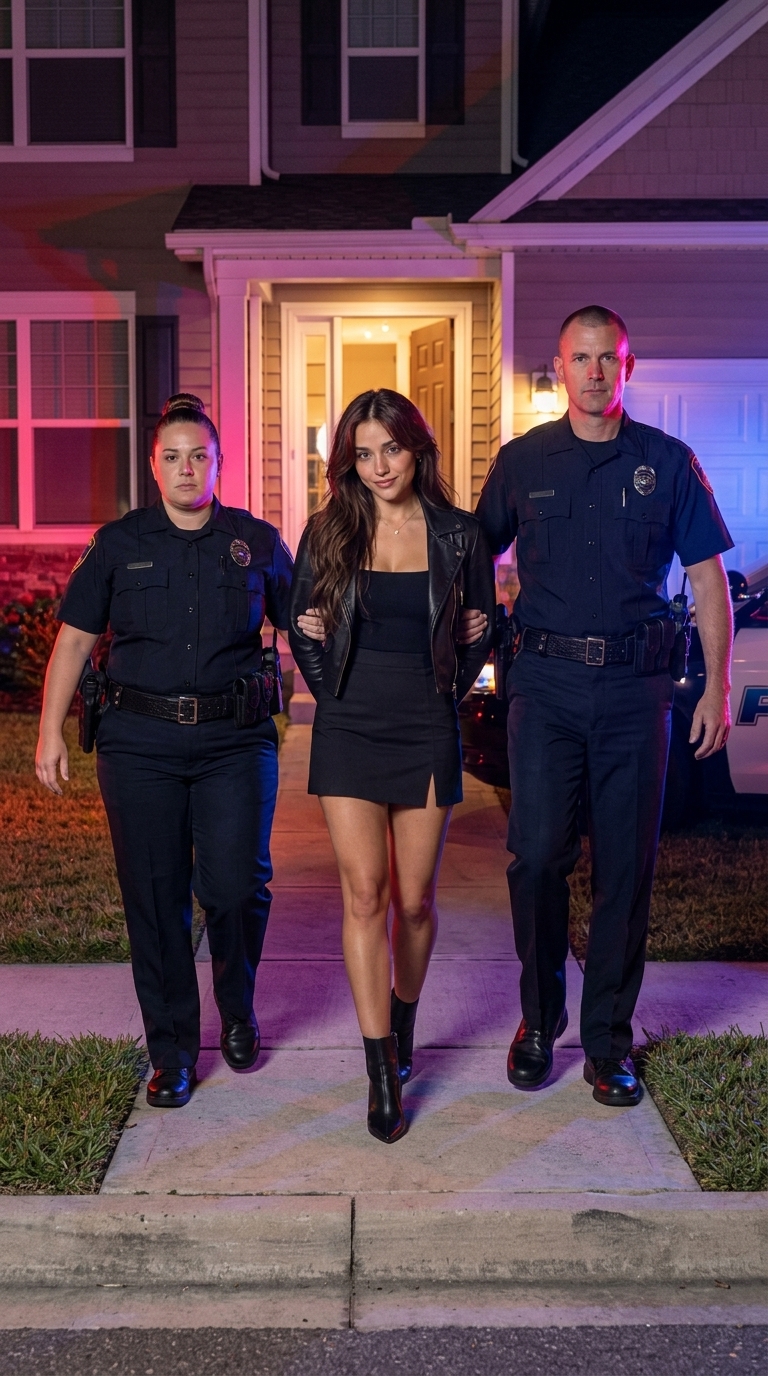
Photo prompt 2: the friend who gets taken
This prompt asks for an evening group photo outside a restaurant where one friend is cuffed and grinning while the others laugh.
Turn my group photo into a realistic evening phone photo of a fictional, staged arrest. Keep every friend from my photo exactly as they are: same faces, hair, skin tones and clothes, no one added or removed.

The friends stand side by side outside a restaurant with warm string lights and a brick wall. One uniformed police officer, a broad-shouldered man in his 40s with a buzz cut, has just cuffed one friend's hands behind their back and holds them by the arm. The chosen friend looks back at the camera with a big amused grin. The other friends stay where they are, uncuffed, laughing and pointing.

Red and blue light from a police car at the curb sweeps across the brick wall. Handheld phone look at eye level, waist-up framing, natural evening light, no cinematic grading. Vertical 9:16.

No weapons, no force, no readable badges or department names, no real brands or logos, no text, no watermark.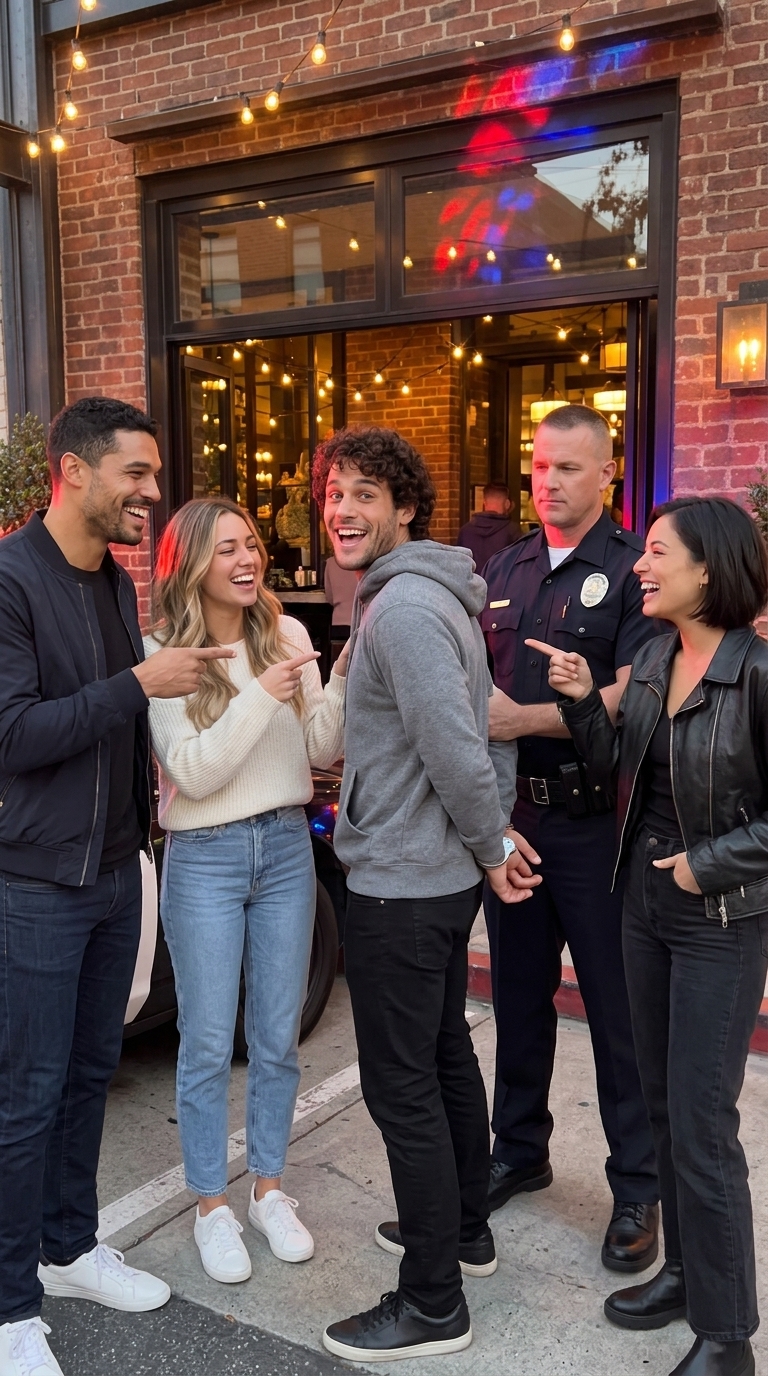
If you need a booking photo, an interrogation room scene or a station walk-out instead of a front porch, explore our AI mugshot generator guide.
How to run a police arrest AI prompt on Seadanse
You can make these videos and photos on Seadanse by pasting the prompts into the composer in your browser. Seedance 2.5 was released by ByteDance on July 31, 2026 to handle synchronized visuals and audio together in one pass.
Run a video prompt in the image to video AI
Here's how to make the video in the image to video AI, in six steps:
- Sign in and open Seadanse's image to video AI workspace.
- Keep the Video lane on and set the mode to Text / Reference to Video.
- Press Add media and upload your source photo.
- Paste the video prompt into the box and fill in your bracket description.
- Pick Seedance 2.5, set the duration to 10 seconds, choose 9:16, and pick 480p, 720p or 1080p.
- Generate the video, then download the finished MP4 file.
Every prompt block on our site features a "Use in generator" button that loads the text directly into the tool for you.
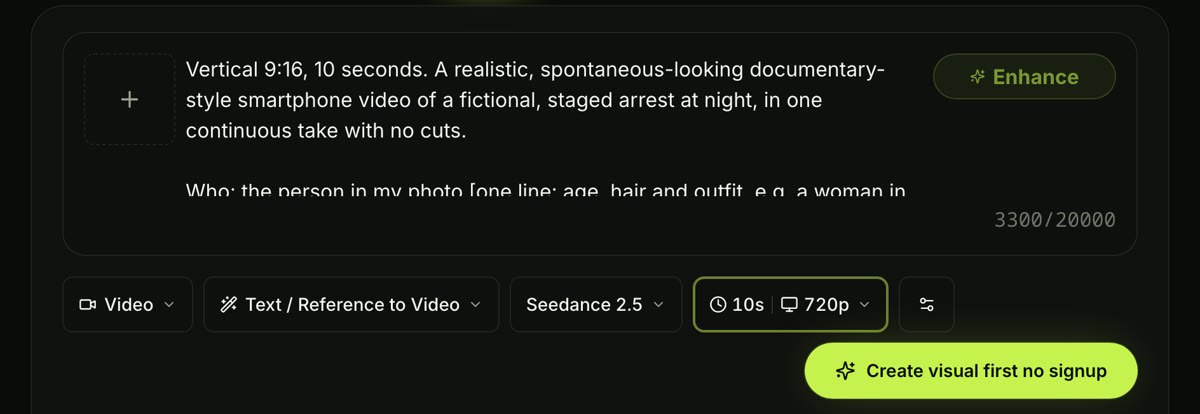
Seadanse's image to video AI with our solo prompt pasted in: Text / Reference to Video, Seedance 2.5, 10 seconds, 720p. Captured October 8, 2026.
Run a photo prompt with Nano Banana 2
Here's how to edit your photo with Nano Banana 2, in four steps:
- Sign in and open Nano Banana 2 on Seadanse.
- Keep Text/Image to Image active, press Add media, and upload your reference picture.
- Paste your chosen photo prompt into the prompt box.
- Pick 1K, 2K or 4K and the 9:16 shape, then generate the image.
On Seadanse, one Nano Banana 2 image costs 7 credits at 1K, 11 credits at 2K or 16 credits at 4K. An image that fails returns its credits automatically.
Police arrest AI prompt tips: keep your face, land the grin
Getting the staged arrest look right takes a few specific prompt habits.
- Photo: upload one adult with a clear face in good light, in a knee-up or full-body shot. For groups, use two to six clear faces; for pets, a full-body shot of the animal.
- What stays the same: tell the model early to lock down the face, hair, skin tone and clothing from your reference image before describing the arrest.
- Timed beats: keep the timing structured across zero to three, three to seven, seven to nine, and nine to 10 seconds so the walk matches the total clip length.
- The look: write that the person "looks straight into the camera lens with both eyes" and gives "a knowing, mischievous smirk with the lips closed". That's the viral punchline.
- Keep walking: instruct the group so it "keeps walking and never stops", making sure the turn to the camera happens "Still walking, without stopping".
- Sound: state audio cues like sirens, radio crackles and footsteps directly, and write "No dialogue" and "No music" to block unwanted background audio.
- No department names: ask for "badges without any readable text" and finish with "no readable badges or department names" so uniforms look fictional.
- A new place: swap the suburban house for another background like an office lobby while keeping the rest of the camera and timing lines intact.
- Least likely suspect: AIXList's guide to the arrest trend points out that "the format works best on the least likely suspect imaginable — a grandparent in their garden clothes, a friend in their work outfit, a cat".
Police arrest AI prompt FAQ
Can I use these prompts in Gemini, Google Flow or CapCut?
Yes. They're plain text, so they paste into any tool that takes a photo and a prompt. SHERRY2.0 runs his solo prompt in Google Flow, and our photo prompts follow the structure outlined in Google DeepMind's official guide.
On Seadanse, the video prompts run with Seedance 2.5 in the image to video AI, and the photo prompts run in Nano Banana 2.
Can I get a police arrest AI prompt in a cinematic, anime or retro mugshot style?
Yes. You can restyle the scene by changing the look words in the first line of the prompt. Swap phrases like "documentary-style smartphone video" for an anime or cinematic look, remove "no cinematic grading", and keep the story beats and rules intact.
If you want a retro booking style, start with the booking mugshot prompt in our mugshot guide and adjust its look terms.
Do I need a CapCut template link for the AI arrest video?
No, you don't need a template link. While templates exist inside CapCut, you can use our standalone effect page to produce the same walk-out video directly in your web browser.
That page needs just one photo and charges $9.90 for one 10-second 720p video, and you don't need an account.
Is there a police AI video prompt generator?
Seadanse includes an Enhance button inside the generator that acts as an automated prompt builder. You type a basic idea, click Enhance, and it expands your idea into a full shot list you can apply or discard.
You can also bypass manual prompting completely by using the pre-built effect page.
How long should an AI arrest video be?
AI arrest videos generally run between eight and 10 seconds. The popular CapCut template runs for 8.04 seconds, while our prompt beats are built for a 10-second clip.
On Seadanse, you can generate clips from five to 30 seconds with Seedance 2.5, while the arrest effect makes 10-second videos.
Is it okay to post an AI arrest video?
Yes, as long as you make it with your own photo or with the consent of friends who are 18 or older. Keep the fictional nature obvious by preserving the playful grin, keeping the officers calm, and omitting real department names.
As AIXList advises, "never caption a generated arrest clip as real footage".
How much does it cost to run a police arrest AI prompt on Seadanse?
A $9.90 credit pack gives you 500 credits, which pays for one 10-second 720p clip on the dedicated effect page.
In the image to video AI, the price depends on the length and quality you pick, and the Seedance 2.5 cost calculator works it out before you generate. A Nano Banana 2 image costs 7 credits at 1K, and a video or image that fails returns its credits automatically.
Make your AI arrest video tonight
A police arrest AI prompt coordinates the people, the officers, the location, the timed walk, the smirk, the sound, and the safety rules inside a clean 10-second frame.
Copy one of the prompts above to build your own scene, or make your AI arrest video from one photo in just a few clicks.
Written by The Seadanse Team. We ran the three video prompts with Seedance 2.5 on October 7, 2026, and checked every price and button on the live site on October 8, 2026.
Related Articles
- How to Do the AI Arrest Trend From One Photo — the steps on the AI Arrest Video page, from one photo to a 10-second clip.
- AI Mugshot Generator: Make an AI Arrest Photo, Then a 10-Second Video — photo prompts for a booking mugshot, a police-station walk-out and an interrogation room.


