
Tiny Desk AI Dog Prompt: 3 Copy-Ready Prompts for Your Dog Band
Seadanse: three copy-ready Tiny Desk AI dog prompts for your lead singer, band and sax solo, written for dogs, or skip prompts with one dog photo.
 The Seadanse Team13 min read
The team behind Seadanse. We run the models we write about, and we publish the specs, prices and limits the marketing leaves out.

TL;DR — A Tiny Desk AI dog prompt tells a video tool to put the dog in your photo into the 19-second "Outstanding" finale. The three below cover its five shots: the lead singer, the band at the red keyboard and the sax solo. You run each prompt with a short clip of that shot plus your dog photos, join the finished shots and add the sound. Or skip prompts entirely: one dog photo on Seadanse's Dog Tiny Desk AI for TikTok and Reels page makes the whole video with the "Outstanding" sound. It's 720p for $9.90, with no sign-up.
Dog bands playing the "Outstanding" finale are all over TikTok and Reels. Most prompts people share just ask for a dog at a desk. They don't say which dog plays what, or how your dog keeps its own coat and markings.
The three prompts here split the finale into its three parts. There's one prompt per part, and every line's written for dogs. You'll get your dog's true look instead of a generic pet.
We cast five dogs this way: a golden retriever, a shiba inu, a corgi, a French bulldog and a husky. Under every prompt below, you'll see that exact part of our five-dog video.
What a Tiny Desk AI Dog Prompt Has to Tell the Tool
A Tiny Desk AI dog prompt has to tell the tool six things, and our three prompts say all six. Here's what every prompt covers:
- Your dog's look: "exactly its face, coat colour, markings, ears, eyes and build", so the tool keeps your dog instead of a generic dog.
- Your dog's spot: which band member in your clip your dog takes over.
- Your dog's paws: where the paws go, like sitting upright "with its front paws on the keys" or holding the gold saxophone.
- An outfit: a specific piece of clothing, like "a plain black hoodie, with no letters, words, print or logos anywhere on it", because a dog photo has no clothes for the tool to copy.
- What stays from the clip: "the camera, framing, lens, every cut and camera move, the timing", the microphones, stands, lighting, colours and room shelves.
- What never shows: negative lines (lines that say what must not show up) at the end of each prompt.
You can copy them as they are, because every line's already written for dogs.
The Tiny Desk AI Dog Prompt Formula in Five Parts
Every Tiny Desk AI dog prompt below is built from the same five parts.
| Part | From our prompts | What it does for you |
|---|---|---|
| Subject | "the dog in @Image1: exactly its face, coat colour, markings, ears, eyes and build" | Your dog stays your dog, not a look-alike. |
| Action | "sitting upright with its front paws on the keys" | Each dog plays its spot like a dog, not a person. |
| Look | "a plain black hoodie, with no letters, words, print or logos" | Your lead dog gets one clean outfit. |
| Setting | "the microphones and stands, the lighting, the colours and the shelves of the room" | The desk concert room stays as it is. |
| Camera | "the camera, framing, lens, every cut and camera move, the timing" | Every cut still lands where the finale cuts. |
The three prompts are these five parts filled in for each spot. Or let our Dog Tiny Desk AI generator handle every part from one photo.
Which Dog Photo Goes Into Which Tiny Desk AI Dog Prompt
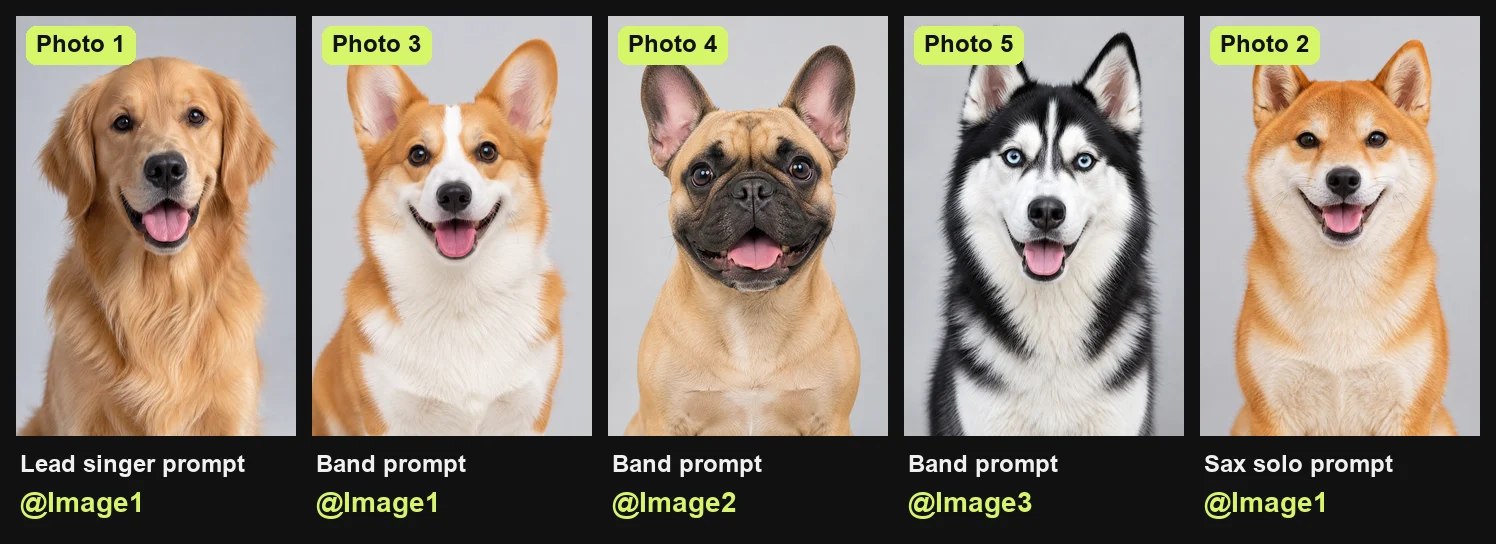
Each Tiny Desk AI dog prompt takes the photos for its own spots, and five photos cover the whole band.
- Photo 1, lead singer: this photo goes into prompt 1 as @Image1, and your dog sings the opening line and turns for the laughing close-up.
- Photo 2, sax player: this photo goes into prompt 3 as @Image1, and your dog plays the sax solo with the gold saxophone.
- Photo 3, keyboard player: this photo goes into prompt 2 as @Image1, and your dog sits upright at the red keyboard with front paws on the keys.
- Photo 4, backup singer on the left: this photo goes into prompt 2 as @Image2, and your dog stands behind the keyboard on the left.
- Photo 5, backup singer on the right: this photo goes into prompt 2 as @Image3, and your dog stands behind the keyboard on the right.
Your lead dog's on screen for about 7.7 of the 19 seconds, in the opening line and the laughing close-up. That's about 40% of the video, so it's the photo to get right.
The band shots run about 8 seconds, and the sax solo about 3.4. A clear photo of one dog facing the camera in good light works best.
Tiny Desk AI Dog Prompt 1: Your Dog Sings Lead
The first Tiny Desk AI dog prompt puts your lead dog into the opening line and the laughing close-up. Photo 1 goes in as @Image1, and your clip of the lead singer's two shots goes in as @Video1.
Edit @Video1. Replace the lead singer in both shots of @Video1 with the dog in @Image1: exactly its face, coat colour, markings, ears, eyes and build. The dog keeps the singer's place and every head turn and mouth movement: side-on in the opening line, then turned to the camera with its mouth wide open in the laughing close-up. The dog wears a plain black hoodie, with no letters, words, print or logos anywhere on it. The blurred head at the lower edge of the first shot stays a blurred, unrecognisable head. Keep everything else from @Video1 exactly as it is: the camera, framing, lens, every cut and camera move, the timing, the microphones and stands, the lighting, the colours and the shelves of the room. Nobody wears a cap, hat, headphones or a headset microphone. No captions, watermarks or logos added.The outfit line's there because a dog photo has no clothes for the tool to copy. So the prompt names one. Here's the lead singer's part of our five-dog video, our golden retriever.
Tiny Desk AI Dog Prompt 2: Three Dogs Play the Band
The second Tiny Desk AI dog prompt fills both band shots with three dogs. Photo 3 sits at the red keyboard as @Image1. Photo 4 stands behind on the left as @Image2, and photo 5 behind on the right as @Image3.
Edit @Video1. Replace the three band members in both shots of @Video1 with three dogs: the player seated at the front in the middle behind the red keyboard becomes the dog in @Image1, sitting upright with its front paws on the keys; the singer standing behind on the left becomes the dog in @Image2; the singer standing behind on the right becomes the dog in @Image3. Each dog keeps exactly its own face, coat colour, markings, ears, eyes and build, and the place, pose and every movement of the band member it replaces. Any hand or saxophone that dips in at the frame edge stays. Keep everything else from @Video1 exactly as it is: the camera, framing, lens, every cut and camera move, the timing, the instruments, microphones and stands, the lighting, the colours and the shelves of the room. Nobody wears a cap, hat, headphones or a headset microphone. No captions, watermarks or logos added.The keyboard dog sits upright with its front paws on the keys. Here are both band shots from our video, our corgi on keys with the French bulldog and the husky behind.
Tiny Desk AI Dog Prompt 3: Your Dog Takes the Sax Solo
The third Tiny Desk AI dog prompt gives the sax solo to photo 2, as @Image1. Your clip of the solo is @Video1.
Edit @Video1. Replace the saxophone player in @Video1 with the dog in @Image1: exactly its face, coat colour, markings, ears, eyes and build, sitting up with the same gold saxophone at its mouth and its front paws on the keys. Remove the out-of-focus head from the lower right corner: nobody else is in the frame, and the corner shows only the microphone stand and the blurred shelves behind it. Keep everything else from @Video1 exactly as it is: the camera, framing, lens, every cut and camera move, the timing, the microphones and stands, the lighting, the colours and the shelves of the room. Nobody wears a cap, hat, headphones or a headset microphone. No captions, watermarks or logos added.The prompt clears the out-of-focus head from the corner, so your dog is the only one in the frame. Here's our shiba inu's solo.
How to Run a Tiny Desk AI Dog Prompt in Your Video Tool
You'll run a Tiny Desk AI dog prompt in a video tool that takes one reference clip plus one to three photos in the same request.
- Pick the tool: choose a video tool that accepts one reference clip (@Video1) plus one to three photos (@Image1, @Image2, @Image3) in a single request.
- Add the clip: upload a short vertical 9:16 clip of that part of the finale for each prompt.
- Add the photos: upload your dog photos in the order the prompt names them.
- Make the three parts: run each prompt once to create the lead's two shots, the two band shots and the sax solo.
- Join and add the sound: cut the five shots apart, arrange them in order for 19 seconds, and lay the "Outstanding" sound underneath from the first second.
If your tool writes references another way, like #image_1 or @Image 1, swap the tokens and leave the rest as it is.
Negative Lines That Keep a Tiny Desk AI Dog Prompt Clean
A negative line in a Tiny Desk AI dog prompt says what must not show up, and ours end with them.
- No caps or headphones: "Nobody wears a cap, hat, headphones or a headset microphone." This keeps modern gear off your dog's head and ears.
- No writing on screen: "No captions, watermarks or logos added." This keeps random text, fake watermarks and branding out of the frame.
- No extra faces: "nobody else is in the frame" after the prompt clears "the out-of-focus head from the lower right corner". This keeps the sax solo focused strictly on your dog.
- A blurred head stays blurred: "The blurred head at the lower edge of the first shot stays a blurred, unrecognisable head." This prevents the tool from turning a background shape into a weird face.
Skip the Tiny Desk AI Dog Prompt and Use One Photo
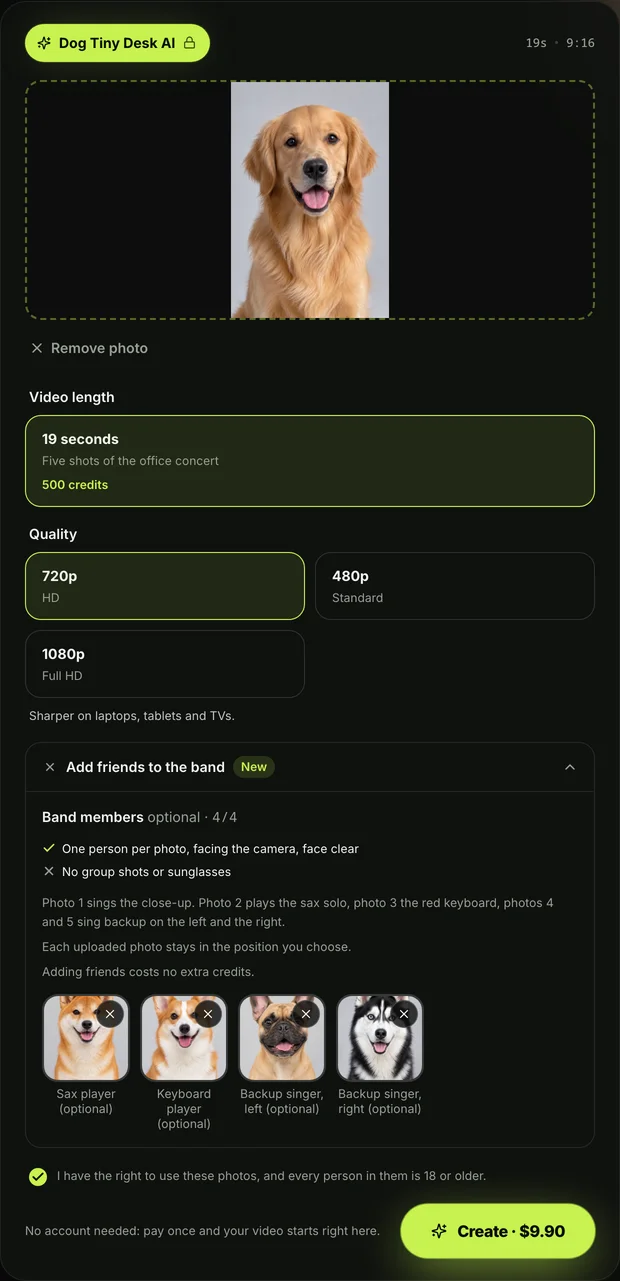
You can skip the Tiny Desk AI dog prompt on our Dog Tiny Desk AI page. There, one photo of your dog makes the whole 19-second finale, with no prompt, no clip and no sound to add.
- One to five photos: add one photo for the lead singer, and up to four more for the other spots if you want.
- The finished video: you get a 19-second vertical 9:16 video in five shots with no watermark.
- The sound: the original "Outstanding" sound plays from the very first second of the video.
- The price: one 720p video costs $9.90, paid once with no subscription and no sign-up needed.
You can see all details on our Seadanse pricing page.
You can also make the same finale with people using our Tiny Desk AI page. If you want a quick walkthrough, read our guide on four steps to a Dog Tiny Desk AI video.
Tiny Desk AI Dog Prompt FAQ
Do I need a prompt to make a Tiny Desk AI dog video?
No, you don't need a prompt on our page. You'll just add your dog's photo, keep the box ticked, pick your resolution and press Create. The prompts here are for running in your own video tool.
Which video tools take a Tiny Desk AI dog prompt?
Any video tool that takes one reference clip plus one to three photos in the same request can run these prompts. If your tool formats tags differently, simply change the labels to match its syntax.
Can I put myself in the band with my dog?
Yes, you can easily put yourself in the band. In a prompt, write "the person in @Image2" instead of "the dog in @Image2", and describe their face, hair, skin tone, age and build. On our page, any spot takes a photo of a person 18 or older.
What song plays in a Tiny Desk AI dog video?
The song is "Outstanding" by The Gap Band, from 1982. It's the closer of Charlie Wilson's NPR Tiny Desk concert, posted on June 5, 2023.
Video generation prompts don't add audio, so you'll lay the sound under the video yourself when editing the clips together. On our page, the sound plays automatically from the first second.
Can I mix cats and dogs in one band?
Yes, you can mix cats and dogs together in the same band. Check out our Pet Tiny Desk AI generator to build a mixed pet lineup. You can explore other creative ideas across all our AI video effects.
Make Your Dog's Tiny Desk AI Video Tonight
You can take the three prompts above and make each shot in your own tool. Or you can skip the editing entirely.
Add one photo of your dog to make your Dog Tiny Desk AI video and get the complete 19-second finale with sound. If you'd rather put your friends on stage, check out the Tiny Desk AI prompt for a band of people.
Written by The Seadanse Team, the team that made the five-dog band on this page.
Related Articles
- Dog Tiny Desk AI Videos: How to Make One With Your Dog (4 Steps) — the four steps on our page, no prompt needed.
- Tiny Desk AI Prompt (Copy-Ready): Every Shot, Every Role — the prompts for a band of people.
- Dog Tiny Desk AI Meaning: Why Dogs Took Over the Band — what the dog version means and where it started.
- Tiny Desk AI Pet Video: Put Your Cats and Dogs in the Band — cats and dogs in one band.
- Tiny Desk AI Cat Prompt (Copy-Ready): 5 Prompts for Every Shot — the same idea for a cat band.
- What Is Cat Tiny Desk AI? The Cat Band Trend, Explained — the cat version of the trend.
- Tiny Desk AI Pet Prompt: 6 Copy-Ready Prompts for Your Pets — prompts for any pet.
- What Are Tiny Desk AI Animals? Pets in the Band, Explained — how animals took over the band.
- Tiny Desk Pets: 6 Pet Band Ideas for Your Tiny Desk AI Video — casting ideas for your pet band.


