
How to Make a Gangnam Style AI Video With Your Friends (4 Steps)
Seadanse: how to make a Gangnam Style AI video from 1 to 3 photos. Selfie, two solo turns and the Gangnam Style song built in. 720p for $9.90, no sign-up.
 The Seadanse Team14 min read
The team behind Seadanse. We run the models we write about, and we publish the specs, prices and limits the marketing leaves out.

TL;DR — You make a Gangnam Style AI video by adding 1 to 3 photos to Seadanse's Gangnam Style AI page and pressing Create. You'll get a 16:9 landscape video of about 20 seconds, the full trend from the first selfie to the wave goodbye. The friend in photo 1 holds the phone and sings up close, then the camera whips to each friend's solo turn and back, and all three wave goodbye together, with PSY's "Gangnam Style" song under it. There's no app, no template and no prompt to manage, and one 720p video costs $9.90, paid once, with no sign-up.
Under a YouTube tutorial for the Gangnam Style AI trend, a viewer asked: "Prompt kaha hai" (Hindi for "where's the prompt?"). Those tutorials make you cut a reel into two silent 10-second parts, paste a prompt and add the song back yourself.
The CapCut route trips people up too: under a CapCut tutorial for the most-used template, a viewer wrote "كذب مصار" (Arabic for "lies, it didn't work").
On our Gangnam Style AI page, we've built the night square, the selfie, the two solo turns, the whip pans and the song right into the page. You add your photos, press Create, and see the price before you pay.
Your first photo holds the phone and sings up close on a lit night square. Your two friends dance behind and then each take a solo turn, with the song playing from the first second.
Here's what's below:
- The 4 steps: add your photos, pick a quality, and press Create.
- Who goes where: which photo holds the phone and which friend gets which solo.
- The other routes: CapCut templates, a chatbot template, generator sites and the YouTube tutorials, and where they trip people up.
- The right photos: the pictures that work best for people, pets and characters.
How Do You Make a Gangnam Style AI Video?
To make a Gangnam Style AI video, you add 1 to 3 photos to our page, pick a quality and press Create. You'll get back a landscape MP4 of about 20 seconds with your three friends on a lit night square. Everything happens in your web browser, and the "Gangnam Style" song's already in the file.
- What changes: the three friends, because faces, hair, build and outfits come straight from your photos.
- What stays: the trend video's own shots and places (the night plaza, the lit domed building, the stone wall), the handheld front-camera selfie, the six parts, the three whip pans, every dance move and the wave goodbye.
- What you hear: PSY's "Gangnam Style" song plays from the first second, from the part of the track the trend uses.
One photo's enough to make a video, because the page makes your two friends to match. Add your first photo to our Gangnam Style AI video maker and press Create to start.
What Happens in Your 20-Second Gangnam Style AI Video
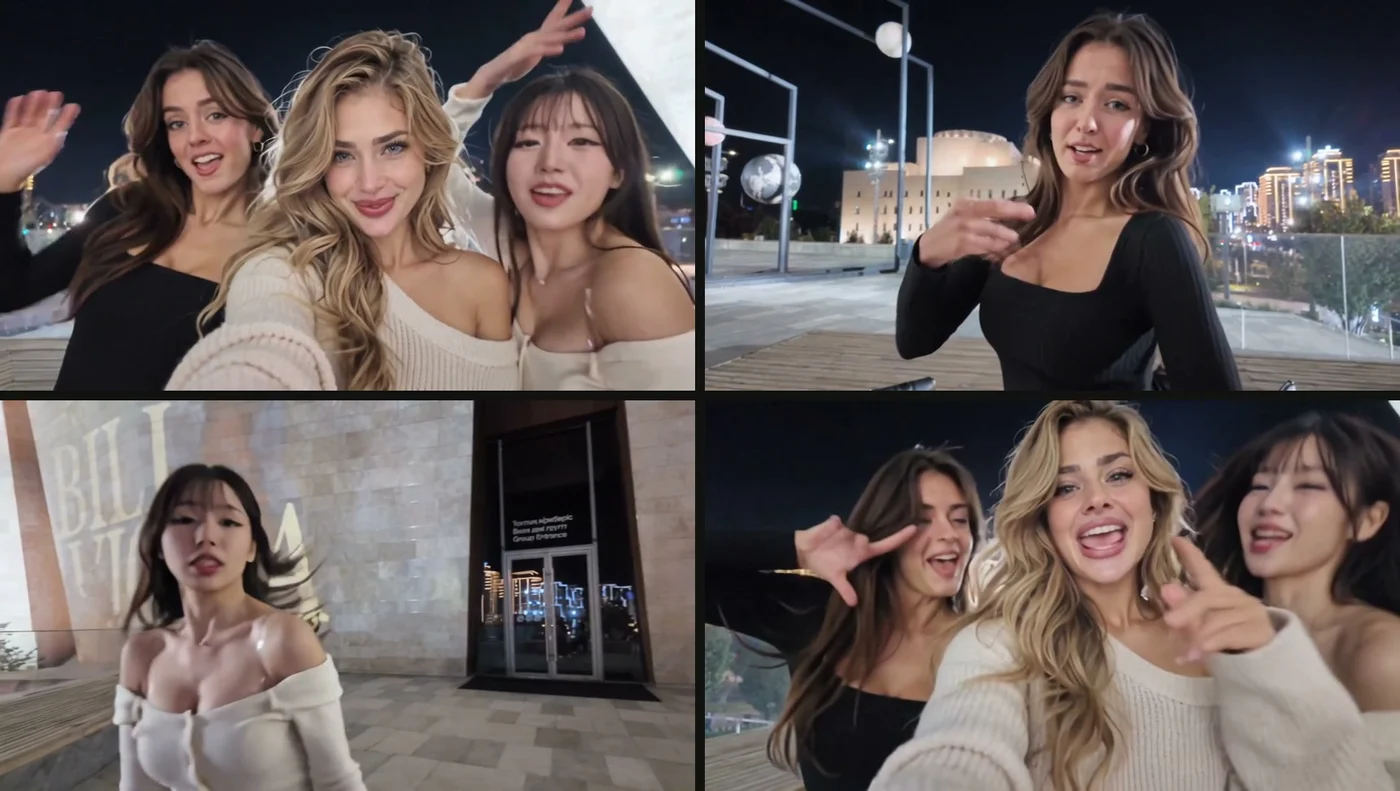
Your Gangnam Style AI video is a 20-second selfie that three friends film at night in the trend video's own places, shot as if on the first friend's own phone. Three whip pans (a fast swing of the camera that blurs from one shot into the next) join the six parts, at about 4.6, 8.4 and 12.1 seconds.
Here's how your 20 seconds play out:
- The opening selfie (0 to 2 seconds): all three friends squeeze into the night selfie, the friend who holds the phone in the middle, the friend on the left and the friend on the right pressed in on each side.
- The phone holder up close (2 to 4.6 seconds): the friend who holds the phone is alone up close, singing into the phone.
- The left friend's solo (about 4.6 to 8.4 seconds): after a whip pan to the left, the friend on the left is alone on the plaza, with a lit domed building behind.
- The right friend's solo (about 8.4 to 12.1 seconds): after a whip pan to the right, the friend on the right is alone, with a hair flip, in front of a stone wall and glass doors.
- The phone holder waves (about 12.1 to 16 seconds): after a whip pan back, the friend who holds the phone is alone up close again, waving an open hand at the lens.
- The goodbye selfie (16 to 20 seconds): both friends squeeze back in, and all three wave goodbye together.
Here's the joke: the phone keeps swinging away from the singer, so each friend gets a moment alone in the frame. That setup comes from how the Gangnam Style AI trend started, when an original selfie reel of three friends singing on a city street went viral.
Make a Gangnam Style AI Video in 4 Steps
To make a Gangnam Style AI video, you add the photo of the friend who holds the phone and add your other two friends if you want. Then you pick 480p or 720p and press Create, all on one page.
Step 1: Add the Photo of the Friend Who Holds the Phone
Open Seadanse's Gangnam Style AI page in your browser.
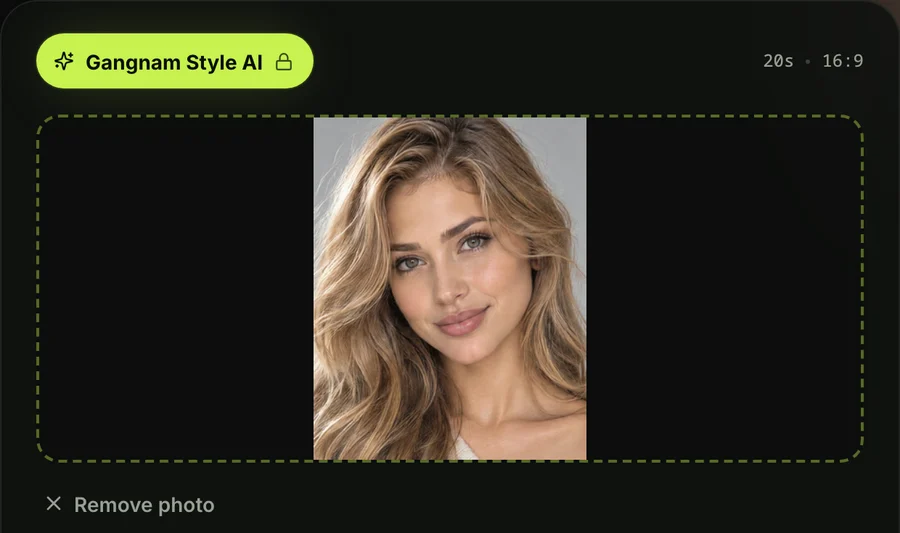
Tap the first photo box and pick the photo of the person, pet or character who'll hold the phone and sing up close, from your camera roll or your computer. It's the one photo the page needs to build your video.
Step 2: Add Your Two Friends or Leave the Boxes Empty
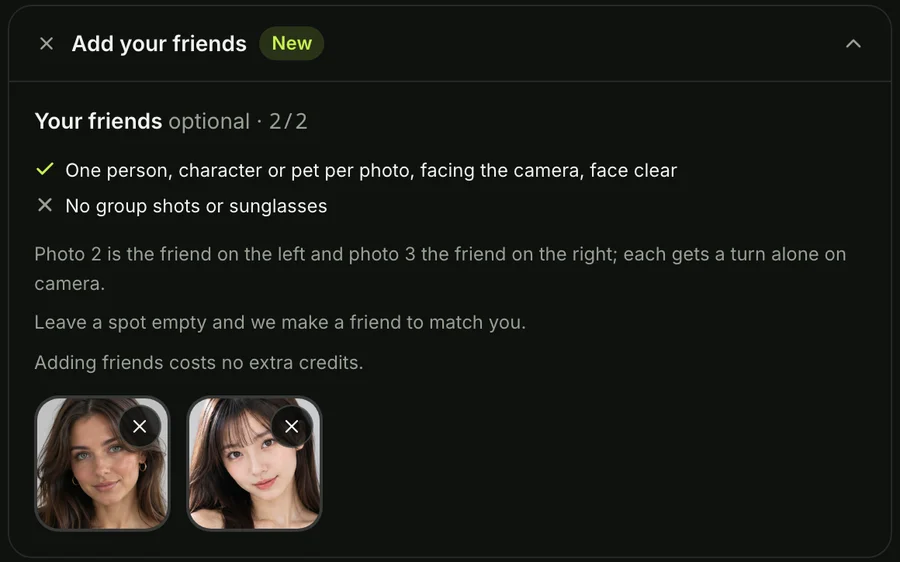
The second and third photo boxes are optional.
The second photo's the friend on the left, and the third's the friend on the right. Leave either box empty and the page makes a friend to match. One, two or three photos cost the same.
Step 3: Pick 480p or 720p
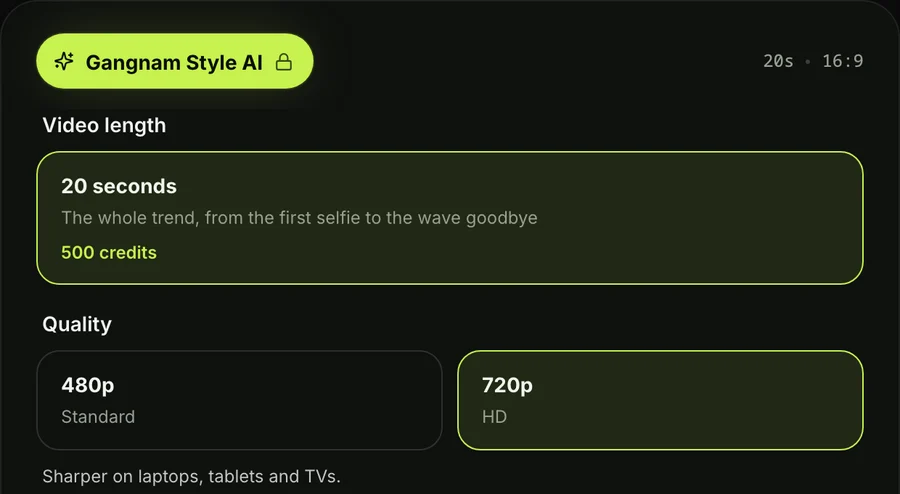
The page opens on 720p by default.
Tap the quality you want to use. At either quality, your video's the same 16:9 landscape format and about 20 seconds. The price shows on the Create button before you pay.
Step 4: Keep the Box Ticked and Press Create
The tick box confirms you've got the right to use the photos and that every person in them is 18 or older. Leave that box ticked.
Press the Create button. You don't need an account to start, since you pay once and the video starts right on the page.
A window with credit packs opens when you press Create. You pay once at checkout with no recurring subscription, and you can see how pay-once credits work across our tools.
Your checkout email carries a sign-in link. That link lets you open your video on any phone, tablet or computer later on.
When your video's ready, download your 16:9 MP4 file. The "Gangnam Style" song's already in the file, with no watermark on exported video. What you upload stays in your account until you delete it.
Who Goes Where in Your Gangnam Style AI Video
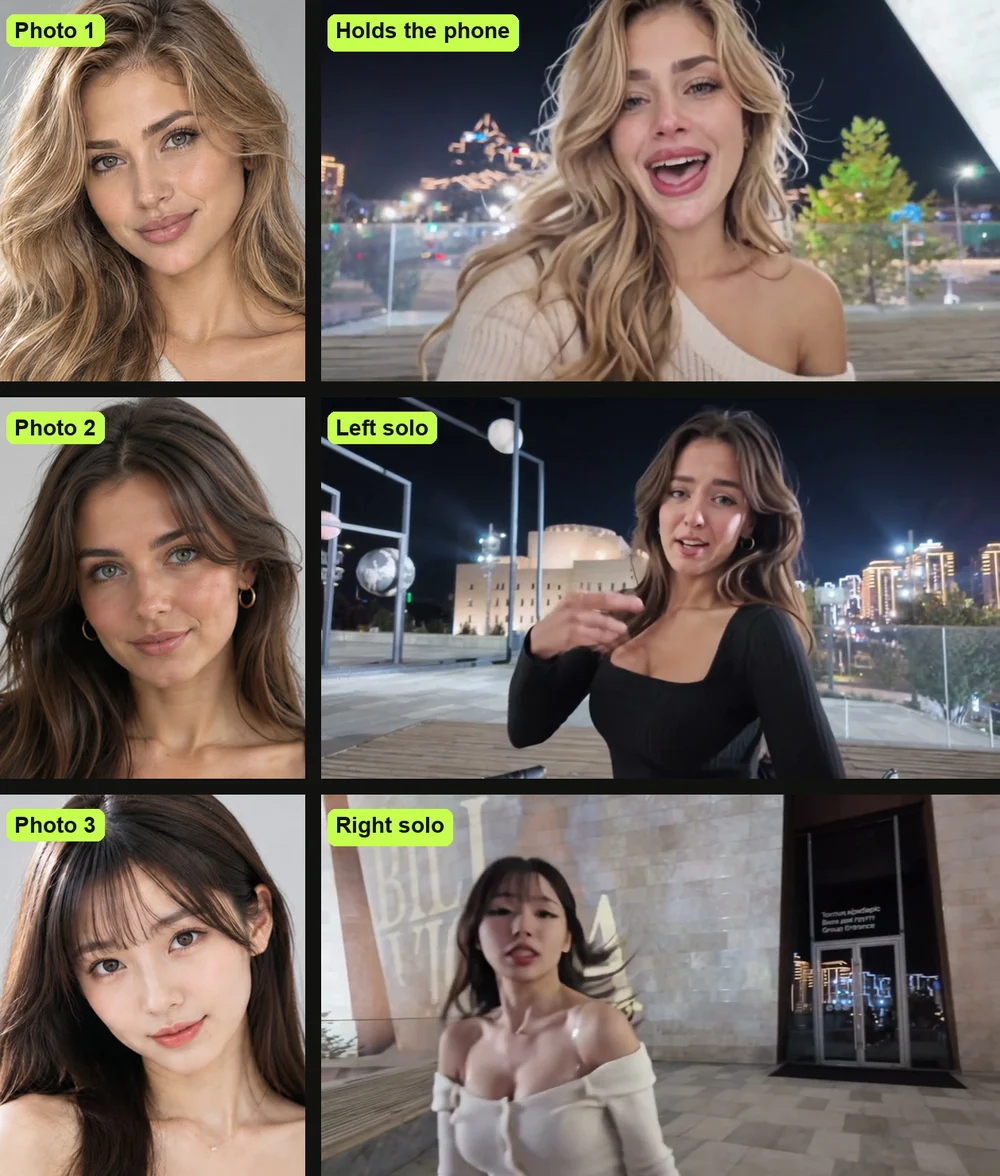
In your Gangnam Style AI video, photo 1 is the friend who holds the phone. Photo 2 is the friend on the left, and photo 3's the friend on the right.
Here's who does what:
- Photo 1: sits in the middle of the opening selfie (0 to 2 seconds), sings alone up close (2 to 4.6 seconds), waves at the lens alone (about 12.1 to 16 seconds), and finishes in the middle of the goodbye selfie (16 to 20 seconds). That's about 6.5 seconds alone up close.
- Photo 2: squeezes into both selfies on the left, and gets the first solo turn alone on the plaza with the lit domed building behind (about 4.6 to 8.4 seconds).
- Photo 3: squeezes into both selfies on the right, and gets the second solo turn with the hair flip in front of the stone wall and glass doors (about 8.4 to 12.1 seconds).
So put whoever you want holding the phone in photo 1, because that's the face that opens and closes the video.
Make a Gangnam Style AI Video With Just One Photo
You can make a Gangnam Style AI video with just one photo, because the page makes the two missing friends to match.
Here's who the page makes:
- A person: an adult friend with a different face and hair, dressed in the same style as your photo.
- A pet: another real animal of the same kind with a different coat.
- A character: an original character of the same kind and drawing style.
With two photos, the page only makes the friend on the right to match. Every video has three friends, and one, two or three photos cost the same.
How Other People Make Gangnam Style AI Videos
Most Gangnam Style AI videos online come from one of four places. There's a CapCut template, a template inside a Telegram chatbot, a generator site, or a YouTube tutorial that walks you through an AI video tool by hand.
Here are the four routes:
- A CapCut template: you tap a link in a TikTok video and add your photo inside the CapCut app. The most-used Gangnam Style AI template takes one photo, but viewers say "مارضا ليه" (Arabic for "it won't accept mine") or "جربت ماصار لي بس صوت ع صوره" (Arabic for "I tried it, all I got was sound over my photo"). Under another CapCut tutorial for the trend, a viewer asked: "ليش بفلوس😭" (Arabic for "why does it cost money").
- A Telegram chatbot template: you send three photos to a chatbot. It keeps the original reel's night square and swaps in your three people, in a video of about 20 seconds. That's how the very first AI versions appeared on TikTok on October 19, 2026.
- A generator site: you upload three pictures into left, middle and right slots on a dedicated web page. Most of these sites need three photos. Some leave out the song, so you've got to lay the audio track back on yourself.
- A YouTube tutorial: creators walk you through an AI video tool by hand. You cut a reel of about 20 seconds into two 10-second parts, mute them, upload three photos and paste a prompt. Viewers hit roadblocks: "Bhai reference video 10 sec tak hi jaa rhi hai trim ho jaa rhai hai" (Hindi for "bro, the reference video only goes up to 10 seconds, it gets trimmed"). Under the most-watched tutorial for this route, a viewer ran into the tool's error: "Unable to edit the speech in this video" and "You will be refunded for this generation".
On our page, we've built the Gangnam Style AI trio effect with the camera moves, the night square, the solo turns and the music built in. You don't have to hunt for templates, slice videos or paste prompts.
If you want to compare templates, see which Gangnam Style CapCut template makes the trio. If you'd rather build it yourself, we've written out the copy-ready Gangnam Style AI video prompt with all three turns.
Which Photos Work Best for a Gangnam Style AI Video
The photos that work best for a Gangnam Style AI video show one person, pet or character each, with the face clear, facing the camera and in good light.
- One subject per photo: pick a picture that features a single person, pet or character so the page knows who to use.
- A clear face: choose a shot where the subject faces forward in bright lighting with nothing covering the eyes or mouth.
- The outfit you want: pick a photo where the person wears the clothes you want to see in the dance, because those clothes stay on the body.
- 18 or older: use photos where every person pictured is an adult.
Pets and characters work just as well as real people.
A cat or dog stands upright, moves like a person, and holds the phone in a paw if it's in photo 1. A cartoon, anime or game character keeps its own drawing style, standing in the real plaza. The rest of the video stays the trend's real footage.
Gangnam Style AI Video FAQ
How do I do the Gangnam Style AI trend?
Add 1 to 3 photos to our Gangnam Style AI page, pick your quality and press Create. You can also hunt down a CapCut template or follow a multi-step YouTube tutorial. To see how those options stack up, here are the Gangnam Style AI video generators compared.
Can I make a Gangnam Style AI video with my cat or dog?
Yes, you can make your video with a cat or dog.
Your pet stays a real animal of its own breed, standing upright and moving like a person, and a pet in photo 1 holds the phone in its paw. With one pet photo, the two friends made to match are other pets of the same kind with different coats.
Will my friends look like their photos?
Yes, everyone keeps the face, the hair or fur and the clothes from their own photo. The photo's original background is left out so your friends stand right on the lit night square, and a real photo comes out photoreal.
What song plays in the Gangnam Style AI video?
The video features PSY's 2012 song Gangnam Style, released on July 15, 2012, using the exact part of the track that powers the viral trend. It plays from the very first second, and it's already in the MP4 file you download.
Do I need an app, a template or a prompt?
No, you don't need an app, a template or a prompt. The page runs right in your web browser, the selfie camera swings and the song are built into the effect, and you only need to add your photos.
How much does a Gangnam Style AI video cost?
A 720p video costs $9.90, paid once with no subscription, and that pack also covers a 480p video.
- 720p: costs 500 credits, and the $9.90 pack of 500 credits covers it.
- 480p: takes 375 credits, and that same $9.90 pack covers it too.
One, two or three photos cost the same. Pack credits stay valid for 12 months.
If a video fails to create, its credits come back automatically. Check our Seadanse pricing page for full details on credit packs.
Can I make other AI dance videos with the same photos?
Yes, you can use your photos across our other dance effects.
You can drop your picture into the street dance routine with Uptown Funk AI or put your face in the lead spot with No Scrubs AI. Both effects sit inside our full catalog of AI video effects, where you add a photo and get a finished video without writing prompts.
Make Your Gangnam Style AI Video Now
You can make a Gangnam Style AI video right in your browser from 1 to 3 photos today. Your first photo holds the phone, and your friends dance in the background and take their solo turns on the night square. The song's ready in the file, and it's $9.90 at 720p.
Written by The Seadanse Team, the team that built the Gangnam Style AI page.
Related Articles
- What Is the Gangnam Style AI Trend? The 'Open Gangnam Style' Trio, Explained — where the three friends' selfie reel came from, how the AI remakes spread, and who people put in it.
- Gangnam Style CapCut Template: Which One Is the Trio and Why It Fails — the templates people share, the one that makes the trio, and the fixes.
- Best Gangnam Style AI Video Generators (2026): 10 Ways Compared — the sites, apps and templates that make this video, side by side on photos, sound and price.
- Gangnam Style AI Video Prompt (Copy-Ready): All Three Turns, Shot by Shot — a full prompt for the selfie and both solo turns, to use in an AI video tool yourself.


