
Pixar Snow Globe CapCut Template: Which One, How to Open It, 7 Fixes
The Pixar snow globe CapCut template is "Pixar Snowglobe Ai", up since November 14, 2026. Open it from a TikTok tag, or make it from one photo with no app.
 The Seadanse Team8 min read
The team behind Seadanse. We run the models we write about, and we publish the specs, prices and limits the marketing leaves out.

TL;DR — The Pixar snow globe CapCut template is titled "Pixar Snowglobe Ai", it went up on November 14, 2026, and it had 2,218 uses on November 18, 2026. You open it from the "CapCut · Try this template" tag on a TikTok post of the trend, then add one photo and export. On Seadanse, the Pixar Snow Globe AI Filter makes the 11-second video in your browser with no app. You add one photo of the two of you, or one each, and $9.90 makes one 720p video.
You saw the snow globe videos and went looking for the template in CapCut. There are a lot of snow globe templates, and the one you found didn't match or wouldn't finish. Here's the exact template, how it opens, the fixes, and a way with no app.
Which Pixar Snow Globe CapCut Template Is the Trend's?
The Pixar snow globe CapCut template you're after is titled "Pixar Snowglobe Ai". It went up on CapCut on November 14, 2026.
- Title: "Pixar Snowglobe Ai"
- Went up: November 14, 2026
- Uses: 2,218 uses and 11,236 plays on November 18, 2026
- Photos: One ordinary photo, and the clip runs about 11 seconds in 9:16.
- The sound: In 275 TikTok videos as of November 18, 2026
- What it makes: An 11-second 9:16 video turning two people into 3D cartoon figures inside a snow globe

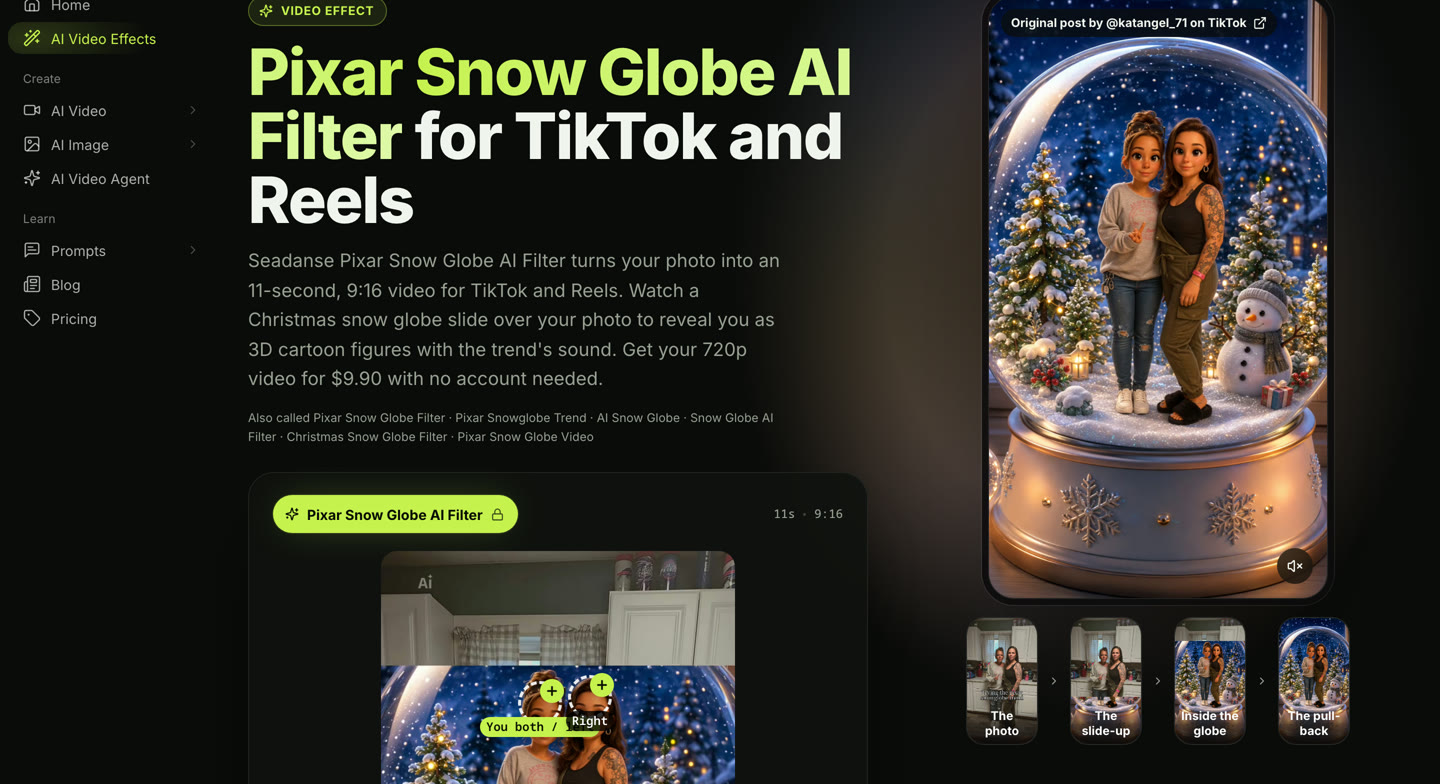
Original clip: @katangel_71 on TikTok
An earlier Pixar snowglobe template ran on TikTok for Christmas 2025 under the tag #pixarsnowglobe. The posts with it that we read run from November 22 to December 20, 2025. It's a different template from the one trending in 2026.
The TikTok snow globe posts we read carry at least 11 other CapCut templates, and others carry close titles such as "Pixar Snow Glob" and "Snow Globe Magic". The title "Pixar Snowglobe Ai" is how you tell this one apart, with "Snowglobe" written as one word.
The template takes your ordinary photo, so there's no cartoon picture to make first in another tool.
How to Open the Pixar Snow Globe CapCut Template
The Pixar snow globe CapCut template opens from a TikTok post that carries the "CapCut · Try this template" tag.
- Open a TikTok post of the trend that shows the "CapCut · Try this template" tag.
- Tap the tag to open the template in the CapCut app.
- Add one photo of the two of you.
- Let CapCut make the clip.
- Export the video and post it.
All 25 posts with this template that we read on November 18, 2026 carried that tag.
Pixar Snow Globe CapCut Template vs Pixar Snow Globe AI Filter on Seadanse
The Pixar snow globe CapCut template and Seadanse's Pixar Snow Globe AI Filter page make the same 11 seconds in two places.
| The CapCut template "Pixar Snowglobe Ai" | Pixar Snow Globe AI Filter on Seadanse | What it means for you | |
|---|---|---|---|
| Where you make it | In the CapCut app, opened from a TikTok post's tag | In your web browser, on one page | Nothing to install or hunt for |
| Photos | One photo | One photo of the two of you, or one photo each, at the same price | Two photos taken apart still work |
| Who can be in it | Couples, friends, and a couple with their cat, in the posts we read | A person, a dog or a cat, or a cartoon or game character in either spot | Your pet can stand beside you |
| Length and frame | About 11 seconds, 9:16 | 11 seconds, 9:16, for TikTok and Reels | The whole snow globe reveal |
| What you get | Your photo, the slide-up, the two of you as 3D cartoon figures in the globe | The same 11 seconds from your photo to the pull-back, with the trend's sound | The trend, start to finish |
| Quality | Set by the template | 720p or 1080p, your pick | You choose before you pay |
The template column is what the template's CapCut page and its TikTok posts showed when we read them on November 18, 2026.
The Pixar snow globe AI filter on Seadanse runs in your web browser on a phone, tablet or computer.
Pixar Snow Globe CapCut Template Not Working? 7 Fixes
The Pixar snow globe CapCut template has seven plain fixes when it won't work.
Open It From the Tag on a TikTok Post
Open the template from the "CapCut · Try this template" tag on a TikTok post of the trend. Don't try to find it by typing a search in the CapCut app.
Check the Title Reads "Pixar Snowglobe Ai"
Check the title reads "Pixar Snowglobe Ai" before you add your photo. That's how you know you've got the right template: it lasts about 11 seconds and takes one photo.
Update CapCut and TikTok
Update CapCut and TikTok to their latest versions from your phone's app store. Updated apps work the way they're meant to.
Clear CapCut's Cache and Restart the App
Clear CapCut's cache (the files an app saves on your phone to load faster) in its settings. Close and restart the app to finish the fix.
Keep CapCut Open on Steady Wi-Fi
Keep CapCut open on a steady Wi-Fi connection while it makes the clip. Don't switch to other apps while the template runs.
Use One Clear Photo of the Two of You
Use one clear photo of the two of you side by side. It's best head to toe or from the knees up, with faces turned to the camera in good light.
Clear Space on Your Phone
Clear space on your phone so CapCut has room to make and save the video. That'll stop errors when the app works on your file.
Make the Pixar Snow Globe AI Filter Video on Seadanse Instead
Seadanse's Pixar Snow Globe AI Filter for TikTok and Reels makes the same trend video from one photo of the two of you, or one photo each, in your browser.
- Add one photo of the two of you in the first circle, or one photo each in the two circles.
- Pick 720p or 1080p. 720p is already picked when the page opens, and the price shows on the Create button.
- Leave the box under the photos ticked and press Create.
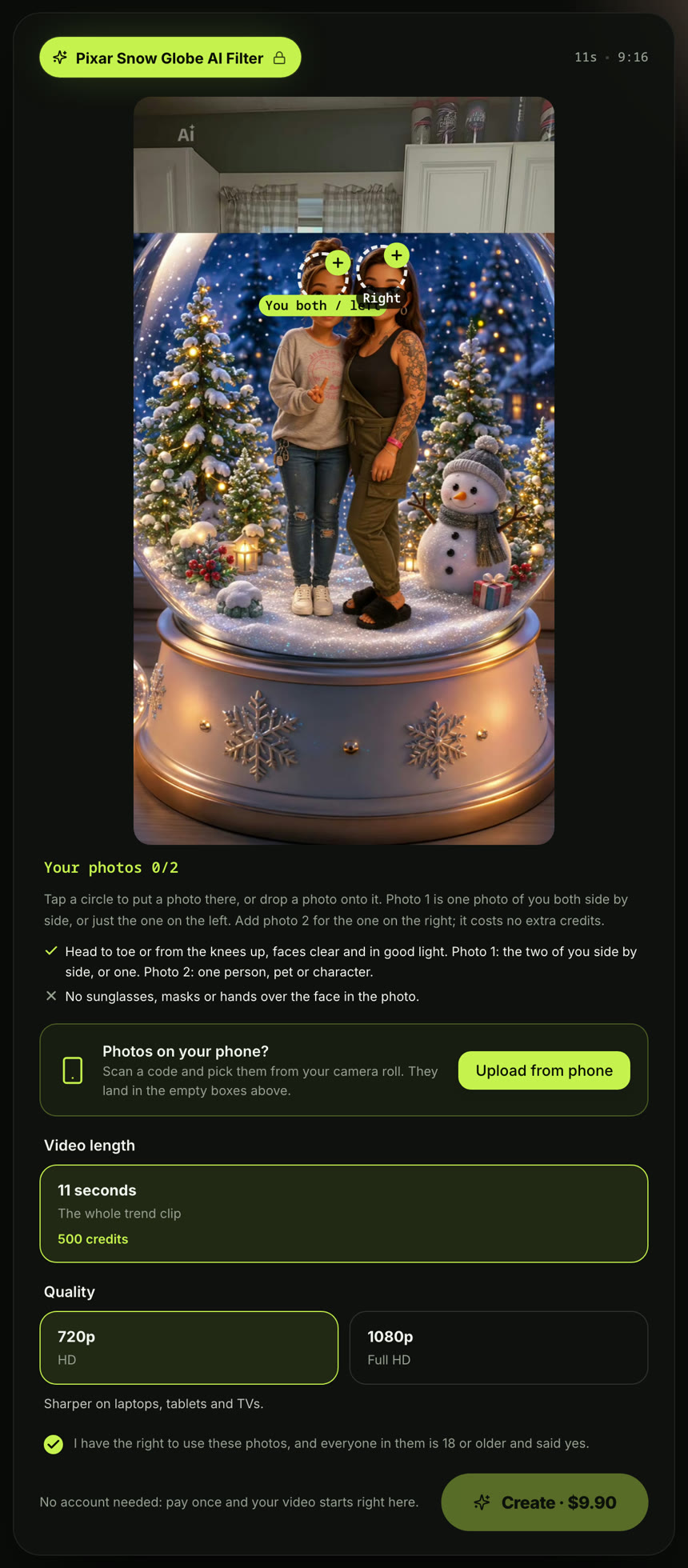
You pay once at checkout, with no account, and your video starts right on the page. $9.90 makes one 720p video.
A 1080p video takes 1,480 credits. Pack credits stay valid for 12 months, and if a video fails, you'll get its credits back automatically. See Seadanse pricing for more on the credits.
The 11-second video follows the trend: you start as a real photo, a snow globe slides up, you become 3D cartoon figures, and the camera pulls back.
Original clip: @katangel_71 on TikTok
For every pick and press, read how to do the Pixar Snow Globe AI Filter step by step.
You can also see the AI Pregnancy Announcement. It turns one photo of the two of you into a 15-second black-and-white video where one of you shows the positive test and you hug. Or try GTA 6 Loading Screen AI, where a hand-painted loading-screen poster slides up over your mirror photo in 8 seconds.
Pixar Snow Globe CapCut Template FAQ
How many photos does the Pixar snow globe CapCut template take?
It takes one photo. Seadanse's Pixar snow globe filter page takes one photo of the two of you, or one photo each, at the same price.
Can a pet be in the Pixar snow globe video?
The template's posts we read include a couple with their cat. On Seadanse, either spot can be a dog, a cat or a cartoon or game character, and it's the same price.
Can I make the Pixar snow globe video without CapCut?
Yes. You don't need CapCut. You can make it from one photo of the two of you in your browser, and you'll get the same 11-second snow globe video with the trend's sound.
Written by The Seadanse Team; we read the template's page and its TikTok posts on November 18, 2026.
Related Articles
- How to Do the Pixar Snow Globe AI Filter — add one photo of the two of you, or one each, pick 720p or 1080p, press Create.


