
AI Crying Trend Prompt: 3 Creator Prompts You Can Copy
AI crying trend prompt: copy three prompts creators posted publicly, each credited, plus how to run them with your own photo or make one with one click.
 The Seadanse Team21 min read
The team behind Seadanse. We run the models we write about, and we publish the specs, prices and limits the marketing leaves out.

TL;DR — An AI crying trend prompt is a timed script for one 10-second night scene. You look past someone's blurred shoulder, your smile breaks, a tear falls, and you turn and walk away. Below are three prompts creators posted publicly, each credited and linked (Sforum's Lê Thành Phát, Sofie Elara and Zayn), plus the boys version and how to run them with your own photo. If you'd rather not write a prompt at all, the AI Crying Trend effect makes it from one photo: $9.90 for a 12-second 720p video.
People everywhere want this prompt. On YouTube, the most-liked comment under one Indonesian tutorial asks for exactly that: a ready-to-copy photo-to-video prompt. It wants a photo turned into a breakup drama where they cry facing their partner, and it has to work for both guys and girls.
Getting that text isn't as easy as it looks. Prompts that circulate on social feeds are often locked behind comments like "follow me and comment PROMPT." Worse, the sample prompts in Google's search summary describe a still portrait. There's no clip length, no one standing in front of you, no timed beats and no walk away.
Here are the real scripts creators wrote. You'll get three public prompts with credits intact, word swaps to make a boys version, and steps to generate your clip from your own photo.
Skip the prompt: make the AI crying trend from one photo
The AI Crying Trend Generator turns one photo into a finished clip without any prompt writing.
It's one of our AI video effects, and the scene comes built in. You get a 12-second vertical 9:16 video, filmed at night over the shoulder of the person you face. Your tears roll down, and you walk away into the dark street.
Here's what you pick on the page:
- Version: Smile to Tears (a warm smile breaks on a city street) or Hilltop Tears (wet eyes on a dark hill before the walk away).
- Who you face: Facing Him or Facing Her puts a man's or a woman's blurred shoulder in the foreground.
- Note: an optional line lets you name a place, add rain or describe the person you face.
- Quality: 480p or 720p.
- Price: $9.90 for one 12-second 720p video (500 credits), or 375 credits for 480p, shown right beside the button before you start.
You'll sign in to create. Exported video carries no watermark, and a failed video returns its credits automatically.
Smile to Tears, one of the two versions of our AI Crying Trend effect.
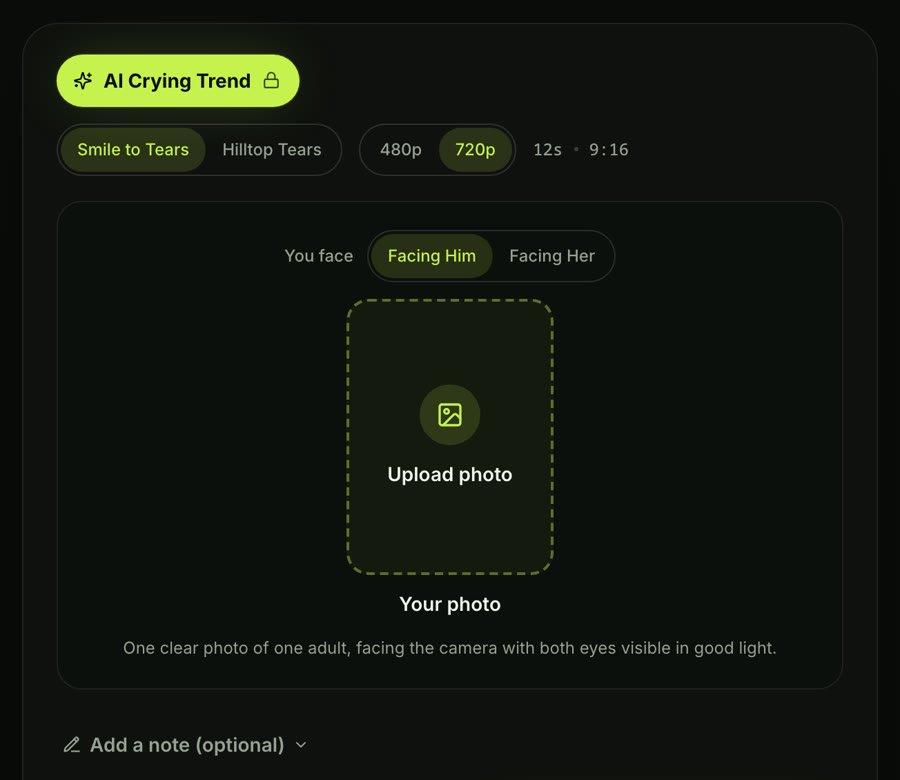
The AI Crying Trend effect on Seadanse, captured October 8, 2026: pick a version, the quality and who you face, then add one photo.
For a full walkthrough of this tool, read our step-by-step guide to the AI crying trend. If you'd rather direct the beats and the story yourself, paste one of the creator prompts below.
What an AI crying trend prompt has to describe
A working prompt times an emotional farewell second by second. It doesn't just describe a single sad portrait.
- The look: You look at the blurred person standing in front of you.
- It breaks: The smile breaks, and your eyes go red and fill with tears.
- Tears fall: A tear runs down your cheek, your lips tremble, and you look down.
- Walk away: You turn around and slowly walk off into the dark street.
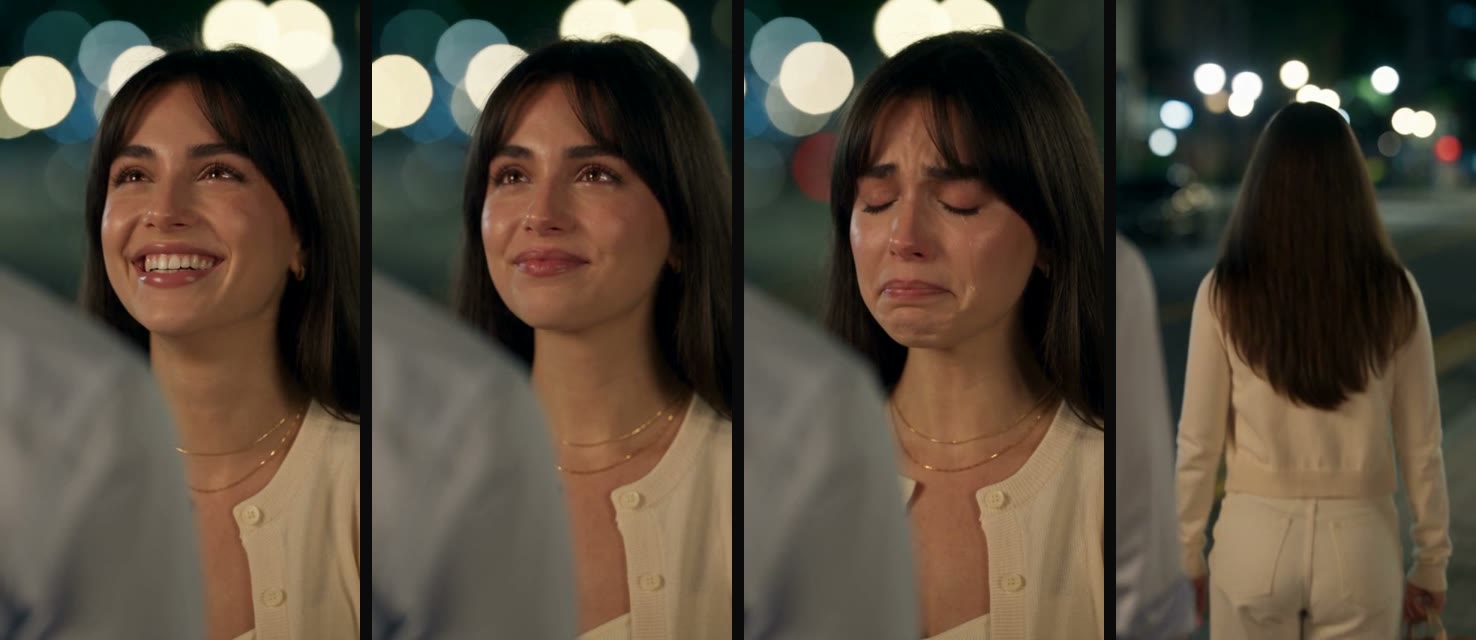
The four beats, in frames from Smile to Tears, made with our AI Crying Trend effect: the look, the smile breaking, the tears, the walk away.
The scene opens one of two ways. You can start with a soft smile that breaks after a couple of seconds, or you can start with wet eyes from the very first frame.
Hilltop Tears, the second version of our AI Crying Trend effect: wet eyes from the first second, then the walk away on a hill above the city.
| Prompt | Posted by | Made with | Length and shape | How it ends | Pick it if |
|---|---|---|---|---|---|
| 1. Smile through tears | Lê Thành Phát, Sforum, Sep 26, 2026 | CapCut's AI creation tool | 10 seconds, 9:16 | She walks away into the night | You want the trend clip as people know it |
| 2. Tears from the first second | Sofie Elara, Facebook, Oct 3, 2026 | Google Flow | Two 10-second scenes, 9:16 | Scene 2 turns her away, fade to black | You want to cry from the first frame, no smile |
| 3. He wipes her tears | Zayn, X, Aug 31, 2026 | Seedance 2.5 | 10 seconds | She hurries off along the river | You want a couple scene with two spoken lines |
Each row links to its creator's original post in the section below.
AI crying trend prompt 1: smile through tears, then walk away
Lê Thành Phát wrote this prompt for a Sforum guide published September 26, 2026. Sforum is the tech news site of CellphoneS. The original's in Vietnamese, and we've translated it into English below.
Tỷ lệ 9:16, sử dụng nhân vật trong ảnh tham chiếu. Bối cảnh ngoài trời vào ban đêm, ánh sáng vàng dịu, hậu cảnh bokeh mờ, màu phim lạnh và hơi giảm bão hòa, camera handheld chuyển động nhẹ tự nhiên. 0–1 giây: Cận cảnh qua vai một người đàn ông, người phụ nữ nhìn về phía trước với đôi mắt đỏ hoe, môi hé mở, hàng mi run nhẹ. 1–2 giây: Cô cố nở một nụ cười buồn, ánh mắt vẫn ướt và đầy tiếc nuối. 2–3 giây: Nụ cười biến mất, cô cúi mắt xuống để kìm nước mắt. 3–4 giây: Cô ngước nhìn người đàn ông, ánh mắt chan chứa nước mắt và đau lòng. 4–5 giây: Cô lại hạ mắt xuống, gương mặt lặng lẽ và cô độc. 5–7 giây: Cận trung cảnh, cô nhắm mắt cố kìm nước mắt rồi mở mắt, một giọt lệ xuất hiện ở khóe mắt. 7–8 giây: Góc nghiêng cận mặt, cô lặng lẽ cúi đầu. 8–10 giây: Cô từ từ quay người bước đi vào màn đêm, mái tóc khẽ lay động, để lại bóng lưng cô đơn. Chuyển động mượt mà, biểu cảm tinh tế, không cường điệu, không lời thoại, không nhạc nền, không chữ trên màn hình.Here's our English translation of Lê Thành Phát's prompt:
9:16 aspect ratio, use the character in the reference image. Outdoor setting at night, soft golden light, blurred bokeh background, cool and slightly desaturated film color, handheld camera with light, natural movement.
0–1 s: Close-up over a man's shoulder. The woman looks ahead with red-rimmed eyes, lips slightly parted, eyelashes trembling a little.
1–2 s: She tries to force a sad smile; her eyes are still wet and full of regret.
2–3 s: The smile fades, and she lowers her eyes to hold back her tears.
3–4 s: She looks up at the man, her eyes brimming with tears and heartache.
4–5 s: She lowers her eyes again, her face quiet and lonely.
5–7 s: Medium close-up. She closes her eyes, trying to hold back the tears, then opens them, and a tear appears at the corner of her eye.
7–8 s: Side-angle close-up of her face. She silently bows her head.
8–10 s: She slowly turns and walks away into the night, her hair moving gently, leaving a lonely figure seen from behind.
Smooth motion, subtle expressions, nothing exaggerated, no dialogue, no background music, no on-screen text.How to use it:
- Photo: Upload one clear photo of you facing the camera. The prompt's first line tells the model to use the person in your reference image (the photo the AI copies your face from).
- Length: Sforum's prompt runs 0–10 seconds, so set the length to 10 seconds and every beat lands where it was written.
- Shape: 9:16 (the tall shape TikTok and Reels use); it's what the script asks for.
- Where to run it: Paste the text into Seadanse's image to video AI with your reference photo attached.
AI crying trend prompt 2: tears from the first second
Creator Sofie Elara posted her crying video on Facebook on October 3, 2026. Her caption reads: "The internet said, 'Let's cry' and I said, 'Let me try!'" She made it with Google Flow and shared her prompts in three comments on the post. Those comments include an image setup prompt, Scene 1 (the 10-second crying close-up), and Scene 2 (a 10-second turn away fading to black).
{
"scene": 1,
"title": "THE TEARS SHE TRIED TO HIDE",
"duration": "10 seconds",
"format": "Google Flow / Veo, Vertical 9:16",
"CONTINUITY": {
"identity": "Use the uploaded reference image as the sole authority for the woman's facial identity. Preserve her recognizable features, proportions, natural skin texture, and appearance.",
"wardrobe": "Exact ivory-white dress from the starting image. Preserve its color, fabric, neckline, ruffled sleeves, fit, and details.",
"hair": "Long, voluminous dark-brown hair with the same natural waves, parting, length, and texture as the reference.",
"setting": "Outdoor nighttime setting with warm golden bokeh lights and subtle cool shadows.",
"male_character": "Her ex-boyfriend is partially visible in the right foreground, facing her. Keep his face blurred and mostly outside the frame.",
"style": "Photorealistic cinematic Filipino romantic drama, natural skin texture, realistic tears, and shallow depth of field."
},
"PERFORMANCE": {
"dialogue": "NONE",
"voice": "NONE",
"lip_sync": "NONE",
"expression": "Restrained heartbreak, sadness, disbelief, and lingering love.",
"crying": "Gradual, realistic tears with subtle facial movements.",
"movement": "Minimal, natural movements. Maintain emotional eye contact except during specified downward glances."
},
"STORY_FLOW": [
{
"shot": 1,
"time": "0-2.5s",
"title": "Holding Back",
"camera": "Tight chest-up close-up, front three-quarter angle, very slow push-in, steady framing.",
"action": "The woman silently maintains eye contact with her ex-boyfriend. Her eyes are already glossy. She blinks naturally, trying to stay composed as her lower lip begins to tremble.",
"movement": "Keep her head almost still, lips gently pressed together, and body relaxed with natural breathing.",
"audio": "Very subtle nighttime ambience and soft breathing. No music initially."
},
{
"shot": 2,
"time": "2.5-5.5s",
"title": "The First Tear",
"camera": "Tight facial close-up, same angle, continuing the slow push-in. Focus on her eyes and cheek.",
"action": "A realistic tear forms along her lower eyelid and slowly rolls down her cheek. She tightens her lips slightly, struggling to suppress her emotions. Her expression reveals sadness and disbelief.",
"movement": "Natural blinking, subtle lip trembling, and restrained posture. Keep her gaze on the man.",
"audio": "Soft, shaky breathing and faint nighttime ambience. A melancholic piano tone gradually fades in."
},
{
"shot": 3,
"time": "5.5-8s",
"title": "The Pain in Her Eyes",
"camera": "Intimate facial close-up with a slow cinematic push-in and no sudden movement.",
"action": "She briefly lowers her gaze, trying to gather herself. Her eyes are watery and slightly reddened. Another tear gathers as she takes an unsteady breath.",
"movement": "Subtle downward head movement, natural lip trembling, then slowly return her gaze toward the man.",
"audio": "Natural, uneven breathing, quiet nighttime ambience, and soft melancholic piano."
},
{
"shot": 4,
"time": "8-10s",
"title": "Before She Breaks",
"camera": "Very tight close-up of her eyes and upper face, with an almost imperceptible final push-in.",
"action": "She slowly raises her gaze toward the man again. A tear continues down her cheek. She fights back a sob, keeping her lips closed. End with her eyes fixed on him, full of restrained heartbreak.",
"movement": "Nearly motionless head, slight lip trembling, and steady tear-filled eye contact.",
"audio": "Faint shaky breathing, subtle nighttime ambience, and a sustained soft piano note that gently fades."
}
],
"CAMERA": {
"style": "Premium cinematic live-action romantic drama.",
"lens": "85mm portrait lens aesthetic, f/1.8.",
"framing": "Tight chest-up portrait with the blurred man in the right foreground.",
"movement": "Slow, restrained push-in with smooth continuous progression.",
"performance": "Authentic facial micro-expressions and emotionally believable movements.",
"tears": "Realistic tears following gravity with natural reflections and tear trails.",
"editing": "No abrupt cuts."
},
"AUDIO": {
"dialogue": "NONE",
"voice": "NONE",
"music": "Minimal melancholic piano introduced gradually.",
"ambience": "Quiet nighttime atmosphere.",
"breathing": "Natural, delicate, slightly shaky.",
"mixing": "Keep music and ambience subtle and balanced."
},
"ENDING": {
"expression": "She is still holding back tears, with a visible tear trail and trembling lips.",
"position": "Still facing her ex-boyfriend.",
"transition": "Use the final frame as the starting frame for Scene 2, preserving her identity, expression, position, wardrobe, hairstyle, and lighting."
},
"NEGATIVE_CONSTRAINTS": [
"No facial identity drift or face reshaping.",
"No wardrobe or hairstyle changes.",
"No artificial beauty filters or plastic skin.",
"No exaggerated crying, screaming, or unnatural mouth movements.",
"No floating or duplicated tears.",
"No sudden head or body movements.",
"No camera shake or abrupt cuts.",
"No additional people or background changes.",
"No dialogue, voice, or lip-sync.",
"No text, subtitles, logos, or watermark."
],
"FINAL_DIRECTION": "Create a continuous 10-second cinematic scene of a woman trying to hide her heartbreak. Show gradual, realistic tears, natural facial expressions, subtle breathing, and consistent facial identity. End with her still looking at the man, silently struggling to hold back her tears."
}How to use it:
- Photo: The text makes your uploaded reference image the sole authority for her face, so the prompt asks for your face from start to finish.
- Length and shape: Run it at 10 seconds in 9:16.
- Turn away: This first scene ends while she's still looking at him. If you want the turn-away fade, run her Scene 2 prompt from the comments on her post.
AI crying trend prompt 3: he wipes her tears, then she hurries away
Creator Zayn shared this Seedance 2.5 prompt on X on August 31, 2026. His scene times five shots across 10 seconds on a riverside bridge. It has two spoken Japanese lines: Character B says 「行かないで。」 ("Don't go."), and Character A answers 「元気でね。」 ("Take care.") before she breaks away.
A quiet riverside pedestrian path or small neighborhood bridge on New Year’s Eve at night.
This is their final meeting before parting. Character A still loves Character B but knows she must leave. Emotional arc:
plea → failed smile → fragile affection → gentle cheek touch and tear wipe → immediate rejection → broken farewell → hurried departure
Character B speaks only once. Character A speaks only once.

SHOT 1 — 0s–1.2s | CLOSE-UP / PLEA
Tight close-up on Character A. Character B’s blurred shoulder remains in the right foreground.
 From the blurred foreground, Character B softly says in Japanese:
「行かないで。」
 (“Don’t go.”)
The line is quiet, intimate, and restrained.
 Character A tries to smile, but it fails almost immediately. Her eyes are wet and deeply sad. She lowers her gaze slightly.
Show:
• wet lower eyelids
• tiny lower-lip tremble
• uneven inhale
• restrained heartbreak

SHOT 2 — 1.2s–3.8s | CLOSE-UP / FRAGILE COMPOSURE
Remain in a tight emotional close-up. Character A looks back up and attempts another weaker, apologetic smile. Her eyes communicate affection, regret, and finality. She releases a tiny breathy exhale that almost becomes a laugh but breaks. She swallows, glances down briefly, then raises her gaze again.
No dialogue.

SHOT 3 — 3.8s–6.4s | GENTLE TOUCH / TEAR WIPE / REJECTION
Character B slowly raises one hand from the blurred foreground and gently touches Character A’s left cheek while softly wiping away her tears.
The moment his fingers touch:
• her breath stops
• eyes widen slightly
• fragile smile disappears
• jaw tightens
• body tenses
• more tears gather
She does not lean into the touch. After a brief beat, Character A immediately raises one hand, touches his wrist or outer hand, and firmly but carefully brushes his hand away in one clean motion.
Sequence must be clear:
gentle cheek touch → tear wipe → emotional shock → immediate rejection → his hand lowers
No slap. No aggression. No repeated touch.

SHOT 4 — 6.4s–8.2s | MEDIUM CLOSE-UP / FINAL LINE
Character A takes two quick steps backward. Camera gently pulls back to a medium close-up while keeping her sharply focused. Character B remains blurred on the right.
She looks at him with wet eyes and softly says in Japanese:
「元気でね。」
 (“Take care.”)
Delivery: quiet, broken, intimate, almost crying.
 After speaking, her lips stay slightly parted. She drops her gaze and lightly grips part of her clothing or closes one hand near her side to steady herself.

SHOT 5 — 8.2s–10s | LONG SHOT / HURRIED DEPARTURE
Cut to a long shot. Character A suddenly turns away and leaves quickly, as if she must escape before breaking down. She moves rapidly along the riverside path. Her steps are hurried and uneven, hair and clothing moving naturally. She briefly raises one hand near her mouth or chest. She never looks back.
Character B remains behind as a blurred, motionless figure. He does not follow.
End while she is still leaving.

AUDIO
Add soft sad Korean-drama romance music, low in the mix.
 Also include: quiet river ambience, distant city hum, soft winter wind, faint fireworks, breathing, subtle clothing movement, gentle cheek touch, soft fingertip tear wipe, hand brushing away, backward footsteps, hurried footsteps.
No subtitles. No narration.How to use it:
- Model and length: Zayn built this script for Seedance 2.5; set your generator to 10 seconds.
- Shape: The text doesn't name a shape, so choose 9:16 in your video settings.
- Your photo: The prompt calls the crying lead Character A, so you'll add one line at the top: Character A is the woman in @Image 1.
For another take on a breakup, creator Pyona posted a quieter 15-second breakup prompt on X on August 4, 2026, made with Seedance 2.0. It's a 16:9 frame with one spoken Korean line, and it ends on a tearful smile without walking away.
AI crying video prompt for boys: swap these words
You don't need to rewrite these scenes for a male lead: a few quick pronoun and noun swaps do it.
- The woman → the man: Change "the woman" to "the man," and replace "she" and "her" with "he" and "his" throughout the text.
- Foreground shoulder: Change "over a man's shoulder" to "over a woman's shoulder" in Sforum's prompt, change "ex-boyfriend" to "ex-girlfriend" in Sofie Elara's prompt, or write "Character A is the man in @Image 1" in Zayn's prompt.
- Wardrobe line: In Sofie Elara's prompt, replace the ivory-white dress description with what you wear in your reference photo.
If you use our AI crying trend video maker, you don't rewrite a word. The effect works for any adult, men and women, with glasses or a hijab. Picking Facing Her puts a woman's blurred shoulder in the foreground automatically.
How to run an AI crying prompt with your own photo on Seadanse
Open image to video AI to run your chosen prompt with your picture.
- Open the page and pick the Video lane with Text / Reference to Video mode.
- Upload a clear selfie by clicking the + button to add your photo.
- Apply the prompt by pasting the text into the prompt composer.
- Pick the model from the menu, choosing Seedance 2.5.
- Set length to 10 seconds and aspect ratio to 9:16.
- Generate and export your finished clip.
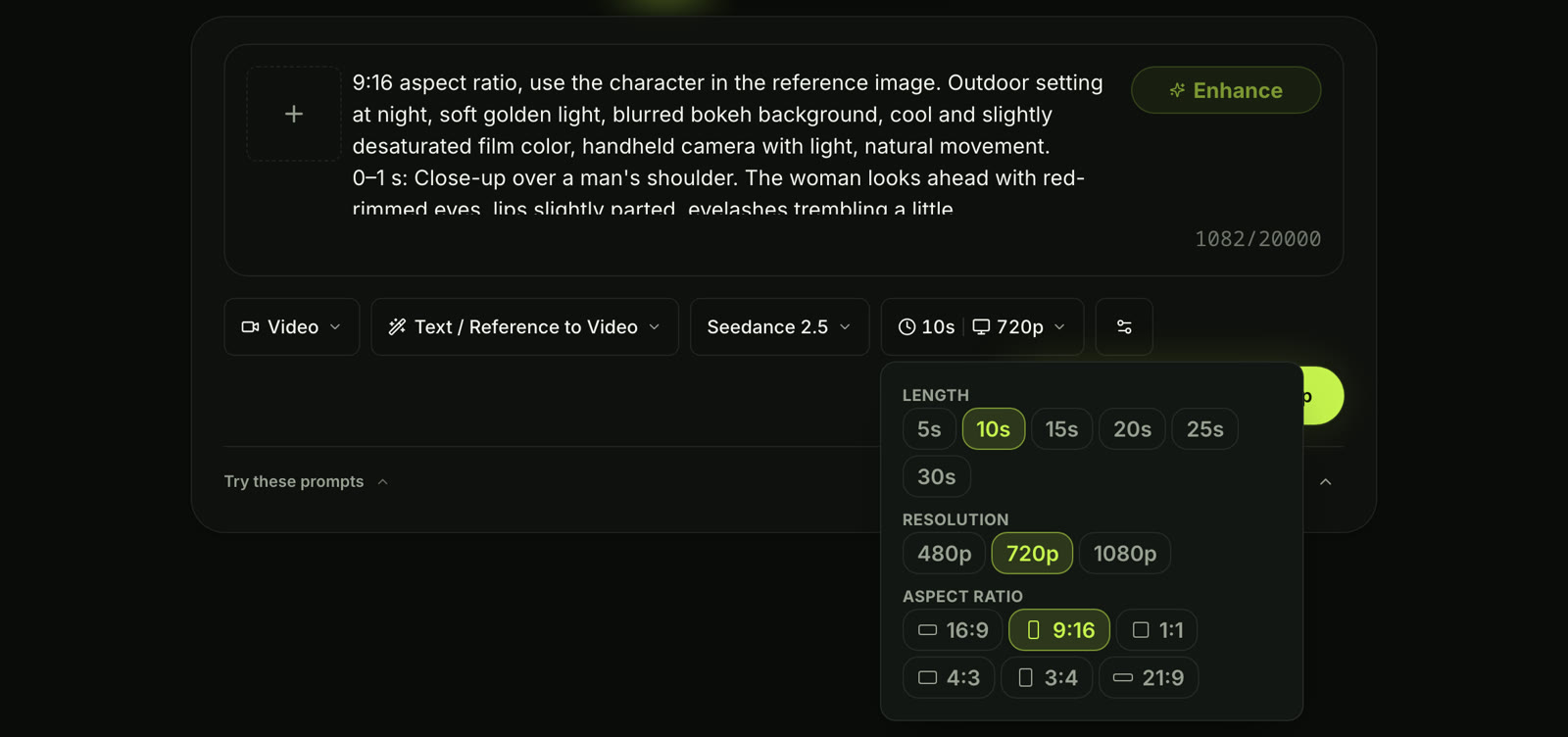
Seadanse's image to video AI with our English version of the Sforum prompt pasted in. Captured October 8, 2026.
There's a shortcut too: the "Use in generator" button below any prompt block on this page loads that script straight into the composer.
How to make the tears show and keep your face
Clean tears and a face that's still yours come down to four habits.
- Photo: Upload a sharp, well-lit portrait of one adult looking directly at the camera, so both eyes show and hair doesn't cover your face.
- Name the tear moment: Tell the model the exact second tears fall, such as "a tear appears at the corner of her eye" at 5–7 seconds or rolling down the cheek at 2.5–5.5 seconds.
- Keep it quiet: Prompt for subtle micro-expressions and restrained sadness, and don't ask for screaming or exaggerated sobbing.
- Keep the face: Tie identity to your upload in your opening line by stating that the model must use the character in the reference image.
FAQ
Can I use these prompts in Gemini, CapCut or Google Flow?
Yes. They're plain text scripts, so they paste into any video generator that takes an image and text instructions. Sforum ran theirs in CapCut's AI tool, Sofie Elara used Google Flow, and Zayn created his with Seedance 2.5.
On Seadanse, Seedance 2.5, Seedance 2.0, and Veo3 all operate under one shared credit balance.
How do I make the tears more visible?
Give tears an exact time and location in your prompt, such as lower eyelids welling up at two seconds and a tear rolling down the cheek at five seconds. It also helps to use a clear front portrait with good lighting, so the AI can position tear trails naturally across your skin.
Is there an AI crying prompt for couples?
Zayn's prompt is a two-person farewell scene, and it's got a touch on the cheek and spoken dialogue between both people. Pyona's prompt also frames a couple parting with a hand on the cheek. If you use our one-click effect, choosing Facing Him or Facing Her places your partner's blurred shoulder in front of you.
How long should an AI crying video be?
Most clips in this trend run around 10 seconds. Sforum's and Zayn's prompts are timed for 10 seconds, Sofie Elara split her scene into two 10-second parts, and our built-in effect creates a 12-second video.
Seadanse's custom generator lets you pick durations between 5 and 30 seconds.
Can I change the style to anime or vintage?
Yes. You'll restyle the video by changing the one sentence inside the prompt that names the look. Replace phrases like "cool and slightly desaturated film color" with "vintage film" or "anime aesthetic" while keeping all the second-by-second acting cues untouched.
What does it cost to run an AI crying prompt on Seadanse?
Making a 12-second 720p clip on our built-in effect costs $9.90 (500 credits). In the generator, the price depends on the length and quality you pick. You'll find every option in our credit packs, and the Seedance 2.5 cost calculator gives exact figures.
Is the AI crying trend the same as the crying filter?
No. The trend's an AI-generated video story, not a static lens. A photo filter just places artificial tears onto an existing still image, and the viral 2022 crying filter was a live augmented-reality camera lens.
Our guide on AI crying filter vs AI crying video walks through the differences.
Make your AI crying trend video today
A working AI crying trend prompt times the whole emotional farewell across one 10-second night scene. It sets the first smile, the gathering tears and the lonely walk away, and it locks onto your uploaded face.
You can paste one of the creator scripts above or find more ideas in our viral AI video effect prompts library. Or skip the prompt writing and make your AI crying trend video from one photo right now.
Written by The Seadanse Team. We read every prompt here at its original post on October 8, 2026, kept each creator's credit, and translated Sforum's Vietnamese prompt ourselves.
Related Articles
- How to Do the AI Crying Trend From One Photo — the three steps on the effect page, from photo to download.
- AI Crying Filter vs AI Crying Video: Which One Is the TikTok Trend? — why the trend is a video, not a photo filter or a live lens.


