
MAGI-2 Prompt Guide: 3 Tested Prompts With Timed Shots
MAGI-2 prompt guide: write each shot with its seconds, camera, action, quoted lines and sound, plus three tested prompts and their clips on Seadanse.
 The Seadanse Team13 min read
The team behind Seadanse. We run the models we write about, and we publish the specs, prices and limits the marketing leaves out.

TL;DR — Write a MAGI-2 prompt as a timed shot list for a clip of 4 to 30 seconds. Give each beat its seconds (like "0-2s:" and "2-5s:"), the camera, the action, any spoken line in quotes, and the sound. We ran three prompts on MAGI-2 on Seadanse: a 4-second cat, a 5-second ramen shop with a spoken line, and a 5-second vertical iced-coffee ad. Each prompt sits below with its clip. For a photo, give a first frame and an optional last frame. For references, name each one "Image 1", "Video 1" or "Audio 1" and give it one job: up to 10 images, 5 videos and 5 audio clips.
When you write one long paragraph, the shots, the line and the sound land wherever they land. You'll get messy timing if you don't tell the model when each part happens.
Sand AI's MAGI-2 video model, announced on November 24, 2026, reads time stamps, quoted lines and sound notes, so you can plan the clip second by second. This MAGI-2 prompt guide shows how. We also explain what MAGI-2 is and what it can make in plain words.
In our ramen run, the rainy street view plays first and the cook's close-up and his line come after it, which matches the order our prompt asked for. That's what happens when you write a MAGI-2 timed shots prompt with clear beats.
How to Write a MAGI-2 Prompt as a Timed Shot List
A MAGI-2 prompt works best as a timed shot list (each shot written with the seconds it plays), so you stay in charge of every beat. You'll shape the whole clip from one block of text instead of hoping the pacing works out.
- Timeline and cuts: Put the seconds in front of each shot, like "0-2s:" and "2-5s:", and say "hard cut to" where you want a cut.
- Camera and action: Give each shot one camera move and one clear action. For example: a slow push-in as milk pours into the glass, or a close-up as a hand lifts the glass toward the camera.
- Dialogue and sound: Put the spoken line in straight quotes after who says it. Then add a "Sound:" list, and end with what to leave out (like "No music.") or the music you want (like "Light acoustic guitar under it.").
- References and continuity: Name each file in the prompt ("Image 1", "Video 1", "Audio 1") and give it one job, while describing the person or product the same way in every beat.
Sand AI's own demo runs 15 shots in 30 seconds, a hard cut every 2 seconds, from one prompt, so the scene shifts every 2 seconds.
You don't need that many shots, because our 5-second clips use two beats each.
3 Tested MAGI-2 Prompts and the Clips They Made
We ran these three MAGI-2 prompts in "Text to Video" on Seadanse on November 26, 2026, at 1080p with sound on. Here's what we typed for each MAGI-2 prompt and what came back.
Prompt 1: A 4-Second Cat With One Sound Line
We set the mode to "Text to Video", the aspect ratio to 16:9, and the length to 4 seconds for this MAGI-2 prompt.
Prompt
A ginger cat sits on a sunny windowsill, turns its head to the camera and meows softly. Sound: a soft meow and distant birdsong.Output
A ginger cat on a sunny windowsill looks out at a green garden, turns its head to the camera and opens its mouth in a meow. You'll hear a soft meow and distant birdsong under it.
- Subject and action: One ginger cat does one clear set of moves on the windowsill.
- Sound line: A single "Sound:" line names the meow and birdsong.
- Short length: At 4 seconds, it's the shortest length to check the subject.
Prompt 2: A Timed Ramen Shop Scene With Dialogue
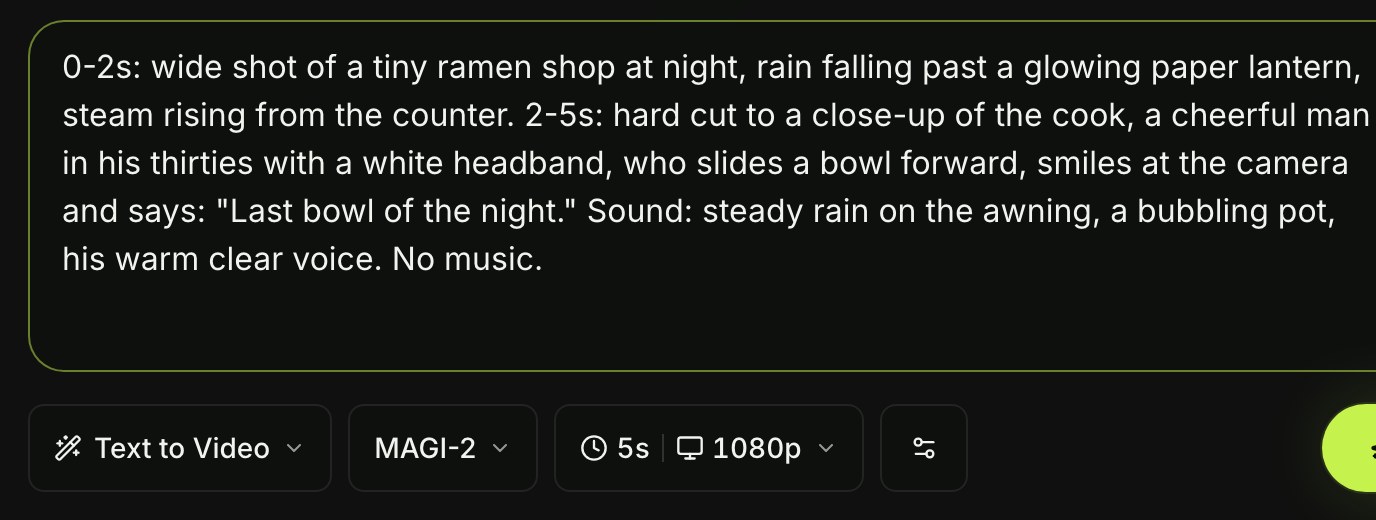
We set the mode to "Text to Video", the aspect ratio to 16:9, and the length to 5 seconds for this MAGI-2 timed shots prompt.
Prompt
0-2s: wide shot of a tiny ramen shop at night, rain falling past a glowing paper lantern, steam rising from the counter. 2-5s: hard cut to a close-up of the cook, a cheerful man in his thirties with a white headband, who slides a bowl forward, smiles at the camera and says: "Last bowl of the night." Sound: steady rain on the awning, a bubbling pot, his warm clear voice. No music.Output
For the first two seconds, a tiny ramen shop at night in the rain shows a glowing red paper lantern and rising steam. Then the shot moves in on the cook in a white headband, who holds a bowl out toward the camera with a big smile. His line, "Last bowl of the night.", plays over the rain.
- Two timed beats: "0-2s:" and "2-5s:" set when each beat plays.
- Quoted line: The spoken line sits in straight quotes right after "says:".
- Sound and no music: The "Sound:" line lists the rain, pot and voice, and ends with "No music."
Prompt 3: A Vertical Iced-Coffee Ad in 9:16
We set the mode to "Text to Video", the aspect ratio to 9:16, and the length to 5 seconds for this MAGI-2 prompt.
Prompt
Vertical product ad. A tall glass of iced coffee on a wet white marble counter in soft morning light. 0-2s: slow push-in as milk pours into the glass and swirls through the coffee. 2-5s: close-up as a hand lifts the glass toward the camera, condensation running down the side. Sound: ice clinking, a soft pour, then a calm female voice says: "Cold brew, done right." Light acoustic guitar under it.Output
Milk pours into a tall glass of iced coffee on a wet white marble counter and swirls through it. Then a hand lifts the glass toward the camera with drops running down the side, and a calm female voice says, "Cold brew, done right."
- Format and ratio match: "Vertical product ad." at the start pairs with 9:16 in "Aspect ratio".
- Two beats and voice: "0-2s:" and "2-5s:" split the pour and the lift, with the spoken line in quotes.
- Named music: "Light acoustic guitar under it." tells MAGI-2 what music to include.
Write Your MAGI-2 Prompt on Seadanse
Open the MAGI-2 AI Video Maker, keep "Text to Video", paste a MAGI-2 prompt from above, pick the length and ratio, and generate. You'll have the same setup we used for our three runs.
Click "Enhance" next to the prompt box when you want it to rewrite what you've typed. You can also follow the step-by-step guide to using MAGI-2 for every screen in the composer.
MAGI-2 Prompt Guide Formula: Six Parts in One Table
Every MAGI-2 prompt in this guide uses the same six parts, and you can reuse them in yours. Use this table as a quick check before you hit generate on any MAGI-2 prompt.
| Part | What to write | Fragment from our prompts | What it does for you |
|---|---|---|---|
| Time stamps | The seconds each beat plays | "0-2s:" … "2-5s:" | Each beat plays when you say |
| Subject | Who or what, with one or two details | "the cook, a cheerful man in his thirties with a white headband" | The same person in every beat |
| Action | One clear action per beat | "slides a bowl forward, smiles at the camera" | Movement you can predict |
| Environment | The place, the time, the light | "a tiny ramen shop at night, rain falling past a glowing paper lantern" | The look and mood of the shot |
| Camera | Shot size and one move | "slow push-in", "close-up" | Framing you choose |
| Sound | Spoken line in quotes, effects, music or "No music." | "Sound: steady rain on the awning, a bubbling pot, his warm clear voice. No music." | Sound that matches the picture |
You'll find every fragment in the table in the three prompts above.
MAGI-2 Prompt Best Practices for Shots, Lines and Sound
MAGI-2 prompts work best when you keep each beat short and you're clear about the sound. Here's what works when you write your own.
- Time stamps: Give every beat its own seconds, in order, like "0-2s:" and "2-5s:", so the beats play in that order.
- One move per shot: Write one camera move and one action per beat, the way you'd tell a camera operator.
- Spoken lines: Put the exact words in straight quotes right after who says them and "says:".
- Sound list: Add a "Sound:" line after the shots for effects, place sound and voice, then end with "No music." or name the music you want.
- Test short: Run a fresh prompt at 4 seconds first, then set "Length" to the full time once you've got the shot you like.
- Action fit: For crowd scenes and fights where two people's moves have to line up, pick Seedance 2.5 on Seadanse, and check the Seedance 2.5 prompt guide to see how to write for it.
Match Your MAGI-2 Prompt to Length, Ratio and Sound
The settings next to the prompt box decide how much time and what shape your shot list gets. You'll plan your beats around the seconds you pick.
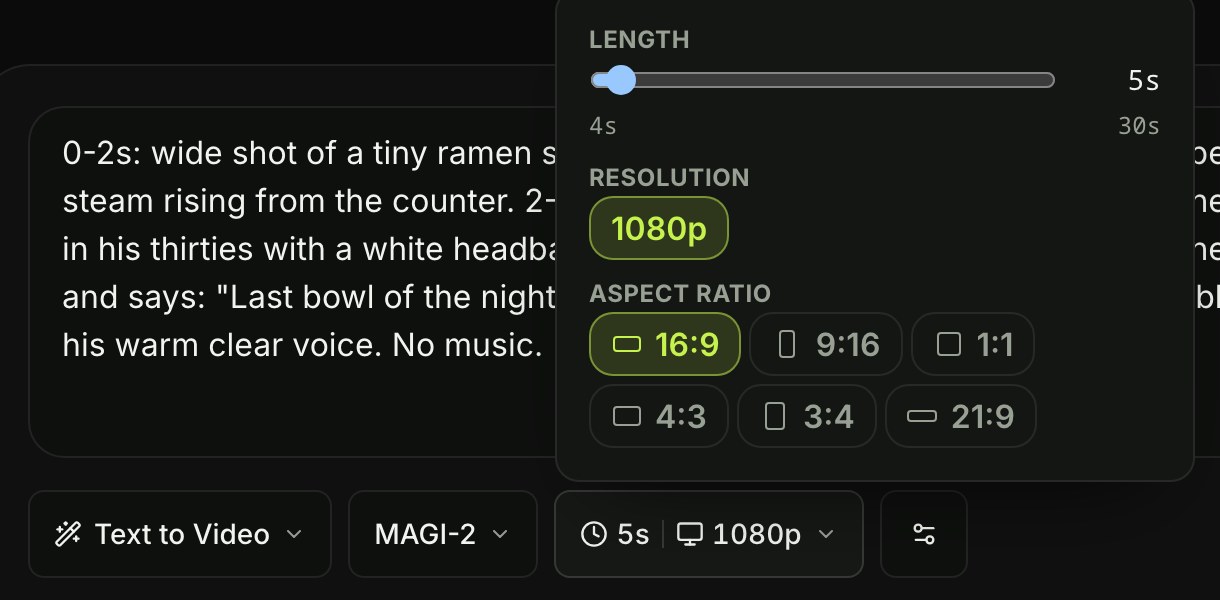
- Length: Use the "Length" slider from 4 to 30 seconds, in any whole second, so a 30-second clip gives you room for more beats than a 4-second one.
- Resolution: You get 1080p under "Resolution".
- Aspect ratio: Pick from six choices under "Aspect ratio": 16:9, 9:16, 1:1, 4:3, 3:4, and 21:9.
- Native soundtrack: Flip "Native soundtrack" on for spoken lines, sound effects and music, or off for a silent clip at the same price.
Every MAGI-2 mode costs the same rate, with or without sound or references, and a 30-second MAGI-2 clip costs 7.5 times a 4-second one. On Seadanse, a 1080p MAGI-2 second costs under a quarter of a 1080p Seedance 2.5 second. You'll find the numbers on Seadanse pricing.
MAGI-2 Image to Video Prompts: First Frame and Last Frame
MAGI-2's image-to-video mode, called "Frames to Video" in the Seadanse composer, starts the clip on your picture. That way, your subject and scene start right from what you've uploaded.
You upload a first frame as the picture the clip starts on. You can also add an optional last frame when you want the clip to end on a set picture.
The composer says: "Upload a first frame, and a last frame if you want the clip to end on it. The video takes the first frame's shape." So the clip's shape follows your first frame.
Because your picture already shows who and where, your MAGI-2 prompt focuses on what moves, the camera, the timing and the sound. You can write a line like "0-3s: she turns from the window and walks toward the camera." or a line like "Sound: footsteps on wood, rain on the glass. No music."
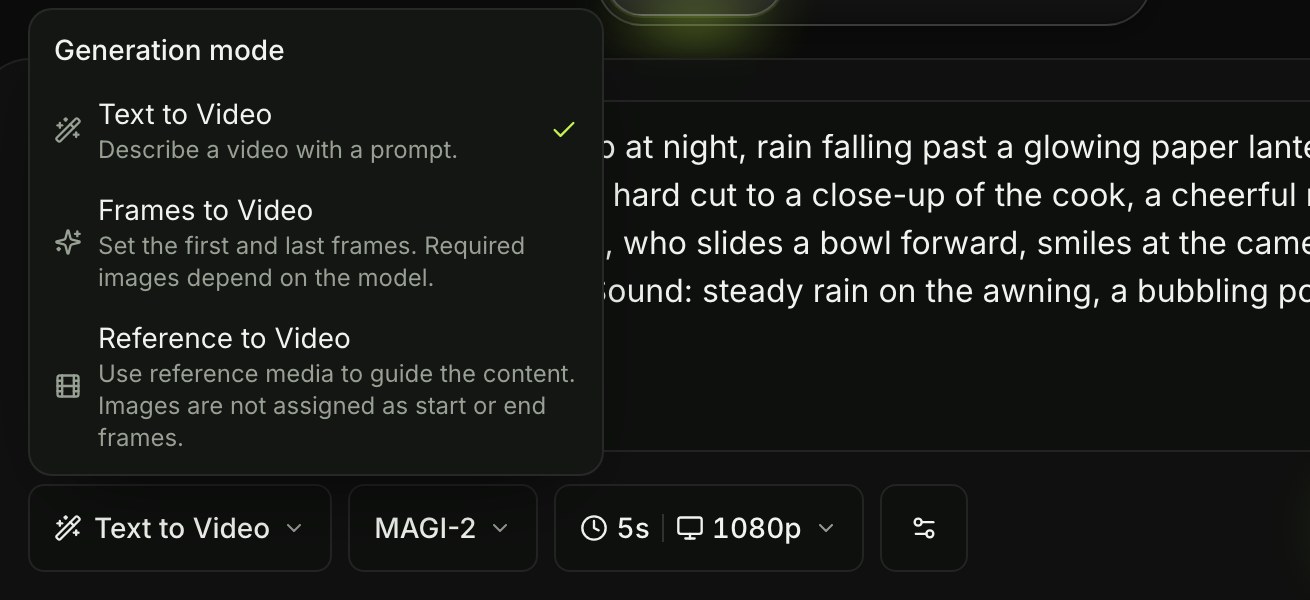
Open the MAGI-2 composer to switch into "Frames to Video" whenever you start from a still.
MAGI-2 Reference Prompts: Name Image 1, Video 1 and Audio 1
"Reference to Video" lets a MAGI-2 prompt use up to 10 images, 5 videos and 5 audio clips. You'll use it when you want MAGI-2 to pull looks, moves or sound from files you supply.
- Reference images: Add up to 10 images in JPEG, PNG or WEBP to set a face, an outfit, a product or a place.
- Reference videos: Add up to 5 clips, each 2 to 30 seconds and 30 seconds in all, in MP4 or MOV to show a move or a camera path.
- Reference audio: Add up to 5 tracks, each 2 to 30 seconds and 30 seconds in all, in MP3 or WAV, for a voice or a sound. Add a reference image or video first, so your audio tracks go along with it.
Say in the prompt how to use them, naming each file as "Image 1", "Image 2", "Video 1" or "Audio 1" and giving each one job. You can write a line like "Image 1 is the woman's face and outfit. Image 2 is the bottle. Video 1 sets the camera move. Audio 1 is her voice."
Frames and references are separate modes, because in "Reference to Video" images aren't assigned as start or end frames. Sand AI's reference demo uses reference images to keep one character's face, headscarf and robe the same through giant flower worlds. The worlds are an iris hillside, a pink rose garden and a lily valley.
MAGI-2 Prompt FAQ
How long can a MAGI-2 prompt be?
MAGI-2 reads prompts up to 15,000 characters. That's plenty of room for timed beats and sound notes in a single MAGI-2 prompt.
How do I make a character speak in a MAGI-2 prompt?
Put the spoken line in straight quotes right after who speaks and "says:", just like we did in prompt 2. Keep "Native soundtrack" on so the voice plays with the shot.
How do I keep music out of a MAGI-2 clip?
Write "No music." at the end of your sound line, as we did in prompt 2. To get music, name it (as in prompt 3), and to get a silent clip, switch "Native soundtrack" off.
How many shots fit in a MAGI-2 prompt?
Sand AI's demo runs 15 shots in 30 seconds, while our 5-second clips use two beats each. Give each beat its own seconds so every shot lands where you want.
Can I use my own voice in a MAGI-2 prompt?
Yes, you can add your recording under "Reference audio" in "Reference to Video", next to a reference image or video. Then say in the prompt what that audio track is for.
MAGI-2 Prompt Guide Recap: Time It, Quote It, Label It
Break your MAGI-2 prompt into timed beats with seconds, camera moves, clear actions, quoted lines and sound notes so each part lands on cue. You can also browse other options under AI Video Models on Seadanse. Head back to the composer to write your first MAGI-2 prompt and try a timed shot list of your own.
Written by The Seadanse Team. We ran the three prompts in this guide on MAGI-2 on Seadanse on November 26, 2026.
Related Articles
- What Is MAGI-2? — Sand AI's video model in plain words: what it makes, how long, and with what sound.
- How to Use MAGI-2 — every step in the composer, from picking the mode to downloading the clip.
- Wan 3.0 Prompt Guide — the same prompt habits applied to another video model with sound.
- MAGI-2 vs Seedance 2.5 — three same-prompt tests and 28 creator verdicts on which model to pick for which job.


