
AI Cupid Trend Prompt (Copy-Ready): The Handbag Scene, Shot by Shot
This AI Cupid trend prompt gives you the copy-ready 15-second handbag scene from one photo: Cupid, the cathedral square, four shots with seconds, the sound.
 The Seadanse Team14 min read
The team behind Seadanse. We run the models we write about, and we publish the specs, prices and limits the marketing leaves out.

TL;DR — The AI Cupid trend prompt below makes the whole 15-second handbag scene from one photo: Cupid's look, the cathedral square, four timed shots and a love theme that stops dead at the hit. You also get a one-line pet version and three quick tweaks. If you want to skip typing, the AI Cupid trend page on Seadanse makes the full scene from your photo with sound.
The Argentine TikTok that brought the comedy clip to TikTok went live on September 2, 2026, with 319.2K views. There, viewers asked "Donde lo haces ?" ("where do you make it?") twice, and "como se puede hacer este video" ("how can you make this video"). Neither question's had a reply.
Other viewers joked, "Le tuve que poner una restricción de acercamiento a Cupido" ("I had to put a restraining order on Cupid") and "cupido y yo, ya no nos hablamos" ("Cupid and I aren't talking anymore").
No social creator's posted the exact prompt behind the clip. When we checked on October 31, 2026, 19 YouTube searches and 6 Reddit searches turned up zero prompts or step-by-step guides. The viral clips are made with AI, so you're usually left guessing what text to write.
Here's the full prompt you can paste today, what each line controls, the four camera cuts, and five habits that keep your video on target.
What Is the AI Cupid Trend Prompt?
The AI Cupid trend prompt is the written instruction an AI video app reads to produce the handbag scene from one photo of you. We've written it straight from the four shots of the cathedral reel that went viral on Instagram, matching its timing and punchline.
A realistic, cinematic 15-second vertical (9:16) comedy video in four shots, with sound. Use the person in my photo as the main character: keep their face, hairstyle, skin tone, body and clothes exactly. They carry a small black leather handbag with a short top handle and no logo.
Cupid is a stranger: a slim adult man in his mid-twenties with short dark curly hair and a clean-shaven face, in a sleeveless white knee-length toga with a thin gold belt, two big white feathered wings, bare feet, a gold bow and gold arrows. He never has the face of the person in my photo and is never a child.
The place: a wide, empty square of grey stone paving in front of a large cream-stone Gothic cathedral with tall carved pointed-arch doors and stone gargoyles, sunny late afternoon, warm low sun, long soft shadows. Nobody else is on the square.
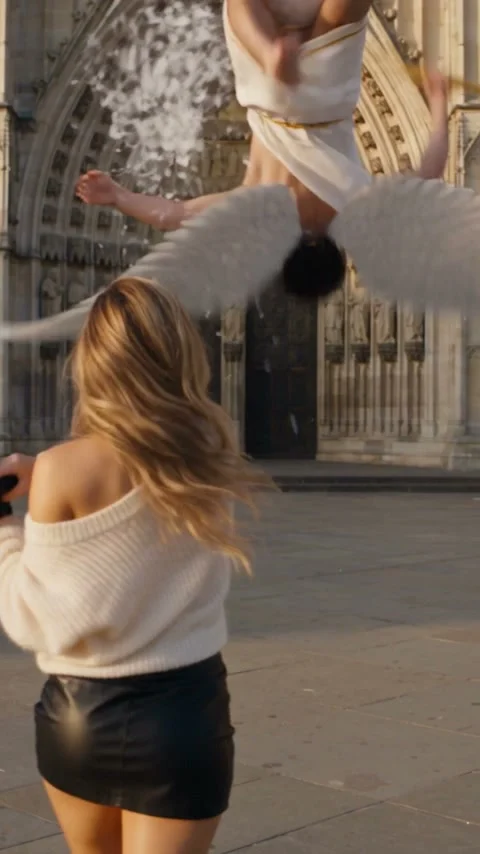
Shot 1 (0-3 s): high angle from just behind Cupid on a carved stone ledge high on the cathedral, a gargoyle beside him. He draws the gold bow and aims straight down; far below, the main character is a tiny figure crossing the square. At about 1.2 s his wings snap open and he dives off the ledge head first.
Shot 2 (3-5.7 s): chase camera behind and above Cupid as he glides low over the square, wings spread wide; the main character walks on ahead toward the cathedral doors, unaware.
Shot 3 (5.7-6.5 s): street level, eye height, 50 mm lens, in front of the carved doors. The main character walks toward the camera holding the handbag, face clearly visible; Cupid swoops in behind them with the bow raised. At about 6.1 s they glance back and swing the handbag hard with both hands. Hard cut at the exact instant the bag meets Cupid.
Shot 4 (6.5-15 s), one continuous shot: over the main character's shoulder, the handbag smacks Cupid in the chest; he flips backwards and lands flat on his back on the paving stones at about 7.8 s, wings spread, a burst of white feathers, the gold bow clattering down. He lies still, knocked out cold. The main character smooths their hair, picks up the handbag and brushes it off, completely unbothered, then walks toward the camera past him and, without stopping, looks straight into the lens with a calm closed-mouth half-smile. End on that chest-up look, Cupid flat on the ground behind.
Sound: wind and big wing beats in the dive, the creak of the bowstring, a leather thump at the hit, a soft thud and fluttering feathers, then only footsteps on stone. A soft romantic harp-and-strings love theme plays from the start and stops dead at the instant of the hit; no music after it. Nobody speaks or sings.
Rules: exactly two characters; one head per person, two arms and five fingers on each hand; Cupid has exactly two wings; real-time speed, no slow motion; comic slapstick only, no blood, no wound, no injury; no text, captions, logos or watermark anywhere.This prompt describes a whole new scene, so you don't need anyone else's clip. Cupid is written as a made-up stranger, which means he never takes on your face.
How the AI Cupid Trend Prompt Is Built
The AI Cupid trend prompt's built in nine lines, with one clear job per line. Here's how every line works together to build the full video:
| Line | What it tells the app | Why it's there |
|---|---|---|
| Opening | 15 seconds, vertical, four shots, sound; you from your photo, with the black handbag | So you're the one holding the bag |
| Cupid | A made-up adult stranger in a white toga, wings, gold bow | So Cupid never gets your face |
| Place | The empty cathedral square, late-afternoon sun | So the scene looks like the trend |
| Shot 1 | Ledge, aim, wings open, the dive | So the joke starts high up |
| Shot 2 | Chase camera over the square | So you see him coming and you don't |
| Shot 3 | The swing, then a hard cut on the hit | So the smack lands like a punchline |
| Shot 4 | The fall, the feathers, your walk and your look | So the video ends on you |
| Sound | Love theme that stops dead at the hit | So the silence is the joke |
| Rules | Two characters, two wings, real speed, slapstick only | So there are no extra wings or hands |
The Four Shots in the AI Cupid Trend Prompt, Second by Second
The AI Cupid trend prompt splits the 15 seconds into four shots, and the cuts follow the cathedral reel at 3.0, 5.7, and 6.5 seconds. Here's the breakdown across the entire timeline:
- Shot 1 (0-3 s): You see a high angle from behind Cupid on a cathedral ledge, with a gargoyle beside him. He aims his gold bow down at you crossing the square. At about 1.2 seconds, his wings snap open and he dives.
- Shot 2 (3-5.7 s): A chase camera flies behind and above Cupid as he glides low across the paving stones. You walk ahead toward the cathedral doors, unaware.
- Shot 3 (5.7-6.5 s): The camera drops to street level in front of the carved doors. You walk toward the camera holding the handbag, and Cupid swoops in behind you. Around 6.1 seconds, you glance back and swing the bag hard with two hands.
- Shot 4 (6.5-15 s): Over your shoulder in one continuous shot, the bag smacks Cupid. He flips backwards and lands flat on his back at about 7.8 seconds in a burst of white feathers. You smooth your hair, pick up the handbag, brush it off, walk past him, and look straight into the lens.
The edit jumps between shot 3 and shot 4 right when the handbag touches Cupid, and that's what turns the smack into a crisp physical punchline.
How Do You Use the AI Cupid Trend Prompt?
To use the AI Cupid trend prompt, you need an AI video app that takes one reference photo and a written prompt together, and one clear photo of you. You'll drop your image into the tool and supply the instructions in the text field. That's all the setup there is.
Here's what you need:
- The app: A video tool that'll take an image and text instructions in a single prompt box.
- Your photo: A single person facing front with clear lighting and a visible face.
- The prompt: The complete nine-line text block, pasted as it is, so don't cut lines out.
- The sound: The sound line asks for the love theme, the wing beats and the thump. If your app makes silent video, add a soft harp-and-strings track in an editor and cut it at the hit.
If you don't want to adjust settings yourself, our AI Cupid video maker builds the scene directly from your picture.
Habits That Keep the AI Cupid Trend Prompt on Target
Five habits keep the AI Cupid trend prompt on target, and you can see each one in the prompt above. Setting strict limits is what prevents common AI mistakes like distorted bodies or mismatched faces. That's why each one's spelled out.
Make Cupid a Stranger With His Own Face
Cupid needs his own description so the AI generator doesn't copy your likeness onto both people. We've described him as "a slim adult man in his mid-twenties" and explicitly say, "He never has the face of the person in my photo". The prompt also specifies that he "is never a child", so he's clearly a grown man.
Keep Your Face, Hair and Clothes From the Photo
Your own subject line tells the tool to "keep their face, hairstyle, skin tone, body and clothes exactly". That's what keeps your look the same throughout all four camera angles. You don't need a purse in your snapshot because the text gives you "a small black leather handbag with a short top handle and no logo".
Cut on the Hit
The prompt calls for a "Hard cut at the exact instant the bag meets Cupid". Splitting the swing and the fall across two camera angles gives the slapstick its full force, and that's the joke. Shot 4 takes over as "one continuous shot" so the aftermath, feather burst, and walk-away unfold smoothly without weird visual jumps.
Stop the Music Dead at the Hit
The sound design sells the comedy just as much as the video. The prompt sets up a romantic mood that "stops dead at the instant of the hit", followed by "no music after it". When the soft tune cuts to silence and footsteps on stone, the joke's done.
Spell Out the Count of Wings, Arms and Fingers
AI generators often hallucinate extra limbs during fast movement unless you restrict them. Our prompt's rules demand "exactly two characters" and state that "Cupid has exactly two wings". Adding constraints like "real-time speed, no slow motion" and "comic slapstick only" prevents unrealistic slow-motion drifts or distorted action.
AI Cupid Trend Prompt for Your Dog or Cat
The AI Cupid trend prompt works for a dog or cat if you swap one sentence. Replace the sentence that starts "Use the person in my photo" with this one line:
Use the dog or cat in my photo as the main character, standing upright like a person in a camel-brown jacket, white T-shirt and dark trousers, with its own real head, face, ears and fur.Your pet stands upright like a person, carries the handbag, and keeps its own real head, face, ears, and fur. The joke's the same, but your pet delivers the knockout swing instead.
Three Tweaks to Try in Your AI Cupid Prompt
Three small edits change the AI Cupid prompt's look without touching the four shots. You'll test these variations in your chosen video generator:
- The landmark: Swap the cathedral square for another stone plaza with a high ledge. Change the Place line and the ledge in Shot 1, and keep the four shots as they are.
- The lighting: Change "sunny late afternoon, warm low sun, long soft shadows" to another light, such as a deep blue evening or foggy morning.
- The missed shot: An Instagram variant from October 9, 2026 features a small winged archer whose heart arrow misses. It pins a coat in a shop window, and the woman falls for the coat. You can write that into Shot 3 and Shot 4 instead of the swing, aiming for a stylish jacket in a store window.
Can You Make an AI Cupid Video Without a Prompt?
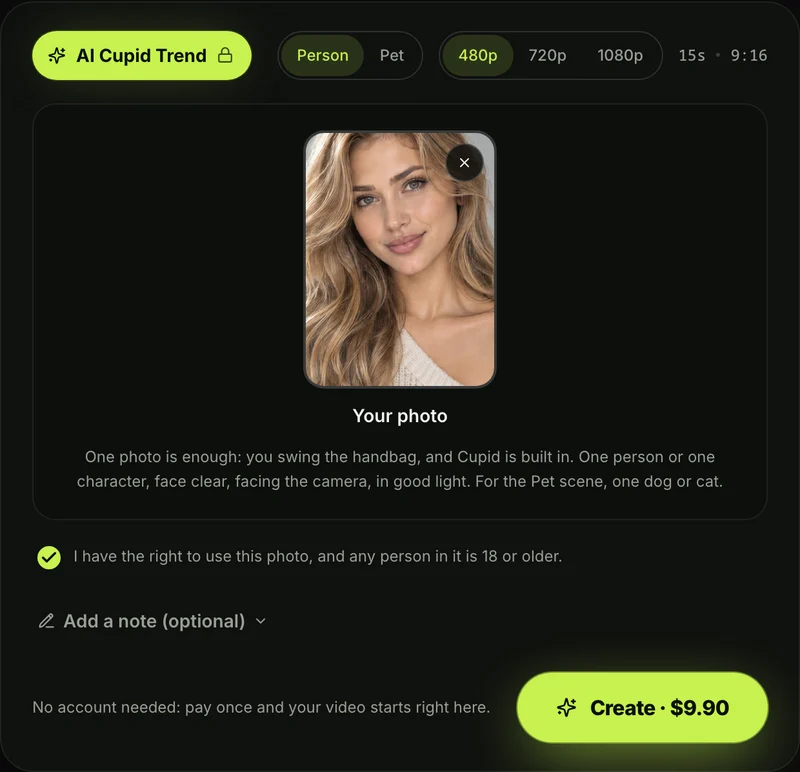
Yes, you can make an AI Cupid video without a prompt on Seadanse's AI Cupid trend, where Cupid, the cathedral square, the four shots and the sound are built in. The entire technical setup's handled behind the scenes. You don't write or see a prompt there.
Here's how to create your clip:
- Add your photo: Upload one clear front-facing picture of yourself, a cartoon or game character, or your dog or cat.
- Pick the scene: Choose between the standard person scene or the upright pet scene.
- Pick 480p, 720p or 1080p: Pick the quality you want.
- Leave the box ticked and press Create: The consent box comes ticked; leave it that way and press Create to make your 15-second video.
Generating one 720p video costs $9.90, paid once, with no account needed.
Check our Seadanse pricing page to see the options, or read how pay-once credits work across our tools. Once it's done, you'll download your MP4 without any watermark.
You can also read how to make the AI Cupid video step by step for an in-depth walkthrough. The same technology powers other one-photo AI video effects, including the police getaway in Blocus Poursuite (a 10-second police-chase prank) and our quick AI Arrest Video (a 10-second arrest scene).
AI Cupid Trend Prompt FAQ
Is this the prompt the creators used?
No creator's posted their own prompt. We wrote this prompt by measuring the cathedral reel's four shots, matching the exact scene built into our automated generator. You get the same cathedral square, four timed cuts, and audio transitions.
Do I need the original reel to use the AI Cupid trend prompt?
No, it doesn't need one: the prompt generates an original clip from scratch using your photo and text instructions. You don't need to download or slice anyone else's video file. Check the AI Cupid video generators compared to see which tools handle direct text prompts best.
Is the AI Cupid trend the FIFTY FIFTY Cupid dance?
No, it isn't. The FIFTY FIFTY trend is a 2023 viral dance routine set to a K-pop song. The AI Cupid trend is a 2026 comedy video featuring an archer dive and a handbag knockout. Our guide on how the two Cupid trends differ breaks down both formats.
Where does "Not today, Cupid" come from?
The phrase comes from an August 2026 black-and-white web comic that circulated on TikTok showing a woman batting away a winged archer with her purse under the caption "Aim somewhere else!". Creators adapted that visual into photoreal 3D AI comedy clips in September and October 2026. You can read the Not today Cupid meme explained for the full background.
How much does an AI Cupid video cost on Seadanse?
One 720p video costs $9.90, paid once, with no account and no monthly subscription needed. The same pack also covers a 480p video, while generating at 1080p takes 1,480 credits. If a video fails, you'll get your credits back to your balance automatically.
Ready to Skip the AI Cupid Trend Prompt?
You don't have to tweak camera timings or sound prompts to make this comedy clip work. You'll just visit our generator to make your own Not today, Cupid video for $9.90 at 720p from a single photo.
Written by The Seadanse Team, the team that built the AI Cupid trend page.
Related Articles
- How to Make the AI Cupid Video (Not Today, Cupid) From One Photo — your photo, the scene, the quality, Create.
- Not Today Cupid Meme: The AI Cupid Handbag Video Explained — where the caption and the handbag clip come from.
- AI Cupid Trend vs the FIFTY FIFTY Cupid Dance: Which Cupid Trend Is It? — the handbag clip and the K-pop dance side by side.
- Best AI Cupid Video Generators for the Handbag Trend (2026) — the sites that make the handbag scene, compared.


