
Is Tiny Desk AI Free? 6 Options Compared (2026)
No: what each Tiny Desk AI route gives you free, and the full 19-second video with the Outstanding sound for $9.90, no sign-up.
 The Seadanse Team12 min read
The team behind Seadanse. We run the models we write about, and we publish the specs, prices and limits the marketing leaves out.

TL;DR — No, Tiny Desk AI isn't free across the 6 options that people use for this trend. On Seadanse, you can make a full 19-second 720p video with the "Outstanding" sound through Tiny Desk AI for TikTok and Reels for $9.90 with no sign-up. Every other route either asks for a paid plan, charges for packs, or gives you an edit with one photo slot.
You see "free" in almost every tutorial title for the Tiny Desk AI trend. Social clips show a group of five people singing and playing behind a crowded office desk.
The music starts right away, the sax solo hits halfway through, and the video feels ready to share.
When you try those steps yourself, the free part stops early. One route opens an editor that only takes a single photo and cuts it to the track.
Another route asks you to create an account, but gives you zero video credits to make anything. Other sites take you straight to a payment screen before the video starts.
We went to each maker's own page on 27 October 2026 to see what each one delivers. We looked at whether there's a free option, how each tool charges, how many photos go in, and whether the song comes in the file.
The breakdown below shows what each tool offers so you know what to expect before you spend time or money.
Is Tiny Desk AI free? What each option gives you
No option makes the complete 19-second group performance for free.
- CapCut template "hh": It's free to open in the app, but it only gives you an edit of one photo cut to music, not an AI group performance.
- Higgsfield: It offers a free account with no video credits, while video creation runs on monthly plans.
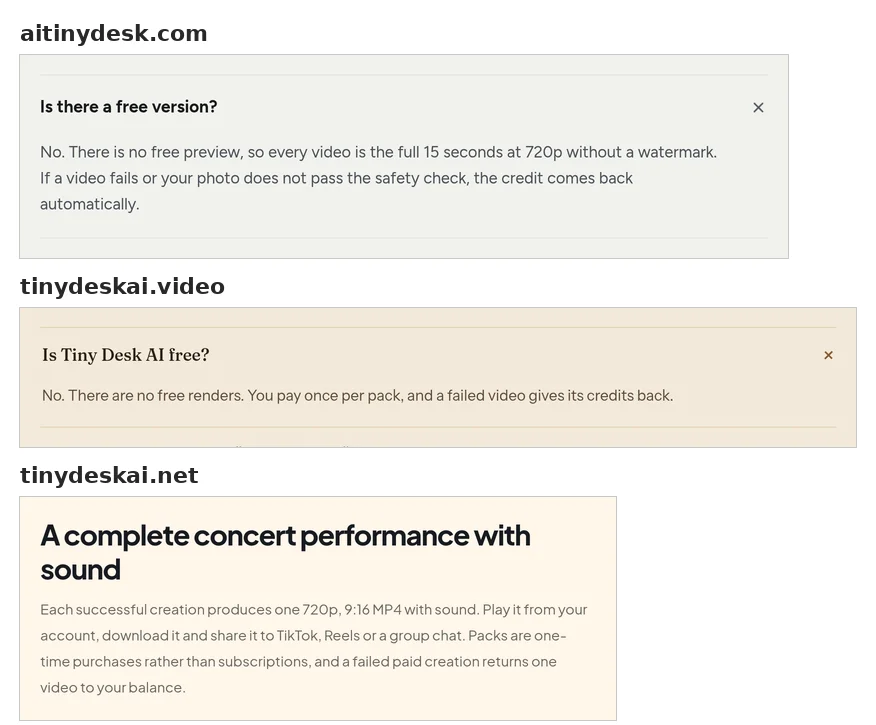
- aitinydesk.com: It states that there's no free version and sells one-time packs for its 15-second videos.
- tinydeskai.video: It states on its page that there are no free renders and charges through credit packs.
- tinydeskai.net: It sells video packs to make 720p vertical videos with the sound included.
- Seadanse Tiny Desk AI: It makes the full 19-second 720p video with 1 to 5 photos and the original sound for $9.90 paid once with no sign-up.
Tiny Desk AI free or paid: 6 options compared
The comparison table below shows what each maker's page listed on 27 October 2026.
| CapCut template "hh" | Higgsfield | aitinydesk.com | tinydeskai.video | tinydeskai.net | Seadanse Tiny Desk AI | What it means for you | |
|---|---|---|---|---|---|---|---|
| Free version | Free to open in CapCut | A free account with no credits | "No" | "No free renders" | — | — | Every route asks you to pay for a full band video. |
| How you pay | No price on its page | Monthly plans | One-time packs | Packs | Packs | $9.90 for one 720p video, paid once | Packs and one-off payments end when you stop buying. |
| Photos | 1 slot | — | 1 or 2 | — | — | 1 to 5, same price | More photos means more friends in set spots. |
| Length | — | — | 15 seconds | About 18 seconds | — | 19 seconds | The trend's original runs 19 seconds. |
| Sound in the file | — | — | Its own song | Song plus a silent copy | Sound included | The original "Outstanding" sound | With the sound in the file, you post it as it is. |
| Sign-in | On CapCut's website | Account needed | — | Sign in to get credits | — | No sign-up | No sign-up means you pay and start right away. |
A dash (—) means the maker's page didn't say. Read on each maker's own page on 27 October 2026: CapCut's template page, Higgsfield's pricing guide, aitinydesk.com, tinydeskai.video and tinydeskai.net.
If you want the complete group video without a subscription or an account, you can use the Tiny Desk AI generator on Seadanse. You add your photos, pick your settings, pay once, and get the 19-second file with the music included.
The CapCut Tiny Desk AI template is free to open, with one photo slot
The CapCut template named "hh" is a template (a ready-made edit you drop your photo into) posted on 24 October 2026 with 1 slot for one photo or clip. The page lists clipping as its sole feature, which means it cuts your picture to match the rhythm of the track.
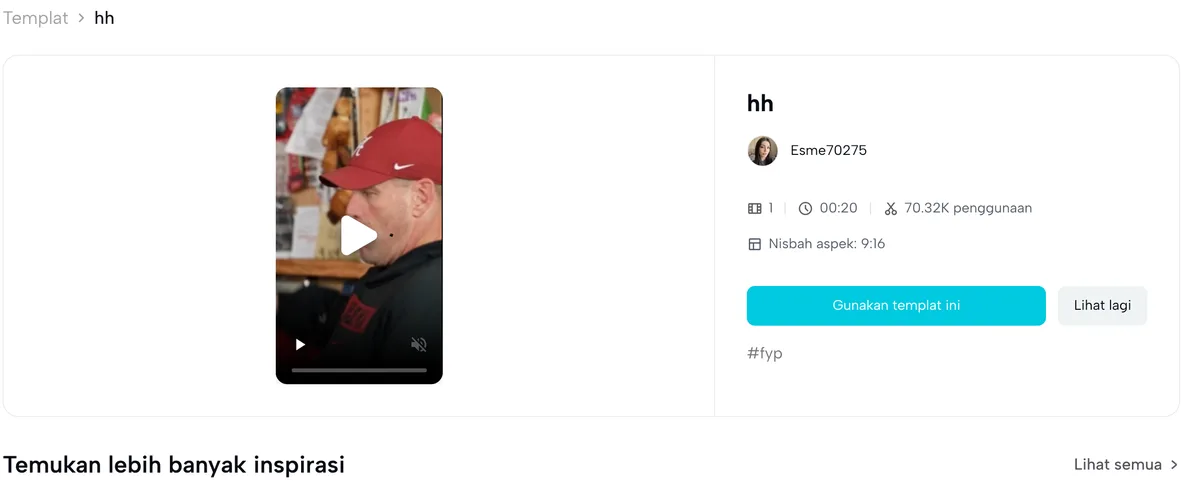
Because it only holds one photo slot, it doesn't turn your friends into five distinct band members. The demo video on the template page shows the viral sports parody.
Dropping your picture into the template places your single still image inside an edit. If you want to know what the CapCut template does with your photo, it creates a fast edit rather than an AI-generated band performance.
The template page shows no price, and opening the template on CapCut's website prompts you to sign in before you can export. When you want five distinct people in set roles across the video, explore what to use when the CapCut template won't open.
Higgsfield's free plan has no video credits
Higgsfield is an AI video platform that structures its billing through monthly plans. According to its pricing guide from October 2026, "Free has no credits".
The free account gives limited access to some image tools, but you can't use it to make videos without paying. Higgsfield also notes that any outputs created under the free account carry restrictions against commercial use.
If you want to make a video on the platform, you have to choose one of its paid monthly plans.
Dedicated Tiny Desk AI sites charge per video
Dedicated web tools focus on this meme format, and each charges for exports.
aitinydesk.com says there's no free version
The site aitinydesk.com addresses free access in its help section. When answering the question "Is there a free version?", the site answers "No".
The service makes a 15-second 720p video and accepts 1 or 2 photos. It sells access through one-time packs, and its exports use its own song rather than the original performance track.
tinydeskai.video says there are no free renders
The FAQ on tinydeskai.video explains whether users can test the tool without paying. In response to "Is Tiny Desk AI free?", the maker states: "No. There are no free renders."
The generator makes a clip of about 18 seconds and gives two downloads: one version with song audio and one silent copy. You sign in and buy credit packs before any video begins.
tinydeskai.net sells video packs with the sound included
The generator at tinydeskai.net sells packs with the sound included in the finished file.
Its files come in vertical 9:16 format at 720p resolution. Like the other dedicated tools, you buy access in packs before making your video.
Seadanse Tiny Desk AI: 19 seconds with the "Outstanding" sound for $9.90
Seadanse lets you make a complete 19-second Tiny Desk AI video in your browser without downloading an app. You can add 1 to 5 photos, and the price remains the same whether you use one picture or five.
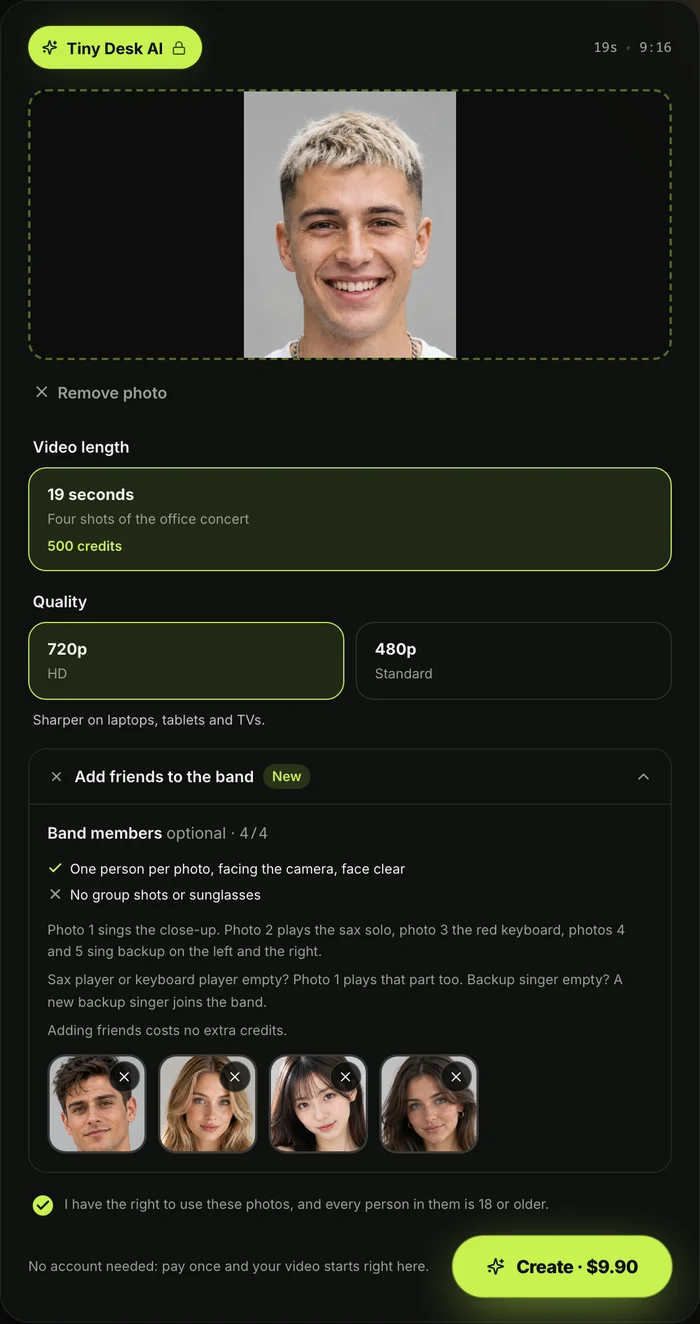
The generator casts your photos into specific band roles across five shots. Photo 1 is the lead singer, in close-up from 0 to 1.4 seconds and again from 6.7 to 13.0 seconds. That's about 7.7 seconds alone on screen.
Photo 2 takes the sax solo from 13.0 to 16.4 seconds, so photo 2 gets about three and a half seconds alone on screen.
Photo 3 sits front and centre at the red keyboard, while photos 4 and 5 take the backup singer spots behind the desk. Together they share about 7.9 seconds in the two band shots.
Each person keeps their own face, hair and clothes from the photo, so team jerseys go on stage with them. The background of the photo is left out.
A pet, a game character or an AI-made character image also works. A pet at the red keyboard sits up with its paws on the keys.
If you add fewer than five photos, photo 1 fills open soloist spots. Extra backup singer spots get singers dressed to match the keyboard player.
You see all the details clearly before you begin:
- Resolution: You pick 720p or 480p.
- Credits: A 720p video uses 500 credits and 480p uses 375 credits (the units a video is paid in).
- Price: One one-time credit pack covers either resolution for $9.90.
- Button: You see the price right on the Create button before you pay.
- Sign-up: There's no sign-up and no subscription.
- Validity: Credits stay valid for 12 months.
- Watermark: There's no watermark on the exported video.
- Failed videos: A video that fails returns its credits automatically.
Why the free Tiny Desk AI routes look different
The free routes look different because creating a full five-person performance needs computing work. Video templates in editing apps are free to open because they apply basic cuts or filters to an existing image.
They don't animate faces, place different people behind instruments, or build camera angles.
AI platforms that offer a free account exclude video creation from that tier. As shown in Higgsfield's pricing guide, an account without credits lets you explore settings, but it can't make video files.
The full band video — five camera cuts, set performance positions for your friends, and the music track — needs paid processing across every service.
To see every platform side by side, read the full list of eight ways to compare all the web tools and templates.
Is Tiny Desk AI free? Questions people ask
Is Tiny Desk AI free on Reddit?
Steps shared on Reddit don't provide a free route to the full band video. Discussions around the trend point users toward template links or AI platforms that charge for video creation.
Even when a first template costs nothing, finishing the full band clip always needs paid credits or packs.
Is the Outstanding Tiny Desk AI template free?
The CapCut template set to "Outstanding" is free to open inside CapCut. But that template only gives you one photo slot and creates a basic edit of your picture cut to music.
It doesn't make the animated group performance with five separate band roles seen in the viral videos.
Do I need a subscription for Tiny Desk AI?
You don't need a subscription when you make your video on Seadanse. While platforms like Higgsfield rely on recurring monthly plans, Seadanse uses single credit packs that let you make AI video effects without a subscription.
You pay once from the Create button, your credits stay valid for 12 months, and you don't face recurring charges.
Is there a watermark on a Tiny Desk AI video?
There's no watermark on the exported video when you make your clip on Seadanse. Once processing finishes, you download a clean 9:16 MP4 file that's ready to share on TikTok or Reels.
Make your Tiny Desk AI video for $9.90
No website gives you the full five-person band video without paying. On Seadanse, you can get the 19-second video with the "Outstanding" audio for a single payment of $9.90 without creating an account.
Add your photos, pick 720p, press Create, and make your Tiny Desk AI video in your browser. Want to see the full setup first? Follow our guide on how to make a Tiny Desk AI video step by step, or browse our wider catalogue of AI video effects.
Written by the Seadanse team. We read each maker's own page on 27 October 2026.
Related Articles
- How to Make a Tiny Desk AI Video From One Photo (4 Steps) — the picks and presses, and who plays what in your band.
- What Is the Tiny Desk AI Trend? The Coaches Video, Explained — who made the first one, when, and how it spread past college football.
- Outstanding Tiny Desk AI Template: What the CapCut One Does — the template the TikTok tutorials link, and what it does with your photo.
- Best Tiny Desk AI Video Generators (2026): 8 Ways Compared — the sites, apps and templates that make this video, side by side.
- Tiny Desk AI Prompt (Copy-Ready): Every Shot, Every Role — the full prompt behind the video, to use in a video tool yourself.
- Tiny Desk AI Meme Ideas: Who Goes on the Sax (and How) — the casts people have made, and who to put in yours.
- Tiny Desk AI Song: "Outstanding" by The Gap Band, Explained — the song, the 2023 set it comes from, and the part the trend uses.
- Tiny Desk AI Sound Not Working? 6 Fixes for TikTok and Reels — why a posted video goes silent and how to get the song back.
- Tiny Desk AI Coaches Video: Make Your Own Team's Version — six casting ideas for your own crew after a loss.
- Tiny Desk AI CapCut Alternative: 5 Ways Without the Template — what to use when the CapCut template won't open for you.


