
Tiny Desk AI Coaches Video: Make Your Own Team's Version
Tiny Desk AI coaches video explained: cast your own team's 19-second version from 1 to 5 photos with six fun ideas, roles, and settings.
 The Seadanse Team11 min read
The team behind Seadanse. We run the models we write about, and we publish the specs, prices and limits the marketing leaves out.

TL;DR — The Tiny Desk AI coaches video is a 19-second AI parody that appeared on 18 October 2026 after a weekend of tough losses. You can make your own team's version with Tiny Desk AI for TikTok and Reels from 1 to 5 photos, set to the "Outstanding" sound, for $9.90 at 720p. It turns a tough weekend loss into a clean group joke in a few minutes.
Your rec-league side just dropped an ugly game, or your fantasy crew had its worst week of the season. The group chat goes dead silent, and everyone is waiting for someone to break the ice.
The viral coaches clip had the whole internet laughing, but it stars people you can't cast for a private joke. Dropping that clip into your group chat only repeats what everyone already saw on social media.
Your own crew fits the same stage. You can put your teammates into the five roles and let the music do the rest.
Here's what the trend is about, six ways to cast your roster, how the shots break down, and the settings to use.
What the Tiny Desk AI coaches video is
The Tiny Desk AI coaches video trend kicked off when TikTok creator @theburnerfromhe11 posted the first AI version on 18 October 2026. Five college football teams had lost their games that Saturday.
The 19-second clip put five coaches together as a soulful band singing through their pain. Its caption stated: "This is an AI parody! Original Video is Tiny Desk: Charlie Wilson. Original Song is Outstanding by the Gap Band".
The video collected 2.3 million views within a week. The Athletic covered the creator on 23 October 2026, calling the clip "an internet AI sensation".
The humor comes from the contrast: people who just took a hard loss play a joyful band performing a celebration song. You can read the full story of the Tiny Desk AI trend to see how the meme developed across social platforms.
Make your team's Tiny Desk AI video
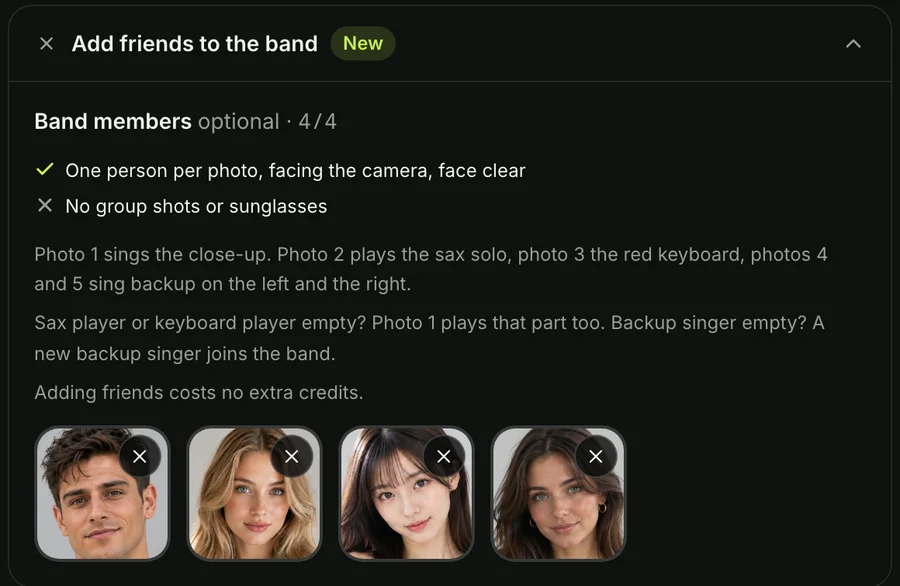
You can turn your own crew into the all-loss band in a 19-second video from 1 to 5 photos with the "Outstanding" sound for $9.90 at 720p on the Tiny Desk AI generator. The tool runs in your web browser without installing an app:
- Photo 1: The lead singer, who gets the opening profile shot and the laughing close-up.
- Photo 2: The sax player, who steps forward for the solo.
- Photo 3: The keyboard player, who sits front and centre at the red keyboard.
- Photo 4: The backup singer standing behind the desk on the left.
- Photo 5: The backup singer standing behind the desk on the right.
Each person keeps their own face, hair, and clothes from the original picture, while the background gets cut away.
If your friends are wearing team jerseys in their snapshots, those jerseys stay on when they walk onto the stage. The price stays the same whether you upload one photo or five photos.
Before you press Create, you tick a box confirming that everyone in the photos is 18 or older and that you have the right to use their images.
6 Tiny Desk AI ideas for your team
You can check more Tiny Desk AI meme ideas for different setups, but sports crews have six natural ways to build a lineup.
Put your rec-league team in the all-loss band
Rec-league teams can put the player who missed the open goal into photo 1. Put the player who argued with the referee into photo 2 for the sax solo.
Seeing your squad dressed in game shirts behind a crowded office desk softens the blow of any bad defeat. It turns Saturday's missed play into Sunday's group chat highlight.
Give your fantasy league's last-place manager the sax solo
Fantasy league lineups can hand the sax solo in photo 2 to the manager who scored the fewest points this week. Put the manager who benched their highest scorer as the lead singer in photo 1.
The sax solo runs for several seconds alone on screen. That gives everyone in your league chat a view of the week's biggest heartbreak.
Cast your watch-party crew in their jerseys
Watch-party crews can build a band using candid pictures of friends sitting on the couch in team jerseys. Photo 1 goes to the fan who talked the most trash before kickoff, while photo 5 goes to the loud friend who pumps a fist.
The stage lighting blends with the jersey colors. That keeps your crew easy to spot from start to finish.
Seat your team's own coach at the red keyboard
Your team's own coach or club manager can take photo 3 if they're an adult friend who enjoys the joke. The keyboard player sits front and centre behind the red keys during both wide group shots.
Make sure you have their consent before uploading photos to the tool. You'll always confirm everyone pictured is an adult before pressing Create.
Play every part yourself from one photo
A single photo can run the entire performance if you don't have pictures of your teammates ready. When you upload one photo into photo 1 and leave the other slots empty, your face takes over the lead singer, the sax solo, and the keyboard.
The tool adds backup singers dressed to match the keyboard player. That means you'll end up carrying the whole performance alone.
Put your team's pet on the sax
Your team's pet can step up to the microphone or take an instrument alongside human teammates. Put your squad's dog into photo 2 to take the sax solo, or drop them into photo 3 to sit up with paws on the red keys.
If you want a different musical style for your group, you can also look at Uptown Funk AI or team up as an AI Rap Duo for other group projects.
Who goes where in your team's Tiny Desk AI band
Planning who takes which spot keeps the joke sharp before you upload pictures into the Tiny Desk AI video maker.
| Photo | Part | Shots | Time on screen | Best pick from your team |
|---|---|---|---|---|
| Photo 1 | Lead singer | Opening close-up and laughing close-up | About 7.7 seconds alone | The one the joke is about |
| Photo 2 | Sax player | The sax solo | About 3.4 seconds alone | The surprise: whoever the group least expects |
| Photo 3 | Keyboard player | Both band shots, front and centre | About 7.9 seconds, shared | The steady one who's always there |
| Photo 4 | Backup singer, left | Both band shots, behind | About 7.9 seconds, shared | A good sport |
| Photo 5 | Backup singer, right | Both band shots, behind, with the fist pump | About 7.9 seconds, shared | The loudest fan |
Timed on our own 19-second sample video on 27 October 2026. With no photo 2 or photo 3, photo 1 takes that part; an empty backup spot gets a new singer.
The lead singer gets the most time alone on screen, so reserve photo 1 for the person at the center of the weekend's story.
Settings for a team Tiny Desk AI video
Settings on Seadanse Tiny Desk AI keep the setup simple before you press Create:
- Resolution: You pick 720p or 480p in your browser before making the clip.
- Credits: A 720p video uses 500 credits, while a 480p video uses 375 credits.
- Price: A single $9.90 one-time credit pack gives you enough credits for either option, so one 19-second 720p video costs $9.90.
- Payment: You pay once from the Create button without signing up for an account or starting a subscription.
- Credits validity: Credits stay valid for 12 months from the day you buy them.
- Failed videos: If a video fails to finish, the system returns your credits automatically.
- Format: Every clip exports as a vertical 9:16 MP4 built for TikTok and Instagram Reels.
- Watermark: There's no watermark on the exported video, and nobody has to sing or play an instrument.
If you want a full walkthrough of the upload steps, check the step-by-step guide to get started.
When to post your team's Tiny Desk AI video
The Tiny Desk AI coaches video trend works best on game weekends when feelings are still fresh. The creator who started the trend posted his first video on a Sunday right after Saturday's match results went final.
He told Sport & State on 22 October 2026 that he planned more videos on Sundays featuring the people whose teams lost the previous day. Following that schedule fits rec leagues and watch parties just as well.
Timing your post for the morning after your game gets the biggest reaction from your friends. When people wake up thinking about the final score, finding their faces singing "Outstanding" on stage turns frustration into laughs.
Post your clip into your team's group chat first. Once your friends have had their fun with the casting choices, you can drop the vertical MP4 onto TikTok or Reels.
Tiny Desk AI coaches questions
Is the coaches Tiny Desk video real?
The Tiny Desk coaches video isn't real. It's an AI-generated parody, and its creator included a caption noting that the clip is an AI parody based on Charlie Wilson's concert performance.
Who made the Tiny Desk AI coaches video?
The Tiny Desk AI coaches video was made by TikTok creator @theburnerfromhe11, who shared it on 18 October 2026. Major sports outlets including The Athletic covered his work as the clip spread across the web.
Can I make a Tiny Desk AI video for my team?
You can make a Tiny Desk AI video for your team using photos of your friends and crew. Upload their snapshots into the tool, assign each person a role, and download the finished vertical clip.
What song is in the Tiny Desk AI coaches video?
The song in the Tiny Desk AI coaches video is "Outstanding" by The Gap Band, taken from Charlie Wilson's June 2023 performance. You can read about the track in our guide to the Tiny Desk AI song.
Cast your team's Tiny Desk AI band
Your crew doesn't have to stay quiet after a tough loss when you can put your friends in a 19-second video from 1 to 5 photos, set to "Outstanding", for $9.90 at 720p.
Add your crew's photos, pick 720p, press Create, and get ready to post the result. Head over to cast your Tiny Desk AI band or explore our other AI video effects to get your group laughing again today.
Written by the Seadanse team. We timed our own video second by second on 27 October 2026.
Related Articles
- How to Make a Tiny Desk AI Video From One Photo (4 Steps) — the picks and presses, and who plays what in your band.
- What Is the Tiny Desk AI Trend? The Coaches Video, Explained — who made the first one, when, and how it spread past college football.
- Outstanding Tiny Desk AI Template: What the CapCut One Does — the template the TikTok tutorials link, and what it does with your photo.
- Best Tiny Desk AI Video Generators (2026): 8 Ways Compared — the sites, apps and templates that make this video, side by side.
- Tiny Desk AI Prompt (Copy-Ready): Every Shot, Every Role — the full prompt behind the video, to use in a video tool yourself.
- Tiny Desk AI Meme Ideas: Who Goes on the Sax (and How) — the casts people have made, and who to put in yours.
- Tiny Desk AI Song: "Outstanding" by The Gap Band, Explained — the song, the 2023 set it comes from, and the part the trend uses.
- Is Tiny Desk AI Free? 6 Options Compared (2026) — what each route gives you free and what it costs to get the full band.
- Tiny Desk AI Sound Not Working? 6 Fixes for TikTok and Reels — why a posted video goes silent and how to get the song back.
- Tiny Desk AI CapCut Alternative: 5 Ways Without the Template — what to use when the CapCut template won't open for you.


